- M.Senthil Kumar, AP/CSE
CS6303 – COMPUTER
ARCHITECTURE
(Regulation 2013)
Unit – I Syllabus
CA by M.Senthil Kumar
1. Eight Ideas.
2.1. Components of a Computer System.
2.2. Technology.
2.3. Performance.
2.4. Power wall.
3. Uniprocessors to multiprocessors.
4.1. Instructions.
4.2. operations and operands.
4.3. Representing instructions.
4.4. Logical operations.
4.5. control operations.
4.6. Addressing and addressing modes.
1.EIGHT IDEAS
CA by M.Senthil Kumar
1. Design for Moore's Law
2. Use Abstraction to Simplify
Design
3. Make the common case fast
4. Performance via parallelism
5. Performance via pipelining
6. Performance via prediction
7. Hierarchy of memories
8. Dependability via redundancyhome
CA by M.Senthil Kumar
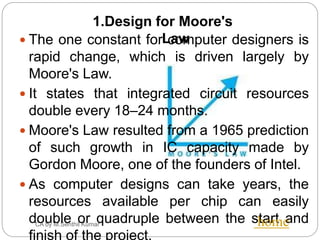
 The one constant for computer designers is
rapid change, which is driven largely by
Moore's Law.
 It states that integrated circuit resources
double every 18–24 months.
 Moore's Law resulted from a 1965 prediction
of such growth in IC capacity made by
Gordon Moore, one of the founders of Intel.
 As computer designs can take years, the
resources available per chip can easily
double or quadruple between the start and
finish of the project.
home
1.Design for Moore's
Law
CA by M.Senthil Kumar home
2. Use Abstraction to Simplify
Design•Both computer architects and programmers
had to invent techniques to make themselves
more productive, for otherwise design time
would lengthen as dramatically as resources
grew by Moore's Law.
•A major productivity technique for hardware
and soft ware is to use abstractions to
represent the design at different levels of
representation;
•lower-level details are hidden to offer a
simpler model at higher levels.
CA by M.Senthil Kumar home
3. Make the common case fast
•Making the common case fast will tend
to enhance performance better than
optimizing the rare case.
•Ironically, the common case is oft en
simpler than the rare case and hence is
often easier to enhance.
•This common sense advice implies that
you know what the common case is,
which is only possible with careful
experimentation and measurement.
CA by M.Senthil Kumar
home
•Since the dawn of computing, computer
architects have offered designs that get
more performance by performing
operations in parallel.
4. Performance via parallelism
5. Performance via pipelining
•A particular pattern of parallelism is so
prevalent in computer architecture that it
merits its own name: pipelining.
•Pipelining is a technique of overlapping
the execution of instructions.
CA by M.Senthil Kumar home
6. Performance via prediction
•Following the saying that it can be better
to ask for forgiveness than to ask for
permission, the next great idea is
prediction.
•In some cases it can be faster on
average to guess and start working
rather than wait until you know for sure,
assuming that the mechanism to recover
from a mis-prediction is not too
expensive and your prediction is
relatively accurate.
CA by M.Senthil Kumar home
7. Hierarchy of memories
•Programmers want memory to be fast, large,
and cheap, as memory speed often shapes
performance, capacity limits the size of
problems that can be solved, and the cost of
memory today is often the majority of
computer cost.
•Architects have found that they can address
these conflicting demands with a hierarchy of
memories, with the fastest, smallest, and
•Most expensive memory per bit at the top of
the hierarchy and the slowest, largest, and
cheapest per bit at the bottom.
CA by M.Senthil Kumar home
8. Dependability via redundancy
•Computers not only need to be fast;
•they need to be dependable.
•Since any physical device can fail, we
make systems dependable by including
redundant components that can take
over when a failure occurs and to help
detect failures.
2.1. COMPONENTS OF A COMPUTER
SYSTEM
CA by M.Senthil Kumar
 TECHNOLOGY
 PERFORMANCE
 POWER WALL
home
COMPONENTS
CA by M.Senthil Kumar
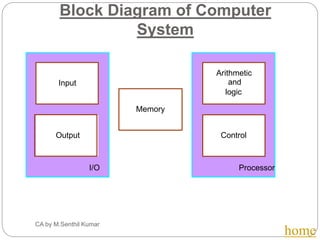
 The five classic components of a computer are
input, output, memory, Datapath, and control, with
the last two sometimes combined and called the
processor.
 This organization is independent of hardware
technology: you can place every piece of every
computer, past and present, into one of these five
categories.
Input Unit
Output Unit
Control Unit
DataPath home
Block Diagram of Computer
System
CA by M.Senthil Kumar
home
I/O Processor
Output
Memory
Input and
Arithmetic
logic
Control
2.2. Components of computer System:
Technology
CA by M.Senthil Kumar home
 Processors and memory have improved at an incredible
rate, because computer designers have long embraced
the latest in electronic technology to try to win the race to
design a better computer.
 A transistor is simply an on/off switch controlled by
electricity.
 The integrated circuit (IC) combined dozens to
hundreds of transistors into a single chip.
 When Gordon Moore predicted the continuous doubling
of resources, he was predicting the growth rate of the
number of transistors per chip.
 To describe the tremendous increase in the number of
transistors from hundreds to millions, the adjective very
large scale is added to the term, creating the abbreviation
2.3. Components of computer System:
Performance
CA by M.Senthil Kumar home
The most important measure of a
computer is how quickly it can
execute programs.
Three factors affect performance:
Hardware design
Instruction set
Compiler
Components of computer System:
Performance (Contd..)
CA by M.Senthil Kumar home
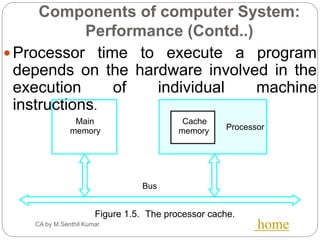
 Processor time to execute a program
depends on the hardware involved in the
execution of individual machine
instructions.
Main
memory Processor
Bus
Cache
memory
Figure 1.5. The processor cache.
Basic Performance Equation
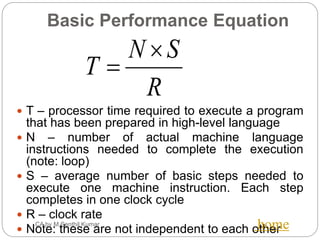
 T – processor time required to execute a program
that has been prepared in high-level language
 N – number of actual machine language
instructions needed to complete the execution
(note: loop)
 S – average number of basic steps needed to
execute one machine instruction. Each step
completes in one clock cycle
 R – clock rate
 Note: these are not independent to each other
R
SN
T


CA by M.Senthil Kumar home
Performance Measurement
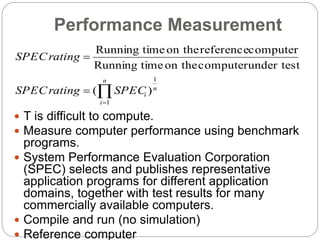
 T is difficult to compute.
 Measure computer performance using benchmark
programs.
 System Performance Evaluation Corporation
(SPEC) selects and publishes representative
application programs for different application
domains, together with test results for many
commercially available computers.
 Compile and run (no simulation)
 Reference computer



n
i
n
iSPECratingSPEC
ratingSPEC
1
1
)(
under testcomputeron thetimeRunning
computerreferenceon thetimeRunning
2.4. Components of computer
System: Powerwall
CA by M.Senthil Kumar
 The dominant technology for integrated circuits
is called CMOS (complementary metal oxide
semiconductor).
 For CMOS, the primary source of energy
consumption is so-called dynamic energy that
is, energy that is consumed when transistors
switch states from 0 to 1 and vice versa.
 The dynamic energy depends on the
capacitive loading of each transistor and thehome
Components of computer
System: Powerwall (Contd..)
CA by M.Senthil Kumar home
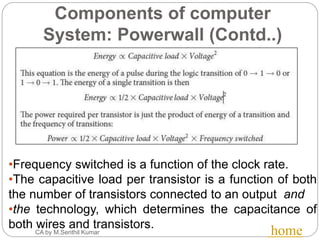
•Frequency switched is a function of the clock rate.
•The capacitive load per transistor is a function of both
the number of transistors connected to an output and
•the technology, which determines the capacitance of
both wires and transistors.
3. Uniprocessors to
Multiprocessors
CA by M.Senthil Kumar home
 The power limit has forced a dramatic change in the
design of microprocessors.
 The response time of a single program running on
the single processor is slow when compared to the
microprocessors with multiple processors per chip,
where the benefit is oft en more on throughput than
on response time.
 To reduce confusion between the words processor
and microprocessor, companies refer to processors
as “cores,” and such microprocessors are
generically called Multicore microprocessors.
 Hence, a “quad core” microprocessor is a chip that
contains four processors or four cores.
3. Uniprocessors to
Multiprocessors
(Contd..)
CA by M.Senthil Kumar home
 Multiprocessor computer
Execute a number of different application tasks in
parallel
Execute subtasks of a single large task in parallel
All processors have access to all of the memory –
shared-memory multiprocessor
Cost – processors, memory units, complex
interconnection networks
 Multicomputers
Each computer only have access to its own memory
Exchange message via a communication network –
message-passing multicomputers
4.1. Instructions
CA by M.Senthil Kumar home
 Machine instructions and program execution,
including branching and subroutine call and
return operations.
 Number representation and
addition/subtraction in the 2’s-complement
system.
 Addressing methods for accessing register
and memory operands.
 Assembly language for representing machine
instructions, data, and programs.
 Program-controlled Input/output operations.
4.1. Instructions
(Contd..)
CA by M.Senthil Kumar home
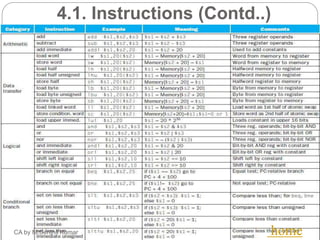
 To Command a computer’s hardware, you
must speak it’s language. The words of a
computer’s language are called Instructions.
 It’s vocabulary is called as Instruction Set.
 There are two types of notations used:
 Register Transfer Notation.
Assembly Language Notation.
4.1 Instruction Formats
(Contd..)
 Three-Address Instructions
 ADD R1, R2, R3 R1 ← R2 + R3
 Two-Address Instructions
 ADD R1, R2 R1 ← R1 + R2
 One-Address Instructions
 ADD M AC ← AC + M[AR]
 Zero-Address Instructions
 ADD TOS ← TOS + (TOS – 1)
 RISC Instructions
 Lots of registers. Memory is restricted to Load & Store
Opcode Operand(s) or Address(es)
4.1. Instructions (Contd..)
CA by M.Senthil Kumar home
4.2. Operations and Operands
CA by M.Senthil Kumar home
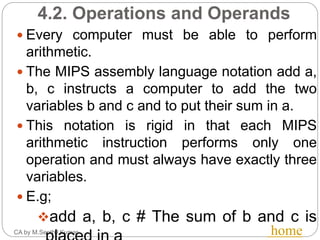
 Every computer must be able to perform
arithmetic.
 The MIPS assembly language notation add a,
b, c instructs a computer to add the two
variables b and c and to put their sum in a.
 This notation is rigid in that each MIPS
arithmetic instruction performs only one
operation and must always have exactly three
variables.
 E.g;
add a, b, c # The sum of b and c is
4.3. Representing Instructions
CA by M.Senthil Kumar home
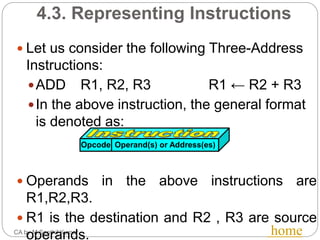
 Let us consider the following Three-Address
Instructions:
ADD R1, R2, R3 R1 ← R2 + R3
In the above instruction, the general format
is denoted as:
 Operands in the above instructions are
R1,R2,R3.
 R1 is the destination and R2 , R3 are source
operands.
Opcode Operand(s) or Address(es)
4.4. Logical Operations
CA by M.Senthil Kumar home
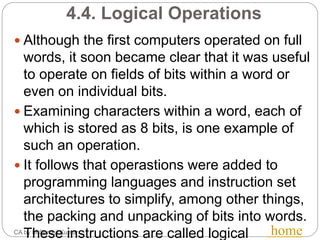
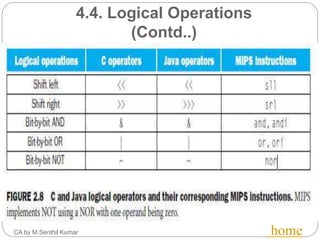
 Although the first computers operated on full
words, it soon became clear that it was useful
to operate on fields of bits within a word or
even on individual bits.
 Examining characters within a word, each of
which is stored as 8 bits, is one example of
such an operation.
 It follows that operastions were added to
programming languages and instruction set
architectures to simplify, among other things,
the packing and unpacking of bits into words.
These instructions are called logical
4.4. Logical Operations
(Contd..)
CA by M.Senthil Kumar home
4.5. Control Operations
CA by M.Senthil Kumar home
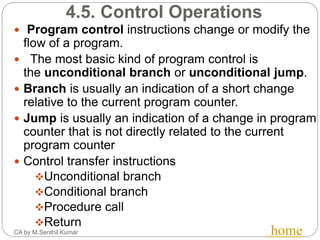
 Program control instructions change or modify the
flow of a program.
 The most basic kind of program control is
the unconditional branch or unconditional jump.
 Branch is usually an indication of a short change
relative to the current program counter.
 Jump is usually an indication of a change in program
counter that is not directly related to the current
program counter
 Control transfer instructions
Unconditional branch
Conditional branch
Procedure call
Return
4.6. Addressing and Addressing
Modes
CA by M.Senthil Kumar home
Name Assembler syntax Addressingfunction
Immediate #Value Operand = Value
Register Ri EA = Ri
Absolute(Direct) LOC EA = LOC
Indirect (Ri ) EA = [Ri ]
(LOC) EA = [LOC]
Index X(Ri) EA = [Ri ] + X
Basewith index (Ri ,Rj ) EA = [Ri ] + [Rj ]
Basewith index X(Ri,Rj ) EA = [Ri ] + [Rj ] + X
and offset
Relative X(PC) EA = [PC] + X
Autoincrement (Ri )+ EA = [Ri ] ;
Increment Ri
Autodecrement (Ri ) Decrement Ri ;
EA = [Ri]

 The
different
ways in
which the
location
of an
operand
is
specified
in an
instructio
n are
referred
to as
addressin
g modes.

CS6303 - Computer Architecture

  • 1.
    - M.Senthil Kumar,AP/CSE CS6303 – COMPUTER ARCHITECTURE (Regulation 2013)
  • 2.
    Unit – ISyllabus CA by M.Senthil Kumar 1. Eight Ideas. 2.1. Components of a Computer System. 2.2. Technology. 2.3. Performance. 2.4. Power wall. 3. Uniprocessors to multiprocessors. 4.1. Instructions. 4.2. operations and operands. 4.3. Representing instructions. 4.4. Logical operations. 4.5. control operations. 4.6. Addressing and addressing modes.
  • 3.
    1.EIGHT IDEAS CA byM.Senthil Kumar 1. Design for Moore's Law 2. Use Abstraction to Simplify Design 3. Make the common case fast 4. Performance via parallelism 5. Performance via pipelining 6. Performance via prediction 7. Hierarchy of memories 8. Dependability via redundancyhome
  • 4.
    CA by M.SenthilKumar  The one constant for computer designers is rapid change, which is driven largely by Moore's Law.  It states that integrated circuit resources double every 18–24 months.  Moore's Law resulted from a 1965 prediction of such growth in IC capacity made by Gordon Moore, one of the founders of Intel.  As computer designs can take years, the resources available per chip can easily double or quadruple between the start and finish of the project. home 1.Design for Moore's Law
  • 5.
    CA by M.SenthilKumar home 2. Use Abstraction to Simplify Design•Both computer architects and programmers had to invent techniques to make themselves more productive, for otherwise design time would lengthen as dramatically as resources grew by Moore's Law. •A major productivity technique for hardware and soft ware is to use abstractions to represent the design at different levels of representation; •lower-level details are hidden to offer a simpler model at higher levels.
  • 6.
    CA by M.SenthilKumar home 3. Make the common case fast •Making the common case fast will tend to enhance performance better than optimizing the rare case. •Ironically, the common case is oft en simpler than the rare case and hence is often easier to enhance. •This common sense advice implies that you know what the common case is, which is only possible with careful experimentation and measurement.
  • 7.
    CA by M.SenthilKumar home •Since the dawn of computing, computer architects have offered designs that get more performance by performing operations in parallel. 4. Performance via parallelism 5. Performance via pipelining •A particular pattern of parallelism is so prevalent in computer architecture that it merits its own name: pipelining. •Pipelining is a technique of overlapping the execution of instructions.
  • 8.
    CA by M.SenthilKumar home 6. Performance via prediction •Following the saying that it can be better to ask for forgiveness than to ask for permission, the next great idea is prediction. •In some cases it can be faster on average to guess and start working rather than wait until you know for sure, assuming that the mechanism to recover from a mis-prediction is not too expensive and your prediction is relatively accurate.
  • 9.
    CA by M.SenthilKumar home 7. Hierarchy of memories •Programmers want memory to be fast, large, and cheap, as memory speed often shapes performance, capacity limits the size of problems that can be solved, and the cost of memory today is often the majority of computer cost. •Architects have found that they can address these conflicting demands with a hierarchy of memories, with the fastest, smallest, and •Most expensive memory per bit at the top of the hierarchy and the slowest, largest, and cheapest per bit at the bottom.
  • 10.
    CA by M.SenthilKumar home 8. Dependability via redundancy •Computers not only need to be fast; •they need to be dependable. •Since any physical device can fail, we make systems dependable by including redundant components that can take over when a failure occurs and to help detect failures.
  • 11.
    2.1. COMPONENTS OFA COMPUTER SYSTEM CA by M.Senthil Kumar  TECHNOLOGY  PERFORMANCE  POWER WALL home
  • 12.
    COMPONENTS CA by M.SenthilKumar  The five classic components of a computer are input, output, memory, Datapath, and control, with the last two sometimes combined and called the processor.  This organization is independent of hardware technology: you can place every piece of every computer, past and present, into one of these five categories. Input Unit Output Unit Control Unit DataPath home
  • 13.
    Block Diagram ofComputer System CA by M.Senthil Kumar home I/O Processor Output Memory Input and Arithmetic logic Control
  • 14.
    2.2. Components ofcomputer System: Technology CA by M.Senthil Kumar home  Processors and memory have improved at an incredible rate, because computer designers have long embraced the latest in electronic technology to try to win the race to design a better computer.  A transistor is simply an on/off switch controlled by electricity.  The integrated circuit (IC) combined dozens to hundreds of transistors into a single chip.  When Gordon Moore predicted the continuous doubling of resources, he was predicting the growth rate of the number of transistors per chip.  To describe the tremendous increase in the number of transistors from hundreds to millions, the adjective very large scale is added to the term, creating the abbreviation
  • 15.
    2.3. Components ofcomputer System: Performance CA by M.Senthil Kumar home The most important measure of a computer is how quickly it can execute programs. Three factors affect performance: Hardware design Instruction set Compiler
  • 16.
    Components of computerSystem: Performance (Contd..) CA by M.Senthil Kumar home  Processor time to execute a program depends on the hardware involved in the execution of individual machine instructions. Main memory Processor Bus Cache memory Figure 1.5. The processor cache.
  • 17.
    Basic Performance Equation T – processor time required to execute a program that has been prepared in high-level language  N – number of actual machine language instructions needed to complete the execution (note: loop)  S – average number of basic steps needed to execute one machine instruction. Each step completes in one clock cycle  R – clock rate  Note: these are not independent to each other R SN T   CA by M.Senthil Kumar home
  • 18.
    Performance Measurement  Tis difficult to compute.  Measure computer performance using benchmark programs.  System Performance Evaluation Corporation (SPEC) selects and publishes representative application programs for different application domains, together with test results for many commercially available computers.  Compile and run (no simulation)  Reference computer    n i n iSPECratingSPEC ratingSPEC 1 1 )( under testcomputeron thetimeRunning computerreferenceon thetimeRunning
  • 19.
    2.4. Components ofcomputer System: Powerwall CA by M.Senthil Kumar  The dominant technology for integrated circuits is called CMOS (complementary metal oxide semiconductor).  For CMOS, the primary source of energy consumption is so-called dynamic energy that is, energy that is consumed when transistors switch states from 0 to 1 and vice versa.  The dynamic energy depends on the capacitive loading of each transistor and thehome
  • 20.
    Components of computer System:Powerwall (Contd..) CA by M.Senthil Kumar home •Frequency switched is a function of the clock rate. •The capacitive load per transistor is a function of both the number of transistors connected to an output and •the technology, which determines the capacitance of both wires and transistors.
  • 21.
    3. Uniprocessors to Multiprocessors CAby M.Senthil Kumar home  The power limit has forced a dramatic change in the design of microprocessors.  The response time of a single program running on the single processor is slow when compared to the microprocessors with multiple processors per chip, where the benefit is oft en more on throughput than on response time.  To reduce confusion between the words processor and microprocessor, companies refer to processors as “cores,” and such microprocessors are generically called Multicore microprocessors.  Hence, a “quad core” microprocessor is a chip that contains four processors or four cores.
  • 22.
    3. Uniprocessors to Multiprocessors (Contd..) CAby M.Senthil Kumar home  Multiprocessor computer Execute a number of different application tasks in parallel Execute subtasks of a single large task in parallel All processors have access to all of the memory – shared-memory multiprocessor Cost – processors, memory units, complex interconnection networks  Multicomputers Each computer only have access to its own memory Exchange message via a communication network – message-passing multicomputers
  • 23.
    4.1. Instructions CA byM.Senthil Kumar home  Machine instructions and program execution, including branching and subroutine call and return operations.  Number representation and addition/subtraction in the 2’s-complement system.  Addressing methods for accessing register and memory operands.  Assembly language for representing machine instructions, data, and programs.  Program-controlled Input/output operations.
  • 24.
    4.1. Instructions (Contd..) CA byM.Senthil Kumar home  To Command a computer’s hardware, you must speak it’s language. The words of a computer’s language are called Instructions.  It’s vocabulary is called as Instruction Set.  There are two types of notations used:  Register Transfer Notation. Assembly Language Notation.
  • 25.
    4.1 Instruction Formats (Contd..) Three-Address Instructions  ADD R1, R2, R3 R1 ← R2 + R3  Two-Address Instructions  ADD R1, R2 R1 ← R1 + R2  One-Address Instructions  ADD M AC ← AC + M[AR]  Zero-Address Instructions  ADD TOS ← TOS + (TOS – 1)  RISC Instructions  Lots of registers. Memory is restricted to Load & Store Opcode Operand(s) or Address(es)
  • 26.
    4.1. Instructions (Contd..) CAby M.Senthil Kumar home
  • 27.
    4.2. Operations andOperands CA by M.Senthil Kumar home  Every computer must be able to perform arithmetic.  The MIPS assembly language notation add a, b, c instructs a computer to add the two variables b and c and to put their sum in a.  This notation is rigid in that each MIPS arithmetic instruction performs only one operation and must always have exactly three variables.  E.g; add a, b, c # The sum of b and c is
  • 28.
    4.3. Representing Instructions CAby M.Senthil Kumar home  Let us consider the following Three-Address Instructions: ADD R1, R2, R3 R1 ← R2 + R3 In the above instruction, the general format is denoted as:  Operands in the above instructions are R1,R2,R3.  R1 is the destination and R2 , R3 are source operands. Opcode Operand(s) or Address(es)
  • 29.
    4.4. Logical Operations CAby M.Senthil Kumar home  Although the first computers operated on full words, it soon became clear that it was useful to operate on fields of bits within a word or even on individual bits.  Examining characters within a word, each of which is stored as 8 bits, is one example of such an operation.  It follows that operastions were added to programming languages and instruction set architectures to simplify, among other things, the packing and unpacking of bits into words. These instructions are called logical
  • 30.
    4.4. Logical Operations (Contd..) CAby M.Senthil Kumar home
  • 31.
    4.5. Control Operations CAby M.Senthil Kumar home  Program control instructions change or modify the flow of a program.  The most basic kind of program control is the unconditional branch or unconditional jump.  Branch is usually an indication of a short change relative to the current program counter.  Jump is usually an indication of a change in program counter that is not directly related to the current program counter  Control transfer instructions Unconditional branch Conditional branch Procedure call Return
  • 32.
    4.6. Addressing andAddressing Modes CA by M.Senthil Kumar home Name Assembler syntax Addressingfunction Immediate #Value Operand = Value Register Ri EA = Ri Absolute(Direct) LOC EA = LOC Indirect (Ri ) EA = [Ri ] (LOC) EA = [LOC] Index X(Ri) EA = [Ri ] + X Basewith index (Ri ,Rj ) EA = [Ri ] + [Rj ] Basewith index X(Ri,Rj ) EA = [Ri ] + [Rj ] + X and offset Relative X(PC) EA = [PC] + X Autoincrement (Ri )+ EA = [Ri ] ; Increment Ri Autodecrement (Ri ) Decrement Ri ; EA = [Ri]   The different ways in which the location of an operand is specified in an instructio n are referred to as addressin g modes.