1
2
“Computing is not about computers anymore. It is about
living…. We have seen computers move out of giant air-
conditioned rooms into closets, then onto desktops, and
now into our laps and pockets. But this is not the end….
Like a force of nature, the digital age cannot be denied or
stopped….
The information superhighway may be mostly hype
today, but it is an understatement about tomorrow. It will
exist beyond people’s wildest predictions…. We are not
waiting on any invention. It is here. It is now. It is almost
genetic in its nature, in that each generation will become
more digital than the preceding one.”
—Nicholas Negroponte, professor of media technology at
MIT
3
Chapter 1 Objectives
Computer organization and architecture.
Units of measure common to computer systems.
Computer as a layered system.
Components von Neumann architecture and the
function of basic computer components.
Cloud computing
Parallel computer
4
Why study {computer : organization/
architecture}?
– Design better programs, including system
software such as compilers, operating systems,
and device drivers.
– Optimize program behavior.
– Evaluate (benchmark) computer system
performance.
– Understand time, space, and price tradeoffs.
1.1 Overview
5
1.1 Overview:
Computer organization
Computer scientists:
• To understand, how hardware interacts with
software.
• Familiar with how various circuits and
components fit together to create working
computer systems.
• Control signals:
– physical aspects of computer systems.
– E.g., circuit design, control signals, memory types.
– How does a computer work?
1.1 Overview:
Computer architecture
• Focus on the structure and behavior of the
computer system
• Refers to the logical and abstract aspects of
system as seen by the programmer.
– E.g., instruction sets, instruction formats, data
types, addressing modes.
– How do I design a computer?
6
7
1.1 Overview
Com Org. vs Com Arch.
• Distinction between com org and com arch is not clear-
cut.
• Com science and com engineering hold differing
opinions,
– they can stand alone;
– are interrelated and interdependent.
• Comprehension of com org and arch ultimately
leads to a deeper understanding of computers and
computation
– the heart and soul of computer science.
8
1.2 Computer Components
• Principle of Equivalence of Hardware and
Software:
–Anything that can be done with
software can also be done with
hardware, and anything that can be
done with hardware can also be
done with software.*
* Assuming speed is not a concern.
9
• At the most basic level, a computer is a
device consisting of three pieces:
– A processor to interpret and execute
programs
– A memory to store both data and programs
– A mechanism for transferring data to and
from the outside world.
1.2 Computer Systems
10
1.3 An Example System
What does it all mean??
11
Measures of capacity:
1.3 An Example System
12
• Hertz = clock cycles per second
(frequency)
– 1MHz = 1,000,000Hz
– Processor speeds are measured in MHz or GHz.
• Byte = a unit of storage
– 1KB = 210 = 1024 Bytes
– 1MB = 220 = 1,048,576 Bytes
– Main memory (RAM) is measured in MB
– Disk storage is measured in GB for small
systems, TB for large systems.
1.3 An Example System
13
1.3 An Example System
Measures of time and space:
14
• Millisecond = 1 thousandth of a second
– Hard disk drive access times are often 10 to 20
milliseconds.
• Nanosecond = 1 billionth of a second
– Main memory access times are often 50 to 70
nanoseconds.
• Micron (micrometer) = 1 millionth of a
meter
– Circuits on computer chips are measured in
microns.
1.3 An Example System
15
Cycle time is the reciprocal of clock frequency.
A bus operating at 133MHz has a cycle time of 7.52
nanoseconds:
1.3 An Example System
Now back to the advertisement ...
133,000,000 cycles/second = 7.52ns/cycle
16
17
18
19
20
1.3 An Example System
A system bus moves data within the
computer. The faster the bus the better.
This one runs at 1600MHz.
memory capacity of 32 GB
DDR3 SDRAM, or double data
rate type three synchronous
dynamic RAM
The microprocessor is the
“brain” of the system. It
executes program instructions.
This one is a Pentium (Intel,
i7) Quad core =>multicore
processors, running at 3.9
GHz.
21
1.3 An Example System
• Large main memory capacity means
you can run larger programs with
greater speed than computers having
small memories.
• RAM = random access memory. Time
to access contents is independent of its
location.
• Cache is a type of temporary memory
that can be accessed faster than RAM.
22
1.3 An Example System
… and two levels of cache memory, the level 1 (L1: that
is built into the microprocessor chip and helps speed up
access to frequently used data.) L1 is smaller and
(probably) faster than the L2 cache that is built-in
memory chips situated between the microprocessor and
main memory.
“128KB L1 cache, 2MB L2
cache” also describes a type of
memory.
To provide even faster access to
data, many systems contain a
special memory called cache.
23
1.3 An Example System
This one can store 1TB. 7200 RPM is the rotational
speed of the disk. Generally, the faster a disk rotates,
the faster it can deliver data to RAM. (There are many
other factors involved.) interface with SATA (serial
advanced technology attachment) which
describes how the hard disk interfaces with (or
connects to) other system components.
Hard disk capacity determines
the amount of data and size of
programs you can store.
24
1.3 An Example System
This drive supports rewritable CD/DVD, +/-RW, that
can be written to many times.. 16x describes its
speed.
25
1.3 An Example System
Expansion slots
System buses can be augmented by dedicated I/O buses. PCI,
peripheral component interface, is one such bus.
HDMI port (High-Definition Multimedia Interface, used to
transmit audio and video).
ports
allow movement of data to and
from devices external to the
computer.
“10 USB ports, 1 serial port.” Serial
ports transfer data by sending a series of
electrical pulses across one or two data
lines.
26
1.3 An Example System
• Serial ports send data as a series of
pulses along one or two data lines.
• Parallel ports send data as a single
pulse along at least eight data lines.
• USB, Universal Serial Bus, is an
intelligent serial interface that is self-
configuring. (It supports “plug and
play.”)
27
1.3 An Example System
8ms: response time, which indicates the rate at which the pixels
can change colors. If this rate is too slow, ghosting and blurring can
occur.
24-bit color (16.7 million colors), VGA/DVI input, and 2USB ports.
LCD monitor has the following specifications: 24",
1920 × 1200 WUXGA,
300 cd/m2 =>Brightness,
active matrix technology uses one transistor per pixel,
1000:1 (static): contrast ratio measures the difference in intensity
between bright whites and dark blacks.
1.3 An Example System
28
29
1.3 An Example System
PCIe video card with 1GB of memory. The memory is used by a
special graphics processing unit on the card. This processor is
responsible for performing the necessary calculations to render the
graphics so the main processor of the computer is not required to
do so.
PCIe sound card; a sound card
contains components needed
by the system’s stereo speakers
and microphone.
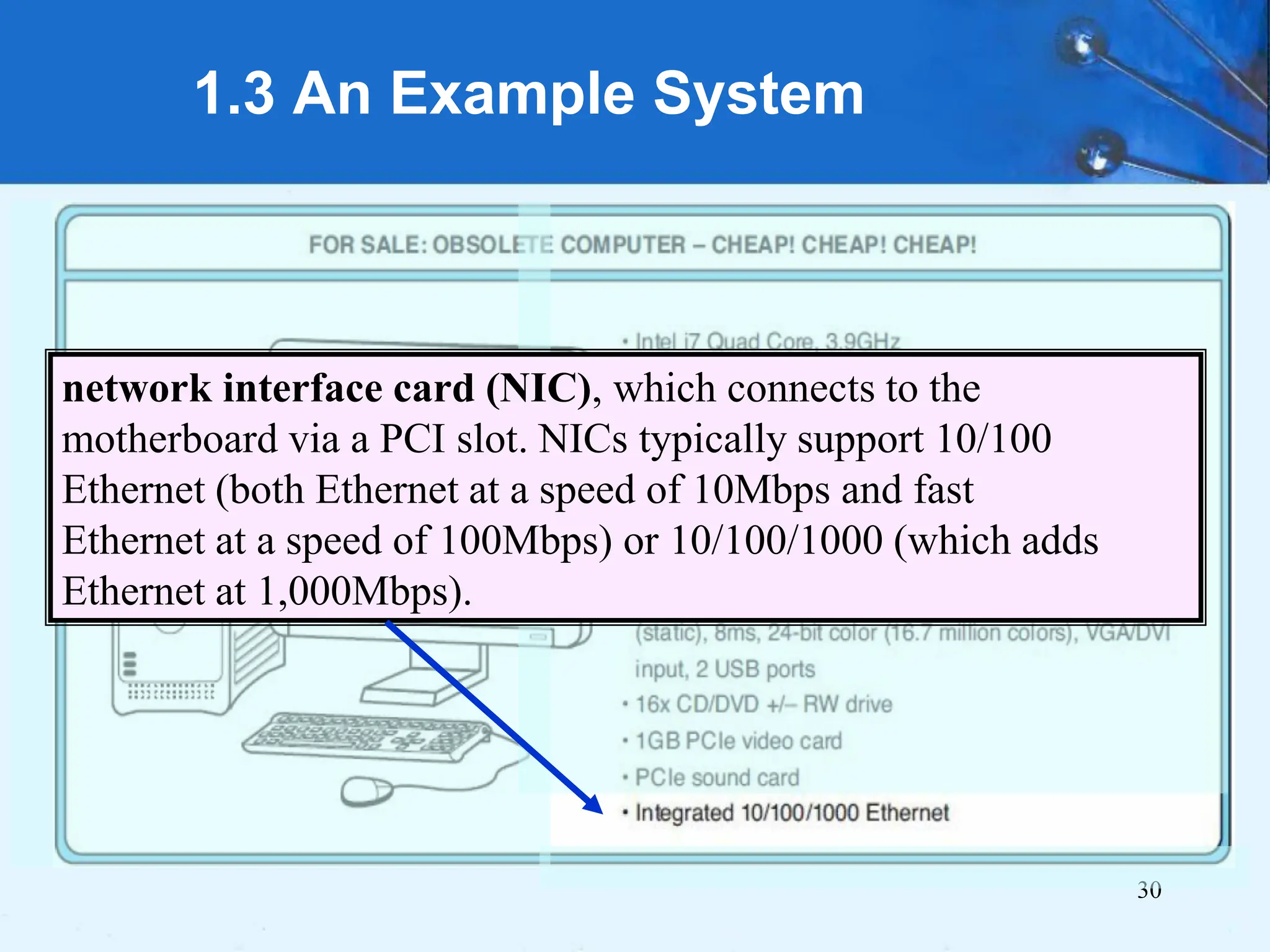
30
1.3 An Example System
network interface card (NIC), which connects to the
motherboard via a PCI slot. NICs typically support 10/100
Ethernet (both Ethernet at a speed of 10Mbps and fast
Ethernet at a speed of 100Mbps) or 10/100/1000 (which adds
Ethernet at 1,000Mbps).
1.3 An Example System
Basic performance characteristics of
computer systems, including:
1. Processor speed,
2. Memory speed,
3. Memory capacity, and
4. Interconnection data rates
31
32
• The evolution of computing
machinery has taken place over
several centuries.
• The evolution of computers is
usually classified into different
generations according to the
technology of the era.
1.5 Historical Development
33
Generation Zero: Mechanical Calculating Machines
(1642 - 1945)
– Calculating Clock - Wilhelm Schickard (1592 - 1635).
1.5 Historical Development
Rechenuhr (calculating clock).
The machine was designed to
assist in all the four basic
functions of arithmetic (addition,
subtraction, multiplication and
division).
Cr:
https://en.wikipedia.org/wiki/Wilhelm_Sc
hickard
34
Generation Zero: Mechanical Calculating Machines
(1642 - 1945)
– Pascaline - Blaise Pascal (1623 - 1662).
1.5 Historical Development
mechanical calculator
capable of addition and
subtraction, called Pascal's
calculator or the Pascaline.
Cr:
https://en.wikipedia.org/wik
i/Blaise_Pascal
35
Generation Zero: Mechanical Calculating Machines
(1642 - 1945)
– Difference Engine - Charles Babbage (1791 - 1871),
also designed but never built the Analytical Engine.
1.5 Historical Development
Babbage's design. The design
has the same precision on all
columns, but when calculating
polynomials, the precision on
the higher-order columns could
be lower.
Cr:
https://en.wikipedia.org/wiki/Dif
ference_engine
36
Generation Zero: Mechanical Calculating Machines
(1642 - 1945)
– Punched card tabulating machines - Herman Hollerith
(1860 - 1929).
Hollerith cards were commonly used for
computer input well into the 1970s.
1.5 Historical Development
The tabulating machine was
an electromechanical machine designed
to assist in summarizing information
stored on punched cards.
Cr:
https://en.wikipedia.org/wiki/Tabulating
_machine
37
– Punched card tabulating machines - Herman Hollerith
(1860 - 1929).
1.5 Historical Development
Hollerith punched card
Cr: https://en.wikipedia.org/wiki/Tabulating_machine
38
• The First Generation: Vacuum Tube Computers
(1945 - 1953)
– Atanasoff Berry Computer (1937 -
1938) solved systems of linear
equations.
– John Atanasoff and Clifford Berry of
Iowa State University.
1.5 Historical Development
39
• The First Generation:
Vacuum Tube
Computers (1945 -
1953)
Electronic Numerical
Integrator and Computer
(ENIAC) by John
Mauchly and J. Presper
Eckertat the University
of Pennsylvania, 1946
1.5 Historical Development
Cr:
https://en.wikipedia.org/wiki/ENIAC
40
• The First Generation:
Vacuum Tube
Computers (1945 -
1953)
The IBM 650 first
mass-produced
computer. (1955). It
was phased out in
1969.
1.5 Historical Development
Cr:
https://en.wikipedia.org/wiki/IBM_650
41
• The Second Generation: Transistorized
Computers (1954 - 1965)
– IBM 7094 (scientific) and 1401 (business)
– Digital Equipment Corporation (DEC) PDP-1
– Univac 1100
– Control Data Corporation 1604.
– . . . and many others.
1.5 Historical Development
42
• The Third Generation: Integrated Circuit Computers
(1965 - 1980)
– IBM 360
– DEC PDP-8 and PDP-11
– Cray-1 supercomputer
– . . . and many others.
• By this time, IBM had gained overwhelming
dominance in the industry.
– Computer manufacturers of this era were characterized as IBM
and the BUNCH (Burroughs, Unisys, NCR, Control Data, and
Honeywell).
1.5 Historical Development
43
• The Fourth Generation: VLSI Computers
(1980 - ????)
– Very large scale integrated circuits (VLSI) have
more than 10,000 components per chip.
– Enabled the creation of microprocessors.
– The first was the 4-bit Intel 4004.
– Later versions, such as the 8080, 8086, and 8088
spawned the idea of “personal computing.”
1.5 Historical Development
44
• Moore’s Law (1965)
– Gordon Moore, Intel founder
– “The density of transistors in an integrated circuit
will double every year.”
• Contemporary version:
– “The density of silicon chips doubles every 18
months.”
But this “law” cannot hold forever ...
1.5 Historical Development
47
• Writing complex programs requires a
“divide and conquer” approach, where
each program module solves a smaller
problem.
• Complex computer systems employ a
similar technique through a series of
virtual machine layers.
1.6 The Computer Level Hierarchy
48
• Each virtual machine layer is
an abstraction of the level
below it.
• The machines at each level
execute their own particular
instructions, calling upon
machines at lower levels to
perform tasks as required.
• Computer circuits ultimately
carry out the work.
1.6 The Computer Level Hierarchy
(Abstract virtual machines)
49
• Level 6: The User Level
– Program execution and user interface level.
– The level with which we are most familiar.
• Level 5: High-Level Language Level
– The level with which we interact when we write
programs in languages such as C, Pascal, Lisp, and
Java.
1.6 The Computer Level Hierarchy
50
• Level 4: Assembly Language Level
– Acts upon assembly language produced from
Level 5, as well as instructions programmed
directly at this level.
• Level 3: System Software Level
– Controls executing processes on the system.
– Protects system resources.
– Assembly language instructions often pass
through Level 3 without modification.
1.6 The Computer Level Hierarchy
51
• Level 2: Machine Level
– Also known as the Instruction Set Architecture
(ISA) Level.
– Consists of instructions that are particular to the
architecture of the machine.
– Programs written in machine language need no
compilers, interpreters, or assemblers.
1.6 The Computer Level Hierarchy
52
• Level 1: Control Level
– A control unit decodes and executes instructions
and moves data through the system.
– Control units can be microprogrammed or
hardwired.
– A microprogram is a program written in a low-
level language that is implemented by the
hardware.
– Hardwired control units consist of hardware that
directly executes machine instructions.
1.6 The Computer Level Hierarchy
53
• Level 0: Digital Logic Level
– This level is where we find digital circuits
(the chips).
– Digital circuits consist of gates and wires.
– These components implement the
mathematical logic of all other levels.
1.6 The Computer Level Hierarchy
1.7 CLOUD COMPUTING
(virtual computing platform)
54
SaaS
PaaS
IaaS
1.7 CLOUD COMPUTING
• The “computer” and “storage” appear to
the user as a single entity in the Cloud but
usually span several physical servers.
• It presents a virtual machine to the user.
• At the top of the computer hierarchy, where
we have executable programs, a Cloud
provider might offer an entire application
over the Internet, with no components
installed locally. This is called Software as
a Service, or SaaS. 55
1.7 CLOUD COMPUTING
• Consumer that desire to have more control
over their applications, or that need
applications for which SaaS is unavailable,
• might instead opt to deploy their own
applications on a Cloud-hosted environment
called Platform as a Service, or PaaS.
56
1.7 CLOUD COMPUTING
• If a company’s main business is software
development. PaaS is not a good fit in situations
where rapid configuration changes are required.
• Indeed, in any company where staff is capable of
managing operating system and database
software, the Infrastructure as a Service (IaaS)
• PaaS and IaaS provide elasticity: the ability to
add and remove resources based on demand. A
customer pays for only as much infrastructure as
is needed. 57
1.7 CLOUD COMPUTING
• Cloud model charges fees in proportion to
the resources consumed.
• These resources include communications
bandwidth, processor cycles, and storage.
• Thus, to save money, application programs
should be designed to reduce trips over the
network, economize machine cycles, and
minimize bytes of storage.
58
59
• On the ENIAC, all programming was done at
the digital logic level. Programming the
computer involved moving plugs and wires.
• A different hardware configuration was needed
to solve every unique problem type.
1.8 The von Neumann Model
Configuring the ENIAC to solve a “simple” problem
required many days labor by skilled technicians.
60
• The invention of stored program
computers has been ascribed to a
mathematician, John von Neumann,
who was a contemporary of Mauchley
and Eckert.
• Stored-program computers have
become known as von Neumann
Architecture systems.
1.8 The von Neumann Model
61
1.8 The von Neumann Model
• Today’s stored-program computers have the
following characteristics:
– Three hardware systems:
• A central processing unit (CPU)
• A main memory system
• An I/O system
– The capacity to carry out sequential instruction
processing.
– A single data path between the CPU and main
memory.
• This single path is known as the von Neumann
bottleneck.
62
1.8 The von Neumann Model
• This is a general
depiction of a von
Neumann system:
• These computers
employ a fetch-
decode-execute
cycle to run
programs as
follows . . .
63
1.8 The von Neumann Model
• The control unit fetches the next instruction from
memory using the program counter to determine where
the instruction is located.
64
1.8 The von Neumann Model
• The instruction is decoded into a language that the ALU
can understand.
65
1.8 The von Neumann Model
• Any data operands required to execute the instruction
are fetched from memory and placed into registers
within the CPU.
66
1.8 The von Neumann Model
• The ALU executes the instruction and places results in
registers or memory.
1.8 The von Neumann Model
Modified von Neumann Architecture, Adding a System Bus.
• Data bus moves data from RAM to CPU registers (and vice versa).
• Address bus holds address of the data that the data bus is currently
accessing.
• Control bus carries the necessary control signals that specify how
the information transfer is to take place. 67
68
• Conventional stored-program computers have
undergone many incremental improvements
over the years.
• These improvements include adding
specialized buses, floating-point units, and
cache memories, to name only a few.
• But enormous improvements in computational
power require departure from the classic von
Neumann architecture.
• Adding processors is one approach.
1.9 Non-von Neumann Models
69
• In the late 1960s, high-performance computer
systems were equipped with dual processors to
increase computational throughput.
• In the 1970s supercomputer systems were
introduced with 32 processors.
• Supercomputers with 1,000 processors were
built in the 1980s.
• In 1999, IBM announced its Blue Gene system
containing over 1 million processors.
1.9 Non-von Neumann Models
70
• Parallel processing is only one
method of providing increased
computational power.
• DNA computers, quantum computers,
and dataflow systems. At this point, it is
unclear whether any of these systems
will provide the basis for the next
generation of computers.
1.9 Non-von Neumann Models
71
Leonard Adleman is often called the inventor
of DNA computers. His article in a 1994 issue
of the journal Science outlined how to use
DNA to solve a well-known mathematical
problem, called the "traveling salesman"
problem. The goal of the problem is to find the
shortest route between a number of cities,
going through each city only once. As you add
more cities to the problem, the problem
becomes more difficult. Adleman chose to find
the shortest route between seven cities. DNA
computing is still in its infancy.
1.9 Non-von Neumann Models
1.10 PARALLEL PROCESSORS AND
PARALLEL COMPUTING
• Multicore architectures are parallel
processing machines that allow for multiple
processing units (often called cores) on a
single chip.
• What is a core?
• Each processing unit has its own ALU and
set of registers, but all processors share
memory and some other resources.
72
1.10 PARALLEL PROCESSORS AND
PARALLEL COMPUTING
• Multiple cores, or multicore, provides the
potential to increase performance without
increasing the clock rate.
• With Dual core, caches became larger,
– it made performance sense to create two and
then three levels of cache on a chip,
– with the first-level cache dedicated to an
individual processor.
– and levels two and three being shared by all the
processors.
73
1.10 PARALLEL PROCESSORS
Intel Core Duo
• Introduced in 2006, implements two x86
superscalar processors with a shared L2
cache.
74
1.10 PARALLEL PROCESSORS
Intel Core Duo Block Diagram
75
• Each core has L1 cache: L1-I=32
kB and L1-D 32-kB.
• Each core has an independent
thermal control unit, especially
for laptop and mobile systems.
• Advanced Programmable
Interrupt Controller (APIC).
• power management logic, for
reducing power consumption,
increasing battery life for mobile
platforms, such as laptops.
• Chip includes a shared 2-MB L2
cache.
• Bus interface connects to the
external bus.
1.10 PARALLEL PROCESSORS
Intel Core i7-990X Block Diagram
• Introduced in November
of 2008,
• implements four x86
Simultaneous
multithreading (SMT)
processors,
• each with a dedicated L2
cache, and with a shared
L3 cache
76
1.10 PARALLEL PROCESSORS AND
PARALLEL COMPUTING
• “Dual core” is
different from “dual
processor.”
• Dual-processor
machines, for
example, have two
processors, but each
processor plugs into
the motherboard
separately. 77
1.10 PARALLEL PROCESSORS AND
PARALLEL COMPUTING
• Multiple cores does not mean it will run your programs
more quickly.
• Application programs (including OS) must be written to
take advantage of multiple processing units.
• Multicore computers are very useful for multitasking—
– Ex: you may be reading email, listening to music, browsing
the Web, and burning a DVD all at the same time.
– These “multiple tasks” can be assigned to different processors
and carried out in parallel, provided the operating system is
able to manipulate many tasks at once.
78
1.10 PARALLEL PROCESSORS AND
PARALLEL COMPUTING
• Multithreading can also increase the performance
of any application with inherent parallelism.
• Programs are divided into threads, which can be
thought of as mini-processes.
• Ex: Web browser is multithreaded;
– one thread can download text,
– while each image is controlled and downloaded by a
separate thread.
• If an application is multithreaded, separate threads
can run in parallel on different processing units.
79
1.10 PARALLEL PROCESSORS AND
PARALLEL COMPUTING
• If parallel machines and other non–von Neumann
architectures give such huge increases in processing speed
and power, why isn’t everyone using them everywhere?
• The answer lies in their programmability.
• Advances in operating systems that can utilize multiple
cores have put these chips in laptops and desktops that we
can buy today;
– However, true multiprocessor programming is more complex
than both uniprocessor and multicore programming and requires
people to think about problems in a different way, using new
algorithms and programming tools.
80
81
Transputer
IMSB008 base platform with IMSB419 and IMSB404 modules
mounted
Cr: https://en.wikipedia.org/wiki/Transputer
82
• This chapter has given you an overview
of the subject of computer architecture.
Conclusion
83
End of Chapter 1

Ch1Intro.pdf Computer organization and org.

  • 1.
  • 2.
    2 “Computing is notabout computers anymore. It is about living…. We have seen computers move out of giant air- conditioned rooms into closets, then onto desktops, and now into our laps and pockets. But this is not the end…. Like a force of nature, the digital age cannot be denied or stopped…. The information superhighway may be mostly hype today, but it is an understatement about tomorrow. It will exist beyond people’s wildest predictions…. We are not waiting on any invention. It is here. It is now. It is almost genetic in its nature, in that each generation will become more digital than the preceding one.” —Nicholas Negroponte, professor of media technology at MIT
  • 3.
    3 Chapter 1 Objectives Computerorganization and architecture. Units of measure common to computer systems. Computer as a layered system. Components von Neumann architecture and the function of basic computer components. Cloud computing Parallel computer
  • 4.
    4 Why study {computer: organization/ architecture}? – Design better programs, including system software such as compilers, operating systems, and device drivers. – Optimize program behavior. – Evaluate (benchmark) computer system performance. – Understand time, space, and price tradeoffs. 1.1 Overview
  • 5.
    5 1.1 Overview: Computer organization Computerscientists: • To understand, how hardware interacts with software. • Familiar with how various circuits and components fit together to create working computer systems. • Control signals: – physical aspects of computer systems. – E.g., circuit design, control signals, memory types. – How does a computer work?
  • 6.
    1.1 Overview: Computer architecture •Focus on the structure and behavior of the computer system • Refers to the logical and abstract aspects of system as seen by the programmer. – E.g., instruction sets, instruction formats, data types, addressing modes. – How do I design a computer? 6
  • 7.
    7 1.1 Overview Com Org.vs Com Arch. • Distinction between com org and com arch is not clear- cut. • Com science and com engineering hold differing opinions, – they can stand alone; – are interrelated and interdependent. • Comprehension of com org and arch ultimately leads to a deeper understanding of computers and computation – the heart and soul of computer science.
  • 8.
    8 1.2 Computer Components •Principle of Equivalence of Hardware and Software: –Anything that can be done with software can also be done with hardware, and anything that can be done with hardware can also be done with software.* * Assuming speed is not a concern.
  • 9.
    9 • At themost basic level, a computer is a device consisting of three pieces: – A processor to interpret and execute programs – A memory to store both data and programs – A mechanism for transferring data to and from the outside world. 1.2 Computer Systems
  • 10.
    10 1.3 An ExampleSystem What does it all mean??
  • 11.
  • 12.
    12 • Hertz =clock cycles per second (frequency) – 1MHz = 1,000,000Hz – Processor speeds are measured in MHz or GHz. • Byte = a unit of storage – 1KB = 210 = 1024 Bytes – 1MB = 220 = 1,048,576 Bytes – Main memory (RAM) is measured in MB – Disk storage is measured in GB for small systems, TB for large systems. 1.3 An Example System
  • 13.
    13 1.3 An ExampleSystem Measures of time and space:
  • 14.
    14 • Millisecond =1 thousandth of a second – Hard disk drive access times are often 10 to 20 milliseconds. • Nanosecond = 1 billionth of a second – Main memory access times are often 50 to 70 nanoseconds. • Micron (micrometer) = 1 millionth of a meter – Circuits on computer chips are measured in microns. 1.3 An Example System
  • 15.
    15 Cycle time isthe reciprocal of clock frequency. A bus operating at 133MHz has a cycle time of 7.52 nanoseconds: 1.3 An Example System Now back to the advertisement ... 133,000,000 cycles/second = 7.52ns/cycle
  • 16.
  • 17.
  • 18.
  • 19.
  • 20.
    20 1.3 An ExampleSystem A system bus moves data within the computer. The faster the bus the better. This one runs at 1600MHz. memory capacity of 32 GB DDR3 SDRAM, or double data rate type three synchronous dynamic RAM The microprocessor is the “brain” of the system. It executes program instructions. This one is a Pentium (Intel, i7) Quad core =>multicore processors, running at 3.9 GHz.
  • 21.
    21 1.3 An ExampleSystem • Large main memory capacity means you can run larger programs with greater speed than computers having small memories. • RAM = random access memory. Time to access contents is independent of its location. • Cache is a type of temporary memory that can be accessed faster than RAM.
  • 22.
    22 1.3 An ExampleSystem … and two levels of cache memory, the level 1 (L1: that is built into the microprocessor chip and helps speed up access to frequently used data.) L1 is smaller and (probably) faster than the L2 cache that is built-in memory chips situated between the microprocessor and main memory. “128KB L1 cache, 2MB L2 cache” also describes a type of memory. To provide even faster access to data, many systems contain a special memory called cache.
  • 23.
    23 1.3 An ExampleSystem This one can store 1TB. 7200 RPM is the rotational speed of the disk. Generally, the faster a disk rotates, the faster it can deliver data to RAM. (There are many other factors involved.) interface with SATA (serial advanced technology attachment) which describes how the hard disk interfaces with (or connects to) other system components. Hard disk capacity determines the amount of data and size of programs you can store.
  • 24.
    24 1.3 An ExampleSystem This drive supports rewritable CD/DVD, +/-RW, that can be written to many times.. 16x describes its speed.
  • 25.
    25 1.3 An ExampleSystem Expansion slots System buses can be augmented by dedicated I/O buses. PCI, peripheral component interface, is one such bus. HDMI port (High-Definition Multimedia Interface, used to transmit audio and video). ports allow movement of data to and from devices external to the computer. “10 USB ports, 1 serial port.” Serial ports transfer data by sending a series of electrical pulses across one or two data lines.
  • 26.
    26 1.3 An ExampleSystem • Serial ports send data as a series of pulses along one or two data lines. • Parallel ports send data as a single pulse along at least eight data lines. • USB, Universal Serial Bus, is an intelligent serial interface that is self- configuring. (It supports “plug and play.”)
  • 27.
    27 1.3 An ExampleSystem 8ms: response time, which indicates the rate at which the pixels can change colors. If this rate is too slow, ghosting and blurring can occur. 24-bit color (16.7 million colors), VGA/DVI input, and 2USB ports. LCD monitor has the following specifications: 24", 1920 × 1200 WUXGA, 300 cd/m2 =>Brightness, active matrix technology uses one transistor per pixel, 1000:1 (static): contrast ratio measures the difference in intensity between bright whites and dark blacks.
  • 28.
    1.3 An ExampleSystem 28
  • 29.
    29 1.3 An ExampleSystem PCIe video card with 1GB of memory. The memory is used by a special graphics processing unit on the card. This processor is responsible for performing the necessary calculations to render the graphics so the main processor of the computer is not required to do so. PCIe sound card; a sound card contains components needed by the system’s stereo speakers and microphone.
  • 30.
    30 1.3 An ExampleSystem network interface card (NIC), which connects to the motherboard via a PCI slot. NICs typically support 10/100 Ethernet (both Ethernet at a speed of 10Mbps and fast Ethernet at a speed of 100Mbps) or 10/100/1000 (which adds Ethernet at 1,000Mbps).
  • 31.
    1.3 An ExampleSystem Basic performance characteristics of computer systems, including: 1. Processor speed, 2. Memory speed, 3. Memory capacity, and 4. Interconnection data rates 31
  • 32.
    32 • The evolutionof computing machinery has taken place over several centuries. • The evolution of computers is usually classified into different generations according to the technology of the era. 1.5 Historical Development
  • 33.
    33 Generation Zero: MechanicalCalculating Machines (1642 - 1945) – Calculating Clock - Wilhelm Schickard (1592 - 1635). 1.5 Historical Development Rechenuhr (calculating clock). The machine was designed to assist in all the four basic functions of arithmetic (addition, subtraction, multiplication and division). Cr: https://en.wikipedia.org/wiki/Wilhelm_Sc hickard
  • 34.
    34 Generation Zero: MechanicalCalculating Machines (1642 - 1945) – Pascaline - Blaise Pascal (1623 - 1662). 1.5 Historical Development mechanical calculator capable of addition and subtraction, called Pascal's calculator or the Pascaline. Cr: https://en.wikipedia.org/wik i/Blaise_Pascal
  • 35.
    35 Generation Zero: MechanicalCalculating Machines (1642 - 1945) – Difference Engine - Charles Babbage (1791 - 1871), also designed but never built the Analytical Engine. 1.5 Historical Development Babbage's design. The design has the same precision on all columns, but when calculating polynomials, the precision on the higher-order columns could be lower. Cr: https://en.wikipedia.org/wiki/Dif ference_engine
  • 36.
    36 Generation Zero: MechanicalCalculating Machines (1642 - 1945) – Punched card tabulating machines - Herman Hollerith (1860 - 1929). Hollerith cards were commonly used for computer input well into the 1970s. 1.5 Historical Development The tabulating machine was an electromechanical machine designed to assist in summarizing information stored on punched cards. Cr: https://en.wikipedia.org/wiki/Tabulating _machine
  • 37.
    37 – Punched cardtabulating machines - Herman Hollerith (1860 - 1929). 1.5 Historical Development Hollerith punched card Cr: https://en.wikipedia.org/wiki/Tabulating_machine
  • 38.
    38 • The FirstGeneration: Vacuum Tube Computers (1945 - 1953) – Atanasoff Berry Computer (1937 - 1938) solved systems of linear equations. – John Atanasoff and Clifford Berry of Iowa State University. 1.5 Historical Development
  • 39.
    39 • The FirstGeneration: Vacuum Tube Computers (1945 - 1953) Electronic Numerical Integrator and Computer (ENIAC) by John Mauchly and J. Presper Eckertat the University of Pennsylvania, 1946 1.5 Historical Development Cr: https://en.wikipedia.org/wiki/ENIAC
  • 40.
    40 • The FirstGeneration: Vacuum Tube Computers (1945 - 1953) The IBM 650 first mass-produced computer. (1955). It was phased out in 1969. 1.5 Historical Development Cr: https://en.wikipedia.org/wiki/IBM_650
  • 41.
    41 • The SecondGeneration: Transistorized Computers (1954 - 1965) – IBM 7094 (scientific) and 1401 (business) – Digital Equipment Corporation (DEC) PDP-1 – Univac 1100 – Control Data Corporation 1604. – . . . and many others. 1.5 Historical Development
  • 42.
    42 • The ThirdGeneration: Integrated Circuit Computers (1965 - 1980) – IBM 360 – DEC PDP-8 and PDP-11 – Cray-1 supercomputer – . . . and many others. • By this time, IBM had gained overwhelming dominance in the industry. – Computer manufacturers of this era were characterized as IBM and the BUNCH (Burroughs, Unisys, NCR, Control Data, and Honeywell). 1.5 Historical Development
  • 43.
    43 • The FourthGeneration: VLSI Computers (1980 - ????) – Very large scale integrated circuits (VLSI) have more than 10,000 components per chip. – Enabled the creation of microprocessors. – The first was the 4-bit Intel 4004. – Later versions, such as the 8080, 8086, and 8088 spawned the idea of “personal computing.” 1.5 Historical Development
  • 44.
    44 • Moore’s Law(1965) – Gordon Moore, Intel founder – “The density of transistors in an integrated circuit will double every year.” • Contemporary version: – “The density of silicon chips doubles every 18 months.” But this “law” cannot hold forever ... 1.5 Historical Development
  • 45.
    47 • Writing complexprograms requires a “divide and conquer” approach, where each program module solves a smaller problem. • Complex computer systems employ a similar technique through a series of virtual machine layers. 1.6 The Computer Level Hierarchy
  • 46.
    48 • Each virtualmachine layer is an abstraction of the level below it. • The machines at each level execute their own particular instructions, calling upon machines at lower levels to perform tasks as required. • Computer circuits ultimately carry out the work. 1.6 The Computer Level Hierarchy (Abstract virtual machines)
  • 47.
    49 • Level 6:The User Level – Program execution and user interface level. – The level with which we are most familiar. • Level 5: High-Level Language Level – The level with which we interact when we write programs in languages such as C, Pascal, Lisp, and Java. 1.6 The Computer Level Hierarchy
  • 48.
    50 • Level 4:Assembly Language Level – Acts upon assembly language produced from Level 5, as well as instructions programmed directly at this level. • Level 3: System Software Level – Controls executing processes on the system. – Protects system resources. – Assembly language instructions often pass through Level 3 without modification. 1.6 The Computer Level Hierarchy
  • 49.
    51 • Level 2:Machine Level – Also known as the Instruction Set Architecture (ISA) Level. – Consists of instructions that are particular to the architecture of the machine. – Programs written in machine language need no compilers, interpreters, or assemblers. 1.6 The Computer Level Hierarchy
  • 50.
    52 • Level 1:Control Level – A control unit decodes and executes instructions and moves data through the system. – Control units can be microprogrammed or hardwired. – A microprogram is a program written in a low- level language that is implemented by the hardware. – Hardwired control units consist of hardware that directly executes machine instructions. 1.6 The Computer Level Hierarchy
  • 51.
    53 • Level 0:Digital Logic Level – This level is where we find digital circuits (the chips). – Digital circuits consist of gates and wires. – These components implement the mathematical logic of all other levels. 1.6 The Computer Level Hierarchy
  • 52.
    1.7 CLOUD COMPUTING (virtualcomputing platform) 54 SaaS PaaS IaaS
  • 53.
    1.7 CLOUD COMPUTING •The “computer” and “storage” appear to the user as a single entity in the Cloud but usually span several physical servers. • It presents a virtual machine to the user. • At the top of the computer hierarchy, where we have executable programs, a Cloud provider might offer an entire application over the Internet, with no components installed locally. This is called Software as a Service, or SaaS. 55
  • 54.
    1.7 CLOUD COMPUTING •Consumer that desire to have more control over their applications, or that need applications for which SaaS is unavailable, • might instead opt to deploy their own applications on a Cloud-hosted environment called Platform as a Service, or PaaS. 56
  • 55.
    1.7 CLOUD COMPUTING •If a company’s main business is software development. PaaS is not a good fit in situations where rapid configuration changes are required. • Indeed, in any company where staff is capable of managing operating system and database software, the Infrastructure as a Service (IaaS) • PaaS and IaaS provide elasticity: the ability to add and remove resources based on demand. A customer pays for only as much infrastructure as is needed. 57
  • 56.
    1.7 CLOUD COMPUTING •Cloud model charges fees in proportion to the resources consumed. • These resources include communications bandwidth, processor cycles, and storage. • Thus, to save money, application programs should be designed to reduce trips over the network, economize machine cycles, and minimize bytes of storage. 58
  • 57.
    59 • On theENIAC, all programming was done at the digital logic level. Programming the computer involved moving plugs and wires. • A different hardware configuration was needed to solve every unique problem type. 1.8 The von Neumann Model Configuring the ENIAC to solve a “simple” problem required many days labor by skilled technicians.
  • 58.
    60 • The inventionof stored program computers has been ascribed to a mathematician, John von Neumann, who was a contemporary of Mauchley and Eckert. • Stored-program computers have become known as von Neumann Architecture systems. 1.8 The von Neumann Model
  • 59.
    61 1.8 The vonNeumann Model • Today’s stored-program computers have the following characteristics: – Three hardware systems: • A central processing unit (CPU) • A main memory system • An I/O system – The capacity to carry out sequential instruction processing. – A single data path between the CPU and main memory. • This single path is known as the von Neumann bottleneck.
  • 60.
    62 1.8 The vonNeumann Model • This is a general depiction of a von Neumann system: • These computers employ a fetch- decode-execute cycle to run programs as follows . . .
  • 61.
    63 1.8 The vonNeumann Model • The control unit fetches the next instruction from memory using the program counter to determine where the instruction is located.
  • 62.
    64 1.8 The vonNeumann Model • The instruction is decoded into a language that the ALU can understand.
  • 63.
    65 1.8 The vonNeumann Model • Any data operands required to execute the instruction are fetched from memory and placed into registers within the CPU.
  • 64.
    66 1.8 The vonNeumann Model • The ALU executes the instruction and places results in registers or memory.
  • 65.
    1.8 The vonNeumann Model Modified von Neumann Architecture, Adding a System Bus. • Data bus moves data from RAM to CPU registers (and vice versa). • Address bus holds address of the data that the data bus is currently accessing. • Control bus carries the necessary control signals that specify how the information transfer is to take place. 67
  • 66.
    68 • Conventional stored-programcomputers have undergone many incremental improvements over the years. • These improvements include adding specialized buses, floating-point units, and cache memories, to name only a few. • But enormous improvements in computational power require departure from the classic von Neumann architecture. • Adding processors is one approach. 1.9 Non-von Neumann Models
  • 67.
    69 • In thelate 1960s, high-performance computer systems were equipped with dual processors to increase computational throughput. • In the 1970s supercomputer systems were introduced with 32 processors. • Supercomputers with 1,000 processors were built in the 1980s. • In 1999, IBM announced its Blue Gene system containing over 1 million processors. 1.9 Non-von Neumann Models
  • 68.
    70 • Parallel processingis only one method of providing increased computational power. • DNA computers, quantum computers, and dataflow systems. At this point, it is unclear whether any of these systems will provide the basis for the next generation of computers. 1.9 Non-von Neumann Models
  • 69.
    71 Leonard Adleman isoften called the inventor of DNA computers. His article in a 1994 issue of the journal Science outlined how to use DNA to solve a well-known mathematical problem, called the "traveling salesman" problem. The goal of the problem is to find the shortest route between a number of cities, going through each city only once. As you add more cities to the problem, the problem becomes more difficult. Adleman chose to find the shortest route between seven cities. DNA computing is still in its infancy. 1.9 Non-von Neumann Models
  • 70.
    1.10 PARALLEL PROCESSORSAND PARALLEL COMPUTING • Multicore architectures are parallel processing machines that allow for multiple processing units (often called cores) on a single chip. • What is a core? • Each processing unit has its own ALU and set of registers, but all processors share memory and some other resources. 72
  • 71.
    1.10 PARALLEL PROCESSORSAND PARALLEL COMPUTING • Multiple cores, or multicore, provides the potential to increase performance without increasing the clock rate. • With Dual core, caches became larger, – it made performance sense to create two and then three levels of cache on a chip, – with the first-level cache dedicated to an individual processor. – and levels two and three being shared by all the processors. 73
  • 72.
    1.10 PARALLEL PROCESSORS IntelCore Duo • Introduced in 2006, implements two x86 superscalar processors with a shared L2 cache. 74
  • 73.
    1.10 PARALLEL PROCESSORS IntelCore Duo Block Diagram 75 • Each core has L1 cache: L1-I=32 kB and L1-D 32-kB. • Each core has an independent thermal control unit, especially for laptop and mobile systems. • Advanced Programmable Interrupt Controller (APIC). • power management logic, for reducing power consumption, increasing battery life for mobile platforms, such as laptops. • Chip includes a shared 2-MB L2 cache. • Bus interface connects to the external bus.
  • 74.
    1.10 PARALLEL PROCESSORS IntelCore i7-990X Block Diagram • Introduced in November of 2008, • implements four x86 Simultaneous multithreading (SMT) processors, • each with a dedicated L2 cache, and with a shared L3 cache 76
  • 75.
    1.10 PARALLEL PROCESSORSAND PARALLEL COMPUTING • “Dual core” is different from “dual processor.” • Dual-processor machines, for example, have two processors, but each processor plugs into the motherboard separately. 77
  • 76.
    1.10 PARALLEL PROCESSORSAND PARALLEL COMPUTING • Multiple cores does not mean it will run your programs more quickly. • Application programs (including OS) must be written to take advantage of multiple processing units. • Multicore computers are very useful for multitasking— – Ex: you may be reading email, listening to music, browsing the Web, and burning a DVD all at the same time. – These “multiple tasks” can be assigned to different processors and carried out in parallel, provided the operating system is able to manipulate many tasks at once. 78
  • 77.
    1.10 PARALLEL PROCESSORSAND PARALLEL COMPUTING • Multithreading can also increase the performance of any application with inherent parallelism. • Programs are divided into threads, which can be thought of as mini-processes. • Ex: Web browser is multithreaded; – one thread can download text, – while each image is controlled and downloaded by a separate thread. • If an application is multithreaded, separate threads can run in parallel on different processing units. 79
  • 78.
    1.10 PARALLEL PROCESSORSAND PARALLEL COMPUTING • If parallel machines and other non–von Neumann architectures give such huge increases in processing speed and power, why isn’t everyone using them everywhere? • The answer lies in their programmability. • Advances in operating systems that can utilize multiple cores have put these chips in laptops and desktops that we can buy today; – However, true multiprocessor programming is more complex than both uniprocessor and multicore programming and requires people to think about problems in a different way, using new algorithms and programming tools. 80
  • 79.
    81 Transputer IMSB008 base platformwith IMSB419 and IMSB404 modules mounted Cr: https://en.wikipedia.org/wiki/Transputer
  • 80.
    82 • This chapterhas given you an overview of the subject of computer architecture. Conclusion
  • 81.