Computer architecture
Introduction
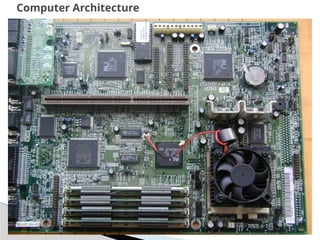
Computer Architecture
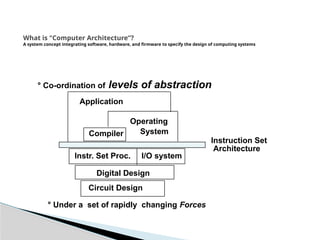
What is "Computer Architecture”?
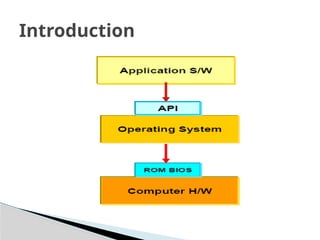
A system concept integrating software, hardware, and firmware to specify the design of computing systems
° Co-ordination of levels of abstraction
° Under a set of rapidly changing Forces
I/O system
Instr. Set Proc.
Compiler
Operating
System
Application
Digital Design
Circuit Design
Instruction Set
Architecture
 Consider three terms – Computer organization,
computer architecture and computer design
 Computer Organization refers to the level of
concept between digital logic level and OS.
 The major components are functional units or
subsystems that correspond to specific pieces of
hardware built from the lower level building
blocks.
Introduction
Introduction
 Computer organization is concerned with the
way the hardware components
 Operation and connection together to form the
computer system.
 It is concerned with all physical aspects of
computer systems e.g. circuit design, control
signals, memory types.
 The various components are assumed to be
placed for proper functioning
Introduction
 Computer design is concerned with the
hardware design of the computer.
 Once the computer specifications are
formulated, designer develops the hardware.
 Determine what hardware should be used and
how the parts should be connected.
 Sometimes referred to as computer
implementation.
Introduction
 Computer architecture is concerned with the
structure and behavior of the computer as seen by
the users.
 It includes the information formats, the instruction
set, and techniques for addressing memory.
 It concerns with the specification of processors and
memories, and structuring them to gather into a
computer system.
 It deals with all logical aspects e.g. instruction sets,
instruction formats, data types, addressing modes.
Introduction
 Why study computer architecture?
◦ Design better programs, including system software
such as compilers, operating systems, and device
drivers.
◦ Optimize program behavior.
◦ Evaluate (benchmark) computer system
performance.
◦ Understand time, space, and price tradeoffs.
Introduction
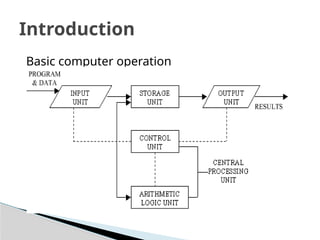
Basic computer operation
Introduction
 A computer performs basically five major
operations or functions irrespective of their
size and make. These are:
◦ 1) it accepts data or instructions by way of input,
◦ 2) it stores data,
◦ 3) it can process data as required by the user,
◦ 4) it gives results in the form of output, and
◦ 5) it controls all operations inside a computer.
Introduction
 Basic Operational Concepts of a Computer
 Most computer operations are executed in
the ALU (arithmetic and logic unit) of a
processor.
 Example: to add two numbers that are both
located in memory.
◦ Each number is brought into the processor, and the
addition is carried out by the ALU.
◦ The sum then may be stored in memory or retained
in the processor for immediate use.
Introduction
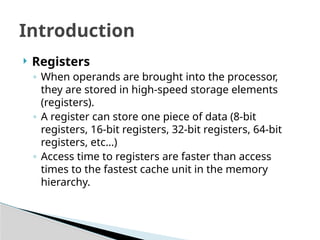
 Registers
◦ When operands are brought into the processor,
they are stored in high-speed storage elements
(registers).
◦ A register can store one piece of data (8-bit
registers, 16-bit registers, 32-bit registers, 64-bit
registers, etc…)
◦ Access time to registers are faster than access
times to the fastest cache unit in the memory
hierarchy.
Introduction
 Instructions
 Instructions for a processor are defined in the
ISA (Instruction Set Architecture)
 Typical instructions include:
– Mov BX, LocA
◦ Fetch the instruction
◦ Fetch the contents of memory location LocA
◦ Store the contents in general purpose register BX
Introduction
 BUS STRUCTURES:
◦ A bus is basically a subsystem which transfers data
between the components of computer
◦ It connects peripheral devices at the same time.
 Some properties:
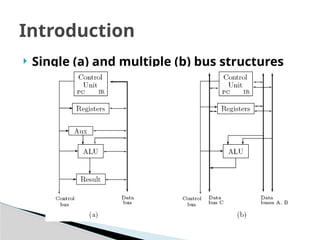
◦ In single bus structure all units are connected in the
same bus than connecting different buses as multiple
bus structure.
◦ Multiple bus structure's performance is better than
single bus structure.
◦ Single bus structure's cost is cheap than multiple bus
structure.
Introduction
 Single (a) and multiple (b) bus structures
Introduction
 Performance
◦ Computer performance is often described in terms
of clock speed (usually in MHz or GHz).
◦ This refers to the cycles per second of the main
clock of the CPU.
◦ It is somewhat misleading, as a machine with a
higher clock rate may not necessarily have higher
performance.
◦ The manufacturers have moved away from clock
speed as a measure of performance.
Introduction
 Modern CPUs can execute multiple
instructions per clock cycle to speed up.
Other factors influence speed:
◦ The mix of functional units, bus speeds,
◦ Available main and cache memory
◦ The type and order of instructions in the programs
being run
◦ Performance is affected by a very wide range of
design choices — for example, pipelining, parallel
processing
Introduction
 There are two main types of speed - latency
and throughput.
◦ Latency is the time between the start of a process
and its completion
◦ Throughput is the amount of work done per unit
time.
◦ Interrupt latency is the guaranteed maximum
response time of the system to an electronic event
Introduction
 Why study performance?
◦ Make intelligent design choices
◦ See through the marketing publicity
◦ Key to understanding underlying computer
organization
 Why is some hardware faster than others for different
programs?
 What factors of system performance are hardware
related? (e.g., Do we need a new machine, or a new
operating system?)
 How does a machine’s instruction set affect its
performance?
Introduction
 Design Tradeoff
◦ Maximum performance: measured by the numbers
of instructions executed per sec
◦ Minimum cost: measured by the size of the circuit.
◦ Best performance/price: measured by the ratio of
speed to size.
Introduction
 Execution time
◦ Elapsed Time/Wall Clock Time: counts everything
(disk and memory accesses, I/O, etc.) a useful number,
but often not good for comparison purposes
◦ CPU time: Doesn’t include I/O or time spent
running other programs can be broken up into
system time, and user time
◦ Our focus on CPU time: Time spent executing
actual instructions of “our” program
Introduction
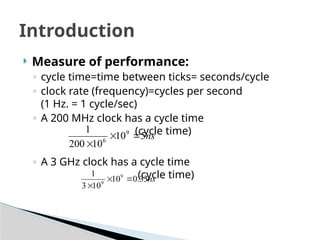
 Measure of performance:
◦ cycle time=time between ticks= seconds/cycle
◦ clock rate (frequency)=cycles per second
(1 Hz. = 1 cycle/sec)
◦ A 200 MHz clock has a cycle time
(cycle time)
◦ A 3 GHz clock has a cycle time
(cycle time)
Introduction
ns
5
10
10
200
1 9
6



ns
33
.
0
10
10
3
1 9
9



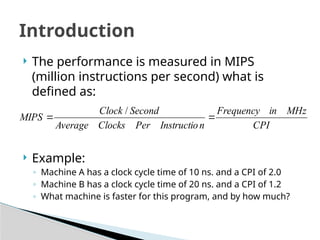
 The performance is measured in MIPS
(million instructions per second) what is
defined as:
 Example:
◦ Machine A has a clock cycle time of 10 ns. and a CPI of 2.0
◦ Machine B has a clock cycle time of 20 ns. and a CPI of 1.2
◦ What machine is faster for this program, and by how much?
Introduction
CPI
MHz
in
Frequency
n
Instructio
Per
Clocks
Average
Second
Clock
MIPS 

/
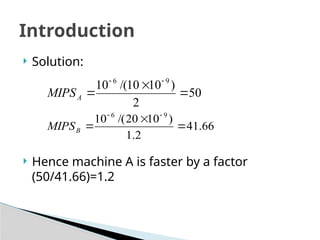
 Solution:
 Hence machine A is faster by a factor
(50/41.66)=1.2
Introduction
50
2
)
10
10
/(
10 9
6





A
MIPS
66
.
41
2
.
1
)
10
20
/(
10 9
6





B
MIPS

Basic Computer Architecture slides num.1

  • 1.
  • 2.
  • 3.
    What is "ComputerArchitecture”? A system concept integrating software, hardware, and firmware to specify the design of computing systems ° Co-ordination of levels of abstraction ° Under a set of rapidly changing Forces I/O system Instr. Set Proc. Compiler Operating System Application Digital Design Circuit Design Instruction Set Architecture
  • 4.
     Consider threeterms – Computer organization, computer architecture and computer design  Computer Organization refers to the level of concept between digital logic level and OS.  The major components are functional units or subsystems that correspond to specific pieces of hardware built from the lower level building blocks. Introduction
  • 5.
  • 6.
     Computer organizationis concerned with the way the hardware components  Operation and connection together to form the computer system.  It is concerned with all physical aspects of computer systems e.g. circuit design, control signals, memory types.  The various components are assumed to be placed for proper functioning Introduction
  • 7.
     Computer designis concerned with the hardware design of the computer.  Once the computer specifications are formulated, designer develops the hardware.  Determine what hardware should be used and how the parts should be connected.  Sometimes referred to as computer implementation. Introduction
  • 8.
     Computer architectureis concerned with the structure and behavior of the computer as seen by the users.  It includes the information formats, the instruction set, and techniques for addressing memory.  It concerns with the specification of processors and memories, and structuring them to gather into a computer system.  It deals with all logical aspects e.g. instruction sets, instruction formats, data types, addressing modes. Introduction
  • 9.
     Why studycomputer architecture? ◦ Design better programs, including system software such as compilers, operating systems, and device drivers. ◦ Optimize program behavior. ◦ Evaluate (benchmark) computer system performance. ◦ Understand time, space, and price tradeoffs. Introduction
  • 10.
  • 11.
     A computerperforms basically five major operations or functions irrespective of their size and make. These are: ◦ 1) it accepts data or instructions by way of input, ◦ 2) it stores data, ◦ 3) it can process data as required by the user, ◦ 4) it gives results in the form of output, and ◦ 5) it controls all operations inside a computer. Introduction
  • 12.
     Basic OperationalConcepts of a Computer  Most computer operations are executed in the ALU (arithmetic and logic unit) of a processor.  Example: to add two numbers that are both located in memory. ◦ Each number is brought into the processor, and the addition is carried out by the ALU. ◦ The sum then may be stored in memory or retained in the processor for immediate use. Introduction
  • 13.
     Registers ◦ Whenoperands are brought into the processor, they are stored in high-speed storage elements (registers). ◦ A register can store one piece of data (8-bit registers, 16-bit registers, 32-bit registers, 64-bit registers, etc…) ◦ Access time to registers are faster than access times to the fastest cache unit in the memory hierarchy. Introduction
  • 14.
     Instructions  Instructionsfor a processor are defined in the ISA (Instruction Set Architecture)  Typical instructions include: – Mov BX, LocA ◦ Fetch the instruction ◦ Fetch the contents of memory location LocA ◦ Store the contents in general purpose register BX Introduction
  • 15.
     BUS STRUCTURES: ◦A bus is basically a subsystem which transfers data between the components of computer ◦ It connects peripheral devices at the same time.  Some properties: ◦ In single bus structure all units are connected in the same bus than connecting different buses as multiple bus structure. ◦ Multiple bus structure's performance is better than single bus structure. ◦ Single bus structure's cost is cheap than multiple bus structure. Introduction
  • 16.
     Single (a)and multiple (b) bus structures Introduction
  • 17.
     Performance ◦ Computerperformance is often described in terms of clock speed (usually in MHz or GHz). ◦ This refers to the cycles per second of the main clock of the CPU. ◦ It is somewhat misleading, as a machine with a higher clock rate may not necessarily have higher performance. ◦ The manufacturers have moved away from clock speed as a measure of performance. Introduction
  • 18.
     Modern CPUscan execute multiple instructions per clock cycle to speed up. Other factors influence speed: ◦ The mix of functional units, bus speeds, ◦ Available main and cache memory ◦ The type and order of instructions in the programs being run ◦ Performance is affected by a very wide range of design choices — for example, pipelining, parallel processing Introduction
  • 19.
     There aretwo main types of speed - latency and throughput. ◦ Latency is the time between the start of a process and its completion ◦ Throughput is the amount of work done per unit time. ◦ Interrupt latency is the guaranteed maximum response time of the system to an electronic event Introduction
  • 20.
     Why studyperformance? ◦ Make intelligent design choices ◦ See through the marketing publicity ◦ Key to understanding underlying computer organization  Why is some hardware faster than others for different programs?  What factors of system performance are hardware related? (e.g., Do we need a new machine, or a new operating system?)  How does a machine’s instruction set affect its performance? Introduction
  • 21.
     Design Tradeoff ◦Maximum performance: measured by the numbers of instructions executed per sec ◦ Minimum cost: measured by the size of the circuit. ◦ Best performance/price: measured by the ratio of speed to size. Introduction
  • 22.
     Execution time ◦Elapsed Time/Wall Clock Time: counts everything (disk and memory accesses, I/O, etc.) a useful number, but often not good for comparison purposes ◦ CPU time: Doesn’t include I/O or time spent running other programs can be broken up into system time, and user time ◦ Our focus on CPU time: Time spent executing actual instructions of “our” program Introduction
  • 23.
     Measure ofperformance: ◦ cycle time=time between ticks= seconds/cycle ◦ clock rate (frequency)=cycles per second (1 Hz. = 1 cycle/sec) ◦ A 200 MHz clock has a cycle time (cycle time) ◦ A 3 GHz clock has a cycle time (cycle time) Introduction ns 5 10 10 200 1 9 6    ns 33 . 0 10 10 3 1 9 9   
  • 24.
     The performanceis measured in MIPS (million instructions per second) what is defined as:  Example: ◦ Machine A has a clock cycle time of 10 ns. and a CPI of 2.0 ◦ Machine B has a clock cycle time of 20 ns. and a CPI of 1.2 ◦ What machine is faster for this program, and by how much? Introduction CPI MHz in Frequency n Instructio Per Clocks Average Second Clock MIPS   /
  • 25.
     Solution:  Hencemachine A is faster by a factor (50/41.66)=1.2 Introduction 50 2 ) 10 10 /( 10 9 6      A MIPS 66 . 41 2 . 1 ) 10 20 /( 10 9 6      B MIPS