TEXT BOOK:
David A. Patterson and John L. Hennessey,
“Computer organization and design’, Morgan
Kauffman / Elsevier, Fifth edition, 2014.
 Fundamental Components of Computer system.
 Functions of the Components.
 Arithmetic Operations of the Components.
 Operations of Processor and Control Unit.
 Concepts of Pipelining, Hazards, Parallelism.
 Block Diagram of Memories and I/O systems.
 OVERVIEW & INSTRUCTIONS
 1. Design for Moore’s Law.
 2. Use Abstraction to Simplify Design.
 3. Make the Common Case Fast.
 4. Performance via Parallelism.
 5. Performance via Pipelining.
 6. Performance via Prediction.
 7. Hierarchy of Memories.
 8. Dependability via Redundancy.
 Moore’s Law. It states that integrated circuit
resources double every 18–24 months.
 computer architects must anticipate where the
technology will be when the design finishes
rather than design for where it starts.
 The resources available per chip can easily
double or quadruple between the start and finish
of the project.
 We use an "up and to
the right" Moore's Law
graph to represent
designing for rapid
change.
 A major productivity technique for hardware
and software is to use abstractions to
represent the design at different levels of
representation.
 lower-level details are hidden to offer a
simpler model at higher levels.
 We use the abstract
painting icon to
represent this second
great idea.
 Making the common case fast will tend to
enhance performance better than optimizing
the rare case.
 The common case is often simpler than the
rare case and hence is often easier to
enhance.
 it is easier to make a
fast sports car than a
fast minivan.
 Computer architects have offered designs
that get more performance by performing
operations in parallel.
 We use multiple jet
engines of a plane as
our icon for parallel
performance.
 A particular pattern of parallelism performed in
computer architecture is named as “pipelining”.
 Performance can be achieved by overlapping the
execution of successive instructions.
 The pipeline icon is a
sequence of pipes,
with each section
representing one stage
of the pipeline.
 In some cases it can be faster on average to
guess and start working rather than wait
until you know for sure.
 Assuming that the mechanism to recover
from a misprediction is not too expensive and
your prediction is relatively accurate.
 We use the fortune-
teller's crystal ball as
our prediction icon.
 Programmers want memory to be fast, large,
and cheap.
 Hierarchy of Memories, with the fastest,
smallest , and most expensive memory per
bit at the top of the hierarchy and the
slowest, largest, and cheapest per bit at the
bottom.
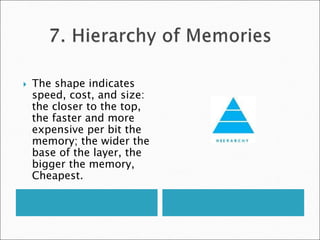
 The shape indicates
speed, cost, and size:
the closer to the top,
the faster and more
expensive per bit the
memory; the wider the
base of the layer, the
bigger the memory,
Cheapest.
 Computers need to be dependable.
 When any physical device fail, we make
systems dependable by including redundant
components that can take over when a failure
occurs and to help detect failures.
We use the tractor-trailer
as our icon, since the
dual tires on each side of
its rear axels allow the
truck to continue driving
even when one tire fails.
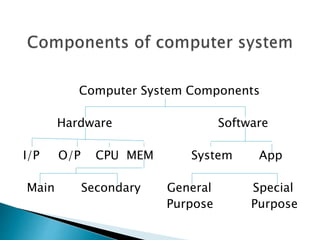
Computer System Components
Hardware Software
I/P O/P CPU MEM System App
Main Secondary General Special
Purpose Purpose
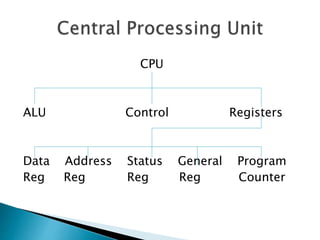
CPU
ALU Control Registers
Data Address Status General Program
Reg Reg Reg Reg Counter
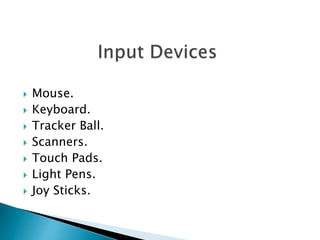
 Mouse.
 Keyboard.
 Tracker Ball.
 Scanners.
 Touch Pads.
 Light Pens.
 Joy Sticks.
 VDU or Monitor.
 Printers.
 Plotters.
 Speakers.
 Speech synthesizers.
 Processing unit is the brain of any computer.
The functional units are
 Control Processing Unit (CPU)
 Arithmetic and Logical Unit (ALU)
 Control Unit
 Registers
 A Register is a small set of data holding place
which is a part of the computer processor.
Types:
 Data registers.
 Address registers.
 Status registers.
 Program Counter.
 General Purpose Registers.
 Main Memory (or)
Primary Memory.
Types
 RAM
 ROM
 Secondary Memory
Types
 Hard disk
 Floppy disk
 CD-ROM
 Magnetic disks
 Tape drive
 Flash Memory
 Bit :1 or 0 level of storage.
 Byte :Consists of eight bits.
 Kilobyte :Consists of 1024 bytes.
 Megabyte :Consists of 1024 kilobytes.
 Gigabyte :Consists of 1024 megabytes.
 s/w is a set of programs, which is designed
to perform a well defined function.
Types of Software
 System Software.
 Application Software.
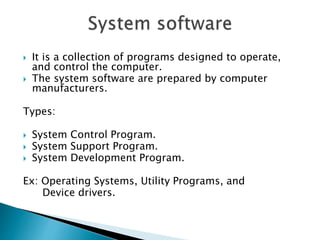
 It is a collection of programs designed to operate,
and control the computer.
 The system software are prepared by computer
manufacturers.
Types:
 System Control Program.
 System Support Program.
 System Development Program.
Ex: Operating Systems, Utility Programs, and
Device drivers.
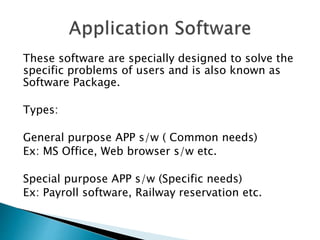
These software are specially designed to solve the
specific problems of users and is also known as
Software Package.
Types:
General purpose APP s/w ( Common needs)
Ex: MS Office, Web browser s/w etc.
Special purpose APP s/w (Specific needs)
Ex: Payroll software, Railway reservation etc.
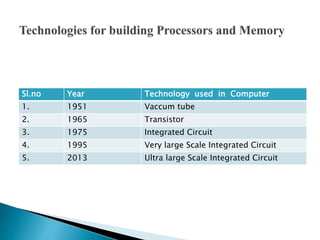
Sl.no Year Technology used in Computer
1. 1951 Vaccum tube
2. 1965 Transistor
3. 1975 Integrated Circuit
4. 1995 Very large Scale Integrated Circuit
5. 2013 Ultra large Scale Integrated Circuit
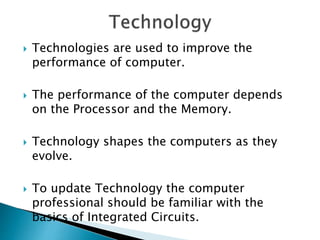
 Technologies are used to improve the
performance of computer.
 The performance of the computer depends
on the Processor and the Memory.
 Technology shapes the computers as they
evolve.
 To update Technology the computer
professional should be familiar with the
basics of Integrated Circuits.
Transistor
A transistor is simply an on/off switch
controlled by electric signal.
Integrated Circuit(IC)
The IC combines dozens to hundreds of
transistors into a single chip.
Very Large scale Integrated Circuit(VLSI)
The VLSI combines thousands to millions
of transistors.
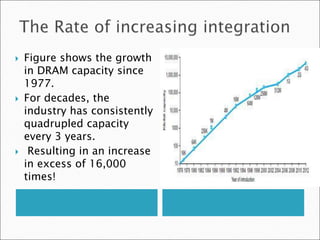
 Figure shows the growth
in DRAM capacity since
1977.
 For decades, the
industry has consistently
quadrupled capacity
every 3 years.
 Resulting in an increase
in excess of 16,000
times!
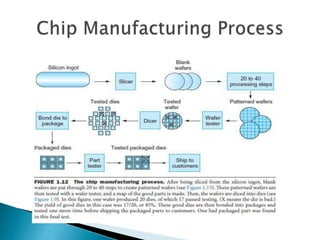
 Chip is the basic element for manufacturing IC.
 The manufacture of a chip begins with silicon.
 A substance found in sand.
 silicon does not conduct electricity.
 It is called a semiconductor.
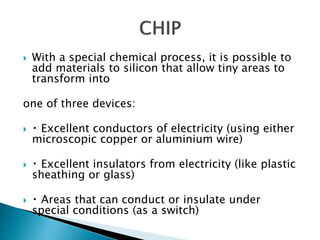
 With a special chemical process, it is possible to
add materials to silicon that allow tiny areas to
transform into
one of three devices:
 Excellent conductors of electricity (using either
microscopic copper or aluminium wire)
 Excellent insulators from electricity (like plastic
sheathing or glass)
 Areas that can conduct or insulate under
special conditions (as a switch)
 Once good dies are found, they are connected
to the input/output pins of a package using a
process called bonding.
 These packaged parts are tested for a final
time.
 If there is no mistake it can be shipped to
customers.
 Metrics for measuring Performance
 Response Time (or) Execution Time.
 Throughput (or) Bandwidth.
 CPU Execution Time (or) CPU Time.
 User CPU Time and System CPU Time
 Response Time (or) Execution Time.
The time between the start and completion of
a task.
 Throughput (or) Bandwidth.
The total amount of work done in a given time.
 The computer that performs the same amount of
work in the least time is the fastest.
 Program execution time is measured in seconds
per program.
 CPU Execution Time (or) CPU Time.
The actual time the CPU spends computing
for a specific task.
 1. User CPU Time.
The CPU time spent in the program is called
the User CPU time.
 2. System CPU Time
The CPU time spent in the operating system
performing tasks on behalf of the program is
called System CPU time.
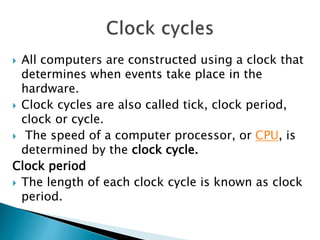
 All computers are constructed using a clock that
determines when events take place in the
hardware.
 Clock cycles are also called tick, clock period,
clock or cycle.
 The speed of a computer processor, or CPU, is
determined by the clock cycle.
Clock period
 The length of each clock cycle is known as clock
period.
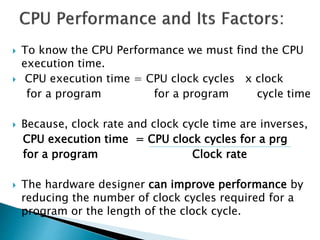
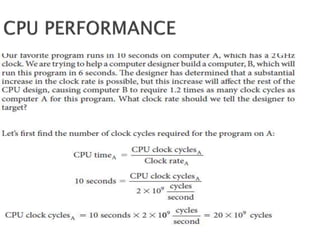
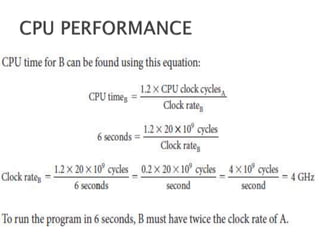
 To know the CPU Performance we must find the CPU
execution time.
 CPU execution time = CPU clock cycles x clock
for a program for a program cycle time
 Because, clock rate and clock cycle time are inverses,
CPU execution time = CPU clock cycles for a prg
for a program Clock rate
 The hardware designer can improve performance by
reducing the number of clock cycles required for a
program or the length of the clock cycle.
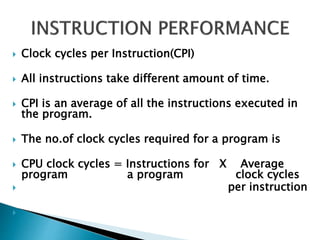
 Clock cycles per Instruction(CPI)
 All instructions take different amount of time.
 CPI is an average of all the instructions executed in
the program.
 The no.of clock cycles required for a program is
 CPU clock cycles = Instructions for X Average
program a program clock cycles
 per instruction

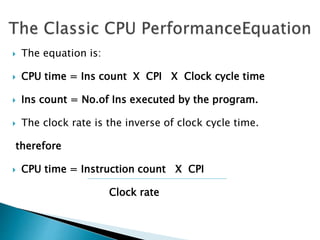
 The equation is:
 CPU time = Ins count X CPI X Clock cycle time
 Ins count = No.of Ins executed by the program.
 The clock rate is the inverse of clock cycle time.
therefore
 CPU time = Instruction count X CPI
Clock rate
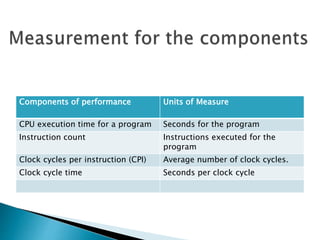
Components of performance Units of Measure
CPU execution time for a program Seconds for the program
Instruction count Instructions executed for the
program
Clock cycles per instruction (CPI) Average number of clock cycles.
Clock cycle time Seconds per clock cycle
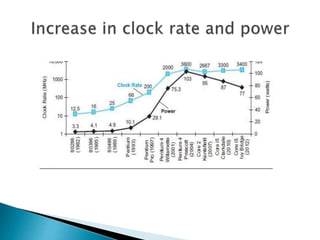
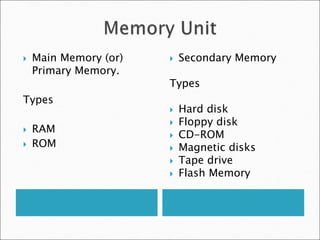
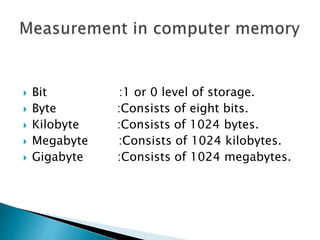
 Both clock rate and power increased rapidly
for decades, and then flattened off recently.
 The energy metric joules is a better measure
than a power rate like watts, which is just
joules/second.
 Dominant technology for integrated circuits is
called CMOS (complementary metal oxide
 semiconductor)
 The primary source of energy consumption is called
dynamic energy.
 It is the energy that is consumed when transistors
switch states from 0 to 1 and vice versa.
 Energy α Capacitive load X (Voltage)2
 This equation is the energy of a pulse during the
logic transition of 0 → 1 → 0 or 1 → 0 → 1.

 The energy of a single transition is then
 Energy α 1/2 X Capacitive load X (Voltage)2
 The power required per transistor is the product of
energy of a transition and the frequency of
transitions
 Power α Energy X Frequency switched
[or]
 Power α 1/2 X Capacitive load X (Voltage)2 X
Frequency switched
 Frequency switched is a function of the clock rate.
 The capacitive load per transistor is a function of
both the number of transistors connected to an
output (called the fan out).
 Energy and power can be reduced by lowering
the voltage, which occurred with each new
generation of technology.
 To address the power problem,
 Designers have already attached large devices
to increase cooling, and they turn off parts of
the chip that are not used in a given clock
cycle.
 Companies refer processors as “cores,”.
 Microprocessors are called as multicore
microprocessors.
 A “quadcore” microprocessor is a chip that
contains four processors or four cores.
 The programmers have to continue to improve
performance of their code as the
number of cores increases.
 1. More than one processing core.
 2. High throughput.
 3. Reduced response time.
 4. Less power consumption.
 5.Task division can be done.
 6.The programmers can rewrite the programs
to improve the response time.
 The words of a computer’s language are called
instructions.
 Instruction set is the vocabulary of commands
Used to understand a given architecture.
 From the instruction set it is easy to know how
the H/W is represented and their relationship
between high level programming languages.
 Instruction set describe the functions of
architecture. So computer designer must know
the instruction set.
 The Instruction set comes from MIPS technologies and the
following 3 popular Instruction sets.
 1. ARMv7 is similar to MIPS. More than 9 billion chips with ARM
processors were manufactured in 2011, making it the most
popular Instruction set in the world.
 2. The second is the Intel x86, which powers both the PC and
the cloud of the PostPC Era.
 3. The third is ARMv8, which extends the address size of the
ARMv7 from 32 bits to 64 bits. The 2013 instruction set is
closer to MIPS than it is to ARMv7.
 Every computer must be able to perform
arithmetic.
 The MIPS assembly language notation
add a, b, c
 instructs a computer to add the two variables b
and c and to put their sum in a.
 This notation is rigid in that each MIPS arithmetic
instruction performs only one operation and must
always have exactly three variables.
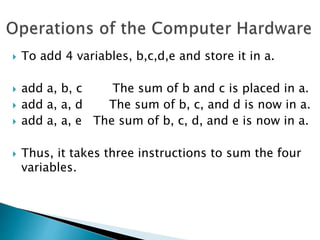
 To add 4 variables, b,c,d,e and store it in a.
 add a, b, c The sum of b and c is placed in a.
 add a, a, d The sum of b, c, and d is now in a.
 add a, a, e The sum of b, c, d, and e is now in a.
 Thus, it takes three instructions to sum the four
variables.
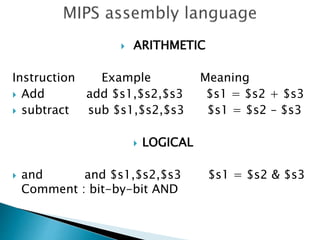
 ARITHMETIC
Instruction Example Meaning
 Add add $s1,$s2,$s3 $s1 = $s2 + $s3
 subtract sub $s1,$s2,$s3 $s1 = $s2 – $s3
 LOGICAL
 and and $s1,$s2,$s3 $s1 = $s2 & $s3
Comment : bit-by-bit AND
 DATA TRANSFER
 INSTRUCTION EXAMPLE MEANING
load word lw $s1,20($s2) s1 = Memory[$s2 + 20]
 COMMENT : Word from memory to register.
 To keep the hardware simple, every instruction
should have exactly three operands.
 Design Principle 1: Simplicity favors regularity.
 Design Principle 2: Smaller is faster.
 Design Principle 3: Good design demands good
compromises.
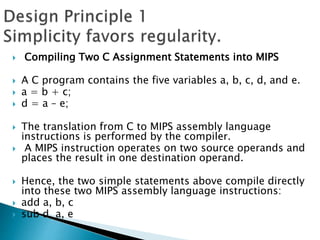
 Compiling Two C Assignment Statements into MIPS
 A C program contains the five variables a, b, c, d, and e.
 a = b + c;
 d = a – e;
 The translation from C to MIPS assembly language
instructions is performed by the compiler.
 A MIPS instruction operates on two source operands and
places the result in one destination operand.
 Hence, the two simple statements above compile directly
into these two MIPS assembly language instructions:
 add a, b, c
 sub d, a, e
 Compiling a Complex C Assignment into MIPS.
 f = (g + h) – (i + j);
 What might a C compiler produce?
 add t0,g,h temporary variable t0 contains g + h
 add t1,i,j temporary variable t1 contains i + j
 sub f,t0,t1 f gets t0 – t1, which is (g + h) – (i + j)
 Java programming is executed by the interpreter.
 Instruction set of java interpreter is called java
byte codes.
 Java compilers are called Just In Time (JIT)
compilers.
 The operands of arithmetic instructions are
restricted
 They must be from a limited number of special
locations built directly in hardware called registers.
 The size of a register in the MIPS architecture is 32
bits.
 Groups of 32 bits occur frequently, they are given
the name word in the MIPS architecture.
 Compiling a C Assignment Using Registers
 f = (g + h) – (i + j);
 The variables f, g, h, i, and j are assigned to the
registers $s0, $s1, $s2,$s3, and $s4,

 add $t0,$s1,$s2 register $t0 contains g + h
 add $t1,$s3,$s4 register $t1 contains i + j
 sub $s0,$t0,$t1 f gets $t0 – $t1,
 which is (g + h)–(i + j)
 The MIPS is to use two-character names following
a dollar sign to represent a register. eg: $s0
 Programming languages have simple variables that
contain single data elements.
 They also have more complex data structures—arrays
and structures.
 These complex data structures can contain many
more data elements than there are registers in a
computer.
 The processor can keep only a small amount of data
in registers.
 Computer memory contains billions of data elements.
 MIPS include instructions that transfer data
between memory and registers.
 Such instructions are called data transfer
instructions.
 To access a word in memory, the instruction
must supply the memory address.
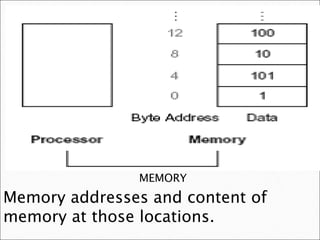
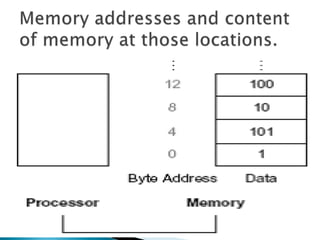
MEMORY
Memory is a large, single dimensional array, with
the address acting as the index to that array,
starting at 0.
MEMORY
Memory addresses and content of
memory at those locations.
 The data transfer instruction that copies data from
memory to a register is called load.
 The format of the load instruction is the name of the
operation followed by the register to be loaded, then a
constant and register used to access memory.
 The sum of the constant portion of the instruction and
the contents of the second register forms the memory
address.
 The actual MIPS name for this instruction is lw,
means load word.
 A is an array of 100 words and that the compiler
has associated the variables g and h with the
registers $s1 and $s2.
 Let the starting address, or base address, of the
array is in $s3.
 Compile this C assignment statement:
 g = h + A[8]
 Although there is a single operation in this
assignment statement, one of the operands is in
memory, so we must first transfer A[8] to a
register.
 The address of this array element is the sum of the
base of the array A, found in register $s3, plus the
number to select element 8.[i.e] 8($s3).
 The data should be placed in a temporary register
for use in the next instruction.[i.e] $t0.

 The first compiled instruction is
lw $t0,8($s3) Temporary reg $t0 gets A[8].
 The second compiled instruction is
add $s1,$s2,$t0 g = h + A[8].
 The constant in a data transfer instruction (8) is called
the off set.
 The register added to form the address ($s3) is called
the base register.
 In MIPS, words must start at addresses that are
multiples of 4.
 This requirement is called an alignment
restriction, and many architectures have it.
 Big Endian and Little Endian
 Some computers use the address of the left most
or “big end” byte.
 Some computers use the rightmost or “little end”
byte.
 MIPS is in the big-endian camp.
 The instruction complementary to load is
traditionally called store.
 It copies data from a register to memory.
 The format of a store is similar to that of a load.
 The name of the operation, followed by the
register to be stored, then off set to select the
array element, and finally the base register.
 The compiler tries to keep the most frequently
used variables in registers and places the rest in
memory.
 The compiler use loads and stores to move
variables between registers and memory.
 The process of putting less commonly used
variables (or those needed later) into memory is
called spilling registers.
 Many times a program will use a constant in an
operation.
 The constants are placed in memory when the program
was loaded.
 To avoid the load instruction used in arithmetic
instructions we can use one operand as constant.
 This quick add instruction with one constant
operand is called add immediate or addi.
 To add 4 to register $s3, we can write
 addi $s3,$s3,4 $s3 = $s3 + 4
 The register in the data transfer instructions
was originally invented to hold an index of an
array with the offset used for the starting
address of an array.
 The base register is also called the index
register.
 Instructions are kept in the computer as a series of
high and low electronic signals and may be
represented as numbers.
 Each piece of an instruction can be considered as an
individual number, and placing these numbers side by
side forms the instruction.
 Since registers are referred to in instructions, there
must be a convention to map register names into
numbers.
 In MIPS assembly language, registers $s0 to$s7 map
onto registers 16 to 23.
 Hence, $s0 means register 16, $s1 means register
17, $s2 means register 18, . . . ,
 Assembly language instructions use exactly 32
bits , the same size of a data word.
 All MIPS instructions are 32 bits long, so we need
to focus on machine language.
 Machine language is a binary representation used
for communication within a computer system.
 Instructions used in machine language are called
machine code.
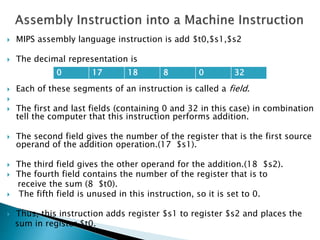
 MIPS assembly language instruction is add $t0,$s1,$s2
 The decimal representation is
 Each of these segments of an instruction is called a field.

 The first and last fields (containing 0 and 32 in this case) in combination
tell the computer that this instruction performs addition.
 The second field gives the number of the register that is the first source
operand of the addition operation.(17 $s1).
 The third field gives the other operand for the addition.(18 $s2).
 The fourth field contains the number of the register that is to
receive the sum (8 $t0).
 The fifth field is unused in this instruction, so it is set to 0.
 Thus, this instruction adds register $s1 to register $s2 and places the
sum in register $t0.
0 17 18 8 0 32
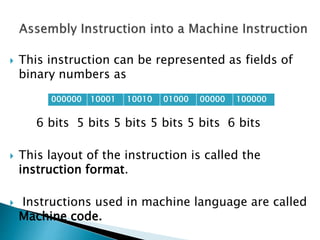
 This instruction can be represented as fields of
binary numbers as
6 bits 5 bits 5 bits 5 bits 5 bits 6 bits
 This layout of the instruction is called the
instruction format.
 Instructions used in machine language are called
Machine code.
000000 10001 10010 01000 00000 100000
 All computer data sizes are multiples of 4,
hexadecimal (base 16) numbers are popular.
 we can convert by replacing each group of
four binary digits by a single hexadecimal
digit, and vice versa.
 we will subscript decimal numbers with ten,
binary numbers with two, and hexadecimal
numbers with hex. (If there is no subscript,
the default is base 10.)
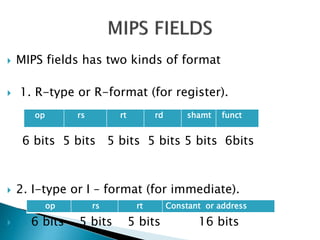
 MIPS fields has two kinds of format
 1. R-type or R-format (for register).
6 bits 5 bits 5 bits 5 bits 5 bits 6bits
 2. I-type or I – format (for immediate).
 6 bits 5 bits 5 bits 16 bits
op rs rt rd shamt funct
op rs rt Constant or address
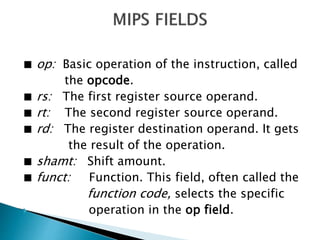
■ op: Basic operation of the instruction, called
the opcode.
■ rs: The first register source operand.
■ rt: The second register source operand.
■ rd: The register destination operand. It gets
the result of the operation.
■ shamt: Shift amount.
■ funct: Function. This field, often called the
function code, selects the specific
 operation in the op field.
 Definiton:
Logical operation is an instruction in which
the quantity being operated on bit and the results
of the operation can have two values (0 and 1).
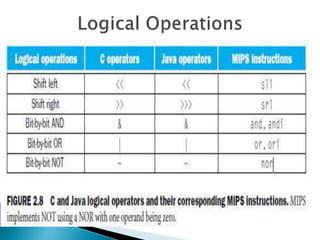
Logical operations include AND, OR, NAND, XOR,
and NOR.
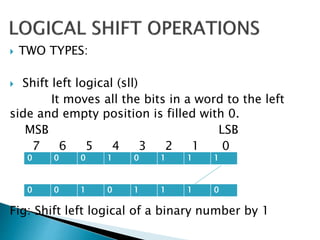
 TWO TYPES:
 Shift left logical (sll)
It moves all the bits in a word to the left
side and empty position is filled with 0.
MSB LSB
7 6 5 4 3 2 1 0
Fig: Shift left logical of a binary number by 1
0 0 0 1 0 1 1 1
0 0 1 0 1 1 1 0
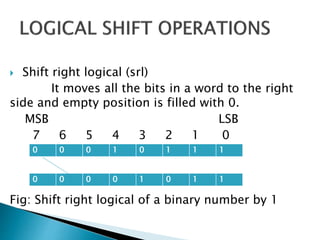
 Shift right logical (srl)
It moves all the bits in a word to the right
side and empty position is filled with 0.
MSB LSB
7 6 5 4 3 2 1 0
Fig: Shift right logical of a binary number by 1
0 0 0 1 0 1 1 1
0 0 0 0 1 0 1 1
 A logical AND is a bit by bit operation with two
operands that calculates 1 only if there is a 1 in
both operands.
 A logical OR is a bit by bit operation with two
operands that calculates 1if there is a 1 in either
operand.
 A logical NOT is a bit by bit operation with two
operands that replaces every 1 with 0 and every 0
with 1.
 A logical NOR is a bit by bit operation with two
operands that calculates the NOT of the OR of the
two operands.
 It calculates a 1 only if there is a 0 in both
operands.
 Decision making is commonly represented in programming languages
using the if statement, sometimes combined with go to statements and
labels.
 MIPS assembly language includes two decision-making instructions,
similar to an if statement with a goto. The first instruction is
beq register1, register2, L1
 This instruction means goto the statement labeled L1 if the value in
register1 equals the value in register2.
 The mnemonic beq stands for branch if equal.
bne register1, register2, L1
 It means go to the statement labeled L1 if the value in register1 does not
equal the value in register2.
 These two instructions are called conditional branches.
 This instruction says that the processor always
follows the branch.
 To distinguish between conditional and
unconditional branches, the MIPS name for this
type of instruction is jump, abbreviated as j
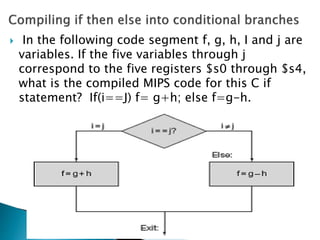
 In the following code segment f, g, h, I and j are
variables. If the five variables through j
correspond to the five registers $s0 through $s4,
what is the compiled MIPS code for this C if
statement? If(i==J) f= g+h; else f=g-h.
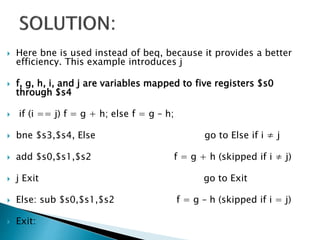
 Here bne is used instead of beq, because it provides a better
efficiency. This example introduces j
 f, g, h, i, and j are variables mapped to five registers $s0
through $s4
 if (i == j) f = g + h; else f = g – h;
 bne $s3,$s4, Else go to Else if i ≠ j
 add $s0,$s1,$s2 f = g + h (skipped if i ≠ j)
 j Exit go to Exit
 Else: sub $s0,$s1,$s2 f = g – h (skipped if i = j)
 Exit:
 Looping statements are used to execute the same
task more than one time until certain condition
gets failed.
 For looping we need to perform some decisions
to obtain the task.
 Decisions are important for choosing between
two alternatives—found in if statements—and for
iterating a computation.
 while (save[i] == k)
i += 1;
 Assume that i and k correspond to registers $s3 and $s5 and the base
of the array save is in $s6.
Loop: sll $t1,$s3,2 Temp reg $t1 = i * 4
 To get the address of save[i], we need to add $t1 and the base of save
in $s6:
add $t1,$t1,$s6 $t1 = address of save[i]
 Now we can use that address to load save[i] into a temporary register:
lw $t0,0($t1) Temp reg $t0 = save[i]
 The next instruction performs the loop test, exiting if save[i] ≠ k:
bne $t0,$s5, Exit go to Exit if save[i] ≠ k
 The next instruction adds 1 to i
addi $s3,$s3,1 i = i + 1 :
 The end of the loop branches back to the while test at the top of the
loop. We just add the Exit label after it
j Loop go to Loop
 Exit:
 Basic Block : A sequence of instructions without
Branches and without branch targets or branch
Labels.
The first phase of compilation process is breaking
the program into basic blocks.
CASE/SWITCH STATEMENT: This statement allows the programmer
to select one of many alternatives depending on a single value.
Switch statement can be implemented in two ways:
1. Using chain of if-then-else statements
2. Using jump address table
Jump table:
The jump table is an array of words containing addresses that
correspond to label in the code
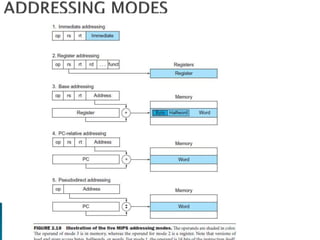
 Multiple forms of addressing are called addressing
modes. MIPS has the following addressing modes.
 1. Immediate addressing.
 2. Register addressing.
 3. Base or displacement addressing.
 4. PC – relative addressing.
 5. Pseudo – direct addressing.
 The different ways in which the location of an operand
is specified in an instruction are referred to as
addressing modes.
 It is a method used to determine which part of
memory is being referred by a machine instruction.
 Register mode: Operand is the content of a processor
register. The register name/address is given in the
instruction. Value of R2 is moved to R1.
 Example: MOV $R1, $R2
 Absolute mode (direct): Operand is in the memory
location. Address of the location is given
 explicitly. Here value in A is moved to 1000H.
 Example: MOV 1000, A
 Immediate mode: the operand is a constant within
the instruction itself.
 Example: addi $s1,$s2,25
 REGISTER ADDRESSING: the operand is in a
register.
 Either compiler or assembler must break large
constants into pieces and then reassemble them
 into a register.
 Example: add $to,$t1,$t2
 Base or Displacement Addressing: the operand is
at the memory location whose address is the sum
of a register and a constant in the instruction.
Example: g = h + A[8]
 PC-relative addressing: the branch address is the sum
of the PC and a constant in the instruction.
 Pseudodirect addressing, where the jump address
is the 26 bits of the instruction concatenated with
the upper bits of the PC.
Example: blt $to, $zero $s1
blt – branch on less than.
 Auto increment mode and Auto decrement Mode:
The value in the register / address that is
supplied in the instruction is incremented or
decremented.
 Example: Increment R1 (Increments the given
register / address content by one)
 Example: Decrement R2 (Decrements the given
register / address content by one)
CA UNIT I PPT.ppt
CA UNIT I PPT.ppt
CA UNIT I PPT.ppt

CA UNIT I PPT.ppt

  • 1.
    TEXT BOOK: David A.Patterson and John L. Hennessey, “Computer organization and design’, Morgan Kauffman / Elsevier, Fifth edition, 2014.
  • 2.
     Fundamental Componentsof Computer system.  Functions of the Components.  Arithmetic Operations of the Components.  Operations of Processor and Control Unit.  Concepts of Pipelining, Hazards, Parallelism.  Block Diagram of Memories and I/O systems.
  • 3.
     OVERVIEW &INSTRUCTIONS
  • 4.
     1. Designfor Moore’s Law.  2. Use Abstraction to Simplify Design.  3. Make the Common Case Fast.  4. Performance via Parallelism.  5. Performance via Pipelining.  6. Performance via Prediction.  7. Hierarchy of Memories.  8. Dependability via Redundancy.
  • 5.
     Moore’s Law.It states that integrated circuit resources double every 18–24 months.  computer architects must anticipate where the technology will be when the design finishes rather than design for where it starts.  The resources available per chip can easily double or quadruple between the start and finish of the project.
  • 6.
     We usean "up and to the right" Moore's Law graph to represent designing for rapid change.
  • 7.
     A majorproductivity technique for hardware and software is to use abstractions to represent the design at different levels of representation.  lower-level details are hidden to offer a simpler model at higher levels.
  • 8.
     We usethe abstract painting icon to represent this second great idea.
  • 9.
     Making thecommon case fast will tend to enhance performance better than optimizing the rare case.  The common case is often simpler than the rare case and hence is often easier to enhance.
  • 10.
     it iseasier to make a fast sports car than a fast minivan.
  • 11.
     Computer architectshave offered designs that get more performance by performing operations in parallel.
  • 12.
     We usemultiple jet engines of a plane as our icon for parallel performance.
  • 13.
     A particularpattern of parallelism performed in computer architecture is named as “pipelining”.  Performance can be achieved by overlapping the execution of successive instructions.
  • 14.
     The pipelineicon is a sequence of pipes, with each section representing one stage of the pipeline.
  • 15.
     In somecases it can be faster on average to guess and start working rather than wait until you know for sure.  Assuming that the mechanism to recover from a misprediction is not too expensive and your prediction is relatively accurate.
  • 16.
     We usethe fortune- teller's crystal ball as our prediction icon.
  • 17.
     Programmers wantmemory to be fast, large, and cheap.  Hierarchy of Memories, with the fastest, smallest , and most expensive memory per bit at the top of the hierarchy and the slowest, largest, and cheapest per bit at the bottom.
  • 18.
     The shapeindicates speed, cost, and size: the closer to the top, the faster and more expensive per bit the memory; the wider the base of the layer, the bigger the memory, Cheapest.
  • 19.
     Computers needto be dependable.  When any physical device fail, we make systems dependable by including redundant components that can take over when a failure occurs and to help detect failures.
  • 20.
    We use thetractor-trailer as our icon, since the dual tires on each side of its rear axels allow the truck to continue driving even when one tire fails.
  • 21.
    Computer System Components HardwareSoftware I/P O/P CPU MEM System App Main Secondary General Special Purpose Purpose
  • 22.
    CPU ALU Control Registers DataAddress Status General Program Reg Reg Reg Reg Counter
  • 23.
     Mouse.  Keyboard. Tracker Ball.  Scanners.  Touch Pads.  Light Pens.  Joy Sticks.
  • 24.
     VDU orMonitor.  Printers.  Plotters.  Speakers.  Speech synthesizers.
  • 25.
     Processing unitis the brain of any computer. The functional units are  Control Processing Unit (CPU)  Arithmetic and Logical Unit (ALU)  Control Unit  Registers
  • 26.
     A Registeris a small set of data holding place which is a part of the computer processor. Types:  Data registers.  Address registers.  Status registers.  Program Counter.  General Purpose Registers.
  • 27.
     Main Memory(or) Primary Memory. Types  RAM  ROM  Secondary Memory Types  Hard disk  Floppy disk  CD-ROM  Magnetic disks  Tape drive  Flash Memory
  • 28.
     Bit :1or 0 level of storage.  Byte :Consists of eight bits.  Kilobyte :Consists of 1024 bytes.  Megabyte :Consists of 1024 kilobytes.  Gigabyte :Consists of 1024 megabytes.
  • 29.
     s/w isa set of programs, which is designed to perform a well defined function. Types of Software  System Software.  Application Software.
  • 30.
     It isa collection of programs designed to operate, and control the computer.  The system software are prepared by computer manufacturers. Types:  System Control Program.  System Support Program.  System Development Program. Ex: Operating Systems, Utility Programs, and Device drivers.
  • 31.
    These software arespecially designed to solve the specific problems of users and is also known as Software Package. Types: General purpose APP s/w ( Common needs) Ex: MS Office, Web browser s/w etc. Special purpose APP s/w (Specific needs) Ex: Payroll software, Railway reservation etc.
  • 32.
    Sl.no Year Technologyused in Computer 1. 1951 Vaccum tube 2. 1965 Transistor 3. 1975 Integrated Circuit 4. 1995 Very large Scale Integrated Circuit 5. 2013 Ultra large Scale Integrated Circuit
  • 33.
     Technologies areused to improve the performance of computer.  The performance of the computer depends on the Processor and the Memory.  Technology shapes the computers as they evolve.  To update Technology the computer professional should be familiar with the basics of Integrated Circuits.
  • 34.
    Transistor A transistor issimply an on/off switch controlled by electric signal. Integrated Circuit(IC) The IC combines dozens to hundreds of transistors into a single chip. Very Large scale Integrated Circuit(VLSI) The VLSI combines thousands to millions of transistors.
  • 35.
     Figure showsthe growth in DRAM capacity since 1977.  For decades, the industry has consistently quadrupled capacity every 3 years.  Resulting in an increase in excess of 16,000 times!
  • 36.
     Chip isthe basic element for manufacturing IC.  The manufacture of a chip begins with silicon.  A substance found in sand.  silicon does not conduct electricity.  It is called a semiconductor.
  • 37.
     With aspecial chemical process, it is possible to add materials to silicon that allow tiny areas to transform into one of three devices:  Excellent conductors of electricity (using either microscopic copper or aluminium wire)  Excellent insulators from electricity (like plastic sheathing or glass)  Areas that can conduct or insulate under special conditions (as a switch)
  • 39.
     Once gooddies are found, they are connected to the input/output pins of a package using a process called bonding.  These packaged parts are tested for a final time.  If there is no mistake it can be shipped to customers.
  • 40.
     Metrics formeasuring Performance  Response Time (or) Execution Time.  Throughput (or) Bandwidth.  CPU Execution Time (or) CPU Time.  User CPU Time and System CPU Time
  • 41.
     Response Time(or) Execution Time. The time between the start and completion of a task.  Throughput (or) Bandwidth. The total amount of work done in a given time.
  • 42.
     The computerthat performs the same amount of work in the least time is the fastest.  Program execution time is measured in seconds per program.  CPU Execution Time (or) CPU Time. The actual time the CPU spends computing for a specific task.
  • 43.
     1. UserCPU Time. The CPU time spent in the program is called the User CPU time.  2. System CPU Time The CPU time spent in the operating system performing tasks on behalf of the program is called System CPU time.
  • 44.
     All computersare constructed using a clock that determines when events take place in the hardware.  Clock cycles are also called tick, clock period, clock or cycle.  The speed of a computer processor, or CPU, is determined by the clock cycle. Clock period  The length of each clock cycle is known as clock period.
  • 45.
     To knowthe CPU Performance we must find the CPU execution time.  CPU execution time = CPU clock cycles x clock for a program for a program cycle time  Because, clock rate and clock cycle time are inverses, CPU execution time = CPU clock cycles for a prg for a program Clock rate  The hardware designer can improve performance by reducing the number of clock cycles required for a program or the length of the clock cycle.
  • 46.
     Clock cyclesper Instruction(CPI)  All instructions take different amount of time.  CPI is an average of all the instructions executed in the program.  The no.of clock cycles required for a program is  CPU clock cycles = Instructions for X Average program a program clock cycles  per instruction 
  • 47.
     The equationis:  CPU time = Ins count X CPI X Clock cycle time  Ins count = No.of Ins executed by the program.  The clock rate is the inverse of clock cycle time. therefore  CPU time = Instruction count X CPI Clock rate
  • 48.
    Components of performanceUnits of Measure CPU execution time for a program Seconds for the program Instruction count Instructions executed for the program Clock cycles per instruction (CPI) Average number of clock cycles. Clock cycle time Seconds per clock cycle
  • 49.
     Both clockrate and power increased rapidly for decades, and then flattened off recently.  The energy metric joules is a better measure than a power rate like watts, which is just joules/second.  Dominant technology for integrated circuits is called CMOS (complementary metal oxide  semiconductor)
  • 51.
     The primarysource of energy consumption is called dynamic energy.  It is the energy that is consumed when transistors switch states from 0 to 1 and vice versa.  Energy α Capacitive load X (Voltage)2  This equation is the energy of a pulse during the logic transition of 0 → 1 → 0 or 1 → 0 → 1.   The energy of a single transition is then  Energy α 1/2 X Capacitive load X (Voltage)2
  • 52.
     The powerrequired per transistor is the product of energy of a transition and the frequency of transitions  Power α Energy X Frequency switched [or]  Power α 1/2 X Capacitive load X (Voltage)2 X Frequency switched  Frequency switched is a function of the clock rate.  The capacitive load per transistor is a function of both the number of transistors connected to an output (called the fan out).
  • 53.
     Energy andpower can be reduced by lowering the voltage, which occurred with each new generation of technology.  To address the power problem,  Designers have already attached large devices to increase cooling, and they turn off parts of the chip that are not used in a given clock cycle.
  • 54.
     Companies referprocessors as “cores,”.  Microprocessors are called as multicore microprocessors.  A “quadcore” microprocessor is a chip that contains four processors or four cores.  The programmers have to continue to improve performance of their code as the number of cores increases.
  • 55.
     1. Morethan one processing core.  2. High throughput.  3. Reduced response time.  4. Less power consumption.  5.Task division can be done.  6.The programmers can rewrite the programs to improve the response time.
  • 56.
     The wordsof a computer’s language are called instructions.  Instruction set is the vocabulary of commands Used to understand a given architecture.  From the instruction set it is easy to know how the H/W is represented and their relationship between high level programming languages.  Instruction set describe the functions of architecture. So computer designer must know the instruction set.
  • 57.
     The Instructionset comes from MIPS technologies and the following 3 popular Instruction sets.  1. ARMv7 is similar to MIPS. More than 9 billion chips with ARM processors were manufactured in 2011, making it the most popular Instruction set in the world.  2. The second is the Intel x86, which powers both the PC and the cloud of the PostPC Era.  3. The third is ARMv8, which extends the address size of the ARMv7 from 32 bits to 64 bits. The 2013 instruction set is closer to MIPS than it is to ARMv7.
  • 58.
     Every computermust be able to perform arithmetic.  The MIPS assembly language notation add a, b, c  instructs a computer to add the two variables b and c and to put their sum in a.  This notation is rigid in that each MIPS arithmetic instruction performs only one operation and must always have exactly three variables.
  • 59.
     To add4 variables, b,c,d,e and store it in a.  add a, b, c The sum of b and c is placed in a.  add a, a, d The sum of b, c, and d is now in a.  add a, a, e The sum of b, c, d, and e is now in a.  Thus, it takes three instructions to sum the four variables.
  • 60.
     ARITHMETIC Instruction ExampleMeaning  Add add $s1,$s2,$s3 $s1 = $s2 + $s3  subtract sub $s1,$s2,$s3 $s1 = $s2 – $s3  LOGICAL  and and $s1,$s2,$s3 $s1 = $s2 & $s3 Comment : bit-by-bit AND
  • 61.
     DATA TRANSFER INSTRUCTION EXAMPLE MEANING load word lw $s1,20($s2) s1 = Memory[$s2 + 20]  COMMENT : Word from memory to register.  To keep the hardware simple, every instruction should have exactly three operands.
  • 62.
     Design Principle1: Simplicity favors regularity.  Design Principle 2: Smaller is faster.  Design Principle 3: Good design demands good compromises.
  • 63.
     Compiling TwoC Assignment Statements into MIPS  A C program contains the five variables a, b, c, d, and e.  a = b + c;  d = a – e;  The translation from C to MIPS assembly language instructions is performed by the compiler.  A MIPS instruction operates on two source operands and places the result in one destination operand.  Hence, the two simple statements above compile directly into these two MIPS assembly language instructions:  add a, b, c  sub d, a, e
  • 64.
     Compiling aComplex C Assignment into MIPS.  f = (g + h) – (i + j);  What might a C compiler produce?  add t0,g,h temporary variable t0 contains g + h  add t1,i,j temporary variable t1 contains i + j  sub f,t0,t1 f gets t0 – t1, which is (g + h) – (i + j)  Java programming is executed by the interpreter.  Instruction set of java interpreter is called java byte codes.  Java compilers are called Just In Time (JIT) compilers.
  • 65.
     The operandsof arithmetic instructions are restricted  They must be from a limited number of special locations built directly in hardware called registers.  The size of a register in the MIPS architecture is 32 bits.  Groups of 32 bits occur frequently, they are given the name word in the MIPS architecture.
  • 66.
     Compiling aC Assignment Using Registers  f = (g + h) – (i + j);  The variables f, g, h, i, and j are assigned to the registers $s0, $s1, $s2,$s3, and $s4,   add $t0,$s1,$s2 register $t0 contains g + h  add $t1,$s3,$s4 register $t1 contains i + j  sub $s0,$t0,$t1 f gets $t0 – $t1,  which is (g + h)–(i + j)  The MIPS is to use two-character names following a dollar sign to represent a register. eg: $s0
  • 67.
     Programming languageshave simple variables that contain single data elements.  They also have more complex data structures—arrays and structures.  These complex data structures can contain many more data elements than there are registers in a computer.  The processor can keep only a small amount of data in registers.  Computer memory contains billions of data elements.
  • 68.
     MIPS includeinstructions that transfer data between memory and registers.  Such instructions are called data transfer instructions.  To access a word in memory, the instruction must supply the memory address. MEMORY Memory is a large, single dimensional array, with the address acting as the index to that array, starting at 0.
  • 69.
    MEMORY Memory addresses andcontent of memory at those locations.
  • 70.
     The datatransfer instruction that copies data from memory to a register is called load.  The format of the load instruction is the name of the operation followed by the register to be loaded, then a constant and register used to access memory.  The sum of the constant portion of the instruction and the contents of the second register forms the memory address.  The actual MIPS name for this instruction is lw, means load word.
  • 71.
     A isan array of 100 words and that the compiler has associated the variables g and h with the registers $s1 and $s2.  Let the starting address, or base address, of the array is in $s3.  Compile this C assignment statement:  g = h + A[8]
  • 72.
     Although thereis a single operation in this assignment statement, one of the operands is in memory, so we must first transfer A[8] to a register.  The address of this array element is the sum of the base of the array A, found in register $s3, plus the number to select element 8.[i.e] 8($s3).  The data should be placed in a temporary register for use in the next instruction.[i.e] $t0. 
  • 74.
     The firstcompiled instruction is lw $t0,8($s3) Temporary reg $t0 gets A[8].  The second compiled instruction is add $s1,$s2,$t0 g = h + A[8].  The constant in a data transfer instruction (8) is called the off set.  The register added to form the address ($s3) is called the base register.
  • 75.
     In MIPS,words must start at addresses that are multiples of 4.  This requirement is called an alignment restriction, and many architectures have it.  Big Endian and Little Endian  Some computers use the address of the left most or “big end” byte.  Some computers use the rightmost or “little end” byte.  MIPS is in the big-endian camp.
  • 76.
     The instructioncomplementary to load is traditionally called store.  It copies data from a register to memory.  The format of a store is similar to that of a load.  The name of the operation, followed by the register to be stored, then off set to select the array element, and finally the base register.
  • 77.
     The compilertries to keep the most frequently used variables in registers and places the rest in memory.  The compiler use loads and stores to move variables between registers and memory.  The process of putting less commonly used variables (or those needed later) into memory is called spilling registers.
  • 78.
     Many timesa program will use a constant in an operation.  The constants are placed in memory when the program was loaded.  To avoid the load instruction used in arithmetic instructions we can use one operand as constant.  This quick add instruction with one constant operand is called add immediate or addi.  To add 4 to register $s3, we can write  addi $s3,$s3,4 $s3 = $s3 + 4
  • 79.
     The registerin the data transfer instructions was originally invented to hold an index of an array with the offset used for the starting address of an array.  The base register is also called the index register.
  • 80.
     Instructions arekept in the computer as a series of high and low electronic signals and may be represented as numbers.  Each piece of an instruction can be considered as an individual number, and placing these numbers side by side forms the instruction.  Since registers are referred to in instructions, there must be a convention to map register names into numbers.  In MIPS assembly language, registers $s0 to$s7 map onto registers 16 to 23.  Hence, $s0 means register 16, $s1 means register 17, $s2 means register 18, . . . ,
  • 81.
     Assembly languageinstructions use exactly 32 bits , the same size of a data word.  All MIPS instructions are 32 bits long, so we need to focus on machine language.  Machine language is a binary representation used for communication within a computer system.  Instructions used in machine language are called machine code.
  • 82.
     MIPS assemblylanguage instruction is add $t0,$s1,$s2  The decimal representation is  Each of these segments of an instruction is called a field.   The first and last fields (containing 0 and 32 in this case) in combination tell the computer that this instruction performs addition.  The second field gives the number of the register that is the first source operand of the addition operation.(17 $s1).  The third field gives the other operand for the addition.(18 $s2).  The fourth field contains the number of the register that is to receive the sum (8 $t0).  The fifth field is unused in this instruction, so it is set to 0.  Thus, this instruction adds register $s1 to register $s2 and places the sum in register $t0. 0 17 18 8 0 32
  • 83.
     This instructioncan be represented as fields of binary numbers as 6 bits 5 bits 5 bits 5 bits 5 bits 6 bits  This layout of the instruction is called the instruction format.  Instructions used in machine language are called Machine code. 000000 10001 10010 01000 00000 100000
  • 84.
     All computerdata sizes are multiples of 4, hexadecimal (base 16) numbers are popular.  we can convert by replacing each group of four binary digits by a single hexadecimal digit, and vice versa.  we will subscript decimal numbers with ten, binary numbers with two, and hexadecimal numbers with hex. (If there is no subscript, the default is base 10.)
  • 85.
     MIPS fieldshas two kinds of format  1. R-type or R-format (for register). 6 bits 5 bits 5 bits 5 bits 5 bits 6bits  2. I-type or I – format (for immediate).  6 bits 5 bits 5 bits 16 bits op rs rt rd shamt funct op rs rt Constant or address
  • 86.
    ■ op: Basicoperation of the instruction, called the opcode. ■ rs: The first register source operand. ■ rt: The second register source operand. ■ rd: The register destination operand. It gets the result of the operation. ■ shamt: Shift amount. ■ funct: Function. This field, often called the function code, selects the specific  operation in the op field.
  • 87.
     Definiton: Logical operationis an instruction in which the quantity being operated on bit and the results of the operation can have two values (0 and 1). Logical operations include AND, OR, NAND, XOR, and NOR.
  • 89.
     TWO TYPES: Shift left logical (sll) It moves all the bits in a word to the left side and empty position is filled with 0. MSB LSB 7 6 5 4 3 2 1 0 Fig: Shift left logical of a binary number by 1 0 0 0 1 0 1 1 1 0 0 1 0 1 1 1 0
  • 90.
     Shift rightlogical (srl) It moves all the bits in a word to the right side and empty position is filled with 0. MSB LSB 7 6 5 4 3 2 1 0 Fig: Shift right logical of a binary number by 1 0 0 0 1 0 1 1 1 0 0 0 0 1 0 1 1
  • 91.
     A logicalAND is a bit by bit operation with two operands that calculates 1 only if there is a 1 in both operands.  A logical OR is a bit by bit operation with two operands that calculates 1if there is a 1 in either operand.  A logical NOT is a bit by bit operation with two operands that replaces every 1 with 0 and every 0 with 1.  A logical NOR is a bit by bit operation with two operands that calculates the NOT of the OR of the two operands.  It calculates a 1 only if there is a 0 in both operands.
  • 92.
     Decision makingis commonly represented in programming languages using the if statement, sometimes combined with go to statements and labels.  MIPS assembly language includes two decision-making instructions, similar to an if statement with a goto. The first instruction is beq register1, register2, L1  This instruction means goto the statement labeled L1 if the value in register1 equals the value in register2.  The mnemonic beq stands for branch if equal. bne register1, register2, L1  It means go to the statement labeled L1 if the value in register1 does not equal the value in register2.  These two instructions are called conditional branches.
  • 93.
     This instructionsays that the processor always follows the branch.  To distinguish between conditional and unconditional branches, the MIPS name for this type of instruction is jump, abbreviated as j
  • 94.
     In thefollowing code segment f, g, h, I and j are variables. If the five variables through j correspond to the five registers $s0 through $s4, what is the compiled MIPS code for this C if statement? If(i==J) f= g+h; else f=g-h.
  • 95.
     Here bneis used instead of beq, because it provides a better efficiency. This example introduces j  f, g, h, i, and j are variables mapped to five registers $s0 through $s4  if (i == j) f = g + h; else f = g – h;  bne $s3,$s4, Else go to Else if i ≠ j  add $s0,$s1,$s2 f = g + h (skipped if i ≠ j)  j Exit go to Exit  Else: sub $s0,$s1,$s2 f = g – h (skipped if i = j)  Exit:
  • 96.
     Looping statementsare used to execute the same task more than one time until certain condition gets failed.  For looping we need to perform some decisions to obtain the task.  Decisions are important for choosing between two alternatives—found in if statements—and for iterating a computation.
  • 97.
     while (save[i]== k) i += 1;  Assume that i and k correspond to registers $s3 and $s5 and the base of the array save is in $s6. Loop: sll $t1,$s3,2 Temp reg $t1 = i * 4  To get the address of save[i], we need to add $t1 and the base of save in $s6: add $t1,$t1,$s6 $t1 = address of save[i]  Now we can use that address to load save[i] into a temporary register: lw $t0,0($t1) Temp reg $t0 = save[i]  The next instruction performs the loop test, exiting if save[i] ≠ k: bne $t0,$s5, Exit go to Exit if save[i] ≠ k  The next instruction adds 1 to i addi $s3,$s3,1 i = i + 1 :  The end of the loop branches back to the while test at the top of the loop. We just add the Exit label after it j Loop go to Loop  Exit:
  • 98.
     Basic Block: A sequence of instructions without Branches and without branch targets or branch Labels. The first phase of compilation process is breaking the program into basic blocks. CASE/SWITCH STATEMENT: This statement allows the programmer to select one of many alternatives depending on a single value. Switch statement can be implemented in two ways: 1. Using chain of if-then-else statements 2. Using jump address table Jump table: The jump table is an array of words containing addresses that correspond to label in the code
  • 99.
     Multiple formsof addressing are called addressing modes. MIPS has the following addressing modes.  1. Immediate addressing.  2. Register addressing.  3. Base or displacement addressing.  4. PC – relative addressing.  5. Pseudo – direct addressing.
  • 100.
     The differentways in which the location of an operand is specified in an instruction are referred to as addressing modes.  It is a method used to determine which part of memory is being referred by a machine instruction.  Register mode: Operand is the content of a processor register. The register name/address is given in the instruction. Value of R2 is moved to R1.  Example: MOV $R1, $R2  Absolute mode (direct): Operand is in the memory location. Address of the location is given  explicitly. Here value in A is moved to 1000H.  Example: MOV 1000, A
  • 101.
     Immediate mode:the operand is a constant within the instruction itself.  Example: addi $s1,$s2,25  REGISTER ADDRESSING: the operand is in a register.  Either compiler or assembler must break large constants into pieces and then reassemble them  into a register.  Example: add $to,$t1,$t2
  • 102.
     Base orDisplacement Addressing: the operand is at the memory location whose address is the sum of a register and a constant in the instruction. Example: g = h + A[8]  PC-relative addressing: the branch address is the sum of the PC and a constant in the instruction.  Pseudodirect addressing, where the jump address is the 26 bits of the instruction concatenated with the upper bits of the PC. Example: blt $to, $zero $s1 blt – branch on less than.
  • 103.
     Auto incrementmode and Auto decrement Mode: The value in the register / address that is supplied in the instruction is incremented or decremented.  Example: Increment R1 (Increments the given register / address content by one)  Example: Decrement R2 (Decrements the given register / address content by one)