CACHE MEMORY

•
SATHISH.V
• VELAMMAL INSTITUTE OF TECNOLOGY
•
ECE- 2010-2014

CEG 320/520

10: Memory and cache

1
The Memory Hierarchy
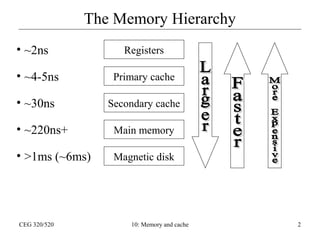
• ~2ns

Registers

• ~4-5ns

Primary cache

• ~30ns

Secondary cache

• ~220ns+

Main memory

• >1ms (~6ms)

Magnetic disk

CEG 320/520

10: Memory and cache

2
Cache & Locality
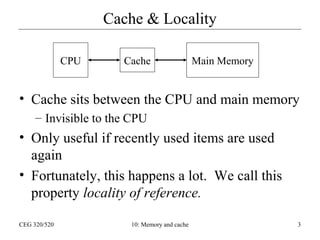
CPU

Cache

Main Memory

• Cache sits between the CPU and main memory
– Invisible to the CPU

• Only useful if recently used items are used
again
• Fortunately, this happens a lot. We call this
property locality of reference.
CEG 320/520

10: Memory and cache

3
Locality of reference
• Temporal locality
– Recently accessed data/instructions are likely to be
accessed again.
• Most program time is spent in loops
• Arrays are often scanned multiple times

• Spatial locality
– If I access memory address n, I am likely to then
access another address close to n (usually n+1,
n+2, or n+4)
• Linear execution of code
• Linear access of arrays
CEG 320/520

10: Memory and cache

4
How a cache exploits locality
• Temporal – When an item is accessed from
memory it is brought into the cache
– If it is accessed again soon, it comes from the
cache and not main memory

• Spatial – When we access a memory word, we
also fetch the next few words of memory into
the cache
– The number of words fetched is the cache line
size, or the cache block size for the machine

CEG 320/520

10: Memory and cache

5
Cache write policies
• As long as we are only doing READ operations, the
cache is an exact copy of a small part of the main
memory
• When we write, should we write to cache or memory?
• Write through cache – write to both cache and main
memory. Cache and memory are always consistent
• Write back cache – write only to cache and set a
“dirty bit”. When the block gets replaced from the
cache, write it out to memory.
When might the write-back policy be dangerous?
CEG 320/520

10: Memory and cache

6
Cache mapping
• Direct mapped – each memory block can
occupy one and only one cache block
• Example:
– Cache block size: 16 words
– Memory = 64K (4K blocks)
– Cache = 2K (128 blocks)

CEG 320/520

10: Memory and cache

7
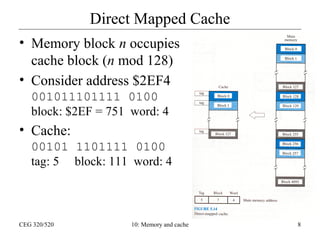
Direct Mapped Cache
• Memory block n occupies
cache block (n mod 128)
• Consider address $2EF4
001011101111 0100
block: $2EF = 751 word: 4

• Cache:
00101 1101111 0100
tag: 5 block: 111 word: 4

CEG 320/520

10: Memory and cache

8
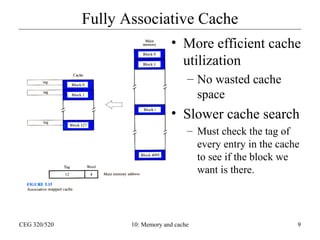
Fully Associative Cache
• More efficient cache
utilization
– No wasted cache
space

• Slower cache search
– Must check the tag of
every entry in the cache
to see if the block we
want is there.

CEG 320/520

10: Memory and cache

9
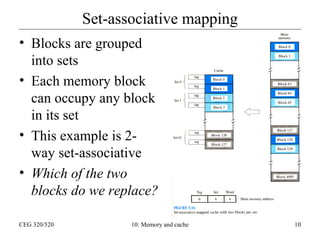
Set-associative mapping
• Blocks are grouped
into sets
• Each memory block
can occupy any block
in its set
• This example is 2way set-associative
• Which of the two
blocks do we replace?
CEG 320/520

10: Memory and cache

10
Replacement algorithms
•
•
•
•

Random
Oldest first
Least accesses
Least recently used (LRU): replace the block
that has gone the longest time without being
referenced.
– This is the most commonly-used replacement
algorithm
– Easy to implement with a small counter…

CEG 320/520

10: Memory and cache

11
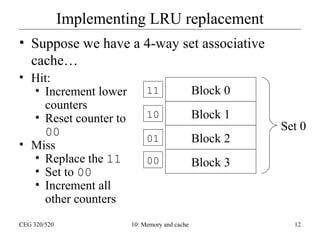
Implementing LRU replacement
• Suppose we have a 4-way set associative
cache…
• Hit:
• Increment lower
counters
• Reset counter to
00
• Miss
• Replace the 11
• Set to 00
• Increment all
other counters
CEG 320/520

11

Block 0

10

Block 1

01

Block 2

00

Block 3

10: Memory and cache

Set 0

12
Interactions with DMA
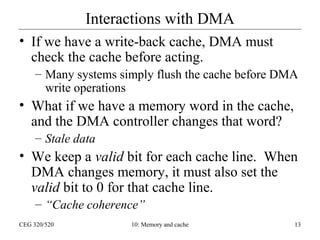
• If we have a write-back cache, DMA must
check the cache before acting.
– Many systems simply flush the cache before DMA
write operations

• What if we have a memory word in the cache,
and the DMA controller changes that word?
– Stale data

• We keep a valid bit for each cache line. When
DMA changes memory, it must also set the
valid bit to 0 for that cache line.
– “Cache coherence”
CEG 320/520

10: Memory and cache

13
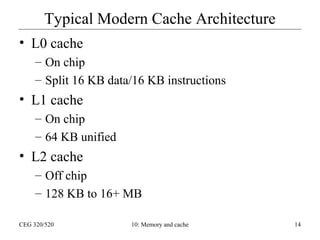
Typical Modern Cache Architecture
• L0 cache
– On chip
– Split 16 KB data/16 KB instructions

• L1 cache
– On chip
– 64 KB unified

• L2 cache
– Off chip
– 128 KB to 16+ MB
CEG 320/520

10: Memory and cache

14
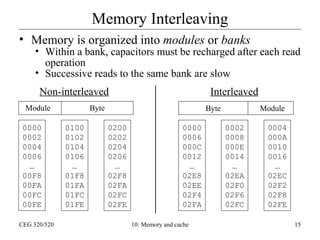
Memory Interleaving
• Memory is organized into modules or banks

• Within a bank, capacitors must be recharged after each read
operation
• Successive reads to the same bank are slow
Non-interleaved

Module
0000
0002
0004
0006
…
00F8
00FA
00FC
00FE
CEG 320/520

Interleaved

Byte
0100
0102
0104
0106
…
01F8
01FA
01FC
01FE

Byte
0200
0202
0204
0206
…
02F8
02FA
02FC
02FE

0000
0006
000C
0012
…
02E8
02EE
02F4
02FA
10: Memory and cache

Module
0002
0008
000E
0014
…
02EA
02F0
02F6
02FC

0004
000A
0010
0016
…
02EC
02F2
02F8
02FE
15
Measuring Cache Performance
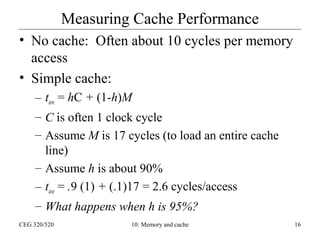
• No cache: Often about 10 cycles per memory
access
• Simple cache:
– tave = hC + (1-h)M
– C is often 1 clock cycle
– Assume M is 17 cycles (to load an entire cache
line)
– Assume h is about 90%
– tave = .9 (1) + (.1)17 = 2.6 cycles/access
– What happens when h is 95%?
CEG 320/520

10: Memory and cache

16
Multi-level cache performance
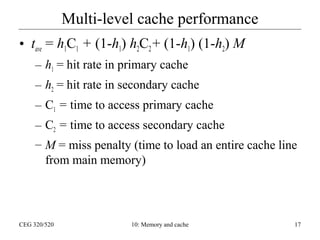
• tave = h1C1 + (1-h1) h2C2 + (1-h1) (1-h2) M
– h1 = hit rate in primary cache
– h2 = hit rate in secondary cache
– C1 = time to access primary cache
– C2 = time to access secondary cache
– M = miss penalty (time to load an entire cache line
from main memory)

CEG 320/520

10: Memory and cache

17
Virtual Memory

CEG 320/520

10: Memory and cache

18
Virtual Memory: Introduction
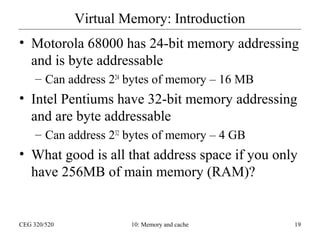
• Motorola 68000 has 24-bit memory addressing
and is byte addressable
– Can address 224 bytes of memory – 16 MB

• Intel Pentiums have 32-bit memory addressing
and are byte addressable
– Can address 232 bytes of memory – 4 GB

• What good is all that address space if you only
have 256MB of main memory (RAM)?

CEG 320/520

10: Memory and cache

19
Virtual Memory: Introduction
• Unreal Tournament (full install) uses 2.4
gigabytes on your hard disk.
• You may only have 256 megabytes of RAM
(main memory).
• How can you play the game if you can’t fit it
all into main memory?
• Other Examples:
– Neverwinter Nights – 2 gigabytes
– Microsoft Office – 243 megabytes
– Quicken Basic 2000 – 28 megabytes
CEG 320/520

10: Memory and cache

20
Working Set
• Not all of a program needs to be in memory while
you are executing it:
– Error handling routines are not called very often.
– Character creation generally only happens at the start of the
game… why keep that code easily available?

• Working set is the memory that is consumed at any
moment by a program while it is running.
– Includes stack, allocated memory, active instructions, etc.

• Examples:
– Unreal Tournament – 100MB (requires 128MB)
– Internet Explorer – 20MB
CEG 320/520

10: Memory and cache

21
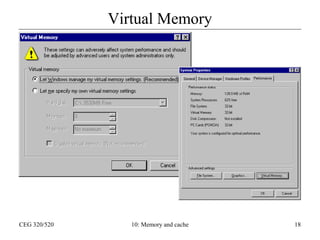
Virtual Memory
• In modern computers it is possible to use more
memory than the amount physically available
in the system
• Memory not currently being used is
temporarily stored on magnetic disk
• Essentially, the main memory acts as a cache
for the virtual memory on disk.

CEG 320/520

10: Memory and cache

22
Memory Management Unit (MMU)
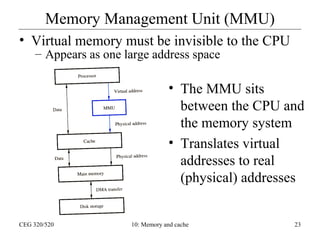
• Virtual memory must be invisible to the CPU
– Appears as one large address space

• The MMU sits
between the CPU and
the memory system
• Translates virtual
addresses to real
(physical) addresses

CEG 320/520

10: Memory and cache

23
Paged Memory
• Memory is divided into pages
– Conceptually like a cache block
– Typically 2K to 16K in size
– A page can live anywhere in main memory, or on
the disk

• Like cache, we need some way of knowing
what page is where in memory
– Page table instead of tags
– Page table base register stores the address of the
page table
CEG 320/520

10: Memory and cache

24
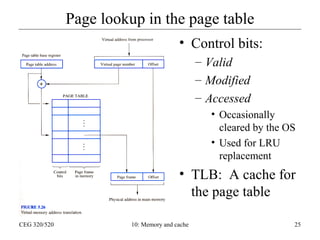
Page lookup in the page table
• Control bits:
– Valid
– Modified
– Accessed
• Occasionally
cleared by the OS
• Used for LRU
replacement

• TLB: A cache for
the page table
CEG 320/520

10: Memory and cache

25
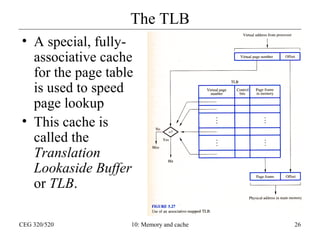
The TLB
• A special, fullyassociative cache
for the page table
is used to speed
page lookup
• This cache is
called the
Translation
Lookaside Buffer
or TLB.
CEG 320/520

10: Memory and cache

26
Page Faults
• If the memory address desired cannot be found
in the TLB, then a page fault has occurred, and
the page containing that memory must be
loaded from the disk into main memory.
• Page faults are costly because moving 2K –
16K (page size) can take a while.
• What if you have too many page faults?

CEG 320/520

10: Memory and cache

27
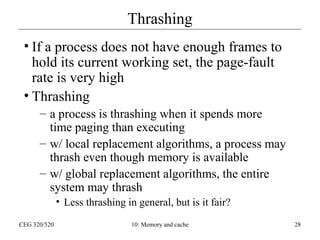
Thrashing
• If a process does not have enough frames to
hold its current working set, the page-fault
rate is very high
• Thrashing
– a process is thrashing when it spends more
time paging than executing
– w/ local replacement algorithms, a process may
thrash even though memory is available
– w/ global replacement algorithms, the entire
system may thrash
• Less thrashing in general, but is it fair?
CEG 320/520

10: Memory and cache

28
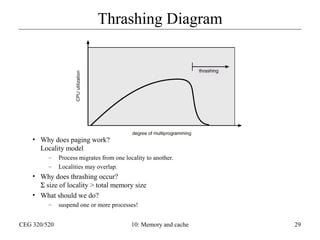
Thrashing Diagram

• Why does paging work?
Locality model
–
–

Process migrates from one locality to another.
Localities may overlap.

• Why does thrashing occur?
Σ size of locality > total memory size
• What should we do?
–
CEG 320/520

suspend one or more processes!
10: Memory and cache

29
Program Structure
• How should we arrange memory references to large arrays?
– Is the array stored in row-major or column-major order?

• Example:
– Array A[1024, 1024] of type integer
– Page size = 1K
• Each row is stored in one page

– System has one frame
– Program 1
1024 page faults
– Program 2
1024 x 1024 page faults
CEG 320/520

for i := 1 to 1024 do
for j := 1 to 1024 do
A[i,j] := 0;
for j := 1 to 1024 do
for i := 1 to 1024 do
A[i,j] := 0;

10: Memory and cache

30

cache memory management

  • 1.
    CACHE MEMORY • SATHISH.V • VELAMMALINSTITUTE OF TECNOLOGY • ECE- 2010-2014 CEG 320/520 10: Memory and cache 1
  • 2.
    The Memory Hierarchy •~2ns Registers • ~4-5ns Primary cache • ~30ns Secondary cache • ~220ns+ Main memory • >1ms (~6ms) Magnetic disk CEG 320/520 10: Memory and cache 2
  • 3.
    Cache & Locality CPU Cache MainMemory • Cache sits between the CPU and main memory – Invisible to the CPU • Only useful if recently used items are used again • Fortunately, this happens a lot. We call this property locality of reference. CEG 320/520 10: Memory and cache 3
  • 4.
    Locality of reference •Temporal locality – Recently accessed data/instructions are likely to be accessed again. • Most program time is spent in loops • Arrays are often scanned multiple times • Spatial locality – If I access memory address n, I am likely to then access another address close to n (usually n+1, n+2, or n+4) • Linear execution of code • Linear access of arrays CEG 320/520 10: Memory and cache 4
  • 5.
    How a cacheexploits locality • Temporal – When an item is accessed from memory it is brought into the cache – If it is accessed again soon, it comes from the cache and not main memory • Spatial – When we access a memory word, we also fetch the next few words of memory into the cache – The number of words fetched is the cache line size, or the cache block size for the machine CEG 320/520 10: Memory and cache 5
  • 6.
    Cache write policies •As long as we are only doing READ operations, the cache is an exact copy of a small part of the main memory • When we write, should we write to cache or memory? • Write through cache – write to both cache and main memory. Cache and memory are always consistent • Write back cache – write only to cache and set a “dirty bit”. When the block gets replaced from the cache, write it out to memory. When might the write-back policy be dangerous? CEG 320/520 10: Memory and cache 6
  • 7.
    Cache mapping • Directmapped – each memory block can occupy one and only one cache block • Example: – Cache block size: 16 words – Memory = 64K (4K blocks) – Cache = 2K (128 blocks) CEG 320/520 10: Memory and cache 7
  • 8.
    Direct Mapped Cache •Memory block n occupies cache block (n mod 128) • Consider address $2EF4 001011101111 0100 block: $2EF = 751 word: 4 • Cache: 00101 1101111 0100 tag: 5 block: 111 word: 4 CEG 320/520 10: Memory and cache 8
  • 9.
    Fully Associative Cache •More efficient cache utilization – No wasted cache space • Slower cache search – Must check the tag of every entry in the cache to see if the block we want is there. CEG 320/520 10: Memory and cache 9
  • 10.
    Set-associative mapping • Blocksare grouped into sets • Each memory block can occupy any block in its set • This example is 2way set-associative • Which of the two blocks do we replace? CEG 320/520 10: Memory and cache 10
  • 11.
    Replacement algorithms • • • • Random Oldest first Leastaccesses Least recently used (LRU): replace the block that has gone the longest time without being referenced. – This is the most commonly-used replacement algorithm – Easy to implement with a small counter… CEG 320/520 10: Memory and cache 11
  • 12.
    Implementing LRU replacement •Suppose we have a 4-way set associative cache… • Hit: • Increment lower counters • Reset counter to 00 • Miss • Replace the 11 • Set to 00 • Increment all other counters CEG 320/520 11 Block 0 10 Block 1 01 Block 2 00 Block 3 10: Memory and cache Set 0 12
  • 13.
    Interactions with DMA •If we have a write-back cache, DMA must check the cache before acting. – Many systems simply flush the cache before DMA write operations • What if we have a memory word in the cache, and the DMA controller changes that word? – Stale data • We keep a valid bit for each cache line. When DMA changes memory, it must also set the valid bit to 0 for that cache line. – “Cache coherence” CEG 320/520 10: Memory and cache 13
  • 14.
    Typical Modern CacheArchitecture • L0 cache – On chip – Split 16 KB data/16 KB instructions • L1 cache – On chip – 64 KB unified • L2 cache – Off chip – 128 KB to 16+ MB CEG 320/520 10: Memory and cache 14
  • 15.
    Memory Interleaving • Memoryis organized into modules or banks • Within a bank, capacitors must be recharged after each read operation • Successive reads to the same bank are slow Non-interleaved Module 0000 0002 0004 0006 … 00F8 00FA 00FC 00FE CEG 320/520 Interleaved Byte 0100 0102 0104 0106 … 01F8 01FA 01FC 01FE Byte 0200 0202 0204 0206 … 02F8 02FA 02FC 02FE 0000 0006 000C 0012 … 02E8 02EE 02F4 02FA 10: Memory and cache Module 0002 0008 000E 0014 … 02EA 02F0 02F6 02FC 0004 000A 0010 0016 … 02EC 02F2 02F8 02FE 15
  • 16.
    Measuring Cache Performance •No cache: Often about 10 cycles per memory access • Simple cache: – tave = hC + (1-h)M – C is often 1 clock cycle – Assume M is 17 cycles (to load an entire cache line) – Assume h is about 90% – tave = .9 (1) + (.1)17 = 2.6 cycles/access – What happens when h is 95%? CEG 320/520 10: Memory and cache 16
  • 17.
    Multi-level cache performance •tave = h1C1 + (1-h1) h2C2 + (1-h1) (1-h2) M – h1 = hit rate in primary cache – h2 = hit rate in secondary cache – C1 = time to access primary cache – C2 = time to access secondary cache – M = miss penalty (time to load an entire cache line from main memory) CEG 320/520 10: Memory and cache 17
  • 18.
    Virtual Memory CEG 320/520 10:Memory and cache 18
  • 19.
    Virtual Memory: Introduction •Motorola 68000 has 24-bit memory addressing and is byte addressable – Can address 224 bytes of memory – 16 MB • Intel Pentiums have 32-bit memory addressing and are byte addressable – Can address 232 bytes of memory – 4 GB • What good is all that address space if you only have 256MB of main memory (RAM)? CEG 320/520 10: Memory and cache 19
  • 20.
    Virtual Memory: Introduction •Unreal Tournament (full install) uses 2.4 gigabytes on your hard disk. • You may only have 256 megabytes of RAM (main memory). • How can you play the game if you can’t fit it all into main memory? • Other Examples: – Neverwinter Nights – 2 gigabytes – Microsoft Office – 243 megabytes – Quicken Basic 2000 – 28 megabytes CEG 320/520 10: Memory and cache 20
  • 21.
    Working Set • Notall of a program needs to be in memory while you are executing it: – Error handling routines are not called very often. – Character creation generally only happens at the start of the game… why keep that code easily available? • Working set is the memory that is consumed at any moment by a program while it is running. – Includes stack, allocated memory, active instructions, etc. • Examples: – Unreal Tournament – 100MB (requires 128MB) – Internet Explorer – 20MB CEG 320/520 10: Memory and cache 21
  • 22.
    Virtual Memory • Inmodern computers it is possible to use more memory than the amount physically available in the system • Memory not currently being used is temporarily stored on magnetic disk • Essentially, the main memory acts as a cache for the virtual memory on disk. CEG 320/520 10: Memory and cache 22
  • 23.
    Memory Management Unit(MMU) • Virtual memory must be invisible to the CPU – Appears as one large address space • The MMU sits between the CPU and the memory system • Translates virtual addresses to real (physical) addresses CEG 320/520 10: Memory and cache 23
  • 24.
    Paged Memory • Memoryis divided into pages – Conceptually like a cache block – Typically 2K to 16K in size – A page can live anywhere in main memory, or on the disk • Like cache, we need some way of knowing what page is where in memory – Page table instead of tags – Page table base register stores the address of the page table CEG 320/520 10: Memory and cache 24
  • 25.
    Page lookup inthe page table • Control bits: – Valid – Modified – Accessed • Occasionally cleared by the OS • Used for LRU replacement • TLB: A cache for the page table CEG 320/520 10: Memory and cache 25
  • 26.
    The TLB • Aspecial, fullyassociative cache for the page table is used to speed page lookup • This cache is called the Translation Lookaside Buffer or TLB. CEG 320/520 10: Memory and cache 26
  • 27.
    Page Faults • Ifthe memory address desired cannot be found in the TLB, then a page fault has occurred, and the page containing that memory must be loaded from the disk into main memory. • Page faults are costly because moving 2K – 16K (page size) can take a while. • What if you have too many page faults? CEG 320/520 10: Memory and cache 27
  • 28.
    Thrashing • If aprocess does not have enough frames to hold its current working set, the page-fault rate is very high • Thrashing – a process is thrashing when it spends more time paging than executing – w/ local replacement algorithms, a process may thrash even though memory is available – w/ global replacement algorithms, the entire system may thrash • Less thrashing in general, but is it fair? CEG 320/520 10: Memory and cache 28
  • 29.
    Thrashing Diagram • Whydoes paging work? Locality model – – Process migrates from one locality to another. Localities may overlap. • Why does thrashing occur? Σ size of locality > total memory size • What should we do? – CEG 320/520 suspend one or more processes! 10: Memory and cache 29
  • 30.
    Program Structure • Howshould we arrange memory references to large arrays? – Is the array stored in row-major or column-major order? • Example: – Array A[1024, 1024] of type integer – Page size = 1K • Each row is stored in one page – System has one frame – Program 1 1024 page faults – Program 2 1024 x 1024 page faults CEG 320/520 for i := 1 to 1024 do for j := 1 to 1024 do A[i,j] := 0; for j := 1 to 1024 do for i := 1 to 1024 do A[i,j] := 0; 10: Memory and cache 30