1
•Software Analysis.
•Software Design.
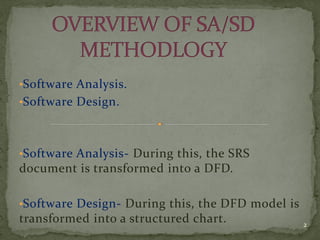
•Software Analysis- During this, the SRS
document is transformed into a DFD.
•Software Design- During this, the DFD model is
transformed into a structured chart. 2
Figure: Structured Analysis and Structured Designed
Viewed as Transformers
3
 Also known as BUBBLE CHART.
 A data flow diagram (DFD) is a graphical
representation of the "flow" of data through an
information system, modeling its process aspects.
 A DFD shows what kinds of information will be input
to and output from the system, from where the data
will come and where the data will be stored.
 DFD does not show information about the timing of
processes, or information about whether processes will
operate in sequence or in parallel (which is shown on a
flowchart).
4
 It is simple to understand.
 It is simple to use.
 DFD model uses a very limited number of primitive
symbols to represent the functions performed by a
system and the data flow among these functions.
 A DFD model represents the sub functions performed
by the functions using a hierarchy of diagrams,
hierarchical representation is an effective means to
tackle complexity.
5
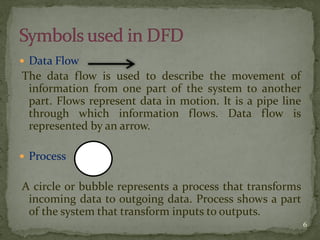
 Data Flow
The data flow is used to describe the movement of
information from one part of the system to another
part. Flows represent data in motion. It is a pipe line
through which information flows. Data flow is
represented by an arrow.
 Process
A circle or bubble represents a process that transforms
incoming data to outgoing data. Process shows a part
of the system that transform inputs to outputs.
6
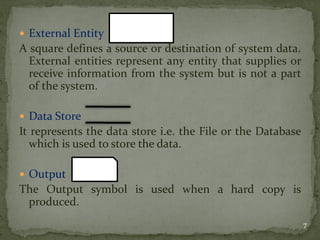
 External Entity
A square defines a source or destination of system data.
External entities represent any entity that supplies or
receive information from the system but is not a part
of the system.
 Data Store
It represents the data store i.e. the File or the Database
which is used to store the data.
 Output
The Output symbol is used when a hard copy is
produced.
7
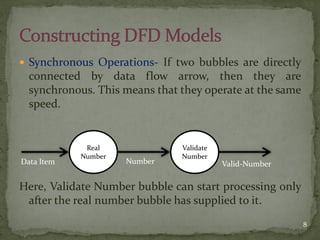
 Synchronous Operations- If two bubbles are directly
connected by data flow arrow, then they are
synchronous. This means that they operate at the same
speed.
Here, Validate Number bubble can start processing only
after the real number bubble has supplied to it.
Real
Number
Validate
Number
Data Item Number Valid-Number
8
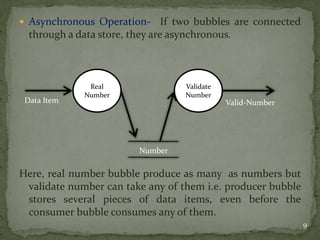
 Asynchronous Operation- If two bubbles are connected
through a data store, they are asynchronous.
Here, real number bubble produce as many as numbers but
validate number can take any of them i.e. producer bubble
stores several pieces of data items, even before the
consumer bubble consumes any of them.
Real
Number
Validate
Number
Data Item
Number
Valid-Number
9
Every DFD model of a system must be accompanied by a
data dictionary. A data dictionary lists all items that
appear in a DFD model. The data items listed include
all data flows and the content of all data stores
appearing on all the DFDs in a DFD model.
10
A DFD model of a system graphically represents how
each input data is transformed to its corresponding
output data through a hierarchy of DFDs.
The DFD model of a problem consists of many DFDs
and a single data dictionary.
11
 The Top level DFD is called the level O DFD.
 It is most simplest representation of System.
 It is easy to draw and Understand.
 It represents Entire System as a single Bubble.
 The bubble is annotated with the name of Software
System being developed(usually a noun).
 The bubbles at all other levels are annotated with verbs
according to main function performed by the bubble.
 To develop it, we have to analyze SRS document to
identify the different types of users who would be
using the system and kind of data.
12
 Usually contains between 3 to 7 bubbles.
 That is, the system is represented as performing 3 to 7
important functions.
 To develop the level 1 DFD, examine the high level
functional requirements in SRS document.
 If there are between 3 to 7 high level functional
requirements, then each of these can be directly
represented as a bubble in the level 1 DFD.
13
 DFDs have diagrams that are easy to understand,
check and change data.
 DFDs help tremendously in depicting information
about how an organization operations.
 They give a very clear and simple look at the
organization of the interfaces between an application
and the people or other applications that use it.
14
 Modification to a data layout in DFDs may cause the
entire layout to be changed. This is because the
specific changed data will bring different data to units
that it accesses. Therefore, evaluation of the possible
of the effect of the modification must be considered
first.
 The number of units in a DFD in a large application is
high. Therefore, maintenance is harder, more costly
and error prone. This is because the ability to access
the data is passed explicitly from one component to
the other. This is why changes are impractical to be
made on DFDs especially in large system.
15

Introduction to Data Flow Diagram (DFD)

  • 1.
  • 2.
    •Software Analysis. •Software Design. •SoftwareAnalysis- During this, the SRS document is transformed into a DFD. •Software Design- During this, the DFD model is transformed into a structured chart. 2
  • 3.
    Figure: Structured Analysisand Structured Designed Viewed as Transformers 3
  • 4.
     Also knownas BUBBLE CHART.  A data flow diagram (DFD) is a graphical representation of the "flow" of data through an information system, modeling its process aspects.  A DFD shows what kinds of information will be input to and output from the system, from where the data will come and where the data will be stored.  DFD does not show information about the timing of processes, or information about whether processes will operate in sequence or in parallel (which is shown on a flowchart). 4
  • 5.
     It issimple to understand.  It is simple to use.  DFD model uses a very limited number of primitive symbols to represent the functions performed by a system and the data flow among these functions.  A DFD model represents the sub functions performed by the functions using a hierarchy of diagrams, hierarchical representation is an effective means to tackle complexity. 5
  • 6.
     Data Flow Thedata flow is used to describe the movement of information from one part of the system to another part. Flows represent data in motion. It is a pipe line through which information flows. Data flow is represented by an arrow.  Process A circle or bubble represents a process that transforms incoming data to outgoing data. Process shows a part of the system that transform inputs to outputs. 6
  • 7.
     External Entity Asquare defines a source or destination of system data. External entities represent any entity that supplies or receive information from the system but is not a part of the system.  Data Store It represents the data store i.e. the File or the Database which is used to store the data.  Output The Output symbol is used when a hard copy is produced. 7
  • 8.
     Synchronous Operations-If two bubbles are directly connected by data flow arrow, then they are synchronous. This means that they operate at the same speed. Here, Validate Number bubble can start processing only after the real number bubble has supplied to it. Real Number Validate Number Data Item Number Valid-Number 8
  • 9.
     Asynchronous Operation-If two bubbles are connected through a data store, they are asynchronous. Here, real number bubble produce as many as numbers but validate number can take any of them i.e. producer bubble stores several pieces of data items, even before the consumer bubble consumes any of them. Real Number Validate Number Data Item Number Valid-Number 9
  • 10.
    Every DFD modelof a system must be accompanied by a data dictionary. A data dictionary lists all items that appear in a DFD model. The data items listed include all data flows and the content of all data stores appearing on all the DFDs in a DFD model. 10
  • 11.
    A DFD modelof a system graphically represents how each input data is transformed to its corresponding output data through a hierarchy of DFDs. The DFD model of a problem consists of many DFDs and a single data dictionary. 11
  • 12.
     The Toplevel DFD is called the level O DFD.  It is most simplest representation of System.  It is easy to draw and Understand.  It represents Entire System as a single Bubble.  The bubble is annotated with the name of Software System being developed(usually a noun).  The bubbles at all other levels are annotated with verbs according to main function performed by the bubble.  To develop it, we have to analyze SRS document to identify the different types of users who would be using the system and kind of data. 12
  • 13.
     Usually containsbetween 3 to 7 bubbles.  That is, the system is represented as performing 3 to 7 important functions.  To develop the level 1 DFD, examine the high level functional requirements in SRS document.  If there are between 3 to 7 high level functional requirements, then each of these can be directly represented as a bubble in the level 1 DFD. 13
  • 14.
     DFDs havediagrams that are easy to understand, check and change data.  DFDs help tremendously in depicting information about how an organization operations.  They give a very clear and simple look at the organization of the interfaces between an application and the people or other applications that use it. 14
  • 15.
     Modification toa data layout in DFDs may cause the entire layout to be changed. This is because the specific changed data will bring different data to units that it accesses. Therefore, evaluation of the possible of the effect of the modification must be considered first.  The number of units in a DFD in a large application is high. Therefore, maintenance is harder, more costly and error prone. This is because the ability to access the data is passed explicitly from one component to the other. This is why changes are impractical to be made on DFDs especially in large system. 15