An overview of What & How
04-04-2016Ankur Biswas
1
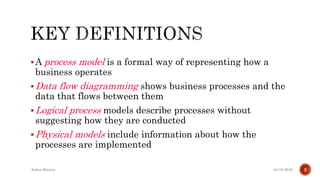
A process model is a formal way of representing how a
business operates
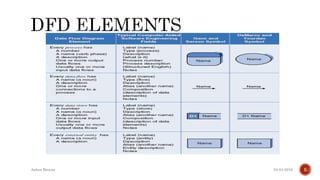
Data flow diagramming shows business processes and the
data that flows between them
Logical process models describe processes without
suggesting how they are conducted
Physical models include information about how the
processes are implemented
04-04-2016Ankur Biswas 2
04-04-2016Ankur Biswas
3
04-04-2016Ankur Biswas 4
04-04-2016Ankur Biswas 5
Creating DFDs is a highly iterative process of gradual refinement.
General steps:
1. Create a preliminary Context Diagram
2. Identify Use Cases, i.e. the ways in which users most commonly
use the system
3. Create DFD fragments for each use case
4. Create a Level 0 diagram from fragments
5. Decompose to Level 1,2,…
6. Go to step 1 and revise as necessary
7. Validate DFDs with users.
04-04-2016Ankur Biswas 6
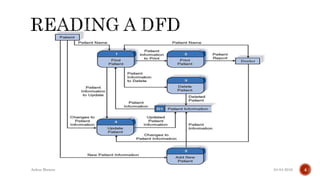
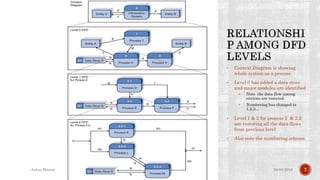
• Context Diagram is showing
whole system as a process.
• Level 0 has added a data store
and major modules are identified
• Note the data flow among
entities are restored.
• Numbering has changed to
1,2,3…
• Level 1 & 2 for process 2 & 2.2
are restoring all the data flows
from previous level
• Also note the numbering scheme.
04-04-2016Ankur Biswas 7
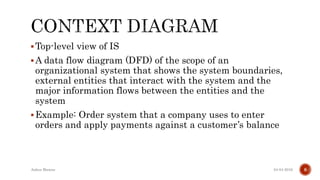
Top-level view of IS
A data flow diagram (DFD) of the scope of an
organizational system that shows the system boundaries,
external entities that interact with the system and the
major information flows between the entities and the
system
Example: Order system that a company uses to enter
orders and apply payments against a customer’s balance
04-04-2016Ankur Biswas 8
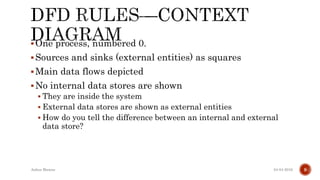
One process, numbered 0.
Sources and sinks (external entities) as squares
Main data flows depicted
No internal data stores are shown
 They are inside the system
 External data stores are shown as external entities
 How do you tell the difference between an internal and external
data store?
04-04-2016Ankur Biswas 9
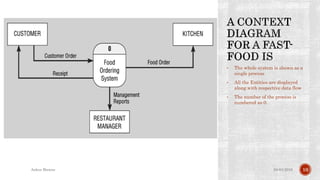
• The whole system is shown as a
single process
• All the Entities are displayed
along with respective data flow
• The number of the process is
numbered as 0.
04-04-2016Ankur Biswas 10
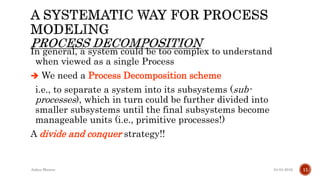
In general, a system could be too complex to understand
when viewed as a single Process
 We need a Process Decomposition scheme
i.e., to separate a system into its subsystems (sub-
processes), which in turn could be further divided into
smaller subsystems until the final subsystems become
manageable units (i.e., primitive processes!)
A divide and conquer strategy!!
04-04-2016Ankur Biswas 11
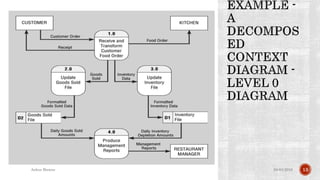
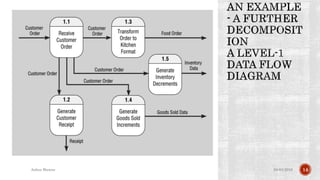
A DFD that represents the primary functional
processes in the system at the highest possible
level
An Example ...
04-04-2016Ankur Biswas 12
04-04-2016Ankur Biswas 13
04-04-2016Ankur Biswas 14
Functional Decomposition
Balancing
04-04-2016Ankur Biswas 15
Functional decomposition
 An iterative process of breaking a system description down into
finer and finer detail
 Uses a series of increasingly detailed DFDs to describe an IS
 Act of going from one single system to many component processes
 Repetitive procedure
 Lowest level is called a primitive DFD
Level-N Diagrams
 A DFD that is the result of n nested decompositions of a series of
subprocesses from a process on a level-0 diagram
04-04-2016Ankur Biswas 16
Generic Decomposition Rules:
A process in a DFD could be either a parent process or a
child process, or both.
A parent process must have two or more child processes.
A child process may further be decomposed into a set of
child processes.
04-04-2016Ankur Biswas 17
04-04-2016Ankur Biswas 18
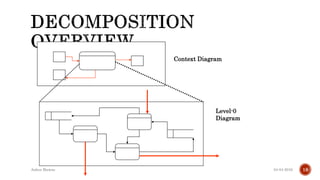
Context Diagram
Level-0
Diagram
When decomposing a DFD, you must conserve inputs to
and outputs from a process at the next level of
decomposition
Ensures that the input and output data flows of the parent
DFD are maintained on the child DFD
This is called balancing
04-04-2016Ankur Biswas 19
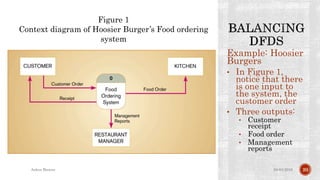
Example: Hoosier
Burgers
• In Figure 1,
notice that there
is one input to
the system, the
customer order
• Three outputs:
• Customer
receipt
• Food order
• Management
reports
04-04-2016Ankur Biswas 20
Figure 1
Context diagram of Hoosier Burger’s Food ordering
system
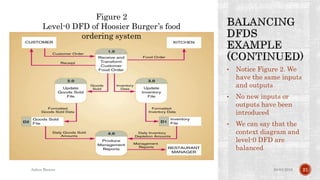
• Notice Figure 2. We
have the same inputs
and outputs
• No new inputs or
outputs have been
introduced
• We can say that the
context diagram and
level-0 DFD are
balanced
04-04-2016Ankur Biswas 21
Figure 2
Level-0 DFD of Hoosier Burger’s food
ordering system
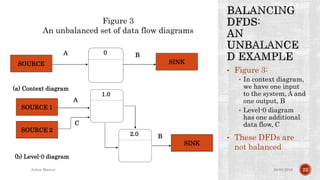
• Figure 3:
• In context diagram,
we have one input
to the system, A and
one output, B
• Level-0 diagram
has one additional
data flow, C
• These DFDs are
not balanced
04-04-2016Ankur Biswas 22
SOURCE SINK
(a) Context diagram
(b) Level-0 diagram
SOURCE 1
SINK
0
SOURCE 2
1.0
2.0
A B
A
C
B
Figure 3
An unbalanced set of data flow diagrams
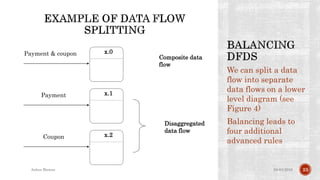
We can split a data
flow into separate
data flows on a lower
level diagram (see
Figure 4)
Balancing leads to
four additional
advanced rules
04-04-2016Ankur Biswas 23
x.0Payment & coupon
x.1Payment
x.2Coupon
Composite data
flow
Disaggregated
data flow
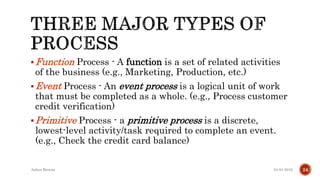
Function Process - A function is a set of related activities
of the business (e.g., Marketing, Production, etc.)
Event Process - An event process is a logical unit of work
that must be completed as a whole. (e.g., Process customer
credit verification)
Primitive Process - a primitive process is a discrete,
lowest-level activity/task required to complete an event.
(e.g., Check the credit card balance)
04-04-2016Ankur Biswas 24
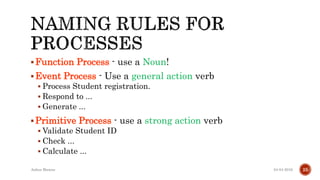
Function Process - use a Noun!
Event Process - Use a general action verb
 Process Student registration.
 Respond to ...
 Generate ...
Primitive Process - use a strong action verb
 Validate Student ID
 Check ...
 Calculate ...
04-04-2016Ankur Biswas 25
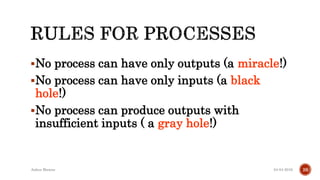
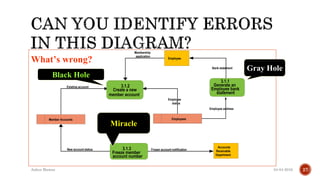
No process can have only outputs (a miracle!)
No process can have only inputs (a black
hole!)
No process can produce outputs with
insufficient inputs ( a gray hole!)
04-04-2016Ankur Biswas 26
04-04-2016Ankur Biswas 27
3.1.2
Create a new
member account
3.1.1
Generate an
Employee bank
statement
3.1.3
Freeze member
account number
Accounts
Receivable
Department
Employee
Member Accounts Employees
Existing account
New account status
Employee
status
Frozen account notification
Employee address
Bank statement
Membership
application
What’s wrong?
Black Hole
Miracle
Gray Hole
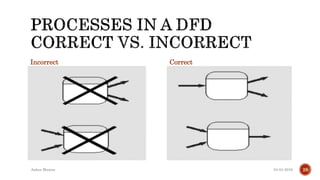
Incorrect Correct
04-04-2016Ankur Biswas 28
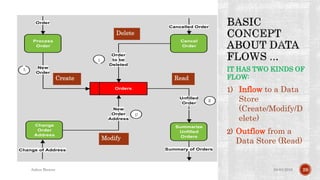
IT HAS TWO KINDS OF
FLOW:
1) Inflow to a Data
Store
(Create/Modify/D
elete)
2) Outflow from a
Data Store (Read)
04-04-2016Ankur Biswas 29
Orders
Process
Order
Cencel
Order
Change
Order
Address
Summarize
Unfilled
Orders
Order
Cancelled Order
Change of Address Summary of Orders
New
Order
Address
Unfilled
Order
l
New
Order
Order
to be
Deleted
2
1
2
2
Create
Delete
Modify
Read
1
1
1
2
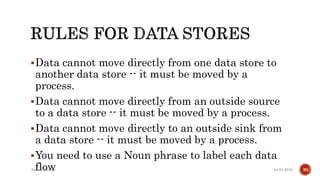
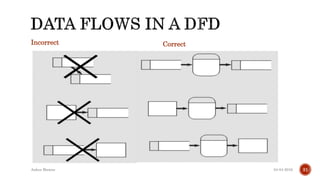
Data cannot move directly from one data store to
another data store -- it must be moved by a
process.
Data cannot move directly from an outside source
to a data store -- it must be moved by a process.
Data cannot move directly to an outside sink from
a data store -- it must be moved by a process.
You need to use a Noun phrase to label each data
flow 04-04-2016Ankur Biswas 30
Incorrect Correct
04-04-2016Ankur Biswas 31
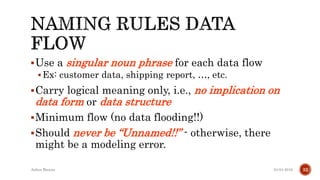
Use a singular noun phrase for each data flow
Ex: customer data, shipping report, …, etc.
Carry logical meaning only, i.e., no implication on
data form or data structure
Minimum flow (no data flooding!!)
Should never be “Unnamed!!” - otherwise, there
might be a modeling error.
04-04-2016Ankur Biswas 32
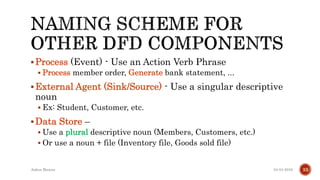
Process (Event) - Use an Action Verb Phrase
 Process member order, Generate bank statement, ...
External Agent (Sink/Source) - Use a singular descriptive
noun
 Ex: Student, Customer, etc.
Data Store –
 Use a plural descriptive noun (Members, Customers, etc.)
 Or use a noun + file (Inventory file, Goods sold file)
04-04-2016Ankur Biswas 33
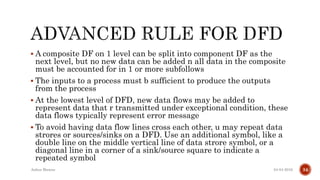
 A composite DF on 1 level can be split into component DF as the
next level, but no new data can be added n all data in the composite
must be accounted for in 1 or more subfollows
 The inputs to a process must b sufficient to produce the outputs
from the process
 At the lowest level of DFD, new data flows may be added to
represent data that r transmitted under exceptional condition, these
data flows typically represent error message
 To avoid having data flow lines cross each other, u may repeat data
strores or sources/sinks on a DFD. Use an additional symbol, like a
double line on the middle vertical line of data strore symbol, or a
diagonal line in a corner of a sink/source square to indicate a
repeated symbol
04-04-2016Ankur Biswas 34
Top-down strategy
Create the high-level diagrams (Context Diagram), then
low-level diagrams (Level-0 diagram), and so on
Bottom-up strategy
Create the low-level diagrams, then higher-level
diagrams
04-04-2016Ankur Biswas 35
Made by your seniors –
GPRS – Gunjita, Pooja, Ritwika & Sayanil (AIT – IT – 2012 Batch)
04-04-2016Ankur Biswas
36
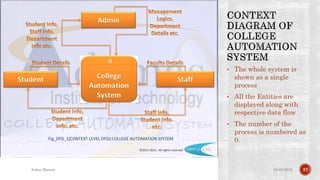
• The whole system is
shown as a single
process
• All the Entities are
displayed along with
respective data flow
• The number of the
process is numbered as
0.
04-04-2016Ankur Biswas 37
©2011-2012. All rights reserved
Fig_DFD_1(CONTEXT LEVEL DFD):COLLEGE AUTOMATION SYSTEM
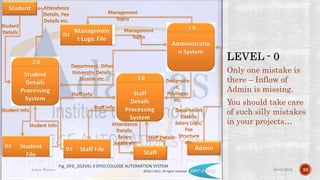
Only one mistake is
there – Inflow of
Admin is missing.
You should take care
of such silly mistakes
in your projects…
04-04-2016Ankur Biswas 38©2011-2012. All rights reserved
Fig_DFD_2(LEVEL 0 DFD):COLLEGE AUTOMATION SYSTEM
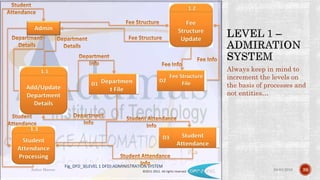
Always keep in mind to
increment the levels on
the basis of processes and
not entities…
04-04-2016Ankur Biswas 39©2011-2012. All rights reserved
Fig_DFD_3(LEVEL 1 DFD):ADMINISTRATION SYSTEM
04-04-2016Ankur Biswas 40©2011-2012. All rights reserved
Fig_DFD_4(LEVEL 2 DFD):ATTENDANCE PROCESSING SYSTEM
04-04-2016Ankur Biswas 41©2011-2012. All rights reserved
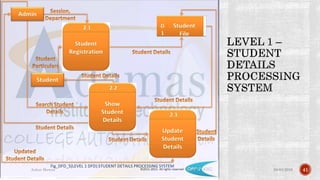
Fig_DFD_5(LEVEL 1 DFD):STUDENT DETAILS PROCESSING SYSTEM
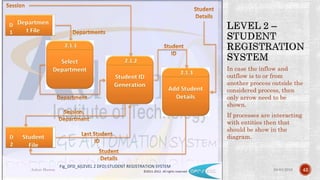
In case the inflow and
outflow is to or from
another process outside the
considered process, then
only arrow need to be
shown.
If processes are interacting
with entities then that
should be show in the
diagram.
04-04-2016Ankur Biswas 42©2011-2012. All rights reserved
Fig_DFD_6(LEVEL 2 DFD):STUDENT REGISTRATION SYSTEM
04-04-2016Ankur Biswas
43

Understanding Data Flow Diagram

  • 1.
    An overview ofWhat & How 04-04-2016Ankur Biswas 1
  • 2.
    A process modelis a formal way of representing how a business operates Data flow diagramming shows business processes and the data that flows between them Logical process models describe processes without suggesting how they are conducted Physical models include information about how the processes are implemented 04-04-2016Ankur Biswas 2
  • 3.
  • 4.
  • 5.
  • 6.
    Creating DFDs isa highly iterative process of gradual refinement. General steps: 1. Create a preliminary Context Diagram 2. Identify Use Cases, i.e. the ways in which users most commonly use the system 3. Create DFD fragments for each use case 4. Create a Level 0 diagram from fragments 5. Decompose to Level 1,2,… 6. Go to step 1 and revise as necessary 7. Validate DFDs with users. 04-04-2016Ankur Biswas 6
  • 7.
    • Context Diagramis showing whole system as a process. • Level 0 has added a data store and major modules are identified • Note the data flow among entities are restored. • Numbering has changed to 1,2,3… • Level 1 & 2 for process 2 & 2.2 are restoring all the data flows from previous level • Also note the numbering scheme. 04-04-2016Ankur Biswas 7
  • 8.
    Top-level view ofIS A data flow diagram (DFD) of the scope of an organizational system that shows the system boundaries, external entities that interact with the system and the major information flows between the entities and the system Example: Order system that a company uses to enter orders and apply payments against a customer’s balance 04-04-2016Ankur Biswas 8
  • 9.
    One process, numbered0. Sources and sinks (external entities) as squares Main data flows depicted No internal data stores are shown  They are inside the system  External data stores are shown as external entities  How do you tell the difference between an internal and external data store? 04-04-2016Ankur Biswas 9
  • 10.
    • The wholesystem is shown as a single process • All the Entities are displayed along with respective data flow • The number of the process is numbered as 0. 04-04-2016Ankur Biswas 10
  • 11.
    In general, asystem could be too complex to understand when viewed as a single Process  We need a Process Decomposition scheme i.e., to separate a system into its subsystems (sub- processes), which in turn could be further divided into smaller subsystems until the final subsystems become manageable units (i.e., primitive processes!) A divide and conquer strategy!! 04-04-2016Ankur Biswas 11
  • 12.
    A DFD thatrepresents the primary functional processes in the system at the highest possible level An Example ... 04-04-2016Ankur Biswas 12
  • 13.
  • 14.
  • 15.
  • 16.
    Functional decomposition  Aniterative process of breaking a system description down into finer and finer detail  Uses a series of increasingly detailed DFDs to describe an IS  Act of going from one single system to many component processes  Repetitive procedure  Lowest level is called a primitive DFD Level-N Diagrams  A DFD that is the result of n nested decompositions of a series of subprocesses from a process on a level-0 diagram 04-04-2016Ankur Biswas 16
  • 17.
    Generic Decomposition Rules: Aprocess in a DFD could be either a parent process or a child process, or both. A parent process must have two or more child processes. A child process may further be decomposed into a set of child processes. 04-04-2016Ankur Biswas 17
  • 18.
    04-04-2016Ankur Biswas 18 ContextDiagram Level-0 Diagram
  • 19.
    When decomposing aDFD, you must conserve inputs to and outputs from a process at the next level of decomposition Ensures that the input and output data flows of the parent DFD are maintained on the child DFD This is called balancing 04-04-2016Ankur Biswas 19
  • 20.
    Example: Hoosier Burgers • InFigure 1, notice that there is one input to the system, the customer order • Three outputs: • Customer receipt • Food order • Management reports 04-04-2016Ankur Biswas 20 Figure 1 Context diagram of Hoosier Burger’s Food ordering system
  • 21.
    • Notice Figure2. We have the same inputs and outputs • No new inputs or outputs have been introduced • We can say that the context diagram and level-0 DFD are balanced 04-04-2016Ankur Biswas 21 Figure 2 Level-0 DFD of Hoosier Burger’s food ordering system
  • 22.
    • Figure 3: •In context diagram, we have one input to the system, A and one output, B • Level-0 diagram has one additional data flow, C • These DFDs are not balanced 04-04-2016Ankur Biswas 22 SOURCE SINK (a) Context diagram (b) Level-0 diagram SOURCE 1 SINK 0 SOURCE 2 1.0 2.0 A B A C B Figure 3 An unbalanced set of data flow diagrams
  • 23.
    We can splita data flow into separate data flows on a lower level diagram (see Figure 4) Balancing leads to four additional advanced rules 04-04-2016Ankur Biswas 23 x.0Payment & coupon x.1Payment x.2Coupon Composite data flow Disaggregated data flow
  • 24.
    Function Process -A function is a set of related activities of the business (e.g., Marketing, Production, etc.) Event Process - An event process is a logical unit of work that must be completed as a whole. (e.g., Process customer credit verification) Primitive Process - a primitive process is a discrete, lowest-level activity/task required to complete an event. (e.g., Check the credit card balance) 04-04-2016Ankur Biswas 24
  • 25.
    Function Process -use a Noun! Event Process - Use a general action verb  Process Student registration.  Respond to ...  Generate ... Primitive Process - use a strong action verb  Validate Student ID  Check ...  Calculate ... 04-04-2016Ankur Biswas 25
  • 26.
    No process canhave only outputs (a miracle!) No process can have only inputs (a black hole!) No process can produce outputs with insufficient inputs ( a gray hole!) 04-04-2016Ankur Biswas 26
  • 27.
    04-04-2016Ankur Biswas 27 3.1.2 Createa new member account 3.1.1 Generate an Employee bank statement 3.1.3 Freeze member account number Accounts Receivable Department Employee Member Accounts Employees Existing account New account status Employee status Frozen account notification Employee address Bank statement Membership application What’s wrong? Black Hole Miracle Gray Hole
  • 28.
  • 29.
    IT HAS TWOKINDS OF FLOW: 1) Inflow to a Data Store (Create/Modify/D elete) 2) Outflow from a Data Store (Read) 04-04-2016Ankur Biswas 29 Orders Process Order Cencel Order Change Order Address Summarize Unfilled Orders Order Cancelled Order Change of Address Summary of Orders New Order Address Unfilled Order l New Order Order to be Deleted 2 1 2 2 Create Delete Modify Read 1 1 1 2
  • 30.
    Data cannot movedirectly from one data store to another data store -- it must be moved by a process. Data cannot move directly from an outside source to a data store -- it must be moved by a process. Data cannot move directly to an outside sink from a data store -- it must be moved by a process. You need to use a Noun phrase to label each data flow 04-04-2016Ankur Biswas 30
  • 31.
  • 32.
    Use a singularnoun phrase for each data flow Ex: customer data, shipping report, …, etc. Carry logical meaning only, i.e., no implication on data form or data structure Minimum flow (no data flooding!!) Should never be “Unnamed!!” - otherwise, there might be a modeling error. 04-04-2016Ankur Biswas 32
  • 33.
    Process (Event) -Use an Action Verb Phrase  Process member order, Generate bank statement, ... External Agent (Sink/Source) - Use a singular descriptive noun  Ex: Student, Customer, etc. Data Store –  Use a plural descriptive noun (Members, Customers, etc.)  Or use a noun + file (Inventory file, Goods sold file) 04-04-2016Ankur Biswas 33
  • 34.
     A compositeDF on 1 level can be split into component DF as the next level, but no new data can be added n all data in the composite must be accounted for in 1 or more subfollows  The inputs to a process must b sufficient to produce the outputs from the process  At the lowest level of DFD, new data flows may be added to represent data that r transmitted under exceptional condition, these data flows typically represent error message  To avoid having data flow lines cross each other, u may repeat data strores or sources/sinks on a DFD. Use an additional symbol, like a double line on the middle vertical line of data strore symbol, or a diagonal line in a corner of a sink/source square to indicate a repeated symbol 04-04-2016Ankur Biswas 34
  • 35.
    Top-down strategy Create thehigh-level diagrams (Context Diagram), then low-level diagrams (Level-0 diagram), and so on Bottom-up strategy Create the low-level diagrams, then higher-level diagrams 04-04-2016Ankur Biswas 35
  • 36.
    Made by yourseniors – GPRS – Gunjita, Pooja, Ritwika & Sayanil (AIT – IT – 2012 Batch) 04-04-2016Ankur Biswas 36
  • 37.
    • The wholesystem is shown as a single process • All the Entities are displayed along with respective data flow • The number of the process is numbered as 0. 04-04-2016Ankur Biswas 37 ©2011-2012. All rights reserved Fig_DFD_1(CONTEXT LEVEL DFD):COLLEGE AUTOMATION SYSTEM
  • 38.
    Only one mistakeis there – Inflow of Admin is missing. You should take care of such silly mistakes in your projects… 04-04-2016Ankur Biswas 38©2011-2012. All rights reserved Fig_DFD_2(LEVEL 0 DFD):COLLEGE AUTOMATION SYSTEM
  • 39.
    Always keep inmind to increment the levels on the basis of processes and not entities… 04-04-2016Ankur Biswas 39©2011-2012. All rights reserved Fig_DFD_3(LEVEL 1 DFD):ADMINISTRATION SYSTEM
  • 40.
    04-04-2016Ankur Biswas 40©2011-2012.All rights reserved Fig_DFD_4(LEVEL 2 DFD):ATTENDANCE PROCESSING SYSTEM
  • 41.
    04-04-2016Ankur Biswas 41©2011-2012.All rights reserved Fig_DFD_5(LEVEL 1 DFD):STUDENT DETAILS PROCESSING SYSTEM
  • 42.
    In case theinflow and outflow is to or from another process outside the considered process, then only arrow need to be shown. If processes are interacting with entities then that should be show in the diagram. 04-04-2016Ankur Biswas 42©2011-2012. All rights reserved Fig_DFD_6(LEVEL 2 DFD):STUDENT REGISTRATION SYSTEM
  • 43.