SYSTEM ANALYSIS
AND DESIGN
Chap 7: using Data Flow Diagrams
1AITS-MCA- Kiran Ajudiya
Data Flow Diagrams (DFD)
 Through a structure analysis technique called
data flow diagram.
 Analyzing data-oriented systems
 Inputs
 Processes
 outputs
 Emphasizes system logic
2
AITS-MCA- Kiran Ajudiya
Advantages
 Freedom from technical commitment (neutral)
 Clarify systems / subsystems (is this right?)
 Communicates understanding to users (is this
right?)
 Analysis of systems (is anything missing?)
3
AITS-MCA- Kiran Ajudiya
Conventions (cont)
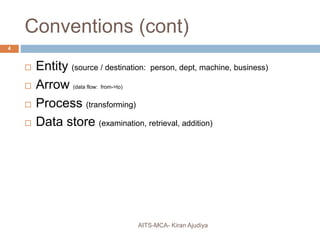
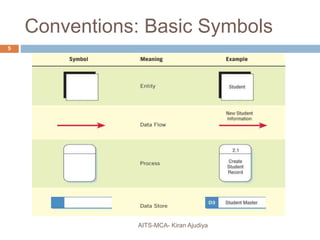
 Entity (source / destination: person, dept, machine, business)
 Arrow (data flow: from->to)
 Process (transforming)
 Data store (examination, retrieval, addition)
4
AITS-MCA- Kiran Ajudiya
Conventions: Basic Symbols
5
AITS-MCA- Kiran Ajudiya
DFD Development : Basic
Rules
AITS-MCA- Kiran Ajudiya
6
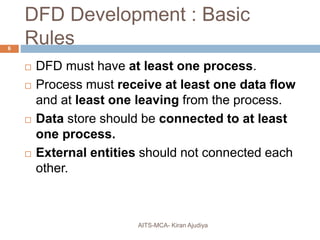
 DFD must have at least one process.
 Process must receive at least one data flow
and at least one leaving from the process.
 Data store should be connected to at least
one process.
 External entities should not connected each
other.
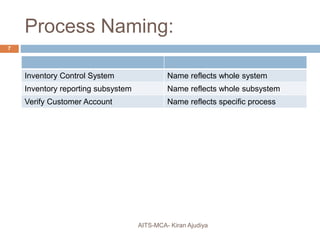
Process Naming:
Inventory Control System Name reflects whole system
Inventory reporting subsystem Name reflects whole subsystem
Verify Customer Account Name reflects specific process
7
AITS-MCA- Kiran Ajudiya
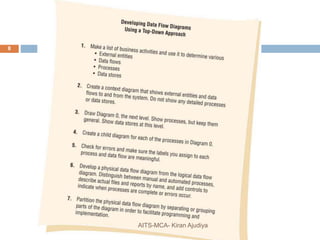
8
AITS-MCA- Kiran Ajudiya
Creating Context Diagram
AITS-MCA- Kiran Ajudiya
9
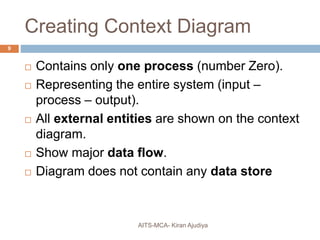
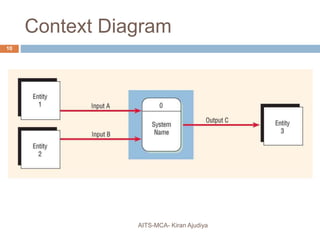
 Contains only one process (number Zero).
 Representing the entire system (input –
process – output).
 All external entities are shown on the context
diagram.
 Show major data flow.
 Diagram does not contain any data store
Context Diagram
10
AITS-MCA- Kiran Ajudiya
Diagram 0 (Next Level)
AITS-MCA- Kiran Ajudiya
11
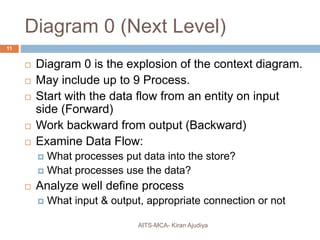
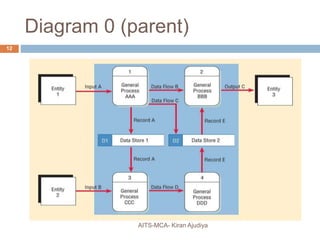
 Diagram 0 is the explosion of the context diagram.
 May include up to 9 Process.
 Start with the data flow from an entity on input
side (Forward)
 Work backward from output (Backward)
 Examine Data Flow:
 What processes put data into the store?
 What processes use the data?
 Analyze well define process
 What input & output, appropriate connection or not
Diagram 0 (parent)
12
AITS-MCA- Kiran Ajudiya
Child Diagram
AITS-MCA- Kiran Ajudiya
13
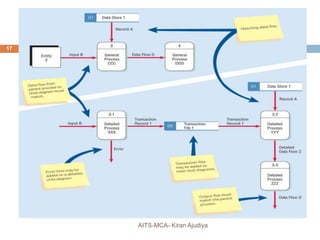
 Each process on diagram 0(zero) may be
exploded to create a child diagram.
 Each process on a lower-level diagram
may be exploded to create another child
diagram.
 Each process is numbered with the parent
diagram number, a period, and a unique
child diagram number.
Child Diagram (Continue….)
AITS-MCA- Kiran Ajudiya
14
 External entities are usually not shown on
the child diagrams below Diagram 0.
 If the parent process has data flow connecting
to a data store, the child diagram may include
the data store as well.
Child Diagram (Continue…)
AITS-MCA- Kiran Ajudiya
15
 A lower-level diagram may contain data
stores not shown on the parent process, such
as:
 A file containing a table of information (such as a
tax table).
 A file linking two processes on the child diagram.
 Minor data flow, such as an error line, may
be included on a child diagram.
 An interface data flow is data that are input or
output from a child diagram that matches the
parent diagram data flow.
Child Diagram (Continue…..)
AITS-MCA- Kiran Ajudiya
16
 Processes may or may not be exploded
depending on their level of complexity when a
processes is not exploded it is said to be
functionally primitive and is called a
“PRIMITIVE PROCESS”
17
AITS-MCA- Kiran Ajudiya
Typical Errors in DFD
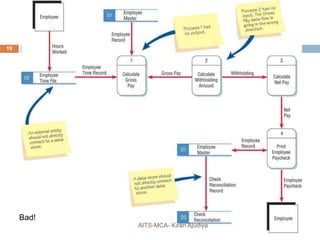
 Data flow arrow wrong direction / forgetting
 Connecting Data store to entity w/o process
 Incorrect labeling
 Too many processes (>9 on a sheet)
 Omitting data flow
 Creating Unbalanced decomposition in child
diagram.
18
AITS-MCA- Kiran Ajudiya
Bad!
19
AITS-MCA- Kiran Ajudiya
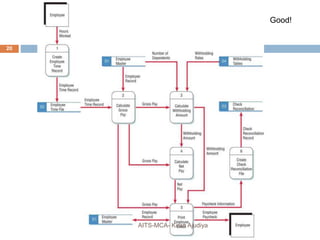
Good!
20
AITS-MCA- Kiran Ajudiya
Logical & physical Data Flow
AITS-MCA- Kiran Ajudiya
21
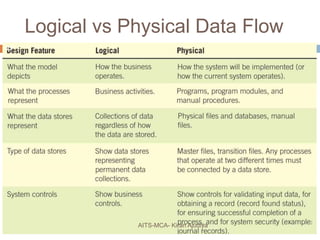
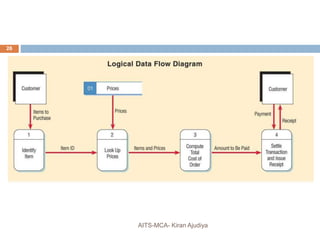
 Logical DFD focused on business and how
business operates.
 It is not worried how the system will be
constructed.
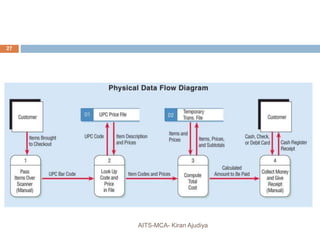
 Physical DFD shows how the system will be
implemented including hardware, software,
files and people involved in the system.
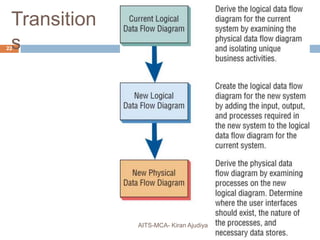
Transition
s22
AITS-MCA- Kiran Ajudiya
Logical vs Physical Data Flow
23
AITS-MCA- Kiran Ajudiya
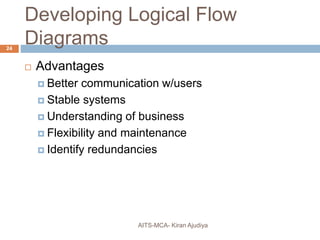
Developing Logical Flow
Diagrams
 Advantages
 Better communication w/users
 Stable systems
 Understanding of business
 Flexibility and maintenance
 Identify redundancies
24
AITS-MCA- Kiran Ajudiya
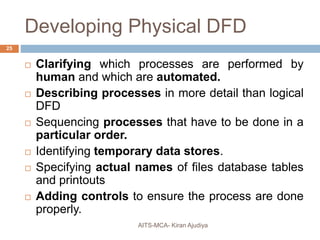
Developing Physical DFD
AITS-MCA- Kiran Ajudiya
25
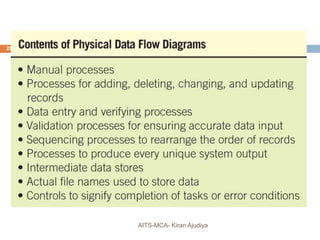
 Clarifying which processes are performed by
human and which are automated.
 Describing processes in more detail than logical
DFD
 Sequencing processes that have to be done in a
particular order.
 Identifying temporary data stores.
 Specifying actual names of files database tables

and printouts
 Adding controls to ensure the process are done
properly.
26
AITS-MCA- Kiran Ajudiya
27
AITS-MCA- Kiran Ajudiya
28
AITS-MCA- Kiran Ajudiya
Partitioning Data Flow Diagram
AITS-MCA- Kiran Ajudiya
29
 Partitioning is the process of examining a data
flow diagram and detecting how it should be
divided into collection of manual process and
collection of computer programs.
Reason for partitioning DFD
AITS-MCA- Kiran Ajudiya
30
 Different user group
 Timing
 Similar tasks
 Efficiency (Report)
 Reliability of data (Credit Card)
 Security (Net Banking)
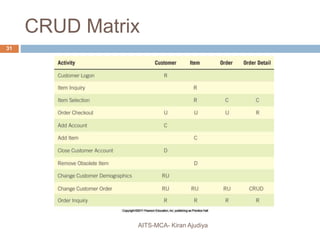
CRUD Matrix
31
AITS-MCA- Kiran Ajudiya
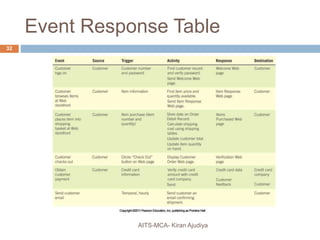
Event Response Table
32
AITS-MCA- Kiran Ajudiya
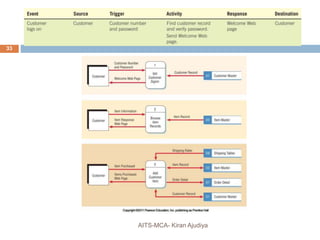
Data Flow Diagrams
33
AITS-MCA- Kiran Ajudiya
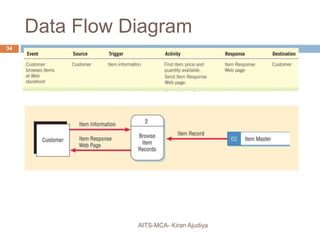
Data Flow Diagram
34
AITS-MCA- Kiran Ajudiya
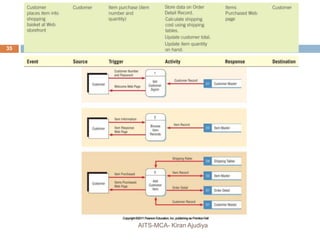
Data Flow Diagram
35
AITS-MCA- Kiran Ajudiya
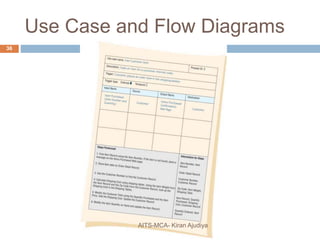
Use Case and Flow Diagrams
36
AITS-MCA- Kiran Ajudiya
In class
example
37
AITS-MCA- Kiran Ajudiya

Using data flow diagram

  • 1.
    SYSTEM ANALYSIS AND DESIGN Chap7: using Data Flow Diagrams 1AITS-MCA- Kiran Ajudiya
  • 2.
    Data Flow Diagrams(DFD)  Through a structure analysis technique called data flow diagram.  Analyzing data-oriented systems  Inputs  Processes  outputs  Emphasizes system logic 2 AITS-MCA- Kiran Ajudiya
  • 3.
    Advantages  Freedom fromtechnical commitment (neutral)  Clarify systems / subsystems (is this right?)  Communicates understanding to users (is this right?)  Analysis of systems (is anything missing?) 3 AITS-MCA- Kiran Ajudiya
  • 4.
    Conventions (cont)  Entity(source / destination: person, dept, machine, business)  Arrow (data flow: from->to)  Process (transforming)  Data store (examination, retrieval, addition) 4 AITS-MCA- Kiran Ajudiya
  • 5.
  • 6.
    DFD Development :Basic Rules AITS-MCA- Kiran Ajudiya 6  DFD must have at least one process.  Process must receive at least one data flow and at least one leaving from the process.  Data store should be connected to at least one process.  External entities should not connected each other.
  • 7.
    Process Naming: Inventory ControlSystem Name reflects whole system Inventory reporting subsystem Name reflects whole subsystem Verify Customer Account Name reflects specific process 7 AITS-MCA- Kiran Ajudiya
  • 8.
  • 9.
    Creating Context Diagram AITS-MCA-Kiran Ajudiya 9  Contains only one process (number Zero).  Representing the entire system (input – process – output).  All external entities are shown on the context diagram.  Show major data flow.  Diagram does not contain any data store
  • 10.
  • 11.
    Diagram 0 (NextLevel) AITS-MCA- Kiran Ajudiya 11  Diagram 0 is the explosion of the context diagram.  May include up to 9 Process.  Start with the data flow from an entity on input side (Forward)  Work backward from output (Backward)  Examine Data Flow:  What processes put data into the store?  What processes use the data?  Analyze well define process  What input & output, appropriate connection or not
  • 12.
  • 13.
    Child Diagram AITS-MCA- KiranAjudiya 13  Each process on diagram 0(zero) may be exploded to create a child diagram.  Each process on a lower-level diagram may be exploded to create another child diagram.  Each process is numbered with the parent diagram number, a period, and a unique child diagram number.
  • 14.
    Child Diagram (Continue….) AITS-MCA-Kiran Ajudiya 14  External entities are usually not shown on the child diagrams below Diagram 0.  If the parent process has data flow connecting to a data store, the child diagram may include the data store as well.
  • 15.
    Child Diagram (Continue…) AITS-MCA-Kiran Ajudiya 15  A lower-level diagram may contain data stores not shown on the parent process, such as:  A file containing a table of information (such as a tax table).  A file linking two processes on the child diagram.  Minor data flow, such as an error line, may be included on a child diagram.  An interface data flow is data that are input or output from a child diagram that matches the parent diagram data flow.
  • 16.
    Child Diagram (Continue…..) AITS-MCA-Kiran Ajudiya 16  Processes may or may not be exploded depending on their level of complexity when a processes is not exploded it is said to be functionally primitive and is called a “PRIMITIVE PROCESS”
  • 17.
  • 18.
    Typical Errors inDFD  Data flow arrow wrong direction / forgetting  Connecting Data store to entity w/o process  Incorrect labeling  Too many processes (>9 on a sheet)  Omitting data flow  Creating Unbalanced decomposition in child diagram. 18 AITS-MCA- Kiran Ajudiya
  • 19.
  • 20.
  • 21.
    Logical & physicalData Flow AITS-MCA- Kiran Ajudiya 21  Logical DFD focused on business and how business operates.  It is not worried how the system will be constructed.  Physical DFD shows how the system will be implemented including hardware, software, files and people involved in the system.
  • 22.
  • 23.
    Logical vs PhysicalData Flow 23 AITS-MCA- Kiran Ajudiya
  • 24.
    Developing Logical Flow Diagrams Advantages  Better communication w/users  Stable systems  Understanding of business  Flexibility and maintenance  Identify redundancies 24 AITS-MCA- Kiran Ajudiya
  • 25.
    Developing Physical DFD AITS-MCA-Kiran Ajudiya 25  Clarifying which processes are performed by human and which are automated.  Describing processes in more detail than logical DFD  Sequencing processes that have to be done in a particular order.  Identifying temporary data stores.  Specifying actual names of files database tables and printouts  Adding controls to ensure the process are done properly.
  • 26.
  • 27.
  • 28.
  • 29.
    Partitioning Data FlowDiagram AITS-MCA- Kiran Ajudiya 29  Partitioning is the process of examining a data flow diagram and detecting how it should be divided into collection of manual process and collection of computer programs.
  • 30.
    Reason for partitioningDFD AITS-MCA- Kiran Ajudiya 30  Different user group  Timing  Similar tasks  Efficiency (Report)  Reliability of data (Credit Card)  Security (Net Banking)
  • 31.
  • 32.
  • 33.
  • 34.
  • 35.
  • 36.
    Use Case andFlow Diagrams 36 AITS-MCA- Kiran Ajudiya
  • 37.