System Analysis & DesignSystem Analysis & Design

Where do they fit in?
 Analysis (What do we do?)
 Fact finding
 investigate business process
and the current system
 modelling the current and
required systems
 deliverables -
 requirements specification
 logical models of the
required system
 Life Cycle Phases
 Planning
 Feasibility Study
 Analysis
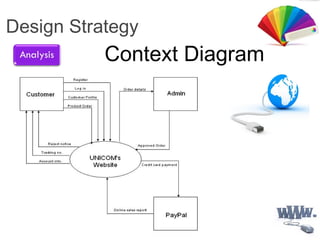
 Design
 Code and Unit test

3
 DFDs describe the flow of data or information into
and out of a system
 what does the system do to the data?
 A DFD is a graphic representation of the flow of data
or information through a system
Data Flow Diagrams
(DFD)

 external entity - people or organisations that
send data into the system or receive data from
the system
 process - models what happens to the data i.e.
transforms incoming data into outgoing data
 data store - represents permanent data that is
used by the system
 data flow - models the actual flow of the data
between the other elements
4 Main Elements

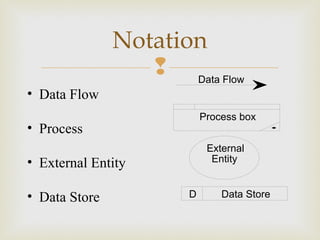
Notation
Process box
D Data Store
External
Entity
Data Flow
• Data Flow
• Process
• External Entity
• Data Store

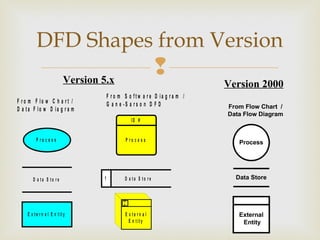
DFD Shapes from Version
F r o m F lo w C h a r t /
D a t a F lo w D ia g r a m
P r o c e s s
D a t a S t o r e
E x t e r n a l E n t it y
F r o m S o f t w a r e D ia g r a m /
G a n e - S a r s o n D F D
P r o c e s s
ID #
ID
#
E x t e r n a l
E n t it y
D a t a S t o r e1
External
Entity
Data Store
Process
From Flow Chart /
Data Flow Diagram
Version 5.x Version 2000

4
 Even a small system could have many processes and
data flows and DFD could be large and messy
 use levelled DFDs - view system at different levels of
detail
 one overview and many progressively greater detailed
views
Levelled DFDs

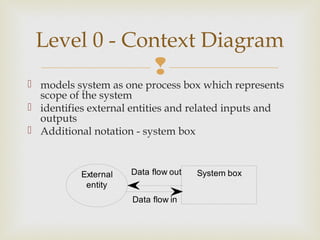
 models system as one process box which represents
scope of the system
 identifies external entities and related inputs and
outputs
 Additional notation - system box
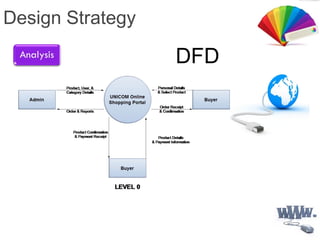
Level 0 - Context Diagram
System boxExternal
entity
Data flow out
Data flow in

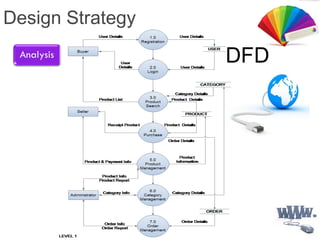
 gives overview of full system
 identifies major processes and data flows between
them
 identifies data stores that are used by the major
processes
 boundary of level 1 is the context diagram
Level 1 - overview
diagram

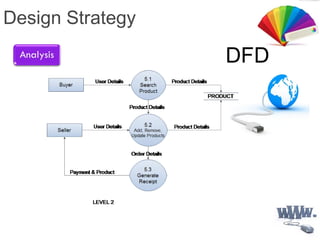
 level 1 process is expanded into more detail
 each process in level 1 is decomposed to show its
constituent processes
 boundary of level 2 is the level 1 process
Level 2 - detailed
diagram
 Duplicates marked by diagonal line in corner
 System Boundary
 Elementary Processes - star in corner
 Process that is levelled - dots on top
Other Notation

5
 Numbering
 Labelling
 Balancing
Rules for DFDs

 On level 1 processes are numbered 1,2,3…
 On level 2 processes are numbered x.1, x.2, x.3…
where x is the number of the parent level 1 process
 Number is used to uniquely identify process not to
represent any order of processing
 Data store numbers usually D1, D2, D3...
Numbering

 Process label - short description of what the process
does, e.G. Price order
 Data flow label - noun representing the data flowing
through it e.G. Customer payment
 Data store label - describes the type of data stored
 Make labels as meaningful as possible
Labelling

 Balancing
 any data flows entering or leaving a parent level must
by equivalent to those on the child level
 Data stores
 data stores that are local to a process need not be
included until the process is expanded
Balancing and data
stores

 Allowed to combine several data flows from lower
level diagrams at a higher level under one data flow
to reduce clutter
 Flows should be labelled except when data to or
from a data store consists of all items in the data
store
Data Flows

 Find the people who send data into the system
 Often data is part of a PHYSICAL transaction
 When handing a bar of chocolate to a shopkeeper, you
are handing him/her a barcode.
 Find the people who get data out of the system.
 The only data you need is data that is transformed or
sent completely out of the system – not data that is
handled by an operator within the system.
Context Diagram
Design Strategy
Context Diagram
Design Strategy
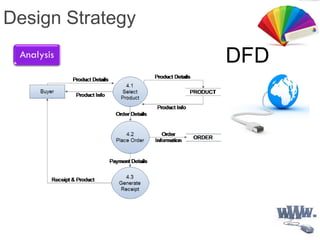
DFD
Design Strategy
DFD
Design Strategy
DFD
Design Strategy
DFD

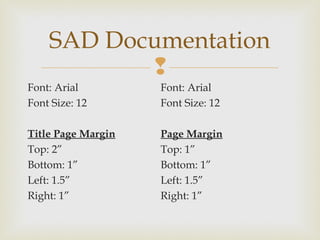
Font: Arial
Font Size: 12
Title Page Margin
Top: 2”
Bottom: 1”
Left: 1.5”
Right: 1”
SAD Documentation
Font: Arial
Font Size: 12
Page Margin
Top: 1”
Bottom: 1”
Left: 1.5”
Right: 1”

Data Flow Diagram

  • 1.
    System Analysis &DesignSystem Analysis & Design
  • 2.
     Where do theyfit in?  Analysis (What do we do?)  Fact finding  investigate business process and the current system  modelling the current and required systems  deliverables -  requirements specification  logical models of the required system  Life Cycle Phases  Planning  Feasibility Study  Analysis  Design  Code and Unit test
  • 3.
     3  DFDs describethe flow of data or information into and out of a system  what does the system do to the data?  A DFD is a graphic representation of the flow of data or information through a system Data Flow Diagrams (DFD)
  • 4.
      external entity- people or organisations that send data into the system or receive data from the system  process - models what happens to the data i.e. transforms incoming data into outgoing data  data store - represents permanent data that is used by the system  data flow - models the actual flow of the data between the other elements 4 Main Elements
  • 5.
     Notation Process box D DataStore External Entity Data Flow • Data Flow • Process • External Entity • Data Store
  • 6.
     DFD Shapes fromVersion F r o m F lo w C h a r t / D a t a F lo w D ia g r a m P r o c e s s D a t a S t o r e E x t e r n a l E n t it y F r o m S o f t w a r e D ia g r a m / G a n e - S a r s o n D F D P r o c e s s ID # ID # E x t e r n a l E n t it y D a t a S t o r e1 External Entity Data Store Process From Flow Chart / Data Flow Diagram Version 5.x Version 2000
  • 7.
     4  Even asmall system could have many processes and data flows and DFD could be large and messy  use levelled DFDs - view system at different levels of detail  one overview and many progressively greater detailed views Levelled DFDs
  • 8.
      models systemas one process box which represents scope of the system  identifies external entities and related inputs and outputs  Additional notation - system box Level 0 - Context Diagram System boxExternal entity Data flow out Data flow in
  • 9.
      gives overviewof full system  identifies major processes and data flows between them  identifies data stores that are used by the major processes  boundary of level 1 is the context diagram Level 1 - overview diagram
  • 10.
      level 1process is expanded into more detail  each process in level 1 is decomposed to show its constituent processes  boundary of level 2 is the level 1 process Level 2 - detailed diagram
  • 11.
     Duplicates markedby diagonal line in corner  System Boundary  Elementary Processes - star in corner  Process that is levelled - dots on top Other Notation
  • 12.
     5  Numbering  Labelling Balancing Rules for DFDs
  • 13.
      On level1 processes are numbered 1,2,3…  On level 2 processes are numbered x.1, x.2, x.3… where x is the number of the parent level 1 process  Number is used to uniquely identify process not to represent any order of processing  Data store numbers usually D1, D2, D3... Numbering
  • 14.
      Process label- short description of what the process does, e.G. Price order  Data flow label - noun representing the data flowing through it e.G. Customer payment  Data store label - describes the type of data stored  Make labels as meaningful as possible Labelling
  • 15.
      Balancing  anydata flows entering or leaving a parent level must by equivalent to those on the child level  Data stores  data stores that are local to a process need not be included until the process is expanded Balancing and data stores
  • 16.
      Allowed tocombine several data flows from lower level diagrams at a higher level under one data flow to reduce clutter  Flows should be labelled except when data to or from a data store consists of all items in the data store Data Flows
  • 17.
      Find thepeople who send data into the system  Often data is part of a PHYSICAL transaction  When handing a bar of chocolate to a shopkeeper, you are handing him/her a barcode.  Find the people who get data out of the system.  The only data you need is data that is transformed or sent completely out of the system – not data that is handled by an operator within the system. Context Diagram
  • 18.
  • 19.
  • 20.
  • 21.
  • 22.
  • 23.
     Font: Arial Font Size:12 Title Page Margin Top: 2” Bottom: 1” Left: 1.5” Right: 1” SAD Documentation Font: Arial Font Size: 12 Page Margin Top: 1” Bottom: 1” Left: 1.5” Right: 1”

Editor's Notes

  • #4 Use example of borrow library book here to illustrate the different components. Student is external passes in request (book and student details) into validate student process output valid student request into reserve book process. Two data stores, students and loans. Output back to student is book; Case study - Just A Line system
  • #8 sides of context process box = system boundary Example context diagram for library, inputs= book request, book return and output = book; external entity = student. Go through the case study - context Fig 3.4 pg 32; level 1- Fig 3.5 pg 32 level 2 - Fig 3.6 pg 33
  • #13 Balancing - Give example of Level 1 with 3 processes, 1,2,3 and inputs between them. In level 2 add in extra flow and leave out one of the flows. Also at level 2 introduce new flows that are internal to level 2 to show that that is OK e.g. for combining dataflows - use level 1 diagram with customer inputting deposit to accept booking process and cutomer inputting balance to issue ticket process. Context diagram then has one input flow of payment = deposit +balance.