What is eLearning?
Dispelling popular misconceptions
/ 24/ 24
Is this eLearning?
PPT Presentations + Audio
Published using Articulate OR Adobe Connect
Uploaded to LMS
2
/ 24/ 24
Is this eLearning?
Recorded live sessions
Uploaded to LMS or Intranet for learner access
3
/ 24/ 24
Some views about level 0 and level 1 eLearning
4
There is so much information to
remember. The textual content is
intimidating!
How can we remember so much?
It is difficult to keep up our
concentration levels throughout the
course.
I wish I could do more than just "Click
Next.”
/ 24/ 24
Some views about level 0 and level 1 eLearning?
5
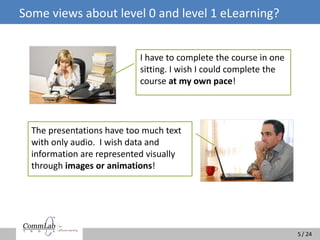
I have to complete the course in one
sitting. I wish I could complete the
course at my own pace!
The presentations have too much text
with only audio. I wish data and
information are represented visually
through images or animations!
/ 24/ 24
What do learners ask for?
 Easy and understandable content
 Interactive participation
 Control over course navigation
 Graphics, animations and visuals
6
/ 24/ 24
What are they getting?
 Heavy textual content
 Too much audio narration
 No interactivities
 Course with time restrictions
 No rich visual experience
7
/ 24/ 24
Why this disconnect?
8
PPTs cannot function as stand-alone learning material.
They contain only a fraction of the knowledge shared
by SMEs during classroom interactions.
Learning experts with inputs from SMEs can create
instructionally sound eLearning courses.
/ 24/ 24
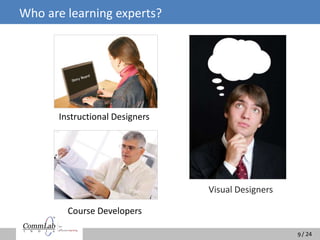
Who are learning experts?
Visual Designers
9
Instructional Designers
Course Developers
/ 24/ 24
Role of Learning Experts in eLearning
Learning experts create eLearning courses keeping in mind:
 How adults learn
 The learning process they follow
 Their different learning styles
 Content types
10
/ 24/ 24
How do adults learn?
11
Autonomous
and
self-directed
Guided by
extrinsic and
intrinsic
motivation
Motivated
by a clear
need for
learning
Bring
knowledge and
experience
to learning
activity
Need more
control and
flexibility in
training
Need to understand
how the learning
benefits them
Prefer activities
that required
application of the
knowledge gained
must be filtered
Information
and tailored
specifically to cater to
the learner’s need
You need to keep these facts in mind when developing eLearning courses
/ 24/ 24
Adult Learning Process
12
You need to understand the LEARNING PROCESS to create
eLearning courses that improve performance of learners
/ 24/ 24
Learning Styles or Preferences
Adults have different learning styles.
13
Visual Learning
Learn through seeing
Auditory Learning
Learn through listening
Kinesthetic learning
Learn through, moving, doing and touching
Courses have to be balanced to have ideal Visual, Audio and Interactive elements
/ 24/ 24
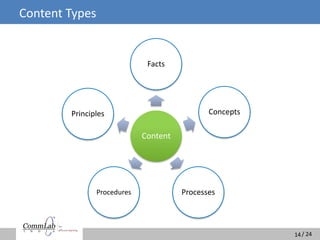
Content Types
14
Content
Facts
Concepts
ProcessesProcedures
Principles
/ 24/ 24
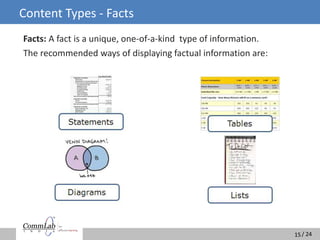
Content Types - Facts
Facts: A fact is a unique, one-of-a-kind type of information.
The recommended ways of displaying factual information are:
15
/ 24/ 24
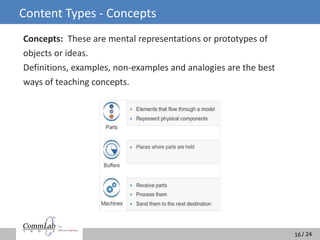
Content Types - Concepts
Concepts: These are mental representations or prototypes of
objects or ideas.
Definitions, examples, non-examples and analogies are the best
ways of teaching concepts.
16
/ 24/ 24
Content Types - Processes
Processes: Processes may be defined as descriptions of how things work.
Process tables and flow diagrams help us understand processes.
17
/ 24/ 24
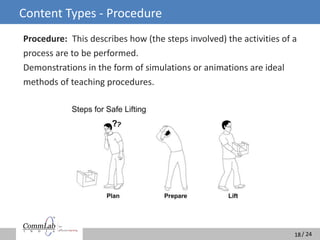
Content Types - Procedure
Procedure: This describes how (the steps involved) the activities of a
process are to be performed.
Demonstrations in the form of simulations or animations are ideal
methods of teaching procedures.
18
/ 24/ 24
Content Types - Principle
Principle: This is a cause and effect relationship that results in a
predictable outcome.
Principles are best explained with the help of representational visuals
or animations.
19
Principles of Interviewing
/ 24/ 24
Ideal eLearning Solution: Level 2
20
Courses need to be designed keeping in mind
adult learning principles, the learning process
and different learning styles of learners.
/ 24/ 24
Ideal eLearning Solution: Level 2
21
Some examples of level 2 eLearning courses
/ 24/ 24
Some Examples of Level 2 eLearning Courses
Course content
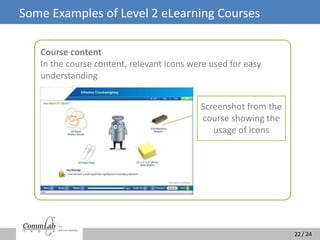
In the course content, relevant icons were used for easy
understanding
22
Screenshot from the
course showing the
usage of icons
/ 24/ 24
Some Examples of Level 2 eLearning Courses
Course content
In the course, the software was demonstrated using simulations
23
Screenshot from the
course showing
simulation
/ 24/ 24
Summary
The objective of eLearning is to HELP the
audience learn. It is NOT just a means of
communication
SME expertise + Learning expertise = eLearning
Level 2 eLearning provides effective learning and
better ROI
24
/ 24/ 24
Access our free course on “Effective Sales Skills”
http://www.commlabindia.com/elearning-resources/
effective sales-skills-ecourse.php
25
/ 24/ 24
Thank You
26

What is E-learning

  • 1.
    What is eLearning? Dispellingpopular misconceptions
  • 2.
    / 24/ 24 Isthis eLearning? PPT Presentations + Audio Published using Articulate OR Adobe Connect Uploaded to LMS 2
  • 3.
    / 24/ 24 Isthis eLearning? Recorded live sessions Uploaded to LMS or Intranet for learner access 3
  • 4.
    / 24/ 24 Someviews about level 0 and level 1 eLearning 4 There is so much information to remember. The textual content is intimidating! How can we remember so much? It is difficult to keep up our concentration levels throughout the course. I wish I could do more than just "Click Next.”
  • 5.
    / 24/ 24 Someviews about level 0 and level 1 eLearning? 5 I have to complete the course in one sitting. I wish I could complete the course at my own pace! The presentations have too much text with only audio. I wish data and information are represented visually through images or animations!
  • 6.
    / 24/ 24 Whatdo learners ask for?  Easy and understandable content  Interactive participation  Control over course navigation  Graphics, animations and visuals 6
  • 7.
    / 24/ 24 Whatare they getting?  Heavy textual content  Too much audio narration  No interactivities  Course with time restrictions  No rich visual experience 7
  • 8.
    / 24/ 24 Whythis disconnect? 8 PPTs cannot function as stand-alone learning material. They contain only a fraction of the knowledge shared by SMEs during classroom interactions. Learning experts with inputs from SMEs can create instructionally sound eLearning courses.
  • 9.
    / 24/ 24 Whoare learning experts? Visual Designers 9 Instructional Designers Course Developers
  • 10.
    / 24/ 24 Roleof Learning Experts in eLearning Learning experts create eLearning courses keeping in mind:  How adults learn  The learning process they follow  Their different learning styles  Content types 10
  • 11.
    / 24/ 24 Howdo adults learn? 11 Autonomous and self-directed Guided by extrinsic and intrinsic motivation Motivated by a clear need for learning Bring knowledge and experience to learning activity Need more control and flexibility in training Need to understand how the learning benefits them Prefer activities that required application of the knowledge gained must be filtered Information and tailored specifically to cater to the learner’s need You need to keep these facts in mind when developing eLearning courses
  • 12.
    / 24/ 24 AdultLearning Process 12 You need to understand the LEARNING PROCESS to create eLearning courses that improve performance of learners
  • 13.
    / 24/ 24 LearningStyles or Preferences Adults have different learning styles. 13 Visual Learning Learn through seeing Auditory Learning Learn through listening Kinesthetic learning Learn through, moving, doing and touching Courses have to be balanced to have ideal Visual, Audio and Interactive elements
  • 14.
    / 24/ 24 ContentTypes 14 Content Facts Concepts ProcessesProcedures Principles
  • 15.
    / 24/ 24 ContentTypes - Facts Facts: A fact is a unique, one-of-a-kind type of information. The recommended ways of displaying factual information are: 15
  • 16.
    / 24/ 24 ContentTypes - Concepts Concepts: These are mental representations or prototypes of objects or ideas. Definitions, examples, non-examples and analogies are the best ways of teaching concepts. 16
  • 17.
    / 24/ 24 ContentTypes - Processes Processes: Processes may be defined as descriptions of how things work. Process tables and flow diagrams help us understand processes. 17
  • 18.
    / 24/ 24 ContentTypes - Procedure Procedure: This describes how (the steps involved) the activities of a process are to be performed. Demonstrations in the form of simulations or animations are ideal methods of teaching procedures. 18
  • 19.
    / 24/ 24 ContentTypes - Principle Principle: This is a cause and effect relationship that results in a predictable outcome. Principles are best explained with the help of representational visuals or animations. 19 Principles of Interviewing
  • 20.
    / 24/ 24 IdealeLearning Solution: Level 2 20 Courses need to be designed keeping in mind adult learning principles, the learning process and different learning styles of learners.
  • 21.
    / 24/ 24 IdealeLearning Solution: Level 2 21 Some examples of level 2 eLearning courses
  • 22.
    / 24/ 24 SomeExamples of Level 2 eLearning Courses Course content In the course content, relevant icons were used for easy understanding 22 Screenshot from the course showing the usage of icons
  • 23.
    / 24/ 24 SomeExamples of Level 2 eLearning Courses Course content In the course, the software was demonstrated using simulations 23 Screenshot from the course showing simulation
  • 24.
    / 24/ 24 Summary Theobjective of eLearning is to HELP the audience learn. It is NOT just a means of communication SME expertise + Learning expertise = eLearning Level 2 eLearning provides effective learning and better ROI 24
  • 25.
    / 24/ 24 Accessour free course on “Effective Sales Skills” http://www.commlabindia.com/elearning-resources/ effective sales-skills-ecourse.php 25
  • 26.

Editor's Notes

  • #2 Welcome to the presentation, “What is e-Learning? Dispelling popular misconceptions”
  • #3 e-Learning is an evolving field which not many people understand the way learning professionals do.   We have noticed a widely popular perception that if you add narrations to PowerPoint slides and publish it using authoring tools such as Articulate, you get an e-Learning course. All you have to do is upload it on to an L-M-S or share it using web conferencing solutions such as Adobe Connect or Web-Ex. Is this what eLearning is all about?  
  • #4 Another popular practice is to record live instructor-led training sessions and synchronize the audio later to be uploaded on to an L-M-S for online access. Learners can pause the course mid-way and go to the next segment whenever they are ready. Some consider this to be a higher level of e-learning. But is this adequate and effective in meeting the needs of learners?
  • #5 We have compiled some concerns that learners shared with us. Let’s look at them.
  • #7 What do you think these learners are expecting from their courses? They expect content to be in an easy and understandable format. Learners expect to actively participate during the course instead of being passive recipients of information.   They enjoy control over course navigation so that they have freedom to stop the course when they want and continue it at a later time.   They expect to have some graphics, animations and visuals so that complex matter becomes easy to understand.
  • #8 What are learners getting instead?   In the name of e-Learning, they receive heavy, boring, textual content that is difficult to assimilate.   They see static screens with a long audio narration in the background which makes it hard for learners to concentrate on the course. This makes understanding the information and assimilating it very difficult for learners. They do not have any option to engage with the content during the course but are obliged to complete it in one sitting.   Further, they do not get any rich visual experience in the form of graphics, videos or animations that can enhance their understanding of the course
  • #9 Why do you think there is this disconnect?   Subject Matter Experts use P-P-Ts as learning aids during classroom sessions. P-P-Ts consist of only a fraction of the knowledge that S-M-Es share during classroom interaction. Without the value addition of S-M-Es, P-P-Ts cannot function as stand-alone learning material. Instructional designers closely working with S-M-Es can bring out instructionally sound courses that are interactive, thorough and effective.  
  • #10 Who are learning experts? In the context of e-Learning course development, learning experts are a team of instructional designers, visual designers and course developers.
  • #11 Let’s look at the role of learning experts in developing e-learning courses. Learning experts develop a course strategy based on the learning design theory which takes into consideration adult learning methodology, the learning process and their different learning styles. They also analyze the course content and design a course that is most effective in a given situation.  
  • #12 So, how do adults learn?   Adults are autonomous and self-directed in their learning habits. Hence, they need more control and flexibility to choose the way they learn. They are guided by extrinsic and intrinsic motivation, which means they need to know exactly how the learning will benefit them. They bring knowledge and experience to the learning activity and, therefore, the information has to be filtered and tailored to cater to their specific needs. They are motivated when they know that learning has an immediate use. They would be interested in activities that will help them apply the knowledge gained.
  • #13 The adult learning process basically involves four main phases of the learning cycle.  At first, we review the content in the context of what we already know.   In the second step, learning takes place with actual transfer of knowledge.   This is followed by understanding how the knowledge can be applied   And, finally, the actual application of knowledge in real-life situation takes place.   You need to understand the LEARNING PROCESS to create e-Learning courses that improve performance of learners.  
  • #14 Adults have different learning styles or preferences. Learning design experts understand these preferences. For example, some adults assimilate content in visual form, some prefer narrations and others enjoy interactive exercises. The amount of information that needs to be shared in visual form, the content suitable for narration and the extent of interactivities will have to be carefully balanced so that information is not unnecessarily repeated.   Instructional designers understand this as the Redundancy Principle. According to this principle, courses have to be balanced to ideally have visual, audio and interactive elements.
  • #15 Learning design also depends on the type of content shared in the course.  Content can be categorized into five types - facts, concepts, processes, procedures and principles.  
  • #16 Facts are unique, one-of-a-kind type of information that must be individually memorized.   When sharing factual information, the use of:   Statements Tables Diagrams Lists   are effective
  • #17 Let’s move on to the second content type, that is Concepts.   A concept is a mental representation or prototype of objects or ideas.   Teaching concepts can be effective through definitions, examples, non-examples and analogies.  
  • #18 The third content type is Processes.   Processes may be defined as description of how things work.   Processes involve a series of events or stages and an effective method of using them would be through process tables or flow diagrams.
  • #19 The fourth type of content is Procedure.   A procedure is a series of clearly-defined steps that result in the achievement of a routine job task. Clear instructions followed by demonstration will help learners understand a procedure. Including simulations in e-learning courses will help learners understand a process better.
  • #20 The last content type is Principle.   A principle is a cause-and-effect relationship that results in a predictable outcome. The learner needs to recall a guideline and apply the same while performing a task. This is best explained with the help of representational visuals, avatars or animations.  
  • #21 By now, you might have got an idea about what goes into making an e-Learning course.   Courses need to be designed by keeping in mind adult learning principles, the learning process and different learning styles of learners.
  • #22 Let’s look at some of the examples that are sometimes called “LEVEL 2” e-Learning courses.
  • #23 In this course, we used visuals and icons to make the content easy to read and understand. Converting the text into visual form makes the interface livelier and more interesting.
  • #24 This is an example of a software applications training course. Here, instead of giving step by step instructions in textual format, we use simulation to capture the steps on-screen. Learners would obviously find it much easier to grasp the procedure better.  
  • #25 To summarize the objective of e-Learning is to help audiences learn. It is not just a means of communication.   e-learning is more powerful and purposeful because it involves the knowledge of the subject matter experts and learning experts who together combine their efforts to create a compelling and effective e-learning course. Ultimately, any training program should provide a better return of investment to the organization.
  • #26 If you would like to see a sample e-Learning course, access our free course titled, Effective Sales Skills - How to be a Successful Salesperson? by clicking the following link.
  • #27 Thank You