Blended Learning vs 
Technology Integration vs 
Technology Enhancements
Technology Enhancement 
Using technology as a means to reiterate a point. 
For example: 
• Online Games 
• iPad Apps 
• Quick Class Polls 
Fun…easy…but?
Technology Integration 
Using technology as tool and as a means to 
teach a point and express learning. 
• Creative Apps 
• EduCreations verses Powerpoint 
• Give students choice on how they show learning. 
We are very good at this!
Blended Learning 
Intentional leverage of technology in a 
classroom to increase student involvement, 
engagement and input. 
• Not quite the same thing as Technology Integration (blurry 
line). 
• Deliberate instruction. 
• “Goes beyond the poll by applying the outcome.”
Creating Strong Connections 
Work done in blended environment must be directly and obviously 
connected to work done face-to-face, not just an extension or an 
means-end. 
For example, after an online activity (poll), ask students: 
“Based on the latest obstacles you faced in the simulation, discuss and 
evaluate….”
Create Collaborative Environments 
• Increase student-to-student and student-to-teacher collaboration. 
• Increase student control of time, place, pace and path of learning. 
• Access from home – what are our obstacles? 
• Solution: Centers
Create an Online Classroom – not a website! 
• Learning Management System – i.e. Edmodo 
• Home base for students day-to-day. 
• Consistent use of the classroom (not just a website with downloads). 
• Daily Five 
• Write to Learn 
• Lack of devices? Work in Groups 
• Polls, Discussions, Assessments
Repurpose Your Time 
• Frees up time for collaborative experiences. 
• Frees up time for problem-solving experiences. 
• Flipped Classrooms – doesn’t have to be done at home, could be 
done in classroom centers.
Overall 
• Not about the tech. 
• All about instructional design. 
• Technology is a leverage (like the arts). 
• Forget the tools and focus on how to improve instruction.
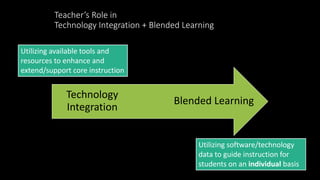
Teacher’s Role in 
Technology Integration + Blended Learning 
Blended Learning 
Technology 
Integration 
Utilizing software/technology 
data to guide instruction for 
students on an individual basis 
Utilizing available tools and 
resources to enhance and 
extend/support core instruction
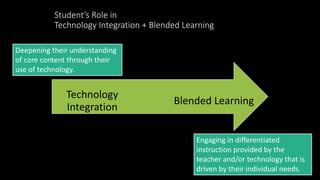
Student’s Role in 
Technology Integration + Blended Learning 
Blended Learning 
Technology 
Integration 
Engaging in differentiated 
instruction provided by the 
teacher and/or technology that is 
driven by their individual needs. 
Deepening their understanding 
of core content through their 
use of technology.
Now for something totally irrelevant…or is it?
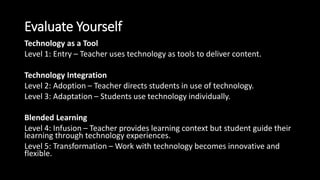
Evaluate Yourself 
Technology as a Tool 
Level 1: Entry – Teacher uses technology as tools to deliver content. 
Technology Integration 
Level 2: Adoption – Teacher directs students in use of technology. 
Level 3: Adaptation – Students use technology individually. 
Blended Learning 
Level 4: Infusion – Teacher provides learning context but student guide their 
learning through technology experiences. 
Level 5: Transformation – Work with technology becomes innovative and 
flexible.
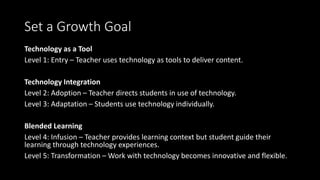
Set a Growth Goal 
Technology as a Tool 
Level 1: Entry – Teacher uses technology as tools to deliver content. 
Technology Integration 
Level 2: Adoption – Teacher directs students in use of technology. 
Level 3: Adaptation – Students use technology individually. 
Blended Learning 
Level 4: Infusion – Teacher provides learning context but student guide their 
learning through technology experiences. 
Level 5: Transformation – Work with technology becomes innovative and flexible.

Blended Learning

  • 1.
    Blended Learning vs Technology Integration vs Technology Enhancements
  • 2.
    Technology Enhancement Usingtechnology as a means to reiterate a point. For example: • Online Games • iPad Apps • Quick Class Polls Fun…easy…but?
  • 3.
    Technology Integration Usingtechnology as tool and as a means to teach a point and express learning. • Creative Apps • EduCreations verses Powerpoint • Give students choice on how they show learning. We are very good at this!
  • 4.
    Blended Learning Intentionalleverage of technology in a classroom to increase student involvement, engagement and input. • Not quite the same thing as Technology Integration (blurry line). • Deliberate instruction. • “Goes beyond the poll by applying the outcome.”
  • 6.
    Creating Strong Connections Work done in blended environment must be directly and obviously connected to work done face-to-face, not just an extension or an means-end. For example, after an online activity (poll), ask students: “Based on the latest obstacles you faced in the simulation, discuss and evaluate….”
  • 7.
    Create Collaborative Environments • Increase student-to-student and student-to-teacher collaboration. • Increase student control of time, place, pace and path of learning. • Access from home – what are our obstacles? • Solution: Centers
  • 8.
    Create an OnlineClassroom – not a website! • Learning Management System – i.e. Edmodo • Home base for students day-to-day. • Consistent use of the classroom (not just a website with downloads). • Daily Five • Write to Learn • Lack of devices? Work in Groups • Polls, Discussions, Assessments
  • 9.
    Repurpose Your Time • Frees up time for collaborative experiences. • Frees up time for problem-solving experiences. • Flipped Classrooms – doesn’t have to be done at home, could be done in classroom centers.
  • 10.
    Overall • Notabout the tech. • All about instructional design. • Technology is a leverage (like the arts). • Forget the tools and focus on how to improve instruction.
  • 11.
    Teacher’s Role in Technology Integration + Blended Learning Blended Learning Technology Integration Utilizing software/technology data to guide instruction for students on an individual basis Utilizing available tools and resources to enhance and extend/support core instruction
  • 12.
    Student’s Role in Technology Integration + Blended Learning Blended Learning Technology Integration Engaging in differentiated instruction provided by the teacher and/or technology that is driven by their individual needs. Deepening their understanding of core content through their use of technology.
  • 13.
    Now for somethingtotally irrelevant…or is it?
  • 14.
    Evaluate Yourself Technologyas a Tool Level 1: Entry – Teacher uses technology as tools to deliver content. Technology Integration Level 2: Adoption – Teacher directs students in use of technology. Level 3: Adaptation – Students use technology individually. Blended Learning Level 4: Infusion – Teacher provides learning context but student guide their learning through technology experiences. Level 5: Transformation – Work with technology becomes innovative and flexible.
  • 15.
    Set a GrowthGoal Technology as a Tool Level 1: Entry – Teacher uses technology as tools to deliver content. Technology Integration Level 2: Adoption – Teacher directs students in use of technology. Level 3: Adaptation – Students use technology individually. Blended Learning Level 4: Infusion – Teacher provides learning context but student guide their learning through technology experiences. Level 5: Transformation – Work with technology becomes innovative and flexible.

Editor's Notes