Based on Ruth Colvin Clark’s Book 
Presented By Dimas Agung Prasetyo
 E-learning 
 Learning Theories 
 How people learn 
 Multimedia principles for Multimedia Learning
90% of universities have distance 
learning 
$50-60 billion/year spent on 
corporate and governmental 
training 
Toward knowledge-based economy 
10 Elearning Statictics
 Instruction delivered via computer 
 Content relevant to learning objectives 
 Uses instructional methods such as examples and practice 
 Builds new knowledge and skills
Media elements present and illustrate 
content 
 Text, audio narration, music, graphics, animation 
and video 
 E.g., Dreamweaver course uses audio narration 
and animated graphics 
 Instructional techniques support learning 
 Examples, practice exercises, feedback 
 E.g., Dreamweaver lesson uses simulation 
practice 
 Why might simulating an actual work 
environment 
be particularly effective?
Cognitive skills: solving problems, applying 
rules, distinguishing items 
 E.g., how to complete tax forms 
Psychomotor skills: coordination physical 
movement and thought 
 E.g., driving a golf ball or driving a crane 
 Require coaching and detailed feedback 
 Attitudinal skills: opinions and behaviors 
 E.g., whether to recycle 
Which is hardest to teach with multimedia?
 Receptive: information acquisition 
 Learning adds information to memory 
 Instruction delivers information efficiently 
Directive: response strengthening 
 Strengthen stimulus-response associations 
 Drill-and-practice with reinforcing feedback 
Guided discovery: knowledge construction 
 Learner builds a mental representation 
 Guide learner in the context of solving problems 
 Is one theory right? Or a combination?
 Inform: build awareness, e.g., about a 
company’s organization 
 Perform: build skills, e.g., how to use software 
or how to evaluate bank loans 
 Procedural: step-by step tasks 
 Near transfer from training to application 
 Learning Dreamweaver may involve near transfer? Why? 
Give an example. 
 Principle-based: guidelines and problem-solving 
skills 
 Far transfer from training to application 
 Why does learning how to evaluate bank loans far transfer?
 Failure to do job or skill analysis 
 Presenting skills and knowledge out of job context 
risks transfer failure 
 How could this pitfall affect your project? 
 Failure to accommodate human learning 
 Multimedia can actually depress learning if it 
overwhelms limits of human processing 
 Attrition: e-Learning dropouts at least 35% 
 Games and stories may detract from learning 
Why?
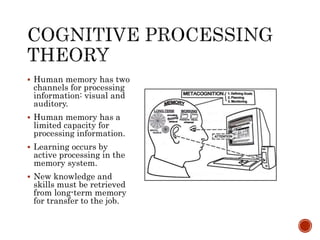
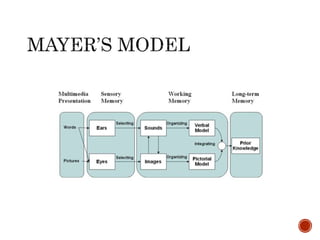
 Human memory has two 
channels for processing 
information: visual and 
auditory. 
 Human memory has a 
limited capacity for 
processing information. 
 Learning occurs by 
active processing in the 
memory system. 
 New knowledge and 
skills must be retrieved 
from long-term memory 
for transfer to the job.
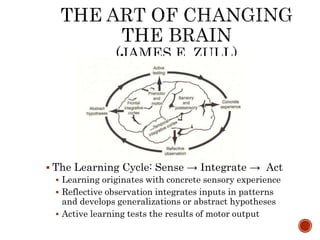
 The Learning Cycle: Sense → Integrate → Act 
 Learning originates with concrete sensory experience 
 Reflective observation integrates inputs in patterns 
and develops generalizations or abstract hypotheses 
 Active learning tests the results of motor output
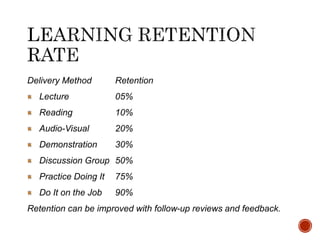
Delivery Method Retention 
Lecture 05% 
Reading 10% 
Audio-Visual 20% 
Demonstration 30% 
Discussion Group 50% 
Practice Doing It 75% 
Do It on the Job 90% 
Retention can be improved with follow-up reviews and feedback.
 Using an arrow or color to draw the eye to important 
information? 
 Listing learning objectives up front? 
 Omitting background music? 
 Using succinct text? 
 Ask about trouble-shooting actions relevant to job context?
 Informal studies: observing people as they learn or 
asking them about it 
 Formative evaluation makes changes from learner feedback 
 Summative evaluation reports results to sponsors & others 
 Formal studies use experimental research design, 
with subjects randomly assigned to test and control 
groups 
 Controlled: compare outcomes of 2 or more groups of learners 
 Clinical trials: evaluate e-learning in real world contexts 
 Should show statistical significance (p<.05) 
 Book uses results of controlled studies that suggest 
basic design principles for e-learning 
 Why is experimental basis useful?
 VP thinks a short course should just consist of text and tells 
course designer: 
 “Everything they need to know is in 
the text. All they have to do is read it. 
And we don’t have much time!” 
 How should the course designer react? 
 “Do you mind if I come up with something that builds on your 
text?”
 Include both words and graphics 
 Why? 
 Graphics facilitate active learning, mentally making connection 
between pictorial and verbal representations 
 Words alone may cause shallow learning
 Decorative vs. explanative illustrations 
 What’s the difference? 
 Decorative pictures are eye candy 
 Explanative illustrations help learner understand the material 
 Instructional designer’s job is to enable learner to make sense 
of information
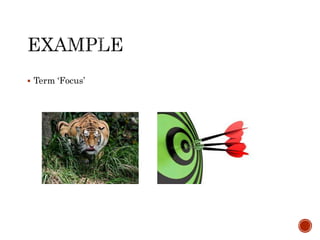
 Term ‘Focus’
 Decorative pictures are “eye candy” 
 Why? Give an example 
 Merely decorate the page without improving understanding 
 E.g., picture of a general in a lesson about explosives 
 Instructional designer’s job is to enable learner to make sense of 
information
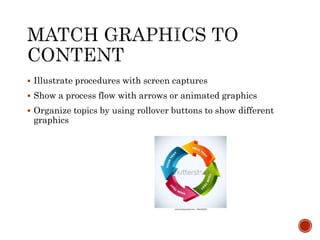
 Illustrate procedures with screen captures 
 Show a process flow with arrows or animated graphics 
 Organize topics by using rollover buttons to show different 
graphics
 Facts, e.g., a screen capture 
 Concepts, e.g., a diagram of species 
 Process, e.g., animation of a pump 
 Procedure, e.g., animation of steps with arrows highlighting 
buttons or parts 
 Principle, e.g., animation of genes passing from parents to 
offspring
 Information delivery theory: learning consists of acquiring 
information 
 Information format shouldn’t matter 
 Cognitive theory: learning is actively making sense of 
information 
 Active learning involves constructing and connecting visual and 
verbal representations of material
Ten lessons teaching scientific or mechanical 
processes, such as how pumps work 
 Students who receive multimedia lesson 
perform better on post-test than students 
who receive same information in words 
Improvement of 55-121% more correct 
solutions to transfer problems
 Based on cognitive theory, designer is confident in multimedia 
principle 
 Explains to the VP that people learn more deeply when they 
are able to build mental connections between verbal and 
pictorial presentations 
 Shows prototype storyboards
 Dilemma: use fixed screen displays or scrolling pages (to save 
bandwidth)? 
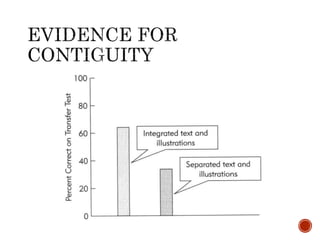
 Principle: place text near corresponding graphics
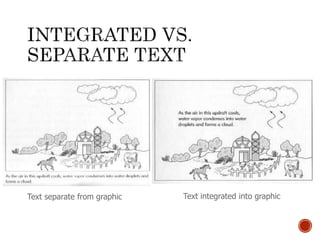
Text separate from graphic Text integrated into graphic
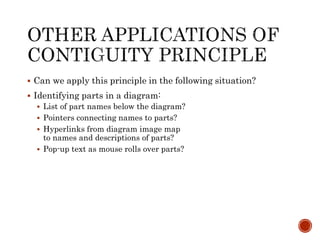
 Can we apply this principle in the following situation? 
 Identifying parts in a diagram: 
 List of part names below the diagram? 
 Pointers connecting names to parts? 
 Hyperlinks from diagram image map 
to names and descriptions of parts? 
 Pop-up text as mouse rolls over parts?
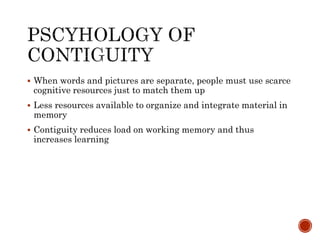
 When words and pictures are separate, people must use scarce 
cognitive resources just to match them up 
 Less resources available to organize and integrate material in 
memory 
 Contiguity reduces load on working memory and thus 
increases learning
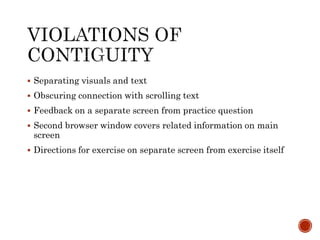
 Separating visuals and text 
 Obscuring connection with scrolling text 
 Feedback on a separate screen from practice question 
 Second browser window covers related information on main 
screen 
 Directions for exercise on separate screen from exercise itself
 So far we’ve learned how to apply 
two cognitive principles to e-learning: 
 Multimedia principle? 
 Include both words and graphics 
 Contiguity principle? 
 Place text near corresponding graphics 
 Next, we’ll apply two more principles: 
 Modality principle: put words in spoken form 
 Redundancy principle: don’t put same words 
in both speech and text
 Project sponsor tells course designer to “get rid of all that 
[narration] audio” 
 Why would she say that? 
 How should the course designer react? 
 “Let me look into it” (resolves to look into theory and research 
about audio)
Put words in spoken rather than graphic 
form, when graphic or animation is in focus 
Why? 
Cognitive theory of learning: 
 Separate information processing channels for 
visual and auditory/verbal processing 
 Capacity of each channel is limited 
 Graphics and onscreen text compete for attention 
 Overloads visual channel 
 Instead, use both auditory and visual channels
 People learn more lessons with concurrent speech than just text 
alone 
 64% vs. 36% correct on post-test 
 Are you impressed? 
 Would project sponsor be convinced? 
 Is it worth the extra work of audio production? 
 When is audio less effective?
 VP: “We need to accommodate different learning styles: add text 
to the screen for those who learn better from reading.” 
 Is she right? Why or why not? 
 Redundancy doesn’t help: people learn more from audio alone 
than audio plus text explaining graphics or animation
Some have visual, others auditory style 
 Therefore present both, to accommodate both 
learning styles 
 What do you think of this hypothesis? 
This hypothesis is a special case of 
information delivery theory: people learn by 
adding information to memory 
 Mind is an empty vessel to be filled with info 
 So redundant presentation puts more info in mind 
 Cognitive theory: each channel is limited 
 Redundant text could overload visual channel
Avoid presenting words as narration and 
identical text 
Special cases for narration of text: 
 No pictorial representation on a screen 
 Slow pace of presentation 
 Helping learners with disabilities or non-native 
speakers 
 Learners who may not have access to speakers or 
headsets
 Director says a first version “seems a little dry—can you spice 
it up a bit?” 
 Why might spicing it up with extra graphics or background 
music seem worthwhile? 
 Common sense: avoid boring the learner 
 Arousal theory: when learners become emotionally aroused they 
try harder to learn the material
 Interesting material can hinder learning 
Why? 
 Cognitive theory: learners have limited resources 
 Extraneous materials competes with core material 
for limited cognitive resources 
Coherence: all materials should cohere 
relevantly with what needs to be learned
Background music and sounds may overload 
working memory 
 Especially when learner experiences heavy 
cognitive processing demands 
Experimental results: 
 For lightning presentation, added sound effects 
such as winds depicting air movement and 
crackling of charge transfers 
 Retention was 61-149% better for narration without 
additional sound effects
 Adding interesting sentences may seem like an easy way to 
increase interest 
 Again, they may just distract learners 
 Conclusion: avoid seductive but irrelevant details that force 
excitement but don’t increase understanding
 Discuss in your project group 
 Do you follow this principle in your scripts so far? 
 Are there any sounds or graphics in your script that you might 
drop?
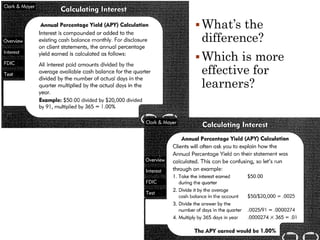
 What’s the 
difference? 
Which is more 
effective for 
learners?
Conversational style aids learning 
 Formal style avoids first- and second-person: e.g., 
“Caution should be used when opening pyrotechnic 
containers.” 
 Use second-person: “You should be careful if you 
open any containers with pyrotechnics.” 
Why might informal style help learning? 
 People work harder to understand material when 
they feel they are in a conversation with a partner. 
 Discuss examples on p. 164
 Agents may be representations of real people or artificial 
characters using animation and computer-generated voice 
 Clippy, Knobby or professor personae?
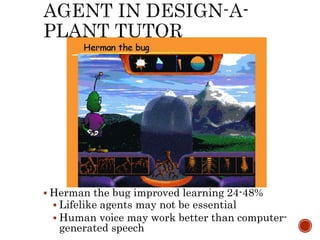
 Herman the bug improved learning 24-48% 
 Lifelike agents may not be essential 
 Human voice may work better than computer-generated 
speech
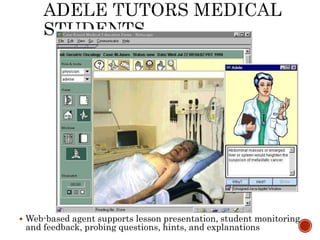
 Web-based agent supports lesson presentation, student monitoring 
and feedback, probing questions, hints, and explanations
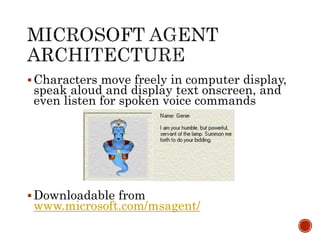
 Characters move freely in computer display, 
speak aloud and display text onscreen, and 
even listen for spoken voice commands 
Downloadable from 
www.microsoft.com/msagent/
Psychological reasons for using visible 
author? 
 Author as guide for student 
 Social relationships motivate students 
 Evidence shows that learners provide richer 
answers for some learners
 Will you adjust your writing style? 
 Will you use learning coaches or agents? 
 Check out Microsoft Agent software? 
 Will you include a “visible” author?
 Interactive practice exercises help learners 
integrate knowledge into LTM 
What kinds of exercises? 
 Drag-and-drop and simulations 
 More crucially: exercises should mirror thinking 
processes and environment of actual task 
 Better learning results from practice questions 
interspersed throughout the lesson 
 Learners should be trained to developer their own 
questions
 Activities should require learners to respond 
in similar ways during training as they will 
on the job 
 E.g., Jeopardy game doesn’t help transfer on job 
 Simulation of actual job decisions does 
Avoid simple regurgitation of information 
provided in training program 
 Doesn’t implant cues for retrieval in job context
 Asking “why” questions improves learning 
 “Why does an object speed up as its radius gets smaller?” 
 Results in greater factual and inference learning 
 Pro and con analysis improves learning 
 Developing arguments requires organization and integration of 
materials
Well designed practice exercises provide 
opportunities for encoding knowledge or skills 
 The more encoding opportunities, the more integration 
 Logarithmic relationship between amount of practice 
and time to complete tasks 
 Improvement occurs regardless of initial ability 
Tradeoff of time in development and lesson 
 Interactive practice can be harder to design 
 Practice also adds to training time: eventually there 
are diminishing returns on learning
 Spacing practice is superior to massed practice, e.g., at end of 
lesson 
 Spacing effect is not immediate but after a period of time
Contiguity: keep text close to graphics 
Modality: use audio to explain graphics 
 But audio is transient, so redundant text and 
graphics is OK for practice questions 
 Feedback should also be presented in text 
Redundancy: use text alone 
 Don’t narrate text directions or practice questions 
 Peronalization: use conversational language 
 Provide hints and feedback in first & second person
 Learners can ask and answer their own questions during 
lessons: “How can I apply the program features to my job?” 
 Agent could suggest such questions 
 Why encourage self-questioning? 
 Active engagement improves learning 
 Developing metacognitive skills improves learning

E learning-basic guidelines to develop multimedia learning

  • 1.
    Based on RuthColvin Clark’s Book Presented By Dimas Agung Prasetyo
  • 2.
     E-learning Learning Theories  How people learn  Multimedia principles for Multimedia Learning
  • 3.
    90% of universitieshave distance learning $50-60 billion/year spent on corporate and governmental training Toward knowledge-based economy 10 Elearning Statictics
  • 4.
     Instruction deliveredvia computer  Content relevant to learning objectives  Uses instructional methods such as examples and practice  Builds new knowledge and skills
  • 5.
    Media elements presentand illustrate content  Text, audio narration, music, graphics, animation and video  E.g., Dreamweaver course uses audio narration and animated graphics  Instructional techniques support learning  Examples, practice exercises, feedback  E.g., Dreamweaver lesson uses simulation practice  Why might simulating an actual work environment be particularly effective?
  • 6.
    Cognitive skills: solvingproblems, applying rules, distinguishing items  E.g., how to complete tax forms Psychomotor skills: coordination physical movement and thought  E.g., driving a golf ball or driving a crane  Require coaching and detailed feedback  Attitudinal skills: opinions and behaviors  E.g., whether to recycle Which is hardest to teach with multimedia?
  • 7.
     Receptive: informationacquisition  Learning adds information to memory  Instruction delivers information efficiently Directive: response strengthening  Strengthen stimulus-response associations  Drill-and-practice with reinforcing feedback Guided discovery: knowledge construction  Learner builds a mental representation  Guide learner in the context of solving problems  Is one theory right? Or a combination?
  • 8.
     Inform: buildawareness, e.g., about a company’s organization  Perform: build skills, e.g., how to use software or how to evaluate bank loans  Procedural: step-by step tasks  Near transfer from training to application  Learning Dreamweaver may involve near transfer? Why? Give an example.  Principle-based: guidelines and problem-solving skills  Far transfer from training to application  Why does learning how to evaluate bank loans far transfer?
  • 9.
     Failure todo job or skill analysis  Presenting skills and knowledge out of job context risks transfer failure  How could this pitfall affect your project?  Failure to accommodate human learning  Multimedia can actually depress learning if it overwhelms limits of human processing  Attrition: e-Learning dropouts at least 35%  Games and stories may detract from learning Why?
  • 10.
     Human memoryhas two channels for processing information: visual and auditory.  Human memory has a limited capacity for processing information.  Learning occurs by active processing in the memory system.  New knowledge and skills must be retrieved from long-term memory for transfer to the job.
  • 11.
     The LearningCycle: Sense → Integrate → Act  Learning originates with concrete sensory experience  Reflective observation integrates inputs in patterns and develops generalizations or abstract hypotheses  Active learning tests the results of motor output
  • 13.
    Delivery Method Retention Lecture 05% Reading 10% Audio-Visual 20% Demonstration 30% Discussion Group 50% Practice Doing It 75% Do It on the Job 90% Retention can be improved with follow-up reviews and feedback.
  • 14.
     Using anarrow or color to draw the eye to important information?  Listing learning objectives up front?  Omitting background music?  Using succinct text?  Ask about trouble-shooting actions relevant to job context?
  • 15.
     Informal studies:observing people as they learn or asking them about it  Formative evaluation makes changes from learner feedback  Summative evaluation reports results to sponsors & others  Formal studies use experimental research design, with subjects randomly assigned to test and control groups  Controlled: compare outcomes of 2 or more groups of learners  Clinical trials: evaluate e-learning in real world contexts  Should show statistical significance (p<.05)  Book uses results of controlled studies that suggest basic design principles for e-learning  Why is experimental basis useful?
  • 16.
     VP thinksa short course should just consist of text and tells course designer:  “Everything they need to know is in the text. All they have to do is read it. And we don’t have much time!”  How should the course designer react?  “Do you mind if I come up with something that builds on your text?”
  • 17.
     Include bothwords and graphics  Why?  Graphics facilitate active learning, mentally making connection between pictorial and verbal representations  Words alone may cause shallow learning
  • 18.
     Decorative vs.explanative illustrations  What’s the difference?  Decorative pictures are eye candy  Explanative illustrations help learner understand the material  Instructional designer’s job is to enable learner to make sense of information
  • 19.
  • 20.
     Decorative picturesare “eye candy”  Why? Give an example  Merely decorate the page without improving understanding  E.g., picture of a general in a lesson about explosives  Instructional designer’s job is to enable learner to make sense of information
  • 21.
     Illustrate procedureswith screen captures  Show a process flow with arrows or animated graphics  Organize topics by using rollover buttons to show different graphics
  • 22.
     Facts, e.g.,a screen capture  Concepts, e.g., a diagram of species  Process, e.g., animation of a pump  Procedure, e.g., animation of steps with arrows highlighting buttons or parts  Principle, e.g., animation of genes passing from parents to offspring
  • 23.
     Information deliverytheory: learning consists of acquiring information  Information format shouldn’t matter  Cognitive theory: learning is actively making sense of information  Active learning involves constructing and connecting visual and verbal representations of material
  • 24.
    Ten lessons teachingscientific or mechanical processes, such as how pumps work  Students who receive multimedia lesson perform better on post-test than students who receive same information in words Improvement of 55-121% more correct solutions to transfer problems
  • 25.
     Based oncognitive theory, designer is confident in multimedia principle  Explains to the VP that people learn more deeply when they are able to build mental connections between verbal and pictorial presentations  Shows prototype storyboards
  • 26.
     Dilemma: usefixed screen displays or scrolling pages (to save bandwidth)?  Principle: place text near corresponding graphics
  • 27.
    Text separate fromgraphic Text integrated into graphic
  • 28.
     Can weapply this principle in the following situation?  Identifying parts in a diagram:  List of part names below the diagram?  Pointers connecting names to parts?  Hyperlinks from diagram image map to names and descriptions of parts?  Pop-up text as mouse rolls over parts?
  • 29.
     When wordsand pictures are separate, people must use scarce cognitive resources just to match them up  Less resources available to organize and integrate material in memory  Contiguity reduces load on working memory and thus increases learning
  • 31.
     Separating visualsand text  Obscuring connection with scrolling text  Feedback on a separate screen from practice question  Second browser window covers related information on main screen  Directions for exercise on separate screen from exercise itself
  • 32.
     So farwe’ve learned how to apply two cognitive principles to e-learning:  Multimedia principle?  Include both words and graphics  Contiguity principle?  Place text near corresponding graphics  Next, we’ll apply two more principles:  Modality principle: put words in spoken form  Redundancy principle: don’t put same words in both speech and text
  • 33.
     Project sponsortells course designer to “get rid of all that [narration] audio”  Why would she say that?  How should the course designer react?  “Let me look into it” (resolves to look into theory and research about audio)
  • 34.
    Put words inspoken rather than graphic form, when graphic or animation is in focus Why? Cognitive theory of learning:  Separate information processing channels for visual and auditory/verbal processing  Capacity of each channel is limited  Graphics and onscreen text compete for attention  Overloads visual channel  Instead, use both auditory and visual channels
  • 35.
     People learnmore lessons with concurrent speech than just text alone  64% vs. 36% correct on post-test  Are you impressed?  Would project sponsor be convinced?  Is it worth the extra work of audio production?  When is audio less effective?
  • 36.
     VP: “Weneed to accommodate different learning styles: add text to the screen for those who learn better from reading.”  Is she right? Why or why not?  Redundancy doesn’t help: people learn more from audio alone than audio plus text explaining graphics or animation
  • 37.
    Some have visual,others auditory style  Therefore present both, to accommodate both learning styles  What do you think of this hypothesis? This hypothesis is a special case of information delivery theory: people learn by adding information to memory  Mind is an empty vessel to be filled with info  So redundant presentation puts more info in mind  Cognitive theory: each channel is limited  Redundant text could overload visual channel
  • 38.
    Avoid presenting wordsas narration and identical text Special cases for narration of text:  No pictorial representation on a screen  Slow pace of presentation  Helping learners with disabilities or non-native speakers  Learners who may not have access to speakers or headsets
  • 39.
     Director saysa first version “seems a little dry—can you spice it up a bit?”  Why might spicing it up with extra graphics or background music seem worthwhile?  Common sense: avoid boring the learner  Arousal theory: when learners become emotionally aroused they try harder to learn the material
  • 40.
     Interesting materialcan hinder learning Why?  Cognitive theory: learners have limited resources  Extraneous materials competes with core material for limited cognitive resources Coherence: all materials should cohere relevantly with what needs to be learned
  • 41.
    Background music andsounds may overload working memory  Especially when learner experiences heavy cognitive processing demands Experimental results:  For lightning presentation, added sound effects such as winds depicting air movement and crackling of charge transfers  Retention was 61-149% better for narration without additional sound effects
  • 42.
     Adding interestingsentences may seem like an easy way to increase interest  Again, they may just distract learners  Conclusion: avoid seductive but irrelevant details that force excitement but don’t increase understanding
  • 43.
     Discuss inyour project group  Do you follow this principle in your scripts so far?  Are there any sounds or graphics in your script that you might drop?
  • 44.
     What’s the difference? Which is more effective for learners?
  • 45.
    Conversational style aidslearning  Formal style avoids first- and second-person: e.g., “Caution should be used when opening pyrotechnic containers.”  Use second-person: “You should be careful if you open any containers with pyrotechnics.” Why might informal style help learning?  People work harder to understand material when they feel they are in a conversation with a partner.  Discuss examples on p. 164
  • 46.
     Agents maybe representations of real people or artificial characters using animation and computer-generated voice  Clippy, Knobby or professor personae?
  • 47.
     Herman thebug improved learning 24-48%  Lifelike agents may not be essential  Human voice may work better than computer-generated speech
  • 48.
     Web-based agentsupports lesson presentation, student monitoring and feedback, probing questions, hints, and explanations
  • 49.
     Characters movefreely in computer display, speak aloud and display text onscreen, and even listen for spoken voice commands Downloadable from www.microsoft.com/msagent/
  • 50.
    Psychological reasons forusing visible author?  Author as guide for student  Social relationships motivate students  Evidence shows that learners provide richer answers for some learners
  • 51.
     Will youadjust your writing style?  Will you use learning coaches or agents?  Check out Microsoft Agent software?  Will you include a “visible” author?
  • 52.
     Interactive practiceexercises help learners integrate knowledge into LTM What kinds of exercises?  Drag-and-drop and simulations  More crucially: exercises should mirror thinking processes and environment of actual task  Better learning results from practice questions interspersed throughout the lesson  Learners should be trained to developer their own questions
  • 53.
     Activities shouldrequire learners to respond in similar ways during training as they will on the job  E.g., Jeopardy game doesn’t help transfer on job  Simulation of actual job decisions does Avoid simple regurgitation of information provided in training program  Doesn’t implant cues for retrieval in job context
  • 54.
     Asking “why”questions improves learning  “Why does an object speed up as its radius gets smaller?”  Results in greater factual and inference learning  Pro and con analysis improves learning  Developing arguments requires organization and integration of materials
  • 55.
    Well designed practiceexercises provide opportunities for encoding knowledge or skills  The more encoding opportunities, the more integration  Logarithmic relationship between amount of practice and time to complete tasks  Improvement occurs regardless of initial ability Tradeoff of time in development and lesson  Interactive practice can be harder to design  Practice also adds to training time: eventually there are diminishing returns on learning
  • 56.
     Spacing practiceis superior to massed practice, e.g., at end of lesson  Spacing effect is not immediate but after a period of time
  • 57.
    Contiguity: keep textclose to graphics Modality: use audio to explain graphics  But audio is transient, so redundant text and graphics is OK for practice questions  Feedback should also be presented in text Redundancy: use text alone  Don’t narrate text directions or practice questions  Peronalization: use conversational language  Provide hints and feedback in first & second person
  • 58.
     Learners canask and answer their own questions during lessons: “How can I apply the program features to my job?”  Agent could suggest such questions  Why encourage self-questioning?  Active engagement improves learning  Developing metacognitive skills improves learning