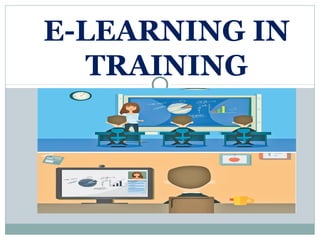

E-LEARNING IN
TRAINING
8-2
AREAS COVERED
1.What is E-Learning?
2.How new technologies are influencing training.
3.How learning is enhanced by new training
technologies.
4.Advantages and disadvantages of multimedia
training.
5.Strengths and limitations of e-learning
6.Different types of distance learning.
7.Electronic performance support system.
8.Traditional training methods versus Technology-
based training methods.
9.Benefits of learning management systems.
8-3
E-LEARNING
E-learning is a computer based educational
tool or system that enables you to learn
anywhere and at any time.
Today e-learning is mostly delivered through
the internet
New technologies have made it possible
to:
reduce the costs associated with delivering
training.
increase the effectiveness of the learning
environment.
help training contribute to business goals.
Technology’s Influence on Training
and Learning
New training delivery and
instructional methods include:
online learning (e-learning)
distance learning
simulations
virtual reality
expert systems
electronic support systems
learning management systems
Benefits of Technology
Employees can gain control over when
and where they receive training.
Employees can access knowledge and
expert systems on an as-needed basis.
The learning environment can look, feel,
and sound just like the work
environment.
Employees can choose the type of media
they want to use in a training program.
Benefits of Technology
Paperwork and time needed for
administrative activities is reduced.
Employees’ accomplishments during
training can be monitored.
Traditional training methods can be
delivered to trainees rather than
requiring them to come to a central
training location.
Impact of new technology on the
learning environment:
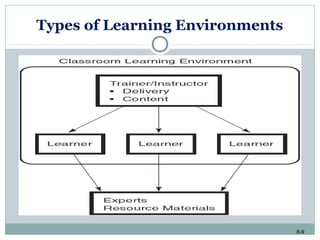
Prior to the introduction of new technology:
 Communication on course content was one way
 Learners had to wait to access resource materials and
experts
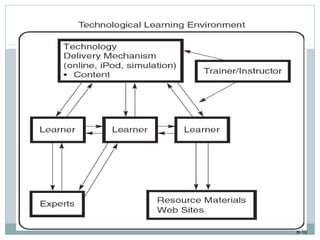
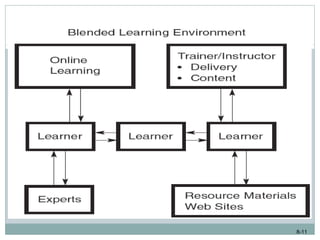
Due to technology, learning has become a more
dynamic process.
 Greater interaction between learners and training
content
 Participating games, listening, exchange ideas and
interacting with experts (engineers, managers, etc.)
8-9
Types of Learning Environments
8-10
8-11
8-12
Technology and Multimedia
Multimedia trainingMultimedia training - combines audiovisual
training methods with computer-based
training.
These programs integrate text, graphics,
animation, audio, and video
Because this training is computer-based,
the trainee can interact with the content
Can be delivered using interactive video,
the Internet or intranets
8-13
Advantages and Disadvantages of
Multimedia Training
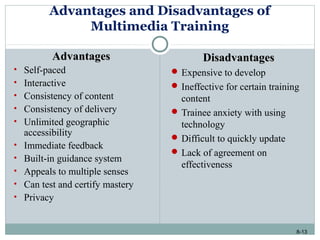
AdvantagesAdvantages
• Self-paced
• Interactive
• Consistency of content
• Consistency of delivery
• Unlimited geographic
accessibility
• Immediate feedback
• Built-in guidance system
• Appeals to multiple senses
• Can test and certify mastery
• Privacy
DisadvantagesDisadvantages
 Expensive to develop
 Ineffective for certain training
content
 Trainee anxiety with using
technology
 Difficult to quickly update
 Lack of agreement on
effectiveness
8-14
Computer-Based Training
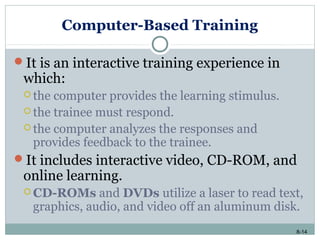
It is an interactive training experience in
which:
 the computer provides the learning stimulus.
 the trainee must respond.
 the computer analyzes the responses and
provides feedback to the trainee.
It includes interactive video, CD-ROM, and
online learning.
 CD-ROMs and DVDs utilize a laser to read text,
graphics, audio, and video off an aluminum disk.
8-15
Computer-Based Training (cont.)
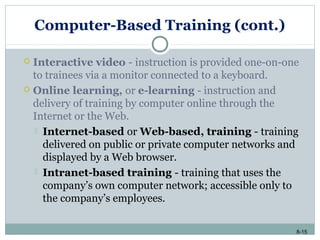
 Interactive video - instruction is provided one-on-one
to trainees via a monitor connected to a keyboard.
 Online learning, or e-learning - instruction and
delivery of training by computer online through the
Internet or the Web.
 Internet-based or Web-based, training - training
delivered on public or private computer networks and
displayed by a Web browser.
 Intranet-based training - training that uses the
company’s own computer network; accessible only to
the company’s employees.
8-16
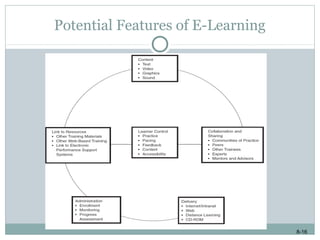
Potential Features of E-Learning
8-17
Advantages of E-Learning
It supports company’s business strategy and
objectives
It is accessible at any time and any place
The audience can include employees and managers
as well as vendors, customers, and clients
Training can be delivered to geographically
dispersed employees
8-18
Advantages of E-Learning (cont.)
Training can be delivered faster and to more
employees in a shorter period of time
Updating is easy
Practice, feedback, objectives, assessment, and other
positive features of a learning environment can be
built into the program
8-19
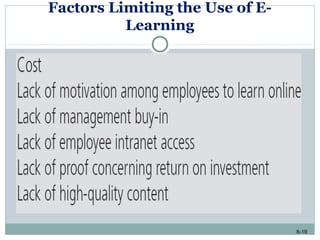
Factors Limiting the Use of E-
Learning
8-20
Simulations
Represents a real life situation, with trainees’ decisions
resulting in outcomes that mirror what would happen if they
were on job.
Allow trainees to see the impact of their decisions in
artificial, risk free environment
8-21
Mobile Technology and Training Methods:
iPods, PDAs
Mobile technology consists of:
 Wireless transmission systems (Wi-Fi and Bluetooth)
 Mobile devices (PDAs, GPS, RFID, etc.)
 Software applications
 Challenges:
 Ensuring employees know when and how to take
advantage of the technology.
 Ensuring employees can connect to a variety of
networks irrespective of their location or mobile device.
8-22
Intelligent Tutoring Systems (ITS)
They are instructional systems that use
artificial intelligence.
Three types of ITS environments:
 Tutoring
 Coaching
 Empowering
8-23
Intelligent Tutoring Systems (ITS)
(cont.)
Different from other new training
technologies in several ways:
 Has the ability to match instruction to individual
student needs.
 Can communicate and respond to the student.
 Can model the trainee’s learning process.
 Can decide, on the basis of a trainee’s previous
performance, what information to provide.
8-24
Distance Learning
It involves two types of technology:
 Teleconferencing - synchronous exchange of
audio, video, and/or text between two or more
individuals or groups at two or more locations.
 Interactive distance learning (IDL) - latest
generation of distance learning, which uses
satellite technology to broadcast programs to
different locations and allows trainees to respond
to questions posed during the training program
using a keypad.
8-25
Distance Learning (cont.)
Advantages:
 Company saves on travel costs.
 Allows employees in geographically dispersed sites to receive
training from experts who would not otherwise be available to
visit each location.
Disadvantages:
 Lack of interaction between the trainer and the audience.
 Technology failures.
 Unprepared trainers.
8-26
Technologies for Training Support
Expert systems - technology that organizes and
applies the knowledge of human experts to specific
problems.
 It has three elements:
 A knowledge base.
 A decision-making capability.
 A user interface.
8-27
Technologies for Training Support
(cont.)
Groupware - enables multiple users to track, share,
and organize information and to work on the same
document simultaneously.
 Companies use groupware to improve business processes, to
improve meeting effectiveness, as well as to identify and share
knowledge in the organization.
8-28
Technologies for Training
Administration
Interactive voice technology - uses a
conventional personal computer to create an
automated phone response system.
Imaging - scanning documents, storing them
electronically, and retrieving them.
Training software applications - used to track
information related to training administration,
employee skills, employees’ training activities, online
learning, and transfer of training.
8-29
Learning Management Systems: Systems for Training
Delivery, Support, and Administration
Learning management system (LMS) - a
technology platform that can be used to automate
the administration, development, and delivery of all
of a company’s training programs.
8-30
Learning Management Systems: Systems for Training
Delivery, Support, and Administration (cont.)
Advantages of LMSs:
 Reduces travel and training related costs.
 Reduces time for program completion.
 Increase employees’ accessibility to training
across the business.
 Provides administrative capabilities to track
program completion and course enrollments.
 Allows companies to track all learning activity in
the business.
8-31
Choosing New Technology Training
Methods
New technology training methods should be
considered when:
 Sufficient budget and resources are provided.
 Trainees are geographically dispersed.
 Trainees are comfortable using technology.
 It is a part of the company’s business strategy and suits
its culture.
 Employees have a difficult time attending scheduled
training programs.
 Current training methods allow limited time for practice,
feedback, and assessment.
8-32
TRENDS IN SRI LANKA
Minister of Education has taken steps to train teachers of
government schools in e-learning training techniques
Today, more and more industries are adopting e-learning
as their chosen mode of training and learning delivery.
Sri Lankan internet users have touched 6.2 million by
end 2017 and it is about 30 per cent penetration.
With the good network Aided by this, Sri Lanka has very
fertile environment for e-learning to grow.
8-33

E- Learning in Training

  • 1.
  • 2.
    8-2 AREAS COVERED 1.What isE-Learning? 2.How new technologies are influencing training. 3.How learning is enhanced by new training technologies. 4.Advantages and disadvantages of multimedia training. 5.Strengths and limitations of e-learning 6.Different types of distance learning. 7.Electronic performance support system. 8.Traditional training methods versus Technology- based training methods. 9.Benefits of learning management systems.
  • 3.
    8-3 E-LEARNING E-learning is acomputer based educational tool or system that enables you to learn anywhere and at any time. Today e-learning is mostly delivered through the internet
  • 4.
    New technologies havemade it possible to: reduce the costs associated with delivering training. increase the effectiveness of the learning environment. help training contribute to business goals. Technology’s Influence on Training and Learning
  • 5.
    New training deliveryand instructional methods include: online learning (e-learning) distance learning simulations virtual reality expert systems electronic support systems learning management systems
  • 6.
    Benefits of Technology Employeescan gain control over when and where they receive training. Employees can access knowledge and expert systems on an as-needed basis. The learning environment can look, feel, and sound just like the work environment. Employees can choose the type of media they want to use in a training program.
  • 7.
    Benefits of Technology Paperworkand time needed for administrative activities is reduced. Employees’ accomplishments during training can be monitored. Traditional training methods can be delivered to trainees rather than requiring them to come to a central training location.
  • 8.
    Impact of newtechnology on the learning environment: Prior to the introduction of new technology:  Communication on course content was one way  Learners had to wait to access resource materials and experts Due to technology, learning has become a more dynamic process.  Greater interaction between learners and training content  Participating games, listening, exchange ideas and interacting with experts (engineers, managers, etc.)
  • 9.
  • 10.
  • 11.
  • 12.
    8-12 Technology and Multimedia MultimediatrainingMultimedia training - combines audiovisual training methods with computer-based training. These programs integrate text, graphics, animation, audio, and video Because this training is computer-based, the trainee can interact with the content Can be delivered using interactive video, the Internet or intranets
  • 13.
    8-13 Advantages and Disadvantagesof Multimedia Training AdvantagesAdvantages • Self-paced • Interactive • Consistency of content • Consistency of delivery • Unlimited geographic accessibility • Immediate feedback • Built-in guidance system • Appeals to multiple senses • Can test and certify mastery • Privacy DisadvantagesDisadvantages  Expensive to develop  Ineffective for certain training content  Trainee anxiety with using technology  Difficult to quickly update  Lack of agreement on effectiveness
  • 14.
    8-14 Computer-Based Training It isan interactive training experience in which:  the computer provides the learning stimulus.  the trainee must respond.  the computer analyzes the responses and provides feedback to the trainee. It includes interactive video, CD-ROM, and online learning.  CD-ROMs and DVDs utilize a laser to read text, graphics, audio, and video off an aluminum disk.
  • 15.
    8-15 Computer-Based Training (cont.) Interactive video - instruction is provided one-on-one to trainees via a monitor connected to a keyboard.  Online learning, or e-learning - instruction and delivery of training by computer online through the Internet or the Web.  Internet-based or Web-based, training - training delivered on public or private computer networks and displayed by a Web browser.  Intranet-based training - training that uses the company’s own computer network; accessible only to the company’s employees.
  • 16.
  • 17.
    8-17 Advantages of E-Learning Itsupports company’s business strategy and objectives It is accessible at any time and any place The audience can include employees and managers as well as vendors, customers, and clients Training can be delivered to geographically dispersed employees
  • 18.
    8-18 Advantages of E-Learning(cont.) Training can be delivered faster and to more employees in a shorter period of time Updating is easy Practice, feedback, objectives, assessment, and other positive features of a learning environment can be built into the program
  • 19.
    8-19 Factors Limiting theUse of E- Learning
  • 20.
    8-20 Simulations Represents a reallife situation, with trainees’ decisions resulting in outcomes that mirror what would happen if they were on job. Allow trainees to see the impact of their decisions in artificial, risk free environment
  • 21.
    8-21 Mobile Technology andTraining Methods: iPods, PDAs Mobile technology consists of:  Wireless transmission systems (Wi-Fi and Bluetooth)  Mobile devices (PDAs, GPS, RFID, etc.)  Software applications  Challenges:  Ensuring employees know when and how to take advantage of the technology.  Ensuring employees can connect to a variety of networks irrespective of their location or mobile device.
  • 22.
    8-22 Intelligent Tutoring Systems(ITS) They are instructional systems that use artificial intelligence. Three types of ITS environments:  Tutoring  Coaching  Empowering
  • 23.
    8-23 Intelligent Tutoring Systems(ITS) (cont.) Different from other new training technologies in several ways:  Has the ability to match instruction to individual student needs.  Can communicate and respond to the student.  Can model the trainee’s learning process.  Can decide, on the basis of a trainee’s previous performance, what information to provide.
  • 24.
    8-24 Distance Learning It involvestwo types of technology:  Teleconferencing - synchronous exchange of audio, video, and/or text between two or more individuals or groups at two or more locations.  Interactive distance learning (IDL) - latest generation of distance learning, which uses satellite technology to broadcast programs to different locations and allows trainees to respond to questions posed during the training program using a keypad.
  • 25.
    8-25 Distance Learning (cont.) Advantages: Company saves on travel costs.  Allows employees in geographically dispersed sites to receive training from experts who would not otherwise be available to visit each location. Disadvantages:  Lack of interaction between the trainer and the audience.  Technology failures.  Unprepared trainers.
  • 26.
    8-26 Technologies for TrainingSupport Expert systems - technology that organizes and applies the knowledge of human experts to specific problems.  It has three elements:  A knowledge base.  A decision-making capability.  A user interface.
  • 27.
    8-27 Technologies for TrainingSupport (cont.) Groupware - enables multiple users to track, share, and organize information and to work on the same document simultaneously.  Companies use groupware to improve business processes, to improve meeting effectiveness, as well as to identify and share knowledge in the organization.
  • 28.
    8-28 Technologies for Training Administration Interactivevoice technology - uses a conventional personal computer to create an automated phone response system. Imaging - scanning documents, storing them electronically, and retrieving them. Training software applications - used to track information related to training administration, employee skills, employees’ training activities, online learning, and transfer of training.
  • 29.
    8-29 Learning Management Systems:Systems for Training Delivery, Support, and Administration Learning management system (LMS) - a technology platform that can be used to automate the administration, development, and delivery of all of a company’s training programs.
  • 30.
    8-30 Learning Management Systems:Systems for Training Delivery, Support, and Administration (cont.) Advantages of LMSs:  Reduces travel and training related costs.  Reduces time for program completion.  Increase employees’ accessibility to training across the business.  Provides administrative capabilities to track program completion and course enrollments.  Allows companies to track all learning activity in the business.
  • 31.
    8-31 Choosing New TechnologyTraining Methods New technology training methods should be considered when:  Sufficient budget and resources are provided.  Trainees are geographically dispersed.  Trainees are comfortable using technology.  It is a part of the company’s business strategy and suits its culture.  Employees have a difficult time attending scheduled training programs.  Current training methods allow limited time for practice, feedback, and assessment.
  • 32.
    8-32 TRENDS IN SRILANKA Minister of Education has taken steps to train teachers of government schools in e-learning training techniques Today, more and more industries are adopting e-learning as their chosen mode of training and learning delivery. Sri Lankan internet users have touched 6.2 million by end 2017 and it is about 30 per cent penetration. With the good network Aided by this, Sri Lanka has very fertile environment for e-learning to grow.
  • 33.