The Central Processing Unit:  What Goes On Inside the Computer
Objectives Identify the components of the central processing unit and explain how they work together and interact with memory Describe how program instructions are executed by the computer Explain how data is represented in the computer Describe how the computer finds instructions and data Describe the components of a microcomputer system unit’s motherboard List the measures of computer processing speed and explain the approaches that increase speed
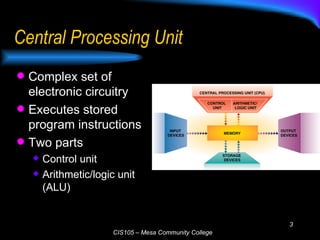
Central Processing Unit Complex set of electronic circuitry  Executes stored program instructions Two parts Control unit Arithmetic/logic unit (ALU)
The Control Unit Directs & coordinates Machine/Instruction Cycle Fetching instruction Decoding Executing Storing/Write-back MIPS  (million instructions/sec.) Must communicate with memory and ALU Sends data and instructions from secondary storage to memory as needed The Arithmetic/Logic Unit Arithmetic operations Comparison operations Logical operations  (and/or) Compare numbers, letters, or special characters Tests for one of three conditions Equal-to condition Less-than condition Greater-than condition
How the CPU Executes Instructions Four steps performed for each instruction Machine cycle: the amount of time needed to execute an instruction  Personal computers execute in less than one millionth of a second Supercomputers execute in less than one trillionth of a second Each CPU has its own instruction set those instructions that CPU can understand and execute
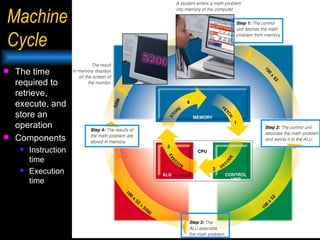
Machine Cycle The time required to retrieve, execute, and store an operation Components Instruction time Execution time
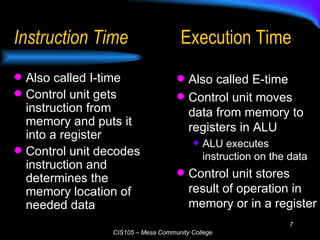
Instruction Time Also called I-time Control unit gets instruction from memory and puts it into a register Control unit decodes instruction and determines the memory location of needed data Execution Time Also called E-time Control unit moves data from memory to registers in ALU ALU executes instruction on the data Control unit stores result of operation in memory or in a register
RISC Technology Reduced Instruction Set Computing Uses a small subset of instructions Fewer instructions increases speed Drawback: complex operations have to be broken down into a series of smaller instructions Traditional processors use Complex Instruction Set Computing (CISC)
Computer Processing Speeds Instruction speeds measured in fractions of seconds Milli second: one thousandth of a second Micro second: one millionth of a second Nano second: one billionth of a second Modern computers have reached this speed Pico second: one trillionth of a second
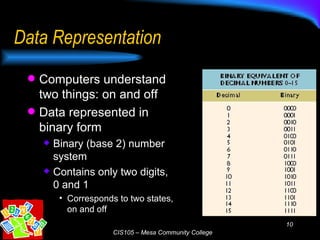
Data Representation Computers understand two things: on and off Data represented in binary form Binary (base 2) number system Contains only two digits, 0 and 1 Corresponds to two states, on and off
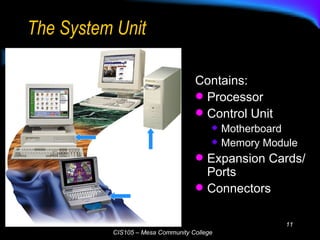
The System Unit Contains: Processor Control Unit Motherboard Memory Module Expansion Cards/Ports Connectors
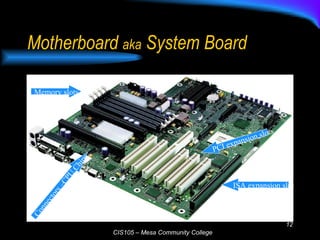
Motherboard  aka  System Board Memory slots Connectors –CPU Chips PCI expansion slots ISA expansion slot
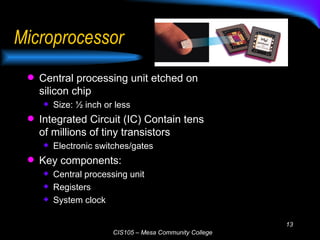
Microprocessor Central processing unit etched on silicon chip Size: ½ inch or less Integrated Circuit (IC) Contain tens of millions of tiny transistors  Electronic switches/gates Key components: Central processing unit Registers System clock
Types of Chips Intel makes a family of processors Pentium processors in most PCs Celeron processor sold for low-cost PCs Xeon and Itanium for high-end workstations and network servers Other processors Cyrix and AMD make Intel-compatible microprocessors PowerPC chips used primarily in Macintosh computers Compaq’s Alpha microprocessor used in high-end servers
Data Storage and the CPU Two types of storage: Primary storage (memory) Stores data temporarily CPU refers to it for both program instructions and data Secondary storage Long-term storage Stored on external medium, such as a disk
Memory Stored Program Concept Operating system  Application programs Data processed Benchmarks RAM (volatile) Register Dynamic (DRAM) Static (SRAM) Cache Frequently used instructions ROM (non-volatile) CMOS (non-volatile) Configuration info
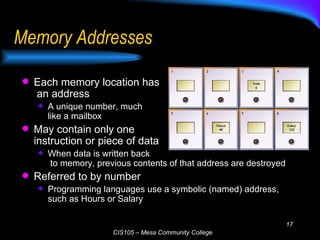
Memory Addresses Each memory location has  an address A unique number, much  like a mailbox May contain only one  instruction or piece of data When data is written back  to memory, previous contents of that address are destroyed Referred to by number Programming languages use a symbolic (named) address, such as Hours or Salary
Storage Sizes Kilo byte: 1024 (2 10 ) bytes Memory capacity of older personal computers Mega byte: roughly one million (2 20 ) bytes Personal computer memory  Portable storage devices (diskette, CD-ROM) Giga byte: roughly one billion (2 30 ) bytes Storage devices (hard drives) Mainframe and network server memory Tera byte: roughly one trillion (2 40 ) bytes Storage devices on very large systems
Registers High-speed temporary storage areas Storage locations located within the CPU Work under direction of control unit Accept, hold, and transfer instructions or data Keep track of where the next instruction to be executed or needed data is stored
Semiconductor Memory Used by most modern computers Reliable, inexpensive, and compact Volatile: requires continuous electric current If the current is interrupted, data is lost CMOS (Complementary Metal Oxide Semiconductor) Retains information when power is shut down Used to store information needed when the computer boots
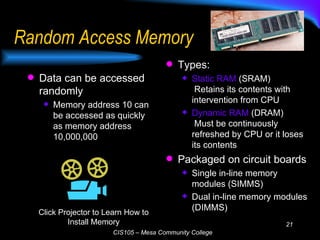
Random Access Memory Data can be accessed randomly  Memory address 10 can be accessed as quickly as memory address 10,000,000 Types: Static RAM  (SRAM)  Retains its contents with intervention from CPU Dynamic RAM  (DRAM)  Must be continuously refreshed by CPU or it loses its contents Packaged on circuit boards Single in-line memory modules (SIMMS) Dual in-line memory modules (DIMMS) Click Projector to Learn How to Install Memory
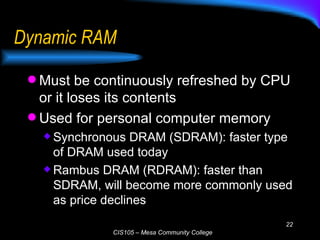
Dynamic RAM Must be continuously refreshed by CPU or it loses its contents Used for personal computer memory Synchronous DRAM (SDRAM): faster type of DRAM used today Rambus DRAM (RDRAM): faster than SDRAM, will become more commonly used as price declines
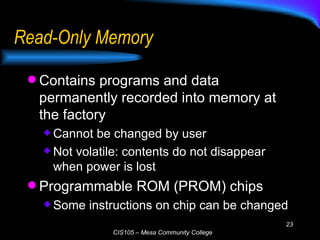
Read-Only Memory Contains programs and data permanently recorded into memory at the factory Cannot be changed by user Not volatile: contents do not disappear when power is lost Programmable ROM (PROM) chips Some instructions on chip can be changed
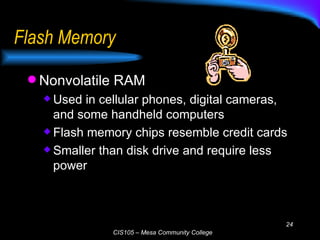
Flash Memory Nonvolatile RAM Used in cellular phones, digital cameras, and some handheld computers Flash memory chips resemble credit cards Smaller than disk drive and require less power
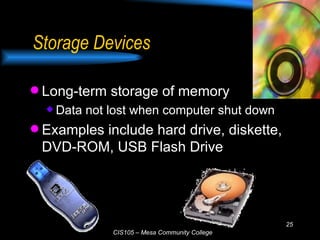
Storage Devices Long-term storage of memory Data not lost when computer shut down Examples include hard drive, diskette, DVD-ROM, USB Flash Drive
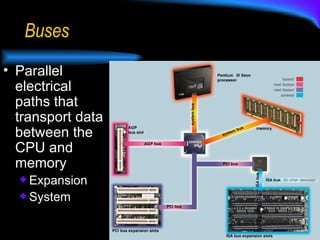
Buses Parallel electrical paths that transport data between the CPU and memory Expansion System
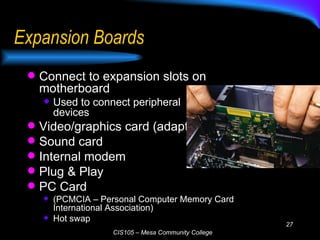
Expansion Boards Connect to expansion slots on motherboard Used to connect peripheral devices Video/graphics card (adapter) Sound card Internal modem Plug & Play PC Card  (PCMCIA – Personal Computer Memory Card International Association) Hot swap
Ports External connectors to plug in peripherals such as printers Two types of ports Serial: transmit data one bit at a time Used for slow devices such as the mouse and keyboard Parallel: transmit groups of bits together side-by-side Used for faster devices such as printers and scanners
Cache A temporary storage area Speeds up data transfer within computer Memory cache A small block of high-speed memory Stores most frequently and most recently used data and instructions Microprocessor looks in cache first (faster); if not there, it retrieves from memory Processor cache Internal (Level 1) cache built into microprocessor Fastest access, but highest cost External (Level 2) cache on separate chip Incorporated into processor on some current microprocessors
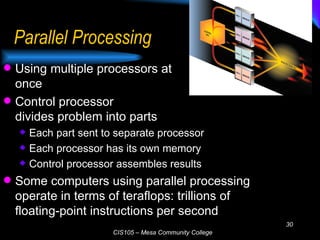
Parallel Processing Using multiple processors at  once Control processor  divides problem into parts Each part sent to separate processor Each processor has its own memory Control processor assembles results Some computers using parallel processing operate in terms of teraflops: trillions of floating-point instructions per second
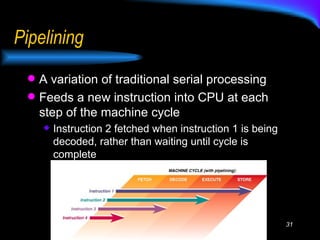
Pipelining A variation of traditional serial processing Feeds a new instruction into CPU at each step of the machine cycle Instruction 2 fetched when instruction 1 is being decoded, rather than waiting until cycle is complete
Trivia What is E-time? What is  pipelining ? What is a register? Execution time Temporary storage What is CISC vs RISC? CISC-Complex RISC-Reduced Instruction Set Computer
Terms to Know: Central Processing Unit Arithmetic/logic unit (ALU) ASCII Binary system Cache memory CMOS Control unit CPU EBCDIC E-time Expansion board Flash memory I-time Machine cycle Memory Motherboard Non-volatile memory Parallel processing Pipelining Plug and Play RAM Register ROM System unit USB Volatile memory
Questions? ? ? ? ? ?
If Asked, Can You…. Identify the components of the central processing unit and explain how they work together and interact with memory Describe how program instructions are executed by the computer Explain how data is represented in the computer Describe how the computer finds instructions and data Describe the components of a microcomputer system unit’s motherboard List the measures of computer processing speed and explain the approaches that increase speed
Sources Capron; Computers: Tools for An Information Age, 8 th  Ed. 2003 Pfaffenberger; Computers in Your Future 2003 Microsoft Clipart   Webopedia

Three Central Processing Unit

  • 1.
    The Central ProcessingUnit: What Goes On Inside the Computer
  • 2.
    Objectives Identify thecomponents of the central processing unit and explain how they work together and interact with memory Describe how program instructions are executed by the computer Explain how data is represented in the computer Describe how the computer finds instructions and data Describe the components of a microcomputer system unit’s motherboard List the measures of computer processing speed and explain the approaches that increase speed
  • 3.
    Central Processing UnitComplex set of electronic circuitry Executes stored program instructions Two parts Control unit Arithmetic/logic unit (ALU)
  • 4.
    The Control UnitDirects & coordinates Machine/Instruction Cycle Fetching instruction Decoding Executing Storing/Write-back MIPS (million instructions/sec.) Must communicate with memory and ALU Sends data and instructions from secondary storage to memory as needed The Arithmetic/Logic Unit Arithmetic operations Comparison operations Logical operations (and/or) Compare numbers, letters, or special characters Tests for one of three conditions Equal-to condition Less-than condition Greater-than condition
  • 5.
    How the CPUExecutes Instructions Four steps performed for each instruction Machine cycle: the amount of time needed to execute an instruction Personal computers execute in less than one millionth of a second Supercomputers execute in less than one trillionth of a second Each CPU has its own instruction set those instructions that CPU can understand and execute
  • 6.
    Machine Cycle Thetime required to retrieve, execute, and store an operation Components Instruction time Execution time
  • 7.
    Instruction Time Alsocalled I-time Control unit gets instruction from memory and puts it into a register Control unit decodes instruction and determines the memory location of needed data Execution Time Also called E-time Control unit moves data from memory to registers in ALU ALU executes instruction on the data Control unit stores result of operation in memory or in a register
  • 8.
    RISC Technology ReducedInstruction Set Computing Uses a small subset of instructions Fewer instructions increases speed Drawback: complex operations have to be broken down into a series of smaller instructions Traditional processors use Complex Instruction Set Computing (CISC)
  • 9.
    Computer Processing SpeedsInstruction speeds measured in fractions of seconds Milli second: one thousandth of a second Micro second: one millionth of a second Nano second: one billionth of a second Modern computers have reached this speed Pico second: one trillionth of a second
  • 10.
    Data Representation Computersunderstand two things: on and off Data represented in binary form Binary (base 2) number system Contains only two digits, 0 and 1 Corresponds to two states, on and off
  • 11.
    The System UnitContains: Processor Control Unit Motherboard Memory Module Expansion Cards/Ports Connectors
  • 12.
    Motherboard aka System Board Memory slots Connectors –CPU Chips PCI expansion slots ISA expansion slot
  • 13.
    Microprocessor Central processingunit etched on silicon chip Size: ½ inch or less Integrated Circuit (IC) Contain tens of millions of tiny transistors Electronic switches/gates Key components: Central processing unit Registers System clock
  • 14.
    Types of ChipsIntel makes a family of processors Pentium processors in most PCs Celeron processor sold for low-cost PCs Xeon and Itanium for high-end workstations and network servers Other processors Cyrix and AMD make Intel-compatible microprocessors PowerPC chips used primarily in Macintosh computers Compaq’s Alpha microprocessor used in high-end servers
  • 15.
    Data Storage andthe CPU Two types of storage: Primary storage (memory) Stores data temporarily CPU refers to it for both program instructions and data Secondary storage Long-term storage Stored on external medium, such as a disk
  • 16.
    Memory Stored ProgramConcept Operating system Application programs Data processed Benchmarks RAM (volatile) Register Dynamic (DRAM) Static (SRAM) Cache Frequently used instructions ROM (non-volatile) CMOS (non-volatile) Configuration info
  • 17.
    Memory Addresses Eachmemory location has an address A unique number, much like a mailbox May contain only one instruction or piece of data When data is written back to memory, previous contents of that address are destroyed Referred to by number Programming languages use a symbolic (named) address, such as Hours or Salary
  • 18.
    Storage Sizes Kilobyte: 1024 (2 10 ) bytes Memory capacity of older personal computers Mega byte: roughly one million (2 20 ) bytes Personal computer memory Portable storage devices (diskette, CD-ROM) Giga byte: roughly one billion (2 30 ) bytes Storage devices (hard drives) Mainframe and network server memory Tera byte: roughly one trillion (2 40 ) bytes Storage devices on very large systems
  • 19.
    Registers High-speed temporarystorage areas Storage locations located within the CPU Work under direction of control unit Accept, hold, and transfer instructions or data Keep track of where the next instruction to be executed or needed data is stored
  • 20.
    Semiconductor Memory Usedby most modern computers Reliable, inexpensive, and compact Volatile: requires continuous electric current If the current is interrupted, data is lost CMOS (Complementary Metal Oxide Semiconductor) Retains information when power is shut down Used to store information needed when the computer boots
  • 21.
    Random Access MemoryData can be accessed randomly Memory address 10 can be accessed as quickly as memory address 10,000,000 Types: Static RAM (SRAM) Retains its contents with intervention from CPU Dynamic RAM (DRAM) Must be continuously refreshed by CPU or it loses its contents Packaged on circuit boards Single in-line memory modules (SIMMS) Dual in-line memory modules (DIMMS) Click Projector to Learn How to Install Memory
  • 22.
    Dynamic RAM Mustbe continuously refreshed by CPU or it loses its contents Used for personal computer memory Synchronous DRAM (SDRAM): faster type of DRAM used today Rambus DRAM (RDRAM): faster than SDRAM, will become more commonly used as price declines
  • 23.
    Read-Only Memory Containsprograms and data permanently recorded into memory at the factory Cannot be changed by user Not volatile: contents do not disappear when power is lost Programmable ROM (PROM) chips Some instructions on chip can be changed
  • 24.
    Flash Memory NonvolatileRAM Used in cellular phones, digital cameras, and some handheld computers Flash memory chips resemble credit cards Smaller than disk drive and require less power
  • 25.
    Storage Devices Long-termstorage of memory Data not lost when computer shut down Examples include hard drive, diskette, DVD-ROM, USB Flash Drive
  • 26.
    Buses Parallel electricalpaths that transport data between the CPU and memory Expansion System
  • 27.
    Expansion Boards Connectto expansion slots on motherboard Used to connect peripheral devices Video/graphics card (adapter) Sound card Internal modem Plug & Play PC Card (PCMCIA – Personal Computer Memory Card International Association) Hot swap
  • 28.
    Ports External connectorsto plug in peripherals such as printers Two types of ports Serial: transmit data one bit at a time Used for slow devices such as the mouse and keyboard Parallel: transmit groups of bits together side-by-side Used for faster devices such as printers and scanners
  • 29.
    Cache A temporarystorage area Speeds up data transfer within computer Memory cache A small block of high-speed memory Stores most frequently and most recently used data and instructions Microprocessor looks in cache first (faster); if not there, it retrieves from memory Processor cache Internal (Level 1) cache built into microprocessor Fastest access, but highest cost External (Level 2) cache on separate chip Incorporated into processor on some current microprocessors
  • 30.
    Parallel Processing Usingmultiple processors at once Control processor divides problem into parts Each part sent to separate processor Each processor has its own memory Control processor assembles results Some computers using parallel processing operate in terms of teraflops: trillions of floating-point instructions per second
  • 31.
    Pipelining A variationof traditional serial processing Feeds a new instruction into CPU at each step of the machine cycle Instruction 2 fetched when instruction 1 is being decoded, rather than waiting until cycle is complete
  • 32.
    Trivia What isE-time? What is pipelining ? What is a register? Execution time Temporary storage What is CISC vs RISC? CISC-Complex RISC-Reduced Instruction Set Computer
  • 33.
    Terms to Know:Central Processing Unit Arithmetic/logic unit (ALU) ASCII Binary system Cache memory CMOS Control unit CPU EBCDIC E-time Expansion board Flash memory I-time Machine cycle Memory Motherboard Non-volatile memory Parallel processing Pipelining Plug and Play RAM Register ROM System unit USB Volatile memory
  • 34.
  • 35.
    If Asked, CanYou…. Identify the components of the central processing unit and explain how they work together and interact with memory Describe how program instructions are executed by the computer Explain how data is represented in the computer Describe how the computer finds instructions and data Describe the components of a microcomputer system unit’s motherboard List the measures of computer processing speed and explain the approaches that increase speed
  • 36.
    Sources Capron; Computers:Tools for An Information Age, 8 th Ed. 2003 Pfaffenberger; Computers in Your Future 2003 Microsoft Clipart Webopedia