
How organisations use ICT  Control Systems By the end of this presentation you should be able to answer the following questions: What is a control system? Explain how an air conditioning system, refrigerator and central heating system works Describe the advantages and disadvantages of a control system
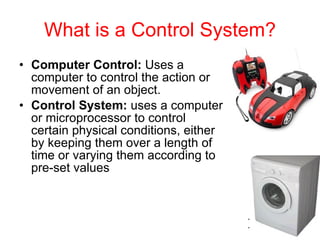
What is a Control System? Computer Control:  Uses a computer to control the action or movement of an object. Control System:  uses a computer or microprocessor to control certain physical conditions, either by keeping them over a length of time or varying them according to pre-set values 
Control Systems  Input device: Sensor A sensor is something which can measure physical quantities in the surrounding environment.   Examples: heat sensor which measures the temperature in a room or a pressure sensor which senses when someone has walked over it. Once sensors have taken a reading or measurement, they might send that reading straight back to the computer or they may store it up and take a set of readings over time and send them back in a batch. 
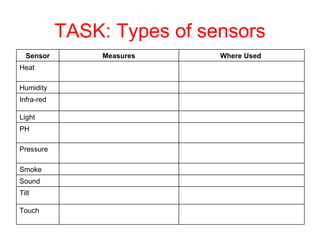
TASK: Types of sensors Touch Tilt Sound Smoke Pressure PH Light Infra-red Humidity Heat Where Used  Measures Sensor
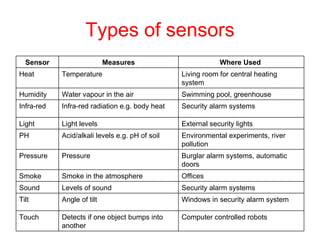
Types of sensors Computer controlled robots  Detects if one object bumps into another  Touch Windows in security alarm system  Angle of tilt  Tilt Security alarm systems  Levels of sound  Sound Offices Smoke in the atmosphere  Smoke Burglar alarm systems, automatic doors  Pressure Pressure Environmental experiments, river pollution  Acid/alkali levels e.g. pH of soil  PH External security lights  Light levels  Light Security alarm systems  Infra-red radiation e.g. body heat  Infra-red Swimming pool, greenhouse  Water vapour in the air  Humidity Living room for central heating system  Temperature Heat Where Used  Measures Sensor
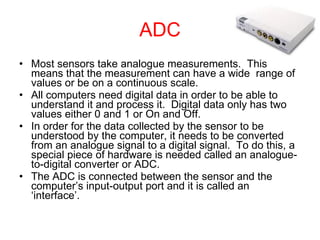
ADC Most sensors take analogue measurements.  This means that the measurement can have a wide  range of values or be on a continuous scale. All computers need digital data in order to be able to understand it and process it.  Digital data only has two values either 0 and 1 or On and Off. In order for the data collected by the sensor to be understood by the computer, it needs to be converted from an analogue signal to a digital signal.  To do this, a special piece of hardware is needed called an analogue-to-digital converter or ADC. The ADC is connected between the sensor and the computer’s input-output port and it is called an ‘interface’.
Process Once the input data from the sensors has been received by the computer, it can then begin to process it. The data will be  compared  against a set of  rules  which have been programmed into the control system and a decision will be made.
Example: central heating systems The system is set to keep the room at a constant 22 ° C.   The  sensor  will take regular temperature readings in the room and send the readings back to the computer.   The computer will then  process  the data to see if it matches the ideal 22 ° C.   If it is lower e.g. 20 ° C, then the computer will need to identify the correct response (e.g. the heating must be turned on).   If it is equal or above 22 ° C then the computer must identify the correct response (e.g. the heating must be turned off).  This stage is called  processing .  The computer can only follow the rules that it has programmed into the control system, it cannot make its own decisions.
Output Once the processing has taken place and a decision has been made, the computer will send the correct signal to the output device.   Example: for a central heating system, this might be to turn the heating on or off.  For a greenhouse watering system this might be to turn the sprinklers on or off.
Open loop systems There  two  types of computer control system:  Open loop system Closed loop system/feedback system Open Loop System:  only looks at its input signal in order to decide what to do. It takes no account at all of what is happening to its output.  Examples: a) You set the microwave oven to run for two minutes.  After cooking for two minutes, the control system turns the microwave off. It has no idea whether your food is still frozen, burnt or cooked perfectly. b) You program the video recorder to start recording the football game at 7.30pm. However, because the news program finished early, you miss the first vital 15 minutes of the match. Because the system is only checking its input (time), it had no idea that the starting time of the match had changed.
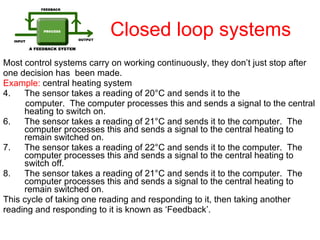
Closed loop systems Most control systems carry on working continuously, they don’t just stop after one decision has  been made. Example:  central heating system The sensor takes a reading of 20 ° C and sends it to the computer.  The computer processes this and sends a signal to the central heating to switch on. The sensor takes a reading of 21 ° C and sends it to the computer.  The computer processes this and sends a signal to the central heating to remain switched on. The sensor takes a reading of 22 ° C and sends it to the computer.  The computer processes this and sends a signal to the central heating to switch off. The sensor takes a reading of 21 ° C and sends it to the computer.  The computer processes this and sends a signal to the central heating to remain switched on. This cycle of taking one reading and responding to it, then taking another reading and responding to it is known as ‘Feedback’.
Control examples Air conditioning systems Central heating systems  Refrigeration Car manufacture Medical applications Process control – Batch / Continuous / Discrete
 
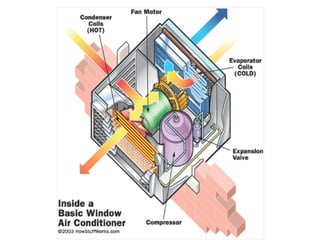
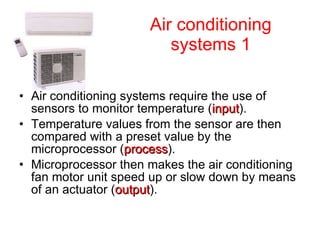
Air conditioning systems 1 Air conditioning systems require the use of sensors to monitor temperature ( input ). Temperature values from the sensor are then compared with a preset value by the microprocessor ( process ). Microprocessor then makes the air conditioning fan motor unit speed up or slow down by means of an actuator ( output ).
Air conditioning systems uses Air conditioning systems are often used in warm climates, especially in: Computer rooms Homes Offices Cars Shops Other public places
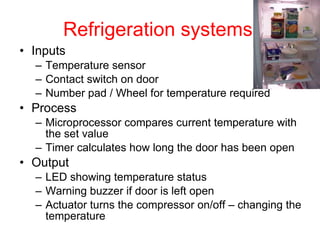
Refrigeration systems Inputs Temperature sensor Contact switch on door Number pad / Wheel for temperature required Process Microprocessor compares current temperature with the set value Timer calculates how long the door has been open Output LED showing temperature status Warning buzzer if door is left open Actuator turns the compressor on/off – changing the temperature
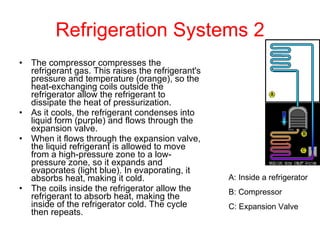
Refrigeration Systems 2 The compressor compresses the refrigerant gas. This raises the refrigerant's pressure and temperature (orange), so the heat-exchanging coils outside the refrigerator allow the refrigerant to dissipate the heat of pressurization.  As it cools, the refrigerant condenses into liquid form (purple) and flows through the expansion valve.  When it flows through the expansion valve, the liquid refrigerant is allowed to move from a high-pressure zone to a low-pressure zone, so it expands and evaporates (light blue). In evaporating, it absorbs heat, making it cold.  The coils inside the refrigerator allow the refrigerant to absorb heat, making the inside of the refrigerator cold. The cycle then repeats.  A: Inside a refrigerator B: Compressor C: Expansion Valve
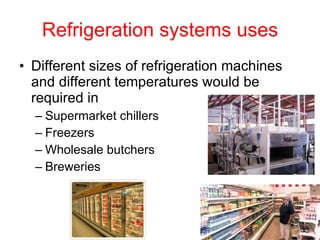
Refrigeration systems uses Different sizes of refrigeration machines and different temperatures would be required in  Supermarket chillers Freezers Wholesale butchers Breweries
Advantages of Control Systems Can operate 24 hours a day without taking a break.   Can work without holidays or sick days  Will work without any wages.  Will repeat actions over and over and over again  Can process data from sensors very quickly  Can take account of hundreds of inputs at the same time  Can make reliable and accurate decisions  Can be used in dangerous or awkward environments where it wouldn't be a good idea to send humans to.
Disadvantages of Control Systems The software for the control system is specialist and may cost a lot of money to develop  If the computer malfunctions the system will not work  If there is a power cut the system will not work  The computer can’t react to unexpected events like a human could. It can only respond in the way it has been programmed to.  It can cause some concern if total control for a system and the decisions are handed over to a computer.
Questions What is a control system? Name 2 types of control systems Describe how a central heating system works Describe the advantages and disadvantages of a control system
Vocabulary – Time to fill in your electronic vocabulary list Control system Sensor Closed loop system Open loop system ADC Feedback: is where the output of a system affects the input.
Next lesson Exam question A computer company uses robots in their assembly line however because there could be a danger of the robots overheating the company wants to introduce a computerised air conditioning system. Describe how this system would work. Marks 3
Answer Sensors are needed to monitor temperature (continuously) Microprocessor compares the temperature with a preset value/range Depending on result microprocessor causes the fan motor to speed up or slow down/fan motor switched on or off
OLC links Watch youtube videos on OLC

Intro to control ca

  • 1.
    How organisations useICT Control Systems By the end of this presentation you should be able to answer the following questions: What is a control system? Explain how an air conditioning system, refrigerator and central heating system works Describe the advantages and disadvantages of a control system
  • 2.
    What is aControl System? Computer Control: Uses a computer to control the action or movement of an object. Control System: uses a computer or microprocessor to control certain physical conditions, either by keeping them over a length of time or varying them according to pre-set values 
  • 3.
    Control Systems Input device: Sensor A sensor is something which can measure physical quantities in the surrounding environment.  Examples: heat sensor which measures the temperature in a room or a pressure sensor which senses when someone has walked over it. Once sensors have taken a reading or measurement, they might send that reading straight back to the computer or they may store it up and take a set of readings over time and send them back in a batch. 
  • 4.
    TASK: Types ofsensors Touch Tilt Sound Smoke Pressure PH Light Infra-red Humidity Heat Where Used Measures Sensor
  • 5.
    Types of sensorsComputer controlled robots Detects if one object bumps into another Touch Windows in security alarm system Angle of tilt Tilt Security alarm systems Levels of sound Sound Offices Smoke in the atmosphere Smoke Burglar alarm systems, automatic doors Pressure Pressure Environmental experiments, river pollution Acid/alkali levels e.g. pH of soil PH External security lights Light levels Light Security alarm systems Infra-red radiation e.g. body heat Infra-red Swimming pool, greenhouse Water vapour in the air Humidity Living room for central heating system Temperature Heat Where Used Measures Sensor
  • 6.
    ADC Most sensorstake analogue measurements.  This means that the measurement can have a wide range of values or be on a continuous scale. All computers need digital data in order to be able to understand it and process it.  Digital data only has two values either 0 and 1 or On and Off. In order for the data collected by the sensor to be understood by the computer, it needs to be converted from an analogue signal to a digital signal.  To do this, a special piece of hardware is needed called an analogue-to-digital converter or ADC. The ADC is connected between the sensor and the computer’s input-output port and it is called an ‘interface’.
  • 7.
    Process Once theinput data from the sensors has been received by the computer, it can then begin to process it. The data will be compared against a set of rules which have been programmed into the control system and a decision will be made.
  • 8.
    Example: central heatingsystems The system is set to keep the room at a constant 22 ° C.  The sensor will take regular temperature readings in the room and send the readings back to the computer.  The computer will then process the data to see if it matches the ideal 22 ° C.  If it is lower e.g. 20 ° C, then the computer will need to identify the correct response (e.g. the heating must be turned on).  If it is equal or above 22 ° C then the computer must identify the correct response (e.g. the heating must be turned off). This stage is called processing .  The computer can only follow the rules that it has programmed into the control system, it cannot make its own decisions.
  • 9.
    Output Once theprocessing has taken place and a decision has been made, the computer will send the correct signal to the output device.  Example: for a central heating system, this might be to turn the heating on or off.  For a greenhouse watering system this might be to turn the sprinklers on or off.
  • 10.
    Open loop systemsThere two types of computer control system: Open loop system Closed loop system/feedback system Open Loop System: only looks at its input signal in order to decide what to do. It takes no account at all of what is happening to its output. Examples: a) You set the microwave oven to run for two minutes.  After cooking for two minutes, the control system turns the microwave off. It has no idea whether your food is still frozen, burnt or cooked perfectly. b) You program the video recorder to start recording the football game at 7.30pm. However, because the news program finished early, you miss the first vital 15 minutes of the match. Because the system is only checking its input (time), it had no idea that the starting time of the match had changed.
  • 11.
    Closed loop systemsMost control systems carry on working continuously, they don’t just stop after one decision has been made. Example: central heating system The sensor takes a reading of 20 ° C and sends it to the computer.  The computer processes this and sends a signal to the central heating to switch on. The sensor takes a reading of 21 ° C and sends it to the computer.  The computer processes this and sends a signal to the central heating to remain switched on. The sensor takes a reading of 22 ° C and sends it to the computer.  The computer processes this and sends a signal to the central heating to switch off. The sensor takes a reading of 21 ° C and sends it to the computer.  The computer processes this and sends a signal to the central heating to remain switched on. This cycle of taking one reading and responding to it, then taking another reading and responding to it is known as ‘Feedback’.
  • 12.
    Control examples Airconditioning systems Central heating systems Refrigeration Car manufacture Medical applications Process control – Batch / Continuous / Discrete
  • 13.
  • 14.
    Air conditioning systems1 Air conditioning systems require the use of sensors to monitor temperature ( input ). Temperature values from the sensor are then compared with a preset value by the microprocessor ( process ). Microprocessor then makes the air conditioning fan motor unit speed up or slow down by means of an actuator ( output ).
  • 15.
    Air conditioning systemsuses Air conditioning systems are often used in warm climates, especially in: Computer rooms Homes Offices Cars Shops Other public places
  • 16.
    Refrigeration systems InputsTemperature sensor Contact switch on door Number pad / Wheel for temperature required Process Microprocessor compares current temperature with the set value Timer calculates how long the door has been open Output LED showing temperature status Warning buzzer if door is left open Actuator turns the compressor on/off – changing the temperature
  • 17.
    Refrigeration Systems 2The compressor compresses the refrigerant gas. This raises the refrigerant's pressure and temperature (orange), so the heat-exchanging coils outside the refrigerator allow the refrigerant to dissipate the heat of pressurization. As it cools, the refrigerant condenses into liquid form (purple) and flows through the expansion valve. When it flows through the expansion valve, the liquid refrigerant is allowed to move from a high-pressure zone to a low-pressure zone, so it expands and evaporates (light blue). In evaporating, it absorbs heat, making it cold. The coils inside the refrigerator allow the refrigerant to absorb heat, making the inside of the refrigerator cold. The cycle then repeats. A: Inside a refrigerator B: Compressor C: Expansion Valve
  • 18.
    Refrigeration systems usesDifferent sizes of refrigeration machines and different temperatures would be required in Supermarket chillers Freezers Wholesale butchers Breweries
  • 19.
    Advantages of ControlSystems Can operate 24 hours a day without taking a break.  Can work without holidays or sick days Will work without any wages. Will repeat actions over and over and over again Can process data from sensors very quickly Can take account of hundreds of inputs at the same time Can make reliable and accurate decisions Can be used in dangerous or awkward environments where it wouldn't be a good idea to send humans to.
  • 20.
    Disadvantages of ControlSystems The software for the control system is specialist and may cost a lot of money to develop If the computer malfunctions the system will not work If there is a power cut the system will not work The computer can’t react to unexpected events like a human could. It can only respond in the way it has been programmed to. It can cause some concern if total control for a system and the decisions are handed over to a computer.
  • 21.
    Questions What isa control system? Name 2 types of control systems Describe how a central heating system works Describe the advantages and disadvantages of a control system
  • 22.
    Vocabulary – Timeto fill in your electronic vocabulary list Control system Sensor Closed loop system Open loop system ADC Feedback: is where the output of a system affects the input.
  • 23.
    Next lesson Examquestion A computer company uses robots in their assembly line however because there could be a danger of the robots overheating the company wants to introduce a computerised air conditioning system. Describe how this system would work. Marks 3
  • 24.
    Answer Sensors areneeded to monitor temperature (continuously) Microprocessor compares the temperature with a preset value/range Depending on result microprocessor causes the fan motor to speed up or slow down/fan motor switched on or off
  • 25.
    OLC links Watchyoutube videos on OLC