
Basic Computer
Architecture
Submitted by-
Name ID
Asikul Islam 143-15-
Kanchon Kumar 143-15-
Saiful Islam 143-15-
Sonot Kumar 143-15-
Sohel Al Mamun143-15-
Tuhinur Rahman 143-15-
Submitted to-
Masud Rabbani
Dept. Of CSE
Basic Computer Design
1. History of Computers
2. Introduction to Arduino
3. Basic Computer Architecture
4. Combinational Logic Circuit
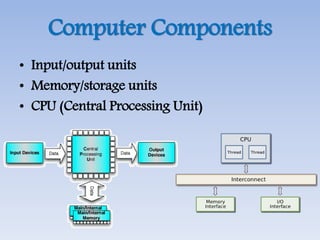
Computer Components
• Input/output units
• Memory/storage units
• CPU (Central Processing Unit)
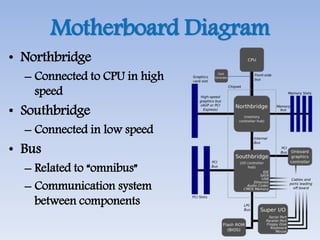
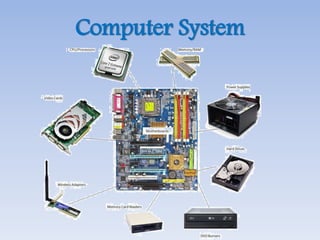
Motherboard Diagram
• Northbridge
– Connected to CPU in high
speed
• Southbridge
– Connected in low speed
• Bus
– Related to “omnibus”
– Communication system
between components
Computer System
Connection of Components
Northbridge
South
bridge
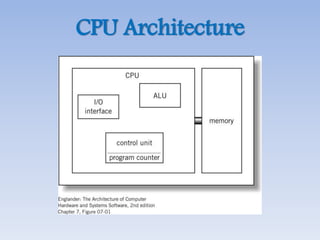
CPU Architecture
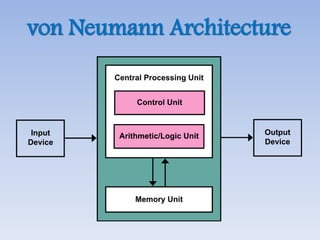
von Neumann Architecture
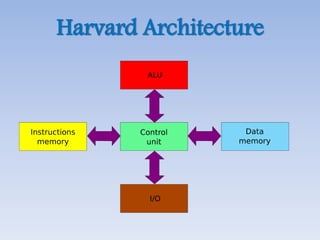
Harvard Architecture
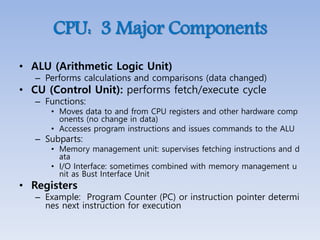
CPU: 3 Major Components
• ALU (Arithmetic Logic Unit)
– Performs calculations and comparisons (data changed)
• CU (Control Unit): performs fetch/execute cycle
– Functions:
• Moves data to and from CPU registers and other hardware comp
onents (no change in data)
• Accesses program instructions and issues commands to the ALU
– Subparts:
• Memory management unit: supervises fetching instructions and d
ata
• I/O Interface: sometimes combined with memory management u
nit as Bust Interface Unit
• Registers
– Example: Program Counter (PC) or instruction pointer determi
nes next instruction for execution
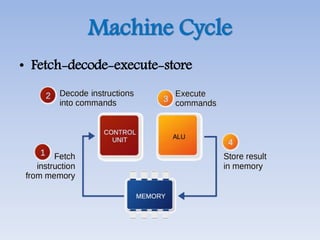
Machine Cycle
• Fetch-decode-execute-store
Concept of Registers
• Small, permanent storage locations withi
n the CPU used for a particular purpose
• Manipulated directly by the CU
• Wired for specific function
• Size in bits or bytes (not MB like memor
y)
• Can hold data, an address or an instructi
on
Register Operations
• Stores values from other locations (regist
ers and memory)
• Addition and subtraction
• Shift or rotate data
• Test contents for conditions such as zero
or positive
Registers in CPU
• Program Counter
(PC) register
• Instruction Register
(IR)
• Status register:
status, flags
Cache Memory
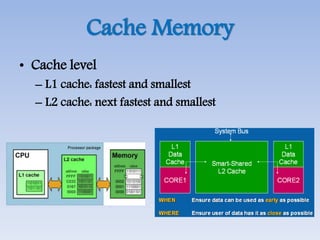
• Cache level
– L1 cache: fastest and smallest
– L2 cache: next fastest and smallest
Operation of Memory
• Each memory location has a unique addr
ess
• Address from an instruction is copied to
the MAR (Memory Address Register) whi
ch finds the location in memory
• CPU determines if it is a store or retrieval
• Transfer takes place between the MDR (
Memory Data Register) and memory
• MDR is a two way register
Random Access Memory
• DRAM (Dynamic RAM)
– Most common, cheap
– Volatile: must be refreshed (recharged with pow
er) 1000’s of times each second
• SRAM (Static RAM)
– Faster than DRAM and more expensive than DR
AM
– Volatile
– Frequently small amount used in cache memory
for high-speed access used
Read Only Memory
• Non-volatile memory to hold software th
at is not expected to change over the life
of the system
• Magnetic core memory
• EEPROM
– Electrically Erasable Programmable ROM
– Slower and less flexible than Flash ROM
• Flash ROM
– Faster than disks but more expensive
– Uses
• BIOS: initial boot instructions and diagnostics
• Digital cameras
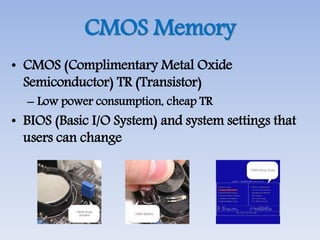
CMOS Memory
• CMOS (Complimentary Metal Oxide
Semiconductor) TR (Transistor)
– Low power consumption, cheap TR
• BIOS (Basic I/O System) and system settings that
users can change
Thank you 

Basic computer architecture

  • 1.
  • 2.
    Submitted by- Name ID AsikulIslam 143-15- Kanchon Kumar 143-15- Saiful Islam 143-15- Sonot Kumar 143-15- Sohel Al Mamun143-15- Tuhinur Rahman 143-15- Submitted to- Masud Rabbani Dept. Of CSE
  • 3.
    Basic Computer Design 1.History of Computers 2. Introduction to Arduino 3. Basic Computer Architecture 4. Combinational Logic Circuit
  • 4.
    Computer Components • Input/outputunits • Memory/storage units • CPU (Central Processing Unit)
  • 5.
    Motherboard Diagram • Northbridge –Connected to CPU in high speed • Southbridge – Connected in low speed • Bus – Related to “omnibus” – Communication system between components
  • 6.
  • 7.
  • 8.
  • 9.
  • 10.
  • 11.
    CPU: 3 MajorComponents • ALU (Arithmetic Logic Unit) – Performs calculations and comparisons (data changed) • CU (Control Unit): performs fetch/execute cycle – Functions: • Moves data to and from CPU registers and other hardware comp onents (no change in data) • Accesses program instructions and issues commands to the ALU – Subparts: • Memory management unit: supervises fetching instructions and d ata • I/O Interface: sometimes combined with memory management u nit as Bust Interface Unit • Registers – Example: Program Counter (PC) or instruction pointer determi nes next instruction for execution
  • 12.
  • 13.
    Concept of Registers •Small, permanent storage locations withi n the CPU used for a particular purpose • Manipulated directly by the CU • Wired for specific function • Size in bits or bytes (not MB like memor y) • Can hold data, an address or an instructi on
  • 14.
    Register Operations • Storesvalues from other locations (regist ers and memory) • Addition and subtraction • Shift or rotate data • Test contents for conditions such as zero or positive
  • 15.
    Registers in CPU •Program Counter (PC) register • Instruction Register (IR) • Status register: status, flags
  • 16.
    Cache Memory • Cachelevel – L1 cache: fastest and smallest – L2 cache: next fastest and smallest
  • 17.
    Operation of Memory •Each memory location has a unique addr ess • Address from an instruction is copied to the MAR (Memory Address Register) whi ch finds the location in memory • CPU determines if it is a store or retrieval • Transfer takes place between the MDR ( Memory Data Register) and memory • MDR is a two way register
  • 18.
    Random Access Memory •DRAM (Dynamic RAM) – Most common, cheap – Volatile: must be refreshed (recharged with pow er) 1000’s of times each second • SRAM (Static RAM) – Faster than DRAM and more expensive than DR AM – Volatile – Frequently small amount used in cache memory for high-speed access used
  • 19.
    Read Only Memory •Non-volatile memory to hold software th at is not expected to change over the life of the system • Magnetic core memory • EEPROM – Electrically Erasable Programmable ROM – Slower and less flexible than Flash ROM • Flash ROM – Faster than disks but more expensive – Uses • BIOS: initial boot instructions and diagnostics • Digital cameras
  • 20.
    CMOS Memory • CMOS(Complimentary Metal Oxide Semiconductor) TR (Transistor) – Low power consumption, cheap TR • BIOS (Basic I/O System) and system settings that users can change
  • 21.