Mysore/Patna MuleSoft
Meetup
01-June-2024
MuleSoft 4.6 and
Java 17 Upgrade
💡
Organizers
Shubham Chaurasia
Billennium India
Integration Developer
Giridhar Meka
Sr. Technical Architect
linkedin.com/in/giridharmeka
linkedin.com/in/shubhamchaurasia1
Priya Shaw
LTI MindTree
Sr. Software Specialist
linkedin.com/in/priya-shaw
Shyam Raj Prasad
Tricon Infotech
Engineering Leader
linkedin.com/in/shyam-raj-prasad
Speakers
• One of the Youngest MuleSoft Ambassdor
• Professional Integration Developer in Billennium India
• 4+ years of Experience in Integrations
• MCIA, MCD L1, MCPA, MCIA, MCHS Certified,
• Salesforce, AWS, GCP, Azure, Workato Certified
• Mulesoft Meetup Leader | Mentor | Blogger | Speaker
• AWS Community Builder
• https://www.linkedin.com/in/shubhamchaurasia1/
• https://medium.com/@myid535
Shubham Chaurasia
Speakers
• MuleSoft Ambassador 2024
• Sr. Software Specialist
• Working in LTIMindTree
• 5+ Years of Experience
• MuleSoft Certified
• IBM Certified
PRIYA SHAW
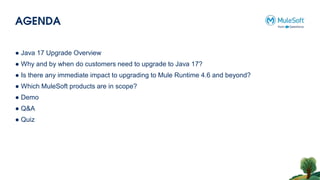
AGENDA
● Java 17 Upgrade Overview
● Why and by when do customers need to upgrade to Java 17?
● Is there any immediate impact to upgrading to Mule Runtime 4.6 and beyond?
● Which MuleSoft products are in scope?
● Demo
● Q&A
● Quiz
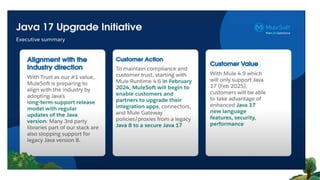
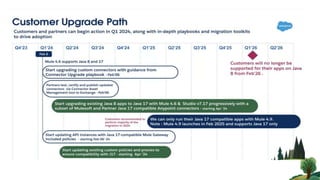
MuleSoft is adopting Java’s long-term-support (LTS) release, beginning with the
Mule Runtime 4.6 which will add support for Java 17 LTS
Mule 4.6 & Java 17 Upgrade
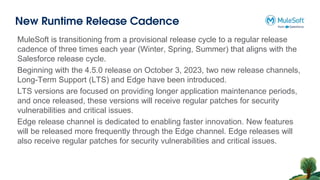
New Runtime Release Cadence
MuleSoft is transitioning from a provisional release cycle to a regular release
cadence of three times each year (Winter, Spring, Summer) that aligns with the
Salesforce release cycle.
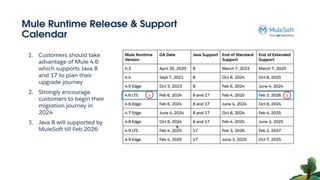
Beginning with the 4.5.0 release on October 3, 2023, two new release channels,
Long-Term Support (LTS) and Edge have been introduced.
LTS versions are focused on providing longer application maintenance periods,
and once released, these versions will receive regular patches for security
vulnerabilities and critical issues.
Edge release channel is dedicated to enabling faster innovation. New features
will be released more frequently through the Edge channel. Edge releases will
also receive regular patches for security vulnerabilities and critical issues.
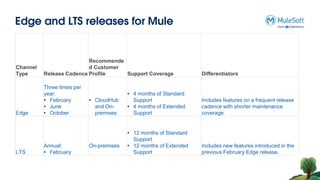
Edge and LTS releases for Mule
Channel
Type Release Cadence
Recommende
d Customer
Profile Support Coverage Differentiators
Edge
Three times per
year:
• February
• June
• October
• CloudHub
and On-
premises
• 4 months of Standard
Support
• 4 months of Extended
Support
Includes features on a frequent release
cadence with shorter maintenance
coverage.
LTS
Annual:
• February
On-premises
• 12 months of Standard
Support
• 12 months of Extended
Support
Includes new features introduced in the
previous February Edge release.
Versioning Schema
For Cloudhub 1.0, Cloudhub 2.0 and RTF-
Major[numeric] Minor[numeric] Patch[numeric]: Build[numeric] Channel[e for edge,
nothing for LTS]
Each February, MuleSoft releases both an Edge and an LTS release with the same
Major. Minor version. To distinguish the versions, they are represented as:
• Edge: 4.6.0:le
• LTS: 4.6.0:1
For Standalone(On Premises) -
The Mule runtime versioning changes from date-based, for example, 4.4.0-
20230317 to semantic versioning as: Major. Minor.Patch
• 4.5.1
• 4.5.2
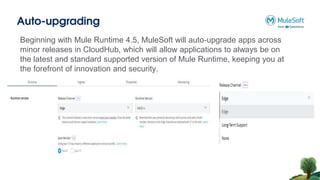
Auto-upgrading
Beginning with Mule Runtime 4.5, MuleSoft will auto-upgrade apps across
minor releases in CloudHub, which will allow applications to always be on
the latest and standard supported version of Mule Runtime, keeping you at
the forefront of innovation and security.
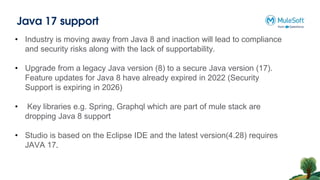
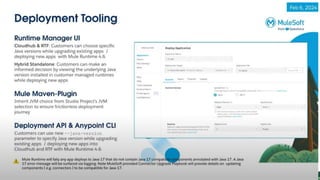
Java 17 support
• Industry is moving away from Java 8 and inaction will lead to compliance
and security risks along with the lack of supportability.
• Upgrade from a legacy Java version (8) to a secure Java version (17).
Feature updates for Java 8 have already expired in 2022 (Security
Support is expiring in 2026)
• Key libraries e.g. Spring, Graphql which are part of mule stack are
dropping Java 8 support
• Studio is based on the Eclipse IDE and the latest version(4.28) requires
JAVA 17.
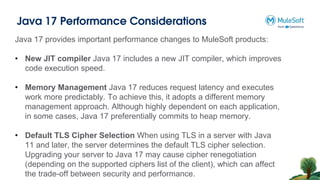
Java 17 Performance Considerations
Java 17 provides important performance changes to MuleSoft products:
• New JIT compiler Java 17 includes a new JIT compiler, which improves
code execution speed.
• Memory Management Java 17 reduces request latency and executes
work more predictably. To achieve this, it adopts a different memory
management approach. Although highly dependent on each application,
in some cases, Java 17 preferentially commits to heap memory.
• Default TLS Cipher Selection When using TLS in a server with Java
11 and later, the server determines the default TLS cipher selection.
Upgrading your server to Java 17 may cause cipher renegotiation
(depending on the supported ciphers list of the client), which can affect
the trade-off between security and performance.
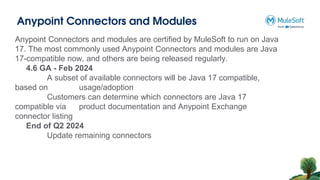
Anypoint Connectors and Modules
Anypoint Connectors and modules are certified by MuleSoft to run on Java
17. The most commonly used Anypoint Connectors and modules are Java
17-compatible now, and others are being released regularly.
4.6 GA - Feb 2024
A subset of available connectors will be Java 17 compatible,
based on usage/adoption
Customers can determine which connectors are Java 17
compatible via product documentation and Anypoint Exchange
connector listing
End of Q2 2024
Update remaining connectors
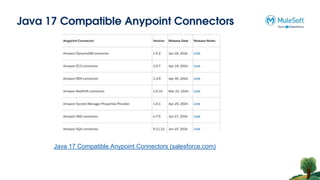
Java 17 Compatible Anypoint Connectors
Java 17 Compatible Anypoint Connectors (salesforce.com)
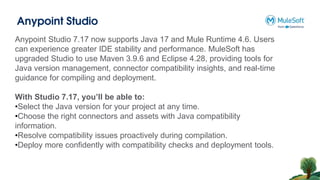
Anypoint Studio
Anypoint Studio 7.17 now supports Java 17 and Mule Runtime 4.6. Users
can experience greater IDE stability and performance. MuleSoft has
upgraded Studio to use Maven 3.9.6 and Eclipse 4.28, providing tools for
Java version management, connector compatibility insights, and real-time
guidance for compiling and deployment.
With Studio 7.17, you’ll be able to:
•Select the Java version for your project at any time.
•Choose the right connectors and assets with Java compatibility
information.
•Resolve compatibility issues proactively during compilation.
•Deploy more confidently with compatibility checks and deployment tools.
Anypoint Studio
Anypoint Studio 7.17 now supports Java 17 and Mule Runtime 4.6. Users
can experience greater IDE stability and performance. MuleSoft has
upgraded Studio to use Maven 3.9.6 and Eclipse 4.28, providing tools for
Java version management, connector compatibility insights, and real-time
guidance for compiling and deployment.
With Studio 7.17, you’ll be able to:
•Select the Java version for your project at any time.
•Choose the right connectors and assets with Java compatibility
information.
•Resolve compatibility issues proactively during compilation.
•Deploy more confidently with compatibility checks and deployment tools.
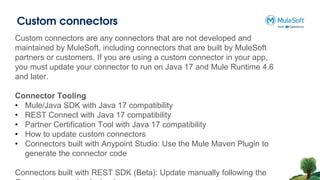
Custom connectors
Custom connectors are any connectors that are not developed and
maintained by MuleSoft, including connectors that are built by MuleSoft
partners or customers. If you are using a custom connector in your app,
you must update your connector to run on Java 17 and Mule Runtime 4.6
and later.
Connector Tooling
• Mule/Java SDK with Java 17 compatibility
• REST Connect with Java 17 compatibility
• Partner Certification Tool with Java 17 compatibility
• How to update custom connectors
• Connectors built with Anypoint Studio: Use the Mule Maven Plugin to
generate the connector code
Connectors built with REST SDK (Beta): Update manually following the
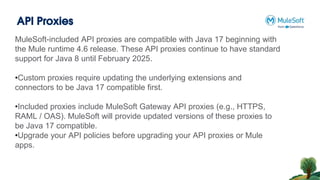
API Proxies
MuleSoft-included API proxies are compatible with Java 17 beginning with
the Mule runtime 4.6 release. These API proxies continue to have standard
support for Java 8 until February 2025.
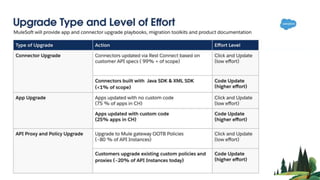
•Custom proxies require updating the underlying extensions and
connectors to be Java 17 compatible first.
•Included proxies include MuleSoft Gateway API proxies (e.g., HTTPS,
RAML / OAS). MuleSoft will provide updated versions of these proxies to
be Java 17 compatible.
•Upgrade your API policies before upgrading your API proxies or Mule
apps.
Demo
Networking time
Thank You

Mule 4.6 & Java 17 Upgrade | MuleSoft Mysore Meetup #46

  • 1.
  • 2.
    Organizers Shubham Chaurasia Billennium India IntegrationDeveloper Giridhar Meka Sr. Technical Architect linkedin.com/in/giridharmeka linkedin.com/in/shubhamchaurasia1 Priya Shaw LTI MindTree Sr. Software Specialist linkedin.com/in/priya-shaw Shyam Raj Prasad Tricon Infotech Engineering Leader linkedin.com/in/shyam-raj-prasad
  • 3.
    Speakers • One ofthe Youngest MuleSoft Ambassdor • Professional Integration Developer in Billennium India • 4+ years of Experience in Integrations • MCIA, MCD L1, MCPA, MCIA, MCHS Certified, • Salesforce, AWS, GCP, Azure, Workato Certified • Mulesoft Meetup Leader | Mentor | Blogger | Speaker • AWS Community Builder • https://www.linkedin.com/in/shubhamchaurasia1/ • https://medium.com/@myid535 Shubham Chaurasia
  • 4.
    Speakers • MuleSoft Ambassador2024 • Sr. Software Specialist • Working in LTIMindTree • 5+ Years of Experience • MuleSoft Certified • IBM Certified PRIYA SHAW
  • 5.
    AGENDA ● Java 17Upgrade Overview ● Why and by when do customers need to upgrade to Java 17? ● Is there any immediate impact to upgrading to Mule Runtime 4.6 and beyond? ● Which MuleSoft products are in scope? ● Demo ● Q&A ● Quiz
  • 6.
    MuleSoft is adoptingJava’s long-term-support (LTS) release, beginning with the Mule Runtime 4.6 which will add support for Java 17 LTS Mule 4.6 & Java 17 Upgrade
  • 7.
    New Runtime ReleaseCadence MuleSoft is transitioning from a provisional release cycle to a regular release cadence of three times each year (Winter, Spring, Summer) that aligns with the Salesforce release cycle. Beginning with the 4.5.0 release on October 3, 2023, two new release channels, Long-Term Support (LTS) and Edge have been introduced. LTS versions are focused on providing longer application maintenance periods, and once released, these versions will receive regular patches for security vulnerabilities and critical issues. Edge release channel is dedicated to enabling faster innovation. New features will be released more frequently through the Edge channel. Edge releases will also receive regular patches for security vulnerabilities and critical issues.
  • 8.
    Edge and LTSreleases for Mule Channel Type Release Cadence Recommende d Customer Profile Support Coverage Differentiators Edge Three times per year: • February • June • October • CloudHub and On- premises • 4 months of Standard Support • 4 months of Extended Support Includes features on a frequent release cadence with shorter maintenance coverage. LTS Annual: • February On-premises • 12 months of Standard Support • 12 months of Extended Support Includes new features introduced in the previous February Edge release.
  • 10.
    Versioning Schema For Cloudhub1.0, Cloudhub 2.0 and RTF- Major[numeric] Minor[numeric] Patch[numeric]: Build[numeric] Channel[e for edge, nothing for LTS] Each February, MuleSoft releases both an Edge and an LTS release with the same Major. Minor version. To distinguish the versions, they are represented as: • Edge: 4.6.0:le • LTS: 4.6.0:1 For Standalone(On Premises) - The Mule runtime versioning changes from date-based, for example, 4.4.0- 20230317 to semantic versioning as: Major. Minor.Patch • 4.5.1 • 4.5.2
  • 11.
    Auto-upgrading Beginning with MuleRuntime 4.5, MuleSoft will auto-upgrade apps across minor releases in CloudHub, which will allow applications to always be on the latest and standard supported version of Mule Runtime, keeping you at the forefront of innovation and security.
  • 12.
    Java 17 support •Industry is moving away from Java 8 and inaction will lead to compliance and security risks along with the lack of supportability. • Upgrade from a legacy Java version (8) to a secure Java version (17). Feature updates for Java 8 have already expired in 2022 (Security Support is expiring in 2026) • Key libraries e.g. Spring, Graphql which are part of mule stack are dropping Java 8 support • Studio is based on the Eclipse IDE and the latest version(4.28) requires JAVA 17.
  • 13.
    Java 17 PerformanceConsiderations Java 17 provides important performance changes to MuleSoft products: • New JIT compiler Java 17 includes a new JIT compiler, which improves code execution speed. • Memory Management Java 17 reduces request latency and executes work more predictably. To achieve this, it adopts a different memory management approach. Although highly dependent on each application, in some cases, Java 17 preferentially commits to heap memory. • Default TLS Cipher Selection When using TLS in a server with Java 11 and later, the server determines the default TLS cipher selection. Upgrading your server to Java 17 may cause cipher renegotiation (depending on the supported ciphers list of the client), which can affect the trade-off between security and performance.
  • 15.
    Anypoint Connectors andModules Anypoint Connectors and modules are certified by MuleSoft to run on Java 17. The most commonly used Anypoint Connectors and modules are Java 17-compatible now, and others are being released regularly. 4.6 GA - Feb 2024 A subset of available connectors will be Java 17 compatible, based on usage/adoption Customers can determine which connectors are Java 17 compatible via product documentation and Anypoint Exchange connector listing End of Q2 2024 Update remaining connectors
  • 16.
    Java 17 CompatibleAnypoint Connectors Java 17 Compatible Anypoint Connectors (salesforce.com)
  • 17.
    Anypoint Studio Anypoint Studio7.17 now supports Java 17 and Mule Runtime 4.6. Users can experience greater IDE stability and performance. MuleSoft has upgraded Studio to use Maven 3.9.6 and Eclipse 4.28, providing tools for Java version management, connector compatibility insights, and real-time guidance for compiling and deployment. With Studio 7.17, you’ll be able to: •Select the Java version for your project at any time. •Choose the right connectors and assets with Java compatibility information. •Resolve compatibility issues proactively during compilation. •Deploy more confidently with compatibility checks and deployment tools.
  • 18.
    Anypoint Studio Anypoint Studio7.17 now supports Java 17 and Mule Runtime 4.6. Users can experience greater IDE stability and performance. MuleSoft has upgraded Studio to use Maven 3.9.6 and Eclipse 4.28, providing tools for Java version management, connector compatibility insights, and real-time guidance for compiling and deployment. With Studio 7.17, you’ll be able to: •Select the Java version for your project at any time. •Choose the right connectors and assets with Java compatibility information. •Resolve compatibility issues proactively during compilation. •Deploy more confidently with compatibility checks and deployment tools.
  • 19.
    Custom connectors Custom connectorsare any connectors that are not developed and maintained by MuleSoft, including connectors that are built by MuleSoft partners or customers. If you are using a custom connector in your app, you must update your connector to run on Java 17 and Mule Runtime 4.6 and later. Connector Tooling • Mule/Java SDK with Java 17 compatibility • REST Connect with Java 17 compatibility • Partner Certification Tool with Java 17 compatibility • How to update custom connectors • Connectors built with Anypoint Studio: Use the Mule Maven Plugin to generate the connector code Connectors built with REST SDK (Beta): Update manually following the
  • 20.
    API Proxies MuleSoft-included APIproxies are compatible with Java 17 beginning with the Mule runtime 4.6 release. These API proxies continue to have standard support for Java 8 until February 2025. •Custom proxies require updating the underlying extensions and connectors to be Java 17 compatible first. •Included proxies include MuleSoft Gateway API proxies (e.g., HTTPS, RAML / OAS). MuleSoft will provide updated versions of these proxies to be Java 17 compatible. •Upgrade your API policies before upgrading your API proxies or Mule apps.
  • 23.
  • 24.
  • 25.