INPUT DEVICES PRESENTED
BY:
OUTPUT DEVICES
PRESENTED BY:
MEMOMY PRESENTED BY:
CPU PRESENTED BY:
In this presentation, we’ll discuss various input,
output, and CPU(central processing unit),memory
designed to meet the various needs and lifestyles
of people.
Input Devices Output Devices Storage Devices
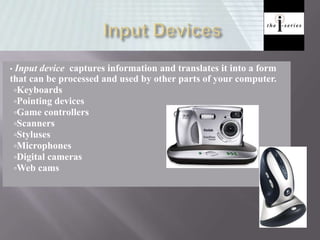
• Input device captures information and translates it into a form
that can be processed and used by other parts of your computer.
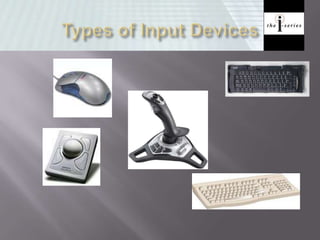
Keyboards
Pointing devices
Game controllers
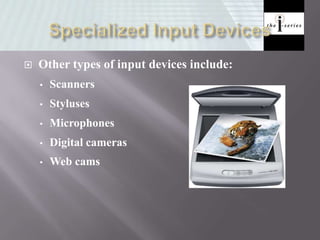
Scanners
Styluses
Microphones
Digital cameras
Web cams
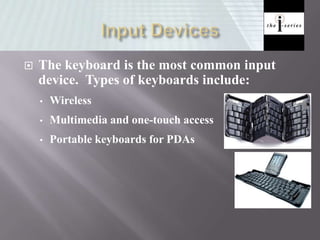
 The keyboard is the most common input
device. Types of keyboards include:
• Wireless
• Multimedia and one-touch access
• Portable keyboards for PDAs
 Pointing devices are mainly used to choose and
enter commands
 Pointing devices tend to have PS/2 connectors or
USB connectors
• PS/2 connector fits into a PS/2 port, which a small round
socket with small holes that fit the pins on the connector
• USB connectors fit into USB ports, and these are small
rectangular openings on the back or front of your computer,
or even on your keyboard or monitor
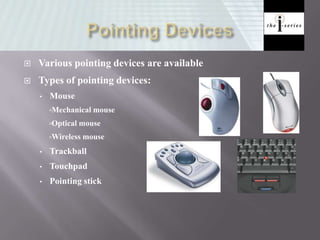
 Various pointing devices are available
 Types of pointing devices:
• Mouse
Mechanical mouse
Optical mouse
Wireless mouse
• Trackball
• Touchpad
• Pointing stick
 Game controllers are used mainly to play games
 Types of gaming devices
• Gamepads
• Joysticks
• Gaming wheels
• Force feed
 Other types of input devices include:
• Scanners
• Styluses
• Microphones
• Digital cameras
• Web cams
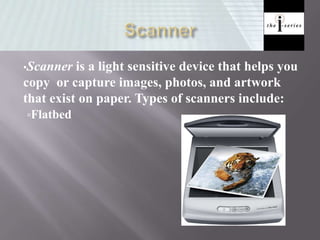
•Scanner is a light sensitive device that helps you
copy or capture images, photos, and artwork
that exist on paper. Types of scanners include:
Flatbed
• Stylus is an input device consisting of a thin
stick that uses pressure to enter information
or to click and point
• Styluses are used with:
PDAs
Tablet PCs
Graphics tablets
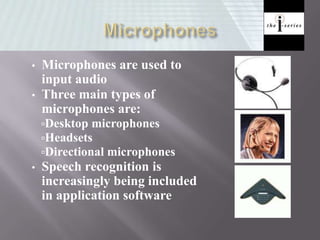
• Microphones are used to
input audio
• Three main types of
microphones are:
Desktop microphones
Headsets
Directional microphones
• Speech recognition is
increasingly being included
in application software
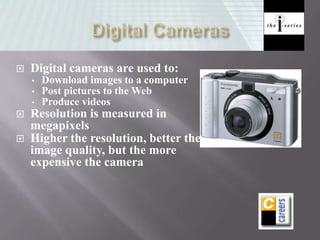
 Digital cameras are used to:
• Download images to a computer
• Post pictures to the Web
• Produce videos
 Resolution is measured in
megapixels
 Higher the resolution, better the
image quality, but the more
expensive the camera
• Web cam is a video camera
that can be used to take
images for uploading to the
Web
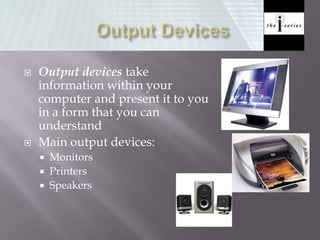
 Output devices take
information within your
computer and present it to you
in a form that you can
understand
 Main output devices:
 Monitors
 Printers
 Speakers
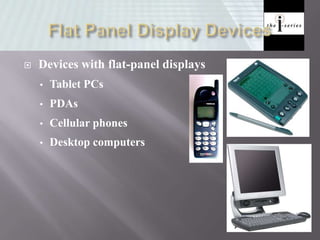
 Devices with flat-panel displays
• Tablet PCs
• PDAs
• Cellular phones
• Desktop computers
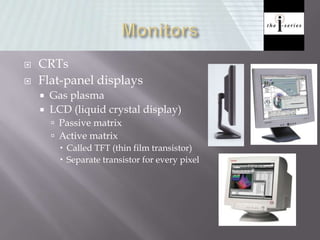
 CRTs
 Flat-panel displays
 Gas plasma
 LCD (liquid crystal display)
 Passive matrix
 Active matrix
 Called TFT (thin film transistor)
 Separate transistor for every pixel
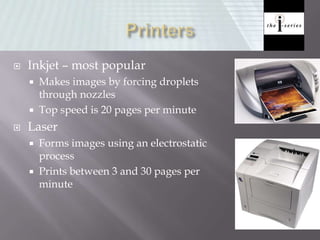
 Inkjet – most popular
 Makes images by forcing droplets
through nozzles
 Top speed is 20 pages per minute
 Laser
 Forms images using an electrostatic
process
 Prints between 3 and 30 pages per
minute
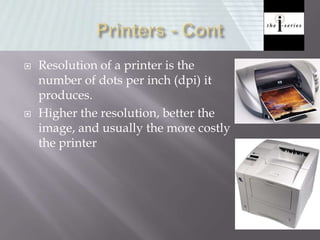
 Resolution of a printer is the
number of dots per inch (dpi) it
produces.
 Higher the resolution, better the
image, and usually the more costly
the printer
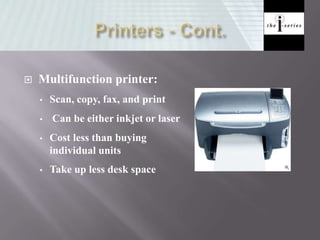
 Multifunction printer:
• Scan, copy, fax, and print
• Can be either inkjet or laser
• Cost less than buying
individual units
• Take up less desk space
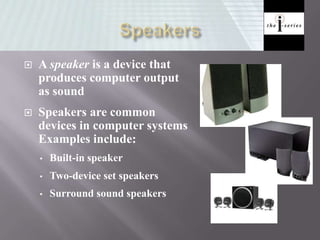
 A speaker is a device that
produces computer output
as sound
 Speakers are common
devices in computer systems
Examples include:
• Built-in speaker
• Two-device set speakers
• Surround sound speakers
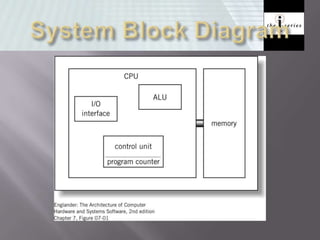
 ALU (arithmetic logic unit)
 Performs calculations and comparisons (data changed)
 CU (control unit): performs fetch/execute cycle
 Functions:
 Moves data to and from CPU registers and other hardware
components (no change in data)
 Accesses program instructions and issues commands to the ALU
 Subparts:
 Memory management unit: supervises fetching instructions and data
 I/O Interface: sometimes combined with memory management unit
as Bust Interface Unit
 Registers
 Example: Program counter (PC) or instruction pointer
determines next instruction for execution
 Small, permanent storage locations within the
CPU used for a particular purpose
 Manipulated directly by the Control Unit
 Wired for specific function
 Size in bits or bytes (not MB like memory)
 Can hold data, an address or an instruction
 How many registers does the LMC have?
 Use of Registers
 Scratchpad for currently executing program
 Holds data needed quickly or frequently
 Stores information about status of CPU and
currently executing program
 Address of next program instruction
 Signals from external devices
 General Purpose Registers
 User-visible registers
 Hold intermediate results or data values, e.g.,
loop counters
 Equivalent to LMC’s calculator
 Typically several dozen in current CPUs
 Program Count Register (PC)
 Also called instruction pointer
 Instruction Register (IR)
 Stores instruction fetched from memory
 Memory Address Register (MAR)
 Memory Data Register (MDR)
 Status Registers
 Status of CPU and currently executing
program
 Flags (one bit Boolean variable) to track
condition like arithmetic carry and overflow,
power failure, internal computer error
 Stores values from other locations (registers
and memory)
 Addition and subtraction
 Shift or rotate data
 Test contents for conditions such as zero or
positive
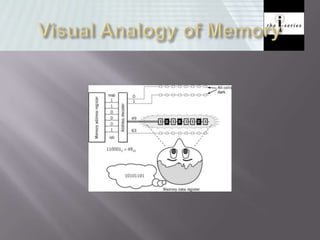
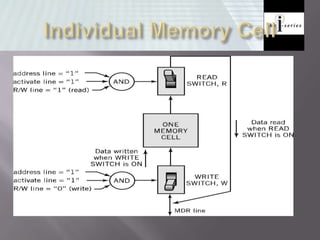
 Each memory location has a unique address
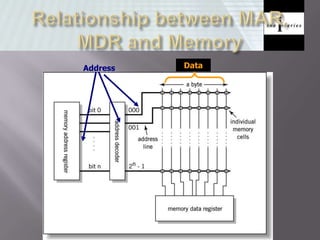
 Address from an instruction is copied to the
MAR which finds the location in memory
 CPU determines if it is a store or retrieval
 Transfer takes place between the MDR and
memory
 MDR is a two way register
©2003 The McGraw-Hill Companies
Address Data
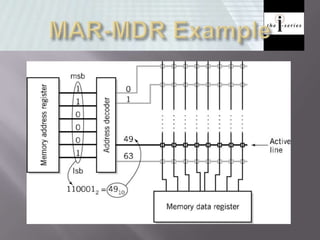
 Determined by two factors
1. Number of bits in the MAR
 LMC = 100 (00 to 99)
 2K where K = width of the register in bits
2. Size of the address portion of the instruction
 4 bits allows 16 locations
 8 bits allows 256 locations
 32 bits allows 4,294,967,296 or 4 GB
 Important for performance
 Insufficient memory can cause a processor to
work at 50% below performance
 DRAM (Dynamic RAM)
 Most common, cheap
 Volatile: must be refreshed (recharged with
power) 1000’s of times each second
 SRAM (static RAM)
 Faster than DRAM and more expensive than
DRAM
 Volatile
 Frequently small amount used in cache
memory for high-speed access used
 Non-volatile memory to hold software that is
not expected to change over the life of the
system
 Magnetic core memory
 EEPROM
 Electrically Erasable Programmable ROM
 Slower and less flexible than Flash ROM
 Flash ROM
 Faster than disks but more expensive
 Uses
 BIOS: initial boot instructions and
diagnostics
 Digital cameras
BASIC COMPUTER ARCHITECTURE

BASIC COMPUTER ARCHITECTURE

  • 1.
    INPUT DEVICES PRESENTED BY: OUTPUTDEVICES PRESENTED BY: MEMOMY PRESENTED BY: CPU PRESENTED BY:
  • 2.
    In this presentation,we’ll discuss various input, output, and CPU(central processing unit),memory designed to meet the various needs and lifestyles of people.
  • 3.
    Input Devices OutputDevices Storage Devices
  • 4.
    • Input devicecaptures information and translates it into a form that can be processed and used by other parts of your computer. Keyboards Pointing devices Game controllers Scanners Styluses Microphones Digital cameras Web cams
  • 5.
     The keyboardis the most common input device. Types of keyboards include: • Wireless • Multimedia and one-touch access • Portable keyboards for PDAs
  • 7.
     Pointing devicesare mainly used to choose and enter commands  Pointing devices tend to have PS/2 connectors or USB connectors • PS/2 connector fits into a PS/2 port, which a small round socket with small holes that fit the pins on the connector • USB connectors fit into USB ports, and these are small rectangular openings on the back or front of your computer, or even on your keyboard or monitor
  • 8.
     Various pointingdevices are available  Types of pointing devices: • Mouse Mechanical mouse Optical mouse Wireless mouse • Trackball • Touchpad • Pointing stick
  • 9.
     Game controllersare used mainly to play games  Types of gaming devices • Gamepads • Joysticks • Gaming wheels • Force feed
  • 10.
     Other typesof input devices include: • Scanners • Styluses • Microphones • Digital cameras • Web cams
  • 11.
    •Scanner is alight sensitive device that helps you copy or capture images, photos, and artwork that exist on paper. Types of scanners include: Flatbed
  • 12.
    • Stylus isan input device consisting of a thin stick that uses pressure to enter information or to click and point • Styluses are used with: PDAs Tablet PCs Graphics tablets
  • 13.
    • Microphones areused to input audio • Three main types of microphones are: Desktop microphones Headsets Directional microphones • Speech recognition is increasingly being included in application software
  • 14.
     Digital camerasare used to: • Download images to a computer • Post pictures to the Web • Produce videos  Resolution is measured in megapixels  Higher the resolution, better the image quality, but the more expensive the camera
  • 15.
    • Web camis a video camera that can be used to take images for uploading to the Web
  • 16.
     Output devicestake information within your computer and present it to you in a form that you can understand  Main output devices:  Monitors  Printers  Speakers
  • 17.
     Devices withflat-panel displays • Tablet PCs • PDAs • Cellular phones • Desktop computers
  • 18.
     CRTs  Flat-paneldisplays  Gas plasma  LCD (liquid crystal display)  Passive matrix  Active matrix  Called TFT (thin film transistor)  Separate transistor for every pixel
  • 19.
     Inkjet –most popular  Makes images by forcing droplets through nozzles  Top speed is 20 pages per minute  Laser  Forms images using an electrostatic process  Prints between 3 and 30 pages per minute
  • 20.
     Resolution ofa printer is the number of dots per inch (dpi) it produces.  Higher the resolution, better the image, and usually the more costly the printer
  • 21.
     Multifunction printer: •Scan, copy, fax, and print • Can be either inkjet or laser • Cost less than buying individual units • Take up less desk space
  • 22.
     A speakeris a device that produces computer output as sound  Speakers are common devices in computer systems Examples include: • Built-in speaker • Two-device set speakers • Surround sound speakers
  • 23.
     ALU (arithmeticlogic unit)  Performs calculations and comparisons (data changed)  CU (control unit): performs fetch/execute cycle  Functions:  Moves data to and from CPU registers and other hardware components (no change in data)  Accesses program instructions and issues commands to the ALU  Subparts:  Memory management unit: supervises fetching instructions and data  I/O Interface: sometimes combined with memory management unit as Bust Interface Unit  Registers  Example: Program counter (PC) or instruction pointer determines next instruction for execution
  • 25.
     Small, permanentstorage locations within the CPU used for a particular purpose  Manipulated directly by the Control Unit  Wired for specific function  Size in bits or bytes (not MB like memory)  Can hold data, an address or an instruction  How many registers does the LMC have?
  • 26.
     Use ofRegisters  Scratchpad for currently executing program  Holds data needed quickly or frequently  Stores information about status of CPU and currently executing program  Address of next program instruction  Signals from external devices  General Purpose Registers  User-visible registers  Hold intermediate results or data values, e.g., loop counters  Equivalent to LMC’s calculator  Typically several dozen in current CPUs
  • 27.
     Program CountRegister (PC)  Also called instruction pointer  Instruction Register (IR)  Stores instruction fetched from memory  Memory Address Register (MAR)  Memory Data Register (MDR)  Status Registers  Status of CPU and currently executing program  Flags (one bit Boolean variable) to track condition like arithmetic carry and overflow, power failure, internal computer error
  • 28.
     Stores valuesfrom other locations (registers and memory)  Addition and subtraction  Shift or rotate data  Test contents for conditions such as zero or positive
  • 29.
     Each memorylocation has a unique address  Address from an instruction is copied to the MAR which finds the location in memory  CPU determines if it is a store or retrieval  Transfer takes place between the MDR and memory  MDR is a two way register
  • 30.
    ©2003 The McGraw-HillCompanies Address Data
  • 34.
     Determined bytwo factors 1. Number of bits in the MAR  LMC = 100 (00 to 99)  2K where K = width of the register in bits 2. Size of the address portion of the instruction  4 bits allows 16 locations  8 bits allows 256 locations  32 bits allows 4,294,967,296 or 4 GB  Important for performance  Insufficient memory can cause a processor to work at 50% below performance
  • 35.
     DRAM (DynamicRAM)  Most common, cheap  Volatile: must be refreshed (recharged with power) 1000’s of times each second  SRAM (static RAM)  Faster than DRAM and more expensive than DRAM  Volatile  Frequently small amount used in cache memory for high-speed access used
  • 36.
     Non-volatile memoryto hold software that is not expected to change over the life of the system  Magnetic core memory  EEPROM  Electrically Erasable Programmable ROM  Slower and less flexible than Flash ROM  Flash ROM  Faster than disks but more expensive  Uses  BIOS: initial boot instructions and diagnostics  Digital cameras