
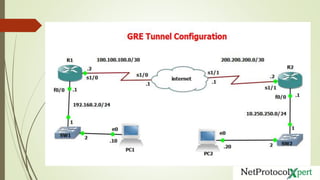

GRE Tunnel Configuration
www.netprotocolxpert.in
GRE (Generic Routing encapsulation)
 It is the simplest protocol
 It encapsulate inside or outside ip address
 GRE is nothing to do with encryption that IPsec provide
 We use GRE for Multicast traffic
 It allow us to start treating the VPN connection like we using private link
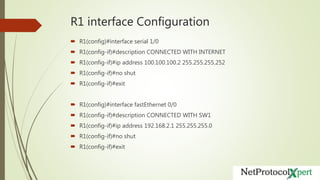
R1 interface Configuration
 R1(config)#interface serial 1/0
 R1(config-if)#description CONNECTED WITH INTERNET
 R1(config-if)#ip address 100.100.100.2 255.255.255.252
 R1(config-if)#no shut
 R1(config-if)#exit
 R1(config)#interface fastEthernet 0/0
 R1(config-if)#description CONNECTED WITH SW1
 R1(config-if)#ip address 192.168.2.1 255.255.255.0
 R1(config-if)#no shut
 R1(config-if)#exit
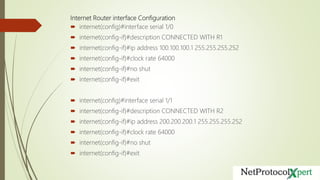
Internet Router interface Configuration
 internet(config)#interface serial 1/0
 internet(config-if)#description CONNECTED WITH R1
 internet(config-if)#ip address 100.100.100.1 255.255.255.252
 internet(config-if)#clock rate 64000
 internet(config-if)#no shut
 internet(config-if)#exit
 internet(config)#interface serial 1/1
 internet(config-if)#description CONNECTED WITH R2
 internet(config-if)#ip address 200.200.200.1 255.255.255.252
 internet(config-if)#clock rate 64000
 internet(config-if)#no shut
 internet(config-if)#exit
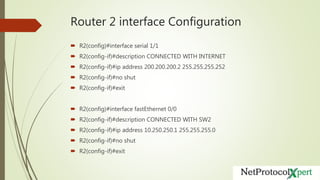
Router 2 interface Configuration
 R2(config)#interface serial 1/1
 R2(config-if)#description CONNECTED WITH INTERNET
 R2(config-if)#ip address 200.200.200.2 255.255.255.252
 R2(config-if)#no shut
 R2(config-if)#exit
 R2(config)#interface fastEthernet 0/0
 R2(config-if)#description CONNECTED WITH SW2
 R2(config-if)#ip address 10.250.250.1 255.255.255.0
 R2(config-if)#no shut
 R2(config-if)#exit
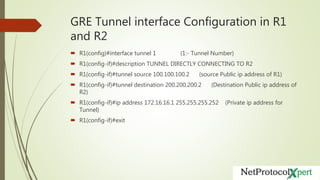
GRE Tunnel interface Configuration in R1
and R2
 R1(config)#interface tunnel 1 (1:- Tunnel Number)
 R1(config-if)#description TUNNEL DIRECTLY CONNECTING TO R2
 R1(config-if)#tunnel source 100.100.100.2 (source Public ip address of R1)
 R1(config-if)#tunnel destination 200.200.200.2 (Destination Public ip address of
R2)
 R1(config-if)#ip address 172.16.16.1 255.255.255.252 (Private ip address for
Tunnel)
 R1(config-if)#exit
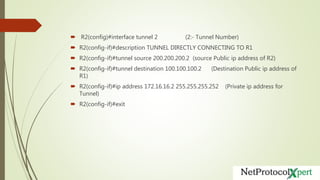
 R2(config)#interface tunnel 2 (2:- Tunnel Number)
 R2(config-if)#description TUNNEL DIRECTLY CONNECTING TO R1
 R2(config-if)#tunnel source 200.200.200.2 (source Public ip address of R2)
 R2(config-if)#tunnel destination 100.100.100.2 (Destination Public ip address of
R1)
 R2(config-if)#ip address 172.16.16.2 255.255.255.252 (Private ip address for
Tunnel)
 R2(config-if)#exit
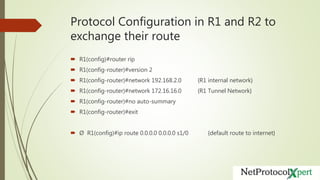
Protocol Configuration in R1 and R2 to
exchange their route
 R1(config)#router rip
 R1(config-router)#version 2
 R1(config-router)#network 192.168.2.0 {R1 internal network}
 R1(config-router)#network 172.16.16.0 {R1 Tunnel Network}
 R1(config-router)#no auto-summary
 R1(config-router)#exit
 Ø R1(config)#ip route 0.0.0.0 0.0.0.0 s1/0 {default route to internet}
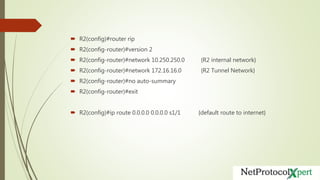
 R2(config)#router rip
 R2(config-router)#version 2
 R2(config-router)#network 10.250.250.0 {R2 internal network}
 R2(config-router)#network 172.16.16.0 {R2 Tunnel Network}
 R2(config-router)#no auto-summary
 R2(config-router)#exit
 R2(config)#ip route 0.0.0.0 0.0.0.0 s1/1 {default route to internet}
Troubleshooting & Verification Commands
 Show ip interface brief
 Show ip route
 Show interfaces tunnel 2 (Tunnel Number)
Verify using
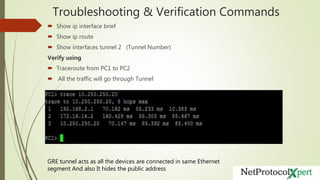
 Traceroute from PC1 to PC2
 All the traffic will go through Tunnel
GRE tunnel acts as all the devices are connected in same Ethernet
segment And also It hides the public address

GRE Tunnel Configuration

  • 1.
  • 3.
    GRE (Generic Routingencapsulation)  It is the simplest protocol  It encapsulate inside or outside ip address  GRE is nothing to do with encryption that IPsec provide  We use GRE for Multicast traffic  It allow us to start treating the VPN connection like we using private link
  • 4.
    R1 interface Configuration R1(config)#interface serial 1/0  R1(config-if)#description CONNECTED WITH INTERNET  R1(config-if)#ip address 100.100.100.2 255.255.255.252  R1(config-if)#no shut  R1(config-if)#exit  R1(config)#interface fastEthernet 0/0  R1(config-if)#description CONNECTED WITH SW1  R1(config-if)#ip address 192.168.2.1 255.255.255.0  R1(config-if)#no shut  R1(config-if)#exit
  • 5.
    Internet Router interfaceConfiguration  internet(config)#interface serial 1/0  internet(config-if)#description CONNECTED WITH R1  internet(config-if)#ip address 100.100.100.1 255.255.255.252  internet(config-if)#clock rate 64000  internet(config-if)#no shut  internet(config-if)#exit  internet(config)#interface serial 1/1  internet(config-if)#description CONNECTED WITH R2  internet(config-if)#ip address 200.200.200.1 255.255.255.252  internet(config-if)#clock rate 64000  internet(config-if)#no shut  internet(config-if)#exit
  • 6.
    Router 2 interfaceConfiguration  R2(config)#interface serial 1/1  R2(config-if)#description CONNECTED WITH INTERNET  R2(config-if)#ip address 200.200.200.2 255.255.255.252  R2(config-if)#no shut  R2(config-if)#exit  R2(config)#interface fastEthernet 0/0  R2(config-if)#description CONNECTED WITH SW2  R2(config-if)#ip address 10.250.250.1 255.255.255.0  R2(config-if)#no shut  R2(config-if)#exit
  • 7.
    GRE Tunnel interfaceConfiguration in R1 and R2  R1(config)#interface tunnel 1 (1:- Tunnel Number)  R1(config-if)#description TUNNEL DIRECTLY CONNECTING TO R2  R1(config-if)#tunnel source 100.100.100.2 (source Public ip address of R1)  R1(config-if)#tunnel destination 200.200.200.2 (Destination Public ip address of R2)  R1(config-if)#ip address 172.16.16.1 255.255.255.252 (Private ip address for Tunnel)  R1(config-if)#exit
  • 8.
     R2(config)#interface tunnel2 (2:- Tunnel Number)  R2(config-if)#description TUNNEL DIRECTLY CONNECTING TO R1  R2(config-if)#tunnel source 200.200.200.2 (source Public ip address of R2)  R2(config-if)#tunnel destination 100.100.100.2 (Destination Public ip address of R1)  R2(config-if)#ip address 172.16.16.2 255.255.255.252 (Private ip address for Tunnel)  R2(config-if)#exit
  • 9.
    Protocol Configuration inR1 and R2 to exchange their route  R1(config)#router rip  R1(config-router)#version 2  R1(config-router)#network 192.168.2.0 {R1 internal network}  R1(config-router)#network 172.16.16.0 {R1 Tunnel Network}  R1(config-router)#no auto-summary  R1(config-router)#exit  Ø R1(config)#ip route 0.0.0.0 0.0.0.0 s1/0 {default route to internet}
  • 10.
     R2(config)#router rip R2(config-router)#version 2  R2(config-router)#network 10.250.250.0 {R2 internal network}  R2(config-router)#network 172.16.16.0 {R2 Tunnel Network}  R2(config-router)#no auto-summary  R2(config-router)#exit  R2(config)#ip route 0.0.0.0 0.0.0.0 s1/1 {default route to internet}
  • 11.
    Troubleshooting & VerificationCommands  Show ip interface brief  Show ip route  Show interfaces tunnel 2 (Tunnel Number) Verify using  Traceroute from PC1 to PC2  All the traffic will go through Tunnel GRE tunnel acts as all the devices are connected in same Ethernet segment And also It hides the public address