VirtualLANs
Virtual LANs
written by
Ilias ahmed
VirtualLANsIntroduction to VLANs
 A VLAN (Virtual Local Area Network) is a logical
grouping of devices or users
 devices or users can be grouped by…
 Function
 Department
 Application
 Devices on a VLAN are restricted to only
communicating with devices that are on their own
VLAN
 Routers provide connectivity between different
VLAN segments
 Just as routers provide connectivity between different
LAN segments
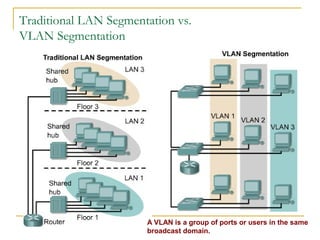
VirtualLANsTraditional LAN Segmentation vs.
VLAN Segmentation
A VLAN is a group of ports or users in the same
broadcast domain.
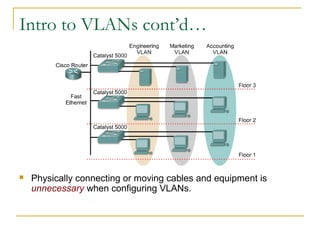
VirtualLANsIntro to VLANs cont’d…
 Physically connecting or moving cables and equipment is
unnecessary when configuring VLANs.
VirtualLANsCommunication within VLANs
 VLANs logically segment the network into different
broadcast domains
 packets are only switched between ports that are
designated for the same VLAN
 A workstation in a VLAN group is restricted to
communicating with file servers or other
workstations in the same VLAN group.
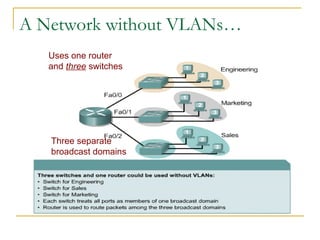
VirtualLANsA Network without VLANs…
Uses one router
and three switches
Three separate
broadcast domains
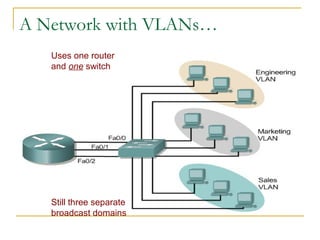
VirtualLANsA Network with VLANs…
Uses one router
and one switch
Still three separate
broadcast domains
VirtualLANsFrame Forwarding in VLANs
 Implementing VLANs on a switch causes the
following to occur:
 The switch maintains a separate bridging table for each
VLAN
 If the frame comes in on a port in VLAN x, the switch
searches the bridging table for VLAN x.
 When the frame is received, the switch adds the source
address to the bridging table if it is currently unknown.
 The destination is checked so a forwarding decision
can be made.
 For learning and forwarding the search is made against
the address table for that VLAN only.
VirtualLANsHandling of Frames
 A bridge handles a frame…
 If the destination is on another segment, the
bridge forwards the frame ONLY to the correct
interface
 If the destination port is unknown, a bridge will
flood the frame to all ports in the broadcast
domain, except the source port
 If the destination of the frame is on the same
segment as the source, a bridge will not
forward the frame.
VirtualLANsVLAN Configuration
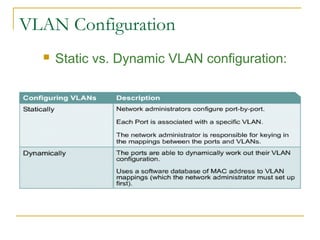
 Static vs. Dynamic VLAN configuration:
VirtualLANsStatic VLANs
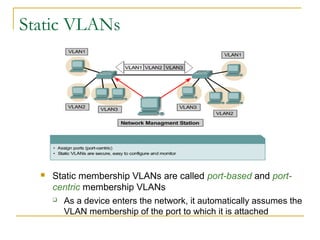
 Static membership VLANs are called port-based and port-
centric membership VLANs
 As a device enters the network, it automatically assumes the
VLAN membership of the port to which it is attached
VirtualLANsDynamic VLANs
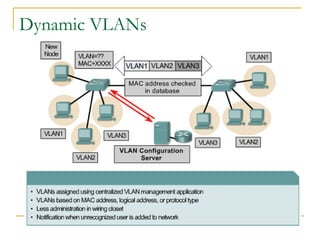
 Dynamic membership VLANs are created through
network management software
 CiscoWorks 2000 or CiscoWorks for Switched
Internetworks
 Dynamic VLANs allow for membership based on the
MAC address of the device connected to the switch
port; hosts join VLANS based on MAC/IP address
 As a device is connected to switch, it queries a
database server for a VLAN membership
VirtualLANsDynamic VLANs
VirtualLANsBenefits of VLANs
 Key benefit of VLANs is the ability to organize
a LAN logically, allowing administrators to…
 Easily move workstations on the LAN
 Easily add workstations to the LAN
 Easily change the LAN configuration
 Easily control network traffic
 Improve security
VirtualLANsEstablishing VLAN Membership
 There are three basic VLAN memberships for
determining and controlling how a packet gets
assigned:
 Port-based VLANs (attached ports)
 Maximizes forwarding performance
 MAC address based VLANs (physical address)
 Protocol based VLANs (layer 3/logical address)
VirtualLANsFrame Tagging
VirtualLANsIdentifying Frames through Frame Tagging
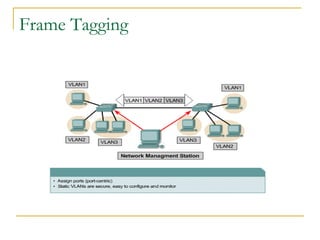
 Frame Tagging (frame identification) uniquely
assigns a user-defined ID to each frame
 There are two major methods of frame tagging
 Inter-Switch Link (ISL) (frame is lengthened)
 802.1Q (header is modified)
 ISL used to be the most common, but is now being
replaced by 802.1Q frame tagging
 A unique identifier is placed in the header of the
frame
 The ID is removed when frame exits the
backbone
VirtualLANsVLAN Configuration
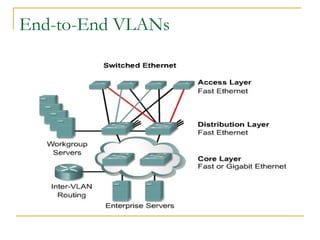
 VLANs can exist either as end-to-end networks or they can exist
inside of geographic boundaries
 An end-to-end VLAN network comprises the following
characteristics:
 Users are grouped into VLANs independent of physical
location, but dependent on group or job function.
 All users in a VLAN should have the same 80/20 traffic flow
patterns (80 percent of the traffic is contained within the VLAN
and 20 percent of the traffic crosses the router to the
enterprise servers, Internet, or WAN)
 As a user moves around the campus, VLAN membership for
that user should not change.
 Each VLAN has a common set of security requirements for all
members.
VirtualLANsEnd-to-End VLANs
VirtualLANsGeographic VLANs
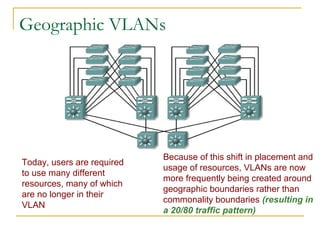
Today, users are required
to use many different
resources, many of which
are no longer in their
VLAN
Because of this shift in placement and
usage of resources, VLANs are now
more frequently being created around
geographic boundaries rather than
commonality boundaries (resulting in
a 20/80 traffic pattern)
VirtualLANsStatic VLAN Configuration
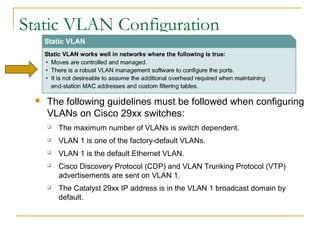
 The following guidelines must be followed when configuring
VLANs on Cisco 29xx switches:
 The maximum number of VLANs is switch dependent.
 VLAN 1 is one of the factory-default VLANs.
 VLAN 1 is the default Ethernet VLAN.
 Cisco Discovery Protocol (CDP) and VLAN Trunking Protocol (VTP)
advertisements are sent on VLAN 1.
 The Catalyst 29xx IP address is in the VLAN 1 broadcast domain by
default.
VirtualLANs
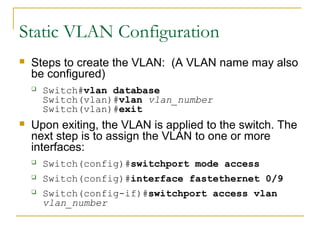
 Steps to create the VLAN: (A VLAN name may also
be configured)
 Switch#vlan database
Switch(vlan)#vlan vlan_number
Switch(vlan)#exit
 Upon exiting, the VLAN is applied to the switch. The
next step is to assign the VLAN to one or more
interfaces:
 Switch(config)#switchport mode access
 Switch(config)#interface fastethernet 0/9
 Switch(config-if)#switchport access vlan
vlan_number
Static VLAN Configuration
VirtualLANs
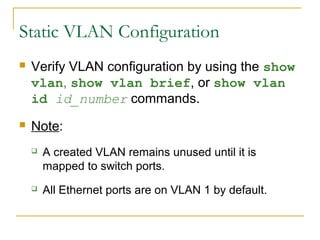
 Verify VLAN configuration by using the show
vlan, show vlan brief, or show vlan
id id_number commands.
 Note:
 A created VLAN remains unused until it is
mapped to switch ports.
 All Ethernet ports are on VLAN 1 by default.
Static VLAN Configuration
VirtualLANsAdding port to VLANs
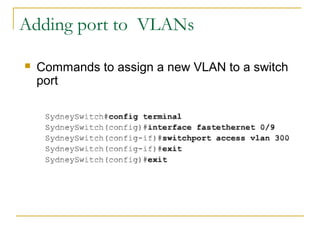
 Commands to assign a new VLAN to a switch
port
VirtualLANs
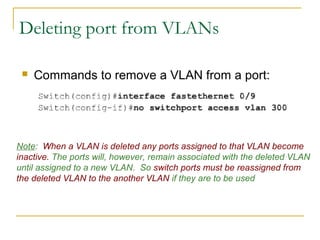
Deleting port from VLANs
 Commands to remove a VLAN from a port:
Note: When a VLAN is deleted any ports assigned to that VLAN become
inactive. The ports will, however, remain associated with the deleted VLAN
until assigned to a new VLAN. So switch ports must be reassigned from
the deleted VLAN to the another VLAN if they are to be used
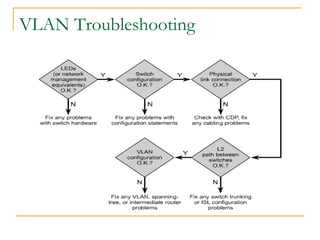
VirtualLANsVLAN Troubleshooting
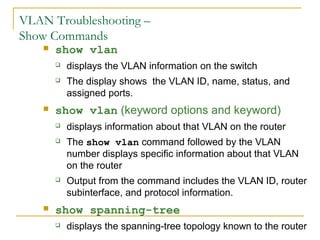
VirtualLANsVLAN Troubleshooting –
Show Commands
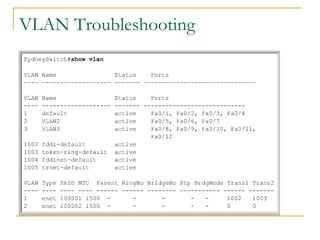
 show vlan
 displays the VLAN information on the switch
 The display shows the VLAN ID, name, status, and
assigned ports.
 show vlan (keyword options and keyword)
 displays information about that VLAN on the router
 The show vlan command followed by the VLAN
number displays specific information about that VLAN
on the router
 Output from the command includes the VLAN ID, router
subinterface, and protocol information.
 show spanning-tree
 displays the spanning-tree topology known to the router
VirtualLANsVLAN Troubleshooting
VirtualLANs
THE END

Vlan

  • 1.
  • 2.
    VirtualLANsIntroduction to VLANs A VLAN (Virtual Local Area Network) is a logical grouping of devices or users  devices or users can be grouped by…  Function  Department  Application  Devices on a VLAN are restricted to only communicating with devices that are on their own VLAN  Routers provide connectivity between different VLAN segments  Just as routers provide connectivity between different LAN segments
  • 3.
    VirtualLANsTraditional LAN Segmentationvs. VLAN Segmentation A VLAN is a group of ports or users in the same broadcast domain.
  • 4.
    VirtualLANsIntro to VLANscont’d…  Physically connecting or moving cables and equipment is unnecessary when configuring VLANs.
  • 5.
    VirtualLANsCommunication within VLANs VLANs logically segment the network into different broadcast domains  packets are only switched between ports that are designated for the same VLAN  A workstation in a VLAN group is restricted to communicating with file servers or other workstations in the same VLAN group.
  • 6.
    VirtualLANsA Network withoutVLANs… Uses one router and three switches Three separate broadcast domains
  • 7.
    VirtualLANsA Network withVLANs… Uses one router and one switch Still three separate broadcast domains
  • 8.
    VirtualLANsFrame Forwarding inVLANs  Implementing VLANs on a switch causes the following to occur:  The switch maintains a separate bridging table for each VLAN  If the frame comes in on a port in VLAN x, the switch searches the bridging table for VLAN x.  When the frame is received, the switch adds the source address to the bridging table if it is currently unknown.  The destination is checked so a forwarding decision can be made.  For learning and forwarding the search is made against the address table for that VLAN only.
  • 9.
    VirtualLANsHandling of Frames A bridge handles a frame…  If the destination is on another segment, the bridge forwards the frame ONLY to the correct interface  If the destination port is unknown, a bridge will flood the frame to all ports in the broadcast domain, except the source port  If the destination of the frame is on the same segment as the source, a bridge will not forward the frame.
  • 10.
    VirtualLANsVLAN Configuration  Staticvs. Dynamic VLAN configuration:
  • 11.
    VirtualLANsStatic VLANs  Staticmembership VLANs are called port-based and port- centric membership VLANs  As a device enters the network, it automatically assumes the VLAN membership of the port to which it is attached
  • 12.
    VirtualLANsDynamic VLANs  Dynamicmembership VLANs are created through network management software  CiscoWorks 2000 or CiscoWorks for Switched Internetworks  Dynamic VLANs allow for membership based on the MAC address of the device connected to the switch port; hosts join VLANS based on MAC/IP address  As a device is connected to switch, it queries a database server for a VLAN membership
  • 13.
  • 14.
    VirtualLANsBenefits of VLANs Key benefit of VLANs is the ability to organize a LAN logically, allowing administrators to…  Easily move workstations on the LAN  Easily add workstations to the LAN  Easily change the LAN configuration  Easily control network traffic  Improve security
  • 15.
    VirtualLANsEstablishing VLAN Membership There are three basic VLAN memberships for determining and controlling how a packet gets assigned:  Port-based VLANs (attached ports)  Maximizes forwarding performance  MAC address based VLANs (physical address)  Protocol based VLANs (layer 3/logical address)
  • 16.
  • 17.
    VirtualLANsIdentifying Frames throughFrame Tagging  Frame Tagging (frame identification) uniquely assigns a user-defined ID to each frame  There are two major methods of frame tagging  Inter-Switch Link (ISL) (frame is lengthened)  802.1Q (header is modified)  ISL used to be the most common, but is now being replaced by 802.1Q frame tagging  A unique identifier is placed in the header of the frame  The ID is removed when frame exits the backbone
  • 18.
    VirtualLANsVLAN Configuration  VLANscan exist either as end-to-end networks or they can exist inside of geographic boundaries  An end-to-end VLAN network comprises the following characteristics:  Users are grouped into VLANs independent of physical location, but dependent on group or job function.  All users in a VLAN should have the same 80/20 traffic flow patterns (80 percent of the traffic is contained within the VLAN and 20 percent of the traffic crosses the router to the enterprise servers, Internet, or WAN)  As a user moves around the campus, VLAN membership for that user should not change.  Each VLAN has a common set of security requirements for all members.
  • 19.
  • 20.
    VirtualLANsGeographic VLANs Today, usersare required to use many different resources, many of which are no longer in their VLAN Because of this shift in placement and usage of resources, VLANs are now more frequently being created around geographic boundaries rather than commonality boundaries (resulting in a 20/80 traffic pattern)
  • 21.
    VirtualLANsStatic VLAN Configuration The following guidelines must be followed when configuring VLANs on Cisco 29xx switches:  The maximum number of VLANs is switch dependent.  VLAN 1 is one of the factory-default VLANs.  VLAN 1 is the default Ethernet VLAN.  Cisco Discovery Protocol (CDP) and VLAN Trunking Protocol (VTP) advertisements are sent on VLAN 1.  The Catalyst 29xx IP address is in the VLAN 1 broadcast domain by default.
  • 22.
    VirtualLANs  Steps tocreate the VLAN: (A VLAN name may also be configured)  Switch#vlan database Switch(vlan)#vlan vlan_number Switch(vlan)#exit  Upon exiting, the VLAN is applied to the switch. The next step is to assign the VLAN to one or more interfaces:  Switch(config)#switchport mode access  Switch(config)#interface fastethernet 0/9  Switch(config-if)#switchport access vlan vlan_number Static VLAN Configuration
  • 23.
    VirtualLANs  Verify VLANconfiguration by using the show vlan, show vlan brief, or show vlan id id_number commands.  Note:  A created VLAN remains unused until it is mapped to switch ports.  All Ethernet ports are on VLAN 1 by default. Static VLAN Configuration
  • 24.
    VirtualLANsAdding port toVLANs  Commands to assign a new VLAN to a switch port
  • 25.
    VirtualLANs Deleting port fromVLANs  Commands to remove a VLAN from a port: Note: When a VLAN is deleted any ports assigned to that VLAN become inactive. The ports will, however, remain associated with the deleted VLAN until assigned to a new VLAN. So switch ports must be reassigned from the deleted VLAN to the another VLAN if they are to be used
  • 26.
  • 27.
    VirtualLANsVLAN Troubleshooting – ShowCommands  show vlan  displays the VLAN information on the switch  The display shows the VLAN ID, name, status, and assigned ports.  show vlan (keyword options and keyword)  displays information about that VLAN on the router  The show vlan command followed by the VLAN number displays specific information about that VLAN on the router  Output from the command includes the VLAN ID, router subinterface, and protocol information.  show spanning-tree  displays the spanning-tree topology known to the router
  • 28.
  • 29.