Introduction
●
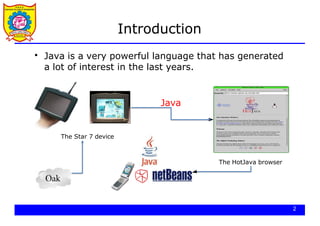
Java is avery powerful language that has generated
a lot of interest in the last years.
The Star 7 device
The HotJava browser
Java
Oak
2
3.
Introduction
3
●
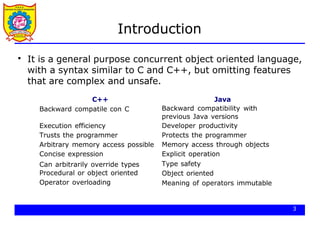
It is ageneral purpose concurrent object oriented language,
with a syntax similar to C and C++, but omitting features
that are complex and unsafe.
C++ Java
Backward compatile con C Backward compatibility with
previous Java versions
Developer productivity
Protects the programmer
Memory access through objects
Explicit operation
Type safety
Object oriented
Meaning of operators immutable
Execution efficiency
Trusts the programmer
Arbitrary memory access possible
Concise expression
Can arbitrarily override types
Procedural or object oriented
Operator overloading
4.
Introduction
4
●
The world wideweb has popularized the use of Java,
because programs can be transparently downloaded with
web pages and executed in any computer with a Java
capable browser.
●
A Java application is a standalone Java program that can be
executed independently of any web browser.
●
A Java applet is a program designed to be executed
under a Java capable browser.
5.
The Java platform
●
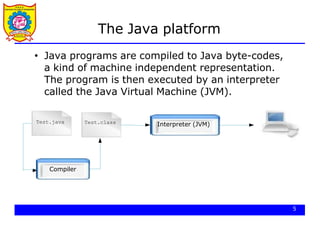
Javaprograms are compiled to Java byte-codes,
a kind of machine independent representation.
The program is then executed by an interpreter
called the Java Virtual Machine (JVM).
Test.java Test.class
Compiler
5
Interpreter (JVM)
6.
The Java platform
●
Thecompiled code is independent of the
architecture of the computer.
The price to pay is a slower execution.
●
Test.java Test.class
Compiler
Interpreter (JVM)
Interpreter (JVM)
Interpreter (JVM)
6
7.
A first example
7
/**
*Hello World Application
* Our first example
*/
public class HelloWorld {
public static void main(String[] args) {
System.out.println("Hello World!"); // display output
}
}
$ javac HelloWorld.java
$ ls
HelloWorld.class
HelloWorld.java
$ java HelloWorld
Hello World
8.
Documentation
●
The javadoc utilitycan be used to generate
automatically documentation for the class.
/**
* My first <b>Test</b>
* @author Carlos Kavka
* @version 1.1
*/
public class HelloWorld {
/**
* @param args the command line arguments
* @since 1.0
*/
public static void main(String[] args) {
System.out.println("Hello World");
}
}
8
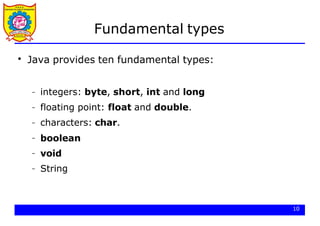
Fundamental types
10
●
Java providesten fundamental types:
– integers: byte, short, int and long
floating point: float and double.
characters: char.
boolean
void
String
–
–
–
–
–
11.
Variables
●
The variables aredeclared specifying its type and
name, and initialized in the point of declaration, or
later with the assignment expression:
int x;
double f = 0.33;
char c = ’a’;
String s = "abcd";
11
x = 55;
12.
Literals
●
The integer valuescan be written in decimal,
hexadecimal, octal and long forms:
int x = 34;
int y = 0x3ef;
int z = 0772;
12
// decimal value
// hexadecimal
// octal
long m = 240395922L; // long
double d = 6.28;
float f = 6.28F;
// 6.28 is a double value
// 6.28F is a float value
●
The floating point values are of type double by
default:
13.
Literals
●
The character valuesare specified with the standard
C notation, with extensions for Unicode values:
char c = ’a’;
char d = ’n’;
char e = ’u2122’
// character lowercase a
// newline
// unicode character (TM)
●
The boolean values are true and false:
boolean ready = true; // boolean value true
boolean late = false; // boolean value false
13
14.
Constants
●
Constants are declaredwith the word final in front.
The specification of the initial value is compulsory:
final double pi = 3.1415; // constant PI
final int maxSize = 100; // integer constant
final char lastLetter = ’z’; // last lowercase letter
final String word = "Hello"; // a constant string
14
Arithmetic operators
class Arithmetic{
public static void main(String[] args) {
int x = 12;
int y = 2 * x;
System.out.println(y);
int z = (y - x) % 5;
System.out.println(z);
final float pi = 3.1415F;
float f = pi / 0.62F;
System.out.println(f);
}
}
$ java Arithmetic
24
2
5.0669355
17
18.
Arithmetic operators
class ShortHand{
public static void main(String[] args) {
int x = 12;
x += 5; // x = x + 5
System.out.println(x);
x *= 2; // x = x * 2
System.out.println(x);
}
}
$ java ShortHand
17
34
18
●
Shorthand operators are provided:
19.
Arithmetic operators
System.out.println(x++); //printed and then incremented
System.out.println(x);
System.out.println(++y); // incremented and then printed
System.out.println(y);
}
}
$ java Increment
12 13 13 13
19
Pre and post operators are also provided:
class Increment {
public static void main(String[] args) {
int x = 12,y = 12;
●
20.
Relational expressions
20
●
Java providesthe following relational operators:
–
–
–
–
–
– equivalent (==)
not equivalent (!=)
less than (<)
greater that (>)
less than or equal (<=)
greater than or equal (>=)
●
Important: relational expressions always return a
boolean value.
21.
Relational Expressions
class Boolean{
public static void main(String[] args) {
int x = 12,y = 33;
System.out.println(x < y);
System.out.println(x != y - 21);
boolean test = x >= 10;
System.out.println(test);
}
}
$ java Boolean
true
false
true
21
22.
Bit level operators
22
●
Javaprovides the following operators:
–
–
–
–
–
– and (&)
or (|)
not(˜)
shift left (<<)
shift right with sign extension (>>)
shift right with zero extension (>>>).
●
Important: char, short and byte arguments are
promoted to int before and the result is an int.
23.
Bit level operators
classBits {
public static void main(String[] args) {
23
int x = 0x16;
int y = 0x33;
// 00000000000000000000000000010110
// 00000000000000000000000000110011
System.out.println(x & y);// 00000000000000000000000000010010
System.out.println(x | y);// 00000000000000000000000000110111
System.out.println(x̃); // 11111111111111111111111111101001
x &= 0xf;
System.out.println(x);
// 00000000000000000000000000000110
// 00000000000000000000000000000110
short s = 7;
System.out.println(s̃);
// 0000000000000111
// 11111111111111111111111111111000
}
}
24.
Bit level operators
classBits2 {
public static void main(String[] args) {
24
int x = 0x16; //00000000000000000000000000010110
System.out.println(x << 3);//00000000000000000000000010110000
int y = 0xfe;
y >>= 4;
System.out.println(y);
//00000000000000000000000011111110
//00000000000000000000000000001111
//00000000000000000000000000001111
x = 9; //00000000000000000000000000001001
System.out.println(x >> 3);//00000000000000000000000000000001
System.out.println(x >>>3);//00000000000000000000000000000001
x = -9; //11111111111111111111111111110111
System.out.println(x >> 3);//11111111111111111111111111111110
System.out.println(x >>>3);//00011111111111111111111111111110
}
}
25.
Logical operators
25
●
Java providesthe following operators:
–
–
– and (&&)
or (||)
not(!)
●
Important: The logical operators can only be
applied to boolean expressions and return a
boolean value.
26.
Logical operators
class Logical{
public static void main(String[] args) {
int x = 12,y = 33;
double d = 2.45,e = 4.54;
System.out.println(x < y && d < e);
System.out.println(!(x < y));
boolean test = ’a’ > ’z’;
System.out.println(test || d - 2.1 > 0);
}
}
$ java Logical
true
false
true
26
27.
String operators
27
●
Java providesmany operators for Strings:
– Concatenation (+)
– many more...
●
Important: If the expression begins with a string
and uses the + operator, then the next argument is
converted to a string.
●
Important: Strings cannot be compared with ==
and !=.
28.
String operators
$ javaStrings
Hello World!
The value of i is 35 and the value of j is 44
28
class Strings {
public static void main(String[] args) {
String s1 = "Hello" + " World!";
System.out.println(s1);
int i = 35,j = 44;
System.out.println("The value of i is " + i +
" and the value of j is " + j);
}
}
Casting
●
30
Java performs aautomatic type conversion in the
values when there is no risk for data to be lost.
class TestWide {
public static void main(String[] args) {
int a = ’x’; // ’x’ is a character
long b = 34; // 34 is an int
float c = 1002; // 1002 is an int
double d = 3.45F; // 3.45F is a float
}
}
31.
Casting
●
31
In order tospecify conversions where data can be lost
it is necessary to use the cast operator.
class TestNarrow {
public static void main(String[] args) {
// a is a long
long a = 34;
int b = (int)a;
double d = 3.45;
float f = (float)d; // d is a double
}
}
32.
Control structures
32
●
Java providesthe same set of control structures
than C.
●
Important: the value used in the conditional
expressions must be a boolean.
33.
Control structures (if)
classIf {
public static void main(String[] args) {
char c = ’x’;
if ((c >= ’a’ && c <= ’z’) || (c >= ’A’ && c <= ’Z’))
System.out.println("letter: " + c);
else
if (c >= ’0’ && c <= ’9’)
System.out.println("digit: " + c);
else {
System.out.println("the character is: " + c);
System.out.println("it is not a letter");
System.out.println("and it is not a digit");
}
}
}
$ java If
letter: x
33
34.
Control structures (while)
classWhile {
public static void main(String[] args) {
final float initialValue = 2.34F;
final float step = 0.11F;
final float limit = 4.69F;
float var = initialValue;
int counter = 0;
while (var < limit) {
var += step;
counter++;
}
System.out.println("Incremented " + counter + " times");
}
}
$ java While
Incremented 22 times
34
35.
Control structures (for)
$java For
Incremented 22 times
35
class For {
public static void main(String[] args) {
final float initialValue = 2.34F;
final float step = 0.11F;
final float limit = 4.69F;
int counter = 0;
for (float var = initialValue;var < limit;var += step)
counter++;
System.out.println("Incremented " + counter + " times");
}
}
36.
Control structures (break/continue)
classBreakContinue {
public static void main(String[] args) {
for (int counter = 0;counter < 10;counter++) {
// start a new iteration if the counter is odd
if (counter % 2 == 1) continue;
// abandon the loop if the counter is equal to 8
if (counter == 8) break;
// print the value
System.out.println(counter);
}
System.out.println("done.");
}
}
$ java BreakContinue
0 2 4 6 done.
36
37.
Control structures (switch)
classSwitch {
public static void main(String[] args) {
boolean leapYear = true;
int days = 0;
for(int month = 1;month <= 12;month++) {
switch(month) {
case 1: // months with 31 days
case 3:
case 5:
case 7:
case 8:
case 10:
case 12:
days += 31;
break;
37
38.
Control structures (switch)
case2: // February is a special case
if (leapYear)
days += 29;
else
days += 28;
break;
default: // it must be a month with 30 days
days += 30;
break;
}
}
System.out.println("number of days: " + days);
}
}
$ java Switch
number of days: 366
38
39.
39
Scanner
Scanner: Anobject that can read input from many sources.
Communicates with System.in
Can also read from files (Ch. 6), web sites, databases, etc…
The Scanner class is found in the java.util package.
import java.util.*; // so you can use Scanner
Constructing a Scanner object to read console input:
Scanner name = new Scanner(System.in);
Example:
Scanner console = new Scanner(System.in);
40.
40
Scanner methods
Eachmethod waits until the user presses Enter.
The value typed by the user is returned.
System.out.print("How old are you? "); // prompt
int age = console.nextInt();
System.out.println("You typed " + age);
prompt: A message telling the user what input to type.
Method Description
nextInt() reads an int from the user and returns it
nextDouble() reads a double from the user
next() reads a one-word String from the user
nextLine() reads a one-line String from the user
41.
41
Scanner example
import java.util.*;// so that I can use Scanner
public class UserInputExample {
public static void main(String[] args) {
Scanner console = new Scanner(System.in);
System.out.print("How old are you? ");
int age = console.nextInt();
int years = 65 - age;
System.out.println(years + " years until retirement!");
}
}
Console (user input underlined):
How old are you?
53 years until retirement!
12
age 12
years 53
42.
42
Scanner example 2
importjava.util.*; // so that I can use Scanner
public class ScannerMultiply {
public static void main(String[] args) {
Scanner console = new Scanner(System.in);
System.out.print("Please type two numbers: ");
int num1 = console.nextInt();
int num2 = console.nextInt();
int product = num1 * num2;
System.out.println("The product is " + product);
}
}
Output (user input underlined):
Please type two numbers: 8 6
The product is 48
The Scanner can read multiple values from one line.
43.
43
Input tokens
token:A unit of user input, as read by the Scanner.
Tokens are separated by whitespace (spaces, tabs, new lines).
How many tokens appear on the following line of input?
23 John Smith 42.0 "Hello world" $2.50 " 19"
When a token is not the type you ask for, it crashes.
System.out.print("What is your age? ");
int age = console.nextInt();
Output:
What is your age? Timmy
java.util.InputMismatchException
at java.util.Scanner.next(Unknown Source)
at java.util.Scanner.nextInt(Unknown Source)
...
44.
44
Scanners as parameters
If many methods need to read input, declare a Scanner in main
and pass it to the other methods as a parameter.
public static void main(String[] args) {
Scanner console = new Scanner(System.in);
int sum = readSum3(console);
System.out.println("The sum is " + sum);
}
// Prompts for 3 numbers and returns their sum.
public static int readSum3(Scanner console) {
System.out.print("Type 3 numbers: ");
int num1 = console.nextInt();
int num2 = console.nextInt();
int num3 = console.nextInt();
return num1 + num2 + num3;
}
45.
Arrays
●
Arrays can beused to store a number of elements
of the same type:
● Important: The declaration does not specify a size.
However, it can be inferred when initialized:
int[] a;
float[] b;
String[] c;
// an unitialized array of integers
// an unitialized array of floats
// an unitialized array of Strings
int[] a = {13,56,2034,4,55};
float[] b = {1.23F,2.1F};
String[] c = {"Java","is","great"};
39
// size: 5
// size: 2
// size: 3
46.
Arrays
●
40
Other possibility toallocate space for arrays
consists in the use of the operator new:
● Components of the arrays are initialized with
default values:
–
–
– 0 for numeric type elements,
'0' for characters
null for references.
int i = 3,j = 5;
double[] d; // unitialized array of doubles
d = new double[i+j]; // array of 8 doubles
47.
Arrays
●
Components can beaccessed with an integer index
with values from 0 to length minus 1.
●
Every array has a member called length that can
be used to get the length of the array:
a[2] = 1000; // modify the third element of a
int len = a.length; // get the size of the array
41
48.
Arrays
class Arrays {
publicstatic void main(String[] args) {
int[] a = {2,4,3,1};
// compute the summation of the elements of a
int sum = 0;
for(int i = 0;i < a.length;i++) sum += a[i];
// create an array of the size computed before
float[] d = new float[sum];
for(int i = 0;i < d.length;i++) d[i] = 1.0F / (i+1);
// print values in odd positions
for(int i = 1;i < d.length;i += 2)
System.out.println("d[" + i + "]=" + d[i]);
}
}
$ java Arrays
d[1]=0.5 d[3]=0.25 d[5]=0.16666667 d[7]=0.125 d[9]=0.1
42
49.
Command line arguments
●
Wehave seen that the method main has to be
defined as follows:
●
Through the array argument, the program can get
access to the command line arguments
public static void main(String[] args)
43
50.
Command line arguments
classCommandArguments {
public static void main(String[] args) {
for(int i = 0;i < args.length;i++)
System.out.println(args[i]);
}
}
$ java
Hello
World
CommandArguments Hello World
$ java CommandArguments
$ java
I
have
25
cents
CommandArguments I have 25 cents
args
[0][1]
"Hello"
44
"World"
Classes
●
A class isdefined in Java by using the class
keyword and specifying a name for it:
●
New instances of the class can be created with
new:
class Book {
}
Book b1 = new Book();
Book b2 = new Book();
b3 = new Book();
46
53.
Classes
●
Inside a classit is possible to define:
– data elements, usually called instance variables
– functions, usually called methods
●
Class Book with instance variables:
●
The instance variables can be accessed with the
dot notation.
class Book {
String title;
String author;
int numberOfPages;
}
47
54.
Classes
class ExampleBooks {
publicstatic void main(String[] args) {
Book b = new Book();
b.title = "Thinking in Java";
b.author = "Bruce Eckel";
b.numberOfPages = 1129;
System.out.println(b.title + " : " + b.author +
" : " + b.numberOfPages);
}
}
class Book {
String title;
String author;
int numberOfPages;
}
"Thinking in Java"
"Bruce Eckel"
1129
title
author
numberOfPages
b
48
55.
Constructors
49
●
The constructors allowthe creation of instances
that are properly initialized.
●
A constructor is a method that:
–
– has the same name as the name of the class to
which it belongs
has no specification for the return value, since it
returns nothing.
56.
Constructors
class Book {
Stringtitle;
String author;
int numberOfPages;
Book(String tit,String aut,int num) {
title = tit;
author = aut;
numberOfPages = num;
}
}
class ExampleBooks2 {
public static void main(String[] args) {
Book b = new Book("Thinking in Java","Bruce Eckel",1129);
System.out.println(b.title + " : " + b.author +
" : " + b.numberOfPages);
}
}
50
57.
Default constructors
●
Java providesa default constructor for the classes.
●
This default constructor is only available when no
constructors are defined in the class.
b = new Book();
51
58.
Multiple constructors
●
It ispossible to define more than one constructor for a
single class, only if they have different number of
arguments or different types for the arguments.
a = new Book("Thinking in Java","Bruce Eckel",1129);
b = new Book("Thinking in Java","Bruce Eckel",1129,"0-13-027363");
"Thinking in Java"
"Bruce Eckel"
1129
title
author
numberOfPages
ISBN "0-13-027363-5"
"Thinking in Java"
"Bruce Eckel"
1129
title
author
numberOfPages
ISBN "unknown"
a
52
b
59.
Multiple constructors
53
class Book{
String title;
String author;
int numberOfPages;
String ISBN;
Book(String tit,String aut,int num) {
title = tit; author = aut;
numberOfPages = num;
ISBN = "unknown";
}
Book(String tit,String aut,int num,String isbn) {
title = tit; author = aut;
numberOfPages = num;
ISBN = isbn;
}
}
60.
Multiple constructors
54
class ExampleBooks3{
public static void main(String[] args) {
Book b1,b2;
b1 = new Book("Thinking in Java","Bruce Eckel",1129);
System.out.println(b1.title + " : " + b1.author +
" : " + b1.numberOfPages + " : " + b1.ISBN);
b2 = new Book("Thinking in Java","Bruce Eckel",1129,
"0-13-027363-5");
System.out.println(b2.title + " : " + b2.author +
" : " + b2.numberOfPages + " : " + b2.ISBN);
}
}
$ java ExampleBooks3
Thinking in Java : Bruce Eckel : 1129 : unknown
Thinking in Java : Bruce Eckel : 1129 : 0-13-027362-5
61.
Methods
55
●
A method isused to implement the messages that an
instance (or a class) can receive.
●
It is implemented as a function, specifying arguments
and type of the return value.
It is called by using the dot notation.
●
62.
Methods
56
class Book {
Stringtitle;
String author;
int numberOfPages;
String ISBN;
...
// compute initials of author's name
public String getInitials() {
String initials = "";
for(int i = 0;i < author.length();i++) {
char currentChar = author.charAt(i);
if (currentChar >= ’A’ && currentChar <=’Z’)
initials = initials + currentChar + ’.’;
}
return initials;
}
}
63.
Methods
class ExampleBooks4 {
publicstatic void main(String[] args) {
Book b;
b = new Book("Thinking in Java","Bruce Eckel",1129);
System.out.println("Initials: " + b.getInitials());
}
}
$ java ExampleBooks4
Initials: B.E. "Thinking in Java"
"Bruce Eckel"
1129
title
author
numberOfPages
ISBN "unknown"
b
57
64.
Methods
58
class ExampleBooks5 {
publicstatic void main(String[] args) {
Book[] a = new Book[3];
a[0] = new Book("Thinking in Java","Bruce Eckel",1129);
a[1] = new Book("Java in a nutshell","David Flanagan",353);
a[2] = new Book("Java network programming",
"Elliott Rusty Harold",649);
for(int i = 0;i < a.length;i++)
System.out.println("Initials: " + a[i].getInitials());
}
}
$ java ExampleBooks5
Initials: B.E.
Initials: D.F.
Initials: E.R.H.
65.
Methods
"Java in anutshell"
"David Flanagan"
353
title
author
numberOfPages
ISBN "unknown"
a
"Thinking in Java"
"Bruce Eckel"
1129
title
author
numberOfPages
ISBN "unknown"
"Java network programming"
"Elliot Rusty Harold"
649
title
author
numberOfPages
ISBN "unknown"
Initials:
59
B.E.
Initials: D.F.
Initials: E.R.H.
66.
Equality and equivalence
60
classExampleBooks6 {
public static void main(String[] args) {
Book b1,b2;
b1 = new Book("Thinking in Java","Bruce Eckel",1129);
b2 = new Book("Thinking in Java","Bruce Eckel",1129);
if (b1 == b2)
System.out.println("The two books are the same");
else
System.out.println("The two books are different");
}
}
$ java ExampleBooks6
The two books are different
67.
Equality and equivalence
"Thinkingin Java"
"Bruce Eckel"
1129
title
author
numberOfPages
ISBN "0-13-027363-5"
"Thinking in Java"
"Bruce Eckel"
1129
title
author
numberOfPages
ISBN "unknown"
b1 b2
b1 = new Book("Thinking in Java","Bruce Eckel",1129);
b2
if
= new Book("Thinking
(b1 == b2)
in Java","Bruce Eckel",1129);
61
System.out.println("The two books are the same");
else
System.out.println("The two books are different");
68.
Equality and equivalence
62
classExampleBooks6a {
public static void main(String[] args) {
Book b1,b2;
b1 = new Book("Thinking in Java","Bruce Eckel",1129);
b2 = b1;
if (b1 == b2)
System.out.println("The two books are the same");
else
System.out.println("The two books are different");
}
}
$ java ExampleBooks6a
The two books are the same
69.
Equality and equivalence
"Thinkingin Java"
"Bruce Eckel"
1129
title
author
numberOfPages
ISBN "unknown"
b1
b2
b1 = new Book("Thinking in Java","Bruce Eckel",1129);
b2
if
= b1;
(b1 == b2)
63
System.out.println("The two books are the same");
else
System.out.println("The two books are different");
70.
Equality and equivalence
64
classBook {
String title;
String author;
int numberOfPages;
String ISBN;
...
// compare two books
public boolean equals(Book b) {
return (title.equals(b.title) &&
author.equals(b.author) &&
numberOfPages == b.numberOfPages &&
ISBN.equals(b.ISBN));
}
}
71.
Equality and equivalence
65
classExampleBooks7 {
public static void main(String[] args) {
Book b1,b2;
b1 = new Book("Thinking in Java","Bruce Eckel",1129);
b2 = new Book("Thinking in Java","Bruce Eckel",1129);
if (b1.equals(b2))
System.out.println("The two books are the same");
else
System.out.println("The two books are different");
}
}
$ java ExampleBooks7
The two books are the same
72.
Class variables
66
●
Class variablesare fields that belong to the class and
do not exist in each instance.
●
It means that there is always only one copy of this
data member, independent of the number of the
instances that were created.
73.
Class variables
67
class Book{
String title;
String author;
int numberOfPages;
String ISBN;
static String owner;
...
public void setOwner(String name) {
owner = name;
}
public String getOwner() {
return owner;
}
}
74.
Class variables
68
class ExampleBooks8{
public static void main(String[] args) {
Book b1,b2;
b1 = new Book("Thinking in Java","Bruce Eckel",1129);
b2 = new Book("Java in a nutshell","David Flanagan",353);
b1.setOwner("Carlos Kavka");
System.out.println("Owner of book b1: " + b1.getOwner());
System.out.println("Owner of book b2: " + b2.getOwner());
}
}
$ java ExampleBooks8
Owner of book b1: Carlos Kavka
Owner of book b2: Carlos Kavka
75.
Class methods
69
●
With thesame idea of the static data members, it is
possible to define class methods or static methods.
●
These methods do not work directly with instances but
with the class.
76.
Class methods
70
class Book{
String title;
String author;
int numberOfPages;
String ISBN;
static String owner;
...
public static String description() {
return "Book instances can store information on books";
}
}
77.
Class methods
71
class ExampleBooks9{
public static void main(String[] args) {
Book b1 = new Book("Thinking in Java","Bruce Eckel",1129);
System.out.println(b1.description());
System.out.println(Book.description());
}
}
$ java ExampleBooks9
Book instances can store information on books
Book instances can store information on books
78.
A static application
72
●
Allthe examples we have seen till now define a class
that contains a static method called main, where
usually instances from other classes are created.
It is possible to define a class with only static methods
and static data members.
●
79.
A static application
73
classAllStatic {
static int x;
static String s;
public static String asString(int aNumber) {
return "" + aNumber;
}
public static void main(String[] args) {
x = 165;
s = asString(x);
System.out.println(s);
}
}
$ java AllStatic
165
80.
Instance initialization
74
●
All datamembers in an object are guaranteed to have
an initial value.
●
There exists a default value for all primitive types:
type initial value
byte
short
int
long
float
double
char
boolean
references
0
0
0
0
0.0F
0.0
'0'
false
null
81.
Instance initialization
class Values{
int x;
float f;
String s;
Book b;
}
class InitialValues {
public static void main(String[] args) {
Values v = new Values();
System.out.println(v.x);
System.out.println(v.f);
System.out.println(v.s);
System.out.println(v.b);
}
}
$ java InitialValues
0 0.0 null null
75
82.
Instance initialization
class Values{
int x = 2;
float f = inverse(x);
String s;
Book b;
Values(String str) { s = str; }
public float inverse(int value) { return 1.0F / value; }
}
class InitialValues2 {
public static void main(String[] args) {
Values v = new Values("hello");
System.out.println("" + v.x + "t" + v.f);
System.out.println("" + v.s + "t" + v.b);
}
}
$ java InitialValues2
2 0.5
hello null
76
83.
This keyword this
77
●
Thekeyword this, when used inside a method, refers
to the receiver object.
●
It has two main uses:
–
– to return a reference to the receiver object from a
method
to call constructors from other constructors.
84.
The keyword this
publicBook setOwner(String name) {
owner = name;
return this;
}
Book b1 = new Book("Thinking in Java","Bruce Eckel",1129);
System.out.println(b1.setOwner("Carlos Kavka").getInitials());
System.out.println(b1.getOwner());
B.E.
Carlos Kavka
78
●
For example, the method setOwner in the previous
Book class could have been defined as follows:
85.
The keyword this
●
79
Theclass Book has two constructors:
Book(String tit,String aut,int num) {
title = tit; author = aut; numberOfPages = num;
ISBN = "unknown";
}
Book(String tit,String aut,int num,String isbn) {
title = tit; author = aut; numberOfPages = num;
ISBN = isbn;
}
●
The second can be defined in terms of the first one:
Book(String tit,String aut,int num,String isbn) {
this(tit,aut,num); ISBN = isbn;
}
86.
An example: complexclass
class TestComplex {
public static void main(String[] args) {
Complex a = new Complex(1.33,4.64);
Complex b = new Complex(3.18,2.74);
Complex c = a.add(b);
System.out.println("c=a+b=" + c.getReal()
+ " " + c.getImaginary());
Complex d = c.sub(a);
System.out.println("d=c-a=" + d.getReal()
+ " " + d.getImaginary());
}
}
$ java TestComplex
c=a+b= 4.51 7.38 d=c-a= 3.18 2.74
1.33
4.64
3.18
2.74
4.51
7.38
3.18
2.74
a
80
b
c
d
87.
An example: complexclass
class Complex {
double real;
double im;
// real part
// imaginary part
Complex(double r,double i) {
real = r;
im = i;
}
public double getReal() {
return real;
}
public double getImaginary() {
return im;
}
}
a = Complex(1.33,4.64)
double realPart = a.getReal()
double imPart = a.getImmaginary()
81
88.
An example: complexclass
// add two complex numbers
public Complex add(Complex x) {
return new Complex(real + x.real,im + x.im);
}
Complex c = a.add(b);
1.33
4.64
3.18
2.74
4.51
7.38
a b c
x
82
89.
An example: complexclass
// substract two complex numbers
public Complex sub(Complex c) {
return new Complex(real - c.real,im - c.im);
}
Complex d = c.sub(a);
4.51
7.38
1.33
4.64
3.18
2.74
c a d
x
83
90.
An example: complexclass
●
The method addReal increments just the real part of
the receptor of the message with the value passed as
argument:
public Complex addReal(double x) {
real += x;
return this;
}
Complex a = new Complex(1.33,4.64);
a.addReal(2.0);
a.addReal(3.0).addReal(3.23);
1.33
4.64
a
3.33
4.64
a
9.56
4.64
a
84
❷
❶
❶
❷
❸
❸
91.
An example: complexclass
●
We must be careful if we want to create one complex
number as a copy of the other:
Complex a = new Complex(1.33,4.64);
Complex e = a;
1.33
4.64
a e
❶
❶
❷
❷ What will be the effect of
85
e.addReal(5.6); ?
92.
An example: complexclass
●
We can define a new constructor to avoid the problem:
Complex a = new Complex(1.33,4.64);
Complex e = new Complex(a);
1.33
4.64
a e
❶ ❷
❶
❷
Complex(Complex x) {
this(x.real,x.im);
}
1.33
4.64
86
93.
Inheritance
●
Inheritance allows todefine new classes by reusing
other classes, specifying just the differences.
●
It is possible to define a new class (subclass) by saying
that the class must be like other class (superclass):
class ScientificBook extends Book {
String area;
boolean proceeding = false;
}
Book
ScientificBook
87
Inheritance (constructors)
class ScientificBookextends Book {
String area;
boolean proceeding = false;
ScientificBook(String tit, String aut,
int num, String isbn, String a) {
super(tit,aut,num,isbn);
area = a;
}
}
Book
ScientificBook
ScientificBook sb;
sb = new ScientificBook(
"Neural Networks",
"Simon Haykin",696,"0-02-352761-7",
"Artificial Intelligence");
89
Book(...)
ScientificBook(...)
96.
Inheritance (constructors)
"Neural Networks"
"SimonHaykin"
696
title
author
numberOfPages
"0-02-352761-7"
"Thinking in Java"
"Bruce Eckel"
1129
title
author
numberOfPages
ISBN "unknown" ISBN
area
b sb
Book b = new Book("Thinking in Java","Bruce Eckel",1129);
ScientificBook sb = new ScientificBook(
"Neural Networks",
"Simon Haykin",696,"0-02-352761-7",
"Artificial Intelligence");
90
proceeding
"Artificial Intelligence"
false
97.
Inheritance (methods)
91
●
New methodscan be defined in the subclass to specify
the behavior of the objects of this class.
●
When a message is sent to an object, the method is
searched for in the class of the receptor object.
If it is not found then it is searched for higher up in the
hierarchy.
●
98.
Inheritance (inheriting methods)
Book
ScientificBook
ScientificBooksb;
sb = new ScientificBook("Neural Networks","Simon Haykin", 696,
"0-02-352761-7","Artificial Intelligence");
System.out.println(sb.getInitials());
S.H.
"Neural Networks"
"Simon Haykin"
696
title
author
numberOfPages
"0-02-352761-7"
ISBN
area
92
sb proceeding
"Artificial Intelligence"
false
getInitials()
99.
Inheritance (overriding methods)
classScientificBook extends Book {
String area;
boolean proceeding = false;
ScientificBook(String tit, String aut,
int num, String isbn, String a) {
super(tit,aut,num,isbn);
area = a;
}
public boolean equals(ScientificBook b){
return super.equals(b) &&
area.equals(b.area) &&
proceeding == b.proceeding;
}
}
Book
ScientificBook
equals(...)
93
equals(...)
100.
Inheritance (overriding methods)
Twopossible solutions:
public boolean equals(ScientificBook b){
return super.equals(b) && area.equals(b.area)
&& proceeding == b.proceeding;
}
●
public boolean equals(ScientificBook b) {
return (title.equals(b.title) && author.equals(b.author)
&& numberOfPages == b.numberOfPages
&& ISBN.equals(b.ISBN) && area.equals(b.area)
&& proceeding == b.proceeding;
}
94
Which one is better ?
101.
Inheritance (overriding methods)
classScientificBook extends Book {
String area;
boolean proceeding = false;
ScientificBook(String tit, String aut,
int num, String isbn, String a) {
...
}
public boolean equals(ScientificBook b){
...
}
public static String description() {
return "ScientificBook instances can" +
" store information on " +
" scientific books";
}
}
Book
ScientificBook
equals(...)
description(...)
95
equals(...)
description(...)
102.
Inheritance (new methods)
classScientificBook extends Book {
String area;
boolean proceeding = false;
ScientificBook(String tit, String aut,
int num, String isbn, String a) {
super(tit,aut,num,isbn);
area = a;
}
...
public void setProceeding() {
proceeding = true;
}
public boolean isProceeding() {
return proceeding;
}
}
Book
ScientificBook
equals(...)
description(...)
96
equals(...)
description(...)
setProceeding(...)
isProceeding(...)
103.
Inheritance (new methods)
97
classTestScientificBooks {
public static void main(String[] args) {
ScientificBook sb1,sb2;
sb1 = new ScientificBook("Neural Networks","Simon Haykin",
696,"0-02-352761-7",
"Artificial Intelligence");
sb2 = new ScientificBook("Neural Networks","Simon Haykin",
696,"0-02-352761-7",
"Artificial Intelligence");
sb2.setProceeding();
System.out.println(sb1.getInitials());
System.out.println(sb1.equals(sb2));
System.out.println(sb2.description());
}
}
$ java TestScientificBooks
S.H. false
ScientificBook instances can store information on scientific books
104.
instanceof
●
instanceof is anoperator that determines if an object
is an instance of a specified class:
Book b1 = new Book("Thinking in Java","Bruce Eckel",1129);
System.out.println(b1 instanceof Book);
True
98
105.
getClass()
●
getClass() returns theruntime class of an object:
Book b1 = new Book("Thinking in Java","Bruce Eckel",1129);
System.out.println(b1.getClass().getName());
99
Book
106.
instanceof and getClass()
100
classTestClass {
public static void main(String[] args) {
Book b1 = new Book("Thinking in Java","Bruce Eckel",1129);
ScientificBook sb1 = new ScientificBook("Neural Networks",
"Simon Haykin",696,"0-02-352761-7",
"Artificial Intelligence");
System.out.println(b1.getClass().getName());
System.out.println(sb1.getClass().getName());
System.out.println(b1 instanceof Book);
System.out.println(sb1 instanceof Book);
System.out.println(b1 instanceof ScientificBook);
System.out.println(sb1 instanceof ScientificBook);
}
}
$ java TestClass
class Book
class ScientificBook
true true false true
107.
Packages
101
●
A package isa structure in which classes can be
organized.
●
It can contain any number of classes, usually related
by purpose or by inheritance.
If not specified, classes are inserted into the default
package.
●
108.
Packages
●
The standard classesin the system are organized in
packages:
import java.util.*; // or import java.util.Date
class TestDate {
public static void main(String[] args) {
System.out.println(new Date());
}
}
$ java TestDate
Wed Oct 25 09:48:54 CEST 2006
102
109.
Packages
●
Package name isdefined by using the keyword
package as the first instruction:
package myBook;
class Book {
String title;
String author;
int numberOfPages;
}
package myBook;
103
class ExampleBooks {
public static void main(String[] args) {
Book b = new Book();
b.title = "Thinking in Java";
b.author = "Bruce Eckel";
b.numberOfPages = 1129;
System.out.println(b.title + " : " +
b.author + " : " + b.numberOfPages);
}
}
Book.java
ExampleBooks.java
110.
Packages
●
Files have tobe stored in special directories accessible
on the class path ($CLASSPATH):
package it.infn.ts;
class Book {
...
}
it
infn
ts
import it.infn.ts.Book;
104
class TestBook {
...
Book b = new Book(...);
...
}
Example of use:
111.
Access control
●
It ispossible to control the access to methods and
variables from other classes with the modifiers:
– public
private
protected
–
–
Book
ScientificBook Novel
ScienceFiction Crime
public int a;
private int b;
protected int c;
105
112.
Access control
●
The defaultaccess allows full access from all classes
that belong to the same package.
●
For example, it is possible to set the proceeding
condition of a scientific book in two ways:
●
or by just accessing the data member:
sb1.setProceeding();
106
sb1.proceeding = true;
113.
Access control
●
Usually wedo not want direct access to a data member
in order to guarantee encapsulation:
● Now, the proceeding condition can only be asserted
with the message:
class ScientificBook extends Book {
private String area;
private boolean proceeding = false;
...............
}
sb1.setProceeding();
sb1.proceeding = true;
// fine
// wrong
107
114.
Access control
●
The sameaccess control can be applied to methods.
class ScientificBook extends Book {
private String area;
private boolean proceeding = false;
...............
private boolean initialized() {
return title != null && author != null &&
numberOfPages != 0 && area != null;
}
}
108
Where can initialized() be called from ?
115.
Final and abstract
109
●
Themodifiers final and abstract can be applied to
classes and methods:
– final:
●
● A final class does not allow subclassing.
A final method cannot be redefined in a subclass.
– abstract:
●
● An abstract class is a class that cannot be
instantiated.
An abstract method has no body, and it must be
redefined in a subclass.
116.
Final and abstract
●
Anexample: the class IOBoard and its subclasses.
IOBoard
IOEthernetBoard IOSerialBoard
110
117.
Final and abstract
abstractclass IOBoard {
String name;
int numErrors = 0;
IOBoard(String s) {
System.out.println("IOBoard constructor");
name = s;
}
final public void anotherError() {
numErrors++;
}
final public int getNumErrors() {
return numErrors;
}
abstract public void initialize();
abstract public void read();
abstract public void write();
abstract public void close();
}
111
118.
Final and abstract
classIOSerialBoard extends IOBoard {
int port;
IOSerialBoard(String s,int p) {
super(s); port = p;
System.out.println("IOSerialBoard constructor");
}
public void initialize() {
System.out.println("initialize method in IOSerialBoard");
}
public void read() {
System.out.println("read method in IOSerialBoard");
}
public void write() {
System.out.println("write method in IOSerialBoard");
}
public void close() {
System.out.println("close method in IOSerialBoard");
}
}
112
119.
Final and abstract
classIOEthernetBoard extends IOBoard {
long networkAddress;
IOEthernetBoard(String s,long netAdd) {
super(s); networkAddress = netAdd;
System.out.println("IOEthernetBoard constructor");
}
public void initialize() {
System.out.println("initialize method in IOEthernetBoard");
}
public void read() {
System.out.println("read method in IOEthernetBoard");
}
public void write() {
System.out.println("write method in IOEthernetBoard");
}
public void close() {
System.out.println("close method in IOEthernetBoard");
}
}
113
120.
Final and abstract
●
Creationof a serial board instance:
class TestBoards1 {
public static void main(String[] args) {
IOSerialBoard serial = new IOSerialBoard("my first port",
0x2f8);
serial.initialize();
serial.read();
serial.close();
}
}
114
$ java TestBoards1
IOBoard constructor
IOSerialBoard constructor
initialize method in IOSerialBoard
read method in IOSerialBoard
close method in IOSerialBoard
121.
Polymorphism
class TestBoards2 {
publicstatic void main(String[] args) {
IOBoard[] board = new IOBoard[3];
board[0] = new IOSerialBoard("my first port",0x2f8);
board[1] = new IOEthernetBoard("my second port",0x3ef8dda8);
board[2] = new IOEthernetBoard("my third port",0x3ef8dda9);
for(int i = 0;i < 3;i++)
board[i].initialize();
for(int i = 0;i < 3;i++)
board[i].read();
for(int i = 0;i < 3;i++)
board[i].close();
}
}
first second
third
[0][1][2]
115
122.
Interfaces
116
●
An interface describeswhat classes should do, without
specifying how they should do it.
An interface looks like a class definition where:
●
–
–
– all fields are static and final
all methods have no body and are public
no instances can be created from interfaces.
123.
Interfaces
●
An interface forspecifying IO boards behavior:
●
An interface for specifying nice behavior:
interface IOBoardInterface {
public void initialize();
public void read();
public void write();
public void close();
}
interface NiceBehavior {
public String getName();
public String getGreeting();
public void sayGoodBye();
}
117
124.
Interfaces
class IOSerialBoard2 implementsIOBoardInterface {
int port;
IOSerialBoard(String s,int p) {
super(s); port = p;
System.out.println("IOSerialBoard constructor");
}
public void initialize() {
System.out.println("initialize method in IOSerialBoard");
}
public void read() {
System.out.println("read method in IOSerialBoard");
}
public void write() {
System.out.println("write method in IOSerialBoard");
}
public void close() {
System.out.println("close method in IOSerialBoard");
}
}
118
125.
Interfaces
●
A class canimplement more than one interface.
Which methods should it implement ?
119
class IOSerialBoard2 implements IOBoardInterface,
NiceBehavior {
....
}
126.
Exceptions
●
The usual behavioron runtime errors is to abort the
execution:
class TestExceptions1 {
public static void main(String[] args) {
String s = "Hello";
System.out.print(s.charAt(10));
}
}
$ java TestExceptions1
Exception in thread "main"
java.lang.StringIndexOutOfBoundsException:
String index out of range: 10
at java.lang.String.charAt(String.java:499)
at TestExceptions1.main(TestExceptions1.java:11)
120
127.
Exceptions
●
The exception canbe trapped:
class TestExceptions2 {
public static void main(String[] args) {
121
String s = "Hello";
try {
System.out.print(s.charAt(10));
} catch (Exception e) {
System.out.println("No such position");
}
}
$ java TestExceptions2
No such position
128.
Exceptions
●
It is possibleto specify interest on a particular
exception:
class TestExceptions3 {
public static void main(String[] args) {
String s = "Hello";
try {
System.out.print(s.charAt(10));
} catch (StringIndexOutOfBoundsException e) {
System.out.println("No such position");
}
}
$ java TestExceptions3
No such position
122
129.
Exceptions
●
It is possibleto send messages to an exception object:
class TestExceptions4 {
public static void main(String[] args) {
123
String s = "Hello";
try {
System.out.print(s.charAt(10));
} catch (StringIndexOutOfBoundsException e) {
System.out.println("No such position");
System.out.println(e.toString());
}
}
$ java TestExceptions4
No such position
java.lang.StringIndexOutOfBoundsException:
String index out of range: 10
130.
Exceptions
class MultipleCatch {
publicvoid printInfo(String sentence) {
try {
// get first and last char before the dot
char first = sentence.charAt(0);
char last = sentence.charAt(sentence.indexOf(".") - 1);
124
last);
String out = String.format("First: %c Last: %c",first,
System.out.println(out);
} catch (StringIndexOutOfBoundsException e1) {
System.out.println("Wrong sentence, no dot?");
} catch (NullPointerException e2) {
System.out.println("Non valid string");
} finally {
System.out.println("done!");
}
}
}
●
We can add multiple catch blocks and a finally clause:
131.
Exceptions
class MultipleCatch {
publicvoid printInfo(String sentence) {
try {
// get first and last char before the dot
char first = sentence.charAt(0);
char last = sentence.charAt(sentence.indexOf(".") - 1);
String out = String.format("First: %c Last: %c",first, last);
System.out.println(out);
} catch (StringIndexOutOfBoundsException e1) {
System.out.println("Wrong sentence, no dot?");
} catch (NullPointerException e2) {
System.out.println("Non valid string");
} finally {
System.out.println("done!");
}
}
} String sentence = "A test sentence.";
MultipleCatch mc = new MultipleCatch();
mc.printInfo(sentence);
125
First: A Last: e
done!
132.
Exceptions
class MultipleCatch {
publicvoid printInfo(String sentence) {
try {
// get first and last char before the dot
char first = sentence.charAt(0);
char last = sentence.charAt(sentence.indexOf(".") - 1);
String out = String.format("First: %c Last: %c",first, last);
System.out.println(out);
} catch (StringIndexOutOfBoundsException e1) {
System.out.println("Wrong sentence, no dot?");
} catch (NullPointerException e2) {
System.out.println("Non valid string");
} finally {
System.out.println("done!");
}
}
} String sentence = "A test sentence";
MultipleCatch mc = new MultipleCatch();
mc.printInfo(sentence);
126
Wrong sentence, no dot?
done!
133.
Exceptions
class MultipleCatch {
publicvoid printInfo(String sentence) {
try {
// get first and last char before the dot
char first = sentence.charAt(0);
char last = sentence.charAt(sentence.indexOf(".") - 1);
String out = String.format("First: %c Last: %c",first, last);
System.out.println(out);
} catch (StringIndexOutOfBoundsException e1) {
System.out.println("Wrong sentence, no dot?");
} catch (NullPointerException e2) {
System.out.println("Non valid string");
} finally {
System.out.println("done!");
}
}
} String sentence = null;
MultipleCatch mc = new MultipleCatch();
mc.printInfo(sentence);
127
Non valid string
done!
134.
Exceptions
128
●
There exists aset of predefined exceptions that can be
caught.
●
In some cases it is compulsory to catch exceptions.
It is also possible to express the interest to not to
catch even compulsory exceptions.
●
135.
Input - Output
129
●
Inputoutput in Java is rather complicated.
However, input output from files, devices, memory or
web sites is performed in the same way.
It is based on the idea of streams:
●
●
–
– An input stream is a data source that can be accessed in
order to get data.
An output stream is a data sink, where data can be
written.
136.
Input - Output
130
●
Streamscan be classified in:
– byte streams
● provides support also for fundamental types.
– character streams
● Unicode, but with OS character support.
Streams can be:
●
– non buffered
– buffered
137.
Input - Output
importjava.io.*;
class WriteBytes {
public static void main(String[] args) {
int data[] = { 10,20,30,40,255 };
FileOutputStream f;
try {
f = new FileOutputStream("file1.data");
for(int i = 0;i < data.length;i++)
f.write(data[i]);
f.close();
} catch (IOException e) {
System.out.println("Error with files:"+e.toString());
}
}
}
byte oriented stream
131
138.
Input - Output
importjava.io.*;
class ReadBytes {
public static void main(String[] args) {
FileInputStream f;
try {
f = new FileInputStream("file1.data");
int data;
while((data = f.read()) != -1)
System.out.println(data);
f.close();
} catch (IOException e) {
System.out.println("Error with files:"+e.toString());
}
}
}
$ java ReadBytes
10 20 30 40 255
byte oriented stream
132
139.
Input - Output
importjava.io.*;
class WriteArrayBytes {
public static void main(String[] args) {
byte data[] = { 10,20,30,40,-128 };
FileOutputStream f;
try {
f = new FileOutputStream("file1.data");
f.write(data,0,data.length);
f.close();
} catch (IOException e) {
System.out.println("Error with files:"+e.toString());
}
}
}
byte oriented stream
133
140.
Input - Output
importjava.io.*;
class WriteBufferedBytes {
public static void main(String[] args) {
int data[] = { 10,20,30,40,255 };
FileOutputStream f;
BufferedOutputStream bf;
try {
f = new FileOutputStream("file1.data");
bf = new BufferedOutputStream(f);
for(int i = 0;i < data.length;i++)
bf.write(data[i]);
bf.close();
} catch (IOException e) {
System.out.println("Error with files:"+e.toString());
}
}
}
buffered byte oriented stream
134
141.
Input - Output
importjava.io.*;
class ReadBufferedBytes {
public static void main(String[] args) {
FileInputStream f; BufferedInputStream bf;
try {
f = new FileInputStream("file1.data");
bf = new BufferedInputStream(f);
int data;
while((data = bf.read()) != -1)
System.out.println(data);
bf.close();
} catch (IOException e) {
System.out.println("Error with files:"+e.toString());
}
}
}
$ java ReadBufferedBytes
10 20 30 40 255
buffered byte oriented stream
135
142.
Input - Output
136
●
Adata buffered byte oriented stream can deal with
data in small pieces (fundamental types).
●
The following messages are provided:
–
–
–
–
–
–
– readBoolean() writeBoolean(boolean)
readByte () writeByte(byte)
readShort() writeShort(short)
readInt() writeInt(int)
readLong() writeLong(long)
readFloat() writeFloat(float)
readDouble() writeDouble(double)
143.
Input - Output
databuffered byte oriented stream
137
import java.io.*;
class WriteData {
public static void main(String[] args) {
double data[] = { 10.3,20.65,8.45,-4.12 };
FileOutputStream f; BufferedOutputStream bf;
DataOutputStream ds;
try {
f = new FileOutputStream("file1.data");
bf = new BufferedOutputStream(f);
ds = new DataOutputStream(bf);
ds.writeInt(data.length);
for(int i = 0;i < data.length;i++)
ds.writeDouble(data[i]);
ds.writeBoolean(true); ds.close();
} catch (IOException e) {
System.out.println("Error with files:"+e.toString());
}
}
144.
Input - Output
databuffered byte oriented stream
import java.io.*;
class ReadData {
public static void main(String[] args) {
FileOutputStream f; BufferedOutputStream bf;
DataOutputStream ds;
try {
f = new FileInputStream("file1.data");
bf = new BufferedInputStream(f);
ds = new DataInputStream(bf);
int length = ds.readInt();
for(int i = 0;i < length;i++)
System.out.println(ds.readDouble());
System.out.println(ds.readBoolean());
ds.close();
} catch (IOException e) {
System.out.println("Error with files:"+e.toString());
}
}
$ java ReadData
10.3
20.65
8.45
-4.12
true
138
145.
Input - Output
139
●
Thecharacter oriented streams can be used to read
and write characters.
●
There exists three methods that can be used to write
data into this kind of streams:
–
–
– write(String,int,int)
write(char[],int,int)
newLine()
146.
Input - Output
bufferedcharacter oriented stream
140
import java.io.*;
class WriteText {
public static void main(String[] args) {
FileWriter f;
BufferedWriter bf;
try {
f = new FileWriter("file1.text");
bf = new BufferedWriter(f);
String s = "Hello World!";
bf.write(s,0,s.length());
bf.newLine();
bf.write("Java is nice!!!",8,5);
bf.newLine();
bf.close();
} catch (IOException e) {
System.out.println("Error with files:"+e.toString());
}
}
147.
Input - Output
bufferedcharacter oriented stream
import java.io.*;
class ReadText {
public static void main(String[] args) {
FileReader f;
BufferedReader bf;
try {
f = new FileReader("file1.text");
bf = new BufferedReader(f);
String s;
while ((s = bf.readLine()) != null)
System.out.println(s);
bf.close();
} catch (IOException e) {
System.out.println("Error with files:"+e.toString());
}
}
$ java ReadText
HelloWorld!
nice!
141
148.
Input - Output
standardinput
import java.io.*;
class StandardInput {
public static void main(String[] args) {
InputStreamReader isr;
BufferedReader br;
try {
isr = new InputStreamReader(System.in);
br = new BufferedReader(isr);
String line;
while ((line = br.readLine()) != null)
System.out.println(line);
} catch (IOException e) {
System.out.println("Error with standard input");
}
}
correct lecture notes
142
149.
Input - Output
standardinput with scanner
import java.io.*;
class ReadWithScanner {
public static void main(String[] args) {
try {
Scanner sc = new Scanner(System.in);
int sum = 0;
while (sc.hasNextInt()) {
int anInt = sc.nextInt();
sum += anInt;
}
System.out.println(sum);
} catch (IOException e) {
System.out.println("Error with standard input");
}
}
$ java ReadWithScanner
11
9
^D
20
143
150.
Threads
144
●
It is possibleto run concurrently different tasks called
threads.
● The threads can communicate between themselves
Their access to shared data can be synchronized.
●
151.
Threads
145
class CharThread extendsThread {
char c;
CharThread(char aChar) {
c = aChar;
}
public void run() {
while (true) {
System.out.println(c);
try {
sleep(100);
} catch (InterruptedException e) {
System.out.println("Interrupted");
}
}
}
}
152.
Threads
146
class TestThreads {
publicstatic void main(String[] args) {
CharThread t1 = new CharThread(’a’);
CharThread t2 = new CharThread(’b’);
t1.start();
t2.start();
}
}
$ java TestThreads
a
b
a
b
...
153.
Threads
class ProducerConsumer {
publicstatic void main(String[] args) {
Buffer buffer = new Buffer(10);
Producer prod = new Producer(buffer);
Consumer cons = new Consumer(buffer);
prod.start();
cons.start();
}
}
Producer Consumer
Buffer
●
147
A typical producer - consumer application:
154.
Threads
●
Insertion and removalof elements in the buffer:
head tail head tail
5
5 8
head tail
8
head
148
tail
initial situation inserting a 5
inserting a 8 removing
155.
Threads
4 7 18
●
Going beyond the limit of the buffer:
head tail head
2 4 7 1 8
tail
149
inserting a 2
156.
Threads
class Producer extendsThread {
Buffer buffer;
public Producer(Buffer b) {
buffer = b;
}
public void run() {
double value = 0.0;
while (true) {
buffer.insert(value);
value += 0.1;
}
}
}
class Consumer extends Thread {
Buffer buffer;
public Consumer(Buffer b) {
buffer = b;
}
public void run() {
while(true) {
char element = buffer.delete()
System.out.println(element);
}
}
}
150
157.
Threads
class Buffer {
doublebuffer[];
int head = 0,tail = 0,size = 0,numElements = 0;
public Buffer(int s) {
buffer = new double[s];
size = s;
}
public void insert(double element) {
buffer[tail] = element; tail = (tail + 1) % size;
numElements++;
}
public double delete() {
double value = buffer[head]; head = (head + 1) % size;
numElements--;
return value;
}
}
However... it does not work
151
158.
Threads
●
The implementation doesnot work!
– The methods insert() and delete() operate concurrently
over the same structure.
The method insert() does not check if there is at least
one slot free in the buffer
the method delete() does not check if there is at least
one piece of data available in the buffer.
–
–
●
There is a need for synchronization.
152
159.
Threads
●
Synchronized access toa critical resource can be
achieved with synchronized method:
–
– They are not allowed to be executed concurrently on the
same instance.
Each instance has a lock, used to synchronize the access.
Producer Consumer
Buffer
synchronized insert()
synchronized delete()
153
160.
Threads
154
●
Threads are synchronizedwith wait and notify:
–
– The message wait puts the calling thread to sleep,
releasing the lock.
The message notify awakens a waiting thread on the
corresponding lock.
Threads
157
public synchronized doubledelete() {
if (numElements == 0) {
try {
wait();
} catch(InterruptedException e) {
System.out.println("Interrupted");
}
}
double value = buffer[head];
head = (head + 1) % size;
numElements--;
notify();
return value;
}
164.
Jar files
158
●
When wewere compiling the example of the Producer
and Consumer, four class files were generated:
●
In order to distribute the executable application it is
necessary to copy the four files.
$ ls *.class
Buffer.class
Consumer.class
ProducerConsumer.class
Producer.class
165.
Jar files
159
●
A JAR(Java ARchive) file can be created and
manipulated by the command jar.
●
In order to create a JAR file, it is necessary to define a
manifest file, which contains information on the files
included.
●
The command jar creates a default manifest file in the
directory META-INF with name MANIFEST.MF, just
below the current directory.
166.
Jar files
160
●
The creationof the JAR file can be done as follows:
●
$ jar cmf mylines.txt ProducerConsumer.jar
ProducerConsumer.class Producer.class
Consumer.class Buffer.class
with:
$ cat mylines.txt
Main-Class: ProducerConsumer
●
The application can be executed as follows:
$ java -jar ProducerConsumer.jar
167.
Jar files
161
●
It contentscan be displayed as follows:
$ jar tf ProducerConsumer.jar
META-INF/
META-INF/MANIFEST.MF
ProducerConsumer.class
Producer.class
Consumer.class
Buffer.class
●
Note that a manifest file was added:
Manifest-Version: 1.0
Main-Class: ProducerConsumer
Created-By: 1.2.2 (Sun Microsystems Inc.)
168.
Ant
162
●
Ant is abuilding tool that provides support to compile,
pack, deploy and document Java applications.
●
In some sense, its functionality is similar to the make
command, except that the approach is completely
different.
●
The specifications for the ant command are defined in
term of XML sentences.
●
Ant can be extended in an object oriented sense.
169.
Ant
163
<?xml version="1.0"?>
<!-- firstbuild file -->
<project name="HelloWorld" default="build" basedir=".">
<target name="build">
<javac srcdir="." />
</target>
</project>
# ant
Buildfile: build.xml
build:
[javac] Compiling 1 source file
BUILD SUCCESSFUL
Total time: 3 seconds
●
An example of a build.xml file:
170.
Ant
164
●
A project specifiesthree elements
–
–
– name
target
basedir
●
A target specifies five elements:
–
–
–
–
– name
depends
if
unless
description
171.
Ant
●
Properties are likevariables:
●
The values can be obtained by placing the property
name between ${ and }.
<property name="conditionOK" value="yes"/>
<property name="src-dir" location="src"/>
<javac srcdir="${src-dir}"/>
165
Ant
169
<target name="clean" description="cleanup">
<delete dir="${build-dir}"/>
<delete dir="${dist-dir}"/>
</target>
</project>
$ ant
Buildfile: build.xml
init:
[mkdir] Created dir: ComplexNumbers/build
build:
[javac] Compiling 2 source files to ComplexNumbers/build
dist:
[mkdir] Created dir: ComplexNumbers/dist
[jar] Building jar: ComplexNumbers/dist/complex.jar
BUILD SUCCESSFUL
Total time: 11 seconds
176.
Java on theTINI
●
In order to be able to execute an application developed
in Java on the TINI, it is necessary to follow a four
steps process:
Test.java Test.class Test.tini
❶
compilation
170
❸
tranfer
❷
conversion
❹
execution
Java on theTINI
172
●
Step 3: transfer
$ ftp tini
Connected to tini.
220 Welcome to slush. (Version 1.17) Ready for user login.
User (tini:(none)): root
331 root login allowed. Password required.
Password:
230 User root logged in.
ftp> bin
200 Type set to Binary
ftp> put HelloWorld.tini
200 PORT Command successful.
150 BINARY connection open, putting HelloWorld.tini
226 Closing data connection.
ftp: 183 bytes sent in 0.00 Seconds.
ftp> bye
179.
Java on theTINI
173
●
Step 4: execution
# telnet tini
Connected to tini.
Escape character is ’ˆ]’.
Welcome to slush. (Version 1.17)
tini00a93c login: root
tini00a93c password:
TINI /> java HelloWorld.tini
HelloWorld
TiniAnt
176
$ ant
Buildfile: build.xml
init:
[mkdir]Created dir: HelloWorldAnt/build
build:
[javac] Compiling 1 source file to HelloWorldAnt/build
convert:
[tini] TINIConvertor (KLA)
[tini] Version 1.24 for TINI 1.1 (Beta 2 and later ONLY!!!)
[tini] Built on or around March 20, 2002
[tini] Copyright (C) 1996 - 2002 Dallas Semiconductor Corp.
[tini] Loading class HelloWorldAnt/build/HelloWorld.class
from file HelloWorldAnt/build/HelloWorld.class
[tini] Getting UNMT...there are 0 user native methods
[tini] Class HelloWorld, size 125, CNUM 8000, TH Contrib: 19
[tini] Initial length of the application: 125
[tini] Output file size : 472
[tini] Number of string table entries: 1
BUILD SUCCESSFUL
Total time: 8 seconds


![A first example
7
/**
* Hello World Application
* Our first example
*/
public class HelloWorld {
public static void main(String[] args) {
System.out.println("Hello World!"); // display output
}
}
$ javac HelloWorld.java
$ ls
HelloWorld.class
HelloWorld.java
$ java HelloWorld
Hello World](https://image.slidesharecdn.com/javaprogramminghek-260116093746-5530a427/85/Java-Programming-core-java-and-basics-concepts-7-320.jpg)
![Documentation
●
The javadoc utility can be used to generate
automatically documentation for the class.
/**
* My first <b>Test</b>
* @author Carlos Kavka
* @version 1.1
*/
public class HelloWorld {
/**
* @param args the command line arguments
* @since 1.0
*/
public static void main(String[] args) {
System.out.println("Hello World");
}
}
8](https://image.slidesharecdn.com/javaprogramminghek-260116093746-5530a427/85/Java-Programming-core-java-and-basics-concepts-8-320.jpg)



![Arithmetic operators
class Arithmetic {
public static void main(String[] args) {
int x = 12;
int y = 2 * x;
System.out.println(y);
int z = (y - x) % 5;
System.out.println(z);
final float pi = 3.1415F;
float f = pi / 0.62F;
System.out.println(f);
}
}
$ java Arithmetic
24
2
5.0669355
17](https://image.slidesharecdn.com/javaprogramminghek-260116093746-5530a427/85/Java-Programming-core-java-and-basics-concepts-17-320.jpg)
![Arithmetic operators
class ShortHand {
public static void main(String[] args) {
int x = 12;
x += 5; // x = x + 5
System.out.println(x);
x *= 2; // x = x * 2
System.out.println(x);
}
}
$ java ShortHand
17
34
18
●
Shorthand operators are provided:](https://image.slidesharecdn.com/javaprogramminghek-260116093746-5530a427/85/Java-Programming-core-java-and-basics-concepts-18-320.jpg)
![Arithmetic operators
System.out.println(x++); // printed and then incremented
System.out.println(x);
System.out.println(++y); // incremented and then printed
System.out.println(y);
}
}
$ java Increment
12 13 13 13
19
Pre and post operators are also provided:
class Increment {
public static void main(String[] args) {
int x = 12,y = 12;
●](https://image.slidesharecdn.com/javaprogramminghek-260116093746-5530a427/85/Java-Programming-core-java-and-basics-concepts-19-320.jpg)

![Relational Expressions
class Boolean {
public static void main(String[] args) {
int x = 12,y = 33;
System.out.println(x < y);
System.out.println(x != y - 21);
boolean test = x >= 10;
System.out.println(test);
}
}
$ java Boolean
true
false
true
21](https://image.slidesharecdn.com/javaprogramminghek-260116093746-5530a427/85/Java-Programming-core-java-and-basics-concepts-21-320.jpg)
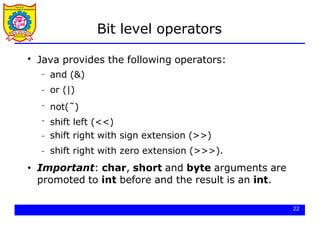
![Bit level operators
class Bits {
public static void main(String[] args) {
23
int x = 0x16;
int y = 0x33;
// 00000000000000000000000000010110
// 00000000000000000000000000110011
System.out.println(x & y);// 00000000000000000000000000010010
System.out.println(x | y);// 00000000000000000000000000110111
System.out.println(x̃); // 11111111111111111111111111101001
x &= 0xf;
System.out.println(x);
// 00000000000000000000000000000110
// 00000000000000000000000000000110
short s = 7;
System.out.println(s̃);
// 0000000000000111
// 11111111111111111111111111111000
}
}](https://image.slidesharecdn.com/javaprogramminghek-260116093746-5530a427/85/Java-Programming-core-java-and-basics-concepts-23-320.jpg)
![Bit level operators
class Bits2 {
public static void main(String[] args) {
24
int x = 0x16; //00000000000000000000000000010110
System.out.println(x << 3);//00000000000000000000000010110000
int y = 0xfe;
y >>= 4;
System.out.println(y);
//00000000000000000000000011111110
//00000000000000000000000000001111
//00000000000000000000000000001111
x = 9; //00000000000000000000000000001001
System.out.println(x >> 3);//00000000000000000000000000000001
System.out.println(x >>>3);//00000000000000000000000000000001
x = -9; //11111111111111111111111111110111
System.out.println(x >> 3);//11111111111111111111111111111110
System.out.println(x >>>3);//00011111111111111111111111111110
}
}](https://image.slidesharecdn.com/javaprogramminghek-260116093746-5530a427/85/Java-Programming-core-java-and-basics-concepts-24-320.jpg)

![Logical operators
class Logical {
public static void main(String[] args) {
int x = 12,y = 33;
double d = 2.45,e = 4.54;
System.out.println(x < y && d < e);
System.out.println(!(x < y));
boolean test = ’a’ > ’z’;
System.out.println(test || d - 2.1 > 0);
}
}
$ java Logical
true
false
true
26](https://image.slidesharecdn.com/javaprogramminghek-260116093746-5530a427/85/Java-Programming-core-java-and-basics-concepts-26-320.jpg)
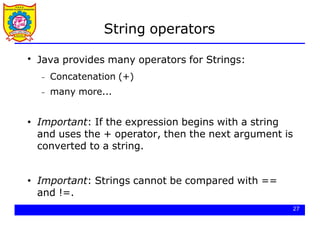
![String operators
$ java Strings
Hello World!
The value of i is 35 and the value of j is 44
28
class Strings {
public static void main(String[] args) {
String s1 = "Hello" + " World!";
System.out.println(s1);
int i = 35,j = 44;
System.out.println("The value of i is " + i +
" and the value of j is " + j);
}
}](https://image.slidesharecdn.com/javaprogramminghek-260116093746-5530a427/85/Java-Programming-core-java-and-basics-concepts-28-320.jpg)
![String operators
class Strings2 {
public static void main(String[] args) {
String s1 = "Hello";
String s2 = "Hello";
System.out.println(s1.equals(s2));
System.out.println(s1.equals("Hi"));
}
}
$ java Strings2
true
false
29](https://image.slidesharecdn.com/javaprogramminghek-260116093746-5530a427/85/Java-Programming-core-java-and-basics-concepts-29-320.jpg)
![Casting
●
30
Java performs a automatic type conversion in the
values when there is no risk for data to be lost.
class TestWide {
public static void main(String[] args) {
int a = ’x’; // ’x’ is a character
long b = 34; // 34 is an int
float c = 1002; // 1002 is an int
double d = 3.45F; // 3.45F is a float
}
}](https://image.slidesharecdn.com/javaprogramminghek-260116093746-5530a427/85/Java-Programming-core-java-and-basics-concepts-30-320.jpg)
![Casting
●
31
In order to specify conversions where data can be lost
it is necessary to use the cast operator.
class TestNarrow {
public static void main(String[] args) {
// a is a long
long a = 34;
int b = (int)a;
double d = 3.45;
float f = (float)d; // d is a double
}
}](https://image.slidesharecdn.com/javaprogramminghek-260116093746-5530a427/85/Java-Programming-core-java-and-basics-concepts-31-320.jpg)
![Control structures (if)
class If {
public static void main(String[] args) {
char c = ’x’;
if ((c >= ’a’ && c <= ’z’) || (c >= ’A’ && c <= ’Z’))
System.out.println("letter: " + c);
else
if (c >= ’0’ && c <= ’9’)
System.out.println("digit: " + c);
else {
System.out.println("the character is: " + c);
System.out.println("it is not a letter");
System.out.println("and it is not a digit");
}
}
}
$ java If
letter: x
33](https://image.slidesharecdn.com/javaprogramminghek-260116093746-5530a427/85/Java-Programming-core-java-and-basics-concepts-33-320.jpg)
![Control structures (while)
class While {
public static void main(String[] args) {
final float initialValue = 2.34F;
final float step = 0.11F;
final float limit = 4.69F;
float var = initialValue;
int counter = 0;
while (var < limit) {
var += step;
counter++;
}
System.out.println("Incremented " + counter + " times");
}
}
$ java While
Incremented 22 times
34](https://image.slidesharecdn.com/javaprogramminghek-260116093746-5530a427/85/Java-Programming-core-java-and-basics-concepts-34-320.jpg)
![Control structures (for)
$ java For
Incremented 22 times
35
class For {
public static void main(String[] args) {
final float initialValue = 2.34F;
final float step = 0.11F;
final float limit = 4.69F;
int counter = 0;
for (float var = initialValue;var < limit;var += step)
counter++;
System.out.println("Incremented " + counter + " times");
}
}](https://image.slidesharecdn.com/javaprogramminghek-260116093746-5530a427/85/Java-Programming-core-java-and-basics-concepts-35-320.jpg)
![Control structures (break/continue)
class BreakContinue {
public static void main(String[] args) {
for (int counter = 0;counter < 10;counter++) {
// start a new iteration if the counter is odd
if (counter % 2 == 1) continue;
// abandon the loop if the counter is equal to 8
if (counter == 8) break;
// print the value
System.out.println(counter);
}
System.out.println("done.");
}
}
$ java BreakContinue
0 2 4 6 done.
36](https://image.slidesharecdn.com/javaprogramminghek-260116093746-5530a427/85/Java-Programming-core-java-and-basics-concepts-36-320.jpg)
![Control structures (switch)
class Switch {
public static void main(String[] args) {
boolean leapYear = true;
int days = 0;
for(int month = 1;month <= 12;month++) {
switch(month) {
case 1: // months with 31 days
case 3:
case 5:
case 7:
case 8:
case 10:
case 12:
days += 31;
break;
37](https://image.slidesharecdn.com/javaprogramminghek-260116093746-5530a427/85/Java-Programming-core-java-and-basics-concepts-37-320.jpg)
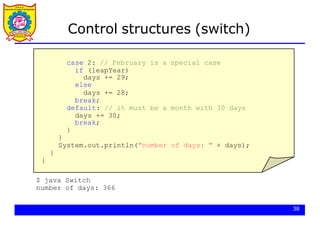


![41
Scanner example
import java.util.*; // so that I can use Scanner
public class UserInputExample {
public static void main(String[] args) {
Scanner console = new Scanner(System.in);
System.out.print("How old are you? ");
int age = console.nextInt();
int years = 65 - age;
System.out.println(years + " years until retirement!");
}
}
Console (user input underlined):
How old are you?
53 years until retirement!
12
age 12
years 53](https://image.slidesharecdn.com/javaprogramminghek-260116093746-5530a427/85/Java-Programming-core-java-and-basics-concepts-41-320.jpg)
![42
Scanner example 2
import java.util.*; // so that I can use Scanner
public class ScannerMultiply {
public static void main(String[] args) {
Scanner console = new Scanner(System.in);
System.out.print("Please type two numbers: ");
int num1 = console.nextInt();
int num2 = console.nextInt();
int product = num1 * num2;
System.out.println("The product is " + product);
}
}
Output (user input underlined):
Please type two numbers: 8 6
The product is 48
The Scanner can read multiple values from one line.](https://image.slidesharecdn.com/javaprogramminghek-260116093746-5530a427/85/Java-Programming-core-java-and-basics-concepts-42-320.jpg)

![44
Scanners as parameters
If many methods need to read input, declare a Scanner in main
and pass it to the other methods as a parameter.
public static void main(String[] args) {
Scanner console = new Scanner(System.in);
int sum = readSum3(console);
System.out.println("The sum is " + sum);
}
// Prompts for 3 numbers and returns their sum.
public static int readSum3(Scanner console) {
System.out.print("Type 3 numbers: ");
int num1 = console.nextInt();
int num2 = console.nextInt();
int num3 = console.nextInt();
return num1 + num2 + num3;
}](https://image.slidesharecdn.com/javaprogramminghek-260116093746-5530a427/85/Java-Programming-core-java-and-basics-concepts-44-320.jpg)
![Arrays
●
Arrays can be used to store a number of elements
of the same type:
● Important: The declaration does not specify a size.
However, it can be inferred when initialized:
int[] a;
float[] b;
String[] c;
// an unitialized array of integers
// an unitialized array of floats
// an unitialized array of Strings
int[] a = {13,56,2034,4,55};
float[] b = {1.23F,2.1F};
String[] c = {"Java","is","great"};
39
// size: 5
// size: 2
// size: 3](https://image.slidesharecdn.com/javaprogramminghek-260116093746-5530a427/85/Java-Programming-core-java-and-basics-concepts-45-320.jpg)
![Arrays
●
40
Other possibility to allocate space for arrays
consists in the use of the operator new:
● Components of the arrays are initialized with
default values:
–
–
– 0 for numeric type elements,
'0' for characters
null for references.
int i = 3,j = 5;
double[] d; // unitialized array of doubles
d = new double[i+j]; // array of 8 doubles](https://image.slidesharecdn.com/javaprogramminghek-260116093746-5530a427/85/Java-Programming-core-java-and-basics-concepts-46-320.jpg)
![Arrays
●
Components can be accessed with an integer index
with values from 0 to length minus 1.
●
Every array has a member called length that can
be used to get the length of the array:
a[2] = 1000; // modify the third element of a
int len = a.length; // get the size of the array
41](https://image.slidesharecdn.com/javaprogramminghek-260116093746-5530a427/85/Java-Programming-core-java-and-basics-concepts-47-320.jpg)
![Arrays
class Arrays {
public static void main(String[] args) {
int[] a = {2,4,3,1};
// compute the summation of the elements of a
int sum = 0;
for(int i = 0;i < a.length;i++) sum += a[i];
// create an array of the size computed before
float[] d = new float[sum];
for(int i = 0;i < d.length;i++) d[i] = 1.0F / (i+1);
// print values in odd positions
for(int i = 1;i < d.length;i += 2)
System.out.println("d[" + i + "]=" + d[i]);
}
}
$ java Arrays
d[1]=0.5 d[3]=0.25 d[5]=0.16666667 d[7]=0.125 d[9]=0.1
42](https://image.slidesharecdn.com/javaprogramminghek-260116093746-5530a427/85/Java-Programming-core-java-and-basics-concepts-48-320.jpg)
![Command line arguments
●
We have seen that the method main has to be
defined as follows:
●
Through the array argument, the program can get
access to the command line arguments
public static void main(String[] args)
43](https://image.slidesharecdn.com/javaprogramminghek-260116093746-5530a427/85/Java-Programming-core-java-and-basics-concepts-49-320.jpg)
![Command line arguments
class CommandArguments {
public static void main(String[] args) {
for(int i = 0;i < args.length;i++)
System.out.println(args[i]);
}
}
$ java
Hello
World
CommandArguments Hello World
$ java CommandArguments
$ java
I
have
25
cents
CommandArguments I have 25 cents
args
[0][1]
"Hello"
44
"World"](https://image.slidesharecdn.com/javaprogramminghek-260116093746-5530a427/85/Java-Programming-core-java-and-basics-concepts-50-320.jpg)
![Command line arguments
class Add {
public static void main(String[] args) {
if (args.length != 2) {
System.out.println("Error");
System.exit(0);
}
int arg1 = Integer.parseInt(args[0]);
int arg2 = Integer.parseInt(args[1]);
System.out.println(arg1 + arg2);
}
}
$ java Add 234 12
246
$ java Add 24
Error args
"234"
"12"
[0][1]
args
"24"
45
[0]](https://image.slidesharecdn.com/javaprogramminghek-260116093746-5530a427/85/Java-Programming-core-java-and-basics-concepts-51-320.jpg)
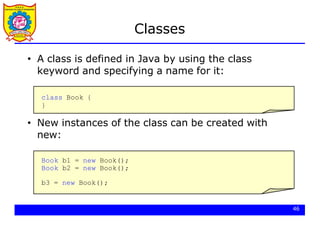

![Classes
class ExampleBooks {
public static void main(String[] args) {
Book b = new Book();
b.title = "Thinking in Java";
b.author = "Bruce Eckel";
b.numberOfPages = 1129;
System.out.println(b.title + " : " + b.author +
" : " + b.numberOfPages);
}
}
class Book {
String title;
String author;
int numberOfPages;
}
"Thinking in Java"
"Bruce Eckel"
1129
title
author
numberOfPages
b
48](https://image.slidesharecdn.com/javaprogramminghek-260116093746-5530a427/85/Java-Programming-core-java-and-basics-concepts-54-320.jpg)

![Constructors
class Book {
String title;
String author;
int numberOfPages;
Book(String tit,String aut,int num) {
title = tit;
author = aut;
numberOfPages = num;
}
}
class ExampleBooks2 {
public static void main(String[] args) {
Book b = new Book("Thinking in Java","Bruce Eckel",1129);
System.out.println(b.title + " : " + b.author +
" : " + b.numberOfPages);
}
}
50](https://image.slidesharecdn.com/javaprogramminghek-260116093746-5530a427/85/Java-Programming-core-java-and-basics-concepts-56-320.jpg)


![Multiple constructors
54
class ExampleBooks3 {
public static void main(String[] args) {
Book b1,b2;
b1 = new Book("Thinking in Java","Bruce Eckel",1129);
System.out.println(b1.title + " : " + b1.author +
" : " + b1.numberOfPages + " : " + b1.ISBN);
b2 = new Book("Thinking in Java","Bruce Eckel",1129,
"0-13-027363-5");
System.out.println(b2.title + " : " + b2.author +
" : " + b2.numberOfPages + " : " + b2.ISBN);
}
}
$ java ExampleBooks3
Thinking in Java : Bruce Eckel : 1129 : unknown
Thinking in Java : Bruce Eckel : 1129 : 0-13-027362-5](https://image.slidesharecdn.com/javaprogramminghek-260116093746-5530a427/85/Java-Programming-core-java-and-basics-concepts-60-320.jpg)

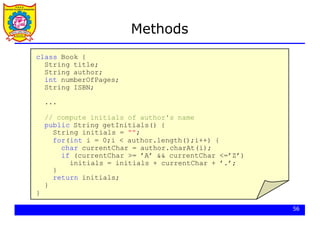
![Methods
class ExampleBooks4 {
public static void main(String[] args) {
Book b;
b = new Book("Thinking in Java","Bruce Eckel",1129);
System.out.println("Initials: " + b.getInitials());
}
}
$ java ExampleBooks4
Initials: B.E. "Thinking in Java"
"Bruce Eckel"
1129
title
author
numberOfPages
ISBN "unknown"
b
57](https://image.slidesharecdn.com/javaprogramminghek-260116093746-5530a427/85/Java-Programming-core-java-and-basics-concepts-63-320.jpg)
![Methods
58
class ExampleBooks5 {
public static void main(String[] args) {
Book[] a = new Book[3];
a[0] = new Book("Thinking in Java","Bruce Eckel",1129);
a[1] = new Book("Java in a nutshell","David Flanagan",353);
a[2] = new Book("Java network programming",
"Elliott Rusty Harold",649);
for(int i = 0;i < a.length;i++)
System.out.println("Initials: " + a[i].getInitials());
}
}
$ java ExampleBooks5
Initials: B.E.
Initials: D.F.
Initials: E.R.H.](https://image.slidesharecdn.com/javaprogramminghek-260116093746-5530a427/85/Java-Programming-core-java-and-basics-concepts-64-320.jpg)
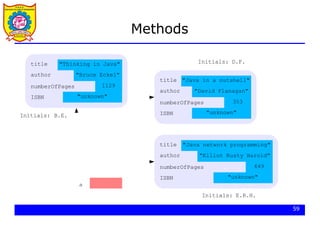
![Equality and equivalence
60
class ExampleBooks6 {
public static void main(String[] args) {
Book b1,b2;
b1 = new Book("Thinking in Java","Bruce Eckel",1129);
b2 = new Book("Thinking in Java","Bruce Eckel",1129);
if (b1 == b2)
System.out.println("The two books are the same");
else
System.out.println("The two books are different");
}
}
$ java ExampleBooks6
The two books are different](https://image.slidesharecdn.com/javaprogramminghek-260116093746-5530a427/85/Java-Programming-core-java-and-basics-concepts-66-320.jpg)

![Equality and equivalence
62
class ExampleBooks6a {
public static void main(String[] args) {
Book b1,b2;
b1 = new Book("Thinking in Java","Bruce Eckel",1129);
b2 = b1;
if (b1 == b2)
System.out.println("The two books are the same");
else
System.out.println("The two books are different");
}
}
$ java ExampleBooks6a
The two books are the same](https://image.slidesharecdn.com/javaprogramminghek-260116093746-5530a427/85/Java-Programming-core-java-and-basics-concepts-68-320.jpg)


![Equality and equivalence
65
class ExampleBooks7 {
public static void main(String[] args) {
Book b1,b2;
b1 = new Book("Thinking in Java","Bruce Eckel",1129);
b2 = new Book("Thinking in Java","Bruce Eckel",1129);
if (b1.equals(b2))
System.out.println("The two books are the same");
else
System.out.println("The two books are different");
}
}
$ java ExampleBooks7
The two books are the same](https://image.slidesharecdn.com/javaprogramminghek-260116093746-5530a427/85/Java-Programming-core-java-and-basics-concepts-71-320.jpg)


![Class variables
68
class ExampleBooks8 {
public static void main(String[] args) {
Book b1,b2;
b1 = new Book("Thinking in Java","Bruce Eckel",1129);
b2 = new Book("Java in a nutshell","David Flanagan",353);
b1.setOwner("Carlos Kavka");
System.out.println("Owner of book b1: " + b1.getOwner());
System.out.println("Owner of book b2: " + b2.getOwner());
}
}
$ java ExampleBooks8
Owner of book b1: Carlos Kavka
Owner of book b2: Carlos Kavka](https://image.slidesharecdn.com/javaprogramminghek-260116093746-5530a427/85/Java-Programming-core-java-and-basics-concepts-74-320.jpg)


![Class methods
71
class ExampleBooks9 {
public static void main(String[] args) {
Book b1 = new Book("Thinking in Java","Bruce Eckel",1129);
System.out.println(b1.description());
System.out.println(Book.description());
}
}
$ java ExampleBooks9
Book instances can store information on books
Book instances can store information on books](https://image.slidesharecdn.com/javaprogramminghek-260116093746-5530a427/85/Java-Programming-core-java-and-basics-concepts-77-320.jpg)

![A static application
73
class AllStatic {
static int x;
static String s;
public static String asString(int aNumber) {
return "" + aNumber;
}
public static void main(String[] args) {
x = 165;
s = asString(x);
System.out.println(s);
}
}
$ java AllStatic
165](https://image.slidesharecdn.com/javaprogramminghek-260116093746-5530a427/85/Java-Programming-core-java-and-basics-concepts-79-320.jpg)

![Instance initialization
class Values {
int x;
float f;
String s;
Book b;
}
class InitialValues {
public static void main(String[] args) {
Values v = new Values();
System.out.println(v.x);
System.out.println(v.f);
System.out.println(v.s);
System.out.println(v.b);
}
}
$ java InitialValues
0 0.0 null null
75](https://image.slidesharecdn.com/javaprogramminghek-260116093746-5530a427/85/Java-Programming-core-java-and-basics-concepts-81-320.jpg)
![Instance initialization
class Values {
int x = 2;
float f = inverse(x);
String s;
Book b;
Values(String str) { s = str; }
public float inverse(int value) { return 1.0F / value; }
}
class InitialValues2 {
public static void main(String[] args) {
Values v = new Values("hello");
System.out.println("" + v.x + "t" + v.f);
System.out.println("" + v.s + "t" + v.b);
}
}
$ java InitialValues2
2 0.5
hello null
76](https://image.slidesharecdn.com/javaprogramminghek-260116093746-5530a427/85/Java-Programming-core-java-and-basics-concepts-82-320.jpg)


![An example: complex class
class TestComplex {
public static void main(String[] args) {
Complex a = new Complex(1.33,4.64);
Complex b = new Complex(3.18,2.74);
Complex c = a.add(b);
System.out.println("c=a+b=" + c.getReal()
+ " " + c.getImaginary());
Complex d = c.sub(a);
System.out.println("d=c-a=" + d.getReal()
+ " " + d.getImaginary());
}
}
$ java TestComplex
c=a+b= 4.51 7.38 d=c-a= 3.18 2.74
1.33
4.64
3.18
2.74
4.51
7.38
3.18
2.74
a
80
b
c
d](https://image.slidesharecdn.com/javaprogramminghek-260116093746-5530a427/85/Java-Programming-core-java-and-basics-concepts-86-320.jpg)
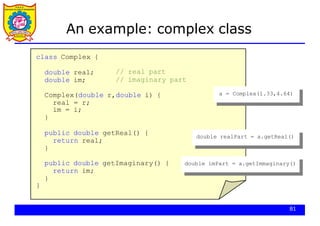
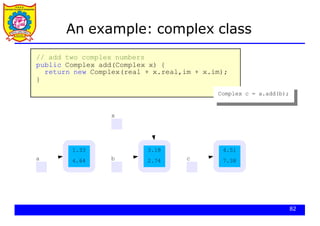
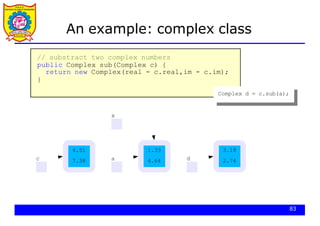


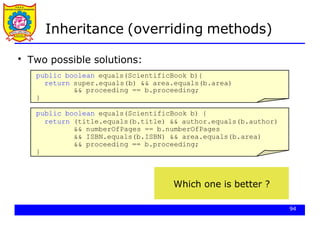


![Inheritance (new methods)
97
class TestScientificBooks {
public static void main(String[] args) {
ScientificBook sb1,sb2;
sb1 = new ScientificBook("Neural Networks","Simon Haykin",
696,"0-02-352761-7",
"Artificial Intelligence");
sb2 = new ScientificBook("Neural Networks","Simon Haykin",
696,"0-02-352761-7",
"Artificial Intelligence");
sb2.setProceeding();
System.out.println(sb1.getInitials());
System.out.println(sb1.equals(sb2));
System.out.println(sb2.description());
}
}
$ java TestScientificBooks
S.H. false
ScientificBook instances can store information on scientific books](https://image.slidesharecdn.com/javaprogramminghek-260116093746-5530a427/85/Java-Programming-core-java-and-basics-concepts-103-320.jpg)


![instanceof and getClass()
100
class TestClass {
public static void main(String[] args) {
Book b1 = new Book("Thinking in Java","Bruce Eckel",1129);
ScientificBook sb1 = new ScientificBook("Neural Networks",
"Simon Haykin",696,"0-02-352761-7",
"Artificial Intelligence");
System.out.println(b1.getClass().getName());
System.out.println(sb1.getClass().getName());
System.out.println(b1 instanceof Book);
System.out.println(sb1 instanceof Book);
System.out.println(b1 instanceof ScientificBook);
System.out.println(sb1 instanceof ScientificBook);
}
}
$ java TestClass
class Book
class ScientificBook
true true false true](https://image.slidesharecdn.com/javaprogramminghek-260116093746-5530a427/85/Java-Programming-core-java-and-basics-concepts-106-320.jpg)

![Packages
●
The standard classes in the system are organized in
packages:
import java.util.*; // or import java.util.Date
class TestDate {
public static void main(String[] args) {
System.out.println(new Date());
}
}
$ java TestDate
Wed Oct 25 09:48:54 CEST 2006
102](https://image.slidesharecdn.com/javaprogramminghek-260116093746-5530a427/85/Java-Programming-core-java-and-basics-concepts-108-320.jpg)
![Packages
●
Package name is defined by using the keyword
package as the first instruction:
package myBook;
class Book {
String title;
String author;
int numberOfPages;
}
package myBook;
103
class ExampleBooks {
public static void main(String[] args) {
Book b = new Book();
b.title = "Thinking in Java";
b.author = "Bruce Eckel";
b.numberOfPages = 1129;
System.out.println(b.title + " : " +
b.author + " : " + b.numberOfPages);
}
}
Book.java
ExampleBooks.java](https://image.slidesharecdn.com/javaprogramminghek-260116093746-5530a427/85/Java-Programming-core-java-and-basics-concepts-109-320.jpg)


![Final and abstract
●
Creation of a serial board instance:
class TestBoards1 {
public static void main(String[] args) {
IOSerialBoard serial = new IOSerialBoard("my first port",
0x2f8);
serial.initialize();
serial.read();
serial.close();
}
}
114
$ java TestBoards1
IOBoard constructor
IOSerialBoard constructor
initialize method in IOSerialBoard
read method in IOSerialBoard
close method in IOSerialBoard](https://image.slidesharecdn.com/javaprogramminghek-260116093746-5530a427/85/Java-Programming-core-java-and-basics-concepts-120-320.jpg)
![Polymorphism
class TestBoards2 {
public static void main(String[] args) {
IOBoard[] board = new IOBoard[3];
board[0] = new IOSerialBoard("my first port",0x2f8);
board[1] = new IOEthernetBoard("my second port",0x3ef8dda8);
board[2] = new IOEthernetBoard("my third port",0x3ef8dda9);
for(int i = 0;i < 3;i++)
board[i].initialize();
for(int i = 0;i < 3;i++)
board[i].read();
for(int i = 0;i < 3;i++)
board[i].close();
}
}
first second
third
[0][1][2]
115](https://image.slidesharecdn.com/javaprogramminghek-260116093746-5530a427/85/Java-Programming-core-java-and-basics-concepts-121-320.jpg)


![Exceptions
●
The usual behavior on runtime errors is to abort the
execution:
class TestExceptions1 {
public static void main(String[] args) {
String s = "Hello";
System.out.print(s.charAt(10));
}
}
$ java TestExceptions1
Exception in thread "main"
java.lang.StringIndexOutOfBoundsException:
String index out of range: 10
at java.lang.String.charAt(String.java:499)
at TestExceptions1.main(TestExceptions1.java:11)
120](https://image.slidesharecdn.com/javaprogramminghek-260116093746-5530a427/85/Java-Programming-core-java-and-basics-concepts-126-320.jpg)
![Exceptions
●
The exception can be trapped:
class TestExceptions2 {
public static void main(String[] args) {
121
String s = "Hello";
try {
System.out.print(s.charAt(10));
} catch (Exception e) {
System.out.println("No such position");
}
}
$ java TestExceptions2
No such position](https://image.slidesharecdn.com/javaprogramminghek-260116093746-5530a427/85/Java-Programming-core-java-and-basics-concepts-127-320.jpg)
![Exceptions
●
It is possible to specify interest on a particular
exception:
class TestExceptions3 {
public static void main(String[] args) {
String s = "Hello";
try {
System.out.print(s.charAt(10));
} catch (StringIndexOutOfBoundsException e) {
System.out.println("No such position");
}
}
$ java TestExceptions3
No such position
122](https://image.slidesharecdn.com/javaprogramminghek-260116093746-5530a427/85/Java-Programming-core-java-and-basics-concepts-128-320.jpg)
![Exceptions
●
It is possible to send messages to an exception object:
class TestExceptions4 {
public static void main(String[] args) {
123
String s = "Hello";
try {
System.out.print(s.charAt(10));
} catch (StringIndexOutOfBoundsException e) {
System.out.println("No such position");
System.out.println(e.toString());
}
}
$ java TestExceptions4
No such position
java.lang.StringIndexOutOfBoundsException:
String index out of range: 10](https://image.slidesharecdn.com/javaprogramminghek-260116093746-5530a427/85/Java-Programming-core-java-and-basics-concepts-129-320.jpg)


![Input - Output
import java.io.*;
class WriteBytes {
public static void main(String[] args) {
int data[] = { 10,20,30,40,255 };
FileOutputStream f;
try {
f = new FileOutputStream("file1.data");
for(int i = 0;i < data.length;i++)
f.write(data[i]);
f.close();
} catch (IOException e) {
System.out.println("Error with files:"+e.toString());
}
}
}
byte oriented stream
131](https://image.slidesharecdn.com/javaprogramminghek-260116093746-5530a427/85/Java-Programming-core-java-and-basics-concepts-137-320.jpg)
![Input - Output
import java.io.*;
class ReadBytes {
public static void main(String[] args) {
FileInputStream f;
try {
f = new FileInputStream("file1.data");
int data;
while((data = f.read()) != -1)
System.out.println(data);
f.close();
} catch (IOException e) {
System.out.println("Error with files:"+e.toString());
}
}
}
$ java ReadBytes
10 20 30 40 255
byte oriented stream
132](https://image.slidesharecdn.com/javaprogramminghek-260116093746-5530a427/85/Java-Programming-core-java-and-basics-concepts-138-320.jpg)
![Input - Output
import java.io.*;
class WriteArrayBytes {
public static void main(String[] args) {
byte data[] = { 10,20,30,40,-128 };
FileOutputStream f;
try {
f = new FileOutputStream("file1.data");
f.write(data,0,data.length);
f.close();
} catch (IOException e) {
System.out.println("Error with files:"+e.toString());
}
}
}
byte oriented stream
133](https://image.slidesharecdn.com/javaprogramminghek-260116093746-5530a427/85/Java-Programming-core-java-and-basics-concepts-139-320.jpg)
![Input - Output
import java.io.*;
class WriteBufferedBytes {
public static void main(String[] args) {
int data[] = { 10,20,30,40,255 };
FileOutputStream f;
BufferedOutputStream bf;
try {
f = new FileOutputStream("file1.data");
bf = new BufferedOutputStream(f);
for(int i = 0;i < data.length;i++)
bf.write(data[i]);
bf.close();
} catch (IOException e) {
System.out.println("Error with files:"+e.toString());
}
}
}
buffered byte oriented stream
134](https://image.slidesharecdn.com/javaprogramminghek-260116093746-5530a427/85/Java-Programming-core-java-and-basics-concepts-140-320.jpg)
![Input - Output
import java.io.*;
class ReadBufferedBytes {
public static void main(String[] args) {
FileInputStream f; BufferedInputStream bf;
try {
f = new FileInputStream("file1.data");
bf = new BufferedInputStream(f);
int data;
while((data = bf.read()) != -1)
System.out.println(data);
bf.close();
} catch (IOException e) {
System.out.println("Error with files:"+e.toString());
}
}
}
$ java ReadBufferedBytes
10 20 30 40 255
buffered byte oriented stream
135](https://image.slidesharecdn.com/javaprogramminghek-260116093746-5530a427/85/Java-Programming-core-java-and-basics-concepts-141-320.jpg)

![Input - Output
data buffered byte oriented stream
137
import java.io.*;
class WriteData {
public static void main(String[] args) {
double data[] = { 10.3,20.65,8.45,-4.12 };
FileOutputStream f; BufferedOutputStream bf;
DataOutputStream ds;
try {
f = new FileOutputStream("file1.data");
bf = new BufferedOutputStream(f);
ds = new DataOutputStream(bf);
ds.writeInt(data.length);
for(int i = 0;i < data.length;i++)
ds.writeDouble(data[i]);
ds.writeBoolean(true); ds.close();
} catch (IOException e) {
System.out.println("Error with files:"+e.toString());
}
}](https://image.slidesharecdn.com/javaprogramminghek-260116093746-5530a427/85/Java-Programming-core-java-and-basics-concepts-143-320.jpg)
![Input - Output
data buffered byte oriented stream
import java.io.*;
class ReadData {
public static void main(String[] args) {
FileOutputStream f; BufferedOutputStream bf;
DataOutputStream ds;
try {
f = new FileInputStream("file1.data");
bf = new BufferedInputStream(f);
ds = new DataInputStream(bf);
int length = ds.readInt();
for(int i = 0;i < length;i++)
System.out.println(ds.readDouble());
System.out.println(ds.readBoolean());
ds.close();
} catch (IOException e) {
System.out.println("Error with files:"+e.toString());
}
}
$ java ReadData
10.3
20.65
8.45
-4.12
true
138](https://image.slidesharecdn.com/javaprogramminghek-260116093746-5530a427/85/Java-Programming-core-java-and-basics-concepts-144-320.jpg)
![Input - Output
139
●
The character oriented streams can be used to read
and write characters.
●
There exists three methods that can be used to write
data into this kind of streams:
–
–
– write(String,int,int)
write(char[],int,int)
newLine()](https://image.slidesharecdn.com/javaprogramminghek-260116093746-5530a427/85/Java-Programming-core-java-and-basics-concepts-145-320.jpg)
![Input - Output
buffered character oriented stream
140
import java.io.*;
class WriteText {
public static void main(String[] args) {
FileWriter f;
BufferedWriter bf;
try {
f = new FileWriter("file1.text");
bf = new BufferedWriter(f);
String s = "Hello World!";
bf.write(s,0,s.length());
bf.newLine();
bf.write("Java is nice!!!",8,5);
bf.newLine();
bf.close();
} catch (IOException e) {
System.out.println("Error with files:"+e.toString());
}
}](https://image.slidesharecdn.com/javaprogramminghek-260116093746-5530a427/85/Java-Programming-core-java-and-basics-concepts-146-320.jpg)
![Input - Output
buffered character oriented stream
import java.io.*;
class ReadText {
public static void main(String[] args) {
FileReader f;
BufferedReader bf;
try {
f = new FileReader("file1.text");
bf = new BufferedReader(f);
String s;
while ((s = bf.readLine()) != null)
System.out.println(s);
bf.close();
} catch (IOException e) {
System.out.println("Error with files:"+e.toString());
}
}
$ java ReadText
HelloWorld!
nice!
141](https://image.slidesharecdn.com/javaprogramminghek-260116093746-5530a427/85/Java-Programming-core-java-and-basics-concepts-147-320.jpg)
![Input - Output
standard input
import java.io.*;
class StandardInput {
public static void main(String[] args) {
InputStreamReader isr;
BufferedReader br;
try {
isr = new InputStreamReader(System.in);
br = new BufferedReader(isr);
String line;
while ((line = br.readLine()) != null)
System.out.println(line);
} catch (IOException e) {
System.out.println("Error with standard input");
}
}
correct lecture notes
142](https://image.slidesharecdn.com/javaprogramminghek-260116093746-5530a427/85/Java-Programming-core-java-and-basics-concepts-148-320.jpg)
![Input - Output
standard input with scanner
import java.io.*;
class ReadWithScanner {
public static void main(String[] args) {
try {
Scanner sc = new Scanner(System.in);
int sum = 0;
while (sc.hasNextInt()) {
int anInt = sc.nextInt();
sum += anInt;
}
System.out.println(sum);
} catch (IOException e) {
System.out.println("Error with standard input");
}
}
$ java ReadWithScanner
11
9
^D
20
143](https://image.slidesharecdn.com/javaprogramminghek-260116093746-5530a427/85/Java-Programming-core-java-and-basics-concepts-149-320.jpg)


![Threads
146
class TestThreads {
public static void main(String[] args) {
CharThread t1 = new CharThread(’a’);
CharThread t2 = new CharThread(’b’);
t1.start();
t2.start();
}
}
$ java TestThreads
a
b
a
b
...](https://image.slidesharecdn.com/javaprogramminghek-260116093746-5530a427/85/Java-Programming-core-java-and-basics-concepts-152-320.jpg)
![Threads
class ProducerConsumer {
public static void main(String[] args) {
Buffer buffer = new Buffer(10);
Producer prod = new Producer(buffer);
Consumer cons = new Consumer(buffer);
prod.start();
cons.start();
}
}
Producer Consumer
Buffer
●
147
A typical producer - consumer application:](https://image.slidesharecdn.com/javaprogramminghek-260116093746-5530a427/85/Java-Programming-core-java-and-basics-concepts-153-320.jpg)


![Threads
class Buffer {
double buffer[];
int head = 0,tail = 0,size = 0,numElements = 0;
public Buffer(int s) {
buffer = new double[s];
size = s;
}
public void insert(double element) {
buffer[tail] = element; tail = (tail + 1) % size;
numElements++;
}
public double delete() {
double value = buffer[head]; head = (head + 1) % size;
numElements--;
return value;
}
}
However... it does not work
151](https://image.slidesharecdn.com/javaprogramminghek-260116093746-5530a427/85/Java-Programming-core-java-and-basics-concepts-157-320.jpg)


![Threads
156
public synchronized void insert(double element) {
if (numElements == size) {
try {
wait();
} catch(InterruptedException e) {
System.out.println("Interrupted");
}
}
buffer[tail] = element;
tail = (tail + 1) % size;
numElements++;
notify();
}](https://image.slidesharecdn.com/javaprogramminghek-260116093746-5530a427/85/Java-Programming-core-java-and-basics-concepts-162-320.jpg)
![Threads
157
public synchronized double delete() {
if (numElements == 0) {
try {
wait();
} catch(InterruptedException e) {
System.out.println("Interrupted");
}
}
double value = buffer[head];
head = (head + 1) % size;
numElements--;
notify();
return value;
}](https://image.slidesharecdn.com/javaprogramminghek-260116093746-5530a427/85/Java-Programming-core-java-and-basics-concepts-163-320.jpg)


![Ant
163
<?xml version="1.0"?>
<!-- first build file -->
<project name="HelloWorld" default="build" basedir=".">
<target name="build">
<javac srcdir="." />
</target>
</project>
# ant
Buildfile: build.xml
build:
[javac] Compiling 1 source file
BUILD SUCCESSFUL
Total time: 3 seconds
●
An example of a build.xml file:](https://image.slidesharecdn.com/javaprogramminghek-260116093746-5530a427/85/Java-Programming-core-java-and-basics-concepts-169-320.jpg)


![Ant
169
<target name="clean" description="clean up">
<delete dir="${build-dir}"/>
<delete dir="${dist-dir}"/>
</target>
</project>
$ ant
Buildfile: build.xml
init:
[mkdir] Created dir: ComplexNumbers/build
build:
[javac] Compiling 2 source files to ComplexNumbers/build
dist:
[mkdir] Created dir: ComplexNumbers/dist
[jar] Building jar: ComplexNumbers/dist/complex.jar
BUILD SUCCESSFUL
Total time: 11 seconds](https://image.slidesharecdn.com/javaprogramminghek-260116093746-5530a427/85/Java-Programming-core-java-and-basics-concepts-175-320.jpg)


![Java on the TINI
173
●
Step 4: execution
# telnet tini
Connected to tini.
Escape character is ’ˆ]’.
Welcome to slush. (Version 1.17)
tini00a93c login: root
tini00a93c password:
TINI /> java HelloWorld.tini
HelloWorld](https://image.slidesharecdn.com/javaprogramminghek-260116093746-5530a427/85/Java-Programming-core-java-and-basics-concepts-179-320.jpg)


![TiniAnt
176
$ ant
Buildfile: build.xml
init:
[mkdir] Created dir: HelloWorldAnt/build
build:
[javac] Compiling 1 source file to HelloWorldAnt/build
convert:
[tini] TINIConvertor (KLA)
[tini] Version 1.24 for TINI 1.1 (Beta 2 and later ONLY!!!)
[tini] Built on or around March 20, 2002
[tini] Copyright (C) 1996 - 2002 Dallas Semiconductor Corp.
[tini] Loading class HelloWorldAnt/build/HelloWorld.class
from file HelloWorldAnt/build/HelloWorld.class
[tini] Getting UNMT...there are 0 user native methods
[tini] Class HelloWorld, size 125, CNUM 8000, TH Contrib: 19
[tini] Initial length of the application: 125
[tini] Output file size : 472
[tini] Number of string table entries: 1
BUILD SUCCESSFUL
Total time: 8 seconds](https://image.slidesharecdn.com/javaprogramminghek-260116093746-5530a427/85/Java-Programming-core-java-and-basics-concepts-182-320.jpg)


