IP SOURCE GUARD Security
•IPSG helps to prevent IP spoofing, which is when an attacker claims
the IP address of a server or device on your network.
•By pretending to be that device, the attacker could potentially direct
sensitive data towards a port he’s connected to.
•Today, we’ll see how IPSG can mitigate this hijacking attack.
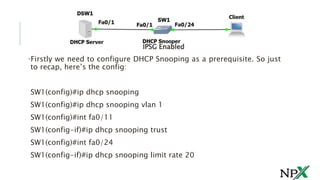
•Firstly we need to configure DHCP Snooping as a prerequisite. So just
to recap, here’s the config:
SW1(config)#ip dhcp snooping
SW1(config)#ip dhcp snooping vlan 1
SW1(config)#int fa0/11
SW1(config-if)#ip dhcp snooping trust
SW1(config)#int fa0/24
SW1(config-if)#ip dhcp snooping limit rate 20
IPSG Enabled
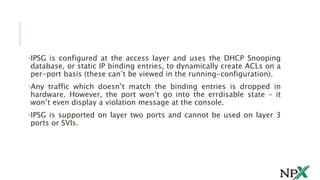
•IPSG is configured at the access layer and uses the DHCP Snooping
database, or static IP binding entries, to dynamically create ACLs on a
per-port basis (these can’t be viewed in the running-configuration).
•Any traffic which doesn’t match the binding entries is dropped in
hardware. However, the port won’t go into the errdisable state – it
won’t even display a violation message at the console.
•IPSG is supported on layer two ports and cannot be used on layer 3
ports or SVIs.
•Configuration commands vary slightly between Catalyst 6500/4500
and lower-end switches. We used a 3550 for this example. When
enabling IPSG, there are two checks which can be put in place.
1. The first is to verify that the source IP address in the incoming
packet matches the IP binding in the DHCP Snooping database (or
static binding), and
2. the second check uses port security to verify the source MAC
address is what the switch expects it to be.
Let’s go ahead and enable IPSG with the IP source check first:
SW1(config)#int fa0/24
SW1(config-if)#ip verify source
Now that that’s enabled, we verify:
SW1#sh ip verify source
Interface Filter-type Filter-mode IP-address Mac-address Vlan
——— ———– ———– ————— —————– ———-
Fa0/24 ip active 172.16.1.11
1
We can see that the “Filter-type” is “ip”, so our IP source check is
functioning. Now, in order to use the MAC address check we must first
enable port security on access interface fa0/24:
SW1(config)#int fa0/24
SW1(config-if)#switchport port-security
SW1(config-if)#ip verify source port-security
The last line of configuration has the port-security parameter attached to
it which adds the MAC check. Let’s verify again:
SW1#sh ip verify source
Interface Filter-type Filter-mode IP-address Mac-address
Vlan
——— ———– ———– ————— —————– ———-
Fa0/24 ip-mac active 172.16.1.11 00:1B:78:4C:05:28
1
We can see that the “Filter-type” is now “ip-mac”, and our client’s MAC
address is listed in the Mac-address column. But what if we have some
hosts on our network with static IPs, or we’re not running DHCP? We can
create static bindings instead of using the DHCP Snooping database.
Let’s create one for interface fa0/14:
When using static bindings, we still need to enable DHCP Snooping
for the VLAN the hosts reside in.
SW1#sh mac address-table int fa0/14
Vlan Mac Address Type Ports
—- ———– ——– —–
1 5c26.0a70.c59a DYNAMIC Fa0/14
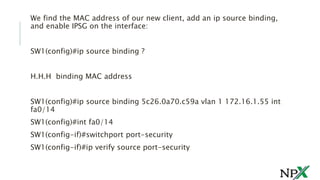
We find the MAC address of our new client, add an ip source binding,
and enable IPSG on the interface:
SW1(config)#ip source binding ?
H.H.H binding MAC address
SW1(config)#ip source binding 5c26.0a70.c59a vlan 1 172.16.1.55 int
fa0/14
SW1(config)#int fa0/14
SW1(config-if)#switchport port-security
SW1(config-if)#ip verify source port-security
Let’s verify our bindings and the IPSG table:
We can see both our DHCP Snooping database entry and our static IP source
binding appear in the tables.
•For IPSG to be effective, it needs to be enabled on all access
ports at the network edge, not just those hosting devices we
want to protect.
•When IPSG is enabled, there must either be a static IP/MAC
binding or an entry in the DHCP Snooping binding table for
every interface or traffic will be dropped.
•If IPSG was not enabled on port fa0/21 for example, an attacker
could connect to that port and assume the IP address of a
machine on the network. Sure, this could be mitigated with a
tight port-security configuration, but there would still be a hole
in the IPSG implementation.
•The best solution uses IPSG, DHCP Snooping, Port-Security and
Dynamic ARP configuration hand-in-hand.
FOLLOW US @
12
 www.facebook.com/NetProtocolXpert
 www.instagram.com/netprotocol_xper
t
 plus.google.com/collection/k8HMDB
 twitter.com/NPX_cisco
 www.linkedin.com/company/netproto
col-xpert
 netprotocolxpert.blogspot.in
 remote.com/netprotocolxpert
 www.netprotocolxpert.in

IP Source Guard

  • 1.
  • 2.
    •IPSG helps toprevent IP spoofing, which is when an attacker claims the IP address of a server or device on your network. •By pretending to be that device, the attacker could potentially direct sensitive data towards a port he’s connected to. •Today, we’ll see how IPSG can mitigate this hijacking attack.
  • 3.
    •Firstly we needto configure DHCP Snooping as a prerequisite. So just to recap, here’s the config: SW1(config)#ip dhcp snooping SW1(config)#ip dhcp snooping vlan 1 SW1(config)#int fa0/11 SW1(config-if)#ip dhcp snooping trust SW1(config)#int fa0/24 SW1(config-if)#ip dhcp snooping limit rate 20 IPSG Enabled
  • 4.
    •IPSG is configuredat the access layer and uses the DHCP Snooping database, or static IP binding entries, to dynamically create ACLs on a per-port basis (these can’t be viewed in the running-configuration). •Any traffic which doesn’t match the binding entries is dropped in hardware. However, the port won’t go into the errdisable state – it won’t even display a violation message at the console. •IPSG is supported on layer two ports and cannot be used on layer 3 ports or SVIs.
  • 5.
    •Configuration commands varyslightly between Catalyst 6500/4500 and lower-end switches. We used a 3550 for this example. When enabling IPSG, there are two checks which can be put in place. 1. The first is to verify that the source IP address in the incoming packet matches the IP binding in the DHCP Snooping database (or static binding), and 2. the second check uses port security to verify the source MAC address is what the switch expects it to be. Let’s go ahead and enable IPSG with the IP source check first: SW1(config)#int fa0/24 SW1(config-if)#ip verify source
  • 6.
    Now that that’senabled, we verify: SW1#sh ip verify source Interface Filter-type Filter-mode IP-address Mac-address Vlan ——— ———– ———– ————— —————– ———- Fa0/24 ip active 172.16.1.11 1 We can see that the “Filter-type” is “ip”, so our IP source check is functioning. Now, in order to use the MAC address check we must first enable port security on access interface fa0/24: SW1(config)#int fa0/24 SW1(config-if)#switchport port-security SW1(config-if)#ip verify source port-security
  • 7.
    The last lineof configuration has the port-security parameter attached to it which adds the MAC check. Let’s verify again: SW1#sh ip verify source Interface Filter-type Filter-mode IP-address Mac-address Vlan ——— ———– ———– ————— —————– ———- Fa0/24 ip-mac active 172.16.1.11 00:1B:78:4C:05:28 1 We can see that the “Filter-type” is now “ip-mac”, and our client’s MAC address is listed in the Mac-address column. But what if we have some hosts on our network with static IPs, or we’re not running DHCP? We can create static bindings instead of using the DHCP Snooping database. Let’s create one for interface fa0/14:
  • 8.
    When using staticbindings, we still need to enable DHCP Snooping for the VLAN the hosts reside in. SW1#sh mac address-table int fa0/14 Vlan Mac Address Type Ports —- ———– ——– —– 1 5c26.0a70.c59a DYNAMIC Fa0/14
  • 9.
    We find theMAC address of our new client, add an ip source binding, and enable IPSG on the interface: SW1(config)#ip source binding ? H.H.H binding MAC address SW1(config)#ip source binding 5c26.0a70.c59a vlan 1 172.16.1.55 int fa0/14 SW1(config)#int fa0/14 SW1(config-if)#switchport port-security SW1(config-if)#ip verify source port-security
  • 10.
    Let’s verify ourbindings and the IPSG table: We can see both our DHCP Snooping database entry and our static IP source binding appear in the tables.
  • 11.
    •For IPSG tobe effective, it needs to be enabled on all access ports at the network edge, not just those hosting devices we want to protect. •When IPSG is enabled, there must either be a static IP/MAC binding or an entry in the DHCP Snooping binding table for every interface or traffic will be dropped. •If IPSG was not enabled on port fa0/21 for example, an attacker could connect to that port and assume the IP address of a machine on the network. Sure, this could be mitigated with a tight port-security configuration, but there would still be a hole in the IPSG implementation. •The best solution uses IPSG, DHCP Snooping, Port-Security and Dynamic ARP configuration hand-in-hand.
  • 12.
    FOLLOW US @ 12 www.facebook.com/NetProtocolXpert  www.instagram.com/netprotocol_xper t  plus.google.com/collection/k8HMDB  twitter.com/NPX_cisco  www.linkedin.com/company/netproto col-xpert  netprotocolxpert.blogspot.in  remote.com/netprotocolxpert  www.netprotocolxpert.in