

STORM-CONTROL
Security | www.netprotocolxpert.in
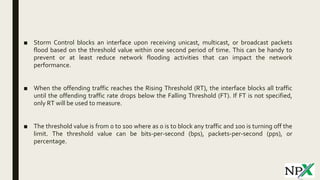
■ Storm Control blocks an interface upon receiving unicast, multicast, or broadcast packets
flood based on the threshold value within one second period of time. This can be handy to
prevent or at least reduce network flooding activities that can impact the network
performance.
■ When the offending traffic reaches the Rising Threshold (RT), the interface blocks all traffic
until the offending traffic rate drops below the Falling Threshold (FT). If FT is not specified,
only RT will be used to measure.
■ The threshold value is from 0 to 100 where as 0 is to block any traffic and 100 is turning off the
limit. The threshold value can be bits-per-second (bps), packets-per-second (pps), or
percentage.
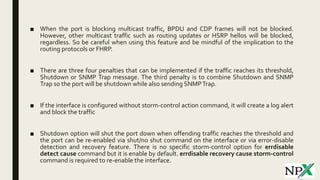
■ When the port is blocking multicast traffic, BPDU and CDP frames will not be blocked.
However, other multicast traffic such as routing updates or HSRP hellos will be blocked,
regardless. So be careful when using this feature and be mindful of the implication to the
routing protocols or FHRP.
■ There are three four penalties that can be implemented if the traffic reaches its threshold,
Shutdown or SNMP Trap message. The third penalty is to combine Shutdown and SNMP
Trap so the port will be shutdown while also sending SNMPTrap.
■ If the interface is configured without storm-control action command, it will create a log alert
and block the traffic
■ Shutdown option will shut the port down when offending traffic reaches the threshold and
the port can be re-enabled via shut/no shut command on the interface or via error-disable
detection and recovery feature. There is no specific storm-control option for errdisable
detect cause command but it is enable by default. errdisable recovery cause storm-control
command is required to re-enable the interface.
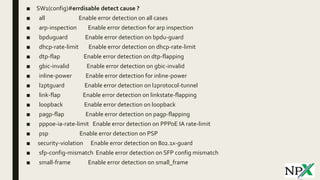
■ SW1(config)#errdisable detect cause ?
■ all Enable error detection on all cases
■ arp-inspection Enable error detection for arp inspection
■ bpduguard Enable error detection on bpdu-guard
■ dhcp-rate-limit Enable error detection on dhcp-rate-limit
■ dtp-flap Enable error detection on dtp-flapping
■ gbic-invalid Enable error detection on gbic-invalid
■ inline-power Enable error detection for inline-power
■ l2ptguard Enable error detection on l2protocol-tunnel
■ link-flap Enable error detection on linkstate-flapping
■ loopback Enable error detection on loopback
■ pagp-flap Enable error detection on pagp-flapping
■ pppoe-ia-rate-limit Enable error detection on PPPoE IA rate-limit
■ psp Enable error detection on PSP
■ security-violation Enable error detection on 802.1x-guard
■ sfp-config-mismatch Enable error detection on SFP config mismatch
■ small-frame Enable error detection on small_frame
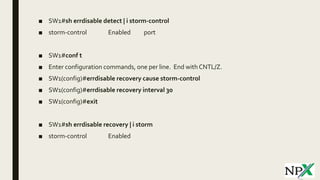
■ SW1#sh errdisable detect | i storm-control
■ storm-control Enabled port
■ SW1#conf t
■ Enter configuration commands, one per line. End with CNTL/Z.
■ SW1(config)#errdisable recovery cause storm-control
■ SW1(config)#errdisable recovery interval 30
■ SW1(config)#exit
■ SW1#sh errdisable recovery | i storm
■ storm-control Enabled
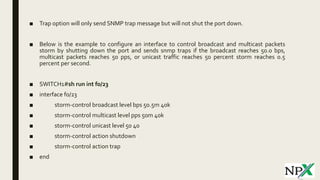
■ Trap option will only send SNMP trap message but will not shut the port down.
■ Below is the example to configure an interface to control broadcast and multicast packets
storm by shutting down the port and sends snmp traps if the broadcast reaches 50.0 bps,
multicast packets reaches 50 pps, or unicast traffic reaches 50 percent storm reaches 0.5
percent per second.
■ SWITCH1#sh run int f0/23
■ interface f0/23
■ storm-control broadcast level bps 50.5m 40k
■ storm-control multicast level pps 50m 40k
■ storm-control unicast level 50 40
■ storm-control action shutdown
■ storm-control action trap
■ end
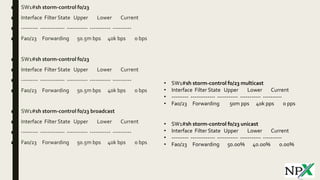
■ SW1#sh storm-control f0/23
■ Interface Filter State Upper Lower Current
■ --------- ------------- ----------- ----------- ----------
■ Fa0/23 Forwarding 50.5m bps 40k bps 0 bps
■ SW1#sh storm-control f0/23
■ Interface Filter State Upper Lower Current
■ --------- ------------- ----------- ----------- ----------
■ Fa0/23 Forwarding 50.5m bps 40k bps 0 bps
■ SW1#sh storm-control f0/23 broadcast
■ Interface Filter State Upper Lower Current
■ --------- ------------- ----------- ----------- ----------
■ Fa0/23 Forwarding 50.5m bps 40k bps 0 bps
• SW1#sh storm-control f0/23 multicast
• Interface Filter State Upper Lower Current
• --------- ------------- ----------- ----------- ----------
• Fa0/23 Forwarding 50m pps 40k pps 0 pps
• SW1#sh storm-control f0/23 unicast
• Interface Filter State Upper Lower Current
• --------- ------------- ----------- ----------- ----------
• Fa0/23 Forwarding 50.00% 40.00% 0.00%
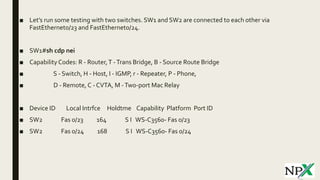
■ Let’s run some testing with two switches. SW1 and SW2 are connected to each other via
FastEthernet0/23 and FastEthernet0/24.
■ SW1#sh cdp nei
■ CapabilityCodes: R - Router,T -Trans Bridge, B - Source Route Bridge
■ S - Switch, H - Host, I - IGMP, r - Repeater, P - Phone,
■ D - Remote, C - CVTA, M -Two-port Mac Relay
■ Device ID Local Intrfce Holdtme Capability Platform Port ID
■ SW2 Fas 0/23 164 S I WS-C3560- Fas 0/23
■ SW2 Fas 0/24 168 S I WS-C3560- Fas 0/24
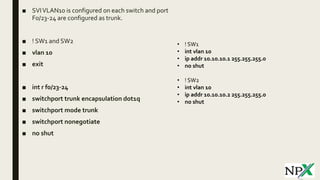
■ SVIVLAN10 is configured on each switch and port
F0/23-24 are configured as trunk.
■ ! SW1 and SW2
■ vlan 10
■ exit
■ int r f0/23-24
■ switchport trunk encapsulation dot1q
■ switchport mode trunk
■ switchport nonegotiate
■ no shut
• ! SW1
• int vlan 10
• ip addr 10.10.10.1 255.255.255.0
• no shut
• ! SW2
• int vlan 10
• ip addr 10.10.10.2 255.255.255.0
• no shut
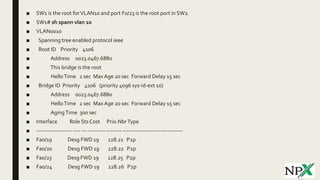
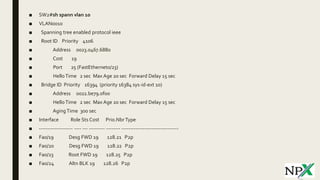
■ SW1 is the root forVLAN10 and port F0/23 is the root port in SW2.
■ SW1# sh spann vlan 10
■ VLAN0010
■ Spanning tree enabled protocol ieee
■ Root ID Priority 4106
■ Address 0023.0467.6880
■ This bridge is the root
■ HelloTime 2 sec Max Age 20 sec Forward Delay 15 sec
■ Bridge ID Priority 4106 (priority 4096 sys-id-ext 10)
■ Address 0023.0467.6880
■ HelloTime 2 sec Max Age 20 sec Forward Delay 15 sec
■ AgingTime 300 sec
■ Interface Role Sts Cost Prio.NbrType
■ ------------------- ---- --- --------- -------- --------------------------------
■ Fa0/19 Desg FWD 19 128.21 P2p
■ Fa0/20 Desg FWD 19 128.22 P2p
■ Fa0/23 Desg FWD 19 128.25 P2p
■ Fa0/24 Desg FWD 19 128.26 P2p
■ SW2#sh spann vlan 10
■ VLAN0010
■ Spanning tree enabled protocol ieee
■ Root ID Priority 4106
■ Address 0023.0467.6880
■ Cost 19
■ Port 25 (FastEthernet0/23)
■ HelloTime 2 sec Max Age 20 sec Forward Delay 15 sec
■ Bridge ID Priority 16394 (priority 16384 sys-id-ext 10)
■ Address 0022.be79.0f00
■ HelloTime 2 sec Max Age 20 sec Forward Delay 15 sec
■ AgingTime 300 sec
■ Interface Role Sts Cost Prio.NbrType
■ ------------------- ---- --- --------- -------- --------------------------------
■ Fa0/19 Desg FWD 19 128.21 P2p
■ Fa0/20 Desg FWD 19 128.22 P2p
■ Fa0/23 Root FWD 19 128.25 P2p
■ Fa0/24 Altn BLK 19 128.26 P2p
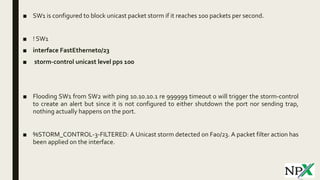
■ SW1 is configured to block unicast packet storm if it reaches 100 packets per second.
■ ! SW1
■ interface FastEthernet0/23
■ storm-control unicast level pps 100
■ Flooding SW1 from SW2 with ping 10.10.10.1 re 999999 timeout 0 will trigger the storm-control
to create an alert but since it is not configured to either shutdown the port nor sending trap,
nothing actually happens on the port.
■ %STORM_CONTROL-3-FILTERED: A Unicast storm detected on Fa0/23. A packet filter action has
been applied on the interface.
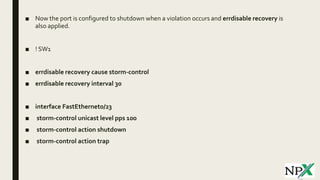
■ Now the port is configured to shutdown when a violation occurs and errdisable recovery is
also applied.
■ ! SW1
■ errdisable recovery cause storm-control
■ errdisable recovery interval 30
■ interface FastEthernet0/23
■ storm-control unicast level pps 100
■ storm-control action shutdown
■ storm-control action trap
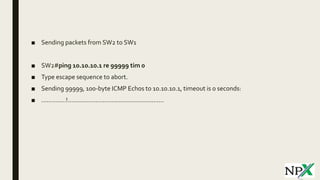
■ Sending packets from SW2 to SW1
■ SW2#ping 10.10.10.1 re 99999 tim 0
■ Type escape sequence to abort.
■ Sending 99999, 100-byte ICMP Echos to 10.10.10.1, timeout is 0 seconds:
■ ..............!.......................................................
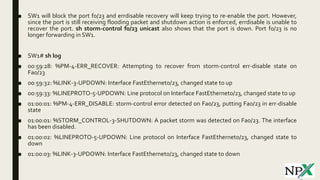
■ SW1 will block the port f0/23 and errdisable recovery will keep trying to re-enable the port. However,
since the port is still receiving flooding packet and shutdown action is enforced, errdisable is unable to
recover the port. sh storm-control f0/23 unicast also shows that the port is down. Port f0/23 is no
longer forwarding in SW1.
■ SW1# sh log
■ 00:59:28: %PM-4-ERR_RECOVER: Attempting to recover from storm-control err-disable state on
Fa0/23
■ 00:59:32: %LINK-3-UPDOWN: Interface FastEthernet0/23, changed state to up
■ 00:59:33: %LINEPROTO-5-UPDOWN: Line protocol on Interface FastEthernet0/23, changed state to up
■ 01:00:01: %PM-4-ERR_DISABLE: storm-control error detected on Fa0/23, putting Fa0/23 in err-disable
state
■ 01:00:01: %STORM_CONTROL-3-SHUTDOWN: A packet storm was detected on Fa0/23. The interface
has been disabled.
■ 01:00:02: %LINEPROTO-5-UPDOWN: Line protocol on Interface FastEthernet0/23, changed state to
down
■ 01:00:03: %LINK-3-UPDOWN: Interface FastEthernet0/23, changed state to down
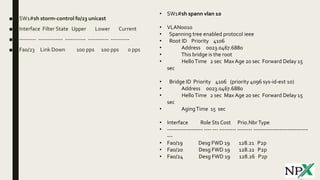
■ SW1#sh storm-control f0/23 unicast
■ Interface Filter State Upper Lower Current
■ --------- ------------- ----------- ----------- ----------
■ Fa0/23 Link Down 100 pps 100 pps 0 pps
• SW1#sh spann vlan 10
• VLAN0010
• Spanning tree enabled protocol ieee
• Root ID Priority 4106
• Address 0023.0467.6880
• This bridge is the root
• HelloTime 2 sec Max Age 20 sec Forward Delay 15
sec
• Bridge ID Priority 4106 (priority 4096 sys-id-ext 10)
• Address 0023.0467.6880
• HelloTime 2 sec Max Age 20 sec Forward Delay 15
sec
• AgingTime 15 sec
• Interface Role Sts Cost Prio.NbrType
• ------------------- ---- --- --------- -------- -----------------------------
---
• Fa0/19 Desg FWD 19 128.21 P2p
• Fa0/20 Desg FWD 19 128.22 P2p
• Fa0/24 Desg FWD 19 128.26 P2p
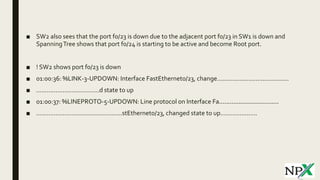
■ SW2 also sees that the port f0/23 is down due to the adjacent port f0/23 in SW1 is down and
SpanningTree shows that port f0/24 is starting to be active and become Root port.
■ ! SW2 shows port f0/23 is down
■ 01:00:36: %LINK-3-UPDOWN: Interface FastEthernet0/23, change.........................................
■ ....................................d state to up
■ 01:00:37: %LINEPROTO-5-UPDOWN: Line protocol on Interface Fa..................................
■ .................................................stEthernet0/23, changed state to up.....................
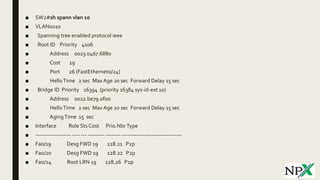
■ SW2#sh spann vlan 10
■ VLAN0010
■ Spanning tree enabled protocol ieee
■ Root ID Priority 4106
■ Address 0023.0467.6880
■ Cost 19
■ Port 26 (FastEthernet0/24)
■ HelloTime 2 sec Max Age 20 sec Forward Delay 15 sec
■ Bridge ID Priority 16394 (priority 16384 sys-id-ext 10)
■ Address 0022.be79.0f00
■ HelloTime 2 sec Max Age 20 sec Forward Delay 15 sec
■ AgingTime 15 sec
■ Interface Role Sts Cost Prio.NbrType
■ ------------------- ---- --- --------- -------- --------------------------------
■ Fa0/19 Desg FWD 19 128.21 P2p
■ Fa0/20 Desg FWD 19 128.22 P2p
■ Fa0/24 Root LRN 19 128.26 P2p
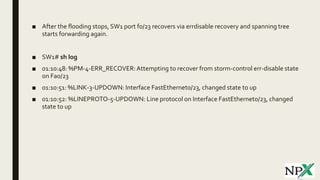
■ After the flooding stops, SW1 port f0/23 recovers via errdisable recovery and spanning tree
starts forwarding again.
■ SW1# sh log
■ 01:10:48: %PM-4-ERR_RECOVER:Attempting to recover from storm-control err-disable state
on Fa0/23
■ 01:10:51: %LINK-3-UPDOWN: Interface FastEthernet0/23, changed state to up
■ 01:10:52: %LINEPROTO-5-UPDOWN: Line protocol on Interface FastEthernet0/23, changed
state to up
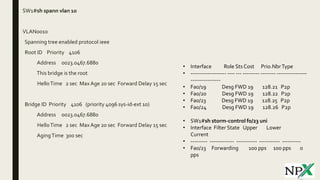
■ SW1#sh spann vlan 10
■ VLAN0010
■ Spanning tree enabled protocol ieee
■ Root ID Priority 4106
■ Address 0023.0467.6880
■ This bridge is the root
■ HelloTime 2 sec MaxAge 20 sec Forward Delay 15 sec
■ Bridge ID Priority 4106 (priority 4096 sys-id-ext 10)
■ Address 0023.0467.6880
■ HelloTime 2 sec MaxAge 20 sec Forward Delay 15 sec
■ AgingTime 300 sec
• Interface Role Sts Cost Prio.NbrType
• ------------------- ---- --- --------- -------- ----------------
----------------
• Fa0/19 Desg FWD 19 128.21 P2p
• Fa0/20 Desg FWD 19 128.22 P2p
• Fa0/23 Desg FWD 19 128.25 P2p
• Fa0/24 Desg FWD 19 128.26 P2p
• SW1#sh storm-control f0/23 uni
• Interface Filter State Upper Lower
Current
• --------- ------------- ----------- ----------- ----------
• Fa0/23 Forwarding 100 pps 100 pps 0
pps
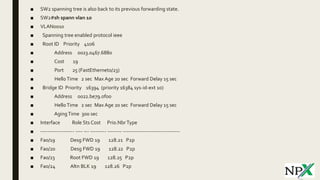
■ SW2 spanning tree is also back to its previous forwarding state.
■ SW2#sh spann vlan 10
■ VLAN0010
■ Spanning tree enabled protocol ieee
■ Root ID Priority 4106
■ Address 0023.0467.6880
■ Cost 19
■ Port 25 (FastEthernet0/23)
■ HelloTime 2 sec Max Age 20 sec Forward Delay 15 sec
■ Bridge ID Priority 16394 (priority 16384 sys-id-ext 10)
■ Address 0022.be79.0f00
■ HelloTime 2 sec Max Age 20 sec Forward Delay 15 sec
■ AgingTime 300 sec
■ Interface Role Sts Cost Prio.NbrType
■ ------------------- ---- --- --------- -------- --------------------------------
■ Fa0/19 Desg FWD 19 128.21 P2p
■ Fa0/20 Desg FWD 19 128.22 P2p
■ Fa0/23 Root FWD 19 128.25 P2p
■ Fa0/24 Altn BLK 19 128.26 P2p
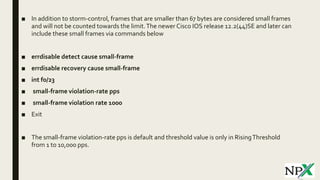
■ In addition to storm-control, frames that are smaller than 67 bytes are considered small frames
and will not be counted towards the limit.The newer Cisco IOS release 12.2(44)SE and later can
include these small frames via commands below
■ errdisable detect cause small-frame
■ errdisable recovery cause small-frame
■ int f0/23
■ small-frame violation-rate pps
■ small-frame violation rate 1000
■ Exit
■ The small-frame violation-rate pps is default and threshold value is only in RisingThreshold
from 1 to 10,000 pps.
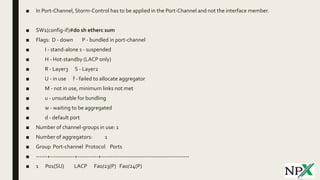
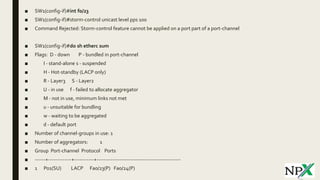
■ In Port-Channel, Storm-Control has to be applied in the Port-Channel and not the interface member.
■ SW1(config-if)#do sh etherc sum
■ Flags: D - down P - bundled in port-channel
■ I - stand-alone s - suspended
■ H - Hot-standby (LACP only)
■ R - Layer3 S - Layer2
■ U - in use f - failed to allocate aggregator
■ M - not in use, minimum links not met
■ u - unsuitable for bundling
■ w - waiting to be aggregated
■ d - default port
■ Number of channel-groups in use: 1
■ Number of aggregators: 1
■ Group Port-channel Protocol Ports
■ ------+-------------+-----------+-----------------------------------------------
■ 1 Po1(SU) LACP Fa0/23(P) Fa0/24(P)
■ SW1(config-if)#int f0/23
■ SW1(config-if)#storm-control unicast level pps 100
■ Command Rejected: Storm-control feature cannot be applied on a port part of a port-channel
■ SW1(config-if)#do sh etherc sum
■ Flags: D - down P - bundled in port-channel
■ I - stand-alone s - suspended
■ H - Hot-standby (LACP only)
■ R - Layer3 S - Layer2
■ U - in use f - failed to allocate aggregator
■ M - not in use, minimum links not met
■ u - unsuitable for bundling
■ w - waiting to be aggregated
■ d - default port
■ Number of channel-groups in use: 1
■ Number of aggregators: 1
■ Group Port-channel Protocol Ports
■ ------+-------------+-----------+-----------------------------------------------
■ 1 Po1(SU) LACP Fa0/23(P) Fa0/24(P)
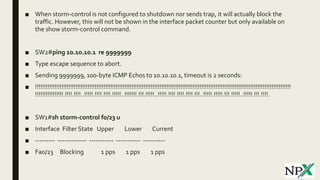
■ When storm-control is not configured to shutdown nor sends trap, it will actually block the
traffic. However, this will not be shown in the interface packet counter but only available on
the show storm-control command.
■ SW2#ping 10.10.10.1 re 9999999
■ Type escape sequence to abort.
■ Sending 9999999, 100-byte ICMP Echos to 10.10.10.1, timeout is 2 seconds:
■ !!!!!!!!!!!!!!!!!!!!!!!!!!!!!!!!!!!!!!!!!!!!!!!!!!!!!!!!!!!!!!!!!!!!!!!!!!!!!!!!!!!!!!!!!!!!!!!!!!!!!!!!!!!!!!!!!!!!!!!!!!!!!!!!!!!!!!!!!!!!!!!!!!
!!!!!!!!!!!!!!!!.!!!!.!!!!..!!!!!.!!!!.!!!!.!!!!!..!!!!!!!.!!!.!!!!!..!!!!!.!!!!.!!!!.!!!!.!!!..!!!!!.!!!!!.!!!.!!!!!..!!!!!.!!!.!!!!.
■ SW1#sh storm-control f0/23 u
■ Interface Filter State Upper Lower Current
■ --------- ------------- ----------- ----------- ----------
■ Fa0/23 Blocking 1 pps 1 pps 1 pps
Follow us @
 www.facebook.com/NetProtocolXpert
 www.instagram.com/netprotocol_xpert
 plus.google.com/collection/k8HMDB
 twitter.com/NPX_cisco
 www.linkedin.com/company/netprotocol-xpert
 netprotocolxpert.blogspot.in
 remote.com/netprotocolxpert
 www.netprotocolxpert.in

Storm-Control

  • 1.
  • 2.
    ■ Storm Controlblocks an interface upon receiving unicast, multicast, or broadcast packets flood based on the threshold value within one second period of time. This can be handy to prevent or at least reduce network flooding activities that can impact the network performance. ■ When the offending traffic reaches the Rising Threshold (RT), the interface blocks all traffic until the offending traffic rate drops below the Falling Threshold (FT). If FT is not specified, only RT will be used to measure. ■ The threshold value is from 0 to 100 where as 0 is to block any traffic and 100 is turning off the limit. The threshold value can be bits-per-second (bps), packets-per-second (pps), or percentage.
  • 3.
    ■ When theport is blocking multicast traffic, BPDU and CDP frames will not be blocked. However, other multicast traffic such as routing updates or HSRP hellos will be blocked, regardless. So be careful when using this feature and be mindful of the implication to the routing protocols or FHRP. ■ There are three four penalties that can be implemented if the traffic reaches its threshold, Shutdown or SNMP Trap message. The third penalty is to combine Shutdown and SNMP Trap so the port will be shutdown while also sending SNMPTrap. ■ If the interface is configured without storm-control action command, it will create a log alert and block the traffic ■ Shutdown option will shut the port down when offending traffic reaches the threshold and the port can be re-enabled via shut/no shut command on the interface or via error-disable detection and recovery feature. There is no specific storm-control option for errdisable detect cause command but it is enable by default. errdisable recovery cause storm-control command is required to re-enable the interface.
  • 4.
    ■ SW1(config)#errdisable detectcause ? ■ all Enable error detection on all cases ■ arp-inspection Enable error detection for arp inspection ■ bpduguard Enable error detection on bpdu-guard ■ dhcp-rate-limit Enable error detection on dhcp-rate-limit ■ dtp-flap Enable error detection on dtp-flapping ■ gbic-invalid Enable error detection on gbic-invalid ■ inline-power Enable error detection for inline-power ■ l2ptguard Enable error detection on l2protocol-tunnel ■ link-flap Enable error detection on linkstate-flapping ■ loopback Enable error detection on loopback ■ pagp-flap Enable error detection on pagp-flapping ■ pppoe-ia-rate-limit Enable error detection on PPPoE IA rate-limit ■ psp Enable error detection on PSP ■ security-violation Enable error detection on 802.1x-guard ■ sfp-config-mismatch Enable error detection on SFP config mismatch ■ small-frame Enable error detection on small_frame
  • 5.
    ■ SW1#sh errdisabledetect | i storm-control ■ storm-control Enabled port ■ SW1#conf t ■ Enter configuration commands, one per line. End with CNTL/Z. ■ SW1(config)#errdisable recovery cause storm-control ■ SW1(config)#errdisable recovery interval 30 ■ SW1(config)#exit ■ SW1#sh errdisable recovery | i storm ■ storm-control Enabled
  • 6.
    ■ Trap optionwill only send SNMP trap message but will not shut the port down. ■ Below is the example to configure an interface to control broadcast and multicast packets storm by shutting down the port and sends snmp traps if the broadcast reaches 50.0 bps, multicast packets reaches 50 pps, or unicast traffic reaches 50 percent storm reaches 0.5 percent per second. ■ SWITCH1#sh run int f0/23 ■ interface f0/23 ■ storm-control broadcast level bps 50.5m 40k ■ storm-control multicast level pps 50m 40k ■ storm-control unicast level 50 40 ■ storm-control action shutdown ■ storm-control action trap ■ end
  • 7.
    ■ SW1#sh storm-controlf0/23 ■ Interface Filter State Upper Lower Current ■ --------- ------------- ----------- ----------- ---------- ■ Fa0/23 Forwarding 50.5m bps 40k bps 0 bps ■ SW1#sh storm-control f0/23 ■ Interface Filter State Upper Lower Current ■ --------- ------------- ----------- ----------- ---------- ■ Fa0/23 Forwarding 50.5m bps 40k bps 0 bps ■ SW1#sh storm-control f0/23 broadcast ■ Interface Filter State Upper Lower Current ■ --------- ------------- ----------- ----------- ---------- ■ Fa0/23 Forwarding 50.5m bps 40k bps 0 bps • SW1#sh storm-control f0/23 multicast • Interface Filter State Upper Lower Current • --------- ------------- ----------- ----------- ---------- • Fa0/23 Forwarding 50m pps 40k pps 0 pps • SW1#sh storm-control f0/23 unicast • Interface Filter State Upper Lower Current • --------- ------------- ----------- ----------- ---------- • Fa0/23 Forwarding 50.00% 40.00% 0.00%
  • 8.
    ■ Let’s runsome testing with two switches. SW1 and SW2 are connected to each other via FastEthernet0/23 and FastEthernet0/24. ■ SW1#sh cdp nei ■ CapabilityCodes: R - Router,T -Trans Bridge, B - Source Route Bridge ■ S - Switch, H - Host, I - IGMP, r - Repeater, P - Phone, ■ D - Remote, C - CVTA, M -Two-port Mac Relay ■ Device ID Local Intrfce Holdtme Capability Platform Port ID ■ SW2 Fas 0/23 164 S I WS-C3560- Fas 0/23 ■ SW2 Fas 0/24 168 S I WS-C3560- Fas 0/24
  • 9.
    ■ SVIVLAN10 isconfigured on each switch and port F0/23-24 are configured as trunk. ■ ! SW1 and SW2 ■ vlan 10 ■ exit ■ int r f0/23-24 ■ switchport trunk encapsulation dot1q ■ switchport mode trunk ■ switchport nonegotiate ■ no shut • ! SW1 • int vlan 10 • ip addr 10.10.10.1 255.255.255.0 • no shut • ! SW2 • int vlan 10 • ip addr 10.10.10.2 255.255.255.0 • no shut
  • 10.
    ■ SW1 isthe root forVLAN10 and port F0/23 is the root port in SW2. ■ SW1# sh spann vlan 10 ■ VLAN0010 ■ Spanning tree enabled protocol ieee ■ Root ID Priority 4106 ■ Address 0023.0467.6880 ■ This bridge is the root ■ HelloTime 2 sec Max Age 20 sec Forward Delay 15 sec ■ Bridge ID Priority 4106 (priority 4096 sys-id-ext 10) ■ Address 0023.0467.6880 ■ HelloTime 2 sec Max Age 20 sec Forward Delay 15 sec ■ AgingTime 300 sec ■ Interface Role Sts Cost Prio.NbrType ■ ------------------- ---- --- --------- -------- -------------------------------- ■ Fa0/19 Desg FWD 19 128.21 P2p ■ Fa0/20 Desg FWD 19 128.22 P2p ■ Fa0/23 Desg FWD 19 128.25 P2p ■ Fa0/24 Desg FWD 19 128.26 P2p
  • 11.
    ■ SW2#sh spannvlan 10 ■ VLAN0010 ■ Spanning tree enabled protocol ieee ■ Root ID Priority 4106 ■ Address 0023.0467.6880 ■ Cost 19 ■ Port 25 (FastEthernet0/23) ■ HelloTime 2 sec Max Age 20 sec Forward Delay 15 sec ■ Bridge ID Priority 16394 (priority 16384 sys-id-ext 10) ■ Address 0022.be79.0f00 ■ HelloTime 2 sec Max Age 20 sec Forward Delay 15 sec ■ AgingTime 300 sec ■ Interface Role Sts Cost Prio.NbrType ■ ------------------- ---- --- --------- -------- -------------------------------- ■ Fa0/19 Desg FWD 19 128.21 P2p ■ Fa0/20 Desg FWD 19 128.22 P2p ■ Fa0/23 Root FWD 19 128.25 P2p ■ Fa0/24 Altn BLK 19 128.26 P2p
  • 12.
    ■ SW1 isconfigured to block unicast packet storm if it reaches 100 packets per second. ■ ! SW1 ■ interface FastEthernet0/23 ■ storm-control unicast level pps 100 ■ Flooding SW1 from SW2 with ping 10.10.10.1 re 999999 timeout 0 will trigger the storm-control to create an alert but since it is not configured to either shutdown the port nor sending trap, nothing actually happens on the port. ■ %STORM_CONTROL-3-FILTERED: A Unicast storm detected on Fa0/23. A packet filter action has been applied on the interface.
  • 13.
    ■ Now theport is configured to shutdown when a violation occurs and errdisable recovery is also applied. ■ ! SW1 ■ errdisable recovery cause storm-control ■ errdisable recovery interval 30 ■ interface FastEthernet0/23 ■ storm-control unicast level pps 100 ■ storm-control action shutdown ■ storm-control action trap
  • 14.
    ■ Sending packetsfrom SW2 to SW1 ■ SW2#ping 10.10.10.1 re 99999 tim 0 ■ Type escape sequence to abort. ■ Sending 99999, 100-byte ICMP Echos to 10.10.10.1, timeout is 0 seconds: ■ ..............!.......................................................
  • 15.
    ■ SW1 willblock the port f0/23 and errdisable recovery will keep trying to re-enable the port. However, since the port is still receiving flooding packet and shutdown action is enforced, errdisable is unable to recover the port. sh storm-control f0/23 unicast also shows that the port is down. Port f0/23 is no longer forwarding in SW1. ■ SW1# sh log ■ 00:59:28: %PM-4-ERR_RECOVER: Attempting to recover from storm-control err-disable state on Fa0/23 ■ 00:59:32: %LINK-3-UPDOWN: Interface FastEthernet0/23, changed state to up ■ 00:59:33: %LINEPROTO-5-UPDOWN: Line protocol on Interface FastEthernet0/23, changed state to up ■ 01:00:01: %PM-4-ERR_DISABLE: storm-control error detected on Fa0/23, putting Fa0/23 in err-disable state ■ 01:00:01: %STORM_CONTROL-3-SHUTDOWN: A packet storm was detected on Fa0/23. The interface has been disabled. ■ 01:00:02: %LINEPROTO-5-UPDOWN: Line protocol on Interface FastEthernet0/23, changed state to down ■ 01:00:03: %LINK-3-UPDOWN: Interface FastEthernet0/23, changed state to down
  • 16.
    ■ SW1#sh storm-controlf0/23 unicast ■ Interface Filter State Upper Lower Current ■ --------- ------------- ----------- ----------- ---------- ■ Fa0/23 Link Down 100 pps 100 pps 0 pps • SW1#sh spann vlan 10 • VLAN0010 • Spanning tree enabled protocol ieee • Root ID Priority 4106 • Address 0023.0467.6880 • This bridge is the root • HelloTime 2 sec Max Age 20 sec Forward Delay 15 sec • Bridge ID Priority 4106 (priority 4096 sys-id-ext 10) • Address 0023.0467.6880 • HelloTime 2 sec Max Age 20 sec Forward Delay 15 sec • AgingTime 15 sec • Interface Role Sts Cost Prio.NbrType • ------------------- ---- --- --------- -------- ----------------------------- --- • Fa0/19 Desg FWD 19 128.21 P2p • Fa0/20 Desg FWD 19 128.22 P2p • Fa0/24 Desg FWD 19 128.26 P2p
  • 17.
    ■ SW2 alsosees that the port f0/23 is down due to the adjacent port f0/23 in SW1 is down and SpanningTree shows that port f0/24 is starting to be active and become Root port. ■ ! SW2 shows port f0/23 is down ■ 01:00:36: %LINK-3-UPDOWN: Interface FastEthernet0/23, change......................................... ■ ....................................d state to up ■ 01:00:37: %LINEPROTO-5-UPDOWN: Line protocol on Interface Fa.................................. ■ .................................................stEthernet0/23, changed state to up.....................
  • 18.
    ■ SW2#sh spannvlan 10 ■ VLAN0010 ■ Spanning tree enabled protocol ieee ■ Root ID Priority 4106 ■ Address 0023.0467.6880 ■ Cost 19 ■ Port 26 (FastEthernet0/24) ■ HelloTime 2 sec Max Age 20 sec Forward Delay 15 sec ■ Bridge ID Priority 16394 (priority 16384 sys-id-ext 10) ■ Address 0022.be79.0f00 ■ HelloTime 2 sec Max Age 20 sec Forward Delay 15 sec ■ AgingTime 15 sec ■ Interface Role Sts Cost Prio.NbrType ■ ------------------- ---- --- --------- -------- -------------------------------- ■ Fa0/19 Desg FWD 19 128.21 P2p ■ Fa0/20 Desg FWD 19 128.22 P2p ■ Fa0/24 Root LRN 19 128.26 P2p
  • 19.
    ■ After theflooding stops, SW1 port f0/23 recovers via errdisable recovery and spanning tree starts forwarding again. ■ SW1# sh log ■ 01:10:48: %PM-4-ERR_RECOVER:Attempting to recover from storm-control err-disable state on Fa0/23 ■ 01:10:51: %LINK-3-UPDOWN: Interface FastEthernet0/23, changed state to up ■ 01:10:52: %LINEPROTO-5-UPDOWN: Line protocol on Interface FastEthernet0/23, changed state to up
  • 20.
    ■ SW1#sh spannvlan 10 ■ VLAN0010 ■ Spanning tree enabled protocol ieee ■ Root ID Priority 4106 ■ Address 0023.0467.6880 ■ This bridge is the root ■ HelloTime 2 sec MaxAge 20 sec Forward Delay 15 sec ■ Bridge ID Priority 4106 (priority 4096 sys-id-ext 10) ■ Address 0023.0467.6880 ■ HelloTime 2 sec MaxAge 20 sec Forward Delay 15 sec ■ AgingTime 300 sec • Interface Role Sts Cost Prio.NbrType • ------------------- ---- --- --------- -------- ---------------- ---------------- • Fa0/19 Desg FWD 19 128.21 P2p • Fa0/20 Desg FWD 19 128.22 P2p • Fa0/23 Desg FWD 19 128.25 P2p • Fa0/24 Desg FWD 19 128.26 P2p • SW1#sh storm-control f0/23 uni • Interface Filter State Upper Lower Current • --------- ------------- ----------- ----------- ---------- • Fa0/23 Forwarding 100 pps 100 pps 0 pps
  • 21.
    ■ SW2 spanningtree is also back to its previous forwarding state. ■ SW2#sh spann vlan 10 ■ VLAN0010 ■ Spanning tree enabled protocol ieee ■ Root ID Priority 4106 ■ Address 0023.0467.6880 ■ Cost 19 ■ Port 25 (FastEthernet0/23) ■ HelloTime 2 sec Max Age 20 sec Forward Delay 15 sec ■ Bridge ID Priority 16394 (priority 16384 sys-id-ext 10) ■ Address 0022.be79.0f00 ■ HelloTime 2 sec Max Age 20 sec Forward Delay 15 sec ■ AgingTime 300 sec ■ Interface Role Sts Cost Prio.NbrType ■ ------------------- ---- --- --------- -------- -------------------------------- ■ Fa0/19 Desg FWD 19 128.21 P2p ■ Fa0/20 Desg FWD 19 128.22 P2p ■ Fa0/23 Root FWD 19 128.25 P2p ■ Fa0/24 Altn BLK 19 128.26 P2p
  • 22.
    ■ In additionto storm-control, frames that are smaller than 67 bytes are considered small frames and will not be counted towards the limit.The newer Cisco IOS release 12.2(44)SE and later can include these small frames via commands below ■ errdisable detect cause small-frame ■ errdisable recovery cause small-frame ■ int f0/23 ■ small-frame violation-rate pps ■ small-frame violation rate 1000 ■ Exit ■ The small-frame violation-rate pps is default and threshold value is only in RisingThreshold from 1 to 10,000 pps.
  • 23.
    ■ In Port-Channel,Storm-Control has to be applied in the Port-Channel and not the interface member. ■ SW1(config-if)#do sh etherc sum ■ Flags: D - down P - bundled in port-channel ■ I - stand-alone s - suspended ■ H - Hot-standby (LACP only) ■ R - Layer3 S - Layer2 ■ U - in use f - failed to allocate aggregator ■ M - not in use, minimum links not met ■ u - unsuitable for bundling ■ w - waiting to be aggregated ■ d - default port ■ Number of channel-groups in use: 1 ■ Number of aggregators: 1 ■ Group Port-channel Protocol Ports ■ ------+-------------+-----------+----------------------------------------------- ■ 1 Po1(SU) LACP Fa0/23(P) Fa0/24(P)
  • 24.
    ■ SW1(config-if)#int f0/23 ■SW1(config-if)#storm-control unicast level pps 100 ■ Command Rejected: Storm-control feature cannot be applied on a port part of a port-channel ■ SW1(config-if)#do sh etherc sum ■ Flags: D - down P - bundled in port-channel ■ I - stand-alone s - suspended ■ H - Hot-standby (LACP only) ■ R - Layer3 S - Layer2 ■ U - in use f - failed to allocate aggregator ■ M - not in use, minimum links not met ■ u - unsuitable for bundling ■ w - waiting to be aggregated ■ d - default port ■ Number of channel-groups in use: 1 ■ Number of aggregators: 1 ■ Group Port-channel Protocol Ports ■ ------+-------------+-----------+----------------------------------------------- ■ 1 Po1(SU) LACP Fa0/23(P) Fa0/24(P)
  • 25.
    ■ When storm-controlis not configured to shutdown nor sends trap, it will actually block the traffic. However, this will not be shown in the interface packet counter but only available on the show storm-control command. ■ SW2#ping 10.10.10.1 re 9999999 ■ Type escape sequence to abort. ■ Sending 9999999, 100-byte ICMP Echos to 10.10.10.1, timeout is 2 seconds: ■ !!!!!!!!!!!!!!!!!!!!!!!!!!!!!!!!!!!!!!!!!!!!!!!!!!!!!!!!!!!!!!!!!!!!!!!!!!!!!!!!!!!!!!!!!!!!!!!!!!!!!!!!!!!!!!!!!!!!!!!!!!!!!!!!!!!!!!!!!!!!!!!!!! !!!!!!!!!!!!!!!!.!!!!.!!!!..!!!!!.!!!!.!!!!.!!!!!..!!!!!!!.!!!.!!!!!..!!!!!.!!!!.!!!!.!!!!.!!!..!!!!!.!!!!!.!!!.!!!!!..!!!!!.!!!.!!!!. ■ SW1#sh storm-control f0/23 u ■ Interface Filter State Upper Lower Current ■ --------- ------------- ----------- ----------- ---------- ■ Fa0/23 Blocking 1 pps 1 pps 1 pps
  • 26.
    Follow us @ www.facebook.com/NetProtocolXpert  www.instagram.com/netprotocol_xpert  plus.google.com/collection/k8HMDB  twitter.com/NPX_cisco  www.linkedin.com/company/netprotocol-xpert  netprotocolxpert.blogspot.in  remote.com/netprotocolxpert  www.netprotocolxpert.in