


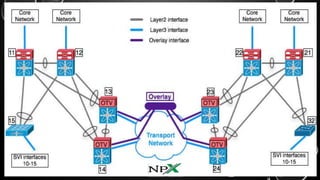



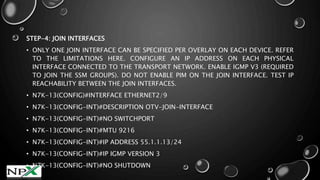

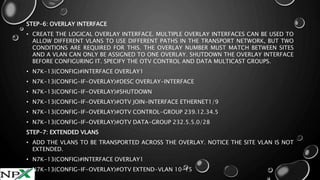

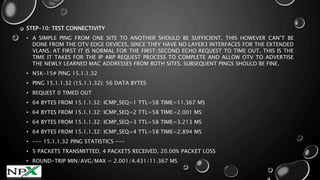


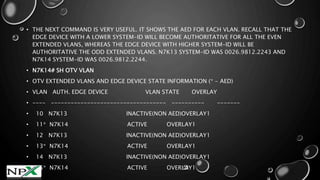
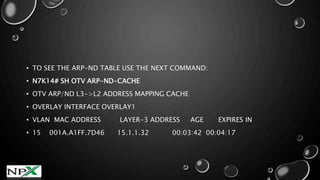
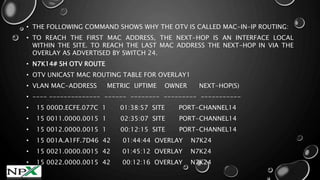

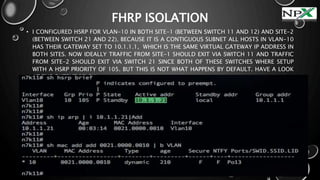






This document provides instructions for setting up and configuring OTV (Overlay Transport Virtualization) in a lab environment to connect two data center sites. The key steps include: 1. Setting up the physical lab topology with two Nexus 7000 switches acting as OTV edge devices in each site, with dedicated VDCs for OTV. 2. Configuring OTV features and licenses on the edge devices, defining the site VLAN and extended VLANs, and configuring join interfaces to connect the devices. 3. Creating overlay interfaces on the edge devices and associating the control and data multicast groups. 4. Verifying the OTV configuration and checking for adjacencies between edge devices


![[Deck] What's New in Spark-Iceberg Integration via DSV2.pptx](https://cdn.slidesharecdn.com/ss_thumbnails/deckwhatsnewinspark-icebergintegrationviadsv2-260210005337-25955b12-thumbnail.jpg?width=640&height=640&fit=bounds)


