
DHCP SNOOPING
SECURITY | WWW.NETPROTOCOLXPERT.IN
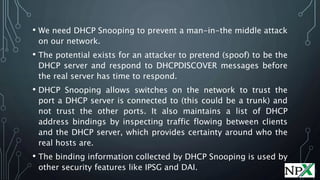
• We need DHCP Snooping to prevent a man-in-the middle attack
on our network.
• The potential exists for an attacker to pretend (spoof) to be the
DHCP server and respond to DHCPDISCOVER messages before
the real server has time to respond.
• DHCP Snooping allows switches on the network to trust the
port a DHCP server is connected to (this could be a trunk) and
not trust the other ports. It also maintains a list of DHCP
address bindings by inspecting traffic flowing between clients
and the DHCP server, which provides certainty around who the
real hosts are.
• The binding information collected by DHCP Snooping is used by
other security features like IPSG and DAI.
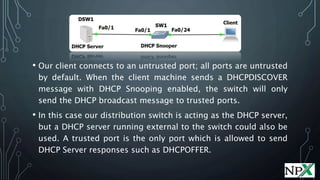
• Our client connects to an untrusted port; all ports are untrusted
by default. When the client machine sends a DHCPDISCOVER
message with DHCP Snooping enabled, the switch will only
send the DHCP broadcast message to trusted ports.
• In this case our distribution switch is acting as the DHCP server,
but a DHCP server running external to the switch could also be
used. A trusted port is the only port which is allowed to send
DHCP Server responses such as DHCPOFFER.
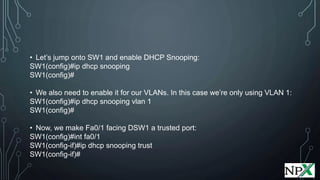
• Let’s jump onto SW1 and enable DHCP Snooping:
SW1(config)#ip dhcp snooping
SW1(config)#
• We also need to enable it for our VLANs. In this case we’re only using VLAN 1:
SW1(config)#ip dhcp snooping vlan 1
SW1(config)#
• Now, we make Fa0/1 facing DSW1 a trusted port:
SW1(config)#int fa0/1
SW1(config-if)#ip dhcp snooping trust
SW1(config-if)#
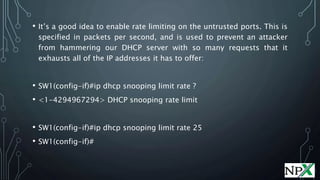
• It’s a good idea to enable rate limiting on the untrusted ports. This is
specified in packets per second, and is used to prevent an attacker
from hammering our DHCP server with so many requests that it
exhausts all of the IP addresses it has to offer:
• SW1(config-if)#ip dhcp snooping limit rate ?
• <1-4294967294> DHCP snooping rate limit
• SW1(config-if)#ip dhcp snooping limit rate 25
• SW1(config-if)#
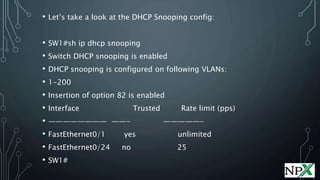
• Let’s take a look at the DHCP Snooping config:
• SW1#sh ip dhcp snooping
• Switch DHCP snooping is enabled
• DHCP snooping is configured on following VLANs:
• 1-200
• Insertion of option 82 is enabled
• Interface Trusted Rate limit (pps)
• ———————— ——- —————-
• FastEthernet0/1 yes unlimited
• FastEthernet0/24 no 25
• SW1#
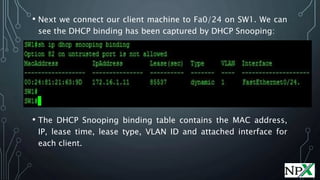
• Next we connect our client machine to Fa0/24 on SW1. We can
see the DHCP binding has been captured by DHCP Snooping:
• The DHCP Snooping binding table contains the MAC address,
IP, lease time, lease type, VLAN ID and attached interface for
each client.
DHCP OPTION 82
• DHCP Option 82 has the potential to cause network engineers
an awful lot of grief if we don’t keep it in check.
• When DHCP Snooping is enabled, DHCP Option 82 is inserted
into DHCP packets as they pass through a switch. Option 82
contains information about the specific port a client machine is
connected to. DHCP packets also carry a “giaddr” field which is
set to 0.0.0.0 by default (a non-zero value).
• These things will show up in error messages if something is
misconfigured. In the topology, Option 82 isn’t a problem
because DHCP Snooping isn’t enabled on DSW1 (only on SW1),
so let’s add another switch:
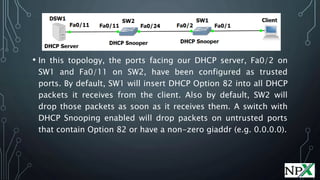
• In this topology, the ports facing our DHCP server, Fa0/2 on
SW1 and Fa0/11 on SW2, have been configured as trusted
ports. By default, SW1 will insert DHCP Option 82 into all DHCP
packets it receives from the client. Also by default, SW2 will
drop those packets as soon as it receives them. A switch with
DHCP Snooping enabled will drop packets on untrusted ports
that contain Option 82 or have a non-zero giaddr (e.g. 0.0.0.0).
• This is what is seen in debug on SW2 when SW1 sends a
DHCPDISCOVER out port Fa0/2:
• %DHCP_SNOOPING-5-DHCP_SNOOPING_NONZERO_GIADDR:
DHCP_SNOOPING drop message with non-zero giaddr or
option82 value on untrusted port
• Remember that port Fa0/24 on SW2 is an untrusted port from
DHCP Snooping’s point of view, so it drops the packets by
default because Option 82 exists. That traffic never makes it to
DWS1. There are several ways to get around this problem,
although initially, We’ll solve this problem by using one
command on SW2 that will trust packets with DHCP Option 82
that are received on untrusted ports.
• SW2(config)#ip dhcp snooping information option allow-
• Because our DHCP server is a Cisco IOS device, it also needs to
trust DHCP packets with option 82 set:
• DSW1(config)#ip dhcp relay information trust-all
• An alternative would be to make port Fa0/24 a trusted port,
but this would expose us security-wise. We could also stop
DHCP Snooping from inserting Option 82 in the first place
(using #no ip dhcp snooping information option).
FOLLOW US @
 www.facebook.com/NetProtocolXpert
 www.instagram.com/netprotocol_xpert
 plus.google.com/collection/k8HMDB
 twitter.com/NPX_cisco
 www.linkedin.com/company/netprotocol-xpert
 netprotocolxpert.blogspot.in
 remote.com/netprotocolxpert
 www.netprotocolxpert.in
12

DHCP Snooping

  • 1.
    DHCP SNOOPING SECURITY |WWW.NETPROTOCOLXPERT.IN
  • 2.
    • We needDHCP Snooping to prevent a man-in-the middle attack on our network. • The potential exists for an attacker to pretend (spoof) to be the DHCP server and respond to DHCPDISCOVER messages before the real server has time to respond. • DHCP Snooping allows switches on the network to trust the port a DHCP server is connected to (this could be a trunk) and not trust the other ports. It also maintains a list of DHCP address bindings by inspecting traffic flowing between clients and the DHCP server, which provides certainty around who the real hosts are. • The binding information collected by DHCP Snooping is used by other security features like IPSG and DAI.
  • 3.
    • Our clientconnects to an untrusted port; all ports are untrusted by default. When the client machine sends a DHCPDISCOVER message with DHCP Snooping enabled, the switch will only send the DHCP broadcast message to trusted ports. • In this case our distribution switch is acting as the DHCP server, but a DHCP server running external to the switch could also be used. A trusted port is the only port which is allowed to send DHCP Server responses such as DHCPOFFER.
  • 4.
    • Let’s jumponto SW1 and enable DHCP Snooping: SW1(config)#ip dhcp snooping SW1(config)# • We also need to enable it for our VLANs. In this case we’re only using VLAN 1: SW1(config)#ip dhcp snooping vlan 1 SW1(config)# • Now, we make Fa0/1 facing DSW1 a trusted port: SW1(config)#int fa0/1 SW1(config-if)#ip dhcp snooping trust SW1(config-if)#
  • 5.
    • It’s agood idea to enable rate limiting on the untrusted ports. This is specified in packets per second, and is used to prevent an attacker from hammering our DHCP server with so many requests that it exhausts all of the IP addresses it has to offer: • SW1(config-if)#ip dhcp snooping limit rate ? • <1-4294967294> DHCP snooping rate limit • SW1(config-if)#ip dhcp snooping limit rate 25 • SW1(config-if)#
  • 6.
    • Let’s takea look at the DHCP Snooping config: • SW1#sh ip dhcp snooping • Switch DHCP snooping is enabled • DHCP snooping is configured on following VLANs: • 1-200 • Insertion of option 82 is enabled • Interface Trusted Rate limit (pps) • ———————— ——- —————- • FastEthernet0/1 yes unlimited • FastEthernet0/24 no 25 • SW1#
  • 7.
    • Next weconnect our client machine to Fa0/24 on SW1. We can see the DHCP binding has been captured by DHCP Snooping: • The DHCP Snooping binding table contains the MAC address, IP, lease time, lease type, VLAN ID and attached interface for each client.
  • 8.
    DHCP OPTION 82 •DHCP Option 82 has the potential to cause network engineers an awful lot of grief if we don’t keep it in check. • When DHCP Snooping is enabled, DHCP Option 82 is inserted into DHCP packets as they pass through a switch. Option 82 contains information about the specific port a client machine is connected to. DHCP packets also carry a “giaddr” field which is set to 0.0.0.0 by default (a non-zero value). • These things will show up in error messages if something is misconfigured. In the topology, Option 82 isn’t a problem because DHCP Snooping isn’t enabled on DSW1 (only on SW1), so let’s add another switch:
  • 9.
    • In thistopology, the ports facing our DHCP server, Fa0/2 on SW1 and Fa0/11 on SW2, have been configured as trusted ports. By default, SW1 will insert DHCP Option 82 into all DHCP packets it receives from the client. Also by default, SW2 will drop those packets as soon as it receives them. A switch with DHCP Snooping enabled will drop packets on untrusted ports that contain Option 82 or have a non-zero giaddr (e.g. 0.0.0.0).
  • 10.
    • This iswhat is seen in debug on SW2 when SW1 sends a DHCPDISCOVER out port Fa0/2: • %DHCP_SNOOPING-5-DHCP_SNOOPING_NONZERO_GIADDR: DHCP_SNOOPING drop message with non-zero giaddr or option82 value on untrusted port • Remember that port Fa0/24 on SW2 is an untrusted port from DHCP Snooping’s point of view, so it drops the packets by default because Option 82 exists. That traffic never makes it to DWS1. There are several ways to get around this problem, although initially, We’ll solve this problem by using one command on SW2 that will trust packets with DHCP Option 82 that are received on untrusted ports. • SW2(config)#ip dhcp snooping information option allow-
  • 11.
    • Because ourDHCP server is a Cisco IOS device, it also needs to trust DHCP packets with option 82 set: • DSW1(config)#ip dhcp relay information trust-all • An alternative would be to make port Fa0/24 a trusted port, but this would expose us security-wise. We could also stop DHCP Snooping from inserting Option 82 in the first place (using #no ip dhcp snooping information option).
  • 12.
    FOLLOW US @ www.facebook.com/NetProtocolXpert  www.instagram.com/netprotocol_xpert  plus.google.com/collection/k8HMDB  twitter.com/NPX_cisco  www.linkedin.com/company/netprotocol-xpert  netprotocolxpert.blogspot.in  remote.com/netprotocolxpert  www.netprotocolxpert.in 12