Open Shortest Path First Protocol 
(OSPF) 
Speaker: 
Martín Bratina. martin.bratina@att.com 
Date 22/03/2013
Agenda 
• What is OSPF? 
• Why is OSPF needed? 
• How OSPF works? 
• LAB 
2 © 2012 AT&T Intellectual Property. All rights reserved. AT&T and the AT&T logo are trademarks of AT&T Intellectual Property.
What is OSPF? 
• Open Shortest Path First 
• Internal routing protocol (IGP) 
• Open Standard. RFC 2328 
• Link State Protocol 
• Designed for IP networks 
© 2012 AT&T Intellectual Property. All rights reserved. AT&T and the AT&T logo are trademarks of 3 AT&T Intellectual Property.
Why is OSPF needed? 
• Open standard 
• Link State Protocol 
• Scalability 
• Fast convergence 
• Supports authentication/security 
• Supports VLSM (Variable Length Subnet Masks) 
• Support IPv6 (OSPFv3) 
• Support load balancing 
• Consumes low bandwidth 

• Uses a hierarchical structure 
© 2012 AT&T Intellectual Property. All rights reserved. AT&T and the AT&T logo are trademarks of 4 AT&T Intellectual Property.
How OSPF works? 
© 2012 AT&T Intellectual Property. All rights reserved. AT&T and the AT&T logo are trademarks of 5 AT&T Intellectual Property.
How OSPF works? 
• Uses a Link State Logic. 
• Neighbor discovery 
• Topology database exchange 
• Route computation 
• Divides routers into areas for route optimization and 
segmentation 
© 2012 AT&T Intellectual Property. All rights reserved. AT&T and the AT&T logo are trademarks of 6 AT&T Intellectual Property.
Neighbor Discovery 
• Neighbor discovery 
• Each router discover its neighbors routers sending hello messages 
• Routers from adjacencies with its neighbors 
• Neighbor adjacency requirements 
• Interfaces in the same subnet 
• Different router ID between neighbors 
• Routers in the same area 
• Same authentication parameters 
© 2012 AT&T Intellectual Property. All rights reserved. AT&T and the AT&T logo are trademarks of 7 AT&T Intellectual Property.
Topology Database Exchange 
• Topology Database Exchange 
• Each router generates its own network topology information (LSA 
Message) 
• Each router flood its LSA message to its neighbors 
• Each router stores a LSA copy on its internal OSPF topology database 
(LSDB) 
• Each router has the same LDSB 
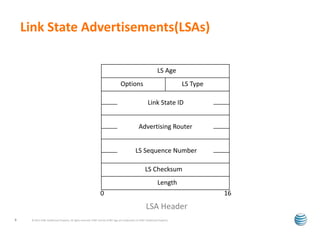
• Link State Advertisement (LSA) Message information 
• Router ID of the LSA 
• List of the router interfaces, IP address, subnet and mask 
• List of routers reachable (neighbors) on each interface 
© 2012 AT&T Intellectual Property. All rights reserved. AT&T and the AT&T logo are trademarks of 8 AT&T Intellectual Property.
Link State Advertisements(LSAs) 
LS Age 
Options LS Type 
Link State ID 
Advertising Router 
LS Sequence Number 
LS Checksum 
Length 
0 16 
LSA Header 
© 2012 AT&T Intellectual Property. All rights reserved. AT&T and the AT&T logo are trademarks of 9 AT&T Intellectual Property.
Route Computation 
• Route Computation 
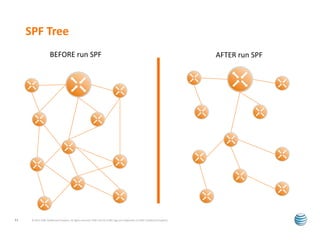
• Each router analyzes its topology database and executes Shortest Path 
First (SPF) algorithm 
• Router choses the shortest (best) route to each destination from its 
perspective (SPF Tree) 
• Router generates entries in the routing table for those selected 
destinations 
© 2012 AT&T Intellectual Property. All rights reserved. AT&T and the AT&T logo are trademarks of 10 AT&T Intellectual Property.
SPF Tree 
BEFORE run SPF AFTER run SPF 
© 2012 AT&T Intellectual Property. All rights reserved. AT&T and the AT&T logo are trademarks of 11 AT&T Intellectual Property.
Communication between OSPF Routers 
• OSPF packets encapsulated in IP packets 
• IP protocol # 89 
• Standard 24 byte header 
• OSPF packet type field 
• OSPF router ID of sender 
• Packet checksum 
• Authentication fields 
• OSPF Area ID 
• Uses Multicast IP address 224.0.0.5 for all OSPF routers 
• DR router use Multicast IP address 224.0.0.6 
© 2012 AT&T Intellectual Property. All rights reserved. AT&T and the AT&T logo are trademarks of 12 AT&T Intellectual Property.
The Hello Protocol 
• Maintains neighbor relationships 
• Elects Designated Router (DR) in multi-access networks 
• The Hello Packet 
• Hello packets sent out every 10 seconds 
• RouterDead Interval (default 40 seconds) 
• Network Mask 
• List of neighbors 
• Ensures that link is bidirectional 
© 2012 AT&T Intellectual Property. All rights reserved. AT&T and the AT&T logo are trademarks of 13 AT&T Intellectual Property.
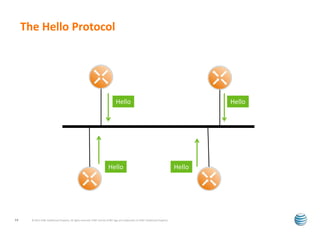
The Hello Protocol 
Hello Hello 
Hello Hello 
© 2012 AT&T Intellectual Property. All rights reserved. AT&T and the AT&T logo are trademarks of 14 AT&T Intellectual Property.
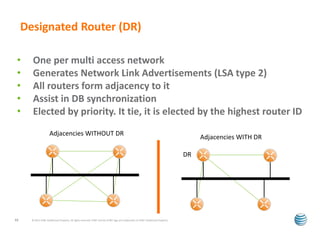
Designated Router (DR) 
• One per multi access network 
• Generates Network Link Advertisements (LSA type 2) 
• All routers form adjacency to it 
• Assist in DB synchronization 
• Elected by priority. It tie, it is elected by the highest router ID 
Adjacencies WITHOUT DR 
© 2012 AT&T Intellectual Property. All rights reserved. AT&T and the AT&T logo are trademarks of 15 AT&T Intellectual Property. 
Adjacencies WITH DR 
DR
Database Synchronization 
• Crucial to ensure correct and loop free routing 
• Must be done before 2 neighbors start 
communication 
• Whenever new LSAs are introduced 
• uses reliable flooding 
• Each router sends LSA headers (small LSA’s) to its 
neighbor when connection comes up 
• Requests only those LSAs which are recent 
© 2012 AT&T Intellectual Property. All rights reserved. AT&T and the AT&T logo are trademarks of 16 AT&T Intellectual Property.
Database Exchange 
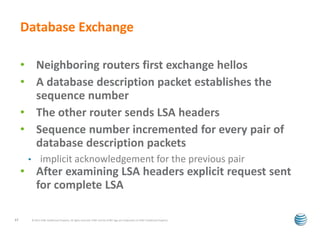
• Neighboring routers first exchange hellos 
• A database description packet establishes the 
sequence number 
• The other router sends LSA headers 
• Sequence number incremented for every pair of 
database description packets 
• implicit acknowledgement for the previous pair 
• After examining LSA headers explicit request sent 
for complete LSA 
© 2012 AT&T Intellectual Property. All rights reserved. AT&T and the AT&T logo are trademarks of 17 AT&T Intellectual Property.
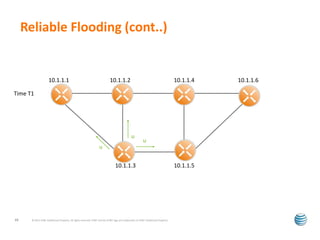
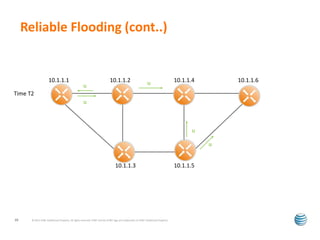
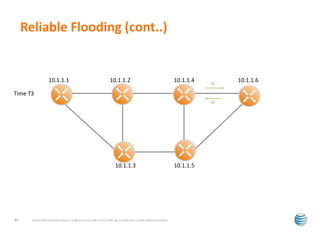
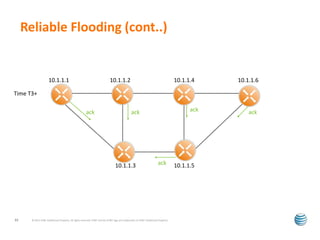
Reliable Flooding 
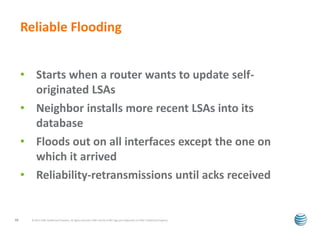
• Starts when a router wants to update self-originated 
LSAs 
• Neighbor installs more recent LSAs into its 
database 
• Floods out on all interfaces except the one on 
which it arrived 
• Reliability-retransmissions until acks received 
© 2012 AT&T Intellectual Property. All rights reserved. AT&T and the AT&T logo are trademarks of 18 AT&T Intellectual Property.
Reliable Flooding (cont..) 
10.1.1.1 10.1.1.2 10.1.1.4 10.1.1.6 
10.1.1.3 10.1.1.5 
Time T1 
u 
u 
u 
© 2012 AT&T Intellectual Property. All rights reserved. AT&T and the AT&T logo are trademarks of 19 AT&T Intellectual Property.
Reliable Flooding (cont..) 
10.1.1.1 10.1.1.2 10.1.1.4 10.1.1.6 
u u 
10.1.1.3 10.1.1.5 
Time T2 
u 
u 
u 
20 © 2012 AT&T Intellectual Property. All rights reserved. AT&T and the AT&T logo are trademarks of AT&T Intellectual Property.
Reliable Flooding (cont..) 
10.1.1.1 10.1.1.2 10.1.1.4 10.1.1.6 
10.1.1.3 10.1.1.5 
Time T3 
u 
u 
© 2012 AT&T Intellectual Property. All rights reserved. AT&T and the AT&T logo are trademarks of 21 AT&T Intellectual Property.
Reliable Flooding (cont..) 
10.1.1.1 10.1.1.2 10.1.1.4 10.1.1.6 
10.1.1.3 10.1.1.5 
Time T3+ 
ack ack ack ack 
ack 
© 2012 AT&T Intellectual Property. All rights reserved. AT&T and the AT&T logo are trademarks of 22 AT&T Intellectual Property.
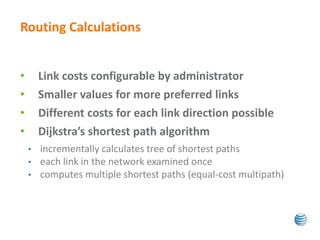
Routing Calculations 
• Link costs configurable by administrator 
• Smaller values for more preferred links 
• Different costs for each link direction possible 
• Dijkstra’s shortest path algorithm 
• incrementally calculates tree of shortest paths 
• each link in the network examined once 
• computes multiple shortest paths (equal-cost multipath)
LAB 
© 2012 AT&T Intellectual Property. All rights reserved. AT&T and the AT&T logo are trademarks of 24 AT&T Intellectual Property.
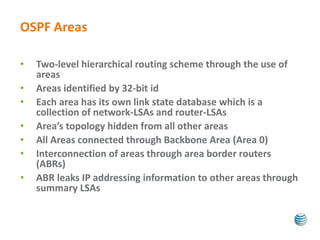
OSPF Areas 
• Two-level hierarchical routing scheme through the use of 
areas 
• Areas identified by 32-bit id 
• Each area has its own link state database which is a 
collection of network-LSAs and router-LSAs 
• Area’s topology hidden from all other areas 
• All Areas connected through Backbone Area (Area 0) 
• Interconnection of areas through area border routers 
(ABRs) 
• ABR leaks IP addressing information to other areas through 
summary LSAs
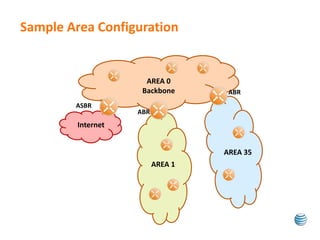
Sample Area Configuration 
AREA 0 
Backbone 
AREA 1 
AREA 35 
ASBR 
Internet 
ABR 
ABR
OSPF Areas (Cont…) 
• Reduction in link state databases of an area 
• Reduction in amount of flooding traffic needed for 
synchronization 
• Reduction in the cost of the shortest path 
calculations 
• Increased robustness 
• Routing protection 
• Hidden prefixes
Incorporating external routing information 
• Special routers called AS boundary routers at the 
edge of OSPF domain 
• ASBRs originate AS-External LSAs 
• only routes for which the choice of an ASBR makes 
sense are imported 
• otherwise default routes are used
Interaction with areas 
• Inter Area communication 
• LSA type 1. Router LSA. All routers in an area 
• LSA type 2. Network LSA. DR generates it. 
• Intra Area communication 
• LSA type 3. Summary ABR LSA. 
• LSA type 5. Summary ASBR LSA.
OSPF Area Types 
• Restrict the amount of external routing 
information within an area 
• Used when resources especially router memory is 
very limited 
• Many types of restricted areas 
• Stub Areas 
• Others: not covered on this training
OSPF Area Types (cont…) 
• Stub Areas 
• Don’t support ASBRs and hence no AS-External-LSAs 
• Routing to external destinations based on default routes 
originated by the area’s border routers 
• Summary LSAs also made optional 
• Must lie on the edge of OSPF routing domain 
• Inter-area routing may also be based on default routes 
• Improved scaling 
• But not preferred due to the possibility of suboptimal 
routes
LAB 
© 2012 AT&T Intellectual Property. All rights reserved. AT&T and the AT&T logo are trademarks of 32 AT&T Intellectual Property.
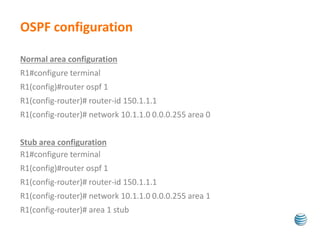
OSPF configuration 
Normal area configuration 
R1#configure terminal 
R1(config)#router ospf 1 
R1(config-router)# router-id 150.1.1.1 
R1(config-router)# network 10.1.1.0 0.0.0.255 area 0 
Stub area configuration 
R1#configure terminal 
R1(config)#router ospf 1 
R1(config-router)# router-id 150.1.1.1 
R1(config-router)# network 10.1.1.0 0.0.0.255 area 1 
R1(config-router)# area 1 stub
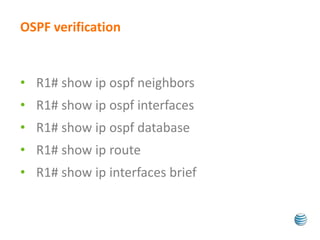
OSPF verification 
• R1# show ip ospf neighbors 
• R1# show ip ospf interfaces 
• R1# show ip ospf database 
• R1# show ip route 
• R1# show ip interfaces brief
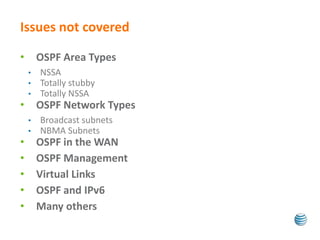
Issues not covered 
• OSPF Area Types 
• NSSA 
• Totally stubby 
• Totally NSSA 
• OSPF Network Types 
• Broadcast subnets 
• NBMA Subnets 
• OSPF in the WAN 
• OSPF Management 
• Virtual Links 
• OSPF and IPv6 
• Many others
Thank You!

OSPF Basics

  • 1.
    Open Shortest PathFirst Protocol (OSPF) Speaker: Martín Bratina. martin.bratina@att.com Date 22/03/2013
  • 2.
    Agenda • Whatis OSPF? • Why is OSPF needed? • How OSPF works? • LAB 2 © 2012 AT&T Intellectual Property. All rights reserved. AT&T and the AT&T logo are trademarks of AT&T Intellectual Property.
  • 3.
    What is OSPF? • Open Shortest Path First • Internal routing protocol (IGP) • Open Standard. RFC 2328 • Link State Protocol • Designed for IP networks © 2012 AT&T Intellectual Property. All rights reserved. AT&T and the AT&T logo are trademarks of 3 AT&T Intellectual Property.
  • 4.
    Why is OSPFneeded? • Open standard • Link State Protocol • Scalability • Fast convergence • Supports authentication/security • Supports VLSM (Variable Length Subnet Masks) • Support IPv6 (OSPFv3) • Support load balancing • Consumes low bandwidth • Uses a hierarchical structure © 2012 AT&T Intellectual Property. All rights reserved. AT&T and the AT&T logo are trademarks of 4 AT&T Intellectual Property.
  • 5.
    How OSPF works? © 2012 AT&T Intellectual Property. All rights reserved. AT&T and the AT&T logo are trademarks of 5 AT&T Intellectual Property.
  • 6.
    How OSPF works? • Uses a Link State Logic. • Neighbor discovery • Topology database exchange • Route computation • Divides routers into areas for route optimization and segmentation © 2012 AT&T Intellectual Property. All rights reserved. AT&T and the AT&T logo are trademarks of 6 AT&T Intellectual Property.
  • 7.
    Neighbor Discovery •Neighbor discovery • Each router discover its neighbors routers sending hello messages • Routers from adjacencies with its neighbors • Neighbor adjacency requirements • Interfaces in the same subnet • Different router ID between neighbors • Routers in the same area • Same authentication parameters © 2012 AT&T Intellectual Property. All rights reserved. AT&T and the AT&T logo are trademarks of 7 AT&T Intellectual Property.
  • 8.
    Topology Database Exchange • Topology Database Exchange • Each router generates its own network topology information (LSA Message) • Each router flood its LSA message to its neighbors • Each router stores a LSA copy on its internal OSPF topology database (LSDB) • Each router has the same LDSB • Link State Advertisement (LSA) Message information • Router ID of the LSA • List of the router interfaces, IP address, subnet and mask • List of routers reachable (neighbors) on each interface © 2012 AT&T Intellectual Property. All rights reserved. AT&T and the AT&T logo are trademarks of 8 AT&T Intellectual Property.
  • 9.
    Link State Advertisements(LSAs) LS Age Options LS Type Link State ID Advertising Router LS Sequence Number LS Checksum Length 0 16 LSA Header © 2012 AT&T Intellectual Property. All rights reserved. AT&T and the AT&T logo are trademarks of 9 AT&T Intellectual Property.
  • 10.
    Route Computation •Route Computation • Each router analyzes its topology database and executes Shortest Path First (SPF) algorithm • Router choses the shortest (best) route to each destination from its perspective (SPF Tree) • Router generates entries in the routing table for those selected destinations © 2012 AT&T Intellectual Property. All rights reserved. AT&T and the AT&T logo are trademarks of 10 AT&T Intellectual Property.
  • 11.
    SPF Tree BEFORErun SPF AFTER run SPF © 2012 AT&T Intellectual Property. All rights reserved. AT&T and the AT&T logo are trademarks of 11 AT&T Intellectual Property.
  • 12.
    Communication between OSPFRouters • OSPF packets encapsulated in IP packets • IP protocol # 89 • Standard 24 byte header • OSPF packet type field • OSPF router ID of sender • Packet checksum • Authentication fields • OSPF Area ID • Uses Multicast IP address 224.0.0.5 for all OSPF routers • DR router use Multicast IP address 224.0.0.6 © 2012 AT&T Intellectual Property. All rights reserved. AT&T and the AT&T logo are trademarks of 12 AT&T Intellectual Property.
  • 13.
    The Hello Protocol • Maintains neighbor relationships • Elects Designated Router (DR) in multi-access networks • The Hello Packet • Hello packets sent out every 10 seconds • RouterDead Interval (default 40 seconds) • Network Mask • List of neighbors • Ensures that link is bidirectional © 2012 AT&T Intellectual Property. All rights reserved. AT&T and the AT&T logo are trademarks of 13 AT&T Intellectual Property.
  • 14.
    The Hello Protocol Hello Hello Hello Hello © 2012 AT&T Intellectual Property. All rights reserved. AT&T and the AT&T logo are trademarks of 14 AT&T Intellectual Property.
  • 15.
    Designated Router (DR) • One per multi access network • Generates Network Link Advertisements (LSA type 2) • All routers form adjacency to it • Assist in DB synchronization • Elected by priority. It tie, it is elected by the highest router ID Adjacencies WITHOUT DR © 2012 AT&T Intellectual Property. All rights reserved. AT&T and the AT&T logo are trademarks of 15 AT&T Intellectual Property. Adjacencies WITH DR DR
  • 16.
    Database Synchronization •Crucial to ensure correct and loop free routing • Must be done before 2 neighbors start communication • Whenever new LSAs are introduced • uses reliable flooding • Each router sends LSA headers (small LSA’s) to its neighbor when connection comes up • Requests only those LSAs which are recent © 2012 AT&T Intellectual Property. All rights reserved. AT&T and the AT&T logo are trademarks of 16 AT&T Intellectual Property.
  • 17.
    Database Exchange •Neighboring routers first exchange hellos • A database description packet establishes the sequence number • The other router sends LSA headers • Sequence number incremented for every pair of database description packets • implicit acknowledgement for the previous pair • After examining LSA headers explicit request sent for complete LSA © 2012 AT&T Intellectual Property. All rights reserved. AT&T and the AT&T logo are trademarks of 17 AT&T Intellectual Property.
  • 18.
    Reliable Flooding •Starts when a router wants to update self-originated LSAs • Neighbor installs more recent LSAs into its database • Floods out on all interfaces except the one on which it arrived • Reliability-retransmissions until acks received © 2012 AT&T Intellectual Property. All rights reserved. AT&T and the AT&T logo are trademarks of 18 AT&T Intellectual Property.
  • 19.
    Reliable Flooding (cont..) 10.1.1.1 10.1.1.2 10.1.1.4 10.1.1.6 10.1.1.3 10.1.1.5 Time T1 u u u © 2012 AT&T Intellectual Property. All rights reserved. AT&T and the AT&T logo are trademarks of 19 AT&T Intellectual Property.
  • 20.
    Reliable Flooding (cont..) 10.1.1.1 10.1.1.2 10.1.1.4 10.1.1.6 u u 10.1.1.3 10.1.1.5 Time T2 u u u 20 © 2012 AT&T Intellectual Property. All rights reserved. AT&T and the AT&T logo are trademarks of AT&T Intellectual Property.
  • 21.
    Reliable Flooding (cont..) 10.1.1.1 10.1.1.2 10.1.1.4 10.1.1.6 10.1.1.3 10.1.1.5 Time T3 u u © 2012 AT&T Intellectual Property. All rights reserved. AT&T and the AT&T logo are trademarks of 21 AT&T Intellectual Property.
  • 22.
    Reliable Flooding (cont..) 10.1.1.1 10.1.1.2 10.1.1.4 10.1.1.6 10.1.1.3 10.1.1.5 Time T3+ ack ack ack ack ack © 2012 AT&T Intellectual Property. All rights reserved. AT&T and the AT&T logo are trademarks of 22 AT&T Intellectual Property.
  • 23.
    Routing Calculations •Link costs configurable by administrator • Smaller values for more preferred links • Different costs for each link direction possible • Dijkstra’s shortest path algorithm • incrementally calculates tree of shortest paths • each link in the network examined once • computes multiple shortest paths (equal-cost multipath)
  • 24.
    LAB © 2012AT&T Intellectual Property. All rights reserved. AT&T and the AT&T logo are trademarks of 24 AT&T Intellectual Property.
  • 25.
    OSPF Areas •Two-level hierarchical routing scheme through the use of areas • Areas identified by 32-bit id • Each area has its own link state database which is a collection of network-LSAs and router-LSAs • Area’s topology hidden from all other areas • All Areas connected through Backbone Area (Area 0) • Interconnection of areas through area border routers (ABRs) • ABR leaks IP addressing information to other areas through summary LSAs
  • 26.
    Sample Area Configuration AREA 0 Backbone AREA 1 AREA 35 ASBR Internet ABR ABR
  • 27.
    OSPF Areas (Cont…) • Reduction in link state databases of an area • Reduction in amount of flooding traffic needed for synchronization • Reduction in the cost of the shortest path calculations • Increased robustness • Routing protection • Hidden prefixes
  • 28.
    Incorporating external routinginformation • Special routers called AS boundary routers at the edge of OSPF domain • ASBRs originate AS-External LSAs • only routes for which the choice of an ASBR makes sense are imported • otherwise default routes are used
  • 29.
    Interaction with areas • Inter Area communication • LSA type 1. Router LSA. All routers in an area • LSA type 2. Network LSA. DR generates it. • Intra Area communication • LSA type 3. Summary ABR LSA. • LSA type 5. Summary ASBR LSA.
  • 30.
    OSPF Area Types • Restrict the amount of external routing information within an area • Used when resources especially router memory is very limited • Many types of restricted areas • Stub Areas • Others: not covered on this training
  • 31.
    OSPF Area Types(cont…) • Stub Areas • Don’t support ASBRs and hence no AS-External-LSAs • Routing to external destinations based on default routes originated by the area’s border routers • Summary LSAs also made optional • Must lie on the edge of OSPF routing domain • Inter-area routing may also be based on default routes • Improved scaling • But not preferred due to the possibility of suboptimal routes
  • 32.
    LAB © 2012AT&T Intellectual Property. All rights reserved. AT&T and the AT&T logo are trademarks of 32 AT&T Intellectual Property.
  • 33.
    OSPF configuration Normalarea configuration R1#configure terminal R1(config)#router ospf 1 R1(config-router)# router-id 150.1.1.1 R1(config-router)# network 10.1.1.0 0.0.0.255 area 0 Stub area configuration R1#configure terminal R1(config)#router ospf 1 R1(config-router)# router-id 150.1.1.1 R1(config-router)# network 10.1.1.0 0.0.0.255 area 1 R1(config-router)# area 1 stub
  • 34.
    OSPF verification •R1# show ip ospf neighbors • R1# show ip ospf interfaces • R1# show ip ospf database • R1# show ip route • R1# show ip interfaces brief
  • 35.
    Issues not covered • OSPF Area Types • NSSA • Totally stubby • Totally NSSA • OSPF Network Types • Broadcast subnets • NBMA Subnets • OSPF in the WAN • OSPF Management • Virtual Links • OSPF and IPv6 • Many others
  • 36.