Network Fundamentals
From Zero to HTTP
One To One
● Two machines can talk to each other
● Each machine has a network interface
● Network interfaces can be connected directly to each other via network cable
● Each network interface has a Media Access Control (MAC) address (AKA
hardware address)
● MAC addresses look like this: 50:46:5d:54:94:23
● MAC addresses are globally unique (at least in theory)
● Data is sent in chunks called ‘frames’
● Each frame has a source and destination MAC address
How Do They Know The Destination MAC Address?
● They don’t!
● They do know the IP address though (because you tell them it)
● An IPv4 address looks like this: 192.168.0.1
○ There’s IPv6 too, but we won’t be covering it here
● A machine can ask the whole network who has a particular IP
● Machines ignore frames that don’t have their MAC as the destination
● But there’s a special ‘anyone’ or ‘broadcast’ MAC: ff:ff:ff:ff:ff:ff
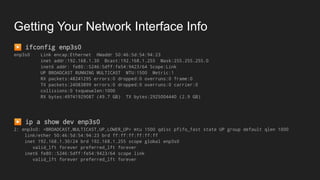
Getting Your Network Interface Info
▶ ifconfig enp3s0
enp3s0 Link encap:Ethernet HWaddr 50:46:5d:54:94:23
inet addr:192.168.1.30 Bcast:192.168.1.255 Mask:255.255.255.0
inet6 addr: fe80::5246:5dff:fe54:9423/64 Scope:Link
UP BROADCAST RUNNING MULTICAST MTU:1500 Metric:1
RX packets:48241295 errors:0 dropped:0 overruns:0 frame:0
TX packets:24083899 errors:0 dropped:0 overruns:0 carrier:0
collisions:0 txqueuelen:1000
RX bytes:49741929087 (49.7 GB) TX bytes:2925004440 (2.9 GB)
▶ ip a show dev enp3s0
2: enp3s0: <BROADCAST,MULTICAST,UP,LOWER_UP> mtu 1500 qdisc pfifo_fast state UP group default qlen 1000
link/ether 50:46:5d:54:94:23 brd ff:ff:ff:ff:ff:ff
inet 192.168.1.30/24 brd 192.168.1.255 scope global enp3s0
valid_lft forever preferred_lft forever
inet6 fe80::5246:5dff:fe54:9423/64 scope link
valid_lft forever preferred_lft forever
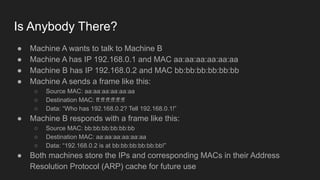
Is Anybody There?
● Machine A wants to talk to Machine B
● Machine A has IP 192.168.0.1 and MAC aa:aa:aa:aa:aa:aa
● Machine B has IP 192.168.0.2 and MAC bb:bb:bb:bb:bb:bb
● Machine A sends a frame like this:
○ Source MAC: aa:aa:aa:aa:aa:aa
○ Destination MAC: ff:ff:ff:ff:ff:ff
○ Data: “Who has 192.168.0.2? Tell 192.168.0.1!”
● Machine B responds with a frame like this:
○ Source MAC: bb:bb:bb:bb:bb:bb
○ Destination MAC: aa:aa:aa:aa:aa:aa
○ Data: “192.168.0.2 is at bb:bb:bb:bb:bb:bb!”
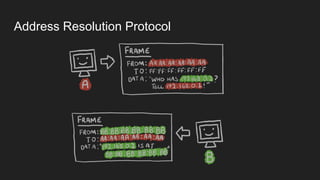
● Both machines store the IPs and corresponding MACs in their Address
Resolution Protocol (ARP) cache for future use
Address Resolution Protocol
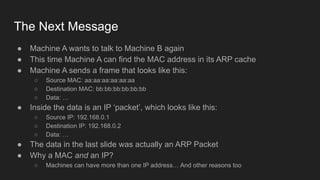
The Next Message
● Machine A wants to talk to Machine B again
● This time Machine A can find the MAC address in its ARP cache
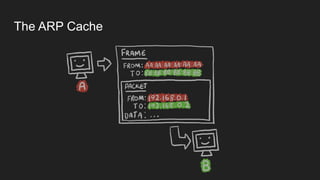
● Machine A sends a frame that looks like this:
○ Source MAC: aa:aa:aa:aa:aa:aa
○ Destination MAC: bb:bb:bb:bb:bb:bb
○ Data: …
● Inside the data is an IP ‘packet’, which looks like this:
○ Source IP: 192.168.0.1
○ Destination IP: 192.168.0.2
○ Data: …
● The data in the last slide was actually an ARP Packet
● Why a MAC and an IP?
○ Machines can have more than one IP address… And other reasons too
The ARP Cache
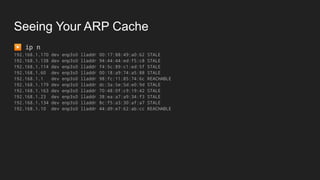
Seeing Your ARP Cache
▶ ip n
192.168.1.170 dev enp3s0 lladdr 00:17:88:49:a0:62 STALE
192.168.1.138 dev enp3s0 lladdr 94:44:44:ed:f5:c8 STALE
192.168.1.114 dev enp3s0 lladdr f4:5c:89:c1:ed:5f STALE
192.168.1.60 dev enp3s0 lladdr 00:18:a9:74:a5:88 STALE
192.168.1.1 dev enp3s0 lladdr 98:fc:11:85:74:6c REACHABLE
192.168.1.179 dev enp3s0 lladdr dc:3a:5e:5d:e0:9d STALE
192.168.1.163 dev enp3s0 lladdr 70:48:0f:c9:19:42 STALE
192.168.1.23 dev enp3s0 lladdr 38:ea:a7:a9:34:f3 STALE
192.168.1.134 dev enp3s0 lladdr 8c:f5:a3:30:af:a7 STALE
192.168.1.10 dev enp3s0 lladdr 44:d9:e7:62:ab:cc REACHABLE
More Than Two Machines
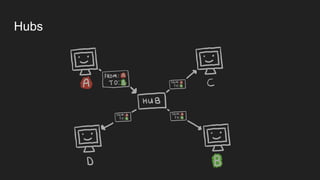
● More than two machines can be connected to a hub
● A hub is pretty dumb
● It just sends everything it receives back out to all ports
● Machines ignore frames not intended for them so everything is (mostly) fine
● Everything that worked for two machines works exactly the same way
● But:
○ It’s slow (10Mbit, 100Mbit if you’re lucky)
○ You get collisions (machines trying to talk over each other)
○ We can do better
Hubs
Switching
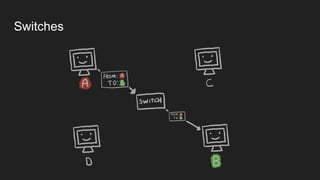
● Network switches are smarter and more efficient
● Switches remember the source MACs they have seen on each port
● Frames are only sent to the port that a MAC is connected to
● If the switch doesn’t know where a MAC is: it sends to all ports
○ It never knows where ff:ff:ff:ff:ff:ff is so that always goes to all ports!
● Fewer collisions!
● Much faster!
○ 10Gbit is fairly common in switched networks
Switches
Subnets
● Machines can only directly send IP packets to machines on the same network
● Sooo… How do we define what a network (technically a sub-network) is?
● As well as an IP, each machine has a subnet mask
○ They look like this: 255.255.255.0
● The subnet mask is used in combination with a source and destination IP to
decide if they are on the same subnet or not
● It’s actually much easier to understand in binary!
Subnet Masks
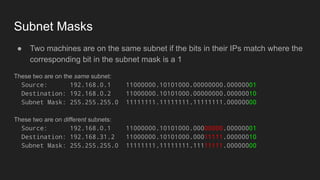
● Two machines are on the same subnet if the bits in their IPs match where the
corresponding bit in the subnet mask is a 1
These two are on the same subnet:
Source: 192.168.0.1 11000000.10101000.00000000.00000001
Destination: 192.168.0.2 11000000.10101000.00000000.00000010
Subnet Mask: 255.255.255.0 11111111.11111111.11111111.00000000
These two are on different subnets:
Source: 192.168.0.1 11000000.10101000.00000000.00000001
Destination: 192.168.31.2 11000000.10101000.00011111.00000010
Subnet Mask: 255.255.255.0 11111111.11111111.11111111.00000000
CIDR Notation
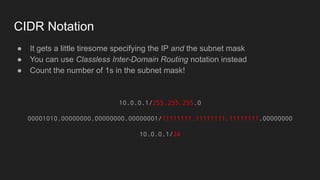
● It gets a little tiresome specifying the IP and the subnet mask
● You can use Classless Inter-Domain Routing notation instead
● Count the number of 1s in the subnet mask!
10.0.0.1/255.255.255.0
00001010.00000000.00000000.00000001/11111111.11111111.11111111.00000000
10.0.0.1/24
Routing
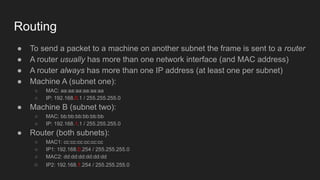
● To send a packet to a machine on another subnet the frame is sent to a router
● A router usually has more than one network interface (and MAC address)
● A router always has more than one IP address (at least one per subnet)
● Machine A (subnet one):
○ MAC: aa:aa:aa:aa:aa:aa
○ IP: 192.168.0.1 / 255.255.255.0
● Machine B (subnet two):
○ MAC: bb:bb:bb:bb:bb:bb
○ IP: 192.168.1.1 / 255.255.255.0
● Router (both subnets):
○ MAC1: cc:cc:cc:cc:cc:cc
○ IP1: 192.168.0.254 / 255.255.255.0
○ MAC2: dd:dd:dd:dd:dd:dd
○ IP2: 192.168.1.254 / 255.255.255.0
An Example Hop
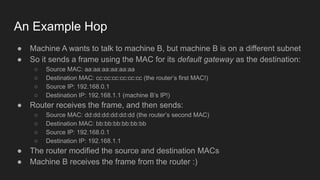
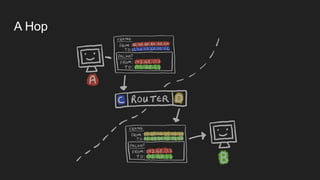
● Machine A wants to talk to machine B, but machine B is on a different subnet
● So it sends a frame using the MAC for its default gateway as the destination:
○ Source MAC: aa:aa:aa:aa:aa:aa
○ Destination MAC: cc:cc:cc:cc:cc:cc (the router’s first MAC!)
○ Source IP: 192.168.0.1
○ Destination IP: 192.168.1.1 (machine B’s IP!)
● Router receives the frame, and then sends:
○ Source MAC: dd:dd:dd:dd:dd:dd (the router’s second MAC)
○ Destination MAC: bb:bb:bb:bb:bb:bb
○ Source IP: 192.168.0.1
○ Destination IP: 192.168.1.1
● The router modified the source and destination MACs
● Machine B receives the frame from the router :)
A Hop
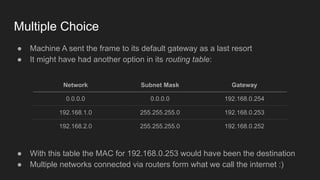
Multiple Choice
● Machine A sent the frame to its default gateway as a last resort
● It might have had another option in its routing table:
Network Subnet Mask Gateway
0.0.0.0 0.0.0.0 192.168.0.254
192.168.1.0 255.255.255.0 192.168.0.253
192.168.2.0 255.255.255.0 192.168.0.252
● With this table the MAC for 192.168.0.253 would have been the destination
● Multiple networks connected via routers form what we call the internet :)
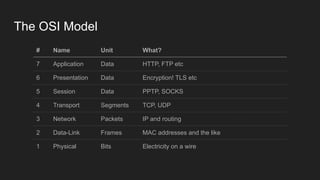
The OSI Model
# Name Unit What?
7 Application Data HTTP, FTP etc
6 Presentation Data Encryption! TLS etc
5 Session Data PPTP, SOCKS
4 Transport Segments TCP, UDP
3 Network Packets IP and routing
2 Data-Link Frames MAC addresses and the like
1 Physical Bits Electricity on a wire
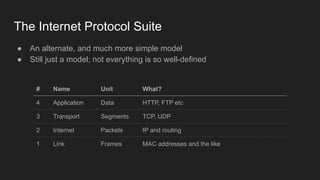
The Internet Protocol Suite
# Name Unit What?
4 Application Data HTTP, FTP etc
3 Transport Segments TCP, UDP
2 Internet Packets IP and routing
1 Link Frames MAC addresses and the like
● An alternate, and much more simple model
● Still just a model; not everything is so well-defined
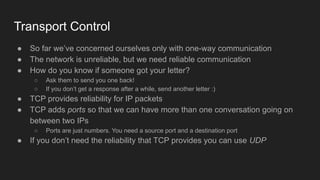
Transport Control
● So far we’ve concerned ourselves only with one-way communication
● The network is unreliable, but we need reliable communication
● How do you know if someone got your letter?
○ Ask them to send you one back!
○ If you don’t get a response after a while, send another letter :)
● TCP provides reliability for IP packets
● TCP adds ports so that we can have more than one conversation going on
between two IPs
○ Ports are just numbers. You need a source port and a destination port
● If you don’t need the reliability that TCP provides you can use UDP
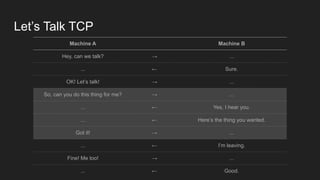
Let’s Talk TCP
Machine A Machine B
Hey, can we talk? → ...
... ← Sure.
OK! Let’s talk! → ...
So, can you do this thing for me? → ...
... ← Yes, I hear you.
... ← Here’s the thing you wanted.
Got it! → ...
... ← I’m leaving.
Fine! Me too! → ...
... ← Good.
The Real Version
192.168.0.1:56789 192.168.0.2:80
SYN → ...
... ← SYN, ACK
ACK → ...
DATA → ...
... ← ACK
... ← DATA
ACK → ...
... ← FIN
FIN, ACK → ...
... ← ACK
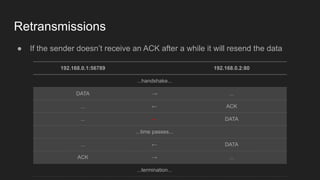
Retransmissions
192.168.0.1:56789 192.168.0.2:80
...handshake...
DATA → ...
... ← ACK
... ← DATA
...time passes...
... ← DATA
ACK → ...
...termination...
● If the sender doesn’t receive an ACK after a while it will resend the data
Skipping A Few Layers (for OSI at least)
● HTTP is an application layer protocol
● HTTP version 1.1 is just plaintext
○ So simple you can write it by hand!
● It might be encrypted with, say, TLS, but we’ll ignore that for now
● HTTP version 2 isn’t plaintext, but we’re going to ignore that too
● When we’re talking about an application layer protocol we can (mostly) ignore
the lower layers :)
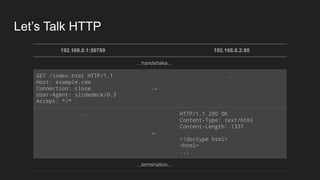
Let’s Talk HTTP
192.168.0.1:56789 192.168.0.2:80
...handshake...
GET /index.html HTTP/1.1
Host: example.com
Connection: close
User-Agent: slidedeck/0.3
Accept: */*
→
...
...
←
HTTP/1.1 200 OK
Content-Type: text/html
Content-Length: 1337
<!doctype html>
<html>
...
...termination...
The Request
What What?
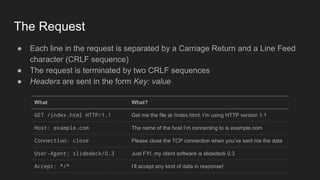
GET /index.html HTTP/1.1 Get me the file at /index.html; I’m using HTTP version 1.1
Host: example.com The name of the host I’m connecting to is example.com
Connection: close Please close the TCP connection when you’ve sent me the data
User-Agent: slidedeck/0.3 Just FYI, my client software is slidedeck 0.3
Accept: */* I’ll accept any kind of data in response!
● Each line in the request is separated by a Carriage Return and a Line Feed
character (CRLF sequence)
● The request is terminated by two CRLF sequences
● Headers are sent in the form Key: value
The Response
What What?
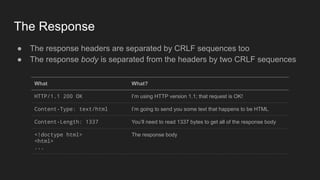
HTTP/1.1 200 OK I’m using HTTP version 1.1; that request is OK!
Content-Type: text/html I’m going to send you some text that happens to be HTML
Content-Length: 1337 You’ll need to read 1337 bytes to get all of the response body
<!doctype html>
<html>
...
The response body
● The response headers are separated by CRLF sequences too
● The response body is separated from the headers by two CRLF sequences
What’s Your Name?
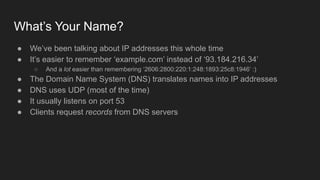
● We’ve been talking about IP addresses this whole time
● It’s easier to remember ‘example.com’ instead of ‘93.184.216.34’
○ And a lot easier than remembering ‘2606:2800:220:1:248:1893:25c8:1946’ :)
● The Domain Name System (DNS) translates names into IP addresses
● DNS uses UDP (most of the time)
● It usually listens on port 53
● Clients request records from DNS servers
Record Types (a non-exhaustive list)
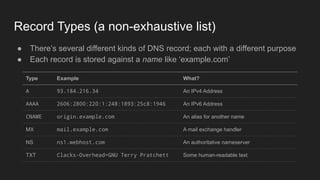
Type Example What?
A 93.184.216.34 An IPv4 Address
AAAA 2606:2800:220:1:248:1893:25c8:1946 An IPv6 Address
CNAME origin.example.com An alias for another name
MX mail.example.com A mail exchange handler
NS ns1.webhost.com An authoritative nameserver
TXT Clacks-Overhead=GNU Terry Pratchett Some human-readable text
● There’s several different kinds of DNS record; each with a different purpose
● Each record is stored against a name like ‘example.com’
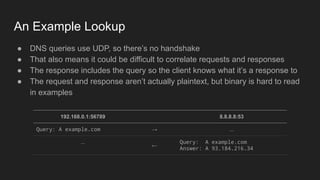
An Example Lookup
192.168.0.1:56789 8.8.8.8:53
Query: A example.com → ...
...
←
Query: A example.com
Answer: A 93.184.216.34
● DNS queries use UDP, so there’s no handshake
● That also means it could be difficult to correlate requests and responses
● The response includes the query so the client knows what it’s a response to
● The request and response aren’t actually plaintext, but binary is hard to read
in examples
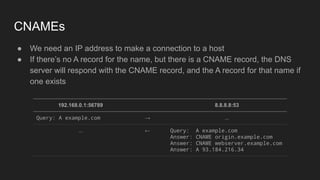
CNAMEs
192.168.0.1:56789 8.8.8.8:53
Query: A example.com → ...
... ← Query: A example.com
Answer: CNAME origin.example.com
Answer: CNAME webserver.example.com
Answer: A 93.184.216.34
● We need an IP address to make a connection to a host
● If there’s no A record for the name, but there is a CNAME record, the DNS
server will respond with the CNAME record, and the A record for that name if
one exists
Load Balancers
● One server is rarely enough to handle all of your traffic
● Load Balancers split incoming requests between multiple servers
● Some load balancers work at the Transport Layer (TCP etc)
● Others work at the Application Layer (HTTP etc)
● Transport Layer is ‘easier’ (i.e. requires less CPU time)
● Application Layer is more powerful
○ You can send requests to, say, a particular HTTP endpoint to a different pool of servers
○ You can respond to some requests without hitting a backend server at all
● Both kinds have multiple load balancing algorithms
○ Round Robin / Weighted Round Robin
○ Least Connections
○ Hashed on some property of the connection (e.g. source IP)
○ Random
Transport Layer Load Balancers
● All packets for a TCP session are sent to and from the same backend server
● Works for any backend service that uses TCP
○ That covers the vast majority of backend services
■ Web Servers
■ Database Servers
■ Internet-enabled Toasters
● Can work for UDP too, but the application layer protocol on top must be
stateless and/or you must use a hash-based load balancing algorithm
● No need to decrypt traffic in transit
● Requests can be split based only on Transport or Internet/Network level
details like source IP address
● Generally fairly limited in their capabilities
Application Layer Load Balancers
● They actually understand the application layer protocol (e.g. HTTP)
● That lets you do useful stuff like:
○ Split requests based on application layer details (e.g. HTTP path, query string, cookies)
○ Respond to some requests without hitting a backend server (e.g. redirecting HTTP to HTTPS)
○ Edge Side Includes (i.e. calling more than one backend server to form one response)
○ Block requests you suspect are malicious (e.g. HTTP request contains possible XSS payload)
● Takes a lot more processing power to run
● Usually made for only one protocol (e.g. an HTTP load balancer couldn’t
really do anything with MySQL connections)
● If you’re using an encrypted transport like TLS the load balancer must decrypt
incoming traffic before it can be processed
○ That means you’ve got to deploy your private keys to your load balancers
○ Sometimes you might need to re-encrypt afterwards (e.g. for cardholder data)
Network Address Translation (NAT)
● IPv4 space is limited - IPv4 addresses are 32 bit unsigned integers
● Max addresses: 4,294,967,295
● Subtracting the reserved ranges it’s actually only 3,702,258,430
● More than 7,607,000,000 people on earth as of March 2018
● How many internet connected devices do you own?
○ There was more than 30 devices on my home network last time I checked
● NAT is a solution to the IPv4 space problem, but also a good way to make
sure your network really is private too
○ E.g. private addresses can’t be routed to from the public internet unless you explicitly allow it
An Aside: Reserved IPv4 Space
● Private-use Ranges:
○ 10.0.0.0/8
○ 172.16.0.0/12
○ 192.168.0.0/16
● Local / loopback:
○ 127.0.0.0/8
○ 0.0.0.0/8
● And 10 or so more ranges reserved for a bunch of different reasons
○ E.g. documentation, broadcast ranges, ‘future use’
How To NAT
● Machine A (192.168.0.10) is on your network, behind NAT
● It wants to connect to Google’s DNS servers (8.8.8.8 port 53)
● Machine A sends a packet:
○ Source MAC: aa:aa:aa:aa:aa:aa
○ Dest MAC: cc:cc:cc:cc:cc:cc (the internal interface on the default gateway)
○ Source IP/port: 192.168.0.10:34567 (Machine A’s IP)
○ Dest IP/port: 8.8.8.8:53
● The default gateway receives the packet and rewrites the source IP/port
before sending it on:
○ Source IP/port: 62.52.42.32:45678 (The gateway’s public IP)
○ Dest IP/port: 8.8.8.8:53
● The translation is recorded so that return traffic can have its destination IP
and port translated

networking.pdf

  • 1.
  • 2.
    One To One ●Two machines can talk to each other ● Each machine has a network interface ● Network interfaces can be connected directly to each other via network cable ● Each network interface has a Media Access Control (MAC) address (AKA hardware address) ● MAC addresses look like this: 50:46:5d:54:94:23 ● MAC addresses are globally unique (at least in theory) ● Data is sent in chunks called ‘frames’ ● Each frame has a source and destination MAC address
  • 3.
    How Do TheyKnow The Destination MAC Address? ● They don’t! ● They do know the IP address though (because you tell them it) ● An IPv4 address looks like this: 192.168.0.1 ○ There’s IPv6 too, but we won’t be covering it here ● A machine can ask the whole network who has a particular IP ● Machines ignore frames that don’t have their MAC as the destination ● But there’s a special ‘anyone’ or ‘broadcast’ MAC: ff:ff:ff:ff:ff:ff
  • 4.
    Getting Your NetworkInterface Info ▶ ifconfig enp3s0 enp3s0 Link encap:Ethernet HWaddr 50:46:5d:54:94:23 inet addr:192.168.1.30 Bcast:192.168.1.255 Mask:255.255.255.0 inet6 addr: fe80::5246:5dff:fe54:9423/64 Scope:Link UP BROADCAST RUNNING MULTICAST MTU:1500 Metric:1 RX packets:48241295 errors:0 dropped:0 overruns:0 frame:0 TX packets:24083899 errors:0 dropped:0 overruns:0 carrier:0 collisions:0 txqueuelen:1000 RX bytes:49741929087 (49.7 GB) TX bytes:2925004440 (2.9 GB) ▶ ip a show dev enp3s0 2: enp3s0: <BROADCAST,MULTICAST,UP,LOWER_UP> mtu 1500 qdisc pfifo_fast state UP group default qlen 1000 link/ether 50:46:5d:54:94:23 brd ff:ff:ff:ff:ff:ff inet 192.168.1.30/24 brd 192.168.1.255 scope global enp3s0 valid_lft forever preferred_lft forever inet6 fe80::5246:5dff:fe54:9423/64 scope link valid_lft forever preferred_lft forever
  • 5.
    Is Anybody There? ●Machine A wants to talk to Machine B ● Machine A has IP 192.168.0.1 and MAC aa:aa:aa:aa:aa:aa ● Machine B has IP 192.168.0.2 and MAC bb:bb:bb:bb:bb:bb ● Machine A sends a frame like this: ○ Source MAC: aa:aa:aa:aa:aa:aa ○ Destination MAC: ff:ff:ff:ff:ff:ff ○ Data: “Who has 192.168.0.2? Tell 192.168.0.1!” ● Machine B responds with a frame like this: ○ Source MAC: bb:bb:bb:bb:bb:bb ○ Destination MAC: aa:aa:aa:aa:aa:aa ○ Data: “192.168.0.2 is at bb:bb:bb:bb:bb:bb!” ● Both machines store the IPs and corresponding MACs in their Address Resolution Protocol (ARP) cache for future use
  • 6.
  • 7.
    The Next Message ●Machine A wants to talk to Machine B again ● This time Machine A can find the MAC address in its ARP cache ● Machine A sends a frame that looks like this: ○ Source MAC: aa:aa:aa:aa:aa:aa ○ Destination MAC: bb:bb:bb:bb:bb:bb ○ Data: … ● Inside the data is an IP ‘packet’, which looks like this: ○ Source IP: 192.168.0.1 ○ Destination IP: 192.168.0.2 ○ Data: … ● The data in the last slide was actually an ARP Packet ● Why a MAC and an IP? ○ Machines can have more than one IP address… And other reasons too
  • 8.
  • 9.
    Seeing Your ARPCache ▶ ip n 192.168.1.170 dev enp3s0 lladdr 00:17:88:49:a0:62 STALE 192.168.1.138 dev enp3s0 lladdr 94:44:44:ed:f5:c8 STALE 192.168.1.114 dev enp3s0 lladdr f4:5c:89:c1:ed:5f STALE 192.168.1.60 dev enp3s0 lladdr 00:18:a9:74:a5:88 STALE 192.168.1.1 dev enp3s0 lladdr 98:fc:11:85:74:6c REACHABLE 192.168.1.179 dev enp3s0 lladdr dc:3a:5e:5d:e0:9d STALE 192.168.1.163 dev enp3s0 lladdr 70:48:0f:c9:19:42 STALE 192.168.1.23 dev enp3s0 lladdr 38:ea:a7:a9:34:f3 STALE 192.168.1.134 dev enp3s0 lladdr 8c:f5:a3:30:af:a7 STALE 192.168.1.10 dev enp3s0 lladdr 44:d9:e7:62:ab:cc REACHABLE
  • 10.
    More Than TwoMachines ● More than two machines can be connected to a hub ● A hub is pretty dumb ● It just sends everything it receives back out to all ports ● Machines ignore frames not intended for them so everything is (mostly) fine ● Everything that worked for two machines works exactly the same way ● But: ○ It’s slow (10Mbit, 100Mbit if you’re lucky) ○ You get collisions (machines trying to talk over each other) ○ We can do better
  • 11.
  • 12.
    Switching ● Network switchesare smarter and more efficient ● Switches remember the source MACs they have seen on each port ● Frames are only sent to the port that a MAC is connected to ● If the switch doesn’t know where a MAC is: it sends to all ports ○ It never knows where ff:ff:ff:ff:ff:ff is so that always goes to all ports! ● Fewer collisions! ● Much faster! ○ 10Gbit is fairly common in switched networks
  • 13.
  • 14.
    Subnets ● Machines canonly directly send IP packets to machines on the same network ● Sooo… How do we define what a network (technically a sub-network) is? ● As well as an IP, each machine has a subnet mask ○ They look like this: 255.255.255.0 ● The subnet mask is used in combination with a source and destination IP to decide if they are on the same subnet or not ● It’s actually much easier to understand in binary!
  • 15.
    Subnet Masks ● Twomachines are on the same subnet if the bits in their IPs match where the corresponding bit in the subnet mask is a 1 These two are on the same subnet: Source: 192.168.0.1 11000000.10101000.00000000.00000001 Destination: 192.168.0.2 11000000.10101000.00000000.00000010 Subnet Mask: 255.255.255.0 11111111.11111111.11111111.00000000 These two are on different subnets: Source: 192.168.0.1 11000000.10101000.00000000.00000001 Destination: 192.168.31.2 11000000.10101000.00011111.00000010 Subnet Mask: 255.255.255.0 11111111.11111111.11111111.00000000
  • 16.
    CIDR Notation ● Itgets a little tiresome specifying the IP and the subnet mask ● You can use Classless Inter-Domain Routing notation instead ● Count the number of 1s in the subnet mask! 10.0.0.1/255.255.255.0 00001010.00000000.00000000.00000001/11111111.11111111.11111111.00000000 10.0.0.1/24
  • 17.
    Routing ● To senda packet to a machine on another subnet the frame is sent to a router ● A router usually has more than one network interface (and MAC address) ● A router always has more than one IP address (at least one per subnet) ● Machine A (subnet one): ○ MAC: aa:aa:aa:aa:aa:aa ○ IP: 192.168.0.1 / 255.255.255.0 ● Machine B (subnet two): ○ MAC: bb:bb:bb:bb:bb:bb ○ IP: 192.168.1.1 / 255.255.255.0 ● Router (both subnets): ○ MAC1: cc:cc:cc:cc:cc:cc ○ IP1: 192.168.0.254 / 255.255.255.0 ○ MAC2: dd:dd:dd:dd:dd:dd ○ IP2: 192.168.1.254 / 255.255.255.0
  • 18.
    An Example Hop ●Machine A wants to talk to machine B, but machine B is on a different subnet ● So it sends a frame using the MAC for its default gateway as the destination: ○ Source MAC: aa:aa:aa:aa:aa:aa ○ Destination MAC: cc:cc:cc:cc:cc:cc (the router’s first MAC!) ○ Source IP: 192.168.0.1 ○ Destination IP: 192.168.1.1 (machine B’s IP!) ● Router receives the frame, and then sends: ○ Source MAC: dd:dd:dd:dd:dd:dd (the router’s second MAC) ○ Destination MAC: bb:bb:bb:bb:bb:bb ○ Source IP: 192.168.0.1 ○ Destination IP: 192.168.1.1 ● The router modified the source and destination MACs ● Machine B receives the frame from the router :)
  • 19.
  • 20.
    Multiple Choice ● MachineA sent the frame to its default gateway as a last resort ● It might have had another option in its routing table: Network Subnet Mask Gateway 0.0.0.0 0.0.0.0 192.168.0.254 192.168.1.0 255.255.255.0 192.168.0.253 192.168.2.0 255.255.255.0 192.168.0.252 ● With this table the MAC for 192.168.0.253 would have been the destination ● Multiple networks connected via routers form what we call the internet :)
  • 21.
    The OSI Model #Name Unit What? 7 Application Data HTTP, FTP etc 6 Presentation Data Encryption! TLS etc 5 Session Data PPTP, SOCKS 4 Transport Segments TCP, UDP 3 Network Packets IP and routing 2 Data-Link Frames MAC addresses and the like 1 Physical Bits Electricity on a wire
  • 22.
    The Internet ProtocolSuite # Name Unit What? 4 Application Data HTTP, FTP etc 3 Transport Segments TCP, UDP 2 Internet Packets IP and routing 1 Link Frames MAC addresses and the like ● An alternate, and much more simple model ● Still just a model; not everything is so well-defined
  • 23.
    Transport Control ● Sofar we’ve concerned ourselves only with one-way communication ● The network is unreliable, but we need reliable communication ● How do you know if someone got your letter? ○ Ask them to send you one back! ○ If you don’t get a response after a while, send another letter :) ● TCP provides reliability for IP packets ● TCP adds ports so that we can have more than one conversation going on between two IPs ○ Ports are just numbers. You need a source port and a destination port ● If you don’t need the reliability that TCP provides you can use UDP
  • 24.
    Let’s Talk TCP MachineA Machine B Hey, can we talk? → ... ... ← Sure. OK! Let’s talk! → ... So, can you do this thing for me? → ... ... ← Yes, I hear you. ... ← Here’s the thing you wanted. Got it! → ... ... ← I’m leaving. Fine! Me too! → ... ... ← Good.
  • 25.
    The Real Version 192.168.0.1:56789192.168.0.2:80 SYN → ... ... ← SYN, ACK ACK → ... DATA → ... ... ← ACK ... ← DATA ACK → ... ... ← FIN FIN, ACK → ... ... ← ACK
  • 26.
    Retransmissions 192.168.0.1:56789 192.168.0.2:80 ...handshake... DATA →... ... ← ACK ... ← DATA ...time passes... ... ← DATA ACK → ... ...termination... ● If the sender doesn’t receive an ACK after a while it will resend the data
  • 27.
    Skipping A FewLayers (for OSI at least) ● HTTP is an application layer protocol ● HTTP version 1.1 is just plaintext ○ So simple you can write it by hand! ● It might be encrypted with, say, TLS, but we’ll ignore that for now ● HTTP version 2 isn’t plaintext, but we’re going to ignore that too ● When we’re talking about an application layer protocol we can (mostly) ignore the lower layers :)
  • 28.
    Let’s Talk HTTP 192.168.0.1:56789192.168.0.2:80 ...handshake... GET /index.html HTTP/1.1 Host: example.com Connection: close User-Agent: slidedeck/0.3 Accept: */* → ... ... ← HTTP/1.1 200 OK Content-Type: text/html Content-Length: 1337 <!doctype html> <html> ... ...termination...
  • 29.
    The Request What What? GET/index.html HTTP/1.1 Get me the file at /index.html; I’m using HTTP version 1.1 Host: example.com The name of the host I’m connecting to is example.com Connection: close Please close the TCP connection when you’ve sent me the data User-Agent: slidedeck/0.3 Just FYI, my client software is slidedeck 0.3 Accept: */* I’ll accept any kind of data in response! ● Each line in the request is separated by a Carriage Return and a Line Feed character (CRLF sequence) ● The request is terminated by two CRLF sequences ● Headers are sent in the form Key: value
  • 30.
    The Response What What? HTTP/1.1200 OK I’m using HTTP version 1.1; that request is OK! Content-Type: text/html I’m going to send you some text that happens to be HTML Content-Length: 1337 You’ll need to read 1337 bytes to get all of the response body <!doctype html> <html> ... The response body ● The response headers are separated by CRLF sequences too ● The response body is separated from the headers by two CRLF sequences
  • 31.
    What’s Your Name? ●We’ve been talking about IP addresses this whole time ● It’s easier to remember ‘example.com’ instead of ‘93.184.216.34’ ○ And a lot easier than remembering ‘2606:2800:220:1:248:1893:25c8:1946’ :) ● The Domain Name System (DNS) translates names into IP addresses ● DNS uses UDP (most of the time) ● It usually listens on port 53 ● Clients request records from DNS servers
  • 32.
    Record Types (anon-exhaustive list) Type Example What? A 93.184.216.34 An IPv4 Address AAAA 2606:2800:220:1:248:1893:25c8:1946 An IPv6 Address CNAME origin.example.com An alias for another name MX mail.example.com A mail exchange handler NS ns1.webhost.com An authoritative nameserver TXT Clacks-Overhead=GNU Terry Pratchett Some human-readable text ● There’s several different kinds of DNS record; each with a different purpose ● Each record is stored against a name like ‘example.com’
  • 33.
    An Example Lookup 192.168.0.1:567898.8.8.8:53 Query: A example.com → ... ... ← Query: A example.com Answer: A 93.184.216.34 ● DNS queries use UDP, so there’s no handshake ● That also means it could be difficult to correlate requests and responses ● The response includes the query so the client knows what it’s a response to ● The request and response aren’t actually plaintext, but binary is hard to read in examples
  • 34.
    CNAMEs 192.168.0.1:56789 8.8.8.8:53 Query: Aexample.com → ... ... ← Query: A example.com Answer: CNAME origin.example.com Answer: CNAME webserver.example.com Answer: A 93.184.216.34 ● We need an IP address to make a connection to a host ● If there’s no A record for the name, but there is a CNAME record, the DNS server will respond with the CNAME record, and the A record for that name if one exists
  • 35.
    Load Balancers ● Oneserver is rarely enough to handle all of your traffic ● Load Balancers split incoming requests between multiple servers ● Some load balancers work at the Transport Layer (TCP etc) ● Others work at the Application Layer (HTTP etc) ● Transport Layer is ‘easier’ (i.e. requires less CPU time) ● Application Layer is more powerful ○ You can send requests to, say, a particular HTTP endpoint to a different pool of servers ○ You can respond to some requests without hitting a backend server at all ● Both kinds have multiple load balancing algorithms ○ Round Robin / Weighted Round Robin ○ Least Connections ○ Hashed on some property of the connection (e.g. source IP) ○ Random
  • 36.
    Transport Layer LoadBalancers ● All packets for a TCP session are sent to and from the same backend server ● Works for any backend service that uses TCP ○ That covers the vast majority of backend services ■ Web Servers ■ Database Servers ■ Internet-enabled Toasters ● Can work for UDP too, but the application layer protocol on top must be stateless and/or you must use a hash-based load balancing algorithm ● No need to decrypt traffic in transit ● Requests can be split based only on Transport or Internet/Network level details like source IP address ● Generally fairly limited in their capabilities
  • 37.
    Application Layer LoadBalancers ● They actually understand the application layer protocol (e.g. HTTP) ● That lets you do useful stuff like: ○ Split requests based on application layer details (e.g. HTTP path, query string, cookies) ○ Respond to some requests without hitting a backend server (e.g. redirecting HTTP to HTTPS) ○ Edge Side Includes (i.e. calling more than one backend server to form one response) ○ Block requests you suspect are malicious (e.g. HTTP request contains possible XSS payload) ● Takes a lot more processing power to run ● Usually made for only one protocol (e.g. an HTTP load balancer couldn’t really do anything with MySQL connections) ● If you’re using an encrypted transport like TLS the load balancer must decrypt incoming traffic before it can be processed ○ That means you’ve got to deploy your private keys to your load balancers ○ Sometimes you might need to re-encrypt afterwards (e.g. for cardholder data)
  • 38.
    Network Address Translation(NAT) ● IPv4 space is limited - IPv4 addresses are 32 bit unsigned integers ● Max addresses: 4,294,967,295 ● Subtracting the reserved ranges it’s actually only 3,702,258,430 ● More than 7,607,000,000 people on earth as of March 2018 ● How many internet connected devices do you own? ○ There was more than 30 devices on my home network last time I checked ● NAT is a solution to the IPv4 space problem, but also a good way to make sure your network really is private too ○ E.g. private addresses can’t be routed to from the public internet unless you explicitly allow it
  • 39.
    An Aside: ReservedIPv4 Space ● Private-use Ranges: ○ 10.0.0.0/8 ○ 172.16.0.0/12 ○ 192.168.0.0/16 ● Local / loopback: ○ 127.0.0.0/8 ○ 0.0.0.0/8 ● And 10 or so more ranges reserved for a bunch of different reasons ○ E.g. documentation, broadcast ranges, ‘future use’
  • 40.
    How To NAT ●Machine A (192.168.0.10) is on your network, behind NAT ● It wants to connect to Google’s DNS servers (8.8.8.8 port 53) ● Machine A sends a packet: ○ Source MAC: aa:aa:aa:aa:aa:aa ○ Dest MAC: cc:cc:cc:cc:cc:cc (the internal interface on the default gateway) ○ Source IP/port: 192.168.0.10:34567 (Machine A’s IP) ○ Dest IP/port: 8.8.8.8:53 ● The default gateway receives the packet and rewrites the source IP/port before sending it on: ○ Source IP/port: 62.52.42.32:45678 (The gateway’s public IP) ○ Dest IP/port: 8.8.8.8:53 ● The translation is recorded so that return traffic can have its destination IP and port translated