1
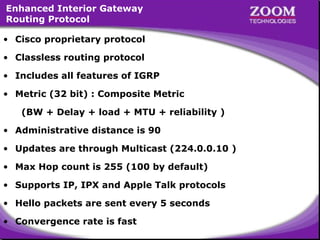
Enhanced Interior Gateway
Routing Protocol
• Cisco proprietary protocol
• Classless routing protocol
• Includes all features of IGRP
• Metric (32 bit) : Composite Metric
(BW + Delay + load + MTU + reliability )
• Administrative distance is 90
• Updates are through Multicast (224.0.0.10 )
• Max Hop count is 255 (100 by default)
• Supports IP, IPX and Apple Talk protocols
• Hello packets are sent every 5 seconds
• Convergence rate is fast

2
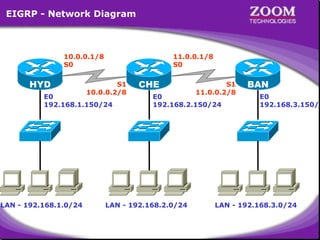
EIGRP - Network Diagram

10.0.0.1/8
S0

HYD

11.0.0.1/8
S0

S1
10.0.0.2/8

E0
192.168.1.150/24

LAN - 192.168.1.0/24

CHE

S1
11.0.0.2/8

E0
192.168.2.150/24

LAN - 192.168.2.0/24

BAN

E0
192.168.3.150/2

LAN - 192.168.3.0/24

3
Disadvantages of EIGRP

• Works only on Cisco Routers

4
5
Microsoft Windows 2000 [Version 5.00.2195]
(C) Copyright 1985-2000 Microsoft Corp.
C:> telnet 192.168.1.150
Connecting .....
================================
Welcome to Hyderabad Router
================================
User Access Verification
password : ****
Directly Connected Networks on
Hyderabad> enable
HYDERABAD Router
password : ****
HYDERABAD Router
Hyderabad# configure terminal
192.168.1.0
192.168.1.0
Enter configuration commands, one per line. End with CNTL/Z.
10.0.0.0
10.0.0.0
Hyderabad(config)# interface serial 0
Hyderabad(config-if)# ip address 10.0.0.1 255.0.0.0
Hyderabad(config-if)# no shut
Hyderabad(config-if)# clockrate 64000
Hyderabad(config-if)# encapsulation hdlc
Hyderabad(config-if)# exit
Hyderabad(config)#

6
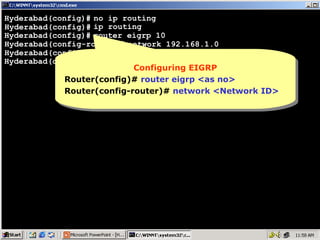
Hyderabad(config)# no ip routing
Hyderabad(config)# ip routing
Hyderabad(config)# router eigrp 10
Hyderabad(config-router)# network 192.168.1.0
Hyderabad(config-router)# network 10.0.0.0
Hyderabad(config-router)#
Configuring EIGRP
Configuring EIGRP
Router(config)# router eigrp <as no>
Router(config-router)# network <Network ID>

7
Hyderabad(config)# no ip routing
Hyderabad(config)# ip routing
Hyderabad(config)# router eigrp 10
Hyderabad(config-router)# network 192.168.1.0
Hyderabad(config-router)# network 10.0.0.0
Hyderabad(config-router)# ^Z
Hyderabad# show ip route
Codes: C - connected, S - static, I - IGRP, R - RIP, M - mobile, B - BGP
D - EIGRP, EX - EIGRP external, O - OSPF, IA - OSPF inter area
N1 - OSPF NSSA external type 1, N2 - OSPF NSSA external type 2
E1 - OSPF external type 1, E2 - OSPF external type 2, E - EGP
i- IS-IS, L1-IS-IS level-1, L2-IS-IS level-2,*- candidate default
U - per-user static route, o - ODR

Gateway of last resort is not set
C
10.0.0.0/8 is directly connected, Serial0
D
11.0.0.0/8 [90/2681856] via 10.0.0.2, 00:00:49, Serial0
C
192.168.1.0/24 is directly connected, Ethernet0
D
192.168.2.0/24 [90/2195456] via 10.0.0.2, 00:00:49, Serial0
Metric of EIGRP
90 isMetricof EIGRP
90 isnothing but
nothing but
D – for EIGRP routes
D –192.168.3.0/24 [90/2707456]Distance
for EIGRP routes
Administrative Distance
D
Composite Metric
Administrative via 10.0.0.2, 00:00:25, Serial0
Composite Metric
Hyderabad#

8
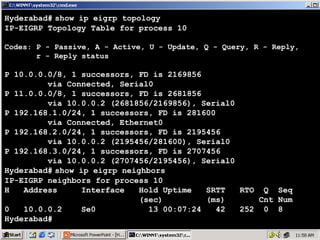
Hyderabad# show ip eigrp topology
IP-EIGRP Topology Table for process 10
Codes: P - Passive, A - Active, U - Update, Q - Query, R - Reply,
r - Reply status

P 10.0.0.0/8, 1 successors, FD is 2169856
via Connected, Serial0
P 11.0.0.0/8, 1 successors, FD is 2681856
via 10.0.0.2 (2681856/2169856), Serial0
P 192.168.1.0/24, 1 successors, FD is 281600
via Connected, Ethernet0
P 192.168.2.0/24, 1 successors, FD is 2195456
via 10.0.0.2 (2195456/281600), Serial0
P 192.168.3.0/24, 1 successors, FD is 2707456
via 10.0.0.2 (2707456/2195456), Serial0
Hyderabad# show ip eigrp neighbors
IP-EIGRP neighbors for process 10
H
Address
Interface
Hold Uptime
SRTT
RTO Q Seq
(sec)
(ms)
Cnt Num
0
10.0.0.2
Se0
13 00:07:24
42
252 0 8
Hyderabad#

9
Microsoft Windows 2000 [Version 5.00.2195]
(C) Copyright 1985-2000 Microsoft Corp.
C:> telnet 192.168.2.150
Connecting .....
================================
Welcome to Chennai Router
================================
User Access Verification
password : ****
Directly Connected Networks on
Chennai> enable Directly Connected Networks on
CHENNAI Router
password : ****
CHENNAI Router
Chennai# configure terminal
192.168.2.0
192.168.2.0
Enter configuration commands, one per line. End with CNTL/Z.
10.0.0.0
10.0.0.0
Chennai(config)# interface serial 1
11.0.0.0
11.0.0.0
Chennai(config-if)# ip address 10.0.0.2 255.0.0.0
Chennai(config-if)# no shut
Chennai(config-if)# encapsulation hdlc
Chennai(config-if)# interface serial 0
Chennai(config-if)# ip address 11.0.0.1 255.0.0.0
Chennai(config-if)# no shut
Chennai(config-if)# encapsulation hdlc

10
Chennai(config)# no ip routing
Chennai(config)# ip routing
Chennai(config)# router eigrp 10
Chennai(config-router)# network 192.168.2.0
Chennai(config-router)# network 10.0.0.0
Chennai(config-router)# network 11.0.0.0
Configuring EIGRP
Configuring EIGRP
Chennai(config-router)#
Router(config)# router eigrp <as no>
Router(config-router)# network <Network ID>

11
Chennai(config)# no ip routing
Chennai(config)# ip routing
Chennai(config)# router eigrp 10
Chennai(config-router)# network 192.168.2.0
Chennai(config-router)# network 10.0.0.0
Chennai(config-router)# network 11.0.0.0
^
Chennai(config-router)# Z
Chennai# show ip route
Codes: C - connected, S - static, I - IGRP, R - RIP, M - mobile, B - BGP
D - EIGRP, EX - EIGRP external, O - OSPF, IA - OSPF inter area
N1 - OSPF NSSA external type 1, N2 - OSPF NSSA external type 2
E1 - OSPF external type 1, E2 - OSPF external type 2, E - EGP
i- IS-IS, L1-IS-IS level-1, L2-IS-IS level-2,*- candidate default
U - per-user static route, o - ODR

Gateway of last resort is not set
C
10.0.0.0/8 is directly connected, Serial1
C
11.0.0.0/8 is directly connected, Serial0
D
192.168.1.0/24 [90/2195456] via 10.0.0.1, 00:01:27, Serial1
C
192.168.2.0/24 is directly connected, Ethernet0
D
192.168.3.0/24 [90/2195456] viaof but
90 isMetric ofIGRP
nothing but
90 isMetric 11.0.0.2, 00:01:00, Serial0
nothing IGRP
D – for EIGRP routes
D – for EIGRP routesAdministrative Distance
Chennai#
Composite Metric
Administrative Distance
Composite Metric 12
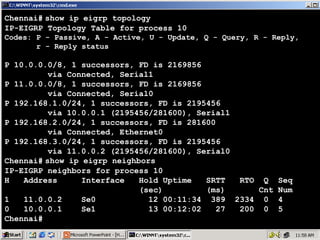
Chennai# show ip eigrp topology
IP-EIGRP Topology Table for process 10
Codes: P - Passive, A - Active, U - Update, Q - Query, R - Reply,
r - Reply status

P 10.0.0.0/8, 1 successors, FD is 2169856
via Connected, Serial1
P 11.0.0.0/8, 1 successors, FD is 2169856
via Connected, Serial0
P 192.168.1.0/24, 1 successors, FD is 2195456
via 10.0.0.1 (2195456/281600), Serial1
P 192.168.2.0/24, 1 successors, FD is 281600
via Connected, Ethernet0
P 192.168.3.0/24, 1 successors, FD is 2195456
via 11.0.0.2 (2195456/281600), Serial0
Chennai# show ip eigrp neighbors
IP-EIGRP neighbors for process 10
H
Address
Interface
Hold Uptime
SRTT
RTO Q Seq
(sec)
(ms)
Cnt Num
1
11.0.0.2
Se0
12 00:11:34 389 2334 0 4
0
10.0.0.1
Se1
13 00:12:02
27
200 0 5
Chennai#

13
Microsoft Windows 2000 [Version 5.00.2195]
(C) Copyright 1985-2000 Microsoft Corp.
C:> telnet 192.168.3.150
Connecting .....
================================
Welcome to Banglore Router
================================
User Access Verification
password : ****
Directly Connected Networks on
Banglore> enableDirectly Connected Networks on
Banglore Router
password : ****
Banglore Router
Banglore# configure terminal
192.168.3.0
192.168.3.0
Enter configuration commands, one per line. End with CNTL/Z.
11.0.0.0
11.0.0.0
Banglore(config)# interface serial 1
Banglore(config-if)# ip address 11.0.0.2 255.0.0.0
Banglore(config-if)# no shut
Banglore(config-if)# clockrate 64000
Banglore(config-if)# encapsulation hdlc
Banglore(config-if)# exit
Banglore(config)#

14
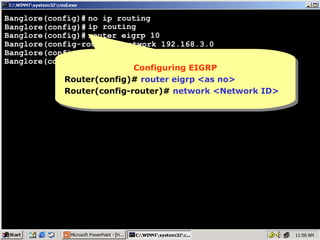
Banglore(config)# no ip routing
Banglore(config)# ip routing
Banglore(config)# router eigrp 10
Banglore(config-router)# network 192.168.3.0
Banglore(config-router)# network 11.0.0.0
Banglore(config-router)#
Configuring EIGRP
Configuring EIGRP
Router(config)# router eigrp <as no>
Router(config-router)# network <Network ID>

15
Banglore(config)# no ip routing
Banglore(config)# ip routing
Banglore(config)# router eigrp 10
Banglore(config-router)# network 192.168.3.0
Banglore(config-router)# network 11.0.0.0
Banglore(config-router)# ^Z
Banglore# show ip route
Codes: C - connected, S - static, I - IGRP, R - RIP, M - mobile, B - BGP
D - EIGRP, EX - EIGRP external, O - OSPF, IA - OSPF inter area
N1 - OSPF NSSA external type 1, N2 - OSPF NSSA external type 2
E1 - OSPF external type 1, E2 - OSPF external type 2, E - EGP
i- IS-IS, L1-IS-IS level-1, L2-IS-IS level-2,*- candidate default
U - per-user static route, o - ODR

Gateway of last resort is not set
D
10.0.0.0/8 [90/2681856] via 11.0.0.1, 00:01:32, Serial1
C
11.0.0.0/8 is directly connected, Serial1
D
192.168.1.0/24 [90/2707456] via 11.0.0.1, 00:01:32, Serial1
90 isMetric of but
nothing IGRP
nothing IGRP
D – 192.168.2.0/24 [90/2195456] of but11.0.0.1, 00:01:32, Serial1
for EIGRP routes 90 isMetric via
D D – for EIGRP routes
Administrative Distance
Composite Metric
Administrative Distance
Composite Metric
C
192.168.3.0/24 is directly connected, Ethernet0
Banglore#

16
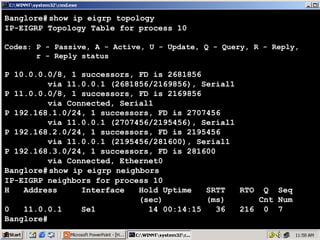
Banglore# show ip eigrp topology
IP-EIGRP Topology Table for process 10
Codes: P - Passive, A - Active, U - Update, Q - Query, R - Reply,
r - Reply status

P 10.0.0.0/8, 1 successors, FD is 2681856
via 11.0.0.1 (2681856/2169856), Serial1
P 11.0.0.0/8, 1 successors, FD is 2169856
via Connected, Serial1
P 192.168.1.0/24, 1 successors, FD is 2707456
via 11.0.0.1 (2707456/2195456), Serial1
P 192.168.2.0/24, 1 successors, FD is 2195456
via 11.0.0.1 (2195456/281600), Serial1
P 192.168.3.0/24, 1 successors, FD is 281600
via Connected, Ethernet0
Banglore# show ip eigrp neighbors
IP-EIGRP neighbors for process 10
H
Address
Interface
Hold Uptime
SRTT
RTO Q Seq
(sec)
(ms)
Cnt Num
0
11.0.0.1
Se1
14 00:14:15
36
216 0 7
Banglore#

17
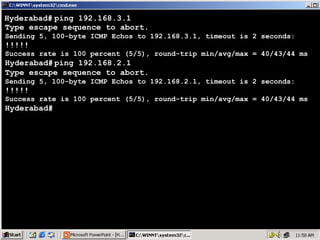
Hyderabad# ping 192.168.3.1
Type escape sequence to abort.
Sending 5, 100-byte ICMP Echos to 192.168.3.1, timeout is 2 seconds:

!!!!!

Success rate is 100 percent (5/5), round-trip min/avg/max = 40/43/44 ms

Hyderabad# ping 192.168.2.1
Type escape sequence to abort.
Sending 5, 100-byte ICMP Echos to 192.168.2.1, timeout is 2 seconds:

!!!!!

Success rate is 100 percent (5/5), round-trip min/avg/max = 40/43/44 ms

Hyderabad#

18
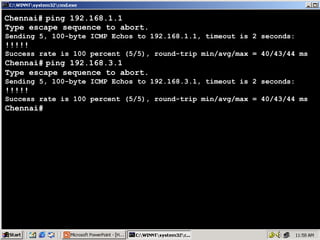
Chennai# ping 192.168.1.1
Type escape sequence to abort.
Sending 5, 100-byte ICMP Echos to 192.168.1.1, timeout is 2 seconds:

!!!!!

Success rate is 100 percent (5/5), round-trip min/avg/max = 40/43/44 ms

Chennai# ping 192.168.3.1
Type escape sequence to abort.
Sending 5, 100-byte ICMP Echos to 192.168.3.1, timeout is 2 seconds:

!!!!!

Success rate is 100 percent (5/5), round-trip min/avg/max = 40/43/44 ms

Chennai#

19
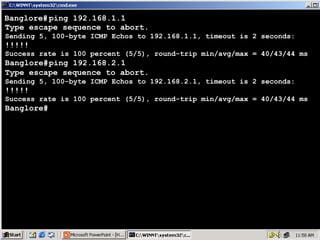
Banglore# ping 192.168.1.1
Type escape sequence to abort.
Sending 5, 100-byte ICMP Echos to 192.168.1.1, timeout is 2 seconds:

!!!!!

Success rate is 100 percent (5/5), round-trip min/avg/max = 40/43/44 ms

Banglore# ping 192.168.2.1
Type escape sequence to abort.
Sending 5, 100-byte ICMP Echos to 192.168.2.1, timeout is 2 seconds:

!!!!!

Success rate is 100 percent (5/5), round-trip min/avg/max = 40/43/44 ms

Banglore#

20

Dynamic routing EIGRP

  • 1.
  • 2.
    Enhanced Interior Gateway RoutingProtocol • Cisco proprietary protocol • Classless routing protocol • Includes all features of IGRP • Metric (32 bit) : Composite Metric (BW + Delay + load + MTU + reliability ) • Administrative distance is 90 • Updates are through Multicast (224.0.0.10 ) • Max Hop count is 255 (100 by default) • Supports IP, IPX and Apple Talk protocols • Hello packets are sent every 5 seconds • Convergence rate is fast 2
  • 3.
    EIGRP - NetworkDiagram 10.0.0.1/8 S0 HYD 11.0.0.1/8 S0 S1 10.0.0.2/8 E0 192.168.1.150/24 LAN - 192.168.1.0/24 CHE S1 11.0.0.2/8 E0 192.168.2.150/24 LAN - 192.168.2.0/24 BAN E0 192.168.3.150/2 LAN - 192.168.3.0/24 3
  • 4.
    Disadvantages of EIGRP •Works only on Cisco Routers 4
  • 5.
  • 6.
    Microsoft Windows 2000[Version 5.00.2195] (C) Copyright 1985-2000 Microsoft Corp. C:> telnet 192.168.1.150 Connecting ..... ================================ Welcome to Hyderabad Router ================================ User Access Verification password : **** Directly Connected Networks on Directly Connected Networks on Hyderabad> enable HYDERABAD Router password : **** HYDERABAD Router Hyderabad# configure terminal 192.168.1.0 192.168.1.0 Enter configuration commands, one per line. End with CNTL/Z. 10.0.0.0 10.0.0.0 Hyderabad(config)# interface serial 0 Hyderabad(config-if)# ip address 10.0.0.1 255.0.0.0 Hyderabad(config-if)# no shut Hyderabad(config-if)# clockrate 64000 Hyderabad(config-if)# encapsulation hdlc Hyderabad(config-if)# exit Hyderabad(config)# 6
  • 7.
    Hyderabad(config)# no iprouting Hyderabad(config)# ip routing Hyderabad(config)# router eigrp 10 Hyderabad(config-router)# network 192.168.1.0 Hyderabad(config-router)# network 10.0.0.0 Hyderabad(config-router)# Configuring EIGRP Configuring EIGRP Router(config)# router eigrp <as no> Router(config)# router eigrp <as no> Router(config-router)# network <Network ID> Router(config-router)# network <Network ID> 7
  • 8.
    Hyderabad(config)# no iprouting Hyderabad(config)# ip routing Hyderabad(config)# router eigrp 10 Hyderabad(config-router)# network 192.168.1.0 Hyderabad(config-router)# network 10.0.0.0 Hyderabad(config-router)# ^Z Hyderabad# show ip route Codes: C - connected, S - static, I - IGRP, R - RIP, M - mobile, B - BGP D - EIGRP, EX - EIGRP external, O - OSPF, IA - OSPF inter area N1 - OSPF NSSA external type 1, N2 - OSPF NSSA external type 2 E1 - OSPF external type 1, E2 - OSPF external type 2, E - EGP i- IS-IS, L1-IS-IS level-1, L2-IS-IS level-2,*- candidate default U - per-user static route, o - ODR Gateway of last resort is not set C 10.0.0.0/8 is directly connected, Serial0 D 11.0.0.0/8 [90/2681856] via 10.0.0.2, 00:00:49, Serial0 C 192.168.1.0/24 is directly connected, Ethernet0 D 192.168.2.0/24 [90/2195456] via 10.0.0.2, 00:00:49, Serial0 Metric of EIGRP 90 isMetricof EIGRP 90 isnothing but nothing but D – for EIGRP routes D –192.168.3.0/24 [90/2707456]Distance for EIGRP routes Administrative Distance D Composite Metric Administrative via 10.0.0.2, 00:00:25, Serial0 Composite Metric Hyderabad# 8
  • 9.
    Hyderabad# show ipeigrp topology IP-EIGRP Topology Table for process 10 Codes: P - Passive, A - Active, U - Update, Q - Query, R - Reply, r - Reply status P 10.0.0.0/8, 1 successors, FD is 2169856 via Connected, Serial0 P 11.0.0.0/8, 1 successors, FD is 2681856 via 10.0.0.2 (2681856/2169856), Serial0 P 192.168.1.0/24, 1 successors, FD is 281600 via Connected, Ethernet0 P 192.168.2.0/24, 1 successors, FD is 2195456 via 10.0.0.2 (2195456/281600), Serial0 P 192.168.3.0/24, 1 successors, FD is 2707456 via 10.0.0.2 (2707456/2195456), Serial0 Hyderabad# show ip eigrp neighbors IP-EIGRP neighbors for process 10 H Address Interface Hold Uptime SRTT RTO Q Seq (sec) (ms) Cnt Num 0 10.0.0.2 Se0 13 00:07:24 42 252 0 8 Hyderabad# 9
  • 10.
    Microsoft Windows 2000[Version 5.00.2195] (C) Copyright 1985-2000 Microsoft Corp. C:> telnet 192.168.2.150 Connecting ..... ================================ Welcome to Chennai Router ================================ User Access Verification password : **** Directly Connected Networks on Chennai> enable Directly Connected Networks on CHENNAI Router password : **** CHENNAI Router Chennai# configure terminal 192.168.2.0 192.168.2.0 Enter configuration commands, one per line. End with CNTL/Z. 10.0.0.0 10.0.0.0 Chennai(config)# interface serial 1 11.0.0.0 11.0.0.0 Chennai(config-if)# ip address 10.0.0.2 255.0.0.0 Chennai(config-if)# no shut Chennai(config-if)# encapsulation hdlc Chennai(config-if)# interface serial 0 Chennai(config-if)# ip address 11.0.0.1 255.0.0.0 Chennai(config-if)# no shut Chennai(config-if)# encapsulation hdlc 10
  • 11.
    Chennai(config)# no iprouting Chennai(config)# ip routing Chennai(config)# router eigrp 10 Chennai(config-router)# network 192.168.2.0 Chennai(config-router)# network 10.0.0.0 Chennai(config-router)# network 11.0.0.0 Configuring EIGRP Configuring EIGRP Chennai(config-router)# Router(config)# router eigrp <as no> Router(config)# router eigrp <as no> Router(config-router)# network <Network ID> Router(config-router)# network <Network ID> 11
  • 12.
    Chennai(config)# no iprouting Chennai(config)# ip routing Chennai(config)# router eigrp 10 Chennai(config-router)# network 192.168.2.0 Chennai(config-router)# network 10.0.0.0 Chennai(config-router)# network 11.0.0.0 ^ Chennai(config-router)# Z Chennai# show ip route Codes: C - connected, S - static, I - IGRP, R - RIP, M - mobile, B - BGP D - EIGRP, EX - EIGRP external, O - OSPF, IA - OSPF inter area N1 - OSPF NSSA external type 1, N2 - OSPF NSSA external type 2 E1 - OSPF external type 1, E2 - OSPF external type 2, E - EGP i- IS-IS, L1-IS-IS level-1, L2-IS-IS level-2,*- candidate default U - per-user static route, o - ODR Gateway of last resort is not set C 10.0.0.0/8 is directly connected, Serial1 C 11.0.0.0/8 is directly connected, Serial0 D 192.168.1.0/24 [90/2195456] via 10.0.0.1, 00:01:27, Serial1 C 192.168.2.0/24 is directly connected, Ethernet0 D 192.168.3.0/24 [90/2195456] viaof but 90 isMetric ofIGRP nothing but 90 isMetric 11.0.0.2, 00:01:00, Serial0 nothing IGRP D – for EIGRP routes D – for EIGRP routesAdministrative Distance Chennai# Composite Metric Administrative Distance Composite Metric 12
  • 13.
    Chennai# show ipeigrp topology IP-EIGRP Topology Table for process 10 Codes: P - Passive, A - Active, U - Update, Q - Query, R - Reply, r - Reply status P 10.0.0.0/8, 1 successors, FD is 2169856 via Connected, Serial1 P 11.0.0.0/8, 1 successors, FD is 2169856 via Connected, Serial0 P 192.168.1.0/24, 1 successors, FD is 2195456 via 10.0.0.1 (2195456/281600), Serial1 P 192.168.2.0/24, 1 successors, FD is 281600 via Connected, Ethernet0 P 192.168.3.0/24, 1 successors, FD is 2195456 via 11.0.0.2 (2195456/281600), Serial0 Chennai# show ip eigrp neighbors IP-EIGRP neighbors for process 10 H Address Interface Hold Uptime SRTT RTO Q Seq (sec) (ms) Cnt Num 1 11.0.0.2 Se0 12 00:11:34 389 2334 0 4 0 10.0.0.1 Se1 13 00:12:02 27 200 0 5 Chennai# 13
  • 14.
    Microsoft Windows 2000[Version 5.00.2195] (C) Copyright 1985-2000 Microsoft Corp. C:> telnet 192.168.3.150 Connecting ..... ================================ Welcome to Banglore Router ================================ User Access Verification password : **** Directly Connected Networks on Banglore> enableDirectly Connected Networks on Banglore Router password : **** Banglore Router Banglore# configure terminal 192.168.3.0 192.168.3.0 Enter configuration commands, one per line. End with CNTL/Z. 11.0.0.0 11.0.0.0 Banglore(config)# interface serial 1 Banglore(config-if)# ip address 11.0.0.2 255.0.0.0 Banglore(config-if)# no shut Banglore(config-if)# clockrate 64000 Banglore(config-if)# encapsulation hdlc Banglore(config-if)# exit Banglore(config)# 14
  • 15.
    Banglore(config)# no iprouting Banglore(config)# ip routing Banglore(config)# router eigrp 10 Banglore(config-router)# network 192.168.3.0 Banglore(config-router)# network 11.0.0.0 Banglore(config-router)# Configuring EIGRP Configuring EIGRP Router(config)# router eigrp <as no> Router(config)# router eigrp <as no> Router(config-router)# network <Network ID> Router(config-router)# network <Network ID> 15
  • 16.
    Banglore(config)# no iprouting Banglore(config)# ip routing Banglore(config)# router eigrp 10 Banglore(config-router)# network 192.168.3.0 Banglore(config-router)# network 11.0.0.0 Banglore(config-router)# ^Z Banglore# show ip route Codes: C - connected, S - static, I - IGRP, R - RIP, M - mobile, B - BGP D - EIGRP, EX - EIGRP external, O - OSPF, IA - OSPF inter area N1 - OSPF NSSA external type 1, N2 - OSPF NSSA external type 2 E1 - OSPF external type 1, E2 - OSPF external type 2, E - EGP i- IS-IS, L1-IS-IS level-1, L2-IS-IS level-2,*- candidate default U - per-user static route, o - ODR Gateway of last resort is not set D 10.0.0.0/8 [90/2681856] via 11.0.0.1, 00:01:32, Serial1 C 11.0.0.0/8 is directly connected, Serial1 D 192.168.1.0/24 [90/2707456] via 11.0.0.1, 00:01:32, Serial1 90 isMetric of but nothing IGRP nothing IGRP D – 192.168.2.0/24 [90/2195456] of but11.0.0.1, 00:01:32, Serial1 for EIGRP routes 90 isMetric via D D – for EIGRP routes Administrative Distance Composite Metric Administrative Distance Composite Metric C 192.168.3.0/24 is directly connected, Ethernet0 Banglore# 16
  • 17.
    Banglore# show ipeigrp topology IP-EIGRP Topology Table for process 10 Codes: P - Passive, A - Active, U - Update, Q - Query, R - Reply, r - Reply status P 10.0.0.0/8, 1 successors, FD is 2681856 via 11.0.0.1 (2681856/2169856), Serial1 P 11.0.0.0/8, 1 successors, FD is 2169856 via Connected, Serial1 P 192.168.1.0/24, 1 successors, FD is 2707456 via 11.0.0.1 (2707456/2195456), Serial1 P 192.168.2.0/24, 1 successors, FD is 2195456 via 11.0.0.1 (2195456/281600), Serial1 P 192.168.3.0/24, 1 successors, FD is 281600 via Connected, Ethernet0 Banglore# show ip eigrp neighbors IP-EIGRP neighbors for process 10 H Address Interface Hold Uptime SRTT RTO Q Seq (sec) (ms) Cnt Num 0 11.0.0.1 Se1 14 00:14:15 36 216 0 7 Banglore# 17
  • 18.
    Hyderabad# ping 192.168.3.1 Typeescape sequence to abort. Sending 5, 100-byte ICMP Echos to 192.168.3.1, timeout is 2 seconds: !!!!! Success rate is 100 percent (5/5), round-trip min/avg/max = 40/43/44 ms Hyderabad# ping 192.168.2.1 Type escape sequence to abort. Sending 5, 100-byte ICMP Echos to 192.168.2.1, timeout is 2 seconds: !!!!! Success rate is 100 percent (5/5), round-trip min/avg/max = 40/43/44 ms Hyderabad# 18
  • 19.
    Chennai# ping 192.168.1.1 Typeescape sequence to abort. Sending 5, 100-byte ICMP Echos to 192.168.1.1, timeout is 2 seconds: !!!!! Success rate is 100 percent (5/5), round-trip min/avg/max = 40/43/44 ms Chennai# ping 192.168.3.1 Type escape sequence to abort. Sending 5, 100-byte ICMP Echos to 192.168.3.1, timeout is 2 seconds: !!!!! Success rate is 100 percent (5/5), round-trip min/avg/max = 40/43/44 ms Chennai# 19
  • 20.
    Banglore# ping 192.168.1.1 Typeescape sequence to abort. Sending 5, 100-byte ICMP Echos to 192.168.1.1, timeout is 2 seconds: !!!!! Success rate is 100 percent (5/5), round-trip min/avg/max = 40/43/44 ms Banglore# ping 192.168.2.1 Type escape sequence to abort. Sending 5, 100-byte ICMP Echos to 192.168.2.1, timeout is 2 seconds: !!!!! Success rate is 100 percent (5/5), round-trip min/avg/max = 40/43/44 ms Banglore# 20