Configuring GRE Tunnel By R P Porwal 
Configuring a GRE tunnel involves creating a tunnel interface, which is a logical interface. Then you must configure the tunnel endpoints for the tunnel interface. 
To configure the tunnel source and destination, issue the tunnel source {ip-address | interface-type} and tunnel destination {host-name | ip-address} commands under the interface configuration mode for the tunnel. 
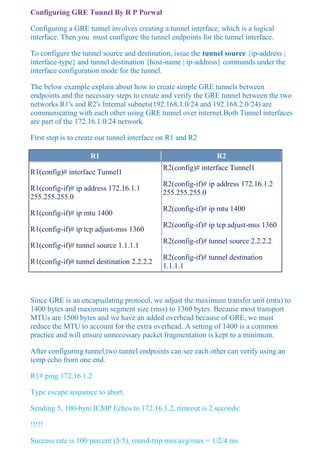
The below example explain about how to create simple GRE tunnels between endpoints and the necessary steps to create and verify the GRE tunnel between the two networks.R1's and R2's Internal subnets(192.168.1.0/24 and 192.168.2.0/24) are communicating with each other using GRE tunnel over internet.Both Tunnel interfaces are part of the 172.16.1.0/24 network. 
First step is to create our tunnel interface on R1 and R2 R1 R2 
R1(config)# interface Tunnel1 
R1(config-if)# ip address 172.16.1.1 255.255.255.0 
R1(config-if)# ip mtu 1400 
R1(config-if)# ip tcp adjust-mss 1360 
R1(config-if)# tunnel source 1.1.1.1 
R1(config-if)# tunnel destination 2.2.2.2 
R2(config)# interface Tunnel1 
R2(config-if)# ip address 172.16.1.2 255.255.255.0 
R2(config-if)# ip mtu 1400 
R2(config-if)# ip tcp adjust-mss 1360 
R2(config-if)# tunnel source 2.2.2.2 
R2(config-if)# tunnel destination 1.1.1.1 
Since GRE is an encapsulating protocol, we adjust the maximum transfer unit (mtu) to 1400 bytes and maximum segment size (mss) to 1360 bytes. Because most transport MTUs are 1500 bytes and we have an added overhead because of GRE, we must reduce the MTU to account for the extra overhead. A setting of 1400 is a common practice and will ensure unnecessary packet fragmentation is kept to a minimum. 
After configuring tunnel,two tunnel endpoints can see each other can verify using an icmp echo from one end. 
R1# ping 172.16.1.2 
Type escape sequence to abort. 
Sending 5, 100-byte ICMP Echos to 172.16.1.2, timeout is 2 seconds: 
!!!!! 
Success rate is 100 percent (5/5), round-trip min/avg/max = 1/2/4 ms
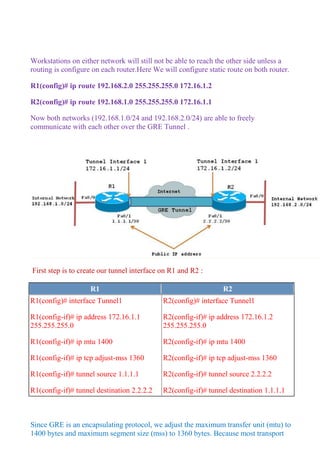
Workstations on either network will still not be able to reach the other side unless a routing is configure on each router.Here We will configure static route on both router. 
R1(config)# ip route 192.168.2.0 255.255.255.0 172.16.1.2 
R2(config)# ip route 192.168.1.0 255.255.255.0 172.16.1.1 
Now both networks (192.168.1.0/24 and 192.168.2.0/24) are able to freely communicate with each other over the GRE Tunnel . 
First step is to create our tunnel interface on R1 and R2 : R1 R2 
R1(config)# interface Tunnel1 
R1(config-if)# ip address 172.16.1.1 255.255.255.0 
R1(config-if)# ip mtu 1400 
R1(config-if)# ip tcp adjust-mss 1360 
R1(config-if)# tunnel source 1.1.1.1 
R1(config-if)# tunnel destination 2.2.2.2 
R2(config)# interface Tunnel1 
R2(config-if)# ip address 172.16.1.2 255.255.255.0 
R2(config-if)# ip mtu 1400 
R2(config-if)# ip tcp adjust-mss 1360 
R2(config-if)# tunnel source 2.2.2.2 
R2(config-if)# tunnel destination 1.1.1.1 
Since GRE is an encapsulating protocol, we adjust the maximum transfer unit (mtu) to 1400 bytes and maximum segment size (mss) to 1360 bytes. Because most transport
MTUs are 1500 bytes and we have an added overhead because of GRE, we must reduce the MTU to account for the extra overhead. A setting of 1400 is a common practice and will ensure unnecessary packet fragmentation is kept to a minimum. 
After configuring tunnel,two tunnel endpoints can see each other can verify using an icmp echo from one end. 
R1# ping 172.16.1.2 
Type escape sequence to abort. 
Sending 5, 100-byte ICMP Echos to 172.16.1.2, timeout is 2 seconds: 
!!!!! 
Success rate is 100 percent (5/5), round-trip min/avg/max = 1/2/4 ms 
Workstations on either network will still not be able to reach the other side unless a routing is configure on each router.Here We will configure static route on both router. 
R1(config)# ip route 192.168.2.0 255.255.255.0 172.16.1.2 
R2(config)# ip route 192.168.1.0 255.255.255.0 172.16.1.1 
Now both networks (192.168.1.0/24 and 192.168.2.0/24) are able to freely communicate with each other over the GRE Tunnel .

Gre tunnel pdf

  • 1.
    Configuring GRE TunnelBy R P Porwal Configuring a GRE tunnel involves creating a tunnel interface, which is a logical interface. Then you must configure the tunnel endpoints for the tunnel interface. To configure the tunnel source and destination, issue the tunnel source {ip-address | interface-type} and tunnel destination {host-name | ip-address} commands under the interface configuration mode for the tunnel. The below example explain about how to create simple GRE tunnels between endpoints and the necessary steps to create and verify the GRE tunnel between the two networks.R1's and R2's Internal subnets(192.168.1.0/24 and 192.168.2.0/24) are communicating with each other using GRE tunnel over internet.Both Tunnel interfaces are part of the 172.16.1.0/24 network. First step is to create our tunnel interface on R1 and R2 R1 R2 R1(config)# interface Tunnel1 R1(config-if)# ip address 172.16.1.1 255.255.255.0 R1(config-if)# ip mtu 1400 R1(config-if)# ip tcp adjust-mss 1360 R1(config-if)# tunnel source 1.1.1.1 R1(config-if)# tunnel destination 2.2.2.2 R2(config)# interface Tunnel1 R2(config-if)# ip address 172.16.1.2 255.255.255.0 R2(config-if)# ip mtu 1400 R2(config-if)# ip tcp adjust-mss 1360 R2(config-if)# tunnel source 2.2.2.2 R2(config-if)# tunnel destination 1.1.1.1 Since GRE is an encapsulating protocol, we adjust the maximum transfer unit (mtu) to 1400 bytes and maximum segment size (mss) to 1360 bytes. Because most transport MTUs are 1500 bytes and we have an added overhead because of GRE, we must reduce the MTU to account for the extra overhead. A setting of 1400 is a common practice and will ensure unnecessary packet fragmentation is kept to a minimum. After configuring tunnel,two tunnel endpoints can see each other can verify using an icmp echo from one end. R1# ping 172.16.1.2 Type escape sequence to abort. Sending 5, 100-byte ICMP Echos to 172.16.1.2, timeout is 2 seconds: !!!!! Success rate is 100 percent (5/5), round-trip min/avg/max = 1/2/4 ms
  • 2.
    Workstations on eithernetwork will still not be able to reach the other side unless a routing is configure on each router.Here We will configure static route on both router. R1(config)# ip route 192.168.2.0 255.255.255.0 172.16.1.2 R2(config)# ip route 192.168.1.0 255.255.255.0 172.16.1.1 Now both networks (192.168.1.0/24 and 192.168.2.0/24) are able to freely communicate with each other over the GRE Tunnel . First step is to create our tunnel interface on R1 and R2 : R1 R2 R1(config)# interface Tunnel1 R1(config-if)# ip address 172.16.1.1 255.255.255.0 R1(config-if)# ip mtu 1400 R1(config-if)# ip tcp adjust-mss 1360 R1(config-if)# tunnel source 1.1.1.1 R1(config-if)# tunnel destination 2.2.2.2 R2(config)# interface Tunnel1 R2(config-if)# ip address 172.16.1.2 255.255.255.0 R2(config-if)# ip mtu 1400 R2(config-if)# ip tcp adjust-mss 1360 R2(config-if)# tunnel source 2.2.2.2 R2(config-if)# tunnel destination 1.1.1.1 Since GRE is an encapsulating protocol, we adjust the maximum transfer unit (mtu) to 1400 bytes and maximum segment size (mss) to 1360 bytes. Because most transport
  • 3.
    MTUs are 1500bytes and we have an added overhead because of GRE, we must reduce the MTU to account for the extra overhead. A setting of 1400 is a common practice and will ensure unnecessary packet fragmentation is kept to a minimum. After configuring tunnel,two tunnel endpoints can see each other can verify using an icmp echo from one end. R1# ping 172.16.1.2 Type escape sequence to abort. Sending 5, 100-byte ICMP Echos to 172.16.1.2, timeout is 2 seconds: !!!!! Success rate is 100 percent (5/5), round-trip min/avg/max = 1/2/4 ms Workstations on either network will still not be able to reach the other side unless a routing is configure on each router.Here We will configure static route on both router. R1(config)# ip route 192.168.2.0 255.255.255.0 172.16.1.2 R2(config)# ip route 192.168.1.0 255.255.255.0 172.16.1.1 Now both networks (192.168.1.0/24 and 192.168.2.0/24) are able to freely communicate with each other over the GRE Tunnel .