VLAN
Presented By
Varsha Honde
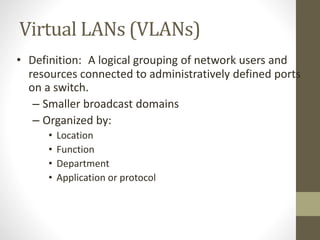
Virtual LANs (VLANs)
• Definition: A logical grouping of network users and
resources connected to administratively defined ports
on a switch.
– Smaller broadcast domains
– Organized by:
• Location
• Function
• Department
• Application or protocol
Switches
Features of VLANs
• Simplify network management
• Provides a level of security over a
flat network
• Flexibility and Scalability
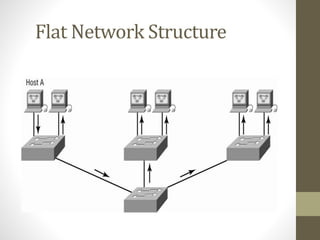
Flat Network Structure
Security
• Flat network problems
• VLANs
Flexibility & Scalability
• Layer-2 switches only read frames
• Can cause a switch to forward all broadcasts
• VLANs
• Essentially create broadcast domains
• Greatly reduces broadcast traffic
• Ability to add wanted users to a VLAN
regardless of their physical location
• Additional VLANs can be created when
network growth consumes more bandwidth
VLANs Remove The Physical
Boundary
VLAN Memberships
• Static VLANs
• Typical method of creating VLANs
• Most secure
• A switch port assigned to a VLAN always maintains that
assignment until changed
• Dynamic VLANs
• Node assignment to a VLAN is automatic
• MAC addresses, protocols, network addresses, etc
• VLAN Management Policy Server (VMPS)
• MAC address database for dynamic assignments
• MAC-address to VLAN mapping
Identifying VLANs
Identifying VLANs (cont.)
VLAN Trunk Protocol (VTP)
•Purpose: to manage all configured
VLANs across a switch internetwork
& maintain consistency
- Allows an administrator to add,
delete, & rename VLANs
VTP Benefits
• Benefits
• Consistent configuration
• Permits trunking over mixed networks
• Accurate tracking
• Dynamic reporting
• Plug-and-Play
• A VTP server must be created to manage
VLANs
VTP Modes
VTP Modes of Operation
• Server
– Default for all Catalyst switches
– Minimum one server for a VTP domain
• Client
– Receives information + sends/receives updates
– Cannot make any changes
• Transparent
– Does not participate in a VTP domain but forwards
VTP advertisements
– Can add/delete VLANs
– Locally significant
Configuring VLANs
•Creating VLANs
•Assigning Switch Ports to VLANs
•Configuring Trunk Ports
•Configuring Inter-VLAN routing

VLAN

  • 1.
  • 2.
    Virtual LANs (VLANs) •Definition: A logical grouping of network users and resources connected to administratively defined ports on a switch. – Smaller broadcast domains – Organized by: • Location • Function • Department • Application or protocol
  • 3.
  • 4.
    Features of VLANs •Simplify network management • Provides a level of security over a flat network • Flexibility and Scalability
  • 5.
  • 6.
    Security • Flat networkproblems • VLANs
  • 7.
    Flexibility & Scalability •Layer-2 switches only read frames • Can cause a switch to forward all broadcasts • VLANs • Essentially create broadcast domains • Greatly reduces broadcast traffic • Ability to add wanted users to a VLAN regardless of their physical location • Additional VLANs can be created when network growth consumes more bandwidth
  • 8.
    VLANs Remove ThePhysical Boundary
  • 9.
    VLAN Memberships • StaticVLANs • Typical method of creating VLANs • Most secure • A switch port assigned to a VLAN always maintains that assignment until changed • Dynamic VLANs • Node assignment to a VLAN is automatic • MAC addresses, protocols, network addresses, etc • VLAN Management Policy Server (VMPS) • MAC address database for dynamic assignments • MAC-address to VLAN mapping
  • 10.
  • 11.
  • 12.
    VLAN Trunk Protocol(VTP) •Purpose: to manage all configured VLANs across a switch internetwork & maintain consistency - Allows an administrator to add, delete, & rename VLANs
  • 13.
    VTP Benefits • Benefits •Consistent configuration • Permits trunking over mixed networks • Accurate tracking • Dynamic reporting • Plug-and-Play • A VTP server must be created to manage VLANs
  • 14.
  • 15.
    VTP Modes ofOperation • Server – Default for all Catalyst switches – Minimum one server for a VTP domain • Client – Receives information + sends/receives updates – Cannot make any changes • Transparent – Does not participate in a VTP domain but forwards VTP advertisements – Can add/delete VLANs – Locally significant
  • 16.
    Configuring VLANs •Creating VLANs •AssigningSwitch Ports to VLANs •Configuring Trunk Ports •Configuring Inter-VLAN routing