Chapter 2 and Infographics ProjectGraphs: Good, Bad & Ugly
A visual presentation of dataRelationships & comparisons are visualLess daunting to some than tables of numbersAllows some artistry and creativityAccuracy is importantStyle of graph must matchScale (level) of measurement of the variable(s)Nature of this particular data setPurpose of a Graph
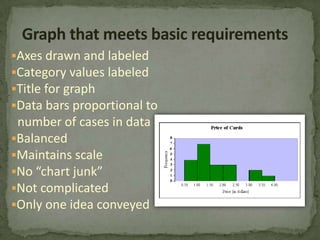
Graph that meets basic requirementsAxes drawn and labeled
Category values labeled
Title for graph
Data bars proportional to  number of cases in data
Balanced
Maintains scale
No “chart junk”
Not complicated
Only one idea conveyedGraphs for Discrete Data(counts)Data are in categoriesNominal Ordinal (if few categories)Types of graph:Pie ChartBar Chart or Pictograph (Excel: Column chart)Show the Frequency (count) or Percent
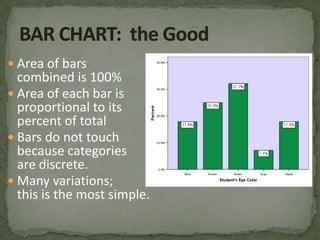
Area of bars combined is 100%Area of each bar is proportional to its percent of totalBars do not touchbecause categoriesare discrete.Many variations; this is the most simple.BAR CHART:  the Good
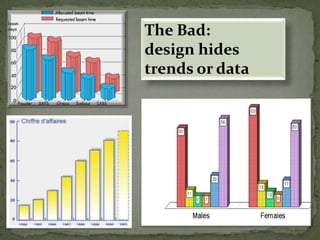
The Bad:design hides trends or data
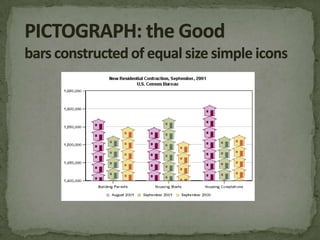
PICTOGRAPH: the Good bars constructed of equal size simple icons
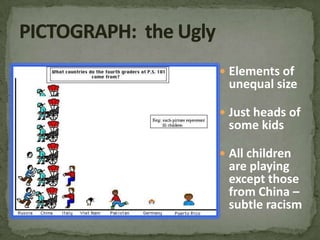
PICTOGRAPH:  the UglyElements of unequal sizeJust heads of some kidsAll children are playing except those from China – subtle racism
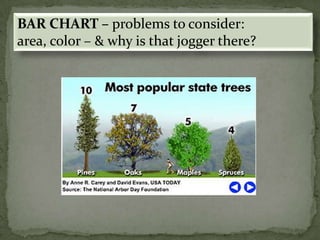
BAR CHART – problems to consider:area, color – & why is that jogger there?
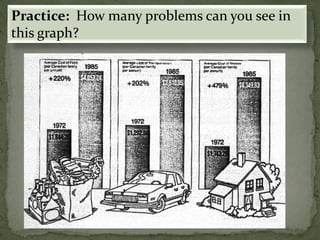
Practice:  How many problems can you see in this graph?
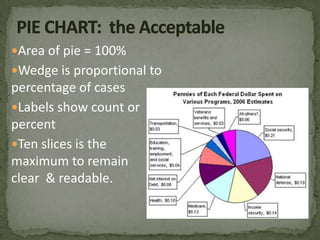
PIE CHART:  the AcceptableArea of pie = 100%Wedge is proportional to percentage of casesLabels show count or percent Ten slices is the maximum to remain clear  & readable.
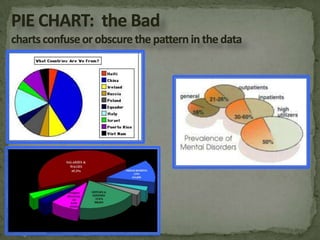
PIE CHART:  the Badcharts confuse or obscure the pattern in the data
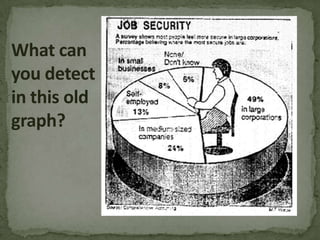
What can you detect in this old graph?
Graphs for Continuous Data  (sometimes used for  Ordinal data)Graph shows continuity of the constructHistogram:  bars that touch at real limitsLine graph: covers range (a.k.a. Frequency Polygon)Horizontal axis goes from low to highIntervals shown for Interval or Ratio dataSome ordinal data also graphed this way(e.g., strongly agree, agree, slightly agree, etc)

Graphing

  • 1.
    Chapter 2 andInfographics ProjectGraphs: Good, Bad & Ugly
  • 2.
    A visual presentationof dataRelationships & comparisons are visualLess daunting to some than tables of numbersAllows some artistry and creativityAccuracy is importantStyle of graph must matchScale (level) of measurement of the variable(s)Nature of this particular data setPurpose of a Graph
  • 3.
    Graph that meetsbasic requirementsAxes drawn and labeled
  • 4.
  • 5.
  • 6.
    Data bars proportionalto number of cases in data
  • 7.
  • 8.
  • 9.
  • 10.
  • 11.
    Only one ideaconveyedGraphs for Discrete Data(counts)Data are in categoriesNominal Ordinal (if few categories)Types of graph:Pie ChartBar Chart or Pictograph (Excel: Column chart)Show the Frequency (count) or Percent
  • 12.
    Area of barscombined is 100%Area of each bar is proportional to its percent of totalBars do not touchbecause categoriesare discrete.Many variations; this is the most simple.BAR CHART: the Good
  • 13.
    The Bad:design hidestrends or data
  • 14.
    PICTOGRAPH: the Goodbars constructed of equal size simple icons
  • 15.
    PICTOGRAPH: theUglyElements of unequal sizeJust heads of some kidsAll children are playing except those from China – subtle racism
  • 16.
    BAR CHART –problems to consider:area, color – & why is that jogger there?
  • 17.
    Practice: Howmany problems can you see in this graph?
  • 18.
    PIE CHART: the AcceptableArea of pie = 100%Wedge is proportional to percentage of casesLabels show count or percent Ten slices is the maximum to remain clear & readable.
  • 19.
    PIE CHART: the Badcharts confuse or obscure the pattern in the data
  • 20.
    What can youdetect in this old graph?
  • 21.
    Graphs for ContinuousData (sometimes used for Ordinal data)Graph shows continuity of the constructHistogram: bars that touch at real limitsLine graph: covers range (a.k.a. Frequency Polygon)Horizontal axis goes from low to highIntervals shown for Interval or Ratio dataSome ordinal data also graphed this way(e.g., strongly agree, agree, slightly agree, etc)
  • 22.
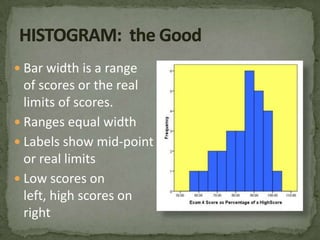
    Bar width isa rangeof scores or the reallimits of scores.Ranges equal widthLabels show mid-point or real limitsLow scores on left, high scores on rightHISTOGRAM: the Good
  • 23.
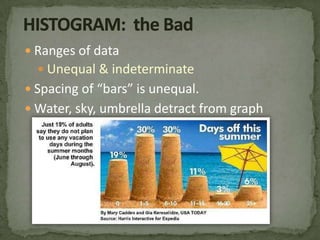
    HISTOGRAM: the BadRanges of dataUnequal & indeterminateSpacing of “bars” is unequal.Water, sky, umbrella detract from graph
  • 24.
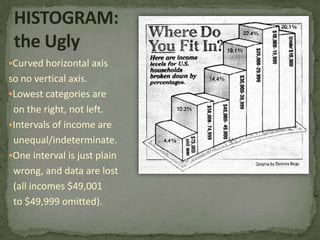
    HISTOGRAM:the UglyCurved horizontalaxis so no vertical axis.
  • 25.
    Lowest categories are on the right, not left.
  • 26.
    Intervals of incomeare unequal/indeterminate.
  • 27.
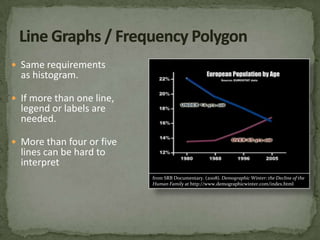
    One interval isjust plain wrong, and data are lost (all incomes $49,001 to $49,999 omitted).Same requirements as histogram.If more than one line,legend or labels are needed.More than four or fivelines can be hard tointerpretLine Graphs / Frequency Polygonfrom SRB Documentary. (2008). Demographic Winter: the Decline of the Human Family at http://www.demographicwinter.com/index.html
  • 28.
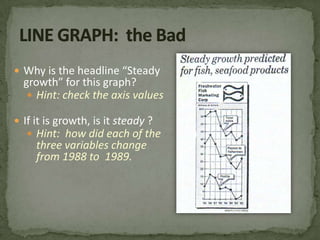
    LINE GRAPH: the BadWhy is the headline “Steady growth” for this graph?Hint: check the axis valuesIf it is growth, is it steady ?Hint: how did each of the three variables change from 1988 to 1989.
  • 29.
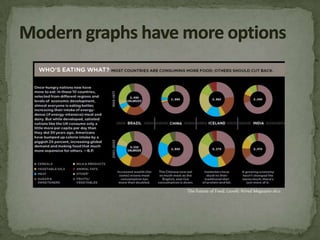
    Modern graphs havemore optionsThe Future of Food. (2008) WiredMagazine 16:11
  • 30.
    Chapter 2 andInfographics ProjectGraphs: Good, Bad & Ugly