
Automating Biostatistics Workflows g
for Bench Scientists Using R‐based 
Web toolsWeb‐tools
Jeff Skinner, Vivek Gopalan, Jason Barnett and Yentram Huyen
l h d f fTools, Techniques and Infrastructure for Next Generation Sequencing
2010 NIAID OCICB Bioinformatics and Computational Biosciences Festival
October 22nd, 2010
Lipsett AuditoriumLipsett Auditorium
Commonly Encountered ProblemsCommonly Encountered Problems
• Large complicated data files from biological instruments
– Microarrays, Next‐Generation Sequencing, 96‐well plate readers, NMR 
and Mass Spectrometry
– Arcane file extensions, ugly headers and footers, multiple tables per file
• Tedious data manipulation in MS Excel or Notepad
– Simple formulas or cut‐and‐paste can add up to hours at the computer– Simple formulas or cut‐and‐paste can add up to hours at the computer
• Critical analyses performed by legacy software
– Many relevant software tools are no longer maintained, because they 
were created with outdated technology or the original developers have 
moved on to new careers
Why Create a Webtool Using R?Why Create a Webtool Using R?
• Advantages of using RAdvantages of using R
– R scripting language is easy to use and will be long lived
– Includes all necessary tools for data import, data 
manipulation, statistical analyses, graphing, generation of 
custom reports, etc.
• Advantages of building a webtool• Advantages of building a webtool
– Provides users an accessible graphical user interface (GUI)
– Simplifies the distribution and maintenance of softwarep
– Agencies can link software to infrastructure resources like 
high performance computing clusters and databases, which 
may not otherwise be available to many end usersmay not otherwise be available to many end users
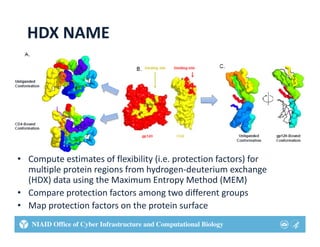
HDX NAME
• Compute estimates of flexibility (i.e. protection factors) for 
multiple protein regions from hydrogen‐deuterium exchangemultiple protein regions from hydrogen‐deuterium exchange 
(HDX) data using the Maximum Entropy Method (MEM)
• Compare protection factors among two different groups 
• Map protection factors on the protein surface
Hydrogen‐Deuterium Exchangey g g
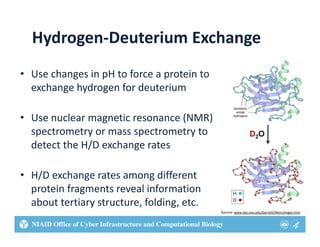
• Use changes in pH to force a protein toUse changes in pH to force a protein to 
exchange hydrogen for deuterium
• Use nuclear magnetic resonance (NMR) 
spectrometry or mass spectrometry to 
detect the H/D exchange rates
• H/D exchange rates among different 
protein fragments reveal information 
about tertiary structure folding etcabout tertiary structure, folding, etc.
Source: www.dac.neu.edu/barnett/Mem/engen.htm
Maximum Entropy Methodsa u t opy et ods
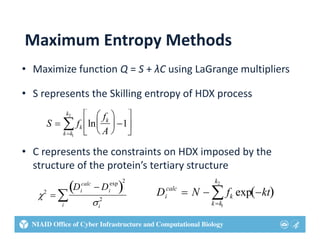
• Maximize function Q = S + λC using LaGrange multipliers
• S represents the Skilling entropy of HDX process
S  fk ln
fk
A





1






kk1
k2

• C represents the constraints on HDX imposed by the 
structure of the protein’s tertiary structurep y
2

Di
calc
 Di
exp
 
2
2 Di
calc
 N  fk exp kt 
k k
k2
ii
 kk1
HDX NAME Workflow
• Workflow inputs:
Protein structures ( pdb file): GP120 or CD4– Protein structures (.pdb file): GP120 or CD4
– Hydrogen exchange data (.txt file): fragment IDs and exchange rates
– Additional data (.txt file): Temperature, pH, time series, replicates numbers,
protein state (liganded or unliganded)protein state (liganded or unliganded) 
• Processing steps:
– Compute number of deuterium exchanged per amide from the exchange rates, 
using differential equations for any liganded protein complexes
– Normalize deuterium exchanged data for constant temperate and pH
– Estimate average exchange rates using MEM (Laplace software)
– Compute protection factors by normalization of average rates with intrinsic rates
– Compute free energy from protection factors 
– Compare fragments from liganded and unliganded states with Student’s T‐tests
– Map results to protein surface to explore conformational changes
Development of Webtoolp
• Backend (Server)
D t i t i d t t t d i R– Data import, processing and tests computed in R 
• HDXNAME : package library created for webtool
• Bio3d : Extract sequences and structural properties from PDB files
• Odesolve : Solving reaction kinetics for differential equations of liganded proteins• Odesolve : Solving reaction kinetics for differential equations of liganded proteins
• Rsolnp : Non‐linear optimization tools for MEM computations
– Perl used to visualize protein structures and run R from web
• Bio::Perl : process fragment features from FASTA or PDB files• Bio::Perl : process fragment features from FASTA or PDB files
• Bio::Structure : parse 3D coordinates of the protein structure
• Bio::Graphics : generate 2D result images from the 3D structure
• Frontend (Client/Browser)• Frontend (Client/Browser)
– jQuery : Javascript library for AJAX implementation
– Jmol : Browser plug‐in to visualize results on protein structure
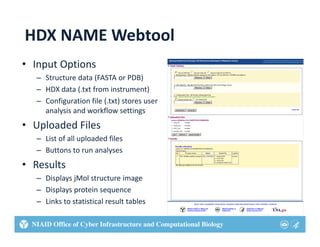
HDX NAME Webtool
• Input Options
Structure data (FASTA or PDB)– Structure data (FASTA or PDB)
– HDX data (.txt from instrument)
– Configuration file (.txt) stores user 
l d kflanalysis and workflow settings
• Uploaded Files
– List of all uploaded files– List of all uploaded files
– Buttons to run analyses
• Results
– Displays jMol structure image
– Displays protein sequence
Links to statistical result tables– Links to statistical result tables
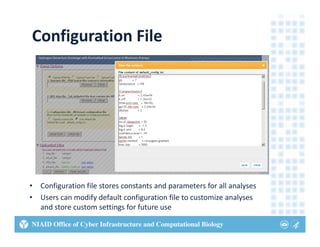
Configuration File
• Configuration file stores constants and parameters for all analyses
• Users can modify default configuration file to customize analyses y g y
and store custom settings for future use
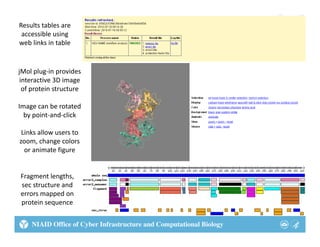
Results tables are 
accessible using 
web links in table
jMol plug‐in provides 
interactive 3D image 
of protein structure
Image can be rotatedImage can be rotated 
by point‐and‐click
Links allow users to 
h lzoom, change colors 
or animate figure
Fragment lengths, 
sec structure and 
errors mapped on 
protein sequenceprotein sequence 
Dose‐Response Analysis Pipeline (DRAP)
• Need to fit logistic dose‐response 
curves to data from dozens orcurves to data from dozens or 
hundreds of 96‐well plates
– Plates can be organized in countless waysg y
– One factor per plate or multiple factors
– Dilutions on columns or rows
• Want to view the curve‐fits and 
export summary statisticsexport summary statistics
– Want to compare EC50s with statistical tests
– Want to export EC90s for use in QTL analyses
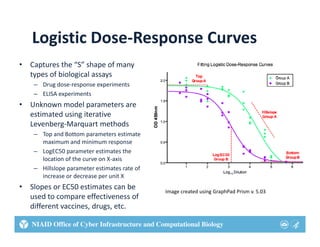
Logistic Dose‐Response Curvesg p
• Captures the “S” shape of many 
types of biological assaystypes of biological assays
– Drug dose‐response experiments
– ELISA experiments
• Unknown model parameters are p
estimated using iterative 
Levenberg‐Marquart methods
– Top and Bottom parameters estimate 
maximum and minimum response
– LogEC50 parameter estimates the 
location of the curve on X‐axis
– Hillslope parameter estimates rate ofHillslope parameter estimates rate of 
increase or decrease per unit X
• Slopes or EC50 estimates can be 
used to compare effectiveness of 
Image created using GraphPad Prism v. 5.03
different vaccines, drugs, etc.
DRAP Workflow
• Data from 96‐well plates (.dat files) processed in MS Excel
– Remove headers and footers record positive and negative controlsRemove headers and footers, record positive and negative controls
– Identify data from multiple groups, noting that some groups may 
occur within a single plate while other groups occur between plates
• Logistic curve‐fits computed in commercial Prism software
– Data from each plate must be imported into Prism separately
– Data need to be reorganized in Prism to create appropriate graphs 
and statistical tests, which may require data from multiple plates
• Summary statistics from Prism pasted into MS Excel or 
PowerPoint to summarize, reorganize and present results 
f lti l t t i i l tfrom multiple tests in a single report
Development of Webtoolp
• Backend (Server)
– All data processing and curve‐fitting performed in R
• drc : Core library to process dose reponse analysis 
• R2HTML : Generate HTML output
– Perl CGI used to run R from the web
• CGI::Application library for handling CGI requests
• Methods to handle Workflow functionalities
• Frontend (Client)
– Google Web Toolkit
I t ti l b ild l t th h b i t f• Interactively build plate through web interface
• Create all the widgets and controls in the web interface
• Process JSON data from server and updates the widgets
• User interface for CRUD operation on plate data.User interface for CRUD operation on plate data.
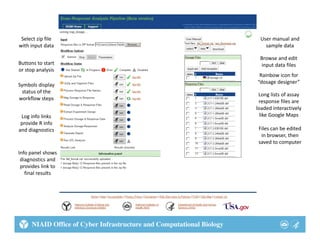
Select zip file 
with input data
User manual and 
sample datawith input data sample data
Browse and edit 
input data filesButtons to start 
or stop analysis
Rainbow icon for
Symbols display 
status of the 
workflow steps 
Rainbow icon for 
“dosage designer”
Long lists of assay 
response files are 
loaded interactively
Log info links 
provide R info 
and diagnostics
loaded interactively 
like Google Maps
Files can be edited 
in browser, then 
Info panel shows 
diagnostics and 
provides link to 
saved to computer
final results
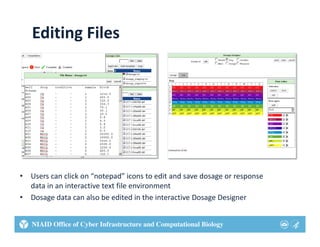
Editing Files
• Users can click on “notepad” icons to edit and save dosage or response 
data in an interactive text file environment
• Dosage data can also be edited in the interactive Dosage Designerg g g
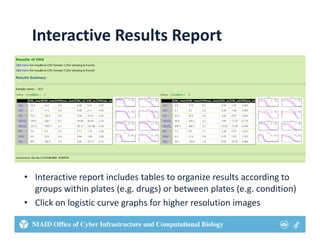
Interactive Results Report
• Interactive report includes tables to organize results according to 
groups within plates (e.g. drugs) or between plates (e.g. condition)
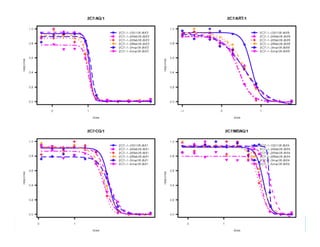
• Click on logistic curve graphs for higher resolution images• Click on logistic curve graphs for higher resolution images
Acknowledgements
• Vivek Gopalan: R programming and web development
J B I f d i DRAP l• Jason Barnett: Interface design on DRAP tool
• Leo Kong and Peter Kwong: HDX NAME experiments
• Juliana Sa Olivia Twu Hongying Jiang Thomas Wellems• Juliana Sa, Olivia Twu, Hongying Jiang, Thomas Wellems
and Xin‐zhuan Su: DRAP experiments
Websites:
http://exon.niaid.nih.gov
http://exon.niaid.nih.gov/drap/
http://exon.niaid.nih.gov/HDX_NAME/
Literature Citedte atu e C ted
HDX NAME
• Kong et al. 2010.  Hydrogen‐deuterium exchange mass spectrometry of 
HIV‐1 gp120 in unliganded and CD4‐bound states.  Journal of Virology. 
84(19):10311‐10321.
Dose‐Response Analysis Pipeline (DRAP)
• Sa et al. 2009. Geographical patterns of P. falciparum drug resistanceSa et al. 2009.  Geographical patterns of P. falciparum drug resistance 
distinguished by differential responses to amodiaquine and chloroquine.  
PNAS. 106(45): 18883‐18889
• Yuan et al. 2009. Genetic mapping of targets mediating differentialYuan et al. 2009. Genetic mapping of targets mediating differential 
chemical phenotypes in P. falciparum.  Nature Chemical Biology. 5:765‐
771

Automating biostatistics workflows using R-based webtools

  • 1.
    Automating Biostatistics Workflows g for Bench Scientists Using R‐based  Web toolsWeb‐tools Jeff Skinner, Vivek Gopalan, Jason Barnett and Yentram Huyen l hd f fTools, Techniques and Infrastructure for Next Generation Sequencing 2010 NIAID OCICB Bioinformatics and Computational Biosciences Festival October 22nd, 2010 Lipsett AuditoriumLipsett Auditorium
  • 2.
    Commonly Encountered ProblemsCommonly Encountered Problems •Large complicated data files from biological instruments – Microarrays, Next‐Generation Sequencing, 96‐well plate readers, NMR  and Mass Spectrometry – Arcane file extensions, ugly headers and footers, multiple tables per file • Tedious data manipulation in MS Excel or Notepad – Simple formulas or cut‐and‐paste can add up to hours at the computer– Simple formulas or cut‐and‐paste can add up to hours at the computer • Critical analyses performed by legacy software – Many relevant software tools are no longer maintained, because they  were created with outdated technology or the original developers have  moved on to new careers
  • 3.
    Why Create aWebtool Using R?Why Create a Webtool Using R? • Advantages of using RAdvantages of using R – R scripting language is easy to use and will be long lived – Includes all necessary tools for data import, data  manipulation, statistical analyses, graphing, generation of  custom reports, etc. • Advantages of building a webtool• Advantages of building a webtool – Provides users an accessible graphical user interface (GUI) – Simplifies the distribution and maintenance of softwarep – Agencies can link software to infrastructure resources like  high performance computing clusters and databases, which  may not otherwise be available to many end usersmay not otherwise be available to many end users
  • 4.
    HDX NAME • Compute estimates of flexibility (i.e. protection factors) for  multiple proteinregions from hydrogen‐deuterium exchangemultiple protein regions from hydrogen‐deuterium exchange  (HDX) data using the Maximum Entropy Method (MEM) • Compare protection factors among two different groups  • Map protection factors on the protein surface
  • 5.
    Hydrogen‐Deuterium Exchangey g g •Use changes in pH to force a protein toUse changes in pH to force a protein to  exchange hydrogen for deuterium • Use nuclear magnetic resonance (NMR)  spectrometry or mass spectrometry to  detect the H/D exchange rates • H/D exchange rates among different  protein fragments reveal information  about tertiary structure folding etcabout tertiary structure, folding, etc. Source: www.dac.neu.edu/barnett/Mem/engen.htm
  • 6.
    Maximum Entropy Methodsa u topy et ods • Maximize function Q = S + λC using LaGrange multipliers • S represents the Skilling entropy of HDX process S  fk ln fk A      1       kk1 k2  • C represents the constraints on HDX imposed by the  structure of the protein’s tertiary structurep y 2  Di calc  Di exp   2 2 Di calc  N  fk exp kt  k k k2 ii  kk1
  • 7.
    HDX NAME Workflow • Workflow inputs: Proteinstructures ( pdb file): GP120 or CD4– Protein structures (.pdb file): GP120 or CD4 – Hydrogen exchange data (.txt file): fragment IDs and exchange rates – Additional data (.txt file): Temperature, pH, time series, replicates numbers, protein state (liganded or unliganded)protein state (liganded or unliganded)  • Processing steps: – Compute number of deuterium exchanged per amide from the exchange rates,  using differential equations for any liganded protein complexes – Normalize deuterium exchanged data for constant temperate and pH – Estimate average exchange rates using MEM (Laplace software) – Compute protection factors by normalization of average rates with intrinsic rates – Compute free energy from protection factors  – Compare fragments from liganded and unliganded states with Student’s T‐tests – Map results to protein surface to explore conformational changes
  • 8.
    Development of Webtoolp • Backend (Server) D ti t i d t t t d i R– Data import, processing and tests computed in R  • HDXNAME : package library created for webtool • Bio3d : Extract sequences and structural properties from PDB files • Odesolve : Solving reaction kinetics for differential equations of liganded proteins• Odesolve : Solving reaction kinetics for differential equations of liganded proteins • Rsolnp : Non‐linear optimization tools for MEM computations – Perl used to visualize protein structures and run R from web • Bio::Perl : process fragment features from FASTA or PDB files• Bio::Perl : process fragment features from FASTA or PDB files • Bio::Structure : parse 3D coordinates of the protein structure • Bio::Graphics : generate 2D result images from the 3D structure • Frontend (Client/Browser)• Frontend (Client/Browser) – jQuery : Javascript library for AJAX implementation – Jmol : Browser plug‐in to visualize results on protein structure
  • 9.
    HDX NAME Webtool • Input Options Structure data(FASTA or PDB)– Structure data (FASTA or PDB) – HDX data (.txt from instrument) – Configuration file (.txt) stores user  l d kflanalysis and workflow settings • Uploaded Files – List of all uploaded files– List of all uploaded files – Buttons to run analyses • Results – Displays jMol structure image – Displays protein sequence Links to statistical result tables– Links to statistical result tables
  • 10.
  • 11.
    Results tables are  accessible using  web links in table jMol plug‐in provides  interactive 3D image  of protein structure Image canbe rotatedImage can be rotated  by point‐and‐click Links allow users to  h lzoom, change colors  or animate figure Fragment lengths,  sec structure and  errors mapped on  protein sequenceprotein sequence 
  • 12.
    Dose‐Response Analysis Pipeline (DRAP) • Need to fit logistic dose‐response  curves todata from dozens orcurves to data from dozens or  hundreds of 96‐well plates – Plates can be organized in countless waysg y – One factor per plate or multiple factors – Dilutions on columns or rows • Want to view the curve‐fits and  export summary statisticsexport summary statistics – Want to compare EC50s with statistical tests – Want to export EC90s for use in QTL analyses
  • 13.
    Logistic Dose‐Response Curvesg p • Captures the “S” shape of many  typesof biological assaystypes of biological assays – Drug dose‐response experiments – ELISA experiments • Unknown model parameters are p estimated using iterative  Levenberg‐Marquart methods – Top and Bottom parameters estimate  maximum and minimum response – LogEC50 parameter estimates the  location of the curve on X‐axis – Hillslope parameter estimates rate ofHillslope parameter estimates rate of  increase or decrease per unit X • Slopes or EC50 estimates can be  used to compare effectiveness of  Image created using GraphPad Prism v. 5.03 different vaccines, drugs, etc.
  • 14.
    DRAP Workflow • Data from 96‐well plates (.dat files) processed in MS Excel –Remove headers and footers record positive and negative controlsRemove headers and footers, record positive and negative controls – Identify data from multiple groups, noting that some groups may  occur within a single plate while other groups occur between plates • Logistic curve‐fits computed in commercial Prism software – Data from each plate must be imported into Prism separately – Data need to be reorganized in Prism to create appropriate graphs  and statistical tests, which may require data from multiple plates • Summary statistics from Prism pasted into MS Excel or  PowerPoint to summarize, reorganize and present results  f lti l t t i i l tfrom multiple tests in a single report
  • 15.
    Development of Webtoolp • Backend (Server) – All data processing and curve‐fitting performed in R •drc : Core library to process dose reponse analysis  • R2HTML : Generate HTML output – Perl CGI used to run R from the web • CGI::Application library for handling CGI requests • Methods to handle Workflow functionalities • Frontend (Client) – Google Web Toolkit I t ti l b ild l t th h b i t f• Interactively build plate through web interface • Create all the widgets and controls in the web interface • Process JSON data from server and updates the widgets • User interface for CRUD operation on plate data.User interface for CRUD operation on plate data.
  • 16.
    Select zip file  with input data User manual and  sampledatawith input data sample data Browse and edit  input data filesButtons to start  or stop analysis Rainbow icon for Symbols display  status of the  workflow steps  Rainbow icon for  “dosage designer” Long lists of assay  response files are  loaded interactively Log info links  provide R info  and diagnostics loaded interactively  like Google Maps Files can be edited  in browser, then  Info panel shows  diagnostics and  provides link to  saved to computer final results
  • 17.
  • 18.
  • 20.
    Acknowledgements • Vivek Gopalan: R programming and web development J BI f d i DRAP l• Jason Barnett: Interface design on DRAP tool • Leo Kong and Peter Kwong: HDX NAME experiments • Juliana Sa Olivia Twu Hongying Jiang Thomas Wellems• Juliana Sa, Olivia Twu, Hongying Jiang, Thomas Wellems and Xin‐zhuan Su: DRAP experiments Websites: http://exon.niaid.nih.gov http://exon.niaid.nih.gov/drap/ http://exon.niaid.nih.gov/HDX_NAME/
  • 21.
    Literature Citedte atu eC ted HDX NAME • Kong et al. 2010.  Hydrogen‐deuterium exchange mass spectrometry of  HIV‐1 gp120 in unliganded and CD4‐bound states.  Journal of Virology.  84(19):10311‐10321. Dose‐Response Analysis Pipeline (DRAP) • Sa et al. 2009. Geographical patterns of P. falciparum drug resistanceSa et al. 2009.  Geographical patterns of P. falciparum drug resistance  distinguished by differential responses to amodiaquine and chloroquine.   PNAS. 106(45): 18883‐18889 • Yuan et al. 2009. Genetic mapping of targets mediating differentialYuan et al. 2009. Genetic mapping of targets mediating differential  chemical phenotypes in P. falciparum.  Nature Chemical Biology. 5:765‐ 771