D i f E i tDesign of Experiments 
Jeff Skinner, M.S.
Biostatistics SpecialistBiostatistics Specialist
Bioinformatics and Computational Biosciences Branch (BCBB)
NIH/NIAID/OD/OSMO/OCICB
http://bioinformatics.niaid.nih.gov
ScienceApps@niaid.nih.gov
What Is a Designed Experiment?
 A designed experiment is planned, completed and analyzed using 
statistical considerations to increase efficiency
 Design of Experiments (DOE) has a rich history connected to 
agriculture, engineering and manufacturing
 Classic DOE attempted to coerce all experiments into a handful 
of well known often inflexible designsof well known, often inflexible, designs
 Modern statistics software packages allow non‐experts to create p g p
flexible but sensible designs based on their own needs
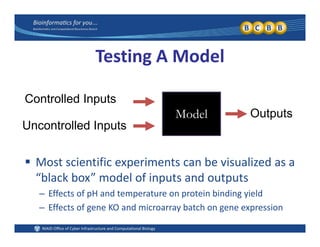
Testing A Model
Controlled Inputs
Model Outputs
Uncontrolled Inputs
 Most scientific experiments can be visualized as a 
“black box” model of inputs and outputs
– Effects of pH and temperature on protein binding yield
– Effects of gene KO and microarray batch on gene expression
Statistical Jargon
 Model inputs are independent variables Model inputs are independent variables
– Controlled inputs are usually called factors
– Uncontrolled inputs are often called blocking variables,Uncontrolled inputs are often called blocking variables, 
covariates or nuisance variables
– All inputs may be called predictor variables, e.g. X
 Model outputs are dependent variables
Outputs are also called response variables e g Y– Outputs are also called response variables, e.g. Y
 The “black box” is our statistical modelThe  black box  is our statistical model
– Linear models, nonlinear models, loglinear models, …
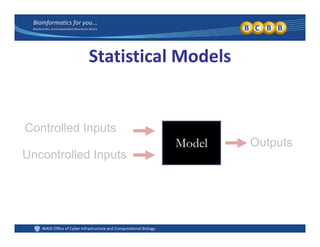
Statistical Models
M d l
Controlled Inputs
O t tModel Outputs
Uncontrolled Inputs
Linear Models (continued)
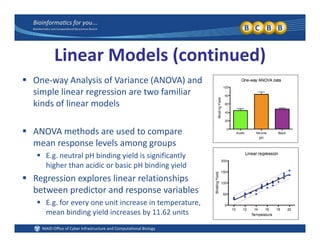
l f ( ) d One‐way Analysis of Variance (ANOVA) and 
simple linear regression are two familiar 
kinds of linear models
 ANOVA methods are used to compare 
mean response levels among groups
 E.g. neutral pH binding yield is significantly 
higher than acidic or basic pH binding yield
 Regression explores linear relationships 
between predictor and response variables
 E g for every one unit increase in temperature E.g. for every one unit increase in temperature, 
mean binding yield increases by 11.62 units
Extensions of the Linear Model
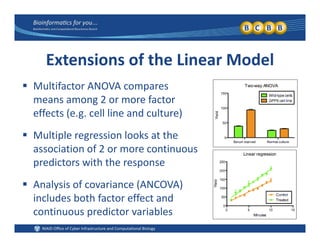
 Multifactor ANOVA compares 
means among 2 or more factor 
effects (e.g. cell line and culture)
 Multiple regression looks at the p g
association of 2 or more continuous 
predictors with the response
 Analysis of covariance (ANCOVA) 
includes both factor effect andincludes both factor effect and 
continuous predictor variables
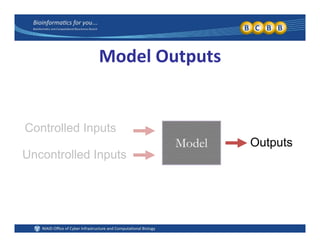
Model Outputs
M d l
Controlled Inputs
O t tModel Outputs
Uncontrolled Inputs
Response Variables
 Response variables determine the appropriate 
statistical model for the experiment
– Most continuous responses use linear models (e.g. yield)
– All categorical responses use generalized linear models
 Response measurements are taken from the 
units of sampled data in the experimentunits of sampled data in the experiment
– Sample units may be selected from the population or 
assigned to the treatments in many different ways
S l i diff f i l i– Sample units may differ from experimental units
Common Sampling Methods
 Simple Random Sampling (SRS)
– Each sample in the population has an equal probability of being selected
 Stratified Sampling Stratified Sampling
– The population is divided into fixed groups, or strata, and a SRS is 
selected from each of the strata
E g stratify a population by gender then SRS both males and females– E.g. stratify a population by gender, then SRS both males and females
 Cluster Sampling
– Several clusters are randomly selected, and all individuals are sampled
– E.g. randomly choose 10 American cities and survey all citizens
 Systematic Sampling
Samples are chosen using an algorithm or heuristic– Samples are chosen using an algorithm or heuristic
– E.g. every fourth name from the phone book is chosen
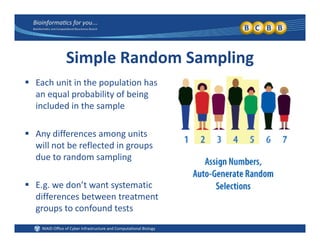
Simple Random Sampling
 Each unit in the population has 
an equal probability of being 
included in the sampleincluded in the sample
 Any differences among units 
will not be reflected in groups 
due to random sampling
 E.g. we don’t want systematic 
differences between treatment 
groups to confound tests
Stratified Sampling
 Want a representative sample of ALL 
lymphocytes in the human body
 Divide human body into several organ, 
tissue or cell types and SRS from eachtissue or cell types and SRS from each
– E.g. T‐cells, B‐cells and NK‐cells
– E.g. Samples from lung, liver and gut tissue
 Ensures lymphocytes from all cell or 
tissue types are in the sampletissue types are in the sample
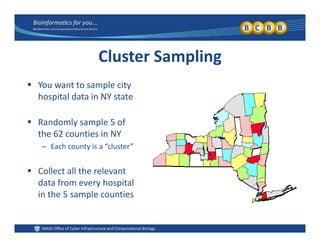
Cluster Sampling
 You want to sample city 
hospital data in NY state
 Randomly sample 5 of 
the 62 counties in NY
– Each county is a “cluster”
 Collect all the relevant Collect all the relevant 
data from every hospital 
in the 5 sample counties
Experimental Units vs. Sampling Units
 A treatment is a unique combination of all the factor levels 
from the controlled and uncontrolled inputs
 The experimental unit (EU) is the smallest entity that can 
receive or accept one treatment combinationreceive or accept one treatment combination
 The sampling unit (SU) is the smallest entity that will be 
measured or observed in the experiment
E i t l d li it t l th Experimental and sampling units are not always the same 
Example: EU and SU are the Same
 Suppose 20 patients have the common cold
– 10 patients are randomly chosen to take a new drug
– 10 patients are randomly chosen for the placebo
– Duration of their symptoms (hours) is the response variable
 EU and SU are the same in this experiment
D d l b t t t li d t h ti t– Drug and placebo treatments are applied to each patient
– Each patient is sampled to record their duration of symptoms
– Therefore EU = patient and SU = patientTherefore EU = patient and SU = patient
Example: EU and SU are different
 20 flowers are planted in individual pots
– 10 flowers are randomly chosen to receive dry fertilizer pellets
– 10 flowers are randomly chosen to receive liquid fertilizer
– All six petals are harvested from each flower and petal length 
is measured as the response variableis measured as the response variable  
 EU and SU are different in this experimentEU and SU are different in this experiment
– Fertilizer treatment is applied to the individual plant or pot
– Measurements are taken from individual flower petalsp
– Therefore EU = plant and SU = petal        (pseudo‐replication)
Pseudo‐Replication
 C f i b t EU’ d SU’ tifi i ll i fl t Confusion between EU’s and SU’s can artificially inflate 
sample sizes and artificially decrease p‐values
– E g It is tempting to treat each flower petal as a unique sample– E.g. It is tempting to treat each flower petal as a unique sample 
(n = 6 x 20 = 120), but the petals are pseudo‐replicates
– “Pseudoreplication and the Design of Ecological Field 
Experiments” (Hurlbert 1984, Ecological Monographs)
 Pooling samples can create pseudo‐replication problems
– E.g. 12 fruit flies are available for a microarray experiment, but 
must pool flies into 4 groups of 3 flies each to get enough RNA
– Once data are pooled it is not appropriate to analyze eachOnce data are pooled, it is not appropriate to analyze each 
individual separately in the statistical model
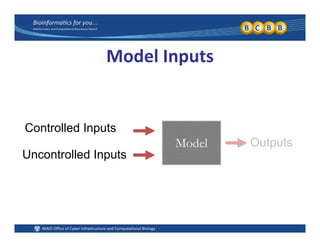
Model Inputs
M d l
Controlled Inputs
O t tModel Outputs
Uncontrolled Inputs
Controlled Inputs
 Controlled inputs are the variables that most 
interest the experimenter
 Controlled inputs can be manipulated and 
randomly assigned by the researcher
 Controlled inputs can be treated as factor 
effects, even if the variable is continuouseffects, even if the variable is continuous
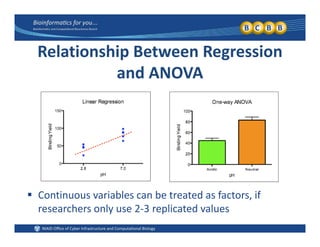
l i hi iRelationship Between Regression 
and ANOVAand ANOVA
 Continuous variables can be treated as factors, if 
researchers only use 2‐3 replicated values  
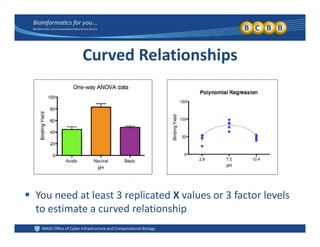
Curved Relationships
 You need at least 3 replicated X values or 3 factor levels 
to estimate a curved relationship
Uncontrolled Inputs
 Uncontrolled inputs are measurable traits of the 
sampling units that do not interest the researcher, but 
must be included in the statistical modelmust be included in the statistical model
 Uncontrolled categorical variables are nuisance factors Uncontrolled categorical variables are nuisance factors
 E.g. gender, race, disease status, cell type, smoking status, …
 Uncontrolled continuous variables are covariatesUncontrolled continuous variables are covariates
 E.g. body mass, age, calcium intake, cigarettes per week, …
 Uncontrolled discrete variables are blocksUncontrolled discrete variables are blocks
 E.g. agricultural plot, microarray chip, chemical batch, subject
Blocking Variables
 Sometimes the phrase block variable is used to describe Sometimes the phrase block variable is used to describe 
consecutive measurements from one factor level
– E.g. We might block an experiment by the gender variable, if g g p y g ,
we collect all of the male and female samples separately
– These variables may be better described as whole plot effects
 The phrase block variable can also describe categorical 
or discrete variables consumed during the experiment
– E.g. If chemical batch is a variable in an experiment, you will 
only get a fixed amount of experiment runs from each batch
– Subject variables are often treated as blocks because oneSubject variables are often treated as blocks, because one 
subject can only accept one treatment at a time
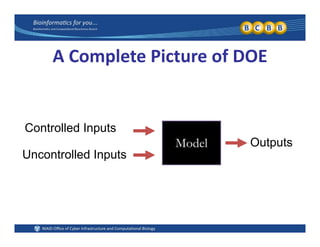
A Complete Picture of DOE
M d l
Controlled Inputs
O t tModel Outputs
Uncontrolled Inputs
Why Use a Designed Experiment?
 You want an unbiased experiment (Basic Designs) You want an unbiased experiment (Basic Designs)
 You want to know how many samples to collect in an 
i i t (P d S l Si )upcoming experiment (Power and Sample Size)
 You know dozens of variables might affect a protein g p
binding process and you want to test them with one 
reasonably‐sized experiment (Screening Designs)
 You want to optimize a fermentation experiment by 
controlling its duration, substrate concentration and 
temperature to maximize yield minimize costs andtemperature to maximize yield, minimize costs and 
target a specific mass (Response Surface Designs) 
Completely Randomized Design
 The simplest type of designed experiment may be the 
completely randomized design (CRD)
 In the CRD, experimental units are randomly assigned to 
the factor level groups using simple random samplingthe factor level groups using simple random sampling
– E.g. Any medical studies where all patients can be randomly assigned to 
drug or placebo groups might be a CRD
 Randomly assigning treatments to the SU’s will eliminate 
biases from other correlated variablesbiases from other correlated variables
– E.g. biases from gender, age, weight or comorbidities in a medical study
Randomized Complete Block Design (RCBD)
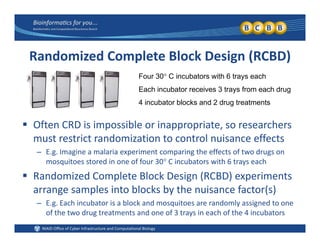
Four 30 C incubators with 6 trays eachFour 30 C incubators with 6 trays each
Each incubator receives 3 trays from each drug
4 incubator blocks and 2 drug treatments
 Often CRD is impossible or inappropriate, so researchers 
must restrict randomization to control nuisance effectsmust restrict randomization to control nuisance effects
– E.g. Imagine a malaria experiment comparing the effects of two drugs on 
mosquitoes stored in one of four 30 C incubators with 6 trays each
 Randomized Complete Block Design (RCBD) experiments 
arrange samples into blocks by the nuisance factor(s)
E E h i b t i bl k d it d l i d t– E.g. Each incubator is a block and mosquitoes are randomly assigned to one 
of the two drug treatments and one of 3 trays in each of the 4 incubators
Within and Among Block Variance

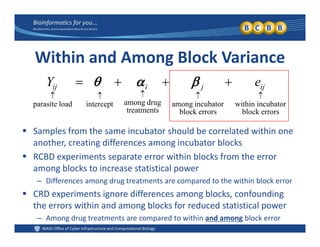
incubatorwithinincubatoramongdrugamonginterceptloadparasite

 ijjiij eY 
 Samples from the same incubator should be correlated within one 
errorsblockerrorsblock
g
treatments
pp
another, creating differences among incubator blocks
 RCBD experiments separate error within blocks from the error 
among blocks to increase statistical poweramong blocks to increase statistical power
– Differences among drug treatments are compared to the within block error
 CRD experiments ignore differences among blocks, confounding 
the errors within and among blocks for reduced statistical power
– Among drug treatments are compared to within and among block error
Random vs. Fixed Effects
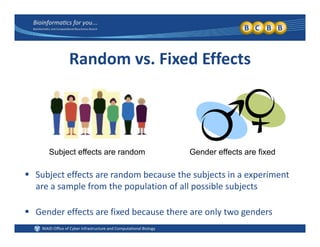
Subject effects are random Gender effects are fixed
 Subject effects are random because the subjects in a experiment 
are a sample from the population of all possible subjects
 Gender effects are fixed because there are only two genders
Split‐plot Design
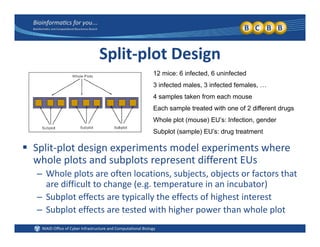
12 mice: 6 infected, 6 uninfected
3 infected males, 3 infected females, …
4 samples taken from each mouse
Each sample treated with one of 2 different drugsEach sample treated with one of 2 different drugs
Whole plot (mouse) EU’s: Infection, gender
Subplot (sample) EU’s: drug treatment
 Split‐plot design experiments model experiments where 
whole plots and subplots represent different EUs
h l l f l b b f h– Whole plots are often locations, subjects, objects or factors that 
are difficult to change (e.g. temperature in an incubator)
– Subplot effects are typically the effects of highest interestp yp y g
– Subplot effects are tested with higher power than whole plot
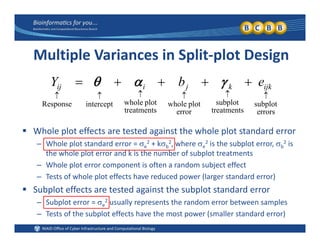
Multiple Variances in Split‐plot Design
b
subplotsubplotplotwholeplotwholeinterceptResponse

 ijkkjiij ebY 
 Whole plot effects are tested against the whole plot standard error
errors
p
treatmentserror
p
treatments
pp
– Whole plot standard error = e
2 + kb
2, where e
2 is the subplot error, b
2 is 
the whole plot error and k is the number of subplot treatments
– Whole plot error component is often a random subject effect
– Tests of whole plot effects have reduced power (larger standard error)
 Subplot effects are tested against the subplot standard error
Subplot error  2 usually represents the random error between samples– Subplot error = e
2 usually represents the random error between samples
– Tests of the subplot effects have the most power (smaller standard error)
Split‐plot vs. RCBD
 Split‐plot experiments deal with multiple EU’s, 
while RCBD can have a single EU = SU
 Blocks in a RCBD experiment are usually nuisance 
variables that do not interest the experimentervariables that do not interest the experimenter
– Blocks included to account for additional variation
– Blocks are usually treated as random effects– Blocks are usually treated as random effects
 Whole‐plot effects do interest experimenters
– Whole‐plot effects are often fixed effects
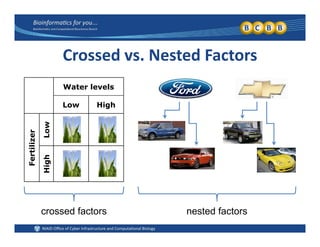
Crossed vs. Nested Factors
Water levels
Low Highg
zer
Low
Fertiliz
HighH
crossed factors nested factors
Crossed and Nested Factors
 T f t d if ll f th i f t l l Two factors are crossed if all of their factor levels can 
occur together in a single experimental unit
– E.g. Fertilizer level (high or low) and water level (high or low) are crossedE.g. Fertilizer level (high or low) and water level (high or low) are crossed 
because all combos are possible (LL, LH, HL, HH)
 Two factors are nested if the levels in one variable 
depend on the levels of the other variable for each EU
– E.g. car manufacturer (Ford or Chevy) and car model (Mustang or F150,  
Corvette or Silvarado) are nested factors, because there is no Chevy F150) , y
 Need to properly specify factors as crossed or nested
– Cannot run nested variables as crossed effects in the model
– Subplot effect is nested within the whole plot in a split‐plot model
Power and Sample SizePower and Sample Size 
How Many Samples?
 Y l i bi l i l i t b t d You are planning a biological experiment, but you do 
not know how many samples to collect
– E.g. mouse experiments, microarray experiments, vaccine productionE.g. mouse experiments, microarray experiments, vaccine production 
 One sample per group
– Cannot computer errors, statistical tests or p‐values
 Too few samples per group
– Will I find any significant p‐values?
– Have I accurately represented my population?
 Too many samples per group
– Did I waste time money or other resources?– Did I waste time, money or other resources?
– Are my statistical results biologically meaningful?
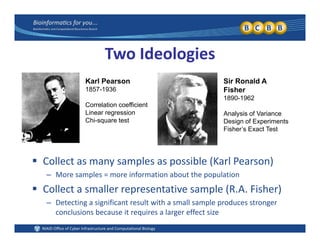
Two Ideologies
Karl Pearson
1857-1936
Correlation coefficient
Sir Ronald A
Fisher
1890-1962
Linear regression
Chi-square test
Analysis of Variance
Design of Experiments
Fisher’s Exact Test
 Collect as many samples as possible (Karl Pearson)
– More samples = more information about the population
 Collect a smaller representative sample (R.A. Fisher)
Detecting a significant result with a small sample produces stronger– Detecting a significant result with a small sample produces stronger 
conclusions because it requires a larger effect size
Recall the Statistical Testing Process
 Formulate null and alternative hypotheses Formulate null and alternative hypotheses
– E.g. (null) H0: μ1 = μ2 vs. (alternative) HA:  μ1 ≠ μ2
 Calculate the appropriate test statisticpp p
– E.g. Student’s t‐test, linear regression, ANOVA F‐test, …
 Compute the probability of observing the test statistic 
(i.e. your sample data) under the null hypothesis
– I.e. Compute a p‐value
M k i i l d i i Make a statistical decision
– Reject the null hypothesis or Fail to Reject the null hypothesis
 Make a biological conclusion Make a biological conclusion
– E.g. New drug reduces viral load, neutral pH produces highest yield, …
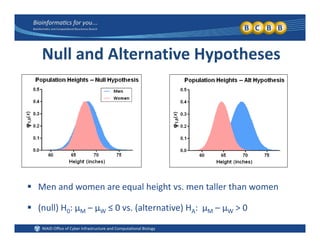
Null and Alternative Hypotheses
 Men and women are equal height vs. men taller than women
 (null) H0: μM – μW ≤ 0 vs. (alternative) HA:  μM – μW > 0
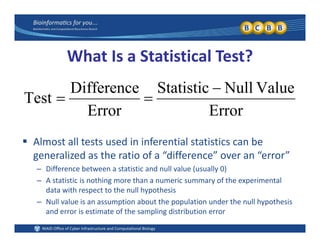
What Is a Statistical Test?
E
ValueNullStatistic
E
Difference
Test


Al t ll t t d i i f ti l t ti ti b
ErrorError
 Almost all tests used in inferential statistics can be 
generalized as the ratio of a “difference” over an “error”
– Difference between a statistic and null value (usually 0)Difference between a statistic and null value (usually 0)
– A statistic is nothing more than a numeric summary of the experimental 
data with respect to the null hypothesis
Null value is an assumption about the population under the null hypothesis– Null value is an assumption about the population under the null hypothesis 
and error is estimate of the sampling distribution error
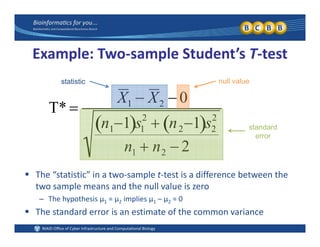
Example: Two‐sample Student’s T‐test
T* 
X1  X2  0
statistic null value
T* 
n11 s1
2
 n21 s2
2
standard
error
n1  n2  2
 The “statistic” in a two‐sample t‐test is a difference between the 
two sample means and the null value is zero
– The hypothesis μ1 = μ2 implies μ1 – μ2 = 0The hypothesis μ1  μ2 implies μ1 μ2  0
 The standard error is an estimate of the common variance 
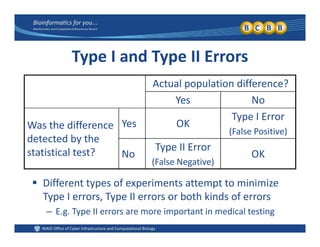
Type I and Type II Errors
Actual population difference? 
Yes No
Was the difference 
detected by the
Yes OK
Type I Error
(False Positive)
detected by the 
statistical test? No
Type II Error
(False Negative)
OK
 Different types of experiments attempt to minimize 
Type I errors, Type II errors or both kinds of errorsyp , yp
– E.g. Type II errors are more important in medical testing
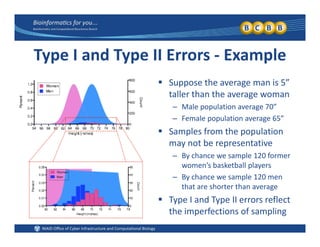
Type I and Type II Errors ‐ Example
 Suppose the average man is 5” 
taller than the average woman
– Male population average 70”Male population average 70
– Female population average 65”
 Samples from the population 
may not be representative
– By chance we sample 120 former 
women’s basketball players
– By chance we sample 120 men 
that are shorter than average
 Type I and Type II errors reflectType I and Type II errors reflect 
the imperfections of sampling
Power and Sample Size Analysis
 Power represents the probability of detecting an 
significant result whenever it truly occurs
 Statistical power is related to sample size and other 
characteristics of the experiment
 The goal is to determine the power achieved by a 
certain sample size or determine the sample size 
necessary to achieve the desired power
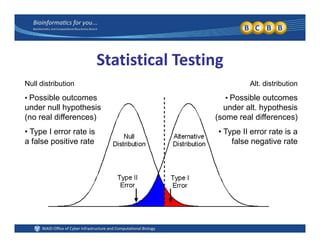
Statistical Testing
Null distribution
• Possible outcomes
under null hypothesis
Alt. distribution
• Possible outcomes
under alt hypothesisunder null hypothesis
(no real differences)
• Type I error rate is
f l iti t
under alt. hypothesis
(some real differences)
• Type II error rate is a
f l ti ta false positive rate false negative rate
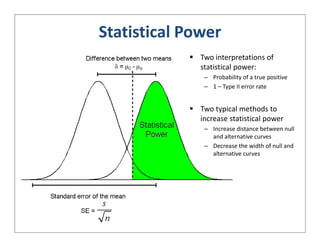
Statistical Power
 Two interpretations of 
statistical power:
Probability of a true positive– Probability of a true positive
– 1 – Type II error rate
 Two typical methods to Two typical methods to 
increase statistical power
– Increase distance between null 
and alternative curves
– Decrease the width of null and 
alternative curves
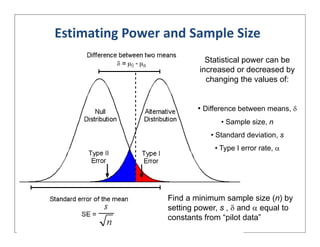
Estimating Power and Sample Size
Statistical power can be
increased or decreased by
h i th l fchanging the values of:
• Difference between means • Difference between means, 
• Sample size, n
• Standard deviation, s
• Type I error rate, 
Find a minimum sample size (n) byp ( ) y
setting power, s ,  and  equal to
constants from “pilot data”
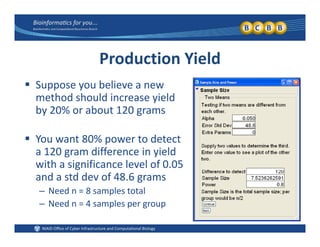
Production Yield
 Suppose you believe a new 
method should increase yield 
b 20% b t 120by 20% or about 120 grams
 You want 80% power to detect You want 80% power to detect 
a 120 gram difference in yield 
with a significance level of 0.05 
and a std dev of 48.6 grams
– Need n = 8 samples total
N d 4 l– Need n = 4 samples per group
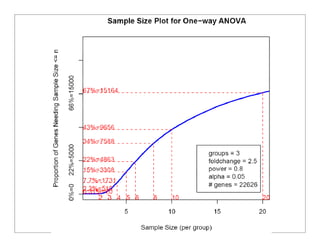
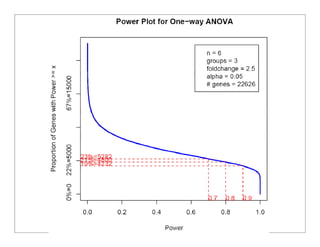
Microarray Sample Size
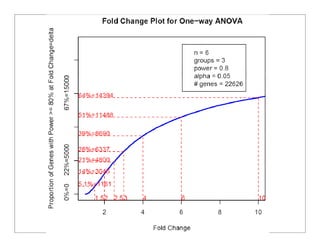
 Microarray experiments test thousands of hypotheses, 
each with a unique variance and fold‐change value
 Input variance estimates for each gene and apply the 
Bonferroni adjustment for multiple comparisons
 Plot the proportion of genes achieving the desired 
power, fold‐change and sample size values
Why Use a Screening Experiment?
 One multi‐factor experiment is more efficient than 
multiple experiments one‐variable‐at‐a‐time
– Save time, money, materials, animals, …
– A single multifactor experiment can utilize larger sample sizes 
th l ll i tper group than several smaller experiments
 Multi‐factor experiments allow researchers to p
detect important interactions between variables
– More accurate estimation of both main effects and interactions
– Avoid bad interpretations due to Simpson’s paradox
A Simple Example
 Y t t i th ff t f t t H You want to examine the effects of temperature, pH 
and substrate concentration on a protein binding yield
– Each run requires 2 hours of bench time and costs $500
Almost doubleAlmost double– Each run requires 2 hours of bench time and costs $500
 Three experiments performed one‐variable‐at‐a‐time:
– Three experiments with 10 runs each (30 runs total)
Almost doubleAlmost double
the sample sizethe sample sizeThree experiments with 10 runs each (30 runs total)
– Sample size n = 5 per group (e.g. 5 observations with low pH)
– Total cost $15,000 and 60 hours of bench time
the sample sizethe sample size
f h lf th tf h lf th t One designed multifactor experiment:
– One experiment with 16 total runs (n = 8 per group)
for half the costfor half the cost
– Total cost $8000 and 32 hours of bench time
A Simple Example
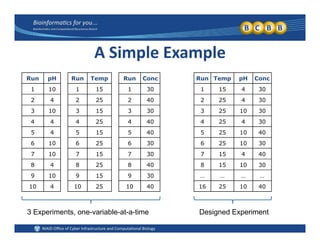
R H R T R C R T H CRun pH
1 10
2 4
Run Temp
1 15
2 25
Run Conc
1 30
2 40
Run Temp pH Conc
1 15 4 30
2 25 4 30
3 10
4 4
5 4
3 15
4 25
5 15
3 30
4 40
5 40
3 25 10 30
4 25 4 30
5 25 10 40
6 10
7 10
8 4
6 25
7 15
8 25
6 30
7 30
8 40
6 25 10 30
7 15 4 40
8 15 10 30
9 10
10 4
9 15
10 25
9 30
10 40
… … … …
16 25 10 40
3 Experiments, one-variable-at-a-time Designed Experiment
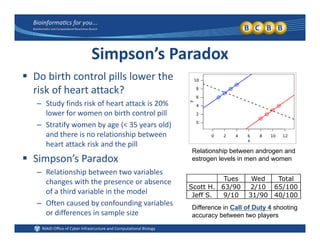
Simpson’s Paradox
 Do birth control pills lower the Do birth control pills lower the 
risk of heart attack?
– Study finds risk of heart attack is 20% 
lower for women on birth control pill
– Stratify women by age (< 35 years old) 
and there is no relationship between 
heart attack risk and the pill
 Simpson’s Paradox
R l ti hi b t t i bl
Relationship between androgen and
estrogen levels in men and women
– Relationship between two variables 
changes with the presence or absence 
of a third variable in the model
Oft d b f di i bl
Tues Wed Total
Scott H. 63/90 2/10 65/100
Jeff S. 9/10 31/90 40/100
– Often caused by confounding variables 
or differences in sample size
Difference in Call of Duty 4 shooting
accuracy between two players
Which Experimental Factors Most 
Affect Protein Binding?Affect Protein Binding?
 What do I use if I have already collected my data?y y
– Stepwise regression methods
– JMP Partitioning Platform
 What do I use if I am still planning my experiment?
– Use traditional screening designs from a book
– JMP DOE Screening Platform or Factorial Platform
JMP DOE C t D i Pl tf– JMP DOE Custom Design Platform
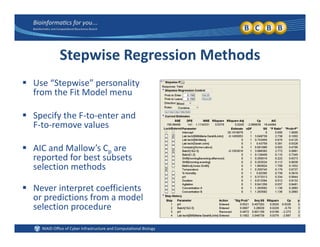
Stepwise Regression Methods
 Use “Stepwise” personality 
from the Fit Model menu
 Specify the F‐to‐enter and 
F‐to‐remove values
 AIC and Mallow’s Cp are 
reported for best subsets 
selection methods
 Never interpret coefficients 
or predictions from a model p
selection procedure
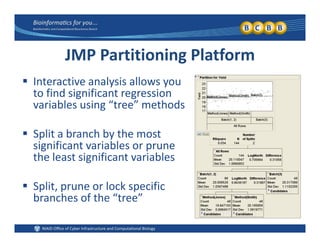
JMP Partitioning Platform
 Interactive analysis allows you 
to find significant regression 
variables using “tree” methodsvariables using  tree  methods
 Split a branch by the most p y
significant variables or prune 
the least significant variables
 Split, prune or lock specific 
branches of the “tree”branches of the  tree
Design a Screening Experiment
 Use the traditional designs
Full factorial and fractional factorial designs– Full factorial and fractional factorial designs
– Plackett‐Burman designs
 Use the JMP DOE menu
– Screening and Full Factorial menus
– Custom design menu (D‐optimal)Custom design menu (D optimal)
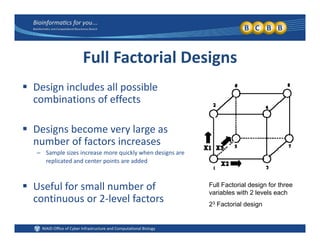
Full Factorial Designs
 Design includes all possible 
combinations of effects
 Designs become very large as 
b f f t inumber of factors increases
– Sample sizes increase more quickly when designs are 
replicated and center points are added
 Useful for small number of 
continuous or 2‐level factors
Full Factorial design for three
variables with 2 levels each
continuous or 2 level factors 23 Factorial design
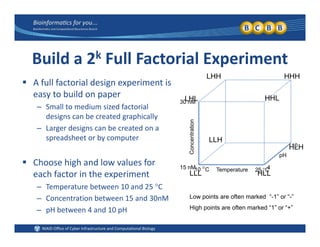
Build a 2k Full Factorial Experiment
HHHLHH
30 nM
 A full factorial design experiment is 
easy to build on paper
– Small to medium sized factorial
LHL HHL
HHHLHH
entration
Small to medium sized factorial 
designs can be created graphically
– Larger designs can be created on a 
spreadsheet or by computer LLH
Temperature10 C 25 C
Conce
15 nM 4
10
pH
spreadsheet or by computer
 Choose high and low values for 
HLH
LLH
Temperature10 C 25 C
each factor in the experiment
– Temperature between 10 and 25 C
– Concentration between 15 and 30nM
LLL HLL
Low points are often marked “-1” or “-”
– pH between 4 and 10 pH High points are often marked “1” or “+”
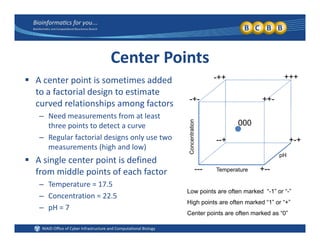
Center Points
dd d +++++ A center point is sometimes added 
to a factorial design to estimate 
curved relationships among factors -+- ++-
+++-++
p g
– Need measurements from at least 
three points to detect a curve
– Regular factorial designs only use two
entration
+ ++
000
Regular factorial designs only use two 
measurements (high and low)
 A single center point is defined 
from middle points of each factor Temperature
Conce
pH
--- +--
+-+--+
from middle points of each factor
– Temperature = 17.5
– Concentration = 22.5
Temperature +
Low points are often marked “-1” or “-”
High points are often marked “1” or “+”
– pH = 7
High points are often marked 1 or +
Center points are often marked as “0”
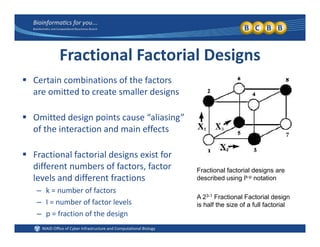
Fractional Factorial Designs
b f h f Certain combinations of the factors 
are omitted to create smaller designs
 Omitted design points cause “aliasing” 
of the interaction and main effects
 Fractional factorial designs exist for 
different numbers of factors, factor  Fractional factorial designs are,
levels and different fractions
– k = number of factors
I = number of factor levels
Fractional factorial designs are
described using Ik-p notation
A 23-1 Fractional Factorial design
– I = number of factor levels
– p = fraction of the design
is half the size of a full factorial
Plackett‐Burman Designs
 Very efficient designs for testing a LARGE number of 
predictor variables with a small number of runs
– Plackett and Burman.  1946.  (Biometrika)
– Based on Paley construction of Hadamard matrices
 Only allow tests of main effects, not interactions
 Significant interactions are aliased with main effects
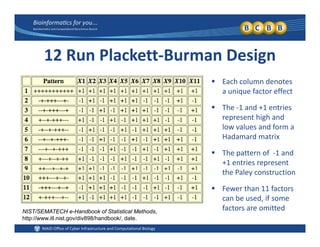
12 Run Plackett‐Burman Design
 Each column denotes 
a unique factor effect
 The ‐1 and +1 entries The ‐1 and +1 entries 
represent high and 
low values and form a 
Hadamard matrixHadamard matrix
 The pattern of  ‐1 and 
+1 entries represent 
th P l t tithe Paley construction
 Fewer than 11 factors 
can be used, if some ,
factors are omittedNIST/SEMATECH e-Handbook of Statistical Methods,
http://www.itl.nist.gov/div898/handbook/, date.
iff S iDifferences Between Screening 
Design and Custom Design MenusDesign and Custom Design Menus
 Screening Designs Platform in JMP
– No blocking factors, covariates or split‐plot designs
– Easy access to effect aliasing information
Choose from classical “named” designs– Choose from classical,  named  designs
 Custom Designs Platform in JMP
– More possible factor types (e.g. blocks, covariates, 4+ level factors, …)
– Possible to define factor constraints (i.e. restricted factor combinations)
– Easy to specify required interactions with model dialogy p y q g
– Diagnostic plots to explore prediction variance for each design
JMP Screening Design Menu
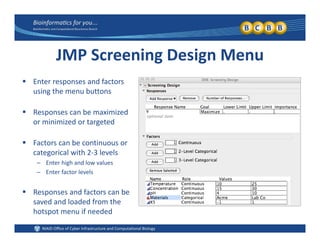
 Enter responses and factors 
using the menu buttons
 Responses can be maximized 
or minimized or targeted
 Factors can be continuous or 
categorical with 2‐3 levels
– Enter high and low values
E f l l– Enter factor levels
 Responses and factors can be 
saved and loaded from thesaved and loaded from the 
hotspot menu if needed
JMP Screening Design Menu
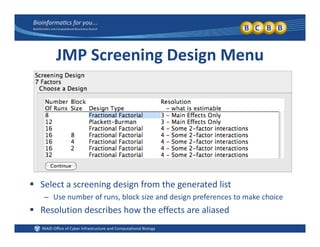
 Select a screening design from the generated list
– Use number of runs, block size and design preferences to make choice
 Resolution describes how the effects are aliased
Aliasing in Fractional Designs
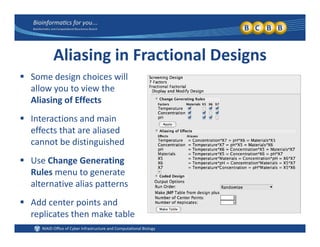
 Some design choices will Some design choices will 
allow you to view the 
Aliasing of Effects
 Interactions and main 
effects that are aliased 
b di i i h dcannot be distinguished
 Use Change Generating 
R l t tRules menu to generate 
alternative alias patterns
 Add center points and Add center points and 
replicates then make table
JMP Custom Design Menu
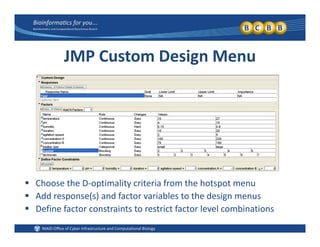
 Choose the D‐optimality criteria from the hotspot menu
 Add response(s) and factor variables to the design menus
 Define factor constraints to restrict factor level combinations
JMP Custom Design Menu
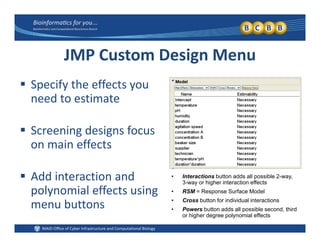
 Specify the effects you 
need to estimate
 Screening designs focus 
on main effects
 Add interaction and 
polynomial effects using 
b tt
• Interactions button adds all possible 2-way,
3-way or higher interaction effects
• RSM = Response Surface Model
• Cross button for individual interactions
menu buttons Cross button for individual interactions
• Powers button adds all possible second, third
or higher degree polynomial effects
JMP Custom Design Menu
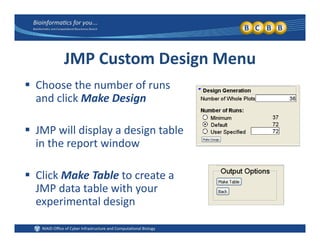
 Choose the number of runs 
and click Make Design
 JMP will display a design table 
h din the report window
 Click Make Table to create a 
JMP data table with your 
experimental designexperimental design
DOE Data Table Output
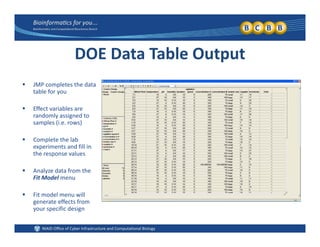
 JMP completes the data 
table for you
 Effect variables are Effect variables are 
randomly assigned to 
samples (i.e. rows)
 Complete the lab Complete the lab 
experiments and fill in 
the response values
 Analyze data from the Analyze data from the 
Fit Model menu
 Fit model menu will 
generate effects fromgenerate effects from 
your specific design
Effect Screening Emphasis
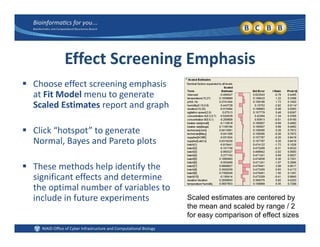
 Choose effect screening emphasis 
at Fit Model menu to generate 
Scaled Estimates report and graphp g p
 Click “hotspot” to generate 
N l B d P t l tNormal, Bayes and Pareto plots
 These methods help identify the p y
significant effects and determine 
the optimal number of variables to 
include in future experiments Scaled estimates are centered byp y
the mean and scaled by range / 2
for easy comparison of effect sizes
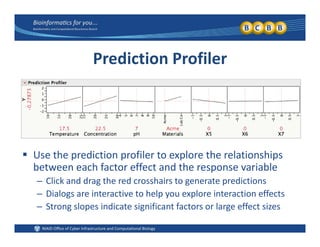
Prediction Profiler
 Use the prediction profiler to explore the relationships 
between each factor effect and the response variablebetween each factor effect and the response variable
– Click and drag the red crosshairs to generate predictions
– Dialogs are interactive to help you explore interaction effects
– Strong slopes indicate significant factors or large effect sizes
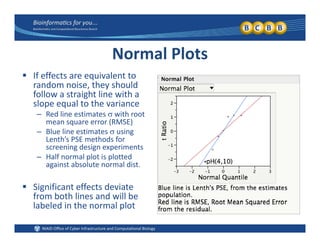
Normal Plots
 If effects are equivalent toIf effects are equivalent to 
random noise, they should 
follow a straight line with a 
slope equal to the variancep q
– Red line estimates  with root 
mean square error (RMSE)
– Blue line estimates  using 
Lenth’s PSE methods forLenth s PSE methods for 
screening design experiments
– Half normal plot is plotted 
against absolute normal dist.
 Significant effects deviate 
from both lines and will be 
labeled in the normal plot
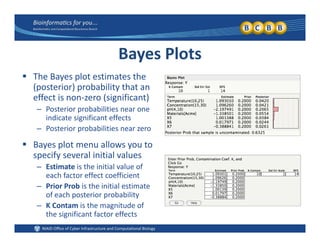
Bayes Plots
 The Bayes plot estimates the The Bayes plot estimates the 
(posterior) probability that an 
effect is non‐zero (significant)
Posterior probabilities near one– Posterior probabilities near one 
indicate significant effects
– Posterior probabilities near zero 
 Bayes plot menu allows you to 
specify several initial values
– Estimate is the initial value of 
each factor effect coefficient
– Prior Prob is the initial estimate 
of each posterior probability
– K Contam is the magnitude of 
the significant factor effects
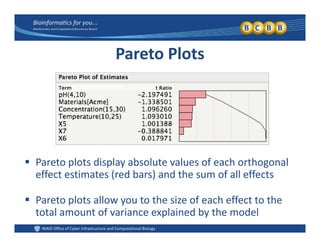
Pareto Plots
 Pareto plots display absolute values of each orthogonal 
( )effect estimates (red bars) and the sum of all effects
 Pareto plots allow you to the size of each effect to thePareto plots allow you to the size of each effect to the 
total amount of variance explained by the model
(10 minute break)
Optimization and 
Response Surface Design
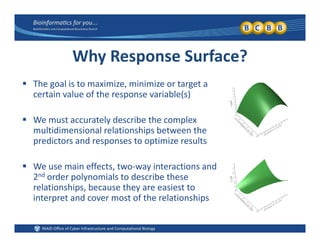
Why Response Surface?
 The goal is to maximize, minimize or target a 
certain value of the response variable(s)
 We must accurately describe the complex 
multidimensional relationships between the 
di t d t ti i ltpredictors and responses to optimize results
 We use main effects, two‐way interactions and , y
2nd order polynomials to describe these 
relationships, because they are easiest to 
interpret and cover most of the relationshipsp p
Example: Fermentation Experiment
 Duration, substrate concentration and temperature are 
the most significant effects in a fermentation process
 Want to simultaneously maximize yield, minimize costs 
and target a specific mass of the fermentation product
 Need an efficient experimental design and analytical 
tools to optimize the fermentation process
Design Response Surface Experiments
 Use the traditional designs
Central Composite Designs– Central Composite Designs
– Box‐Behnken designs
 Use the JMP DOE menu
– Response Surface menu
– Custom design menu (I‐optimal)Custom design menu (I optimal)
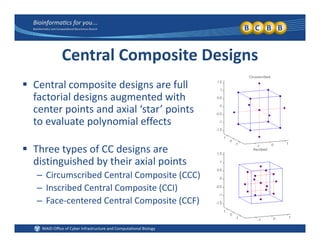
Central Composite Designs
 Central composite designs are full 
factorial designs augmented with 
center points and axial ‘star’ pointscenter points and axial  star  points 
to evaluate polynomial effects
 Three types of CC designs are 
distinguished by their axial points
– Circumscribed Central Composite (CCC)
– Inscribed Central Composite (CCI)
– Face‐centered Central Composite (CCF)– Face‐centered Central Composite (CCF)
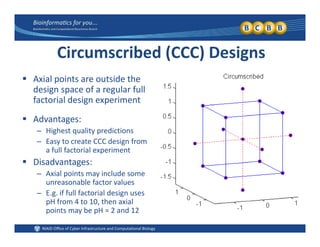
Circumscribed (CCC) Designs
A i l i t t id th Axial points are outside the 
design space of a regular full 
factorial design experiment
 Advantages:
– Highest quality predictions
E CCC d i f– Easy to create CCC design from 
a full factorial experiment
 Disadvantages:
– Axial points may include some 
unreasonable factor values
– E.g. if full factorial design uses 
pH from 4 to 10 then axialpH from 4 to 10, then axial 
points may be pH = 2 and 12
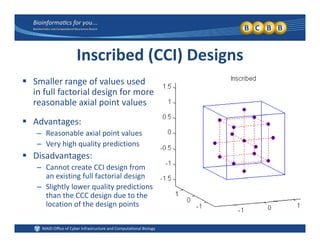
Inscribed (CCI) Designs
 Smaller range of values used 
in full factorial design for more 
reasonable axial point values
 Advantages:
– Reasonable axial point values
– Very high quality predictions
 Disadvantages:
– Cannot create CCI design from g
an existing full factorial design
– Slightly lower quality predictions 
than the CCC design due to the 
l f h dlocation of the design points
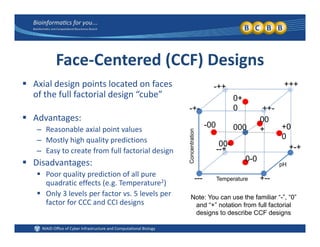
Face‐Centered (CCF) Designs
 Axial design points located on faces 
of the full factorial design “cube”
+ ++
+++-++
0+
0
 Advantages:
– Reasonable axial point values
Mostly high quality predictions
ation
-+- ++-
000
0
+0
0
-00
00
+
– Mostly high quality predictions
– Easy to create from full factorial design
 Disadvantages:
Concentra
pH
--+
0
0-0
00- +-+
 Poor quality prediction of all pure 
quadratic effects (e.g. Temperature2)
 Only 3 levels per factor vs. 5 levels per 
factor for CCC and CCI designs
Temperature--- +--
Note: You can use the familiar “-”, “0”
factor for CCC and CCI designs and “+” notation from full factorial
designs to describe CCF designs
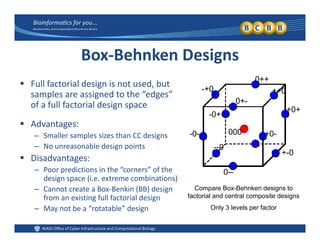
Box‐Behnken Designs
0
 Full factorial design is not used, but 
samples are assigned to the “edges” 
of a full factorial design space +0+
0+-
++0
0++
-+0
g p
 Advantages:
– Smaller samples sizes than CC designs -0- +0-
+0+
000
-0+
p g
– No unreasonable design points
 Disadvantages:
– Poor predictions in the “corners” of the 0
--0
+-0
– Poor predictions in the  corners  of the 
design space (i.e. extreme combinations)
– Cannot create a Box‐Benkin (BB) design 
from an existing full factorial design
Compare Box-Behnken designs to
factorial and central composite designs
0--
g g
– May not be a “rotatable” design  Only 3 levels per factor
Rotatable Designs
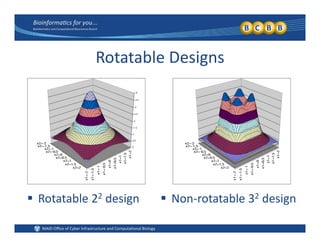
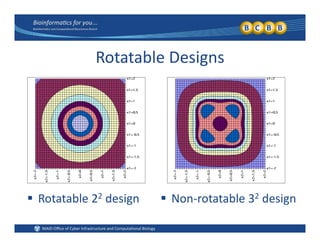
 A designed experiment is rotatable if its prediction 
variances are a function of the distance from itsvariances are a function of the distance from its 
center point, but not the direction away from center
 If a design is NOT rotatable, it will have regions of 
increased or decreased precision that may create c eased o dec eased p ec s o a ay c ea e
biased predictions and misleading optimizations
Rotatable Designs
 Rotatable 22 design  Non‐rotatable 32 designRotatable 2 design Non rotatable 3 design
Rotatable Designs
 Rotatable 22 design  Non‐rotatable 32 designRotatable 2 design Non rotatable 3 design
Orthogonal Designs
l d An experimental design is 
orthogonal if all factor main 
effects and interactions are 
independent of each other
 Screening designs are usually 
not orthogonal, because their 
effects are typically aliased
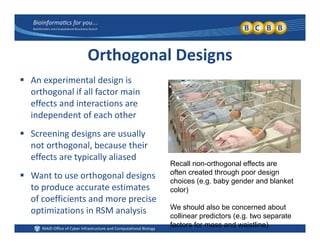
Recall non-orthogonal effects are
ft t d th h d i
 Want to use orthogonal designs 
to produce accurate estimates 
of coefficients and more precise
often created through poor design
choices (e.g. baby gender and blanket
color)
of coefficients and more precise 
optimizations in RSM analysis We should also be concerned about
collinear predictors (e.g. two separate
factors for mass and waistline)
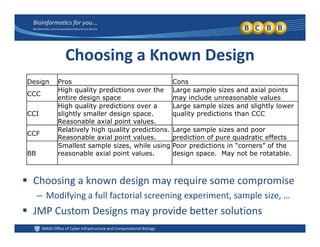
Choosing a Known Design
Design Pros Cons
CCC
High quality predictions over the
entire design space
Large sample sizes and axial points
may include unreasonable values
High quality predictions over a Large sample sizes and slightly lower
CCI
High quality predictions over a
slightly smaller design space.
Reasonable axial point values.
Large sample sizes and slightly lower
quality predictions than CCC
CCF
Relatively high quality predictions.
Reasonable axial point values.
Large sample sizes and poor
prediction of pure quadratic effectsReasonable axial point values. prediction of pure quadratic effects
BB
Smallest sample sizes, while using
reasonable axial point values.
Poor predictions in “corners” of the
design space. May not be rotatable.
 Choosing a known design may require some compromise
– Modifying a full factorial screening experiment, sample size, …
 JMP Custom Designs may provide better solutions
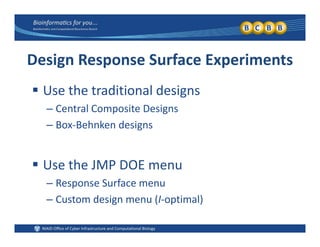
Design Response Surface Experiments
 Use the traditional designs
Central Composite Designs– Central Composite Designs
– Box‐Behnken designs
 Use the JMP DOE menu
– Response Surface menu
– Custom design menu (I‐optimal)Custom design menu (I optimal)
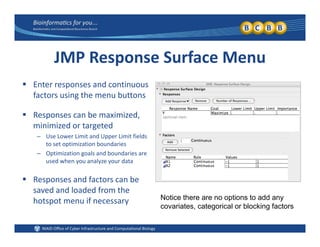
JMP Response Surface Menu
 Enter responses and continuous 
factors using the menu buttons
 Responses can be maximized, 
minimized or targeted
– Use Lower Limit and Upper Limit fields pp
to set optimization boundaries
– Optimization goals and boundaries are 
used when you analyze your data
 Responses and factors can be 
saved and loaded from the 
hotspot menu if necessary Notice there are no options to add any
hotspot menu if necessary p y
covariates, categorical or blocking factors
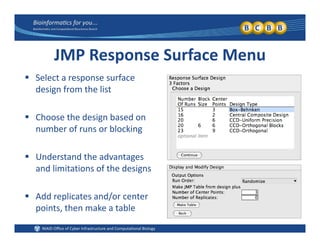
JMP Response Surface Menu
 Select a response surface Select a response surface 
design from the list
 Choose the design based on 
number of runs or blocking
 Understand the advantages 
and limitations of the designsand limitations of the designs
 Add replicates and/or center 
points, then make a table
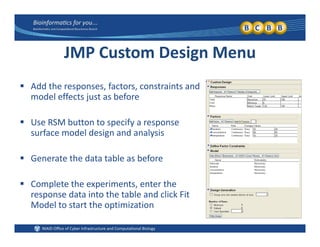
JMP Custom Design Menu
 Add the responses, factors, constraints and 
model effects just as before
 Use RSM button to specify a response 
surface model design and analysis
 Generate the data table as before
 Complete the experiments, enter the 
response data into the table and click Fit 
l hModel to start the optimization
Design Variance
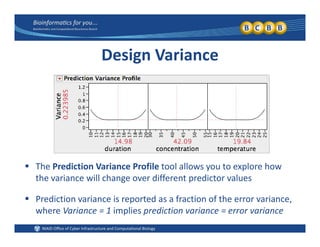
 The Prediction Variance Profile tool allows you to explore how y p
the variance will change over different predictor values
 Prediction variance is reported as a fraction of the error variance,Prediction variance is reported as a fraction of the error variance, 
where Variance = 1 implies prediction variance = error variance
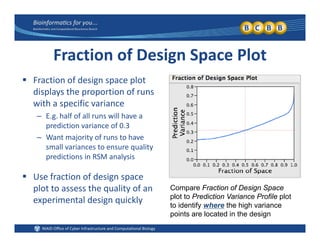
Fraction of Design Space Plot
f d l Fraction of design space plot 
displays the proportion of runs 
with a specific variancep
– E.g. half of all runs will have a 
prediction variance of 0.3
– Want majority of runs to haveWant majority of runs to have 
small variances to ensure quality 
predictions in RSM analysis
 Use fraction of design space 
plot to assess the quality of an 
experimental design quickly
Compare Fraction of Design Space
plot to Prediction Variance Profile plot
experimental design quickly to identify where the high variance
points are located in the design
Prediction Variance Surface
 Explore prediction variance in 3 dimensions
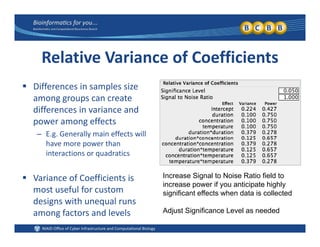
Relative Variance of Coefficients
 Differences in samples size 
among groups can create 
diff i i ddifferences in variance and 
power among effects
– E.g. Generally main effects will 
have more power than 
interactions or quadratics
 Variance of Coefficients is 
most useful for custom 
designs with unequal runs
Increase Signal to Noise Ratio field to
increase power if you anticipate highly
significant effects when data is collected
designs with unequal runs 
among factors and levels  Adjust Significance Level as needed
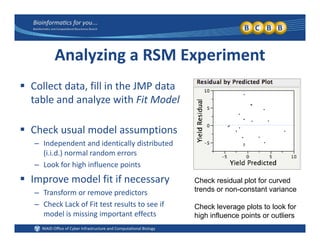
Analyzing a RSM Experiment
 Collect data, fill in the JMP data 
table and analyze with Fit Model
 Check usual model assumptions
– Independent and identically distributed 
(i.i.d.) normal random errors
– Look for high influence points
 Improve model fit if necessary
– Transform or remove predictors
h k k f l f
Check residual plot for curved
trends or non-constant variance
– Check Lack of Fit test results to see if 
model is missing important effects
Check leverage plots to look for
high influence points or outliers
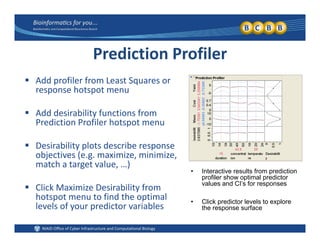
Prediction Profiler
 Add profiler from Least Squares or 
response hotspot menu
 Add desirability functions from 
Prediction Profiler hotspot menu
 Desirability plots describe response 
objectives (e.g. maximize, minimize, 
match a target value, …)
Interactive results from prediction
 Click Maximize Desirability from 
hotspot menu to find the optimal 
• Interactive results from prediction
profiler show optimal predictor
values and CI’s for responses
• Click predictor levels to explore
p p
levels of your predictor variables 
• Click predictor levels to explore
the response surface
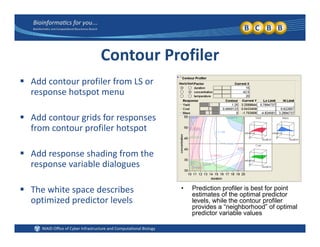
Contour Profiler
 Add contour profiler from LS or 
response hotspot menu
 Add contour grids for responses 
from contour profiler hotspot
 Add response shading from the 
response variable dialogues
 The white space describes 
optimized predictor levels
• Prediction profiler is best for point
estimates of the optimal predictor
levels while the contour profileroptimized predictor levels levels, while the contour profiler
provides a “neighborhood” of optimal
predictor variable values
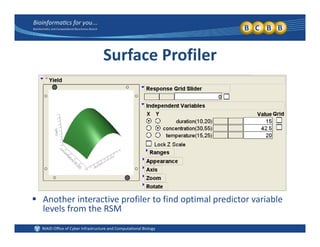
Surface Profiler
 Another interactive profiler to find optimal predictor variableAnother interactive profiler to find optimal predictor variable 
levels from the RSM
Lit t Cit d d RLiterature Cited and Resources
 Plackett and Burman 1946 The design of optimum multifactor Plackett and Burman.  1946.  The design of optimum multifactor 
experiments.  Biometrika.  33(4):305‐325
 Paley.  1933.  On orthogonal matrices.  J. Math. Phys.  12:311‐320
 NIST/SEMATECH e‐Handbook of Statistical Methods, 
http://www.itl.nist.gov/div898/handbook/, 2‐26‐2009

Design of experiments