Nephele 2.0 Webinar
16 November 2018
Bioinformatics and Computational Biosciences Branch
Poorani Subramanian, Ph.D.
Mariam Quiñones, Ph.D.
2
and Overview
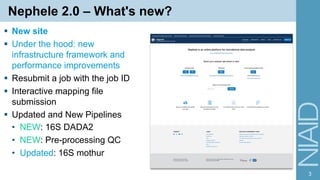
Nephele 2.0 – What's new?
§ New site
§ Under the hood: new
infrastructure framework and
performance improvements
§ Resubmit a job with the job ID
§ Interactive mapping file
submission
§ Updated and New Pipelines
• NEW: 16S DADA2
• NEW: Pre-processing QC
• Updated: 16S mothur
3
Nephele 2.0 – What's new?
§ New site
§ Under the hood: new
infrastructure framework and
performance improvements
§ Resubmit a job with the job ID
§ Interactive mapping file
submission
§ Updated and New Pipelines
• NEW: 16S DADA2
• NEW: Pre-processing QC
• Updated: 16S mothur
4
Nephele 2.0 – What's new?
§ New site
§ Under the hood: new
infrastructure framework and
performance improvements
§ Resubmit a job with the job ID
§ Interactive mapping file
submission
§ Updated and New Pipelines
• NEW: 16S DADA2
• NEW: Pre-processing QC
• Updated: 16S mothur
5
Nephele 2.0 – What's new?
§ New site
§ Under the hood: new
infrastructure framework and
performance improvements
§ Resubmit a job with the job ID
§ Interactive mapping file
submission
§ Updated and New Pipelines
• NEW: 16S DADA2
• NEW: Pre-processing QC
• Updated: 16S mothur
6
https://nephele.niaid.nih.gov/details_dada2/
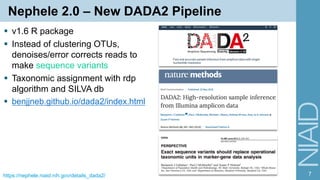
Nephele 2.0 – New DADA2 Pipeline
§ v1.6 R package
§ Instead of clustering OTUs,
denoises/error corrects reads to
make sequence variants
§ Taxonomic assignment with rdp
algorithm and SILVA db
§ benjjneb.github.io/dada2/index.html
7
8
§ Uploading files
§ Quality check of your data
Uploading Files
9
§ File upload page – upload from
local
Uploading Files
§ File upload page – upload from
local
• Sometimes you may see an
error
• File size > 450 MB limit
10
Uploading Files
§ File upload page – upload from
local
• Sometimes you may see an
error
• File size > 450 MB limit
§ Can upload via ftp instead
• Upload data to any public ftp
server; NIH provides
ftp://helix.nih.gov/pub
11https://nephele-prod-resources.s3.amazonaws.com/How_to_load_files_to_Helix_Public_FTP.pdf
Uploading Files
§ File upload page – upload from
local
• Sometimes you may see an
error
• File size > 450 MB limit
§ Can upload via ftp instead
• Upload data to any public ftp
server; NIH provides
ftp://helix.nih.gov/pub
• Use the url of the folder with
your FASTQ files
12https://nephele-prod-resources.s3.amazonaws.com/How_to_load_files_to_Helix_Public_FTP.pdf
13
§ Uploading files
§ Quality check of your data
Why should we care about data quality?
§ Best practices include doing a
series of Quality Control steps to
verify and sometimes improve
data quality
§ Sequence analysis and results
are highly dependent on data
quality!
14
Why should we care about data quality?
§ Many (most?) of the parameters
for Nephele's pipelines relate to
quality
§ Defaults don't always work well
for every dataset
§ Everyone's data is different
§ Get To Know Your Data
15
Pre-processing QC: Get to Know Your Data
§ Nephele's Pre-processing Quality
Check Pipeline
16https://nephele.niaid.nih.gov/details_qc
Pre-processing QC: Get to Know Your Data
§ Nephele's Pre-processing Quality
Check Pipeline
• Designed to be run before you
do microbiome analysis
• Same input data and map file
used for microbiome pipelines
17https://nephele.niaid.nih.gov/details_qc
Pre-processing QC: Get to Know Your Data
§ Nephele's Pre-processing Quality
Check Pipeline
• Designed to be run before you
do microbiome analysis
• Same input data and map file
used for microbiome pipelines
§ Getting Started: Run without any
options!
18https://nephele.niaid.nih.gov/details_qc
Pre-processing QC: FastQC
§ MultiQC aggregates results into
multiqc_report.html
§ Num reads in each file
• Do R1 & R2 have same num
reads?
19http://www.bioinformatics.babraham.ac.uk/projects/fastqc/Help/3%20Analysis%20Modules/
Pre-processing QC: FastQC
§ MultiQC aggregates results into
multiqc_report.html
§ Num reads in each file
• Do R1 & R2 have same num
reads?
§ Average per base quality for each
sample
• Colored according to FastQC
defaults
20http://www.bioinformatics.babraham.ac.uk/projects/fastqc/Help/3%20Analysis%20Modules/
Pre-processing QC: Primer & Adapter Trimming
§ QIIME 2 cutadapt plugin
21https://docs.qiime2.org/2018.6/plugins/available/cutadapt/
Pre-processing QC: Primer & Adapter Trimming
§ QIIME 2 cutadapt plugin
§ For amplicon primers, front 5'
adapter
22https://docs.qiime2.org/2018.6/plugins/available/cutadapt/
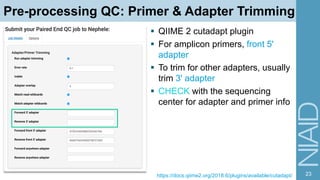
Pre-processing QC: Primer & Adapter Trimming
§ QIIME 2 cutadapt plugin
§ For amplicon primers, front 5'
adapter
§ To trim for other adapters, usually
trim 3' adapter
§ CHECK with the sequencing
center for adapter and primer info
23https://docs.qiime2.org/2018.6/plugins/available/cutadapt/
Pre-processing QC: Primer & Adapter Trimming
§ QIIME 2 cutadapt plugin
§ For amplicon primers, front 5'
adapter
§ To trim for other adapters, usually
trim 3' adapter
§ CHECK with the sequencing
center for adapter and primer info
§ MultiQC graphs
24https://docs.qiime2.org/2018.6/plugins/available/cutadapt/
Pre-processing QC: Other Steps
§ Quality trimming with
Trimmomatic
• Trim with sliding window
• Filter poor quality reads
§ Paired-end read merging with
FLASh
• May be more robust than read
mergers included in QIIME,
mothur, and DADA2
• https://www.researchgate.net/publication/3
03288211_Evaluating_Paired-
End_Read_Mergers
25https://nephele.niaid.nih.gov/details_qc
26
§ Important Files and Troubleshooting
§ Visualizations
Outputs: DADA2 Example
§ DADA2 results in main outputs
folder
§ graphs folder – output of the 16s
visualizations
27
Important files: logfile.txt
§ The story of your data's analysis
28
Important files: logfile.txt
§ The story of your data's analysis
§ Messages start with the date, and then INFO, WARNING, or ERROR
§ At the top list of the pipeline parameters
29
Important files: logfile.txt
§ The story of your data's analysis
§ Individual commands/programs run
30https://nephele.niaid.nih.gov/details_dada2/#pipeline-steps
[Mon Jul 30 16:11:25 2018] Paired End
[Mon Jul 30 16:11:25 2018] pqp <- lapply(readslist, FUN = function(x) { ppp <-
plotQualityProfile(file.path(datadir, x)); ppp$facet$params$ncol <- 4; ppp })
[Mon Jul 30 16:11:37 2018] Saving quality profile plots to
quality_Profile_R*.pdf
[Mon Jul 30 16:11:40 2018] out <-
filterAndTrim(fwd=file.path(datadir,readslist$R1),
filt=file.path(filt.dir,trimlist$R1),rev=file.path(datadir,readslist$R2),
filt.rev=file.path(filt.dir,trimlist$R2), maxEE=5, trimLeft=list(20L, 20L),
truncQ=4, truncLen = list(0L, 0L), rm.phix=TRUE, compress=TRUE, verbose=TRUE,
multithread=nthread, minLen=50)
Creating output directory:
/mnt/EFS/user_uploads/c82b2a9c0e40/outputs/filtered_data
Troubleshooting: logfile.txt
§ Example dummy dataset
§ Get an error email
'Input must be a valid sequence table. '
indicates sequence table is empty
because no sequence variants were
produced after denoising and merging
reads (for PE). You may want to
examine the dataset quality and modify
your filterAndTrim or mergePairs (for
PE) parameters. Please refer to
logfile.txt for more information.
§ When something goes wrong;
look for ERROR messages
31
[2018-10-03 19:00:24.543] dd <- sapply(nameslist, function(x) dada(derep[[x]], err=err[[x]],
multithread=nthread, verbose=1), USE.NAMES=TRUE, simplify=FALSE)
Sample 1 - 99 reads in 54 unique sequences.
[2018-10-03 19:00:24.594] mergePairs(dd$R1, derep$R1, dd$R2, derep$R2, verbose=TRUE,
minOverlap=12, trimOverhang=FALSE, maxMismatch=0, justConcatenate=FALSE)
0 paired-reads (in 0 unique pairings) successfully merged out of 99 (in 9 pairings) input.
[2018-10-03 19:00:24.605] derep <- lapply(trimlist, function(x) derepFastq(x[sample],
verbose=TRUE))
Dereplicating sequence entries in Fastq file:
/mnt/EFS/user_uploads/f6c21d383553/outputs/filtered_data/74S74R1_trim.fastq.gz
Encountered 54 unique sequences from 99 total sequences read.
Dereplicating sequence entries in Fastq file:
/mnt/EFS/user_uploads/f6c21d383553/outputs/filtered_data/74S74R2_trim.fastq.gz
Encountered 54 unique sequences from 99 total sequences read.
[2018-10-03 19:00:24.661] dd <- sapply(nameslist, function(x) dada(derep[[x]], err=err[[x]],
multithread=nthread, verbose=1), USE.NAMES=TRUE, simplify=FALSE)
Sample 1 - 99 reads in 54 unique sequences.
[2018-10-03 19:00:24.711] mergePairs(dd$R1, derep$R1, dd$R2, derep$R2, verbose=TRUE,
minOverlap=12, trimOverhang=FALSE, maxMismatch=0, justConcatenate=FALSE)
0 paired-reads (in 0 unique pairings) successfully merged out of 99 (in 9 pairings) input.
[2018-10-03 19:00:24.722] seqtab <- makeSequenceTable(sampleVariants)
[2018-10-03 19:00:24.740] seqtabnochimera <- removeBimeraDenovo(seqtab, verbose=TRUE,
multithread=nthread)
Warning in is.na(colnames(unqs[[i]])) :
is.na() applied to non-(list or vector) of type 'NULL'
As of the 1.4 release, the default method changed to consensus (from pooled).
Error:
Input must be a valid sequence table.
Call: isBimeraDenovoTable(unqs[[i]], ..., verbose = verbose), Pipeline Step:
dada2::removeBimeraDenovo, Pipeline: dada2compute
[2018-10-03 19:00:24,759 - ERROR] R Pipeline Error:
[2018-10-03 19:00:24,759 - ERROR] ('Input must be a valid sequence table. ', 'f6c21d383553')
[2018-10-03 19:00:24,866 - INFO] 1
Troubleshooting: logfile.txt
§ Get an error email
…You may want to examine the dataset
quality and modify your filterAndTrim or
mergePairs (for PE) parameters…
§ Check output of filterAndTrim
• 99/100 reads passed filter
32
[2018-10-03 19:00:17.445] out <- filterAndTrim(fwd=file.path(datadir,readslist$R1),
filt=file.path(filt.dir,trimlist$R1),rev=file.path(datadir,readslist$R2),
filt.rev=file.path(filt.dir,trimlist$R2), maxEE=5, trimLeft=list(20L, 20L), truncQ=4, truncLen
= list(0L, 0L), rm.phix=TRUE, compress=TRUE, verbose=TRUE, multithread=nthread, minLen=50)
Creating output directory: /mnt/EFS/user_uploads/f6c21d383553/outputs/filtered_data
reads.in reads.out
1S1R1.fastq 100 99
2S2R1.fastq 100 99
3S3R1.fastq 100 99
4S4R1.fastq 100 99
5S5R1.fastq 100 99
6S6R1.fastq 100 99
73S73R1.fastq 100 99
7S7R1.fastq 100 99
74S74R1.fastq 100 99
[2018-10-03 19:00:19.004] Checking that trimmed files exist.
[2018-10-03 19:00:19.023] err <- lapply(trimlist, function(x) learnErrors(x,
multithread=nthread, nreads=1000000,randomize=TRUE))
Initializing error rates to maximum possible estimate.
Sample 1 - 99 reads in 54 unique sequences.
Sample 2 - 99 reads in 54 unique sequences.
Sample 3 - 99 reads in 54 unique sequences.
Sample 4 - 99 reads in 54 unique sequences.
Sample 5 - 99 reads in 54 unique sequences.
Sample 6 - 99 reads in 54 unique sequences.
Sample 7 - 99 reads in 54 unique sequences.
Sample 8 - 99 reads in 54 unique sequences.
Sample 9 - 99 reads in 54 unique sequences.
selfConsist step 2
selfConsist step 3
Convergence after 3 rounds.
Total reads used: 891
Initializing error rates to maximum possible estimate.
Sample 1 - 99 reads in 54 unique sequences.
Sample 2 - 99 reads in 54 unique sequences.
Sample 3 - 99 reads in 54 unique sequences.
Sample 4 - 99 reads in 54 unique sequences.
Sample 5 - 99 reads in 54 unique sequences.
Sample 6 - 99 reads in 54 unique sequences.
Sample 7 - 99 reads in 54 unique sequences.
Troubleshooting: logfile.txt
§ Get an error email
…You may want to examine the dataset
quality and modify your filterAndTrim or
mergePairs (for PE) parameters…
§ Check messages from
mergePairs
§ None of the samples had
reads that merged!
33
[2018-10-03 19:00:24.543] dd <- sapply(nameslist, function(x) dada(derep[[x]], err=err[[x]],
multithread=nthread, verbose=1), USE.NAMES=TRUE, simplify=FALSE)
Sample 1 - 99 reads in 54 unique sequences.
[2018-10-03 19:00:24.594] mergePairs(dd$R1, derep$R1, dd$R2, derep$R2, verbose=TRUE,
minOverlap=12, trimOverhang=FALSE, maxMismatch=0, justConcatenate=FALSE)
0 paired-reads (in 0 unique pairings) successfully merged out of 99 (in 9 pairings) input.
[2018-10-03 19:00:24.605] derep <- lapply(trimlist, function(x) derepFastq(x[sample],
verbose=TRUE))
Dereplicating sequence entries in Fastq file:
/mnt/EFS/user_uploads/f6c21d383553/outputs/filtered_data/74S74R1_trim.fastq.gz
Encountered 54 unique sequences from 99 total sequences read.
Dereplicating sequence entries in Fastq file:
/mnt/EFS/user_uploads/f6c21d383553/outputs/filtered_data/74S74R2_trim.fastq.gz
Encountered 54 unique sequences from 99 total sequences read.
[2018-10-03 19:00:24.661] dd <- sapply(nameslist, function(x) dada(derep[[x]], err=err[[x]],
multithread=nthread, verbose=1), USE.NAMES=TRUE, simplify=FALSE)
Sample 1 - 99 reads in 54 unique sequences.
[2018-10-03 19:00:24.711] mergePairs(dd$R1, derep$R1, dd$R2, derep$R2, verbose=TRUE,
minOverlap=12, trimOverhang=FALSE, maxMismatch=0, justConcatenate=FALSE)
0 paired-reads (in 0 unique pairings) successfully merged out of 99 (in 9 pairings) input.
[2018-10-03 19:00:24.722] seqtab <- makeSequenceTable(sampleVariants)
[2018-10-03 19:00:24.740] seqtabnochimera <- removeBimeraDenovo(seqtab, verbose=TRUE,
multithread=nthread)
Warning in is.na(colnames(unqs[[i]])) :
is.na() applied to non-(list or vector) of type 'NULL'
As of the 1.4 release, the default method changed to consensus (from pooled).
Error:
Input must be a valid sequence table.
Call: isBimeraDenovoTable(unqs[[i]], ..., verbose = verbose), Pipeline Step:
dada2::removeBimeraDenovo, Pipeline: dada2compute
[2018-10-03 19:00:24,759 - ERROR] R Pipeline Error:
[2018-10-03 19:00:24,759 - ERROR] ('Input must be a valid sequence table. ', 'f6c21d383553')
[2018-10-03 19:00:24,866 - INFO] 1
Troubleshooting: logfile.txt
§ Check messages from mergePairs
§ None of the samples had reads that merged!
§ How to fix?
• Change max mismatch for mergePairs in DADA2
• Or use the FLASh read merger in QC pipeline
– Submit merged reads to SE pipeline
34
Troubleshooting: logfile.txt
§ Check messages from filterAndTrim
§ Suppose very few reads pass filter
§ How to fix?
• Change truncLen, truncQ, maxEE for filterAndTrim in
DADA2
• Or use Trimmomatic in QC pipeline
35
Important files: otu_summary_table.txt
Num samples: 10
Num observations: 508
Total count: 161,156
Table density (fraction of non-zero values): 0.167
Counts/sample summary:
Min: 13,516.000
Max: 18,349.000
Median: 15,938.500
Mean: 16,115.600
Std. dev.: 1,566.865
Sample Metadata Categories: None provided
Observation Metadata Categories: taxonomy
Counts/sample detail:
7pRecSw478.1: 13,516.000
A22145: 14,505.000
A22350: 14,814.000
A22833: 15,550.000
A22349: 15,571.000
A22831: 16,306.000
A22061: 16,377.000
A22057: 17,932.000
A22187: 18,236.000
A22192: 18,349.000
36
§ Summary of the final biom file
after taxonomic ID – BUT before
any downstream analysis
§ Num observations: total # of
distinct seq variants or OTUs
§ Compare the counts/sample to:
• # reads in the input file (logfile
or QC report)
• sampling depth (default 10k)
Important files: graphs/samples_being_ignored.txt
§ When is downstream analysis
(graphs, diversity, etc) run?
• At least 3 samples with counts
> sampling depth
§ samples ignored for downstream
analysis
§ These samples do not appear in
the plots or QIIME 1 core diversity
plots and statistics
§ If this file is not in graphs/ folder,
then no samples were ignored
37
38
§ Important Files and Troubleshooting
§ Visualizations
Morpheus Heatmaps
39nephele.niaid.nih.gov/user_guide_tutorials/#heatmap software.broadinstitute.org/morpheus
Plotly Graphs
Simple Edits Videos
40
Plotly Graphs – Change colors
41
1
Bigger Edits Use Plotly Chart Studio
2 3
4
help.plot.ly/tutorials
§ Example Graphs
§ Tutorials page
§ https://nephele.niaid.nih.gov/user_guide_tutorials/#example-files
Try It!
42
Thank You!
Further Help & Info Nephele Team
§ Frequently Asked Questions:
nephele.niaid.nih.gov/faq
§ Tutorials:
nephele.niaid.nih.gov/user_guide_tutorials
§ Details Pages:
nephele.niaid.nih.gov/user_guide_pipes
• Individual Pipelines Links
§ nephelesupport@niaid.nih.gov
43

Nephele 2.0: How to get the most out of your Nephele results

  • 1.
    Nephele 2.0 Webinar 16November 2018 Bioinformatics and Computational Biosciences Branch Poorani Subramanian, Ph.D. Mariam Quiñones, Ph.D.
  • 2.
  • 3.
    Nephele 2.0 –What's new? § New site § Under the hood: new infrastructure framework and performance improvements § Resubmit a job with the job ID § Interactive mapping file submission § Updated and New Pipelines • NEW: 16S DADA2 • NEW: Pre-processing QC • Updated: 16S mothur 3
  • 4.
    Nephele 2.0 –What's new? § New site § Under the hood: new infrastructure framework and performance improvements § Resubmit a job with the job ID § Interactive mapping file submission § Updated and New Pipelines • NEW: 16S DADA2 • NEW: Pre-processing QC • Updated: 16S mothur 4
  • 5.
    Nephele 2.0 –What's new? § New site § Under the hood: new infrastructure framework and performance improvements § Resubmit a job with the job ID § Interactive mapping file submission § Updated and New Pipelines • NEW: 16S DADA2 • NEW: Pre-processing QC • Updated: 16S mothur 5
  • 6.
    Nephele 2.0 –What's new? § New site § Under the hood: new infrastructure framework and performance improvements § Resubmit a job with the job ID § Interactive mapping file submission § Updated and New Pipelines • NEW: 16S DADA2 • NEW: Pre-processing QC • Updated: 16S mothur 6
  • 7.
    https://nephele.niaid.nih.gov/details_dada2/ Nephele 2.0 –New DADA2 Pipeline § v1.6 R package § Instead of clustering OTUs, denoises/error corrects reads to make sequence variants § Taxonomic assignment with rdp algorithm and SILVA db § benjjneb.github.io/dada2/index.html 7
  • 8.
    8 § Uploading files §Quality check of your data
  • 9.
    Uploading Files 9 § Fileupload page – upload from local
  • 10.
    Uploading Files § Fileupload page – upload from local • Sometimes you may see an error • File size > 450 MB limit 10
  • 11.
    Uploading Files § Fileupload page – upload from local • Sometimes you may see an error • File size > 450 MB limit § Can upload via ftp instead • Upload data to any public ftp server; NIH provides ftp://helix.nih.gov/pub 11https://nephele-prod-resources.s3.amazonaws.com/How_to_load_files_to_Helix_Public_FTP.pdf
  • 12.
    Uploading Files § Fileupload page – upload from local • Sometimes you may see an error • File size > 450 MB limit § Can upload via ftp instead • Upload data to any public ftp server; NIH provides ftp://helix.nih.gov/pub • Use the url of the folder with your FASTQ files 12https://nephele-prod-resources.s3.amazonaws.com/How_to_load_files_to_Helix_Public_FTP.pdf
  • 13.
    13 § Uploading files §Quality check of your data
  • 14.
    Why should wecare about data quality? § Best practices include doing a series of Quality Control steps to verify and sometimes improve data quality § Sequence analysis and results are highly dependent on data quality! 14
  • 15.
    Why should wecare about data quality? § Many (most?) of the parameters for Nephele's pipelines relate to quality § Defaults don't always work well for every dataset § Everyone's data is different § Get To Know Your Data 15
  • 16.
    Pre-processing QC: Getto Know Your Data § Nephele's Pre-processing Quality Check Pipeline 16https://nephele.niaid.nih.gov/details_qc
  • 17.
    Pre-processing QC: Getto Know Your Data § Nephele's Pre-processing Quality Check Pipeline • Designed to be run before you do microbiome analysis • Same input data and map file used for microbiome pipelines 17https://nephele.niaid.nih.gov/details_qc
  • 18.
    Pre-processing QC: Getto Know Your Data § Nephele's Pre-processing Quality Check Pipeline • Designed to be run before you do microbiome analysis • Same input data and map file used for microbiome pipelines § Getting Started: Run without any options! 18https://nephele.niaid.nih.gov/details_qc
  • 19.
    Pre-processing QC: FastQC §MultiQC aggregates results into multiqc_report.html § Num reads in each file • Do R1 & R2 have same num reads? 19http://www.bioinformatics.babraham.ac.uk/projects/fastqc/Help/3%20Analysis%20Modules/
  • 20.
    Pre-processing QC: FastQC §MultiQC aggregates results into multiqc_report.html § Num reads in each file • Do R1 & R2 have same num reads? § Average per base quality for each sample • Colored according to FastQC defaults 20http://www.bioinformatics.babraham.ac.uk/projects/fastqc/Help/3%20Analysis%20Modules/
  • 21.
    Pre-processing QC: Primer& Adapter Trimming § QIIME 2 cutadapt plugin 21https://docs.qiime2.org/2018.6/plugins/available/cutadapt/
  • 22.
    Pre-processing QC: Primer& Adapter Trimming § QIIME 2 cutadapt plugin § For amplicon primers, front 5' adapter 22https://docs.qiime2.org/2018.6/plugins/available/cutadapt/
  • 23.
    Pre-processing QC: Primer& Adapter Trimming § QIIME 2 cutadapt plugin § For amplicon primers, front 5' adapter § To trim for other adapters, usually trim 3' adapter § CHECK with the sequencing center for adapter and primer info 23https://docs.qiime2.org/2018.6/plugins/available/cutadapt/
  • 24.
    Pre-processing QC: Primer& Adapter Trimming § QIIME 2 cutadapt plugin § For amplicon primers, front 5' adapter § To trim for other adapters, usually trim 3' adapter § CHECK with the sequencing center for adapter and primer info § MultiQC graphs 24https://docs.qiime2.org/2018.6/plugins/available/cutadapt/
  • 25.
    Pre-processing QC: OtherSteps § Quality trimming with Trimmomatic • Trim with sliding window • Filter poor quality reads § Paired-end read merging with FLASh • May be more robust than read mergers included in QIIME, mothur, and DADA2 • https://www.researchgate.net/publication/3 03288211_Evaluating_Paired- End_Read_Mergers 25https://nephele.niaid.nih.gov/details_qc
  • 26.
    26 § Important Filesand Troubleshooting § Visualizations
  • 27.
    Outputs: DADA2 Example §DADA2 results in main outputs folder § graphs folder – output of the 16s visualizations 27
  • 28.
    Important files: logfile.txt §The story of your data's analysis 28
  • 29.
    Important files: logfile.txt §The story of your data's analysis § Messages start with the date, and then INFO, WARNING, or ERROR § At the top list of the pipeline parameters 29
  • 30.
    Important files: logfile.txt §The story of your data's analysis § Individual commands/programs run 30https://nephele.niaid.nih.gov/details_dada2/#pipeline-steps [Mon Jul 30 16:11:25 2018] Paired End [Mon Jul 30 16:11:25 2018] pqp <- lapply(readslist, FUN = function(x) { ppp <- plotQualityProfile(file.path(datadir, x)); ppp$facet$params$ncol <- 4; ppp }) [Mon Jul 30 16:11:37 2018] Saving quality profile plots to quality_Profile_R*.pdf [Mon Jul 30 16:11:40 2018] out <- filterAndTrim(fwd=file.path(datadir,readslist$R1), filt=file.path(filt.dir,trimlist$R1),rev=file.path(datadir,readslist$R2), filt.rev=file.path(filt.dir,trimlist$R2), maxEE=5, trimLeft=list(20L, 20L), truncQ=4, truncLen = list(0L, 0L), rm.phix=TRUE, compress=TRUE, verbose=TRUE, multithread=nthread, minLen=50) Creating output directory: /mnt/EFS/user_uploads/c82b2a9c0e40/outputs/filtered_data
  • 31.
    Troubleshooting: logfile.txt § Exampledummy dataset § Get an error email 'Input must be a valid sequence table. ' indicates sequence table is empty because no sequence variants were produced after denoising and merging reads (for PE). You may want to examine the dataset quality and modify your filterAndTrim or mergePairs (for PE) parameters. Please refer to logfile.txt for more information. § When something goes wrong; look for ERROR messages 31 [2018-10-03 19:00:24.543] dd <- sapply(nameslist, function(x) dada(derep[[x]], err=err[[x]], multithread=nthread, verbose=1), USE.NAMES=TRUE, simplify=FALSE) Sample 1 - 99 reads in 54 unique sequences. Sample 1 - 99 reads in 54 unique sequences. [2018-10-03 19:00:24.594] mergePairs(dd$R1, derep$R1, dd$R2, derep$R2, verbose=TRUE, minOverlap=12, trimOverhang=FALSE, maxMismatch=0, justConcatenate=FALSE) 0 paired-reads (in 0 unique pairings) successfully merged out of 99 (in 9 pairings) input. [2018-10-03 19:00:24.605] derep <- lapply(trimlist, function(x) derepFastq(x[sample], verbose=TRUE)) Dereplicating sequence entries in Fastq file: /mnt/EFS/user_uploads/f6c21d383553/outputs/filtered_data/74S74R1_trim.fastq.gz Encountered 54 unique sequences from 99 total sequences read. Dereplicating sequence entries in Fastq file: /mnt/EFS/user_uploads/f6c21d383553/outputs/filtered_data/74S74R2_trim.fastq.gz Encountered 54 unique sequences from 99 total sequences read. [2018-10-03 19:00:24.661] dd <- sapply(nameslist, function(x) dada(derep[[x]], err=err[[x]], multithread=nthread, verbose=1), USE.NAMES=TRUE, simplify=FALSE) Sample 1 - 99 reads in 54 unique sequences. Sample 1 - 99 reads in 54 unique sequences. [2018-10-03 19:00:24.711] mergePairs(dd$R1, derep$R1, dd$R2, derep$R2, verbose=TRUE, minOverlap=12, trimOverhang=FALSE, maxMismatch=0, justConcatenate=FALSE) 0 paired-reads (in 0 unique pairings) successfully merged out of 99 (in 9 pairings) input. [2018-10-03 19:00:24.722] seqtab <- makeSequenceTable(sampleVariants) [2018-10-03 19:00:24.740] seqtabnochimera <- removeBimeraDenovo(seqtab, verbose=TRUE, multithread=nthread) Warning in is.na(colnames(unqs[[i]])) : is.na() applied to non-(list or vector) of type 'NULL' As of the 1.4 release, the default method changed to consensus (from pooled). Error: Input must be a valid sequence table. Call: isBimeraDenovoTable(unqs[[i]], ..., verbose = verbose), Pipeline Step: dada2::removeBimeraDenovo, Pipeline: dada2compute [2018-10-03 19:00:24,759 - ERROR] R Pipeline Error: [2018-10-03 19:00:24,759 - ERROR] ('Input must be a valid sequence table. ', 'f6c21d383553') [2018-10-03 19:00:24,866 - INFO] 1
  • 32.
    Troubleshooting: logfile.txt § Getan error email …You may want to examine the dataset quality and modify your filterAndTrim or mergePairs (for PE) parameters… § Check output of filterAndTrim • 99/100 reads passed filter 32 [2018-10-03 19:00:17.445] out <- filterAndTrim(fwd=file.path(datadir,readslist$R1), filt=file.path(filt.dir,trimlist$R1),rev=file.path(datadir,readslist$R2), filt.rev=file.path(filt.dir,trimlist$R2), maxEE=5, trimLeft=list(20L, 20L), truncQ=4, truncLen = list(0L, 0L), rm.phix=TRUE, compress=TRUE, verbose=TRUE, multithread=nthread, minLen=50) Creating output directory: /mnt/EFS/user_uploads/f6c21d383553/outputs/filtered_data reads.in reads.out 1S1R1.fastq 100 99 2S2R1.fastq 100 99 3S3R1.fastq 100 99 4S4R1.fastq 100 99 5S5R1.fastq 100 99 6S6R1.fastq 100 99 73S73R1.fastq 100 99 7S7R1.fastq 100 99 74S74R1.fastq 100 99 [2018-10-03 19:00:19.004] Checking that trimmed files exist. [2018-10-03 19:00:19.023] err <- lapply(trimlist, function(x) learnErrors(x, multithread=nthread, nreads=1000000,randomize=TRUE)) Initializing error rates to maximum possible estimate. Sample 1 - 99 reads in 54 unique sequences. Sample 2 - 99 reads in 54 unique sequences. Sample 3 - 99 reads in 54 unique sequences. Sample 4 - 99 reads in 54 unique sequences. Sample 5 - 99 reads in 54 unique sequences. Sample 6 - 99 reads in 54 unique sequences. Sample 7 - 99 reads in 54 unique sequences. Sample 8 - 99 reads in 54 unique sequences. Sample 9 - 99 reads in 54 unique sequences. selfConsist step 2 selfConsist step 3 Convergence after 3 rounds. Total reads used: 891 Initializing error rates to maximum possible estimate. Sample 1 - 99 reads in 54 unique sequences. Sample 2 - 99 reads in 54 unique sequences. Sample 3 - 99 reads in 54 unique sequences. Sample 4 - 99 reads in 54 unique sequences. Sample 5 - 99 reads in 54 unique sequences. Sample 6 - 99 reads in 54 unique sequences. Sample 7 - 99 reads in 54 unique sequences.
  • 33.
    Troubleshooting: logfile.txt § Getan error email …You may want to examine the dataset quality and modify your filterAndTrim or mergePairs (for PE) parameters… § Check messages from mergePairs § None of the samples had reads that merged! 33 [2018-10-03 19:00:24.543] dd <- sapply(nameslist, function(x) dada(derep[[x]], err=err[[x]], multithread=nthread, verbose=1), USE.NAMES=TRUE, simplify=FALSE) Sample 1 - 99 reads in 54 unique sequences. Sample 1 - 99 reads in 54 unique sequences. [2018-10-03 19:00:24.594] mergePairs(dd$R1, derep$R1, dd$R2, derep$R2, verbose=TRUE, minOverlap=12, trimOverhang=FALSE, maxMismatch=0, justConcatenate=FALSE) 0 paired-reads (in 0 unique pairings) successfully merged out of 99 (in 9 pairings) input. [2018-10-03 19:00:24.605] derep <- lapply(trimlist, function(x) derepFastq(x[sample], verbose=TRUE)) Dereplicating sequence entries in Fastq file: /mnt/EFS/user_uploads/f6c21d383553/outputs/filtered_data/74S74R1_trim.fastq.gz Encountered 54 unique sequences from 99 total sequences read. Dereplicating sequence entries in Fastq file: /mnt/EFS/user_uploads/f6c21d383553/outputs/filtered_data/74S74R2_trim.fastq.gz Encountered 54 unique sequences from 99 total sequences read. [2018-10-03 19:00:24.661] dd <- sapply(nameslist, function(x) dada(derep[[x]], err=err[[x]], multithread=nthread, verbose=1), USE.NAMES=TRUE, simplify=FALSE) Sample 1 - 99 reads in 54 unique sequences. Sample 1 - 99 reads in 54 unique sequences. [2018-10-03 19:00:24.711] mergePairs(dd$R1, derep$R1, dd$R2, derep$R2, verbose=TRUE, minOverlap=12, trimOverhang=FALSE, maxMismatch=0, justConcatenate=FALSE) 0 paired-reads (in 0 unique pairings) successfully merged out of 99 (in 9 pairings) input. [2018-10-03 19:00:24.722] seqtab <- makeSequenceTable(sampleVariants) [2018-10-03 19:00:24.740] seqtabnochimera <- removeBimeraDenovo(seqtab, verbose=TRUE, multithread=nthread) Warning in is.na(colnames(unqs[[i]])) : is.na() applied to non-(list or vector) of type 'NULL' As of the 1.4 release, the default method changed to consensus (from pooled). Error: Input must be a valid sequence table. Call: isBimeraDenovoTable(unqs[[i]], ..., verbose = verbose), Pipeline Step: dada2::removeBimeraDenovo, Pipeline: dada2compute [2018-10-03 19:00:24,759 - ERROR] R Pipeline Error: [2018-10-03 19:00:24,759 - ERROR] ('Input must be a valid sequence table. ', 'f6c21d383553') [2018-10-03 19:00:24,866 - INFO] 1
  • 34.
    Troubleshooting: logfile.txt § Checkmessages from mergePairs § None of the samples had reads that merged! § How to fix? • Change max mismatch for mergePairs in DADA2 • Or use the FLASh read merger in QC pipeline – Submit merged reads to SE pipeline 34
  • 35.
    Troubleshooting: logfile.txt § Checkmessages from filterAndTrim § Suppose very few reads pass filter § How to fix? • Change truncLen, truncQ, maxEE for filterAndTrim in DADA2 • Or use Trimmomatic in QC pipeline 35
  • 36.
    Important files: otu_summary_table.txt Numsamples: 10 Num observations: 508 Total count: 161,156 Table density (fraction of non-zero values): 0.167 Counts/sample summary: Min: 13,516.000 Max: 18,349.000 Median: 15,938.500 Mean: 16,115.600 Std. dev.: 1,566.865 Sample Metadata Categories: None provided Observation Metadata Categories: taxonomy Counts/sample detail: 7pRecSw478.1: 13,516.000 A22145: 14,505.000 A22350: 14,814.000 A22833: 15,550.000 A22349: 15,571.000 A22831: 16,306.000 A22061: 16,377.000 A22057: 17,932.000 A22187: 18,236.000 A22192: 18,349.000 36 § Summary of the final biom file after taxonomic ID – BUT before any downstream analysis § Num observations: total # of distinct seq variants or OTUs § Compare the counts/sample to: • # reads in the input file (logfile or QC report) • sampling depth (default 10k)
  • 37.
    Important files: graphs/samples_being_ignored.txt §When is downstream analysis (graphs, diversity, etc) run? • At least 3 samples with counts > sampling depth § samples ignored for downstream analysis § These samples do not appear in the plots or QIIME 1 core diversity plots and statistics § If this file is not in graphs/ folder, then no samples were ignored 37
  • 38.
    38 § Important Filesand Troubleshooting § Visualizations
  • 39.
  • 40.
  • 41.
    Plotly Graphs –Change colors 41 1 Bigger Edits Use Plotly Chart Studio 2 3 4 help.plot.ly/tutorials
  • 42.
    § Example Graphs §Tutorials page § https://nephele.niaid.nih.gov/user_guide_tutorials/#example-files Try It! 42
  • 43.
    Thank You! Further Help& Info Nephele Team § Frequently Asked Questions: nephele.niaid.nih.gov/faq § Tutorials: nephele.niaid.nih.gov/user_guide_tutorials § Details Pages: nephele.niaid.nih.gov/user_guide_pipes • Individual Pipelines Links § nephelesupport@niaid.nih.gov 43