EMEC245
Industrial Control Systems II
Advanced PLC’s and PAC’s
Data Handling Instructions and Shift Registers
Section 10-3-6 Copy and Fill Instructions
ControlLogix (The textbook is for reference only
and covers the instructions in SLC500 format)
Chapter 10
3
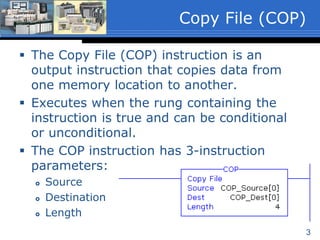
 The Copy File (COP) instruction is an
output instruction that copies data from
one memory location to another.
 Executes when the rung containing the
instruction is true and can be conditional
or unconditional.
 The COP instruction has 3-instruction
parameters:
 Source
 Destination
 Length
Copy File (COP)
4
 Source
 A word level tag that contains the data to be
copied.
 Must be an array with at least one word; ex.
ArrayName[0]. (ArrayName[x], where ‘x’ is the
starting element of the array).
 The word level tag with array element
reference is the starting word of the array to
be copied.
 Data type of SINT, INT, DINT, REAL or
Structure.
COP Instruction
Parameters (1 of 3)
5
 Destination
 A word level tag with array element reference
that is the starting word of the array to which
the Source data is to be copied.
 Must be an array with at least the same number
of elements as the array referenced in the
Source; ex. ArrayDest[0].
 The instruction will overwrite any data that is
already stored in the Destination without
notification.
 Data type of SINT, INT, DINT, REAL or
Structure.
COP Instruction
Parameters (2 of 3)
6
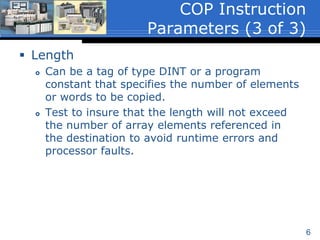
 Length
 Can be a tag of type DINT or a program
constant that specifies the number of elements
or words to be copied.
 Test to insure that the length will not exceed
the number of array elements referenced in
the destination to avoid runtime errors and
processor faults.
COP Instruction
Parameters (3 of 3)
7
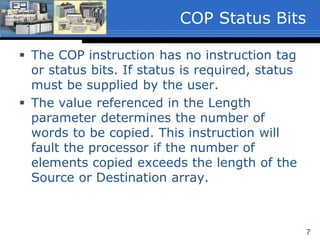
 The COP instruction has no instruction
tags or status bits. If status is required,
status must be supplied by the user.
 The value referenced in the Length
parameter determines the number of
words to be copied. This instruction will
fault the processor if the number of
elements copied exceeds the length of the
Source or Destination array.
COP Status Bits
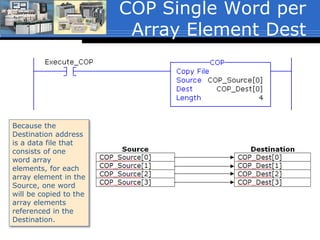
COP Single Word per
Array Element Dest
Because the
Destination address
is a data file that
consists of one
word array
elements, for each
array element in the
Source, one word
will be copied to the
array elements
referenced in the
Destination.
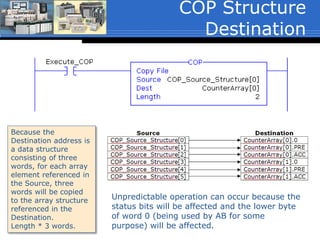
COP Structure
Destination
Because the
Destination address is
a data structure
consisting of three
words, for each array
element referenced in
the Source, three
words will be copied
to the array structure
referenced in the
Destination.
Length * 3 words.
Unpredictable operation can occur because the
status bits will be affected and the lower byte
of word 0 (being used by AB for some
purpose) will be affected.
10
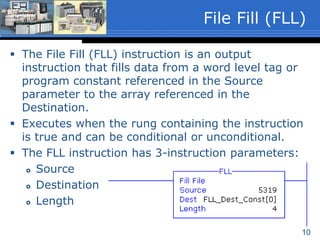
 The File Fill (FLL) instruction is an output
instruction that fills data from a word level tag or
program constant referenced in the Source
parameter to the array referenced in the
Destination.
 Executes when the rung containing the instruction
is true and can be conditional or unconditional.
 The FLL instruction has 3-instruction parameters:
 Source
 Destination
 Length
File Fill (FLL)
11
 Source
 Can be a word level tag or program constant.
 When a tag, the tag is not an array because
only the value stored in the word is filled to
the destination.
FLL Instruction
Parameters (1 of 3)
12
 Destination
 A word level array that references the starting
word of the array to which the Source data is
to be filled.
 Must be an array with a length of at least one
element.
 The instruction will overwrite any data that is
already stored in the Destination without
notification.
FLL Instruction
Parameters (2 of 3)
13
 Length
 Must be a program constant that specifies the
number of array elements to be filled.
 If the Destination data type is 1-word
elements the length range can be 1 to the
upper array bounds.
 If the Destination file type is a structure such
as Timers or Counters, the number of array
elements filled is Length * the number of
words in the structure.
 The length value should be tested to insure
that it will not exceed the upper array bound.
FLL Instruction
Parameters (3 of 3)
14
 The FLL instruction has no instruction tag
or status bits. If status is required, status
must be supplied by the user.
 The value referenced in the Length
parameter determines the number of
words to be filled. This instruction will
fault the processor if the number of
elements filled exceeds the length of the
Destination array.
FLL Status Bits
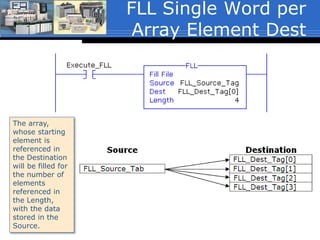
FLL Single Word per
Array Element Dest
The array,
whose starting
element is
referenced in
the Destination
will be filled for
the number of
elements
referenced in
the Length,
with the data
stored in the
Source.
16
 Filling a structure such as timers and
counters should be done with extreme
care. Unpredictable operation can occur
because the status bits will be affected
and the lower byte of word 0 (being used
by AB for some purpose) will be affected.
FLL Array of Structure
Dest (1 of 2)
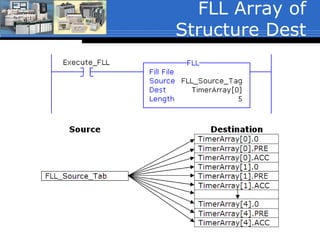
17
 The example shown on the next slide will fill
five timer structures starting at TimerArray[0]
with the value stored in the Source tag
FLL_Source_Tag:
 TimerArray[0].0 (the status bit word) =
FLL_Source_Tag
 TimerArray[0].PRE = FLL_Source_Tag
 TimerArray[0].ACC = FLL_Source_Tag
Through
 TimerArray[4].0 (the status bit word) =
FLL_Source_Tag
 TimerArray[4].PRE = FLL_Source_Tag
 TimerArray[4].ACC = FLL_Source_Tag
FLL Array of Structure
Dest (2 of 2)
FLL Array of
Structure Dest
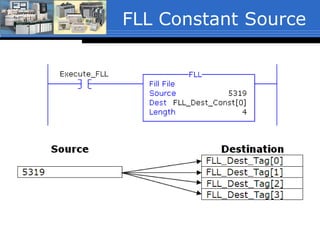
FLL Constant Source
Recipe Application
 This example copies 1-of-4 user
selected recipes to the batch
parameters of a batch process.
 The COP instruction shown will copy
the content of 4-words from a two-
dimensional array referenced in the
source, to a one-dimensional array in
the destination. (The COP will be
discussed in the next unit).
 The source tag is referencing a two-
dimensional array:
Recipe[RecipeNumber, 0]. Note that
the first dimension of the array is a
tag. This tag stores the value of the
recipe number selected by a user and
is used to point to 1-of-4 of the
recipes.
 If the user selects recipe number 2, the
data stored in Recipe[2,0],
Recipe[2,1], Recipe[2,2] and
Recipe[2,3] will be copied to:
BatchRecipe[0] through BatchRecipe[3]
respectively.
0
1
2
3
Optional class material – Not covered inclass
COP & FLL for SLC500
Data Handling Instructions and Shift Registers
Section 10-3-6 Copy and Fill Instructions
SLC500, (LogixPro does not support Copy and
Fill Instructions).
Chapter 10
23
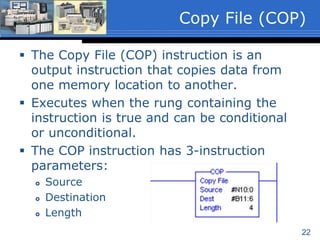
 The Copy File (COP) instruction is an
output instruction that copies data from
one memory location to another.
 Executes when the rung containing the
instruction is true and can be conditional
or unconditional.
 The COP instruction has 3-instruction
parameters:
 Source
 Destination
 Length
Copy File (COP)
24
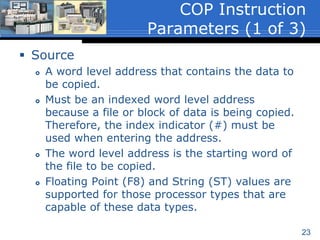
 Source
 A word level address that contains the data to
be copied.
 Must be an indexed word level address
because a file or block of data is being copied.
Therefore, the index indicator (#) must be
used when entering the address.
 The word level address is the starting word of
the file to be copied.
 Floating Point (F8) and String (ST) values are
supported for those processor types that are
capable of these data types.
COP Instruction
Parameters (1 of 3)
25
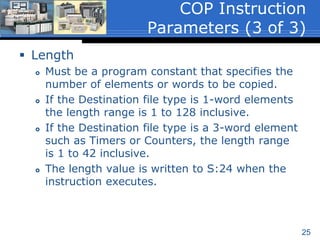
 Destination
 A word level address that is the starting word of
the file to which the Source data is to be copied.
 Must be an indexed word level address because
a file or block of data is being copied. Therefore,
the index indicator (#) must be used when
entering the address.
 The instruction will overwrite any data that is
already stored in the Destination without issuing
a warning.
 Floating Point (F8) and String (ST) values are
supported for those processor types that are
capable of these data types.
COP Instruction
Parameters (2 of 3)
26
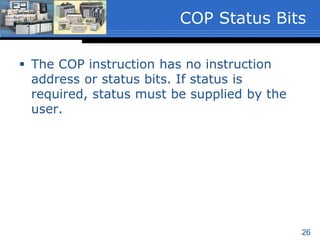
 Length
 Must be a program constant that specifies the
number of elements or words to be copied.
 If the Destination file type is 1-word elements
the length range is 1 to 128 inclusive.
 If the Destination file type is a 3-word element
such as Timers or Counters, the length range
is 1 to 42 inclusive.
 The length value is written to S:24 when the
instruction executes.
COP Instruction
Parameters (3 of 3)
27
 The COP instruction has no instruction
address or status bits. If status is
required, status must be supplied by the
user.
COP Status Bits
28
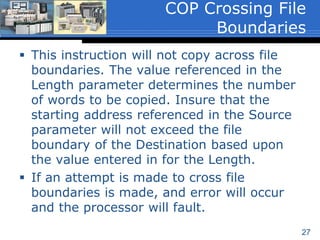
 This instruction will not copy across file
boundaries. The value referenced in the
Length parameter determines the number
of words to be copied. Insure that the
starting address referenced in the Source
parameter will not exceed the file
boundary of the Destination based upon
the value entered in for the Length.
 If an attempt is made to cross file
boundaries is made, and error will occur
and the processor will fault.
COP Crossing File
Boundaries
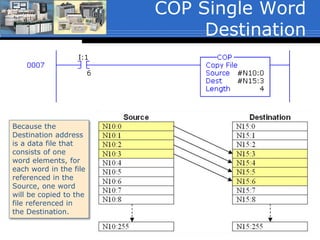
COP Single Word
Destination
Because the
Destination address
is a data file that
consists of one
word elements, for
each word in the file
referenced in the
Source, one word
will be copied to the
file referenced in
the Destination.
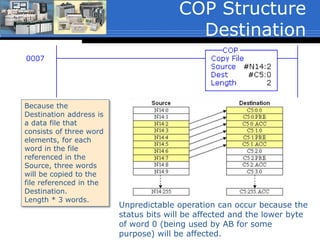
COP Structure
Destination
Because the
Destination address is
a data file that
consists of three word
elements, for each
word in the file
referenced in the
Source, three words
will be copied to the
file referenced in the
Destination.
Length * 3 words.
Unpredictable operation can occur because the
status bits will be affected and the lower byte
of word 0 (being used by AB for some
purpose) will be affected.
31
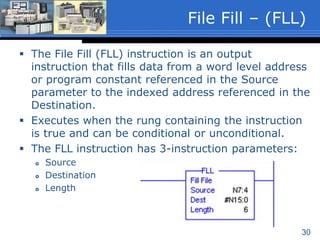
 The File Fill (FLL) instruction is an output
instruction that fills data from a word level address
or program constant referenced in the Source
parameter to the indexed address referenced in the
Destination.
 Executes when the rung containing the instruction
is true and can be conditional or unconditional.
 The FLL instruction has 3-instruction parameters:
 Source
 Destination
 Length
File Fill – (FLL)
32
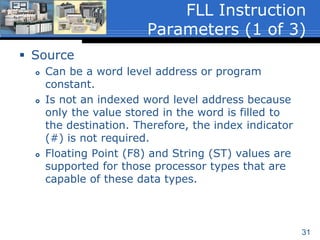
 Source
 Can be a word level address or program
constant.
 Is not an indexed word level address because
only the value stored in the word is filled to
the destination. Therefore, the index indicator
(#) is not required.
 Floating Point (F8) and String (ST) values are
supported for those processor types that are
capable of these data types.
FLL Instruction
Parameters (1 of 3)
33
 Destination
 A word level address that is the starting word of
the file to which the Source data is to be filled.
 Must be an indexed word level address because
a file or block of data is being filled. Therefore,
the index indicator (#) must be used when
entering the address.
 The instruction will overwrite any data that is
already stored in the Destination without issuing
a warning.
 Floating Point (F8) and String (ST) values are
supported for those processor types that are
capable of these data types.
FLL Instruction
Parameters (2 of 3)
34
 Length
 Must be a program constant that specifies the
number of elements or words to be filled.
 If the Destination file type is 1-word elements
the length range is 1 to 128 inclusive.
 If the Destination file type is a 3-word element
such as Timers or Counters, the length range
is 1 to 42 inclusive.
 The length value is written to S:24 when the
instruction executes.
FLL Instruction
Parameters
35
 The FLL instruction has no instruction
address or status bits. If status is
required, status must be supplied by the
user.
FLL Status Bits
36
 This instruction will not fill across file
boundaries. The value referenced in the
Length parameter determines the number
of words to be filled. Insure that the value
referenced in the Length parameter will
not make the filled data exceed the file
boundary.
 If an attempt is made to cross file
boundaries is made, and error will occur
and the processor will fault.
FLL Crossing File
Boundaries
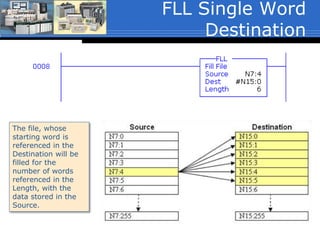
FLL Single Word
Destination
The file, whose
starting word is
referenced in the
Destination will be
filled for the
number of words
referenced in the
Length, with the
data stored in the
Source.
38
 Filling a file whose destination address is a 3-word
structure such as timers and counters should be
done with extreme care. Unpredictable operation
can occur because the status bits will be affected
and the lower byte of word 0 (being used by AB
for some purpose) will be affected.
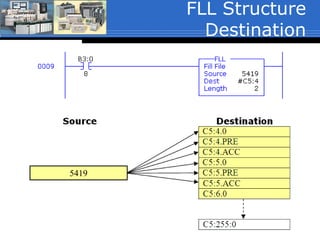
 The example shown on the next slide is being used
as an FYI only to show functionality of the FLL
instruction. It will fill six counter words starting at
C5:4 with the constant 5319 as follows:
 C5:4.0 (the status bit word) = 5319
 C5:4.PRE = 5319
 C5:4.ACC = 5319
FLL Structure
Destination
FLL Structure
Destination
5419
40
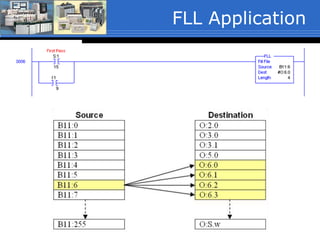
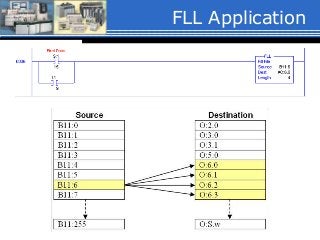
 Allen Bradley makes a module that accepts
4-thermocouples (T/C), (1746-NT4).
Assume this module is placed in slot-6.
 The NT4 module has 4-input channels and
4-output channels. The input channels is
the T/C data and the output channels are
the module configuration channels.
FLL Application
41
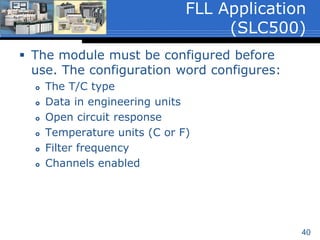
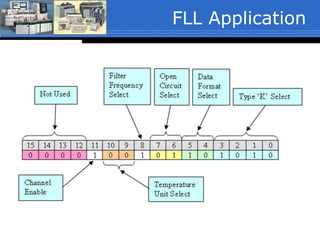
 The module must be configured before
use. The configuration word configures:
 The T/C type
 Data in engineering units
 Open circuit response
 Temperature units (C or F)
 Filter frequency
 Channels enabled
FLL Application
(SLC500)
FLL Application
FLL Application

02 copy file_fill_sp16

  • 1.
    EMEC245 Industrial Control SystemsII Advanced PLC’s and PAC’s
  • 2.
    Data Handling Instructionsand Shift Registers Section 10-3-6 Copy and Fill Instructions ControlLogix (The textbook is for reference only and covers the instructions in SLC500 format) Chapter 10
  • 3.
    3  The CopyFile (COP) instruction is an output instruction that copies data from one memory location to another.  Executes when the rung containing the instruction is true and can be conditional or unconditional.  The COP instruction has 3-instruction parameters:  Source  Destination  Length Copy File (COP)
  • 4.
    4  Source  Aword level tag that contains the data to be copied.  Must be an array with at least one word; ex. ArrayName[0]. (ArrayName[x], where ‘x’ is the starting element of the array).  The word level tag with array element reference is the starting word of the array to be copied.  Data type of SINT, INT, DINT, REAL or Structure. COP Instruction Parameters (1 of 3)
  • 5.
    5  Destination  Aword level tag with array element reference that is the starting word of the array to which the Source data is to be copied.  Must be an array with at least the same number of elements as the array referenced in the Source; ex. ArrayDest[0].  The instruction will overwrite any data that is already stored in the Destination without notification.  Data type of SINT, INT, DINT, REAL or Structure. COP Instruction Parameters (2 of 3)
  • 6.
    6  Length  Canbe a tag of type DINT or a program constant that specifies the number of elements or words to be copied.  Test to insure that the length will not exceed the number of array elements referenced in the destination to avoid runtime errors and processor faults. COP Instruction Parameters (3 of 3)
  • 7.
    7  The COPinstruction has no instruction tags or status bits. If status is required, status must be supplied by the user.  The value referenced in the Length parameter determines the number of words to be copied. This instruction will fault the processor if the number of elements copied exceeds the length of the Source or Destination array. COP Status Bits
  • 8.
    COP Single Wordper Array Element Dest Because the Destination address is a data file that consists of one word array elements, for each array element in the Source, one word will be copied to the array elements referenced in the Destination.
  • 9.
    COP Structure Destination Because the Destinationaddress is a data structure consisting of three words, for each array element referenced in the Source, three words will be copied to the array structure referenced in the Destination. Length * 3 words. Unpredictable operation can occur because the status bits will be affected and the lower byte of word 0 (being used by AB for some purpose) will be affected.
  • 10.
    10  The FileFill (FLL) instruction is an output instruction that fills data from a word level tag or program constant referenced in the Source parameter to the array referenced in the Destination.  Executes when the rung containing the instruction is true and can be conditional or unconditional.  The FLL instruction has 3-instruction parameters:  Source  Destination  Length File Fill (FLL)
  • 11.
    11  Source  Canbe a word level tag or program constant.  When a tag, the tag is not an array because only the value stored in the word is filled to the destination. FLL Instruction Parameters (1 of 3)
  • 12.
    12  Destination  Aword level array that references the starting word of the array to which the Source data is to be filled.  Must be an array with a length of at least one element.  The instruction will overwrite any data that is already stored in the Destination without notification. FLL Instruction Parameters (2 of 3)
  • 13.
    13  Length  Mustbe a program constant that specifies the number of array elements to be filled.  If the Destination data type is 1-word elements the length range can be 1 to the upper array bounds.  If the Destination file type is a structure such as Timers or Counters, the number of array elements filled is Length * the number of words in the structure.  The length value should be tested to insure that it will not exceed the upper array bound. FLL Instruction Parameters (3 of 3)
  • 14.
    14  The FLLinstruction has no instruction tag or status bits. If status is required, status must be supplied by the user.  The value referenced in the Length parameter determines the number of words to be filled. This instruction will fault the processor if the number of elements filled exceeds the length of the Destination array. FLL Status Bits
  • 15.
    FLL Single Wordper Array Element Dest The array, whose starting element is referenced in the Destination will be filled for the number of elements referenced in the Length, with the data stored in the Source.
  • 16.
    16  Filling astructure such as timers and counters should be done with extreme care. Unpredictable operation can occur because the status bits will be affected and the lower byte of word 0 (being used by AB for some purpose) will be affected. FLL Array of Structure Dest (1 of 2)
  • 17.
    17  The exampleshown on the next slide will fill five timer structures starting at TimerArray[0] with the value stored in the Source tag FLL_Source_Tag:  TimerArray[0].0 (the status bit word) = FLL_Source_Tag  TimerArray[0].PRE = FLL_Source_Tag  TimerArray[0].ACC = FLL_Source_Tag Through  TimerArray[4].0 (the status bit word) = FLL_Source_Tag  TimerArray[4].PRE = FLL_Source_Tag  TimerArray[4].ACC = FLL_Source_Tag FLL Array of Structure Dest (2 of 2)
  • 18.
  • 19.
  • 20.
    Recipe Application  Thisexample copies 1-of-4 user selected recipes to the batch parameters of a batch process.  The COP instruction shown will copy the content of 4-words from a two- dimensional array referenced in the source, to a one-dimensional array in the destination. (The COP will be discussed in the next unit).  The source tag is referencing a two- dimensional array: Recipe[RecipeNumber, 0]. Note that the first dimension of the array is a tag. This tag stores the value of the recipe number selected by a user and is used to point to 1-of-4 of the recipes.  If the user selects recipe number 2, the data stored in Recipe[2,0], Recipe[2,1], Recipe[2,2] and Recipe[2,3] will be copied to: BatchRecipe[0] through BatchRecipe[3] respectively. 0 1 2 3
  • 21.
    Optional class material– Not covered inclass COP & FLL for SLC500
  • 22.
    Data Handling Instructionsand Shift Registers Section 10-3-6 Copy and Fill Instructions SLC500, (LogixPro does not support Copy and Fill Instructions). Chapter 10
  • 23.
    23  The CopyFile (COP) instruction is an output instruction that copies data from one memory location to another.  Executes when the rung containing the instruction is true and can be conditional or unconditional.  The COP instruction has 3-instruction parameters:  Source  Destination  Length Copy File (COP)
  • 24.
    24  Source  Aword level address that contains the data to be copied.  Must be an indexed word level address because a file or block of data is being copied. Therefore, the index indicator (#) must be used when entering the address.  The word level address is the starting word of the file to be copied.  Floating Point (F8) and String (ST) values are supported for those processor types that are capable of these data types. COP Instruction Parameters (1 of 3)
  • 25.
    25  Destination  Aword level address that is the starting word of the file to which the Source data is to be copied.  Must be an indexed word level address because a file or block of data is being copied. Therefore, the index indicator (#) must be used when entering the address.  The instruction will overwrite any data that is already stored in the Destination without issuing a warning.  Floating Point (F8) and String (ST) values are supported for those processor types that are capable of these data types. COP Instruction Parameters (2 of 3)
  • 26.
    26  Length  Mustbe a program constant that specifies the number of elements or words to be copied.  If the Destination file type is 1-word elements the length range is 1 to 128 inclusive.  If the Destination file type is a 3-word element such as Timers or Counters, the length range is 1 to 42 inclusive.  The length value is written to S:24 when the instruction executes. COP Instruction Parameters (3 of 3)
  • 27.
    27  The COPinstruction has no instruction address or status bits. If status is required, status must be supplied by the user. COP Status Bits
  • 28.
    28  This instructionwill not copy across file boundaries. The value referenced in the Length parameter determines the number of words to be copied. Insure that the starting address referenced in the Source parameter will not exceed the file boundary of the Destination based upon the value entered in for the Length.  If an attempt is made to cross file boundaries is made, and error will occur and the processor will fault. COP Crossing File Boundaries
  • 29.
    COP Single Word Destination Becausethe Destination address is a data file that consists of one word elements, for each word in the file referenced in the Source, one word will be copied to the file referenced in the Destination.
  • 30.
    COP Structure Destination Because the Destinationaddress is a data file that consists of three word elements, for each word in the file referenced in the Source, three words will be copied to the file referenced in the Destination. Length * 3 words. Unpredictable operation can occur because the status bits will be affected and the lower byte of word 0 (being used by AB for some purpose) will be affected.
  • 31.
    31  The FileFill (FLL) instruction is an output instruction that fills data from a word level address or program constant referenced in the Source parameter to the indexed address referenced in the Destination.  Executes when the rung containing the instruction is true and can be conditional or unconditional.  The FLL instruction has 3-instruction parameters:  Source  Destination  Length File Fill – (FLL)
  • 32.
    32  Source  Canbe a word level address or program constant.  Is not an indexed word level address because only the value stored in the word is filled to the destination. Therefore, the index indicator (#) is not required.  Floating Point (F8) and String (ST) values are supported for those processor types that are capable of these data types. FLL Instruction Parameters (1 of 3)
  • 33.
    33  Destination  Aword level address that is the starting word of the file to which the Source data is to be filled.  Must be an indexed word level address because a file or block of data is being filled. Therefore, the index indicator (#) must be used when entering the address.  The instruction will overwrite any data that is already stored in the Destination without issuing a warning.  Floating Point (F8) and String (ST) values are supported for those processor types that are capable of these data types. FLL Instruction Parameters (2 of 3)
  • 34.
    34  Length  Mustbe a program constant that specifies the number of elements or words to be filled.  If the Destination file type is 1-word elements the length range is 1 to 128 inclusive.  If the Destination file type is a 3-word element such as Timers or Counters, the length range is 1 to 42 inclusive.  The length value is written to S:24 when the instruction executes. FLL Instruction Parameters
  • 35.
    35  The FLLinstruction has no instruction address or status bits. If status is required, status must be supplied by the user. FLL Status Bits
  • 36.
    36  This instructionwill not fill across file boundaries. The value referenced in the Length parameter determines the number of words to be filled. Insure that the value referenced in the Length parameter will not make the filled data exceed the file boundary.  If an attempt is made to cross file boundaries is made, and error will occur and the processor will fault. FLL Crossing File Boundaries
  • 37.
    FLL Single Word Destination Thefile, whose starting word is referenced in the Destination will be filled for the number of words referenced in the Length, with the data stored in the Source.
  • 38.
    38  Filling afile whose destination address is a 3-word structure such as timers and counters should be done with extreme care. Unpredictable operation can occur because the status bits will be affected and the lower byte of word 0 (being used by AB for some purpose) will be affected.  The example shown on the next slide is being used as an FYI only to show functionality of the FLL instruction. It will fill six counter words starting at C5:4 with the constant 5319 as follows:  C5:4.0 (the status bit word) = 5319  C5:4.PRE = 5319  C5:4.ACC = 5319 FLL Structure Destination
  • 39.
  • 40.
    40  Allen Bradleymakes a module that accepts 4-thermocouples (T/C), (1746-NT4). Assume this module is placed in slot-6.  The NT4 module has 4-input channels and 4-output channels. The input channels is the T/C data and the output channels are the module configuration channels. FLL Application
  • 41.
    41  The modulemust be configured before use. The configuration word configures:  The T/C type  Data in engineering units  Open circuit response  Temperature units (C or F)  Filter frequency  Channels enabled FLL Application (SLC500)
  • 42.
  • 43.