Data Manipulation
and Math Instruction
Lino Hugun Saputra (23315309)
INSTITUT TEKNOLOGI BANDUNG
Data Manipulation and Math Instruction
Data Manipulation involves transfer of data and operation on data with math
instruction, data conversion, data comparison, and logical operations.
1. Data Transfer Operation
2. Data Compare Instructions
3. Math Instructions
Data Manipulation Instruction
Each data manipulation instruction requires two or more words of data memory for
operation
Data file, word, and bits
Data Transfer Operation
Data transfer concept
Data Transfer Operation
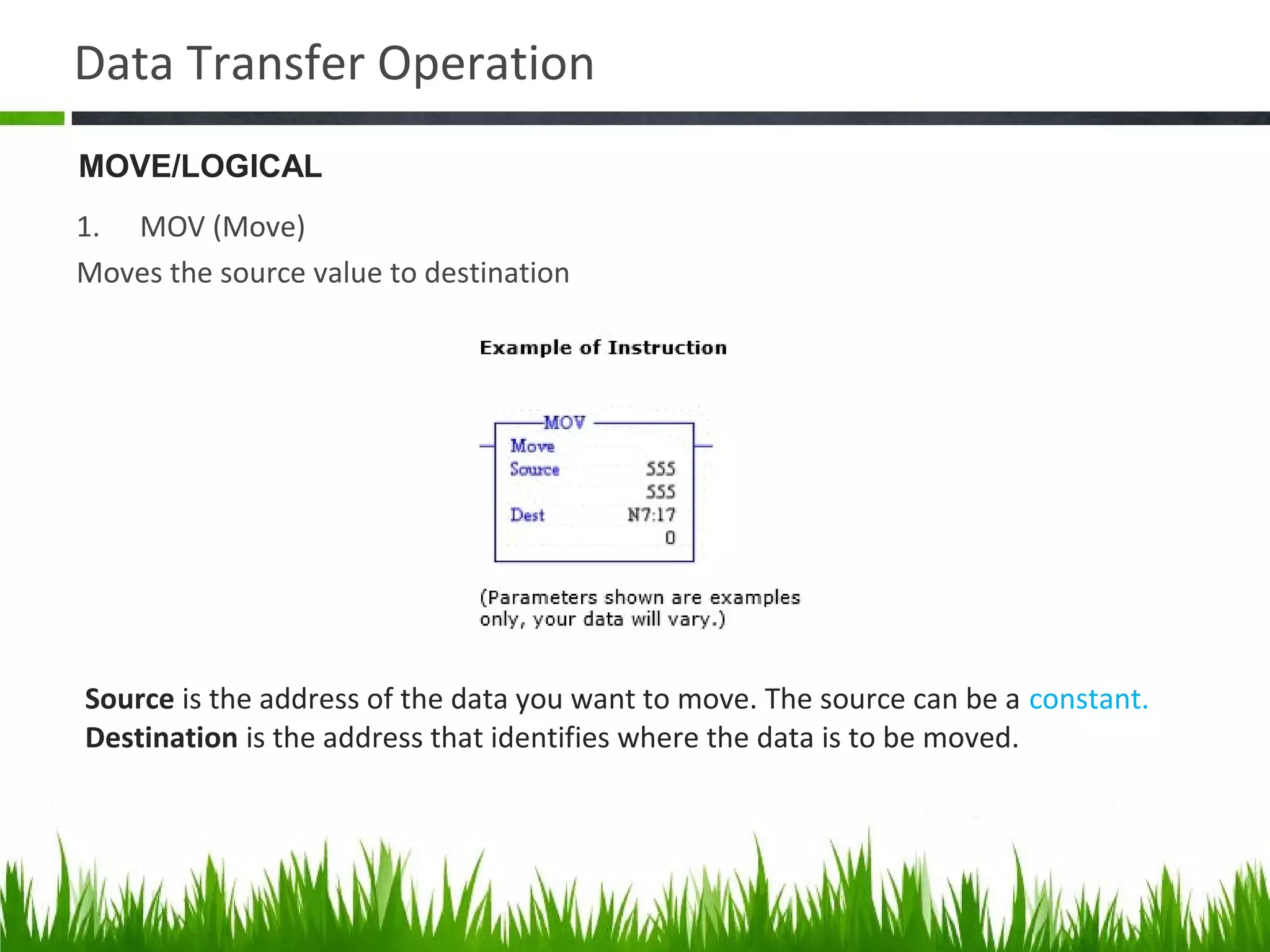
1. MOV (Move)
Moves the source value to destination
Source is the address of the data you want to move. The source can be a constant.
Destination is the address that identifies where the data is to be moved.
MOVE/LOGICAL
Data Transfer Operation
2. MVM (Masked Move)
Moves the source location to selected portion of the destination
Source is the address of the data you want to move.
Mask is the address of the mask through which the instruction moves data.
Destination is the address where the instruction moves the data.
MOVE/LOGICAL
Data Transfer Operation
Mask is the address of the mask through which the instruction moves data. The mask
can also be a hexadecimal value. You can enter the value in binary, decimal, or
hexadecimal. RSLogix 500Micro will make any necessary conversion and display
the hexadecimal value.
The mask acts like a filter for the destination. The pattern of characters in the mask
determines which bits will be passed from the source to the destination, and
which bits will be masked. Only bits in the mask that are set (1) will pass data to
the destination.
For example:
If before the move, the destination address contains 0000000000000000
and the bit values in the source word are - 1111000011110000
and the bit setting in the mask address are - 0000000011111111
after the move, the destination will contain - 0000000011110000
Data Transfer Operation
3. AND (And)
Performs a bitwise AND operation
Sources A and B can be either word addresses or constants; however, both
sources cannot be a constant.
The Destination must be a word address.
MOVE/LOGICAL
Data Transfer Operation
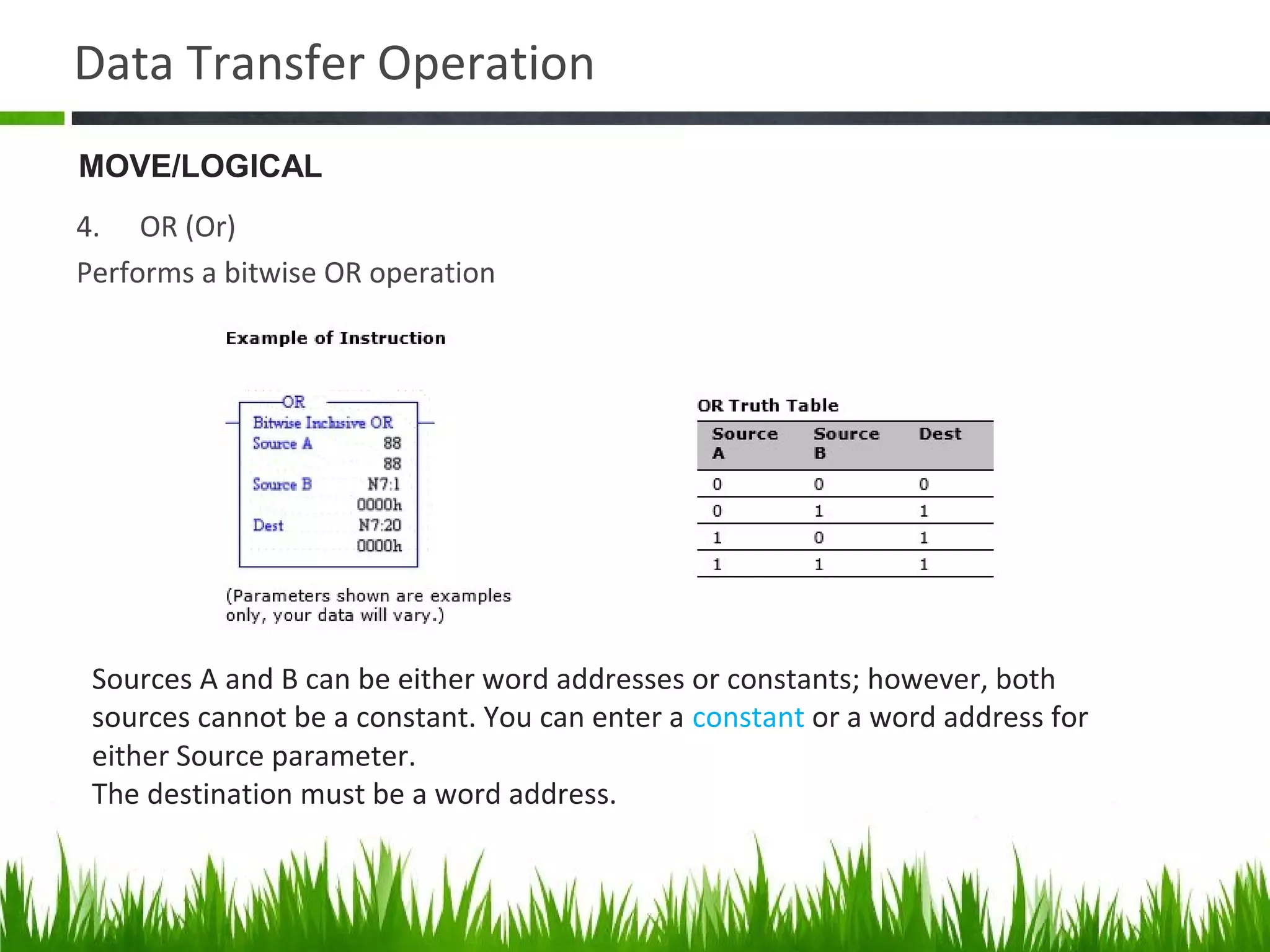
4. OR (Or)
Performs a bitwise OR operation
Sources A and B can be either word addresses or constants; however, both
sources cannot be a constant. You can enter a constant or a word address for
either Source parameter.
The destination must be a word address.
MOVE/LOGICAL
Data Transfer Operation
5. XOR (Exculive Or)
Performs a bitwise XOR operation
Sources A and B of the XOR instruction are Exclusive ORed bit by bit and stored in
the destination. Sources A and B can be either word addresses or constants;
however, both sources cannot be a constant.
MOVE/LOGICAL
Data Transfer Operation
6. NOT (Not)
Performs a NOT operation
The source of the NOT instruction is NOTed bit by bit and stored in the
destination.
The source and destination must be word addresses
MOVE/LOGICAL
Data Transfer Operation
7. CLR (Clear)
Sets all bits of a word to zero.
When rung conditions are true, this output instruction sets all the bits in a
word to zero. The destination must be a word address.
MOVE/LOGICAL
Data Manipulation Application
Changing the preset value of a timer using the move (MOV) instuction
Data Manipulation Application
Moving data using file instruction
Data Manipulation Application
SLC 500 word and file address
(a) Adrress N7:30 is a word address that represents a single word: word number 30 in integer
file 7
(b) Address #N7:30 represents the starting address of a group of conssecutive words in integer
file 7. The length shown is eight words, which is determained by the instruction where the
file address is used
Data Transfer Operation
1. COP (Copy)
Example file copy instruction
FILE/MISK
Data Transfer Operation
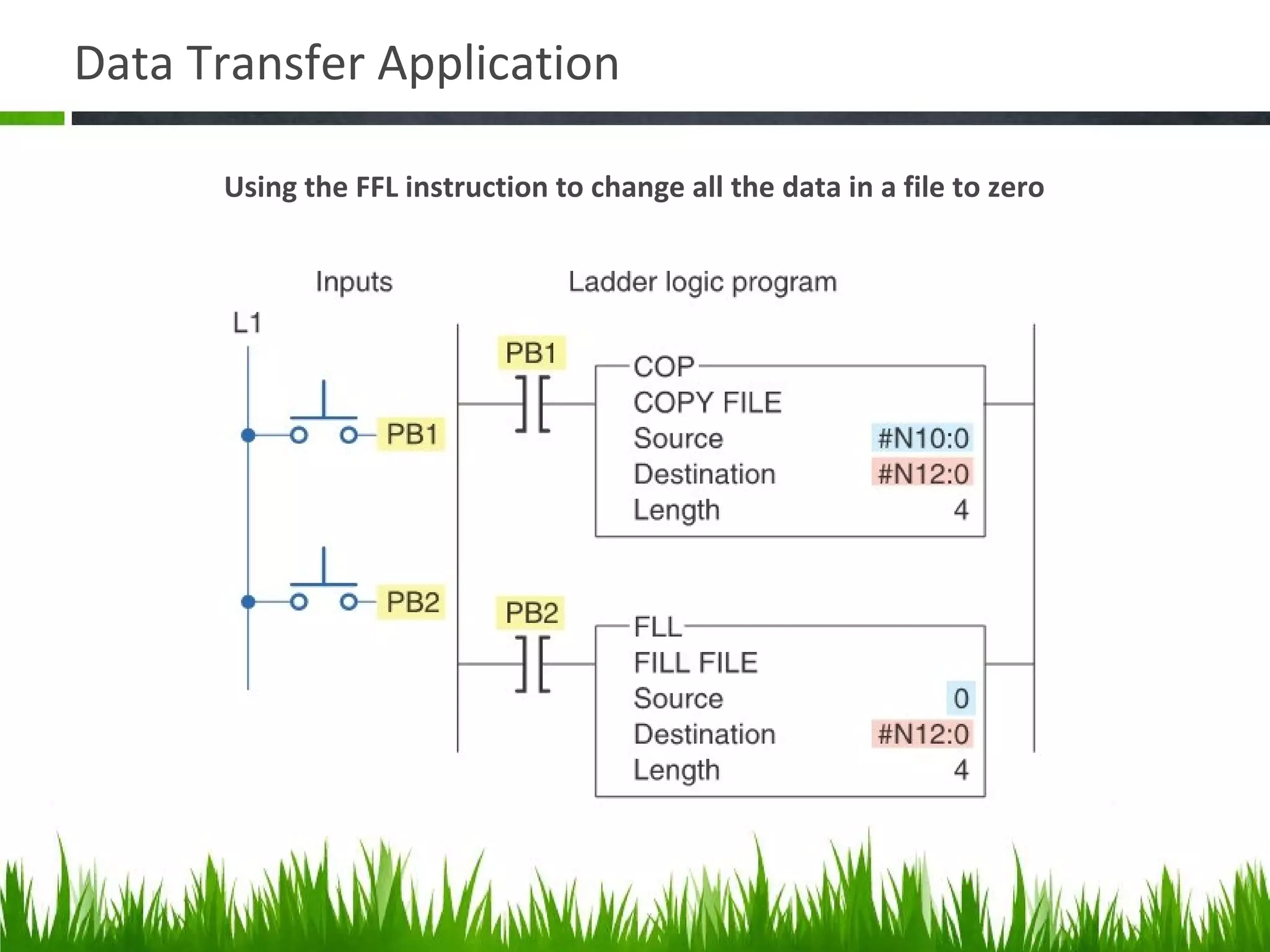
2. FLL
Example FLL instruction.
FILE/MISK
Data Transfer Application
Using the FFL instruction to change all the data in a file to zero
Q & A
1. Aplikasi data manipulation and math instruction di industri?
2. Pengoperasian filter yang ada pada perintah MVM (masked move)?
3. Jika ada dua perintah pada rung yang berbeda, tetapi mengirimkan data ke alamat
memori yang sama. Mana yang menang?
4. Word & file apakah istilah yang hanya digunakan di Allen Bradley atau yang lain
juga sama?
5. Kerja file to word bagaimana?
6. File to file jika ada beda length, apa yang terjadi?
7. Beda FFL dan COP?
8. Tujuan block ladder selalu diberi input?
9. Cara memindahkan data bit to word? Dari Input ke N (integer) ?
10. Cara memindahkan data word to bit? Dari N (integer) ke O?
Data Transfer Operation
1. Batch Process
Consist of a sequence of one or more steps in a difined order.
Data Transfer Operation
5. FAL (file arithmatic and logic)
Example FAL instruction.
Data Transfer Operation
9. BTD (bit distribute)
Example BTD instruction.
Data Compare Instructions
Basic PLC data compare instructions
Data Compare Instructions
Compare menu tab
Data Compare Instructions
EQU logic rung
(Tests whether two values are equal)
Data Compare Instructions
NEQ logic rung
(Tests whether one values is not equal to a second value)
Data Compare Instructions
GRT logic rung
(Tests whether one values is greater than a second value)
Data Compare Instructions
LES logic rung
(Tests whether one values is less than a second value)
Data Compare Instructions
GEQ logic rung
(Tests whether one values is greater than or equal to a second value)
Data Compare Instructions
LEQ logic rung
(Tests whether one values is less than or equal to a second value)
Data Compare Instructions
LIM instruction where the low limit value is less then the high limit value
(Tests whether one values is within the limit range of two other value)
Data Compare Instructions
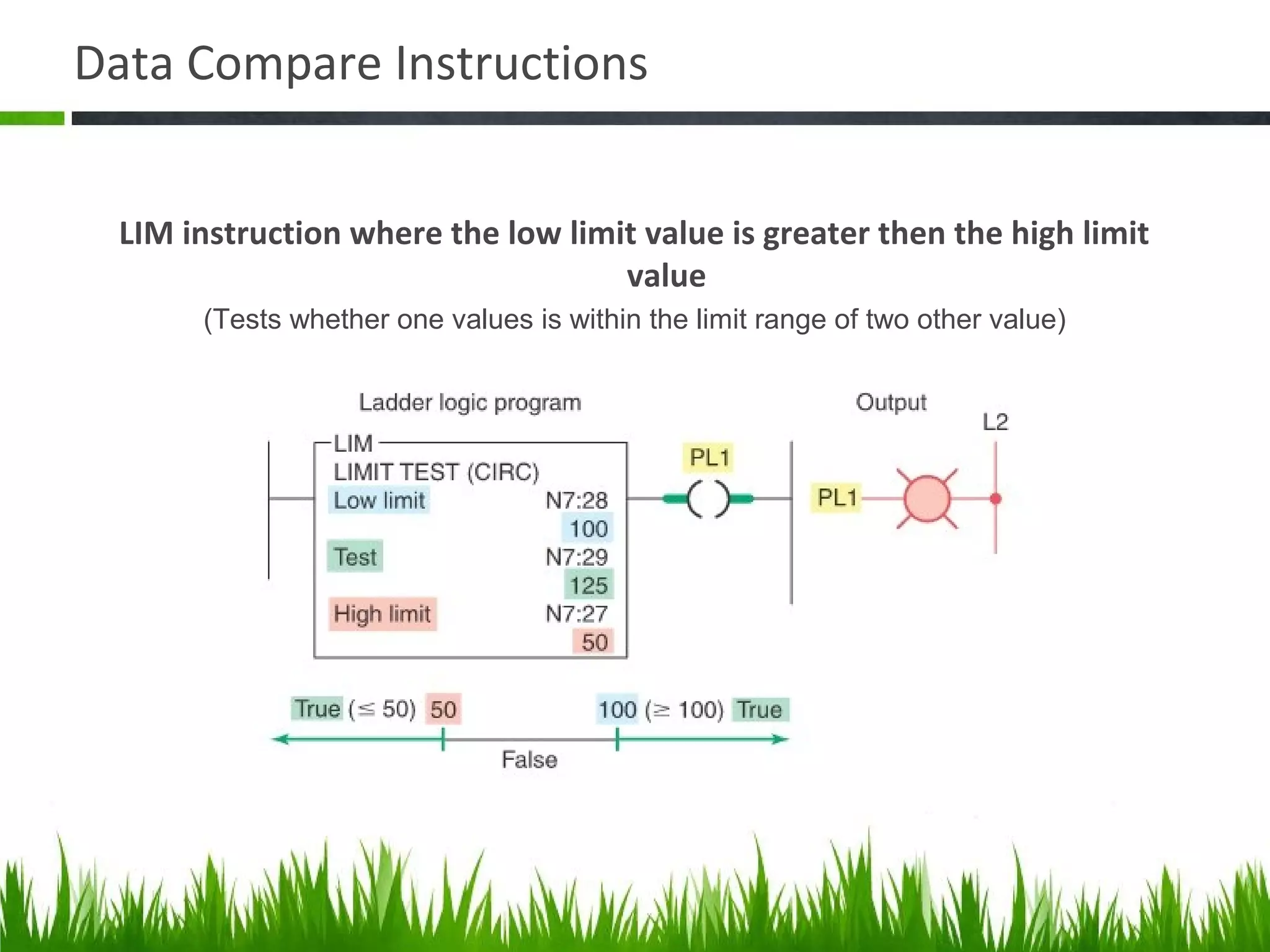
LIM instruction where the low limit value is greater then the high limit
value
(Tests whether one values is within the limit range of two other value)
Data Compare Instructions
Masked comparison for equal (MEQ) logic rung
(Tests portion of two values to see whether they are equal. Compare 16-bit data of a source
address to 16-bit data at a reference address thrugh mask)
Application of Data Compare Instructions
Timer program using the EQU instruction
Application of Data Compare Instructions
Counter program using the LES instruction
Math Instructions
Compute/Math menu tab
Math Instructions
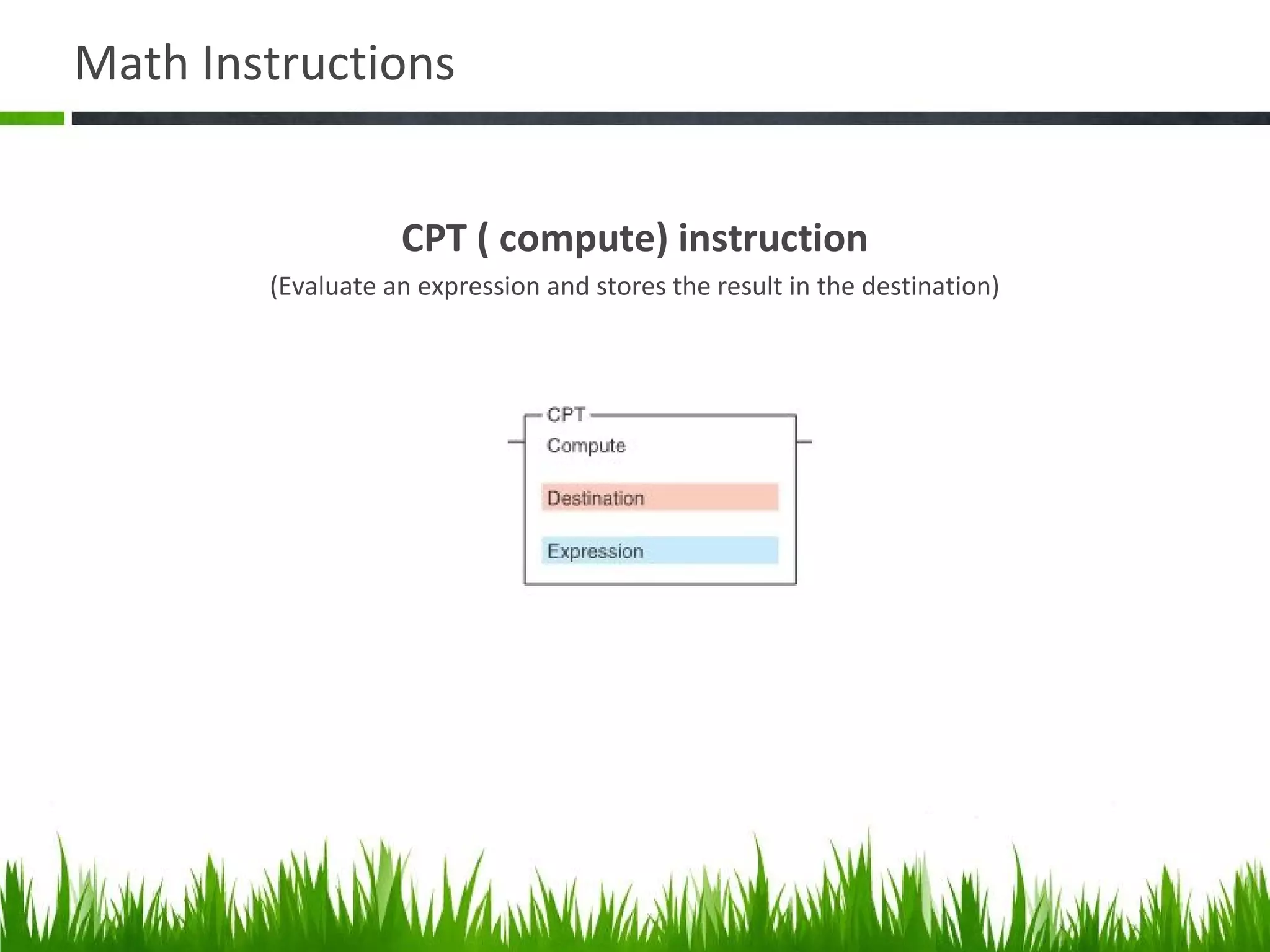
CPT ( compute) instruction
(Evaluate an expression and stores the result in the destination)
Math Instructions
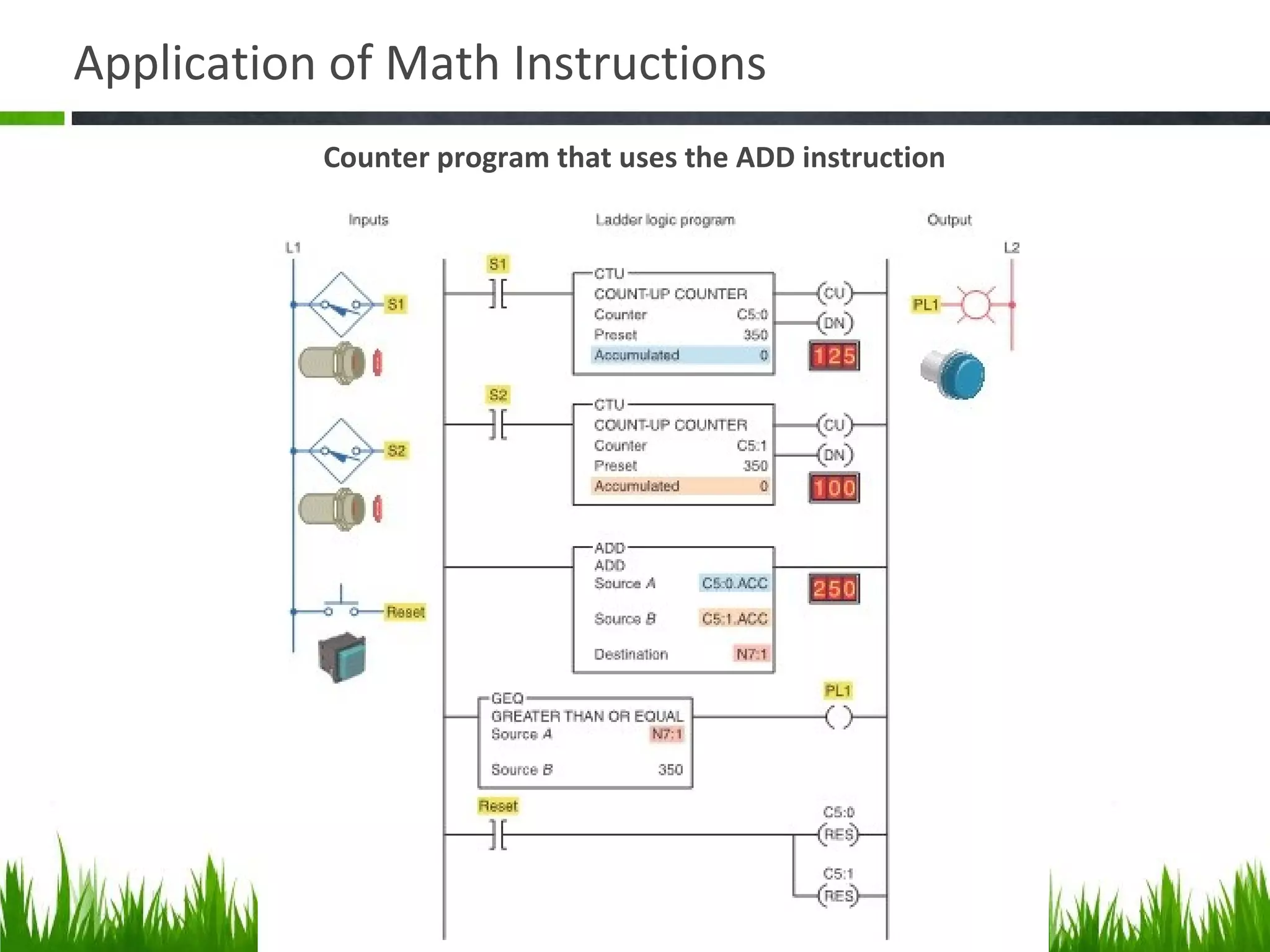
ADD instruction
(Adds source A to source B and stores the result in the destination)
Application of Math Instructions
Counter program that uses the ADD instruction
Math Instructions
SUB instruction
(Subtracts source B from source A and stores the result in the destination)
Math Instructions
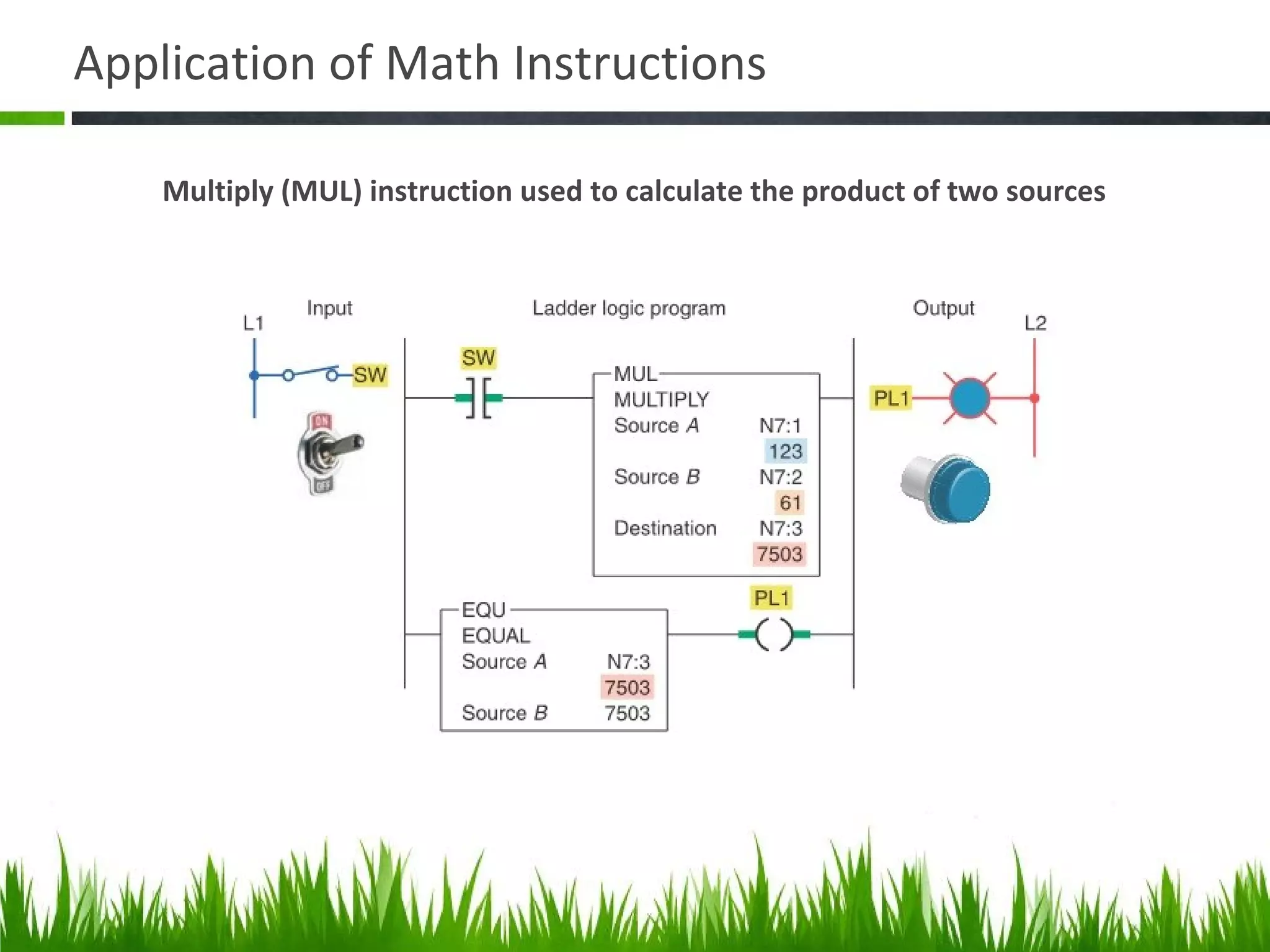
Multiply instruction (MUL)
(Multiplies sourch A by source B and stores the result in the destination)
Application of Math Instructions
Multiply (MUL) instruction used to calculate the product of two sources
Math Instructions
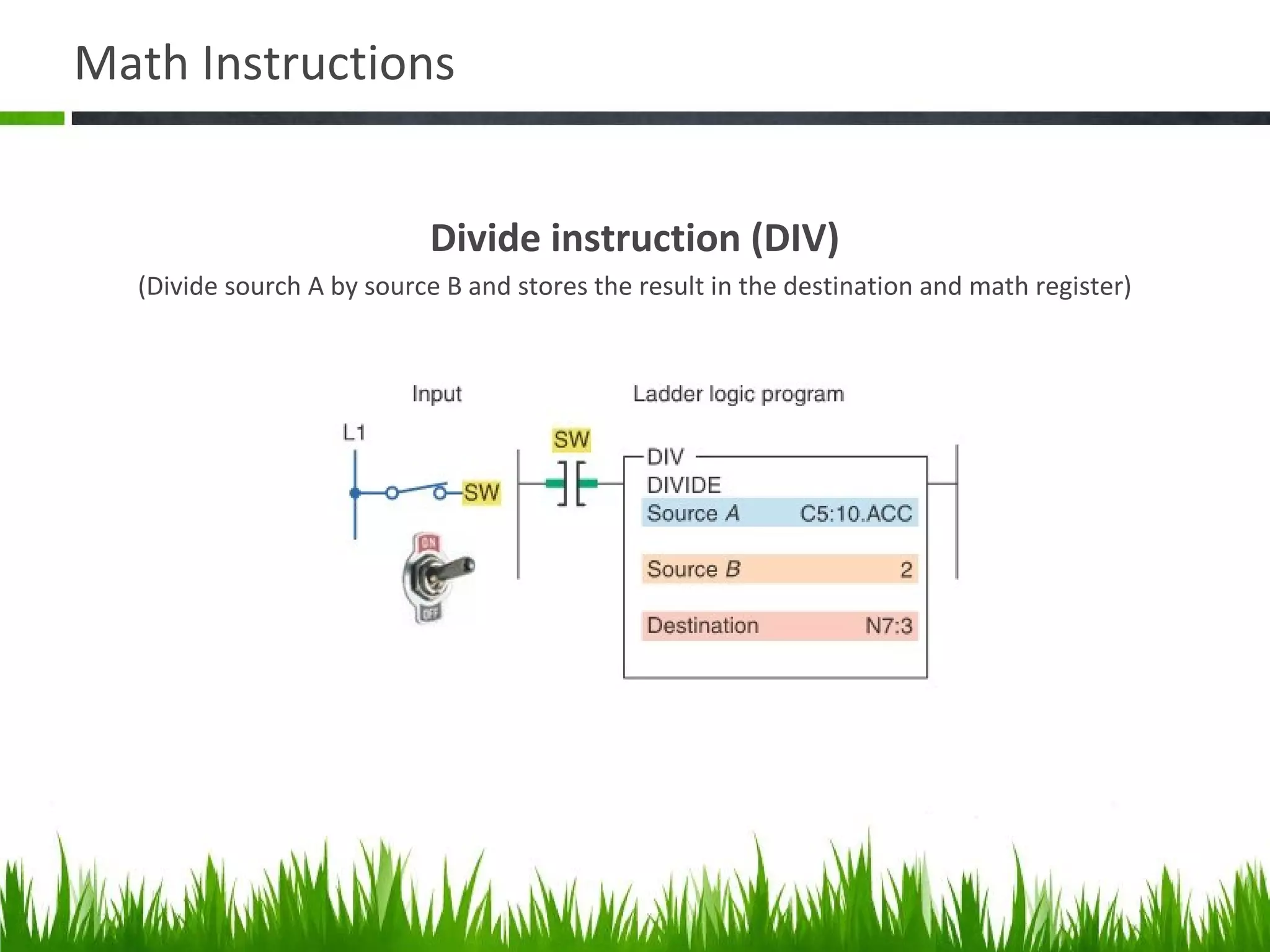
Divide instruction (DIV)
(Divide sourch A by source B and stores the result in the destination and math register)
Application of Math Instructions
Divide (DIV) instruction used to calculate the value that result from dividing sources
A by sources B
Math Instructions
Square instruction (SQR)
(Calculates the square root of the source and places the integer result in the destination)
Math Instructions
Negate instruction (NEG)
(Changes the sign of the source and places it in destination)
Math Instructions
TOD (convert to BCD) instruction
(Converts a 16-bit integer source value to BCD and stores it in the math register or the destination)
Math Instructions
FRD (convert from BCD) instruction
(Converts a BCD value in the math register or the source to an integer and stores it in the destination)
Q & A
1. Fasilitas instruksi dari masing-masing menu tab sudah tetap atau bisa di upgrade?
2. Pada instruksi compute apakah semua operasi matematis bisa dilakukan?
3. Apakah bisa menggunakan memori float pada memori tujuan dari hasil matematis
yang dilakukan pada perintah compute?
4. Kalau Hexadesimal  BCD bisa menggunakan input huruf tidak? Huruf A sebagai
pengganti nomor 10 misalnya?
5. Bisakah rumus di blok compute disimpan dulu agar dapat digunakan/ dipanggil
kembali untuk perhitungan lainnya?
6. Apa implementasi convert to BCD (TOD)?
7. Apa implementasi convert from BCD (FRD)?
8. Adakah intruksi yang digunakan untuk mengkonversi BCD ke graycode?
9. Apa fungsi DDV?
Math Instructions
DDV instruction
Application of Data Manipulation Instructions
Memindahkan tiap bit data yang ada pada input ke output
Application of Data Manipulation Instructions
Set-point control program
Application of Math Instructions
Converting Celsius temperature to Fahrenheit
Application of Math Instructions
Vessel overfill alarm program
Application of Math Instructions
Temperature control program

Data Manipulation and Math Instruction on RSLogix 500

  • 1.
    Data Manipulation and MathInstruction Lino Hugun Saputra (23315309) INSTITUT TEKNOLOGI BANDUNG
  • 2.
    Data Manipulation andMath Instruction Data Manipulation involves transfer of data and operation on data with math instruction, data conversion, data comparison, and logical operations. 1. Data Transfer Operation 2. Data Compare Instructions 3. Math Instructions
  • 3.
    Data Manipulation Instruction Eachdata manipulation instruction requires two or more words of data memory for operation Data file, word, and bits
  • 4.
  • 5.
    Data Transfer Operation 1.MOV (Move) Moves the source value to destination Source is the address of the data you want to move. The source can be a constant. Destination is the address that identifies where the data is to be moved. MOVE/LOGICAL
  • 6.
    Data Transfer Operation 2.MVM (Masked Move) Moves the source location to selected portion of the destination Source is the address of the data you want to move. Mask is the address of the mask through which the instruction moves data. Destination is the address where the instruction moves the data. MOVE/LOGICAL
  • 7.
    Data Transfer Operation Maskis the address of the mask through which the instruction moves data. The mask can also be a hexadecimal value. You can enter the value in binary, decimal, or hexadecimal. RSLogix 500Micro will make any necessary conversion and display the hexadecimal value. The mask acts like a filter for the destination. The pattern of characters in the mask determines which bits will be passed from the source to the destination, and which bits will be masked. Only bits in the mask that are set (1) will pass data to the destination. For example: If before the move, the destination address contains 0000000000000000 and the bit values in the source word are - 1111000011110000 and the bit setting in the mask address are - 0000000011111111 after the move, the destination will contain - 0000000011110000
  • 8.
    Data Transfer Operation 3.AND (And) Performs a bitwise AND operation Sources A and B can be either word addresses or constants; however, both sources cannot be a constant. The Destination must be a word address. MOVE/LOGICAL
  • 9.
    Data Transfer Operation 4.OR (Or) Performs a bitwise OR operation Sources A and B can be either word addresses or constants; however, both sources cannot be a constant. You can enter a constant or a word address for either Source parameter. The destination must be a word address. MOVE/LOGICAL
  • 10.
    Data Transfer Operation 5.XOR (Exculive Or) Performs a bitwise XOR operation Sources A and B of the XOR instruction are Exclusive ORed bit by bit and stored in the destination. Sources A and B can be either word addresses or constants; however, both sources cannot be a constant. MOVE/LOGICAL
  • 11.
    Data Transfer Operation 6.NOT (Not) Performs a NOT operation The source of the NOT instruction is NOTed bit by bit and stored in the destination. The source and destination must be word addresses MOVE/LOGICAL
  • 12.
    Data Transfer Operation 7.CLR (Clear) Sets all bits of a word to zero. When rung conditions are true, this output instruction sets all the bits in a word to zero. The destination must be a word address. MOVE/LOGICAL
  • 13.
    Data Manipulation Application Changingthe preset value of a timer using the move (MOV) instuction
  • 14.
    Data Manipulation Application Movingdata using file instruction
  • 15.
    Data Manipulation Application SLC500 word and file address (a) Adrress N7:30 is a word address that represents a single word: word number 30 in integer file 7 (b) Address #N7:30 represents the starting address of a group of conssecutive words in integer file 7. The length shown is eight words, which is determained by the instruction where the file address is used
  • 16.
    Data Transfer Operation 1.COP (Copy) Example file copy instruction FILE/MISK
  • 17.
    Data Transfer Operation 2.FLL Example FLL instruction. FILE/MISK
  • 18.
    Data Transfer Application Usingthe FFL instruction to change all the data in a file to zero
  • 19.
    Q & A 1.Aplikasi data manipulation and math instruction di industri? 2. Pengoperasian filter yang ada pada perintah MVM (masked move)? 3. Jika ada dua perintah pada rung yang berbeda, tetapi mengirimkan data ke alamat memori yang sama. Mana yang menang? 4. Word & file apakah istilah yang hanya digunakan di Allen Bradley atau yang lain juga sama? 5. Kerja file to word bagaimana? 6. File to file jika ada beda length, apa yang terjadi? 7. Beda FFL dan COP? 8. Tujuan block ladder selalu diberi input? 9. Cara memindahkan data bit to word? Dari Input ke N (integer) ? 10. Cara memindahkan data word to bit? Dari N (integer) ke O?
  • 20.
    Data Transfer Operation 1.Batch Process Consist of a sequence of one or more steps in a difined order.
  • 21.
    Data Transfer Operation 5.FAL (file arithmatic and logic) Example FAL instruction.
  • 22.
    Data Transfer Operation 9.BTD (bit distribute) Example BTD instruction.
  • 23.
    Data Compare Instructions BasicPLC data compare instructions
  • 24.
  • 25.
    Data Compare Instructions EQUlogic rung (Tests whether two values are equal)
  • 26.
    Data Compare Instructions NEQlogic rung (Tests whether one values is not equal to a second value)
  • 27.
    Data Compare Instructions GRTlogic rung (Tests whether one values is greater than a second value)
  • 28.
    Data Compare Instructions LESlogic rung (Tests whether one values is less than a second value)
  • 29.
    Data Compare Instructions GEQlogic rung (Tests whether one values is greater than or equal to a second value)
  • 30.
    Data Compare Instructions LEQlogic rung (Tests whether one values is less than or equal to a second value)
  • 31.
    Data Compare Instructions LIMinstruction where the low limit value is less then the high limit value (Tests whether one values is within the limit range of two other value)
  • 32.
    Data Compare Instructions LIMinstruction where the low limit value is greater then the high limit value (Tests whether one values is within the limit range of two other value)
  • 33.
    Data Compare Instructions Maskedcomparison for equal (MEQ) logic rung (Tests portion of two values to see whether they are equal. Compare 16-bit data of a source address to 16-bit data at a reference address thrugh mask)
  • 34.
    Application of DataCompare Instructions Timer program using the EQU instruction
  • 35.
    Application of DataCompare Instructions Counter program using the LES instruction
  • 36.
  • 37.
    Math Instructions CPT (compute) instruction (Evaluate an expression and stores the result in the destination)
  • 38.
    Math Instructions ADD instruction (Addssource A to source B and stores the result in the destination)
  • 39.
    Application of MathInstructions Counter program that uses the ADD instruction
  • 40.
    Math Instructions SUB instruction (Subtractssource B from source A and stores the result in the destination)
  • 41.
    Math Instructions Multiply instruction(MUL) (Multiplies sourch A by source B and stores the result in the destination)
  • 42.
    Application of MathInstructions Multiply (MUL) instruction used to calculate the product of two sources
  • 43.
    Math Instructions Divide instruction(DIV) (Divide sourch A by source B and stores the result in the destination and math register)
  • 44.
    Application of MathInstructions Divide (DIV) instruction used to calculate the value that result from dividing sources A by sources B
  • 45.
    Math Instructions Square instruction(SQR) (Calculates the square root of the source and places the integer result in the destination)
  • 46.
    Math Instructions Negate instruction(NEG) (Changes the sign of the source and places it in destination)
  • 47.
    Math Instructions TOD (convertto BCD) instruction (Converts a 16-bit integer source value to BCD and stores it in the math register or the destination)
  • 48.
    Math Instructions FRD (convertfrom BCD) instruction (Converts a BCD value in the math register or the source to an integer and stores it in the destination)
  • 49.
    Q & A 1.Fasilitas instruksi dari masing-masing menu tab sudah tetap atau bisa di upgrade? 2. Pada instruksi compute apakah semua operasi matematis bisa dilakukan? 3. Apakah bisa menggunakan memori float pada memori tujuan dari hasil matematis yang dilakukan pada perintah compute? 4. Kalau Hexadesimal  BCD bisa menggunakan input huruf tidak? Huruf A sebagai pengganti nomor 10 misalnya? 5. Bisakah rumus di blok compute disimpan dulu agar dapat digunakan/ dipanggil kembali untuk perhitungan lainnya? 6. Apa implementasi convert to BCD (TOD)? 7. Apa implementasi convert from BCD (FRD)? 8. Adakah intruksi yang digunakan untuk mengkonversi BCD ke graycode? 9. Apa fungsi DDV?
  • 50.
  • 51.
    Application of DataManipulation Instructions Memindahkan tiap bit data yang ada pada input ke output
  • 52.
    Application of DataManipulation Instructions Set-point control program
  • 53.
    Application of MathInstructions Converting Celsius temperature to Fahrenheit
  • 54.
    Application of MathInstructions Vessel overfill alarm program
  • 55.
    Application of MathInstructions Temperature control program

Editor's Notes

  • #2 This presentation demonstrates the new capabilities of PowerPoint and it is best viewed in Slide Show. These slides are designed to give you great ideas for the presentations you’ll create in PowerPoint 2010! For more sample templates, click the File tab, and then on the New tab, click Sample Templates.