PROGRAMMING
CONCEPTS-IV
CHAPTER 5
 We all know that the processor we use is connected to
the I/O as well as the memory
 So far, we have only discussed with data being read from
and written to memory
 Even though we have used the I/O devices like the
keyboard and monitor, but for these we used DOS
interrupts, which are functions already written
 Lets try for interacting the I/O directly using the
instructions of 8086
 In practice, I/O devices are not connected directly to the
processor but are connected through interfacing chips
which provides control signals for the processor to
communicate with the peripheral.
INTRODUCTION
INPUT/ OUTPUT PROGRAMMING
 There are many I/O devices connected to the processor,
using which data is taken in (input device) or data is given
out (output device)
 For I/O processing, there appears the concept of a ‘Port’,
which means a register or storage area for data, from/to
which the data is transferred to the processor
 An I/O device is frequently referred to as a ‘port’ with an
associated address.
 Any I/O device has a unique address, known as ‘port
address’ or simply mentioned as ‘port.
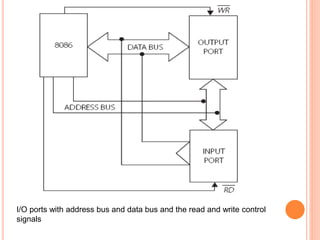
I/O ports with address bus and data bus and the read and write control
signals
 Figure shows an input and output device connected tot
he processor through the address and data bus & a
control pin.
 When its address is placed on the address bus and the
WR signal is activated, data from the processor is written
to the output port
 Similarly, data from the input port is read into the
processor when the input port is addressed and the RD
signal is activated
 There are two schemes for connecting an I/O device to the
processor
 Memory Mapped I/O :
 In this scheme, the I/O device has the same address
space and addressing scheme as memory.
 For example, given the instruction MOV AL, [3456H], the
address 3456H may be a memory location or the address
of an I/O device.
 So I/O addressing does not need any special instructions.
 Peripheral or Isolated I/O:
 Also referred to as ‘I/O mapped I/O’ .
 Here, there are special instructions catering to input and
output devices
 The address space is disjoint and separate from the
memory address space. (Detail in Chapter 7)
I/O INSTRUCTIONS
 8086 has two instructions to communicate:
 IN :
 usage: IN accumulator, port
 This is the case when data is taken from the I/O device
 It implies the device is an input device
 using this instruction, an I/O read machine cycle is initiated
and the data in the input device is transferred to the
accumulator of the processor
 OUT :
 usage: OUT port, accumulator
 here the data is given to an output device from the
accumulator with the initiation of an I/O write machine cycle
THINGS TO REMEMBER
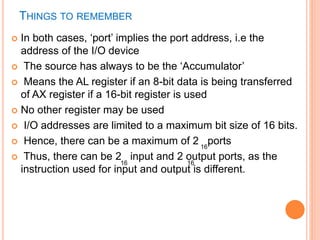
 In both cases, ‘port’ implies the port address, i.e the
address of the I/O device
 The source has always to be the ‘Accumulator’
 Means the AL register if an 8-bit data is being transferred
of AX register if a 16-bit register is used
 No other register may be used
 I/O addresses are limited to a maximum bit size of 16 bits.
 Hence, there can be a maximum of 2 ports
 Thus, there can be 2 input and 2 output ports, as the
instruction used for input and output is different.
16
16 16
TWO FORMATS FOR I/O INSTRUCTIONS
 1. Fixed Port Addressing :
 This is used only when the address of an I/O device is 8
bits wide
 Here the address of the port is directly mentioned in the
instruction.
 Note that data can be 8 bits or 16 bits, depending on
the data bus width of the I/O device.
 Example:
IN AL, 45H ;move 8-bit data into AL from an input
port with address 45H
IN AX, 12H ;
OUT 34H, AL ; move 8-bit data from AL to an output
port with address 34H
OUT 0FCH, AX ;
 2. Variable Port Addressing:
 This is used when the addressed port has a 16-bit
address.
 Here, the port address is to be loaded into DX and then
only the I/O instruction can be used.
 Only the DX register can be used for this.
 Examples
 Mov DX, 9876H ; load the address of the port in DX
IN AL, DX ; move 8-bit data into AL from an input port
whose address is in DX
 Mov DX, 0FC6H
OUT DX, AX
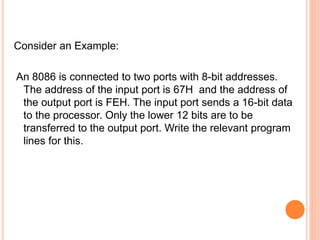
Consider an Example:
An 8086 is connected to two ports with 8-bit addresses.
The address of the input port is 67H and the address of
the output port is FEH. The input port sends a 16-bit data
to the processor. Only the lower 12 bits are to be
transferred to the output port. Write the relevant program
lines for this.
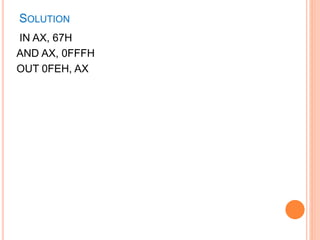
SOLUTION
IN AX, 67H
AND AX, 0FFFH
OUT 0FEH, AX
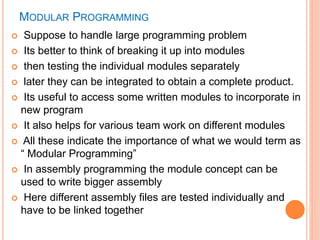
MODULAR PROGRAMMING
 Suppose to handle large programming problem
 Its better to think of breaking it up into modules
 then testing the individual modules separately
 later they can be integrated to obtain a complete product.
 Its useful to access some written modules to incorporate in
new program
 It also helps for various team work on different modules
 All these indicate the importance of what we would term as
“ Modular Programming”
 In assembly programming the module concept can be
used to write bigger assembly
 Here different assembly files are tested individually and
have to be linked together
 There are many issues to be resolved for successful
linking and execution:
 i. The different modules that constitute the solution may be
in different code segments.
 ii. The data which is to be used by one module may have
to be accessed by many different modules and the
‘permission’ for this must be indicated.
 iii. Some labels used in a module may not be found
therein. In that case, there must be some indication that
these are defined in some other module to which linking is
possible and will be done.
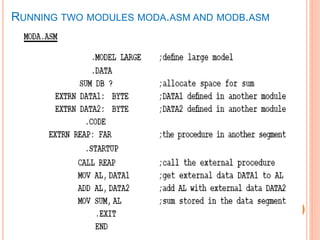
 MASM has certain directives which are used in our program
in order to resolve these issues
1. THE DIRECTIVE PUBLIC
 When a data item or a procedure is to be allowed to be
accessed by other modules, it is declared as PUBLIC .
 Examples:
PUBLIC num1, num2, num3
 This may also be declared as
PUBLIC num1
PUBLIC num2
PUBLIC num3
 A procedure named MULT can be allowed access from
other modules if it is declared as
PUBLIC mult
 When a module needs to use data and code which have
been defined elsewhere, it should use the directive
EXTRN meaning that the labels being used in this
module are external to the module.
 Format
EXTRN name1
EXTRN name1:type, name2:type
 Examples
EXTRN num1:byte
EXTRN num2:word,num3 : word
EXTRN multi :far ;a far procedure is declared
2. THE DIRECTIVE EXTRN
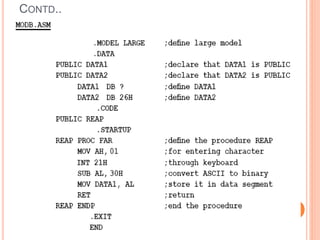
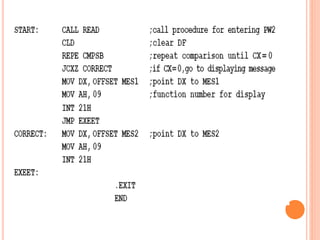
RUNNING TWO MODULES MODA.ASM AND MODB.ASM
CONTD..
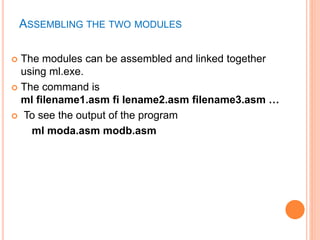
ASSEMBLING THE TWO MODULES
 The modules can be assembled and linked together
using ml.exe.
 The command is
ml filename1.asm fi lename2.asm filename3.asm …
 To see the output of the program
ml moda.asm modb.asm
Chapter 5  programming concepts iv

Chapter 5 programming concepts iv

  • 1.
  • 2.
     We allknow that the processor we use is connected to the I/O as well as the memory  So far, we have only discussed with data being read from and written to memory  Even though we have used the I/O devices like the keyboard and monitor, but for these we used DOS interrupts, which are functions already written  Lets try for interacting the I/O directly using the instructions of 8086  In practice, I/O devices are not connected directly to the processor but are connected through interfacing chips which provides control signals for the processor to communicate with the peripheral. INTRODUCTION
  • 3.
    INPUT/ OUTPUT PROGRAMMING There are many I/O devices connected to the processor, using which data is taken in (input device) or data is given out (output device)  For I/O processing, there appears the concept of a ‘Port’, which means a register or storage area for data, from/to which the data is transferred to the processor  An I/O device is frequently referred to as a ‘port’ with an associated address.  Any I/O device has a unique address, known as ‘port address’ or simply mentioned as ‘port.
  • 4.
    I/O ports withaddress bus and data bus and the read and write control signals
  • 5.
     Figure showsan input and output device connected tot he processor through the address and data bus & a control pin.  When its address is placed on the address bus and the WR signal is activated, data from the processor is written to the output port  Similarly, data from the input port is read into the processor when the input port is addressed and the RD signal is activated
  • 6.
     There aretwo schemes for connecting an I/O device to the processor  Memory Mapped I/O :  In this scheme, the I/O device has the same address space and addressing scheme as memory.  For example, given the instruction MOV AL, [3456H], the address 3456H may be a memory location or the address of an I/O device.  So I/O addressing does not need any special instructions.  Peripheral or Isolated I/O:  Also referred to as ‘I/O mapped I/O’ .  Here, there are special instructions catering to input and output devices  The address space is disjoint and separate from the memory address space. (Detail in Chapter 7)
  • 7.
    I/O INSTRUCTIONS  8086has two instructions to communicate:  IN :  usage: IN accumulator, port  This is the case when data is taken from the I/O device  It implies the device is an input device  using this instruction, an I/O read machine cycle is initiated and the data in the input device is transferred to the accumulator of the processor  OUT :  usage: OUT port, accumulator  here the data is given to an output device from the accumulator with the initiation of an I/O write machine cycle
  • 8.
    THINGS TO REMEMBER In both cases, ‘port’ implies the port address, i.e the address of the I/O device  The source has always to be the ‘Accumulator’  Means the AL register if an 8-bit data is being transferred of AX register if a 16-bit register is used  No other register may be used  I/O addresses are limited to a maximum bit size of 16 bits.  Hence, there can be a maximum of 2 ports  Thus, there can be 2 input and 2 output ports, as the instruction used for input and output is different. 16 16 16
  • 9.
    TWO FORMATS FORI/O INSTRUCTIONS  1. Fixed Port Addressing :  This is used only when the address of an I/O device is 8 bits wide  Here the address of the port is directly mentioned in the instruction.  Note that data can be 8 bits or 16 bits, depending on the data bus width of the I/O device.  Example: IN AL, 45H ;move 8-bit data into AL from an input port with address 45H IN AX, 12H ; OUT 34H, AL ; move 8-bit data from AL to an output port with address 34H OUT 0FCH, AX ;
  • 10.
     2. VariablePort Addressing:  This is used when the addressed port has a 16-bit address.  Here, the port address is to be loaded into DX and then only the I/O instruction can be used.  Only the DX register can be used for this.  Examples  Mov DX, 9876H ; load the address of the port in DX IN AL, DX ; move 8-bit data into AL from an input port whose address is in DX  Mov DX, 0FC6H OUT DX, AX
  • 11.
    Consider an Example: An8086 is connected to two ports with 8-bit addresses. The address of the input port is 67H and the address of the output port is FEH. The input port sends a 16-bit data to the processor. Only the lower 12 bits are to be transferred to the output port. Write the relevant program lines for this.
  • 12.
    SOLUTION IN AX, 67H ANDAX, 0FFFH OUT 0FEH, AX
  • 13.
    MODULAR PROGRAMMING  Supposeto handle large programming problem  Its better to think of breaking it up into modules  then testing the individual modules separately  later they can be integrated to obtain a complete product.  Its useful to access some written modules to incorporate in new program  It also helps for various team work on different modules  All these indicate the importance of what we would term as “ Modular Programming”  In assembly programming the module concept can be used to write bigger assembly  Here different assembly files are tested individually and have to be linked together
  • 14.
     There aremany issues to be resolved for successful linking and execution:  i. The different modules that constitute the solution may be in different code segments.  ii. The data which is to be used by one module may have to be accessed by many different modules and the ‘permission’ for this must be indicated.  iii. Some labels used in a module may not be found therein. In that case, there must be some indication that these are defined in some other module to which linking is possible and will be done.  MASM has certain directives which are used in our program in order to resolve these issues
  • 15.
    1. THE DIRECTIVEPUBLIC  When a data item or a procedure is to be allowed to be accessed by other modules, it is declared as PUBLIC .  Examples: PUBLIC num1, num2, num3  This may also be declared as PUBLIC num1 PUBLIC num2 PUBLIC num3  A procedure named MULT can be allowed access from other modules if it is declared as PUBLIC mult
  • 16.
     When amodule needs to use data and code which have been defined elsewhere, it should use the directive EXTRN meaning that the labels being used in this module are external to the module.  Format EXTRN name1 EXTRN name1:type, name2:type  Examples EXTRN num1:byte EXTRN num2:word,num3 : word EXTRN multi :far ;a far procedure is declared 2. THE DIRECTIVE EXTRN
  • 17.
    RUNNING TWO MODULESMODA.ASM AND MODB.ASM
  • 18.
  • 19.
    ASSEMBLING THE TWOMODULES  The modules can be assembled and linked together using ml.exe.  The command is ml filename1.asm fi lename2.asm filename3.asm …  To see the output of the program ml moda.asm modb.asm