In this session, you will learn to: Read and write contents in a file Use random access in files Objectives
File inputs-outputs is similar to input from/to the terminal. Files are treated as streams of characters. Function are available for single character as well as multiple character input-output from/to files. Reading and Writing Contents in a File
A file needs to be opened to read or to write contents in it. The  fopen()  function is used to open a file. The  fopen()  function returns a pointer of the  FILE  type data. The  fopen()  function opens a file in a specific access mode. The various modes in which a file can be opened are: r - Read-Only Mode w - Write-Only Mode a - Append Mode r+ - Read + Write Mode w+ - Write + Read Mode a+ - Read + Append Mode Opening Files
The  FILE  type pointer is: Returned when a file is opened by using the  fopen()  function. Used to manipulate a file. Used to check whether a file has opened successfully. The  stdin ,  stdout , and  stderr   FILE  pointers refer to the standard input device (keyboard) and standard output and error device (VDU). FILE Type Pointers
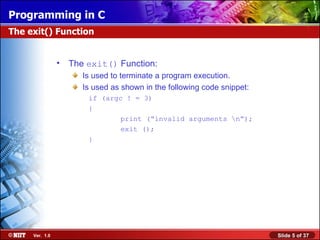
The  exit()  Function: Is used to terminate a program execution. Is used as shown in the following code snippet: if (argc ! = 3) { print (“invalid arguments \n”); exit (); } The exit() Function
The functions used for character input-output with files are: fgetc() : Reads one character at a time from a file, assigns it to a character variable, and moves the file pointer to the next character. It returns an integer type of value. fputc() : Writes one character at a time in a file. Character Input-Output with Files
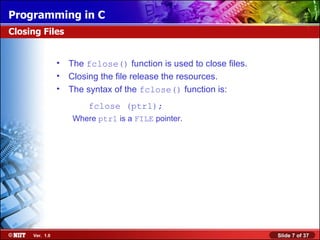
The  fclose()  function is used to close files. Closing the file release the resources. The syntax of the  fclose()  function is: fclose (ptr1); Where  ptr1  is a  FILE  pointer. Closing Files
What does the following code do? while((c = fgetc (fp)) != EOF) { if ((c >= ‘a’) && (c <= ‘z’)) c -= 32; fputc(c, stdout); } Write a program called append, which appends the contents of the first file to the second file specified on the command line. The program should also terminate in the following situations: 2 arguments are not specified on the command line. In this case, the following message must be displayed: Usage: append file1 file2 b. In case the file to be read cannot be opened, the following message may be displayed:   Cannot open input file Practice: 6.1
Solution: Practice: 6.1 (Contd.)
Point out the errors in the following code: a. /* this program creates the file emp.dat */ main() { FILE point; fopen(“w”, “emp.dat”); : fclose(emp.dat); } b. /* this program reads the file emp.dat */ main() { #include<stdio.h> file*ptr; ptr = fopen(emp.dat); : ptr= fclose(); } Practice: 6.2
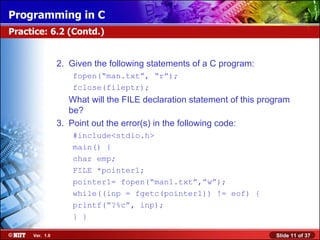
2. Given the following statements of a C program: fopen(“man.txt”, “r”); fclose(fileptr); What will the FILE declaration statement of this program be? 3. Point out the error(s) in the following code: #include<stdio.h> main() { char emp; FILE *pointer1; pointer1= fopen(“man1.txt”,”w”); while((inp = fgetc(pointer1)) != eof) { printf(“?%c”, inp); } } Practice: 6.2 (Contd.)
4. The  copy  command of DOS copies the contents of the first file named on the command line to the second file. Make appropriate changes to the  file-copy  program so that it works identical to the  copy  command. Practice: 6.2 (Contd.)
Solution: Practice: 6.2 (Contd.)
The functions used for line input and output with files are: fgets() :  Is used to read number of specified characters from a stream. Reads number of characters specified – 1 characters. Has the following syntax: fgets(str, 181, ptr1); Str  – Character array for storing the string 181  – Length of the string to be read ptr1-   FILE  pointer fputs() : Is used to output number of specified characters to a stream. Has the following syntax: fputs(str, ptr1); Str  – Character array to be written ptr1-   FILE  pointer Line Input and Output with Files
State whether True or False: Files created using the  fputs()  function will always have records of equal length. Consider the following C statement to input a record from a file called number-list: fgets (line, MAXLEN, file_ind); Given that  MAXLEN  is a  #define  and that all lines in the file number-list are 25 characters long what will the declaration statements for the parameters of  fgets()  be? 3. Assume that the file  number_list  contains the following records: 120 1305 Practice: 6.3
Given that the file has been opened and the first input statement executed is as follows: fgets(line, 3, file_ind); Which of the following will the array called line contain? a. 1 followed by \0. b. 12 followed by \0. c. 120 followed by \0. Match the following functions with the values they can return: a. fgets() 1.  NULL b. fgetc() 2.  EOF c. fopen() 3.  FILE  type pointer Practice: 6.3 (Contd.)
If a function can return more than one type of these values, state the conditions under which the values are returned. A utility called  hprint  has to be written in C, which will allow a user to display, on screen, any number of lines from the beginning of any file. The user has to specify both the number of lines and the file name on the command line in the following format: hprint number file-name The maximum line length is 80 characters. The program should handle possible errors. Practice: 6.3 (Contd.)
Solution: False.  fputs()  writes the contents of a string onto a file. So even if a string has size 100, but contains only 20 characters before a  \0 , only 20 characters get written. The declarations are:  #define MAXLEN 26/* macro definition outside main() */ char line[26]; b.  fgets()  will read either 3 - 1 characters , i.e. 2 characters, or until it comes across a newline character. Since the newline occurs after the third character, it will read in 2 characters from the first record. Practice: 6.3 (Contd.)
  4.  a.  1 b.  2  c.  1 and 3. ( NULL  in case file cannot be opened;  FILE  type pointer in case of successful open)  5.  The answer to this practice will be discussed in class. Work out your solution. Practice: 6.3 (Contd.)
The functions for formatted input and output with files are: fscanf() : Scans and formats input from a stream. Is similar to  scanf() . Has the following syntax: int fscanf(FILE *Stream, const char *format[,address,..]); fprintf(): Sends formatted output to a stream. Is similar to  printf() . Has the following syntax: int fprintf(FILE *Stream, const char *format[,address,..]); Formatted Input and Output with Files
Rewrite the following  printf()  statement using the function  fprintf() :   printf(“The test value is %d”, x); The following statement is written to input 2 fields from the keyboard:   scanf(“ %6s%d”, array, &num); It is rewritten as: fscanf(“%6s%d”, array, &num); This statement is erroneous. Give the correct  fscanf()  statement. Practice: 6.4
Write the appropriate statements to input fields from a record of a file called  alpha-doc , the first field being a  float  value, and the second field a string of size 10. In case the file does not have he required data, and the end-of-file occurs, the following message should be displayed:   End of file encountered. Practice: 6.4 (Contd.)
A utility called format is required to create a formatted report from a file called  manufact . This report is also to be stored on disk with suitable report headings. The name of the file to be created should be accepted during program execution. The program should also ask for a report title, which should appear after every 60 record of the file  manufact . The file  manufact  contains the following 3 fields separated by space.   Field  Size   Manufacturer Code    4   Name  20   Address 60 In the output file, the fields should be separated by one tab character. Practice: 6.4 (Contd.)
Solution: Practice: 6.4 (Contd.)
A file can be accessed using sequential access or random access. In sequential access, the file is always accessed from the beginning. In random access the file can be accessed arbitrarily from any position. Using Random Access in Files
The  fseek()  function: Is used for repositioning the current position on a file opened by the  fopen()  function. Has the following syntax: rtn = fseek (file-pointer, offset, from-where); Here: int rtn  is the value returned by  fseek()( 0 if successful and 1 if unsuccessful). file-pointer  is the pointer to the file. offset  is the number of bytes that the current position will shift on a file. from-where  is the position on the file from where the offset would be effective. The fseek () Function
The  rewind()  function: Is used to reposition the current position to the beginning of a file. Is useful for reinitializing the current position on a file. Has the following syntax: rewind(file-pointer); Here: file-pointer  is the pointer returned by the function  fopen() . After rewind() is executed, current position is always 1,  i.e. beginning of file. The rewind () Function
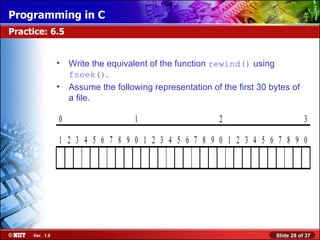
Write the equivalent of the function  rewind()  using  fseek() . Assume the following representation of the first 30 bytes of a file. Practice: 6.5
What will the current position on the file be after the following instructions are performed in sequence? a. fp = fopen (&quot;FOR DEMO.DAT&quot;, “r”); b. fseek(fp, 29L, 1); c.  rewind(fp); d. fgets(buffer, 20L, fp); e. fseek(fp, 4L, 1); Practice: 6.5 (Contd.)
Solution: 1. fseek(fp, 0L, 0); 2. The following current positions are relative to the beginning of the file: 1 30 1 20 24 Practice: 6.5 (Contd.)
Write a function to update the field balance in the file SAVINGS.DAT based on the following information. If balance is   Increment balance by < Rs 2000.00 Rs 150.50 Between Rs. 2000.00  Rs 200.00 and Rs 5000.00  <Rs 5000.00 Rs 300.40 The structure of the file  SAVINGS.DAT  is as follows. Account number Account holder's name Balance (5 bytes) (20 bytes) (5 bytes) Practice: 6.6
Solution: Practice: 6.6 (Contd.)
Go through the following program called  inpcopy.c  and its error listing on compilation and then correct the program: 1  #include <stdio.h> 2  main() 3  { 4  file fp; 5  char c; 6  7  fp = fopen(“file”, w); 8  9  while (( c = fgetc(stdin)) != EOF) 10  fputc(c,fp); 11 12  fclose(fp); 13 } Practice: 6.7
Error listing: &quot;inpcopy/.c&quot;, line 4: file undefined &quot;inpcopy/.c&quot;. line 4: syntax error &quot;inpcopy/.c&quot;, line 7: fp undefined &quot;inpcopy/.c&quot;, line 7: w undefined &quot;inpcopy/.c&quot;, line 7: learning: illegal pointer/integer combination, op = &quot;inpcopy/.c&quot;, line 9: c undefined Practice: 6.7 (Contd.)
Practice: 6.7 (Contd.) Solution: Work out for your answer. The solution will be discussed in the classroom session.
In this session, you learned that: C treats file input-output in much the same way as input-output from/to the terminal. A file needs to be opened to read or to write contents in it. The  fopen()  function is used to open a file. C allows a number of modes in which a file can be opened. When a file is opened by using the  fopen()  function, it returns a pointer that has to be stored in a FILE type pointer. This  FILE  type pointer is used to manipulate a file. The  exit()  function is used to terminate program execution. The  fgetc()  and  fputc()  functions are used for character input-output in files. After completing the I/O operations on the file, it should be closed to releases the resources. Summary
The  fclose()  function is used to close a file. The  fgets()  and  fputs()  functions are used for string input-output in files. The  fscanf()  and  fprintf()  functions are used for formatted input-output in files. In sequential access, the file is always accessed from the beginning. In random access the file can be accessed arbitrarily from any position. C provides the  fseek()  function for random access. The function  rewind()  is used to reposition the current position to the beginning of a file. Summary (Contd.)

C programming session 08

  • 1.
    In this session,you will learn to: Read and write contents in a file Use random access in files Objectives
  • 2.
    File inputs-outputs issimilar to input from/to the terminal. Files are treated as streams of characters. Function are available for single character as well as multiple character input-output from/to files. Reading and Writing Contents in a File
  • 3.
    A file needsto be opened to read or to write contents in it. The fopen() function is used to open a file. The fopen() function returns a pointer of the FILE type data. The fopen() function opens a file in a specific access mode. The various modes in which a file can be opened are: r - Read-Only Mode w - Write-Only Mode a - Append Mode r+ - Read + Write Mode w+ - Write + Read Mode a+ - Read + Append Mode Opening Files
  • 4.
    The FILE type pointer is: Returned when a file is opened by using the fopen() function. Used to manipulate a file. Used to check whether a file has opened successfully. The stdin , stdout , and stderr FILE pointers refer to the standard input device (keyboard) and standard output and error device (VDU). FILE Type Pointers
  • 5.
    The exit() Function: Is used to terminate a program execution. Is used as shown in the following code snippet: if (argc ! = 3) { print (“invalid arguments \n”); exit (); } The exit() Function
  • 6.
    The functions usedfor character input-output with files are: fgetc() : Reads one character at a time from a file, assigns it to a character variable, and moves the file pointer to the next character. It returns an integer type of value. fputc() : Writes one character at a time in a file. Character Input-Output with Files
  • 7.
    The fclose() function is used to close files. Closing the file release the resources. The syntax of the fclose() function is: fclose (ptr1); Where ptr1 is a FILE pointer. Closing Files
  • 8.
    What does thefollowing code do? while((c = fgetc (fp)) != EOF) { if ((c >= ‘a’) && (c <= ‘z’)) c -= 32; fputc(c, stdout); } Write a program called append, which appends the contents of the first file to the second file specified on the command line. The program should also terminate in the following situations: 2 arguments are not specified on the command line. In this case, the following message must be displayed: Usage: append file1 file2 b. In case the file to be read cannot be opened, the following message may be displayed: Cannot open input file Practice: 6.1
  • 9.
  • 10.
    Point out theerrors in the following code: a. /* this program creates the file emp.dat */ main() { FILE point; fopen(“w”, “emp.dat”); : fclose(emp.dat); } b. /* this program reads the file emp.dat */ main() { #include<stdio.h> file*ptr; ptr = fopen(emp.dat); : ptr= fclose(); } Practice: 6.2
  • 11.
    2. Given thefollowing statements of a C program: fopen(“man.txt”, “r”); fclose(fileptr); What will the FILE declaration statement of this program be? 3. Point out the error(s) in the following code: #include<stdio.h> main() { char emp; FILE *pointer1; pointer1= fopen(“man1.txt”,”w”); while((inp = fgetc(pointer1)) != eof) { printf(“?%c”, inp); } } Practice: 6.2 (Contd.)
  • 12.
    4. The copy command of DOS copies the contents of the first file named on the command line to the second file. Make appropriate changes to the file-copy program so that it works identical to the copy command. Practice: 6.2 (Contd.)
  • 13.
  • 14.
    The functions usedfor line input and output with files are: fgets() : Is used to read number of specified characters from a stream. Reads number of characters specified – 1 characters. Has the following syntax: fgets(str, 181, ptr1); Str – Character array for storing the string 181 – Length of the string to be read ptr1- FILE pointer fputs() : Is used to output number of specified characters to a stream. Has the following syntax: fputs(str, ptr1); Str – Character array to be written ptr1- FILE pointer Line Input and Output with Files
  • 15.
    State whether Trueor False: Files created using the fputs() function will always have records of equal length. Consider the following C statement to input a record from a file called number-list: fgets (line, MAXLEN, file_ind); Given that MAXLEN is a #define and that all lines in the file number-list are 25 characters long what will the declaration statements for the parameters of fgets() be? 3. Assume that the file number_list contains the following records: 120 1305 Practice: 6.3
  • 16.
    Given that thefile has been opened and the first input statement executed is as follows: fgets(line, 3, file_ind); Which of the following will the array called line contain? a. 1 followed by \0. b. 12 followed by \0. c. 120 followed by \0. Match the following functions with the values they can return: a. fgets() 1. NULL b. fgetc() 2. EOF c. fopen() 3. FILE type pointer Practice: 6.3 (Contd.)
  • 17.
    If a functioncan return more than one type of these values, state the conditions under which the values are returned. A utility called hprint has to be written in C, which will allow a user to display, on screen, any number of lines from the beginning of any file. The user has to specify both the number of lines and the file name on the command line in the following format: hprint number file-name The maximum line length is 80 characters. The program should handle possible errors. Practice: 6.3 (Contd.)
  • 18.
    Solution: False. fputs() writes the contents of a string onto a file. So even if a string has size 100, but contains only 20 characters before a \0 , only 20 characters get written. The declarations are: #define MAXLEN 26/* macro definition outside main() */ char line[26]; b. fgets() will read either 3 - 1 characters , i.e. 2 characters, or until it comes across a newline character. Since the newline occurs after the third character, it will read in 2 characters from the first record. Practice: 6.3 (Contd.)
  • 19.
    4. a. 1 b. 2 c. 1 and 3. ( NULL in case file cannot be opened; FILE type pointer in case of successful open) 5. The answer to this practice will be discussed in class. Work out your solution. Practice: 6.3 (Contd.)
  • 20.
    The functions forformatted input and output with files are: fscanf() : Scans and formats input from a stream. Is similar to scanf() . Has the following syntax: int fscanf(FILE *Stream, const char *format[,address,..]); fprintf(): Sends formatted output to a stream. Is similar to printf() . Has the following syntax: int fprintf(FILE *Stream, const char *format[,address,..]); Formatted Input and Output with Files
  • 21.
    Rewrite the following printf() statement using the function fprintf() : printf(“The test value is %d”, x); The following statement is written to input 2 fields from the keyboard: scanf(“ %6s%d”, array, &num); It is rewritten as: fscanf(“%6s%d”, array, &num); This statement is erroneous. Give the correct fscanf() statement. Practice: 6.4
  • 22.
    Write the appropriatestatements to input fields from a record of a file called alpha-doc , the first field being a float value, and the second field a string of size 10. In case the file does not have he required data, and the end-of-file occurs, the following message should be displayed: End of file encountered. Practice: 6.4 (Contd.)
  • 23.
    A utility calledformat is required to create a formatted report from a file called manufact . This report is also to be stored on disk with suitable report headings. The name of the file to be created should be accepted during program execution. The program should also ask for a report title, which should appear after every 60 record of the file manufact . The file manufact contains the following 3 fields separated by space. Field Size Manufacturer Code 4 Name 20 Address 60 In the output file, the fields should be separated by one tab character. Practice: 6.4 (Contd.)
  • 24.
  • 25.
    A file canbe accessed using sequential access or random access. In sequential access, the file is always accessed from the beginning. In random access the file can be accessed arbitrarily from any position. Using Random Access in Files
  • 26.
    The fseek() function: Is used for repositioning the current position on a file opened by the fopen() function. Has the following syntax: rtn = fseek (file-pointer, offset, from-where); Here: int rtn is the value returned by fseek()( 0 if successful and 1 if unsuccessful). file-pointer is the pointer to the file. offset is the number of bytes that the current position will shift on a file. from-where is the position on the file from where the offset would be effective. The fseek () Function
  • 27.
    The rewind() function: Is used to reposition the current position to the beginning of a file. Is useful for reinitializing the current position on a file. Has the following syntax: rewind(file-pointer); Here: file-pointer is the pointer returned by the function fopen() . After rewind() is executed, current position is always 1, i.e. beginning of file. The rewind () Function
  • 28.
    Write the equivalentof the function rewind() using fseek() . Assume the following representation of the first 30 bytes of a file. Practice: 6.5
  • 29.
    What will thecurrent position on the file be after the following instructions are performed in sequence? a. fp = fopen (&quot;FOR DEMO.DAT&quot;, “r”); b. fseek(fp, 29L, 1); c. rewind(fp); d. fgets(buffer, 20L, fp); e. fseek(fp, 4L, 1); Practice: 6.5 (Contd.)
  • 30.
    Solution: 1. fseek(fp,0L, 0); 2. The following current positions are relative to the beginning of the file: 1 30 1 20 24 Practice: 6.5 (Contd.)
  • 31.
    Write a functionto update the field balance in the file SAVINGS.DAT based on the following information. If balance is Increment balance by < Rs 2000.00 Rs 150.50 Between Rs. 2000.00 Rs 200.00 and Rs 5000.00 <Rs 5000.00 Rs 300.40 The structure of the file SAVINGS.DAT is as follows. Account number Account holder's name Balance (5 bytes) (20 bytes) (5 bytes) Practice: 6.6
  • 32.
  • 33.
    Go through thefollowing program called inpcopy.c and its error listing on compilation and then correct the program: 1 #include <stdio.h> 2 main() 3 { 4 file fp; 5 char c; 6 7 fp = fopen(“file”, w); 8 9 while (( c = fgetc(stdin)) != EOF) 10 fputc(c,fp); 11 12 fclose(fp); 13 } Practice: 6.7
  • 34.
    Error listing: &quot;inpcopy/.c&quot;,line 4: file undefined &quot;inpcopy/.c&quot;. line 4: syntax error &quot;inpcopy/.c&quot;, line 7: fp undefined &quot;inpcopy/.c&quot;, line 7: w undefined &quot;inpcopy/.c&quot;, line 7: learning: illegal pointer/integer combination, op = &quot;inpcopy/.c&quot;, line 9: c undefined Practice: 6.7 (Contd.)
  • 35.
    Practice: 6.7 (Contd.)Solution: Work out for your answer. The solution will be discussed in the classroom session.
  • 36.
    In this session,you learned that: C treats file input-output in much the same way as input-output from/to the terminal. A file needs to be opened to read or to write contents in it. The fopen() function is used to open a file. C allows a number of modes in which a file can be opened. When a file is opened by using the fopen() function, it returns a pointer that has to be stored in a FILE type pointer. This FILE type pointer is used to manipulate a file. The exit() function is used to terminate program execution. The fgetc() and fputc() functions are used for character input-output in files. After completing the I/O operations on the file, it should be closed to releases the resources. Summary
  • 37.
    The fclose() function is used to close a file. The fgets() and fputs() functions are used for string input-output in files. The fscanf() and fprintf() functions are used for formatted input-output in files. In sequential access, the file is always accessed from the beginning. In random access the file can be accessed arbitrarily from any position. C provides the fseek() function for random access. The function rewind() is used to reposition the current position to the beginning of a file. Summary (Contd.)

Editor's Notes

  • #2 Begin the session by explaining the objectives of the session.
  • #3 Discuss about streams with the students.
  • #4 Discusses various modes for opening a file. Compare the modes and discuss the situations where a specific mode should be chosen.
  • #5 Discuss the use of FILE type pointer to check whether a file has opened successfully. Also, discuss the situations where a FILE type pointer cannot open a file for read or write mode.
  • #7 Discuss the student about the ways to determine the end of file when using the fgetc() function.
  • #9 Use this slide to test the student’s understanding on reading and writing contents in a file.
  • #11 Use this slide to test the student’s understanding on reading and writing contents in a file.
  • #15 Discuss the student about the ways to determine the end of file when using the fgets() function.
  • #16 Use this slide to test the student’s understanding on reading and writing contents in a file.
  • #21 Discuss the need for using the formatted input-output in a file.
  • #22 Use this slide to test the student’s understanding on formatted input-output in a file.
  • #26 Discuss sequential access and random access with their advantages and limitations.
  • #29 Use this slide to test the student’s understanding on random access in a file.
  • #32 Use this slide to test the student’s understanding on reading/writing contents in a file.
  • #34 Use this slide to test the student’s understanding on reading/writing contents in a file.
  • #37 Use this and the next 2 slides for summarizing the session.