Chapter 07 – Conversion and
Comparison Instructions
Sections: 7-4 through 7-6
Data Comparison
Instructions
 Data compare instructions are input
instructions.
 Data compare instructions compare the
data, (or value), stored in two words (or
registers) and makes a decision based
upon those values and the type of
comparison being performed.
Comparison Instructions
 ControlLogix
 Equal (EQU)
 Not Equal (NEQ)
 Less Than (LES)
 Less Than or Equal To (LEQ)
 Greater Than (GRT)
 Greater Than or Equal To (GEQ)
 Limit Test (LIM)
 Compare Expression (CMP) (Not this course)
 Masked Equal (MEQ) (Not this course)
Comparison Instruction
Parameters
 Comparison instructions are word level
instructions of data type SINT, INT, DINT,
REAL or STRING. The basic instructions
have two parameters:
 Source A
 Source B
Source A
Source B
Instruction Parameter
Rules
 Comparison instruction parameters have
several rules:
 Source A and Source B can be word level tags of
data type SINT, INT, DINT, REAL or STRING.
 Source A can be a word level tag and Source B
can be a program constant.
 Source A and Source B cannot both be program
constants
Two word level
tags
A word level tag
And a constant
Two constants
Illegal
Equal (EQU)
 The EQU instruction is an input instruction
that compares the value stored in Source A
to the value stored in Source B. When the
value of Source A is equal to the value of
Source B the instruction is true, otherwise it is
false.
When the program is running,
the value stored in the tag will
be displayed in this field.
Not Equal (NEQ)
 The NEQ instruction is an input instruction
that compares the value stored in Source A
to the value stored in Source B. When the
value of Source A is not equal to the value
stored in Source B the instruction is true,
otherwise it is false.
When the program is running,
the value stored in the tag will
be displayed in this field.
Greater Than (GRT)
 The GRT instruction is an input instruction
that compares the value stored in Source A
to the value stored in Source B. When the
value of Source A is greater than the value of
Source B the instruction is true, otherwise it is
false.
When the program is running,
the value stored in the tag will
be displayed in this field.
Less Than (LES)
 The LES instruction is an input instruction
that compares the value stored in Source A
to the value stored in Source B. When the
value of Source A is Less Than the value of
Source B the instruction is true, otherwise it is
false.
When the program is running,
the value stored in the tag will
be displayed in this field.
Greater Than or Equal
To (GEQ)
 The GEQ instruction is an input instruction
that compares the value stored in Source A
to the value stored in Source B. When the
value of Source A is greater than or equal to
the value of Source B the instruction is true,
otherwise it is false.
When the program is running,
the value stored in the tag will
be displayed in this field.
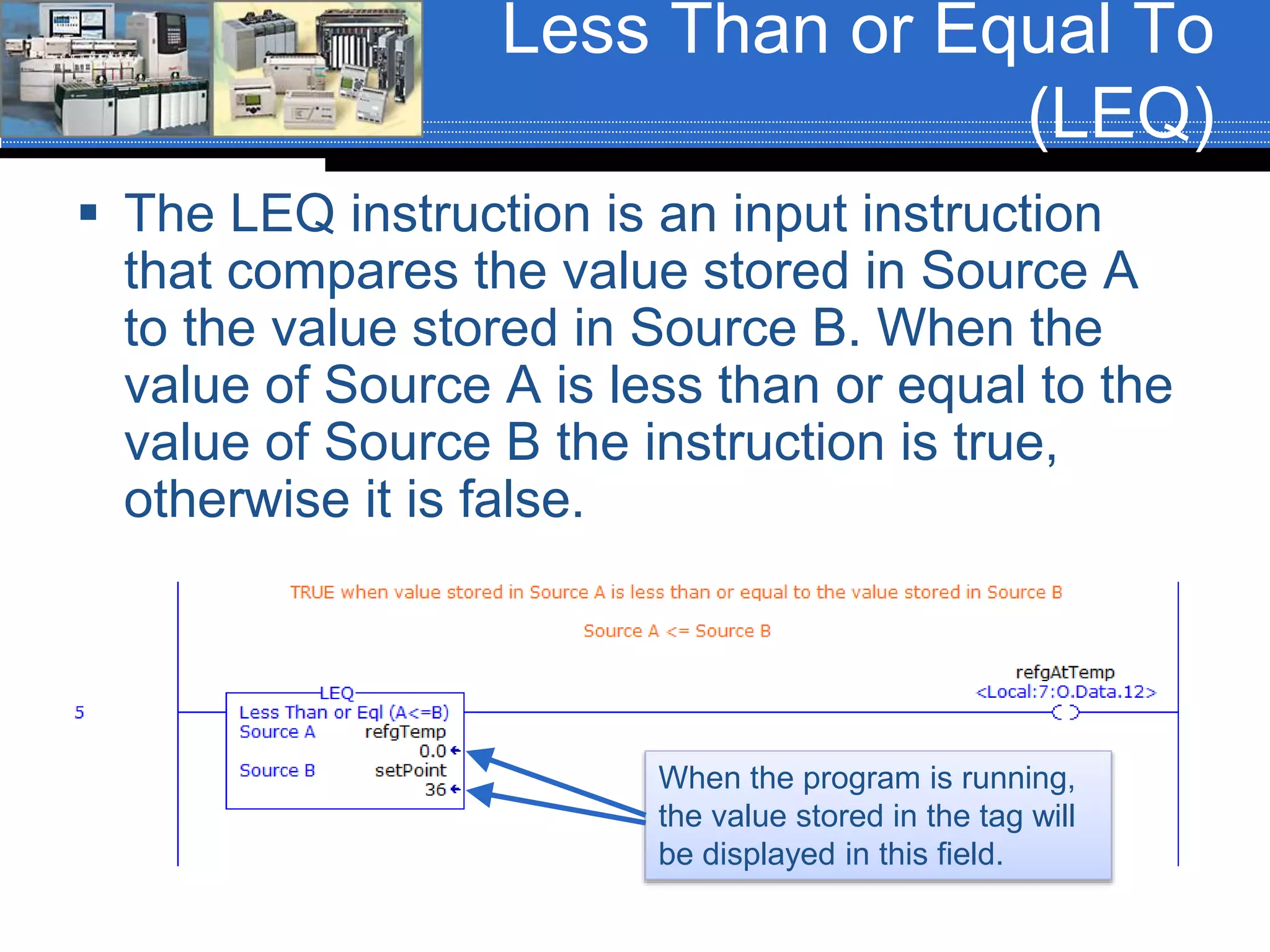
Less Than or Equal To
(LEQ)
 The LEQ instruction is an input instruction
that compares the value stored in Source A
to the value stored in Source B. When the
value of Source A is less than or equal to the
value of Source B the instruction is true,
otherwise it is false.
When the program is running,
the value stored in the tag will
be displayed in this field.
Limit Test (LIM)
Instruction
 The Limit Test instruction is an input instruction that tests for
values that are inside of, or outside of, a specific range. The
output of the instruction is dependent upon how the limits are
set.
 The LIM instruction has three parameters:
 Low Limit (Low Lim)
 Test
 High Limit (High Lim)
LIM Parameter Rules
 There are several rules associated with
entering parameter valuves into the LIM
instruction:
 The parameter values can be word level tags
of data type SINT, INT, DINT, REAL, or
program constants with the following
restrictions:
 If the Test parameter is a program constant, than
the High Limit and Low Limit parameters MUST be
word level tags.
 If the test parameter is a word level tag, than the
Low Limit and High Limit parameters can be a
program constant, a word level tag or a
combination thereof.
LIM Instruction
Operation
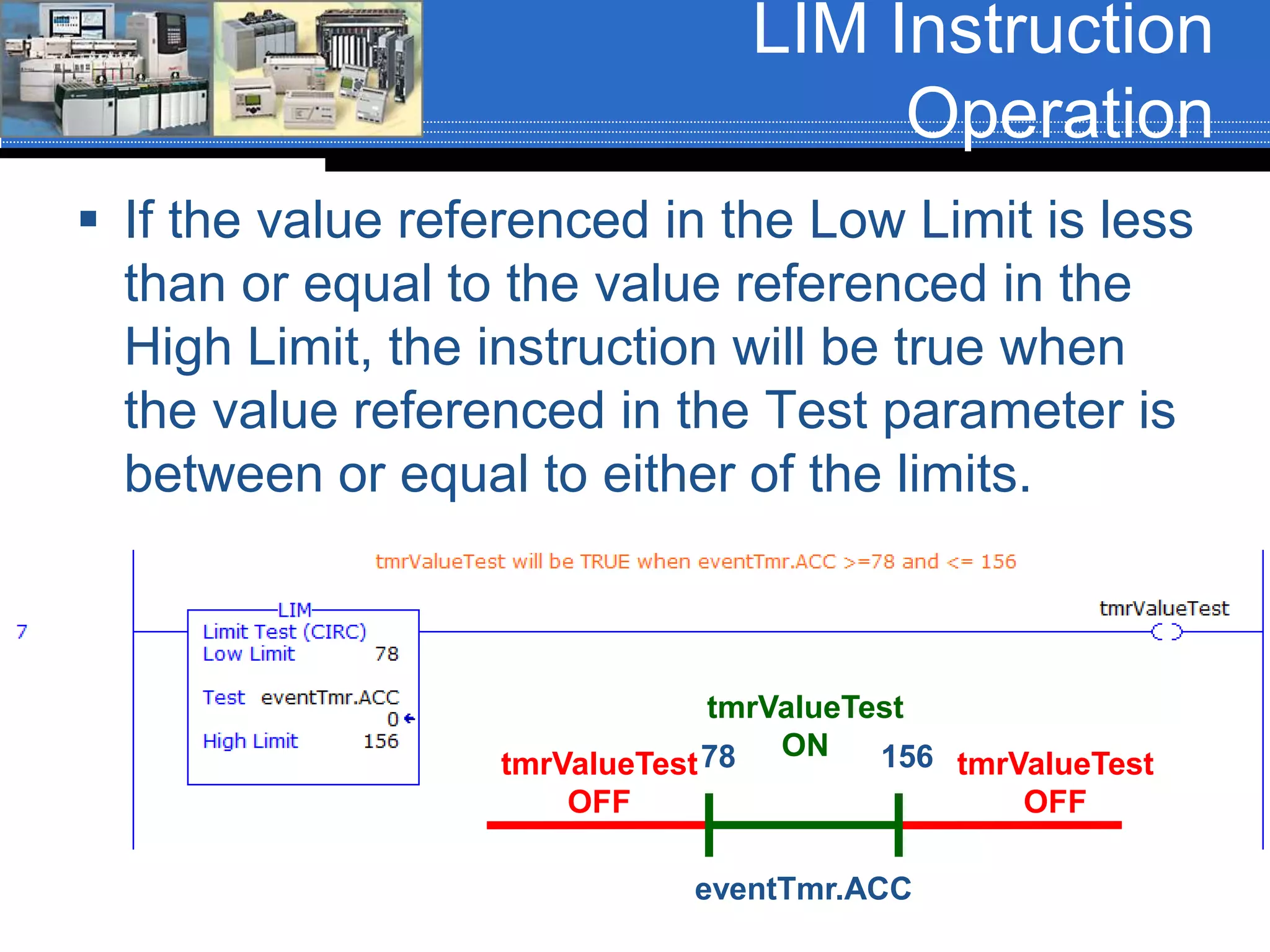
 If the value referenced in the Low Limit is less
than or equal to the value referenced in the
High Limit, the instruction will be true when
the value referenced in the Test parameter is
between or equal to either of the limits.
78 156
eventTmr.ACC
tmrValueTest
ON
tmrValueTest
OFF
tmrValueTest
OFF
LIM Instruction
Operation
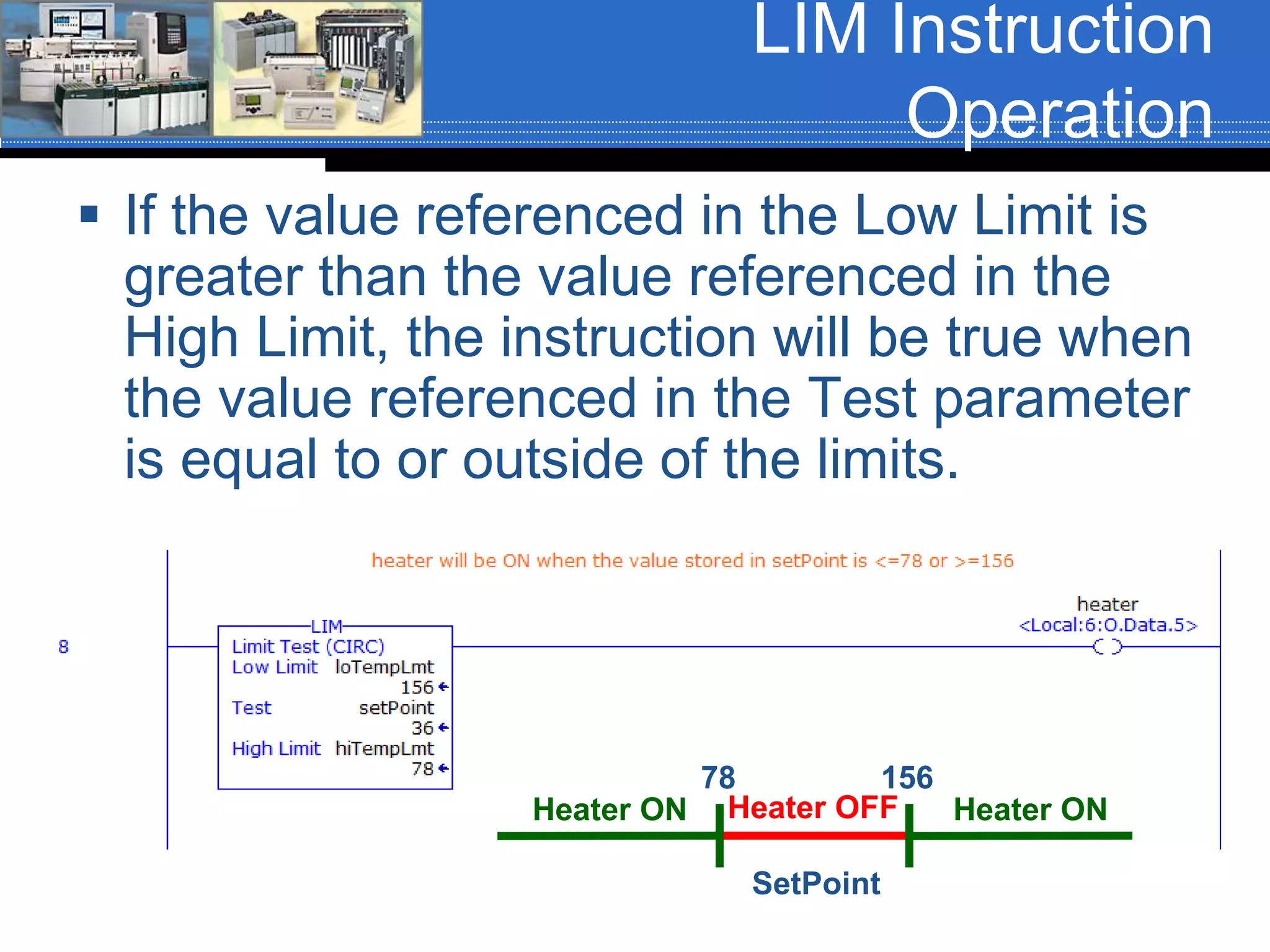
 If the value referenced in the Low Limit is
greater than the value referenced in the
High Limit, the instruction will be true when
the value referenced in the Test parameter
is equal to or outside of the limits.
SetPoint
78 156
Heater OFFHeater ON Heater ON
Performing Comparison
Windows
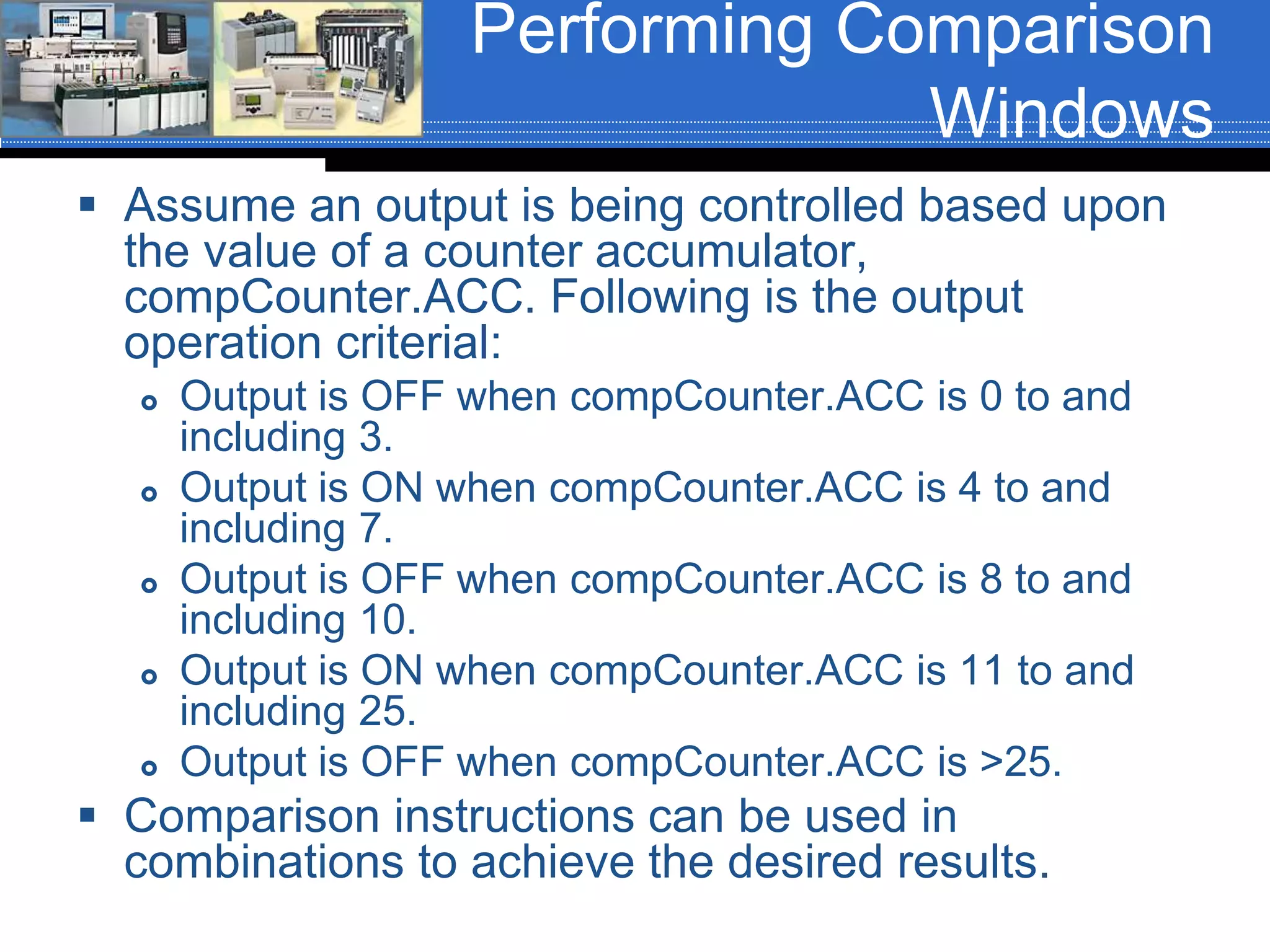
 Assume an output is being controlled based upon
the value of a counter accumulator,
compCounter.ACC. Following is the output
operation criterial:
 Output is OFF when compCounter.ACC is 0 to and
including 3.
 Output is ON when compCounter.ACC is 4 to and
including 7.
 Output is OFF when compCounter.ACC is 8 to and
including 10.
 Output is ON when compCounter.ACC is 11 to and
including 25.
 Output is OFF when compCounter.ACC is >25.
 Comparison instructions can be used in
combinations to achieve the desired results.
Performing Comparison
Windows
Siemens Comparison
Instructions
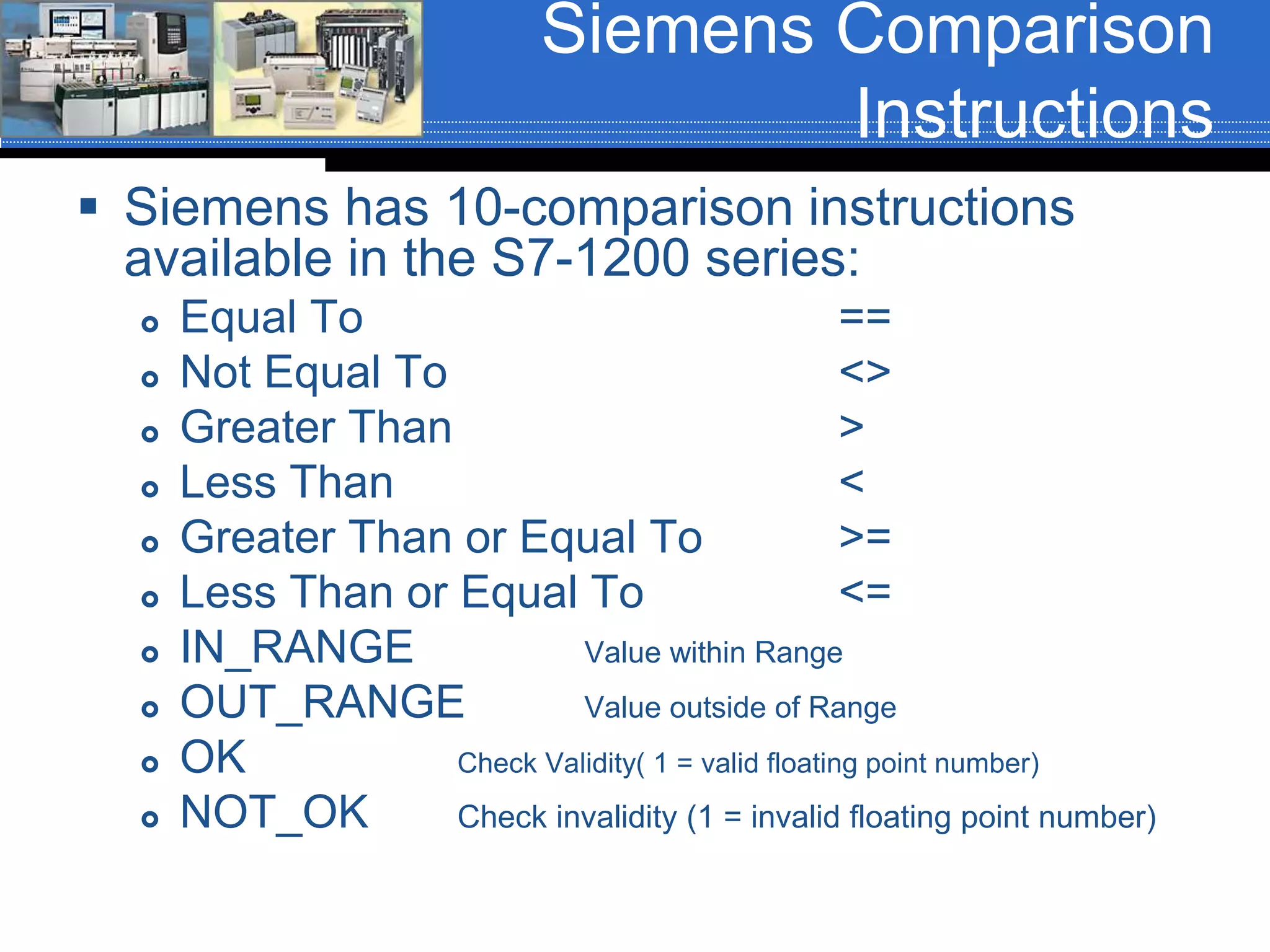
 Siemens has 10-comparison instructions
available in the S7-1200 series:
 Equal To ==
 Not Equal To <>
 Greater Than >
 Less Than <
 Greater Than or Equal To >=
 Less Than or Equal To <=
 IN_RANGE Value within Range
 OUT_RANGE Value outside of Range
 OK Check Validity( 1 = valid floating point number)
 NOT_OK Check invalidity (1 = invalid floating point number)
Siemens Comparison
Instruction Examples
 Siemens comparison instructions are basically
contacts. The instruction is assigned a data type and
the tags that are compared must be of that data type.
 The equal (==) instruction shown will be true when the
value stored in the tag ‘convyr01CntACC’ is equal to
the value stored in the tag ‘convyr01CntACC’. Both
tags are of data type DINT.
Siemens Comparison
Instruction Examples
 Siemens comparison instructions are basically
contacts. The instruction is assigned a data type and
the tags that are compared must be of that data type.
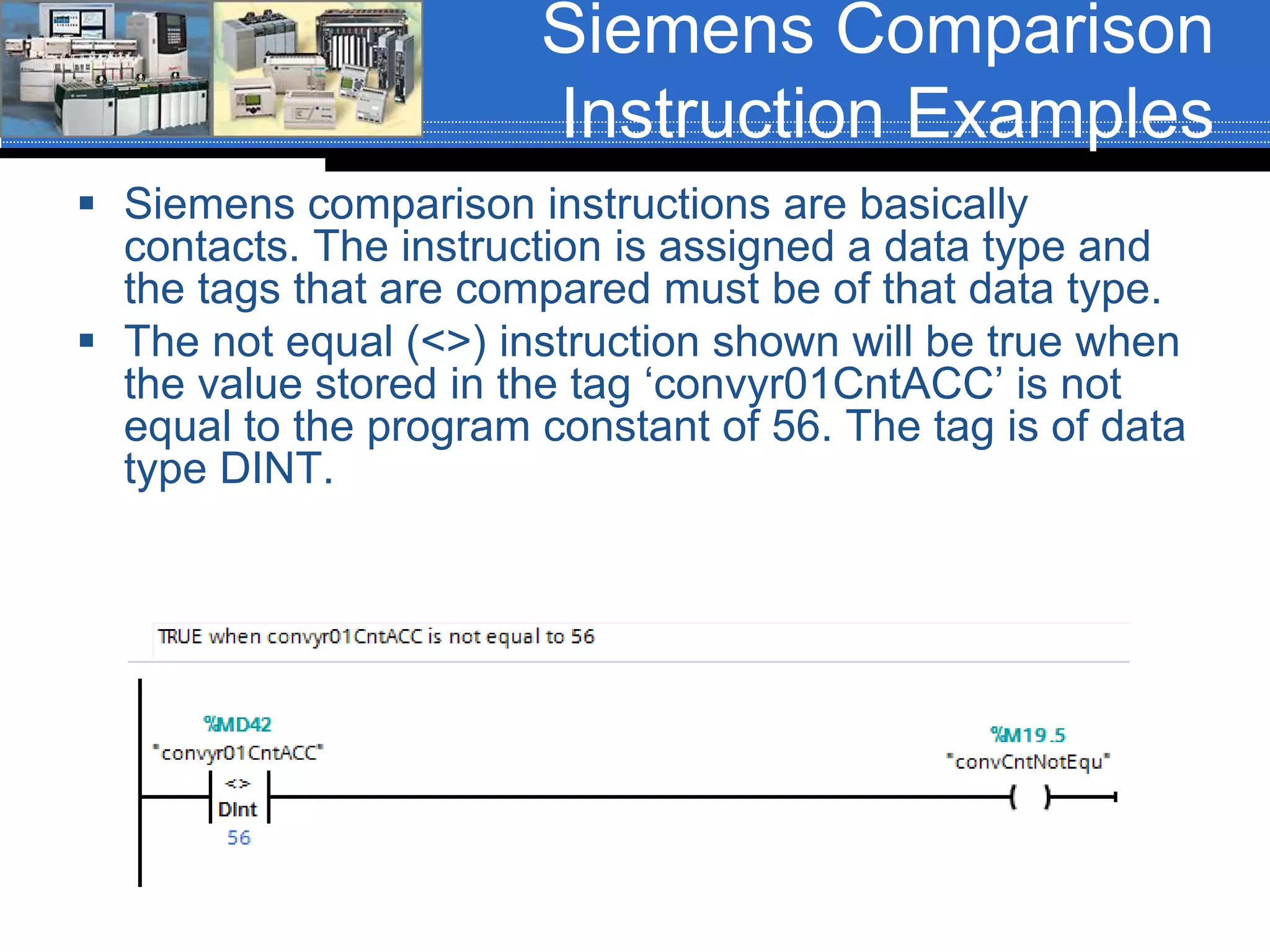
 The not equal (<>) instruction shown will be true when
the value stored in the tag ‘convyr01CntACC’ is not
equal to the program constant of 56. The tag is of data
type DINT.
Siemens Comparison
Instruction Examples
 Siemens comparison instructions are basically
contacts. The instruction is assigned a data type and
the tags that are compared must be of that data type.
 The greater than (>) instruction shown will be true
when the value stored in the tag ‘setPoint’ is greater
than the value stored in the tag ‘furnaceTemp’. Both
tags are of data type INT.
Siemens Comparison
Instruction Examples
 Siemens comparison instructions are basically
contacts. The instruction is assigned a data type and
the tags that are compared must be of that data type.
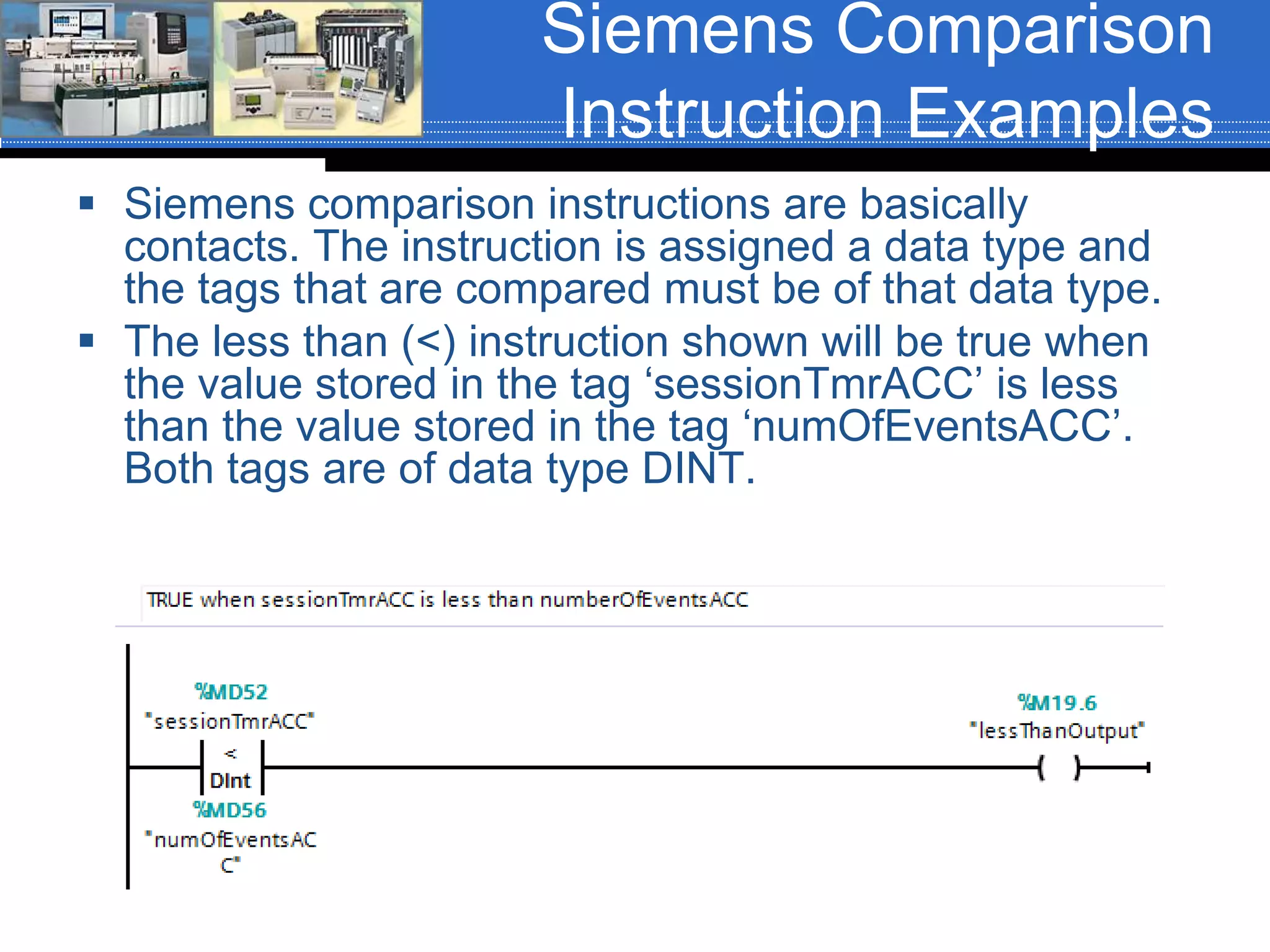
 The less than (<) instruction shown will be true when
the value stored in the tag ‘sessionTmrACC’ is less
than the value stored in the tag ‘numOfEventsACC’.
Both tags are of data type DINT.
Siemens Comparison
Instruction Examples
 Siemens comparison instructions are basically
contacts. The instruction is assigned a data type and
the tags that are compared must be of that data type.
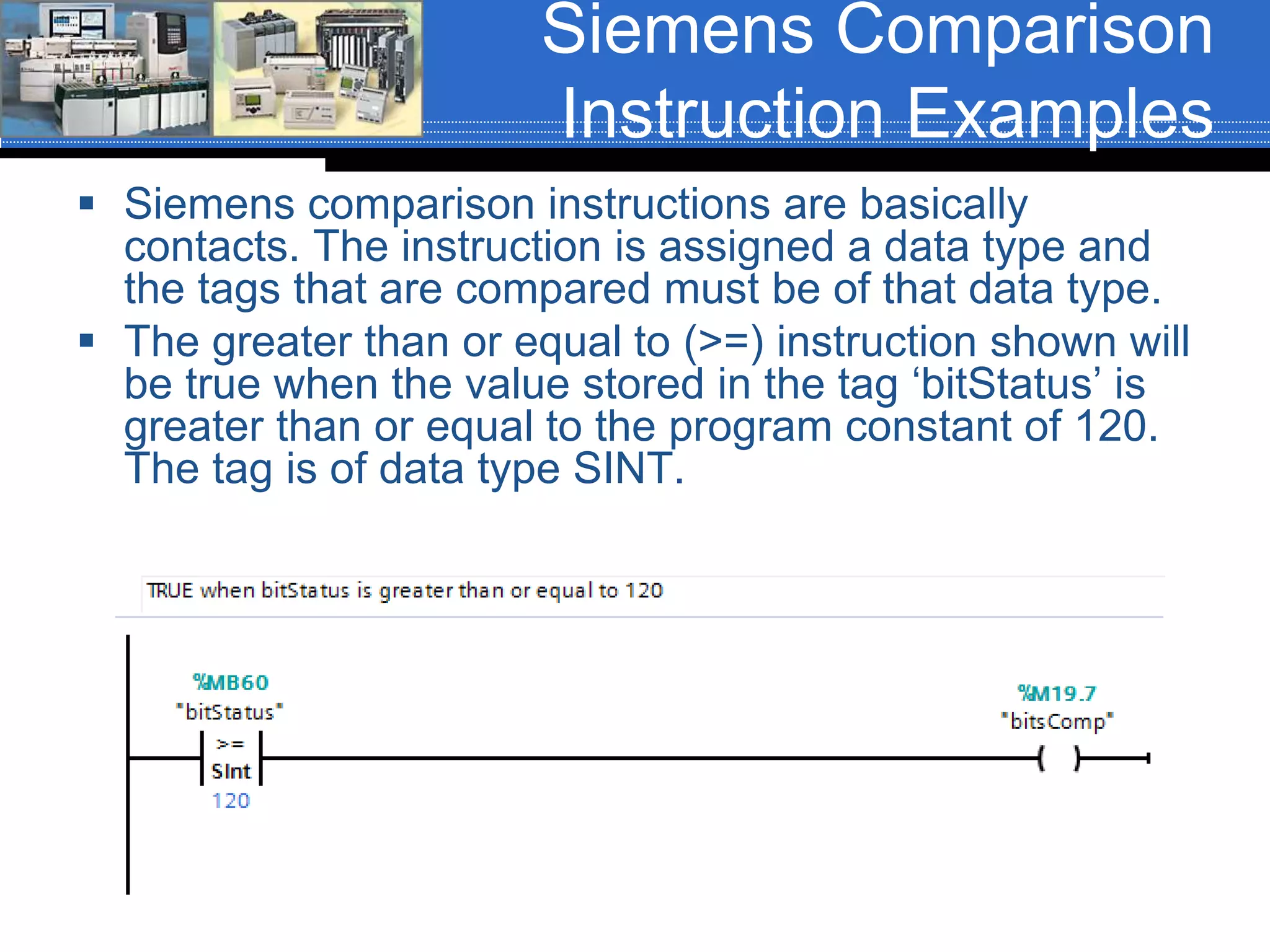
 The greater than or equal to (>=) instruction shown will
be true when the value stored in the tag ‘bitStatus’ is
greater than or equal to the program constant of 120.
The tag is of data type SINT.
Siemens Comparison
Instruction Examples
 Siemens comparison instructions are basically
contacts. The instruction is assigned a data type and
the tags that are compared must be of that data type.
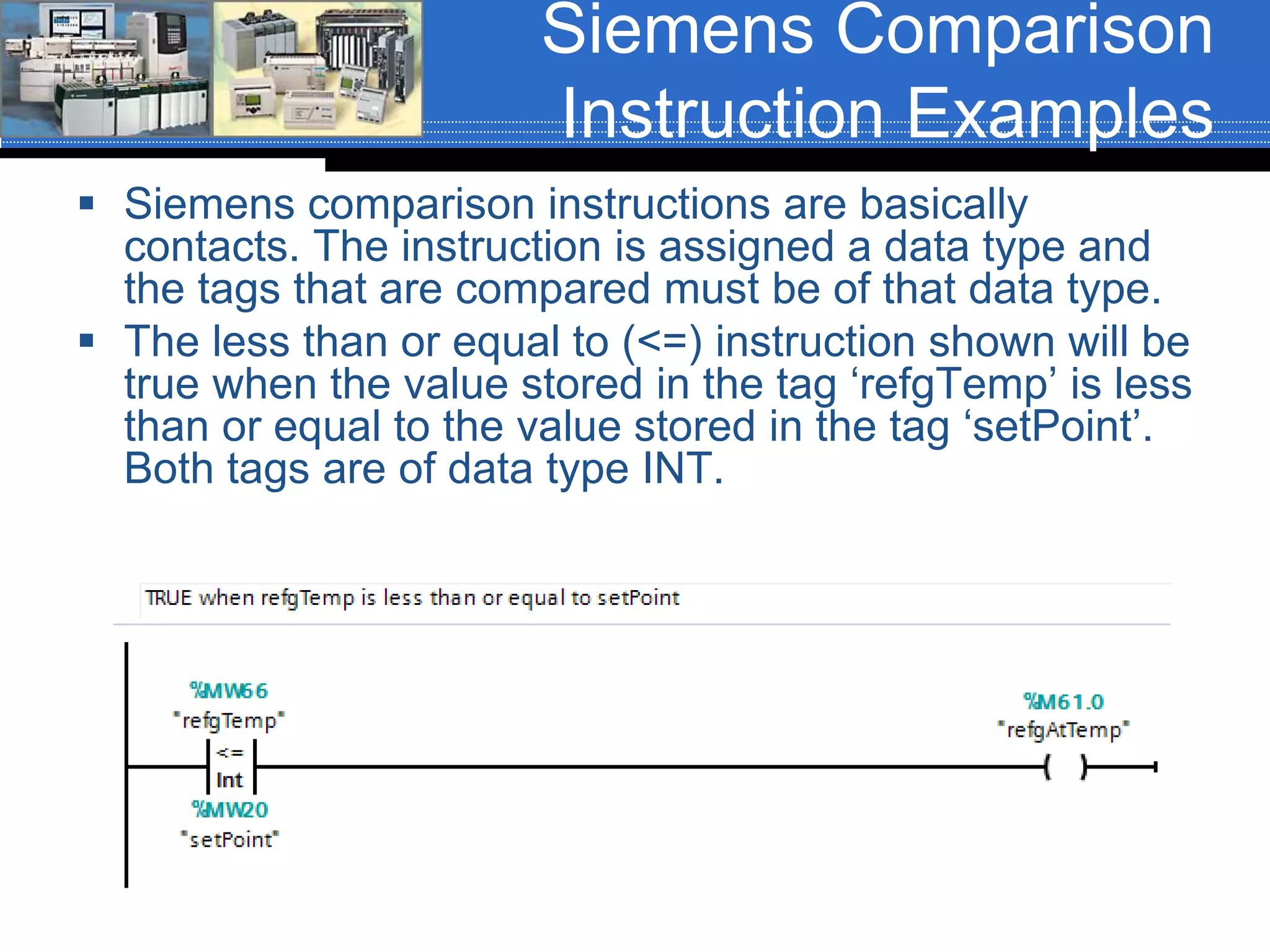
 The less than or equal to (<=) instruction shown will be
true when the value stored in the tag ‘refgTemp’ is less
than or equal to the value stored in the tag ‘setPoint’.
Both tags are of data type INT.
Siemens Comparison
Instruction Examples
 Siemens IN_RANGE comparison is equivalent to the
AB LIM instruction. The instruction is assigned a data
type and the tags that are compared must be of that
data type.
 The IN_RANGE instruction shown will be true when
the value stored in the tag ‘eventTmrACC’ is >= 78
and <= 156. Both tags are of data type DINT.
Siemens Comparison
Instruction Examples
 Siemens OUT_RANGE comparison is equivalent to the AB
LIM instruction. The instruction is assigned a data type and
the tags that are compared must be of that data type.
 The OUT_RANGE instruction shown will be true when the
value stored in the tag ‘setPoint’ is <= the value stored in the
tag ‘loTempLmt and >= to the value stored in the tag
‘hiTempLmt’. Both tags are of data type INT.
Siemens Comparison
Instruction Examples
 Siemens comparison instructions are basically
contacts. The instruction is assigned a data type and
the tags that are compared must be of that data type.
 The OK instruction shown will be true when the value
stored in the tag ‘temperature’ is a valid floating point
number.
Siemens Comparison
Instruction Examples
 Siemens comparison instructions are basically
contacts. The instruction is assigned a data type and
the tags that are compared must be of that data type.
 The NOT_OK instruction shown will be true when the
value stored in the tag ‘temperature’ is not a valid
floating point number.
CCW Comparison
Instructions
 Connected Components Workbench has
6-comparison instructions:
 Equal To =
 Not Equal To <>
 Greater Than >
 Less Than <
 Greater Than or Equal To >=
 Less Than or Equal To <=
CCW Comparison
Instruction Examples
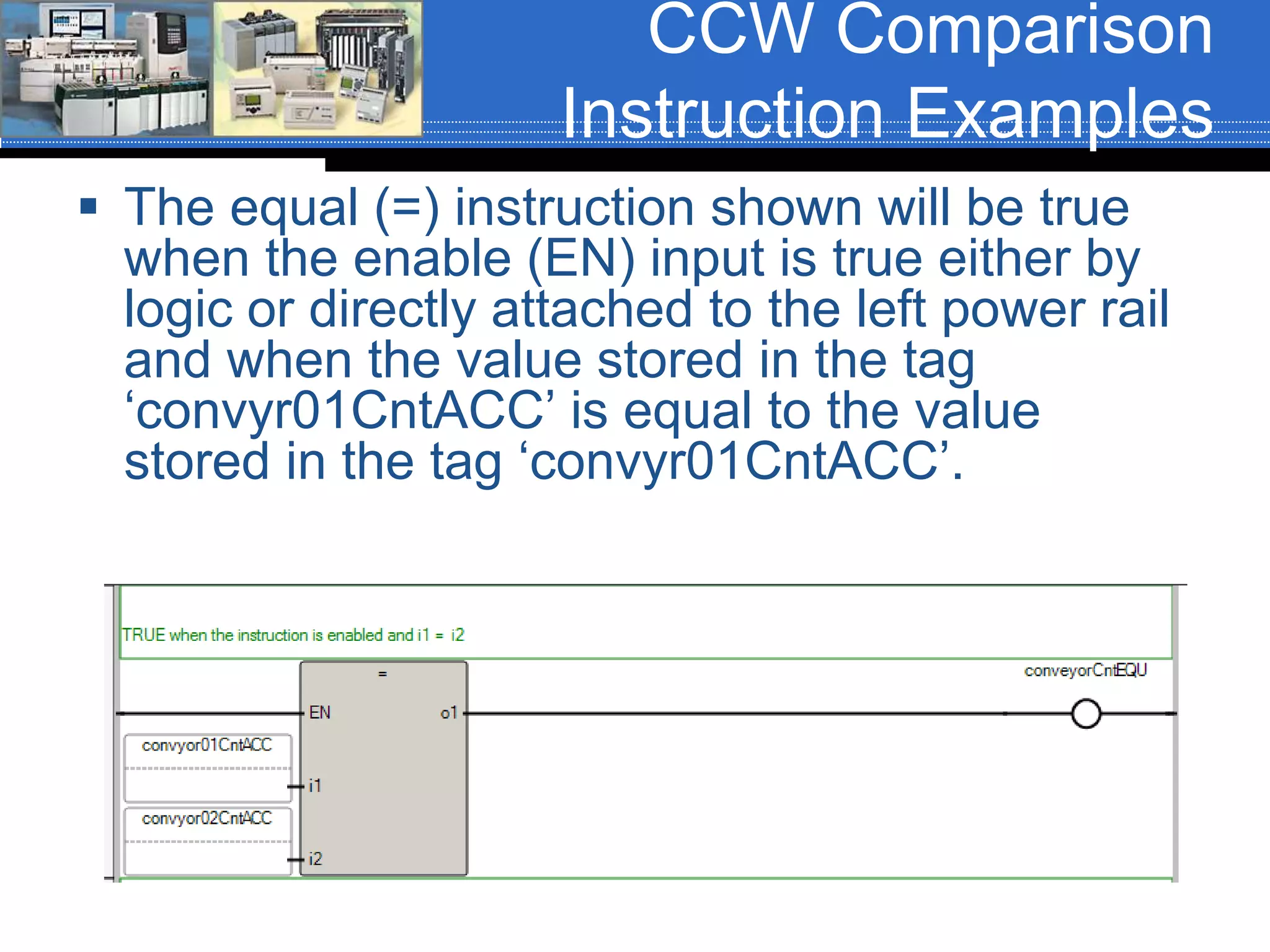
 The equal (=) instruction shown will be true
when the enable (EN) input is true either by
logic or directly attached to the left power rail
and when the value stored in the tag
‘convyr01CntACC’ is equal to the value
stored in the tag ‘convyr01CntACC’.
CCW Comparison
Instruction Examples
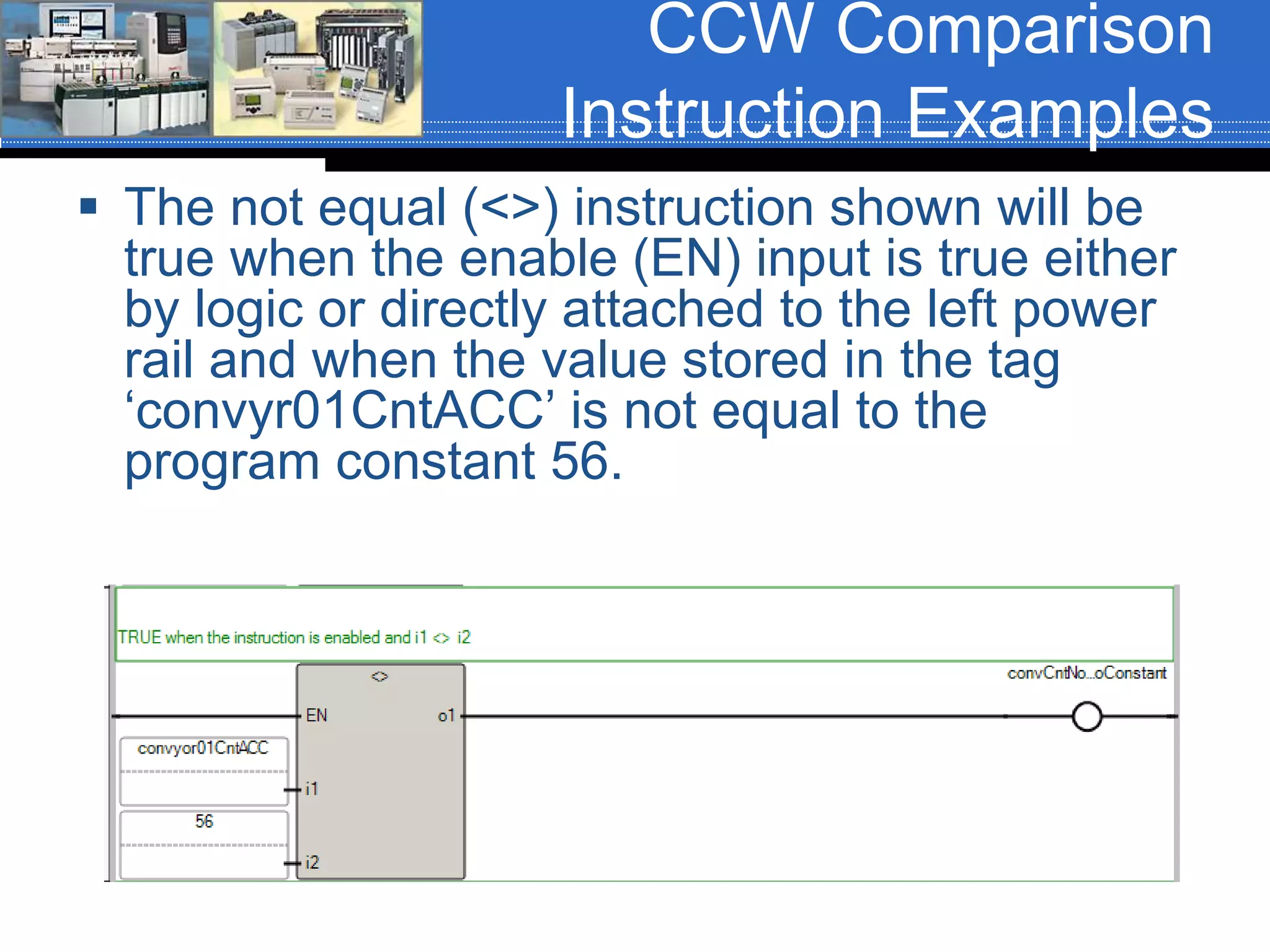
 The not equal (<>) instruction shown will be
true when the enable (EN) input is true either
by logic or directly attached to the left power
rail and when the value stored in the tag
‘convyr01CntACC’ is not equal to the
program constant 56.
CCW Comparison
Instruction Examples
 The greater than (>) instruction shown will be
true when the enable (EN) input is true either
by logic or directly attached to the left power
rail and when the value stored in the tag
‘setPoint’ is greater than the value stored in
the tag ‘furnaceTemp’.
CCW Comparison
Instruction Examples
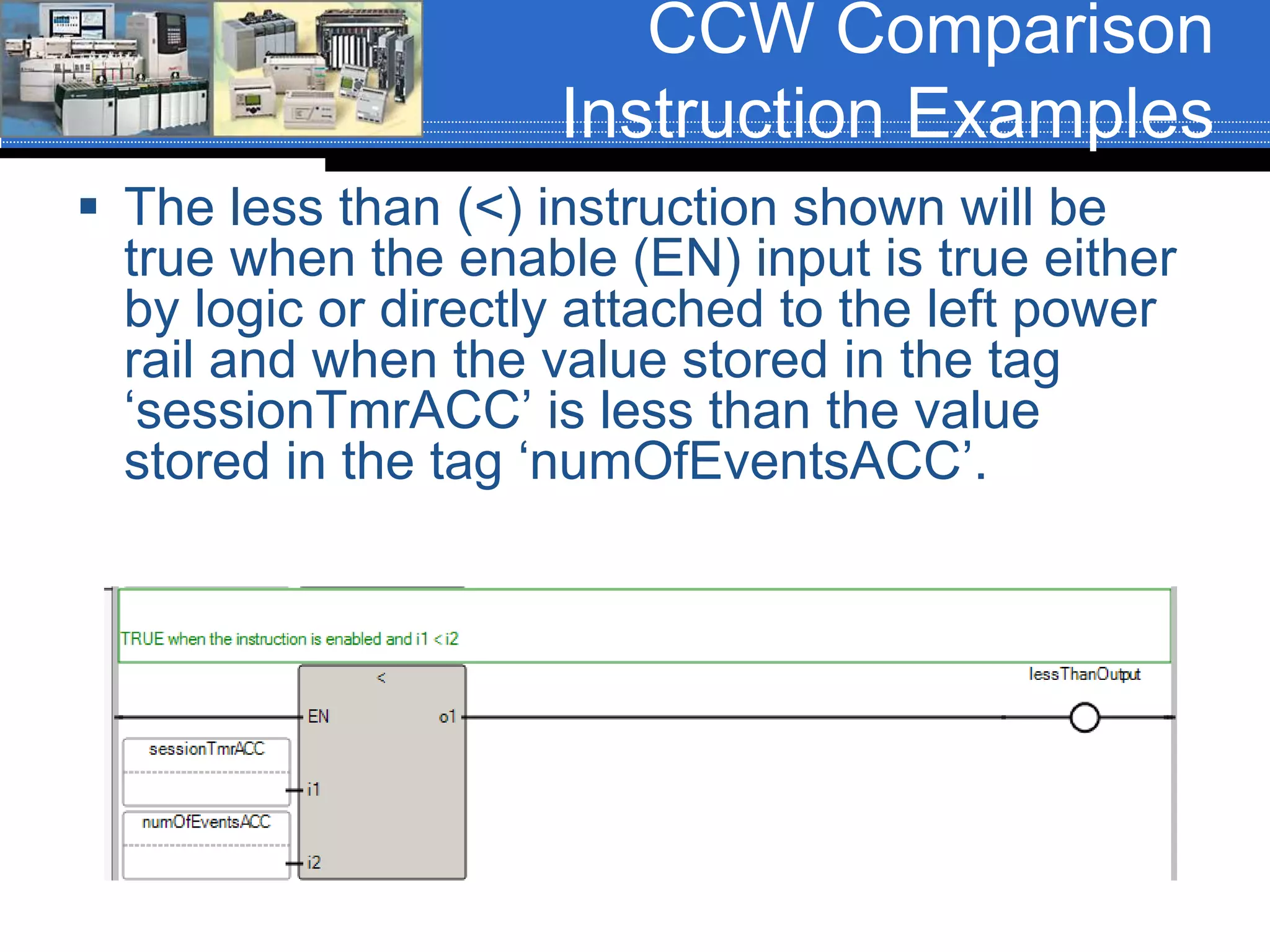
 The less than (<) instruction shown will be
true when the enable (EN) input is true either
by logic or directly attached to the left power
rail and when the value stored in the tag
‘sessionTmrACC’ is less than the value
stored in the tag ‘numOfEventsACC’.
CCW Comparison
Instruction Examples
 The greater than or equal to (>=) instruction
shown will be true when the enable (EN)
input is true either by logic or directly
attached to the left power rail and when the
value stored in the tag ‘betStatus’ is greater
than or equal to the program constant 568.
CCW Comparison
Instruction Examples
 The less than or equal to (<=) instruction shown
will be true when the enable (EN) input is true
either by logic or directly attached to the left power
rail and when the value stored in the tag
‘refgTemp’ is less than or equal to the value stored
in the tag ‘setPoint’.

Comparison instructions, AB, Siemens and AB CCW

  • 1.
    Chapter 07 –Conversion and Comparison Instructions Sections: 7-4 through 7-6
  • 2.
    Data Comparison Instructions  Datacompare instructions are input instructions.  Data compare instructions compare the data, (or value), stored in two words (or registers) and makes a decision based upon those values and the type of comparison being performed.
  • 3.
    Comparison Instructions  ControlLogix Equal (EQU)  Not Equal (NEQ)  Less Than (LES)  Less Than or Equal To (LEQ)  Greater Than (GRT)  Greater Than or Equal To (GEQ)  Limit Test (LIM)  Compare Expression (CMP) (Not this course)  Masked Equal (MEQ) (Not this course)
  • 4.
    Comparison Instruction Parameters  Comparisoninstructions are word level instructions of data type SINT, INT, DINT, REAL or STRING. The basic instructions have two parameters:  Source A  Source B Source A Source B
  • 5.
    Instruction Parameter Rules  Comparisoninstruction parameters have several rules:  Source A and Source B can be word level tags of data type SINT, INT, DINT, REAL or STRING.  Source A can be a word level tag and Source B can be a program constant.  Source A and Source B cannot both be program constants Two word level tags A word level tag And a constant Two constants Illegal
  • 6.
    Equal (EQU)  TheEQU instruction is an input instruction that compares the value stored in Source A to the value stored in Source B. When the value of Source A is equal to the value of Source B the instruction is true, otherwise it is false. When the program is running, the value stored in the tag will be displayed in this field.
  • 7.
    Not Equal (NEQ) The NEQ instruction is an input instruction that compares the value stored in Source A to the value stored in Source B. When the value of Source A is not equal to the value stored in Source B the instruction is true, otherwise it is false. When the program is running, the value stored in the tag will be displayed in this field.
  • 8.
    Greater Than (GRT) The GRT instruction is an input instruction that compares the value stored in Source A to the value stored in Source B. When the value of Source A is greater than the value of Source B the instruction is true, otherwise it is false. When the program is running, the value stored in the tag will be displayed in this field.
  • 9.
    Less Than (LES) The LES instruction is an input instruction that compares the value stored in Source A to the value stored in Source B. When the value of Source A is Less Than the value of Source B the instruction is true, otherwise it is false. When the program is running, the value stored in the tag will be displayed in this field.
  • 10.
    Greater Than orEqual To (GEQ)  The GEQ instruction is an input instruction that compares the value stored in Source A to the value stored in Source B. When the value of Source A is greater than or equal to the value of Source B the instruction is true, otherwise it is false. When the program is running, the value stored in the tag will be displayed in this field.
  • 11.
    Less Than orEqual To (LEQ)  The LEQ instruction is an input instruction that compares the value stored in Source A to the value stored in Source B. When the value of Source A is less than or equal to the value of Source B the instruction is true, otherwise it is false. When the program is running, the value stored in the tag will be displayed in this field.
  • 12.
    Limit Test (LIM) Instruction The Limit Test instruction is an input instruction that tests for values that are inside of, or outside of, a specific range. The output of the instruction is dependent upon how the limits are set.  The LIM instruction has three parameters:  Low Limit (Low Lim)  Test  High Limit (High Lim)
  • 13.
    LIM Parameter Rules There are several rules associated with entering parameter valuves into the LIM instruction:  The parameter values can be word level tags of data type SINT, INT, DINT, REAL, or program constants with the following restrictions:  If the Test parameter is a program constant, than the High Limit and Low Limit parameters MUST be word level tags.  If the test parameter is a word level tag, than the Low Limit and High Limit parameters can be a program constant, a word level tag or a combination thereof.
  • 14.
    LIM Instruction Operation  Ifthe value referenced in the Low Limit is less than or equal to the value referenced in the High Limit, the instruction will be true when the value referenced in the Test parameter is between or equal to either of the limits. 78 156 eventTmr.ACC tmrValueTest ON tmrValueTest OFF tmrValueTest OFF
  • 15.
    LIM Instruction Operation  Ifthe value referenced in the Low Limit is greater than the value referenced in the High Limit, the instruction will be true when the value referenced in the Test parameter is equal to or outside of the limits. SetPoint 78 156 Heater OFFHeater ON Heater ON
  • 16.
    Performing Comparison Windows  Assumean output is being controlled based upon the value of a counter accumulator, compCounter.ACC. Following is the output operation criterial:  Output is OFF when compCounter.ACC is 0 to and including 3.  Output is ON when compCounter.ACC is 4 to and including 7.  Output is OFF when compCounter.ACC is 8 to and including 10.  Output is ON when compCounter.ACC is 11 to and including 25.  Output is OFF when compCounter.ACC is >25.  Comparison instructions can be used in combinations to achieve the desired results.
  • 17.
  • 18.
    Siemens Comparison Instructions  Siemenshas 10-comparison instructions available in the S7-1200 series:  Equal To ==  Not Equal To <>  Greater Than >  Less Than <  Greater Than or Equal To >=  Less Than or Equal To <=  IN_RANGE Value within Range  OUT_RANGE Value outside of Range  OK Check Validity( 1 = valid floating point number)  NOT_OK Check invalidity (1 = invalid floating point number)
  • 19.
    Siemens Comparison Instruction Examples Siemens comparison instructions are basically contacts. The instruction is assigned a data type and the tags that are compared must be of that data type.  The equal (==) instruction shown will be true when the value stored in the tag ‘convyr01CntACC’ is equal to the value stored in the tag ‘convyr01CntACC’. Both tags are of data type DINT.
  • 20.
    Siemens Comparison Instruction Examples Siemens comparison instructions are basically contacts. The instruction is assigned a data type and the tags that are compared must be of that data type.  The not equal (<>) instruction shown will be true when the value stored in the tag ‘convyr01CntACC’ is not equal to the program constant of 56. The tag is of data type DINT.
  • 21.
    Siemens Comparison Instruction Examples Siemens comparison instructions are basically contacts. The instruction is assigned a data type and the tags that are compared must be of that data type.  The greater than (>) instruction shown will be true when the value stored in the tag ‘setPoint’ is greater than the value stored in the tag ‘furnaceTemp’. Both tags are of data type INT.
  • 22.
    Siemens Comparison Instruction Examples Siemens comparison instructions are basically contacts. The instruction is assigned a data type and the tags that are compared must be of that data type.  The less than (<) instruction shown will be true when the value stored in the tag ‘sessionTmrACC’ is less than the value stored in the tag ‘numOfEventsACC’. Both tags are of data type DINT.
  • 23.
    Siemens Comparison Instruction Examples Siemens comparison instructions are basically contacts. The instruction is assigned a data type and the tags that are compared must be of that data type.  The greater than or equal to (>=) instruction shown will be true when the value stored in the tag ‘bitStatus’ is greater than or equal to the program constant of 120. The tag is of data type SINT.
  • 24.
    Siemens Comparison Instruction Examples Siemens comparison instructions are basically contacts. The instruction is assigned a data type and the tags that are compared must be of that data type.  The less than or equal to (<=) instruction shown will be true when the value stored in the tag ‘refgTemp’ is less than or equal to the value stored in the tag ‘setPoint’. Both tags are of data type INT.
  • 25.
    Siemens Comparison Instruction Examples Siemens IN_RANGE comparison is equivalent to the AB LIM instruction. The instruction is assigned a data type and the tags that are compared must be of that data type.  The IN_RANGE instruction shown will be true when the value stored in the tag ‘eventTmrACC’ is >= 78 and <= 156. Both tags are of data type DINT.
  • 26.
    Siemens Comparison Instruction Examples Siemens OUT_RANGE comparison is equivalent to the AB LIM instruction. The instruction is assigned a data type and the tags that are compared must be of that data type.  The OUT_RANGE instruction shown will be true when the value stored in the tag ‘setPoint’ is <= the value stored in the tag ‘loTempLmt and >= to the value stored in the tag ‘hiTempLmt’. Both tags are of data type INT.
  • 27.
    Siemens Comparison Instruction Examples Siemens comparison instructions are basically contacts. The instruction is assigned a data type and the tags that are compared must be of that data type.  The OK instruction shown will be true when the value stored in the tag ‘temperature’ is a valid floating point number.
  • 28.
    Siemens Comparison Instruction Examples Siemens comparison instructions are basically contacts. The instruction is assigned a data type and the tags that are compared must be of that data type.  The NOT_OK instruction shown will be true when the value stored in the tag ‘temperature’ is not a valid floating point number.
  • 29.
    CCW Comparison Instructions  ConnectedComponents Workbench has 6-comparison instructions:  Equal To =  Not Equal To <>  Greater Than >  Less Than <  Greater Than or Equal To >=  Less Than or Equal To <=
  • 30.
    CCW Comparison Instruction Examples The equal (=) instruction shown will be true when the enable (EN) input is true either by logic or directly attached to the left power rail and when the value stored in the tag ‘convyr01CntACC’ is equal to the value stored in the tag ‘convyr01CntACC’.
  • 31.
    CCW Comparison Instruction Examples The not equal (<>) instruction shown will be true when the enable (EN) input is true either by logic or directly attached to the left power rail and when the value stored in the tag ‘convyr01CntACC’ is not equal to the program constant 56.
  • 32.
    CCW Comparison Instruction Examples The greater than (>) instruction shown will be true when the enable (EN) input is true either by logic or directly attached to the left power rail and when the value stored in the tag ‘setPoint’ is greater than the value stored in the tag ‘furnaceTemp’.
  • 33.
    CCW Comparison Instruction Examples The less than (<) instruction shown will be true when the enable (EN) input is true either by logic or directly attached to the left power rail and when the value stored in the tag ‘sessionTmrACC’ is less than the value stored in the tag ‘numOfEventsACC’.
  • 34.
    CCW Comparison Instruction Examples The greater than or equal to (>=) instruction shown will be true when the enable (EN) input is true either by logic or directly attached to the left power rail and when the value stored in the tag ‘betStatus’ is greater than or equal to the program constant 568.
  • 35.
    CCW Comparison Instruction Examples The less than or equal to (<=) instruction shown will be true when the enable (EN) input is true either by logic or directly attached to the left power rail and when the value stored in the tag ‘refgTemp’ is less than or equal to the value stored in the tag ‘setPoint’.