Lists, Indexes and Databases
Chapter 03 – Lists, Indexes and Databases
EMEC125
Overview
• Lists and indexes document the mechanical equipment and control
system devices that make up a process plant.
• Started as handwritten lists that organized data for the construction
and operation of a plant.
• The documents included, but were not limited to:
• Equipment and instruments
• Piping
• Motors
• Cable and circuit schedules
• Etc.
Overview
• Lists called out basic functions such as:
• Defining component identifiers (make sure everything is referenced the same
way on all documents).
• ISA tag numbers or equipment numbers.
• Instrument range.
• Horse power.
• Energy
• Throughput or volume.
Overview
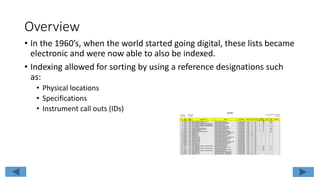
• In the 1960’s, when the world started going digital, these lists became
electronic and were now able to also be indexed.
• Indexing allowed for sorting by using a reference designations such
as:
• Physical locations
• Specifications
• Instrument call outs (IDs)
Overview
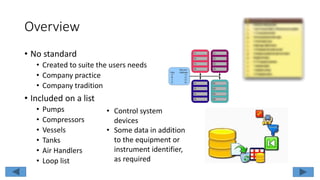
• No standard
• Created to suite the users needs
• Company practice
• Company tradition
• Included on a list
• Pumps
• Compressors
• Vessels
• Tanks
• Air Handlers
• Loop list
• Control system
devices
• Some data in addition
to the equipment or
instrument identifier,
as required
Overview
• List data sharing
• Modern lists will be kept in a
database so that information can
be shared by other software
• Maintenance departments can use
the data in an asset management
system
• Calibration data can be accessed
and instrument accuracy can be
trended
Instrument Index
• ANSI/ISA-5.1-2009 index should include, as a minimum, all
instrument data by the owner and/or government regulator agency
• Loop ID number
• Service description
• Instrument ID number/Tag number
• P&ID drawing number
• Instrument data sheet number
• Location plan drawing numbers
• Installation detail drawing numbers
Database
• Reusable data
• Data (information) should be entered once
• Data should be checked
• Used in other documents and lists
• Content of the database
• Maintenance schedules
• Calibration records
• Instrument indexes
• Loop Diagrams
• P&ID text
• Process control computer configuration files
• Relational database
• Information should only be entered once to eliminate error
• Relational database can be used to sort, cross reference and build various reports
Database
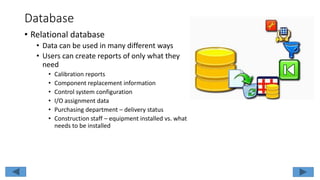
• Relational database
• Data can be used in many different ways
• Users can create reports of only what they
need
• Calibration reports
• Component replacement information
• Control system configuration
• I/O assignment data
• Purchasing department – delivery status
• Construction staff – equipment installed vs. what
needs to be installed
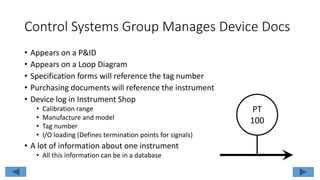
Control Systems Group Manages Device Docs
• Appears on a P&ID
• Appears on a Loop Diagram
• Specification forms will reference the tag number
• Purchasing documents will reference the instrument
• Device log in Instrument Shop
• Calibration range
• Manufacture and model
• Tag number
• I/O loading (Defines termination points for signals)
• A lot of information about one instrument
• All this information can be in a database
PT
100
To List or Not to List?
• What really be on the list?
• Rule of thumb states that if something has to be
• Purchased
• Mounted
• Wired
• Piped or tubed
• Maintained
• Calibrated
• Should also appear on the P&ID
The device should appear on a list or in a database
To List or Not to List?
• What should really be on the list?
• Ask these questions:
• Is the information needed?
• Is value added by including the data?
• Is it data that someone needs?
• The additional data adds cost
• Data has to be found
• Data has to be entered and checked
• Data has to be updated and accurate
• Inaccurate data is WORSE than not having the data
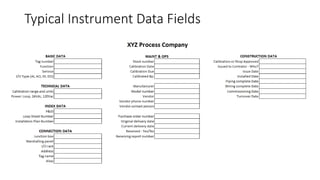
Typical Instrument Data Fields
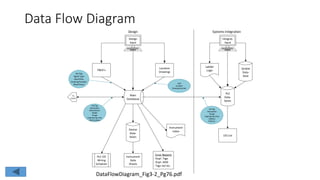
Data Flow Diagram
Main
Databasse
Device
Data-
bases
Instrument
Data
Sheets
Error Reports
- Dupl. Tags
- Dupl. Addr
- Tags not loc.
P&ID’s
Location
Drawings
Design
Input
PLC I/O
Wiring
Schedule
To
Constr
Instrument
Index
PLC
Data-
bases
Ladder
Logic
SCADA
Data-
base
Integrat.
Input
I/O List
ISA Tag
Signal Type
Quantities
Drawing Number
New/Future
ISATag
Description
Manufacture
Model
Range
Engineering Units
Grid Location
Grid
Location
Drawing Number
ISATag
Description
Range
Engineering Units
Address
Grid Loc.
Design Systems Integration
DataFlowDiagram_Fig3-2_Pg76.pdf
DB – Master Document
• Consistency is key
• All text fields should read the same
everywhere they appear
• Function description is sometimes the loop
title
• Function description should only be entered
once no matter how many times it appears in
a document or other documents
• Two basic formats for loop title:
• Loop function first, followed by a “for whom” or
“for what”
• Conventionally state what the loop does
DB – Master Document
• Service identifier format example
1. Level – North Vessel
2. Flow – Chilled Water to Condenser
• The hyphens are called delimiters and can
make the identifier easier to read; however,
• There needs to be consistency in how to enter
the delimiter such as, a space on either side of
the hyphen
• Without the consistency, searching the DB
becomes difficult if not impossible
DB – Master Document
• Ensure there is agreement on the equipment
titles
• Calling a tank the Primary Mixing Tank might
be the proper name; however, for the past 25-
years everyone has been calling it the “Red
Tank”
• Call it the “Red Tank”. The maintenance
technician being called in at 2:00 AM will not
appreciate the document calling out the
Primary Mixing Tank and taking additional
time to learn that it is the “Red Tank”
DB – Master Document
• Ensure that the format used is supported by
all control and monitoring software
• Some software(s) describe a specific format
for data such as:
• Number of characters in a text field
• Spaces or underscores
• Punctuation or not
• Data field format and structure could make
software(s) not “talk” to each other
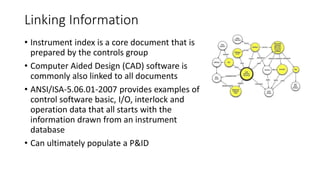
Linking Information
• Instrument index is a core document that is
prepared by the controls group
• Computer Aided Design (CAD) software is
commonly also linked to all documents
• ANSI/ISA-5.06.01-2007 provides examples of
control software basic, I/O, interlock and
operation data that all starts with the
information drawn from an instrument
database
• Can ultimately populate a P&ID
Summary
• Lists, indexes and databases are very
important documents
• Assists all departments with identifying,
locating, purchasing, maintaining and
calibrating equipment
• Need to have data entered and checked in a
consistent manner
• Needs to be kept up-to-date
• Needs to be properly linked to other
documents

03 chapter03 lists_indexes_databases

  • 1.
    Lists, Indexes andDatabases Chapter 03 – Lists, Indexes and Databases EMEC125
  • 2.
    Overview • Lists andindexes document the mechanical equipment and control system devices that make up a process plant. • Started as handwritten lists that organized data for the construction and operation of a plant. • The documents included, but were not limited to: • Equipment and instruments • Piping • Motors • Cable and circuit schedules • Etc.
  • 3.
    Overview • Lists calledout basic functions such as: • Defining component identifiers (make sure everything is referenced the same way on all documents). • ISA tag numbers or equipment numbers. • Instrument range. • Horse power. • Energy • Throughput or volume.
  • 4.
    Overview • In the1960’s, when the world started going digital, these lists became electronic and were now able to also be indexed. • Indexing allowed for sorting by using a reference designations such as: • Physical locations • Specifications • Instrument call outs (IDs)
  • 5.
    Overview • No standard •Created to suite the users needs • Company practice • Company tradition • Included on a list • Pumps • Compressors • Vessels • Tanks • Air Handlers • Loop list • Control system devices • Some data in addition to the equipment or instrument identifier, as required
  • 6.
    Overview • List datasharing • Modern lists will be kept in a database so that information can be shared by other software • Maintenance departments can use the data in an asset management system • Calibration data can be accessed and instrument accuracy can be trended
  • 7.
    Instrument Index • ANSI/ISA-5.1-2009index should include, as a minimum, all instrument data by the owner and/or government regulator agency • Loop ID number • Service description • Instrument ID number/Tag number • P&ID drawing number • Instrument data sheet number • Location plan drawing numbers • Installation detail drawing numbers
  • 8.
    Database • Reusable data •Data (information) should be entered once • Data should be checked • Used in other documents and lists • Content of the database • Maintenance schedules • Calibration records • Instrument indexes • Loop Diagrams • P&ID text • Process control computer configuration files • Relational database • Information should only be entered once to eliminate error • Relational database can be used to sort, cross reference and build various reports
  • 9.
    Database • Relational database •Data can be used in many different ways • Users can create reports of only what they need • Calibration reports • Component replacement information • Control system configuration • I/O assignment data • Purchasing department – delivery status • Construction staff – equipment installed vs. what needs to be installed
  • 10.
    Control Systems GroupManages Device Docs • Appears on a P&ID • Appears on a Loop Diagram • Specification forms will reference the tag number • Purchasing documents will reference the instrument • Device log in Instrument Shop • Calibration range • Manufacture and model • Tag number • I/O loading (Defines termination points for signals) • A lot of information about one instrument • All this information can be in a database PT 100
  • 11.
    To List orNot to List? • What really be on the list? • Rule of thumb states that if something has to be • Purchased • Mounted • Wired • Piped or tubed • Maintained • Calibrated • Should also appear on the P&ID The device should appear on a list or in a database
  • 12.
    To List orNot to List? • What should really be on the list? • Ask these questions: • Is the information needed? • Is value added by including the data? • Is it data that someone needs? • The additional data adds cost • Data has to be found • Data has to be entered and checked • Data has to be updated and accurate • Inaccurate data is WORSE than not having the data
  • 13.
  • 14.
    Data Flow Diagram Main Databasse Device Data- bases Instrument Data Sheets ErrorReports - Dupl. Tags - Dupl. Addr - Tags not loc. P&ID’s Location Drawings Design Input PLC I/O Wiring Schedule To Constr Instrument Index PLC Data- bases Ladder Logic SCADA Data- base Integrat. Input I/O List ISA Tag Signal Type Quantities Drawing Number New/Future ISATag Description Manufacture Model Range Engineering Units Grid Location Grid Location Drawing Number ISATag Description Range Engineering Units Address Grid Loc. Design Systems Integration DataFlowDiagram_Fig3-2_Pg76.pdf
  • 15.
    DB – MasterDocument • Consistency is key • All text fields should read the same everywhere they appear • Function description is sometimes the loop title • Function description should only be entered once no matter how many times it appears in a document or other documents • Two basic formats for loop title: • Loop function first, followed by a “for whom” or “for what” • Conventionally state what the loop does
  • 16.
    DB – MasterDocument • Service identifier format example 1. Level – North Vessel 2. Flow – Chilled Water to Condenser • The hyphens are called delimiters and can make the identifier easier to read; however, • There needs to be consistency in how to enter the delimiter such as, a space on either side of the hyphen • Without the consistency, searching the DB becomes difficult if not impossible
  • 17.
    DB – MasterDocument • Ensure there is agreement on the equipment titles • Calling a tank the Primary Mixing Tank might be the proper name; however, for the past 25- years everyone has been calling it the “Red Tank” • Call it the “Red Tank”. The maintenance technician being called in at 2:00 AM will not appreciate the document calling out the Primary Mixing Tank and taking additional time to learn that it is the “Red Tank”
  • 18.
    DB – MasterDocument • Ensure that the format used is supported by all control and monitoring software • Some software(s) describe a specific format for data such as: • Number of characters in a text field • Spaces or underscores • Punctuation or not • Data field format and structure could make software(s) not “talk” to each other
  • 19.
    Linking Information • Instrumentindex is a core document that is prepared by the controls group • Computer Aided Design (CAD) software is commonly also linked to all documents • ANSI/ISA-5.06.01-2007 provides examples of control software basic, I/O, interlock and operation data that all starts with the information drawn from an instrument database • Can ultimately populate a P&ID
  • 20.
    Summary • Lists, indexesand databases are very important documents • Assists all departments with identifying, locating, purchasing, maintaining and calibrating equipment • Need to have data entered and checked in a consistent manner • Needs to be kept up-to-date • Needs to be properly linked to other documents

Editor's Notes

  • #3 Discuss what an equipment list is and it’s purpose.
  • #6 Discuss what an equipment list is and it’s purpose. The term list and index can be used interchangeably. However; an index is really a list augmented by references to other data that is associated with an item on the list such as a location drawing, an installation detail, a purchase order a specification sheet or any other related data. The loop list will most likely include the name and number of all the assigned loop number. This will help in preventing duplications.
  • #7 Maintenance asset management systems are used to track the health of components and to plan maintenance in a more efficient manner.
  • #8 Discuss the items that should appear on an Instrument Index. Describe in more detail each bullet item on this slide.
  • #9 Discuss databases. It might be good to discuss the various types of databases with a focus on relational databases such as SQL. Briefly discuss how relational databases use tables to store data, similar to Microsoft Excel and how the data can be queried and presented by selecting the table(s) and column(s) to make a document or report of the information needed.
  • #10 Discuss databases. It might be good to discuss the various types of databases with a focus on relational databases such as SQL. Briefly discuss how relational databases use tables to store data, similar to Microsoft Excel and how the data can be queried and presented by selecting the table(s) and column(s) to make a document or report of the information needed.
  • #11 Discuss that the controls group handles most of the instrument information. This group handles a lot of unique data and information. Discuss how this information is found on the documents listed on the bullet list. Discuss the data flow diagram on the next slide. This data flow is directly from the textbook, figure 3-2 on page 76.
  • #12 If something else is included, such as an operator console from one control room, then all operator consoles should be included from all control rooms.
  • #13 Is the information needed? Don’t just list data because it’s available. It has to be needed by someone.
  • #15 Open the PDF file “DataFlowDiagram_Fig3-2_Pg75.pdf” to allow for zooming in. Discuss the aspects of this data flow diagram. The diagram is also shown in Figure 3-2 on page 76 in the textbook. The construction portion has been omitted; however, it can and should be discussed. The point for these students is to show the interconnection of all information and data. It should be stressed that the Database becomes the master document. Formats should not be mixed when entering data and information. Keeping data in the same format will make it easier to sort and search for specific equipment. A standard should be established for entering data and data descriptions.