HITD 201
Empathy and Understanding Users
Mark Billinghurst
HIT Lab NZ
December 10th 2013
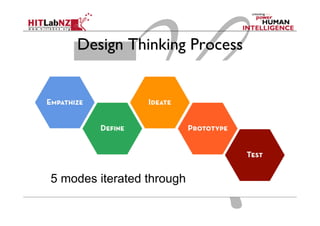
Design Thinking Process

5 modes iterated through
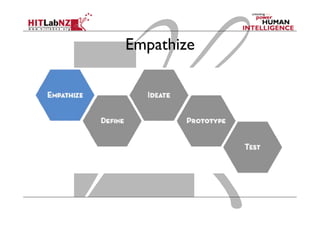
Empathize
Goal
Create a deep understanding of the
user and problem space
Why Empathize
  Need to understand end users
  You’re solving their problems

  Watching people what people do
  Understand what they think and feel

  Engage to uncover unexpected insights
  Uncover needs – conscious and unconscious
  Guide innovation efforts
  Identify right users to design for
Empathize
  Empathy: Foundation of Human-Centered
Design Process
  Observe; Users and their behaviour in context
  Engage: Interact with and interview users
  Immerse: Experience what users experience
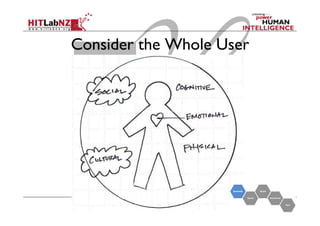
Consider the Whole User
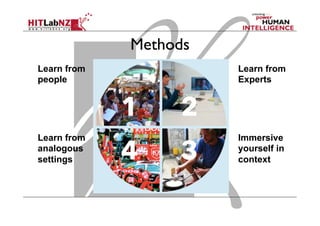
Methods
Learn from
people

Learn from
Experts

Learn from
analogous
settings

Immersive
yourself in
context
Learn from People
  Who
  Brainstorm interesting people to meet
  Think of extremes
  How
  Plan the interaction and logistics
  Invite participants
  Create a trusted atmosphere

  What
  Pay attention to your environment
  Capture your immediate observations
Learn from Experts
  Experts have in-depth knowledge about topic
  Can give large amount of information in short time

  Choose Participants
  Expertise, radical opinion, etc

  Set up for productive conversation
  Plan, capture, document
Immersive yourself in Context
  Observing the problem space around you
  Plan observations
  What emotions do you experience?
  What challenges?

  Explore and take notes
  Sketches, notes, photos

  Capture what you have seen
  Reflections, post-it notes
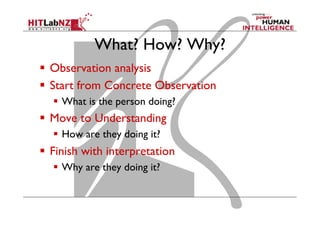
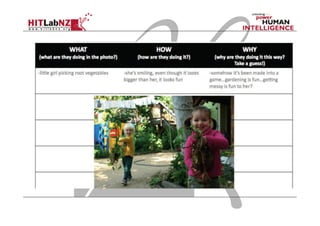
What? How? Why?
  Observation analysis
  Start from Concrete Observation
  What is the person doing?

  Move to Understanding
  How are they doing it?

  Finish with interpretation
  Why are they doing it?
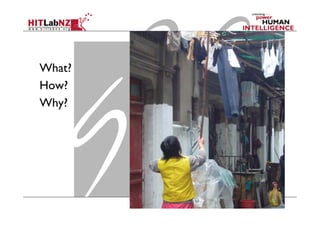
What?
How?
Why?
Seek Inspiration in Analogous Setting
  Inspiration in different context than problem space
  Eg redesign library by going to Apple store

  Think of Analogies that connect with challenge
  Similar scenarios in different places

  Make arrangements for activities
  Logistics

  Absorb experience
  Observe, ask
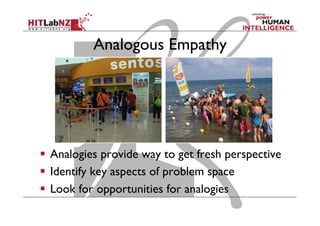
Analogous Empathy

  Analogies provide way to get fresh perspective
  Identify key aspects of problem space
  Look for opportunities for analogies
Interviewing
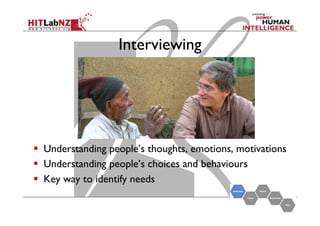
Interviewing

  Understanding people’s thoughts, emotions, motivations
  Understanding people’s choices and behaviours
  Key way to identify needs
Build Your Question Guide
  Identify topics
  Organize questions
  Create a question guide
Word questions strategically
  Build tangible conversation starters
  Confirm your plans
  Assign roles
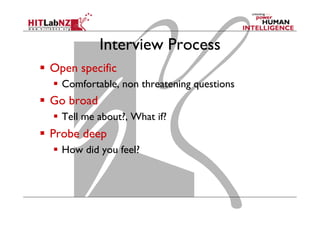
Interview Process
  Open specific
  Comfortable, non threatening questions

  Go broad
  Tell me about?, What if?

  Probe deep
  How did you feel?
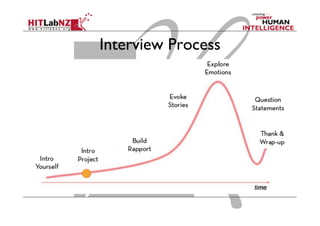
Interview Process
Interviewing Techniques
Good interviewing is a skill and needs to be
done properly to ensure you maximize the
opportunity you have with your users
Tips for interacting with end users:
	
1. Listen
	
2. Watch
	
3. Create Trust
	
4. Inform Design
1. Listen
Most important part of interviewing.
You are not there to train the user or to
demonstrate how much you know. You
are interviewing an expert to gain knowledge.
Treat them like a precious partner and remember
they know a lot more about their work then you do.
Interview Questions
•  Two types:
−  ‘closed questions’ have a predetermined answer format, e.g.,
‘yes’ or ‘no’
−  ‘open questions’ do not have a predetermined format

•  Closed questions are easier to analyze
•  Avoid:
−  Long questions
−  Compound sentences - split them into two
−  Jargon and language that the interviewee may not understand
−  Leading questions that make assumptions e.g., why do you like
…?
−  Unconscious biases e.g., gender stereotypes
www.id-book.com

24
Interview Tips
  Ask why
  Encourage stories
  Look for inconsistencies
  Pay attention to non-verbal cues
  Don’t suggest answers
  Don’t ask binary questions
  Short questions (no more than 10 words)
2. Watch
Remember users will tend to want to say what
they think you want to hear.
Create opportunities to observe users rather than
ask users.
Case Study –
A usability professional is interviewing a user:
Professional: “Do you know how to set the margins?”
User: “Oh yes, I do that all the time.”
Professional: “Could you show me how to do it?”
User: “Sure.” (user presses a series of buttons unrelated
to setting margins – the button sequence is actually
changing a different setting).
“See it beeped so the margins are set.”
3. Create Trust
Users will be nervous that they will appear
stupid or incompetent.
“We are testing design, not you”
To get good data, user must feel relaxed
and trusting.
A user’s perspective:
Well okay, today’s the day. I have to report to some building on 14th street. I must admit I’m a bit
nervous. When I spoke to the woman on the phone, she asked me a whole lot of questions
about my background and experience. She seemed particularly gleeful that I wasn’t
competent using computers and equipment. I’m glad she is happy but for me it’s a recurring
problem.
I’ve always felt intimidated with electronics. She wants me to use something on the computer while
some people watch me. Well, it’s an easy $50 bucks and seeing that I don’t know the people,
it can’t be too embarrassing…
On the other hand, what if I’m the first person in the world that doesn’t understand how to do
whatever I’m supposed to do? What if I totally bomb? What if they ask me a question that is
embarrassing and they find out how stupid I really am. Well, I’ll give it a go this time but I
don’t think I can do this again.
4. Inform Design
User research does not dictate your design but
rather informs you so that you design better.
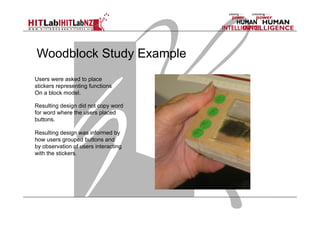
Woodblock Study Example
Users were asked to place
stickers representing functions
On a block model.
Resulting design did not copy word
for word where the users placed
buttons.
Resulting design was informed by
how users grouped buttons and
by observation of users interacting
with the stickers.
Other Interview Techniques
  Show me
  Get the person to show you something

  Draw it
  Draw processes, information, etc,

  5 whys?
  Ask why questions to five consecutive answers

  Think aloud
  Talk why doing a task
Tips
  Establish Trust
  Listen, use non-verbal gestures

  Get the most out of your interaction
  Show space, drawing, why questions

  Know what to look for
  Say vs. do

  Capture what you see
  Photos, notes, quotes, thoughts
Capture Your Learnings
  Find space and time
  Group meeting

  Share impressions with team
  Review important topics
-  Motivations, interactions, frustrations, etc

  Document thoughts
  Notes, post-its, sketches
Other Methods
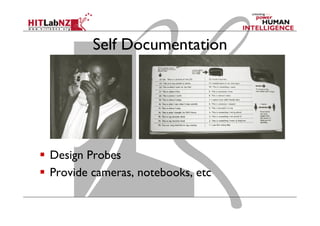
Self Documentation

  Design Probes
  Provide cameras, notebooks, etc

HITD 201: Design Thinking - Lecture 2; Empathy and Understanding Users

  • 1.
    HITD 201 Empathy andUnderstanding Users Mark Billinghurst HIT Lab NZ December 10th 2013
  • 2.
    Design Thinking Process 5modes iterated through
  • 3.
  • 4.
    Goal Create a deepunderstanding of the user and problem space
  • 5.
    Why Empathize   Needto understand end users   You’re solving their problems   Watching people what people do   Understand what they think and feel   Engage to uncover unexpected insights   Uncover needs – conscious and unconscious   Guide innovation efforts   Identify right users to design for
  • 6.
    Empathize   Empathy: Foundationof Human-Centered Design Process   Observe; Users and their behaviour in context   Engage: Interact with and interview users   Immerse: Experience what users experience
  • 7.
  • 8.
    Methods Learn from people Learn from Experts Learnfrom analogous settings Immersive yourself in context
  • 9.
    Learn from People  Who   Brainstorm interesting people to meet   Think of extremes   How   Plan the interaction and logistics   Invite participants   Create a trusted atmosphere   What   Pay attention to your environment   Capture your immediate observations
  • 10.
    Learn from Experts  Experts have in-depth knowledge about topic   Can give large amount of information in short time   Choose Participants   Expertise, radical opinion, etc   Set up for productive conversation   Plan, capture, document
  • 11.
    Immersive yourself inContext   Observing the problem space around you   Plan observations   What emotions do you experience?   What challenges?   Explore and take notes   Sketches, notes, photos   Capture what you have seen   Reflections, post-it notes
  • 12.
    What? How? Why?  Observation analysis   Start from Concrete Observation   What is the person doing?   Move to Understanding   How are they doing it?   Finish with interpretation   Why are they doing it?
  • 14.
  • 15.
    Seek Inspiration inAnalogous Setting   Inspiration in different context than problem space   Eg redesign library by going to Apple store   Think of Analogies that connect with challenge   Similar scenarios in different places   Make arrangements for activities   Logistics   Absorb experience   Observe, ask
  • 16.
    Analogous Empathy   Analogiesprovide way to get fresh perspective   Identify key aspects of problem space   Look for opportunities for analogies
  • 17.
  • 18.
    Interviewing   Understanding people’sthoughts, emotions, motivations   Understanding people’s choices and behaviours   Key way to identify needs
  • 19.
    Build Your QuestionGuide   Identify topics   Organize questions   Create a question guide Word questions strategically   Build tangible conversation starters   Confirm your plans   Assign roles
  • 20.
    Interview Process   Openspecific   Comfortable, non threatening questions   Go broad   Tell me about?, What if?   Probe deep   How did you feel?
  • 21.
  • 22.
    Interviewing Techniques Good interviewingis a skill and needs to be done properly to ensure you maximize the opportunity you have with your users Tips for interacting with end users: 1. Listen 2. Watch 3. Create Trust 4. Inform Design
  • 23.
    1. Listen Most importantpart of interviewing. You are not there to train the user or to demonstrate how much you know. You are interviewing an expert to gain knowledge. Treat them like a precious partner and remember they know a lot more about their work then you do.
  • 24.
    Interview Questions •  Twotypes: −  ‘closed questions’ have a predetermined answer format, e.g., ‘yes’ or ‘no’ −  ‘open questions’ do not have a predetermined format •  Closed questions are easier to analyze •  Avoid: −  Long questions −  Compound sentences - split them into two −  Jargon and language that the interviewee may not understand −  Leading questions that make assumptions e.g., why do you like …? −  Unconscious biases e.g., gender stereotypes www.id-book.com 24
  • 25.
    Interview Tips   Askwhy   Encourage stories   Look for inconsistencies   Pay attention to non-verbal cues   Don’t suggest answers   Don’t ask binary questions   Short questions (no more than 10 words)
  • 26.
    2. Watch Remember userswill tend to want to say what they think you want to hear. Create opportunities to observe users rather than ask users.
  • 27.
    Case Study – Ausability professional is interviewing a user: Professional: “Do you know how to set the margins?” User: “Oh yes, I do that all the time.” Professional: “Could you show me how to do it?” User: “Sure.” (user presses a series of buttons unrelated to setting margins – the button sequence is actually changing a different setting). “See it beeped so the margins are set.”
  • 28.
    3. Create Trust Userswill be nervous that they will appear stupid or incompetent. “We are testing design, not you” To get good data, user must feel relaxed and trusting.
  • 29.
    A user’s perspective: Wellokay, today’s the day. I have to report to some building on 14th street. I must admit I’m a bit nervous. When I spoke to the woman on the phone, she asked me a whole lot of questions about my background and experience. She seemed particularly gleeful that I wasn’t competent using computers and equipment. I’m glad she is happy but for me it’s a recurring problem. I’ve always felt intimidated with electronics. She wants me to use something on the computer while some people watch me. Well, it’s an easy $50 bucks and seeing that I don’t know the people, it can’t be too embarrassing… On the other hand, what if I’m the first person in the world that doesn’t understand how to do whatever I’m supposed to do? What if I totally bomb? What if they ask me a question that is embarrassing and they find out how stupid I really am. Well, I’ll give it a go this time but I don’t think I can do this again.
  • 30.
    4. Inform Design Userresearch does not dictate your design but rather informs you so that you design better.
  • 31.
    Woodblock Study Example Userswere asked to place stickers representing functions On a block model. Resulting design did not copy word for word where the users placed buttons. Resulting design was informed by how users grouped buttons and by observation of users interacting with the stickers.
  • 32.
    Other Interview Techniques  Show me   Get the person to show you something   Draw it   Draw processes, information, etc,   5 whys?   Ask why questions to five consecutive answers   Think aloud   Talk why doing a task
  • 33.
    Tips   Establish Trust  Listen, use non-verbal gestures   Get the most out of your interaction   Show space, drawing, why questions   Know what to look for   Say vs. do   Capture what you see   Photos, notes, quotes, thoughts
  • 34.
    Capture Your Learnings  Find space and time   Group meeting   Share impressions with team   Review important topics -  Motivations, interactions, frustrations, etc   Document thoughts   Notes, post-its, sketches
  • 35.
  • 36.
    Self Documentation   DesignProbes   Provide cameras, notebooks, etc