WQusability
  Choosing the Right UX Method

  Asking the questions to get the right answers

  UX Hong Kong 2012
  Whitney Quesenbery
Questions and answers

Understand the questions
Explore ways to get the answers
Be ready to adapt
Baseline: your last project(s)

            What’s your UX process?
            What research, design, evaluation method
             do you use?


            At the end of the workshop, think about how you might
             change this process.
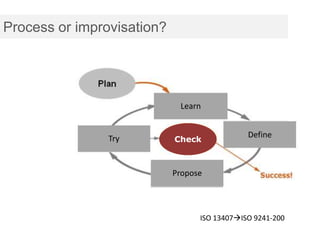
Process or improvisation?


                                     Learn
                                 Context of Use

                                                      Specify
                                                      Define
                  Try
            Evaluate Designs        Check          Requirements


                                   Propose
                               Produce Solutions


                                          ISO 13407ISO 9241-200
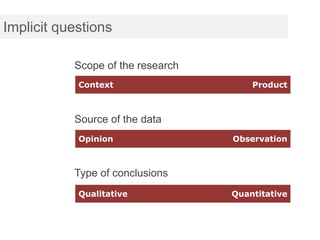
Implicit questions

           Scope of the research
            Context                    Product


           Source of the data
            Opinion                Observation


           Type of conclusions
            Qualitative            Quantitative
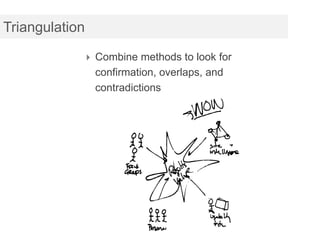
Triangulation

             Combine methods to look for
                confirmation, overlaps, and
                contradictions
Ask “why” to uncover deeper issues

               Let’s test in another country.

                                                                           WHY?

               Because it’s a different culture.

                                                            Why does that matter?

               Our product was designed for users here.


                                                   Why does that make a difference

               We don’t know if the [feature] will work there.

                                                            Why is that important?

               Because the success of the product is based on the value of
               [that feature].
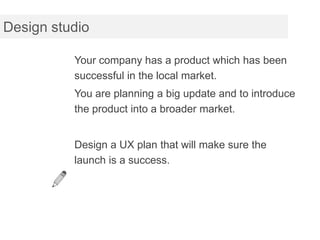
Design studio

          Your company has a product which has been
          successful in the local market.
          You are planning a big update and to introduce
          the product into a broader market.


          Design a UX plan that will make sure the
          launch is a success.
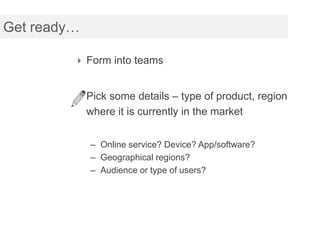
Get ready…

          Form into teams


          Pick some details – type of product, region
             where it is currently in the market


             – Online service? Device? App/software?
             – Geographical regions?
             – Audience or type of users?
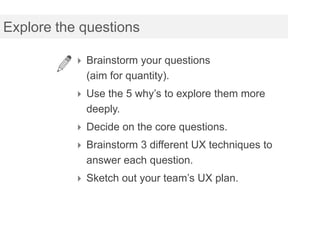
Explore the questions

           Brainstorm your questions
            (aim for quantity).
           Use the 5 why’s to explore them more
            deeply.
           Decide on the core questions.
           Brainstorm 3 different UX techniques to
            answer each question.
           Sketch out your team’s UX plan.
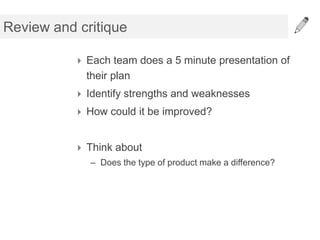
Review and critique

           Each team does a 5 minute presentation of
            their plan
           Identify strengths and weaknesses
           How could it be improved?


           Think about
             – Does the type of product make a difference?
Designing user research sessions

Hint: you can answer more than one question
at a time
Case study

             Project brief:
             Design an online database of medial research
             papers for cancer researchers to help them recruit
             patients to clinical trials for new treatments.


             What are our questions?
Case study

             These were my questions:
              What does a cancer researcher do?
              How do they recruit patients now?
              Do they think there is a problem?
              Don’t they already have access to this medical
               research?


             How do we organize this project efficiently?
Case study

             We mixed user insights and requirements
             gathering
              Interviews in their clinics
              Asked to see researchers and support staff
              Walked through tools and process
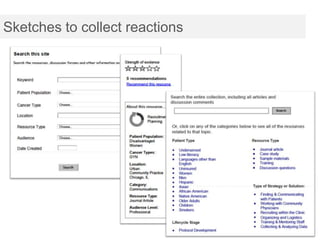
              Showed them “Rorschach sketches”
               (not “designs” but a way to get a reaction to
               ideas)
Sketches to collect reactions
From their tasks to your tasks

           1. Explore their own interests first
              –   How, when, where, activities, goals
           2. Start with their own activity
              – Recall a recent activity and repeat
           3. Find the best match in your list
              – Adjust as you need to to use what’s available and
                still be relevant.
           4. Ask them to do other things on your list
              – Last, ask them to do anything that hasn’t come up
                organically.
           5. Be ready to think on your feet
Case study

             Project brief:
             1. Decide how to divide information between
             the public and signed-in section of the site.
             and
             2. Explore the mental models of how the
             members think about their relationship to the
             site


             Can we do this in a single project?
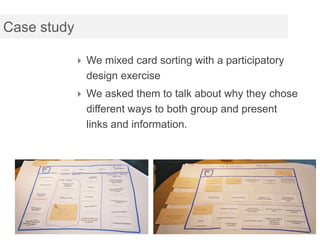
Case study

              We mixed card sorting with a participatory
               design exercise
              We asked them to talk about why they chose
               different ways to both group and present
               links and information.
Mixing methods

          Go back to your project plan.
          Look at the questions you want to answer.


          Can any of them be combined, mixing methods
          in one session?
Adjusting to constraints

The usual suspects:
Time
Resources
Budget
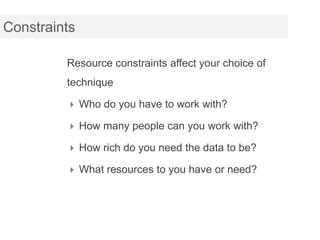
Constraints

         Resource constraints affect your choice of
         technique

          Who do you have to work with?

          How many people can you work with?

          How rich do you need the data to be?

          What resources to you have or need?
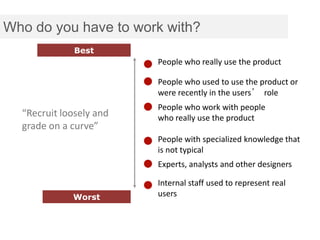
Who do you have to work with?
              Best
                         People who really use the product

                         People who used to use the product or
                         were recently in the users’ role
                         People who work with people
  “Recruit loosely and   who really use the product
  grade on a curve”
                         People with specialized knowledge that
                         is not typical
                         Experts, analysts and other designers

                         Internal staff used to represent real
             Worst       users
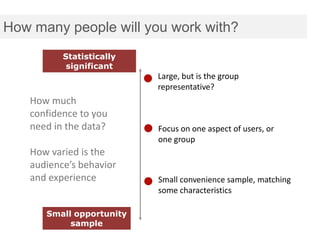
How many people will you work with?
          Statistically
           significant
                          Large, but is the group
                          representative?
   How much
   confidence to you
   need in the data?      Focus on one aspect of users, or
                          one group
   How varied is the
   audience’s behavior
   and experience         Small convenience sample, matching
                          some characteristics

      Small opportunity
           sample
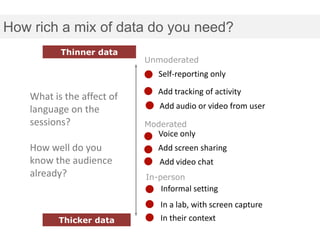
How rich a mix of data do you need?
           Thinner data
                            Unmoderated
                              Self-reporting only
                              Add tracking of activity
    What is the affect of
    language on the            Add audio or video from user
    sessions?               Moderated
                              Voice only
    How well do you           Add screen sharing
    know the audience          Add video chat
    already?                In-person
                               Informal setting
                               In a lab, with screen capture
          Thicker data         In their context
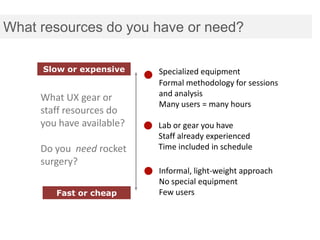
What resources do you have or need?

     Slow or expensive     Specialized equipment
                           Formal methodology for sessions
                           and analysis
     What UX gear or
                           Many users = many hours
     staff resources do
     you have available?   Lab or gear you have
                           Staff already experienced
     Do you need rocket    Time included in schedule
     surgery?
                           Informal, light-weight approach
                           No special equipment
        Fast or cheap      Few users
Mixing methods

          Go back to your project plan.
          How can you make this project easier (faster, less
          cost, fewer resources)?


          What is the least you can do and still answer all
          the questions?
Other constraints

            Accessibility
             How will you work with assistive technologies
             and different interaction styles
            Eyetracking and timing
             Do you need uninterrupted work to get data
             from instrumentation?
            Language
             Handling language differences?
Wrapup

Instead of looking for an ideal process, think
carefully about the questions and your UX
planning will be more creative.
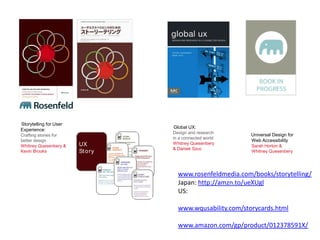
Storytelling for User
                                  Global UX:
Experience:
                                  Design and research      Universal Design for
Crafting stories for
                                  in a connected world
better design                                              Web Accessibility
                        UX        Whitney Quesenbery
Whitney Quesenbery &                                       Sarah Horton &
                                  & Daniek Szuc
Kevin Brooks            St o ry                            Whitney Quesenbery


                                    www.rosenfeldmedia.com/books/storytelling/
                                    Japan: http://amzn.to/ueXUgl
                                    US:

                                    www.wqusability.com/storycards.html

                                    www.amazon.com/gp/product/012378591X/

Choosing the Right UX Method

  • 1.
    WQusability Choosingthe Right UX Method Asking the questions to get the right answers UX Hong Kong 2012 Whitney Quesenbery
  • 2.
    Questions and answers Understandthe questions Explore ways to get the answers Be ready to adapt
  • 3.
    Baseline: your lastproject(s)  What’s your UX process?  What research, design, evaluation method do you use?  At the end of the workshop, think about how you might change this process.
  • 4.
    Process or improvisation? Learn Context of Use Specify Define Try Evaluate Designs Check Requirements Propose Produce Solutions ISO 13407ISO 9241-200
  • 5.
    Implicit questions Scope of the research Context Product Source of the data Opinion Observation Type of conclusions Qualitative Quantitative
  • 6.
    Triangulation  Combine methods to look for confirmation, overlaps, and contradictions
  • 7.
    Ask “why” touncover deeper issues Let’s test in another country. WHY? Because it’s a different culture. Why does that matter? Our product was designed for users here. Why does that make a difference We don’t know if the [feature] will work there. Why is that important? Because the success of the product is based on the value of [that feature].
  • 8.
    Design studio Your company has a product which has been successful in the local market. You are planning a big update and to introduce the product into a broader market. Design a UX plan that will make sure the launch is a success.
  • 9.
    Get ready…  Form into teams  Pick some details – type of product, region where it is currently in the market – Online service? Device? App/software? – Geographical regions? – Audience or type of users?
  • 10.
    Explore the questions  Brainstorm your questions (aim for quantity).  Use the 5 why’s to explore them more deeply.  Decide on the core questions.  Brainstorm 3 different UX techniques to answer each question.  Sketch out your team’s UX plan.
  • 11.
    Review and critique  Each team does a 5 minute presentation of their plan  Identify strengths and weaknesses  How could it be improved?  Think about – Does the type of product make a difference?
  • 12.
    Designing user researchsessions Hint: you can answer more than one question at a time
  • 13.
    Case study Project brief: Design an online database of medial research papers for cancer researchers to help them recruit patients to clinical trials for new treatments. What are our questions?
  • 14.
    Case study These were my questions:  What does a cancer researcher do?  How do they recruit patients now?  Do they think there is a problem?  Don’t they already have access to this medical research? How do we organize this project efficiently?
  • 15.
    Case study We mixed user insights and requirements gathering  Interviews in their clinics  Asked to see researchers and support staff  Walked through tools and process  Showed them “Rorschach sketches” (not “designs” but a way to get a reaction to ideas)
  • 16.
  • 17.
    From their tasksto your tasks 1. Explore their own interests first – How, when, where, activities, goals 2. Start with their own activity – Recall a recent activity and repeat 3. Find the best match in your list – Adjust as you need to to use what’s available and still be relevant. 4. Ask them to do other things on your list – Last, ask them to do anything that hasn’t come up organically. 5. Be ready to think on your feet
  • 18.
    Case study Project brief: 1. Decide how to divide information between the public and signed-in section of the site. and 2. Explore the mental models of how the members think about their relationship to the site Can we do this in a single project?
  • 19.
    Case study  We mixed card sorting with a participatory design exercise  We asked them to talk about why they chose different ways to both group and present links and information.
  • 20.
    Mixing methods Go back to your project plan. Look at the questions you want to answer. Can any of them be combined, mixing methods in one session?
  • 21.
    Adjusting to constraints Theusual suspects: Time Resources Budget
  • 22.
    Constraints Resource constraints affect your choice of technique  Who do you have to work with?  How many people can you work with?  How rich do you need the data to be?  What resources to you have or need?
  • 23.
    Who do youhave to work with? Best People who really use the product People who used to use the product or were recently in the users’ role People who work with people “Recruit loosely and who really use the product grade on a curve” People with specialized knowledge that is not typical Experts, analysts and other designers Internal staff used to represent real Worst users
  • 24.
    How many peoplewill you work with? Statistically significant Large, but is the group representative? How much confidence to you need in the data? Focus on one aspect of users, or one group How varied is the audience’s behavior and experience Small convenience sample, matching some characteristics Small opportunity sample
  • 25.
    How rich amix of data do you need? Thinner data Unmoderated Self-reporting only Add tracking of activity What is the affect of language on the Add audio or video from user sessions? Moderated Voice only How well do you Add screen sharing know the audience Add video chat already? In-person Informal setting In a lab, with screen capture Thicker data In their context
  • 26.
    What resources doyou have or need? Slow or expensive Specialized equipment Formal methodology for sessions and analysis What UX gear or Many users = many hours staff resources do you have available? Lab or gear you have Staff already experienced Do you need rocket Time included in schedule surgery? Informal, light-weight approach No special equipment Fast or cheap Few users
  • 27.
    Mixing methods Go back to your project plan. How can you make this project easier (faster, less cost, fewer resources)? What is the least you can do and still answer all the questions?
  • 28.
    Other constraints  Accessibility How will you work with assistive technologies and different interaction styles  Eyetracking and timing Do you need uninterrupted work to get data from instrumentation?  Language Handling language differences?
  • 29.
    Wrapup Instead of lookingfor an ideal process, think carefully about the questions and your UX planning will be more creative.
  • 30.
    Storytelling for User Global UX: Experience: Design and research Universal Design for Crafting stories for in a connected world better design Web Accessibility UX Whitney Quesenbery Whitney Quesenbery & Sarah Horton & & Daniek Szuc Kevin Brooks St o ry Whitney Quesenbery www.rosenfeldmedia.com/books/storytelling/ Japan: http://amzn.to/ueXUgl US: www.wqusability.com/storycards.html www.amazon.com/gp/product/012378591X/

Editor's Notes

  • #3 No decoration on the slides. This is about stripping down to the basics.I’ve looked at a lot of models – the one we saw yesterday from Christian Rorher, Nielsen has one, I’ve done a few.They are all interesting, but I’ve never been able to use them to decide what to do. My conclusions is that they are useful as a way of thinking about our research and design tools, but they don’t really help me decide what to do.
  • #4 Before we start – let’s get a baseline on what people are already doingCollect the listLearn: usersLearn: contextDefine: (analysis, requirements)Propose: designTry: evaluate
  • #5 One way to think about how to organize your thoughts – human centered design processStory about UML models – do we do all of them? No, only the ones we needIt’s a framework, not a rigid process
  • #6 Scope of the question: Broad (daily life, wants and needs, future scenarios) Product (specific details of design)Source of data: Opinion (survey, interview, asking) in between: self-report of behavior Observation (behavior, expression)Goals Qual = insights Quant = statistical proof
  • #7 Look for answers that amplify or contradictThere’s both research and business power in thatThis is from the OU
  • #10 It doesn’t really matter – just make a decision, so you are talking about sometign
  • #14 Do this on the whiteboard
  • #15 We learned that we were talking to the wrong people. The staff was really interested in this idea, though with a lot of different perspectives.
  • #16 Constraints – availability, willingness to see us, budget, time, travel – all the usualRorschach – the point is to see what they read into them.
  • #17 We weren’t looking for usability, but whether we had the right ideas about how they thought about comparing research results.For every feature we were considering, we created a paper mockup (and showed it to them on paper), and watched and listened to their reactions.
  • #21 Do this on the whiteboard
  • #23 New set of issues to consider.
  • #28 Do this on the whiteboard