User centred demos
WeBBT 2012


Hanne Sidarow; U-sentric
Mathijs Verstraete; CUO/IBBT/K.U.Leuven Future
Health Department
Agenda

1- Introduction to human centred
design
2- Methods and tools
3- DIY
User eXperience
  More than usability…

                              Accessibility	
  

         Playability	
                            Func.onality	
  

                                  UX	
  
            Sociability	
                         Usability	
  

                                Likeability	
  
Microwave racing
Microwave racingà stuur ik morgen door
http://www.youtube.com/watch?
v=Bzy5hVvbei8
Test early
Human Centred design process
Observation
User & task analysis
“Know your user!”


•  Fly on the wall
•  Diary
•  Contextual observation
•  Safari
Diary
In context data
gathering

Text, drawing,
pictures,video ,...
Cardsorting
“Your website or app from a customer point of view”
                               Card sorting
                                   •  10 - 15 users
                                   •  Categorising & labelling
                                   •  Mental model of the user
Personas
Customer experience mapping
How does your customer experience your product?

From the very beginning (awareness)…

                               until long after the use
of it…
Creation
Scenarios & storyboarding
Prototyping
Co-creation
Evaluation
Expert review
•  Information
architecture
•  Labels
•  Navigation
•  Lay-out (colour/
font/...)
•  Readability
•  Accessibility
•  Error messages
•  Consistency
•  ...
User testing
“Real user testing”


                      •  5users
                           •  Real users
                           •  Real tasks
                      •  85 % of the usability hits
                      •  Recording & logging of all user
                      reactions and feedback
Wizard of Oz
Test without a working prototype
Fake interaction
Early feedback
Low cost
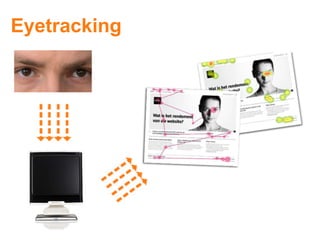
Eyetracking
Guidelines & Tools
Usability checklists                               Norman’s
                                                Seven Principles for
                                               Transforming Difficult
                                               Tasks into Simple Ones

                                                 Shneiderman’s
                                               eight golden rules of
                                                 interface design


                                                   Nielsen’s
                                               ten usability heuristics


http://www.flickr.com/photos/themm/130146412
Nielsen:
   10 heuristics
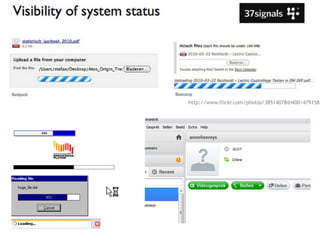
1“VISIBILITY OF THE SYSTEM STATUS”
           http://www.flickr.com/photos/38514078@N00/341504116
http://www.flickr.com/photos/38514078@N00/4791581
2“MATCH BETWEEN THE SYSTEM AND THE REAL WORLD”
                   http://www.flickr.com/photos/
http://drupal.org/node/1009716


                                                                                           http://www.iphoneuxreviews.com/?
                                                                                           p=114
http://vis.berkeley.edu/courses/cs160-sp10/wiki/index.php/HeuristicEvaluation-WeiWu
3“USER CONTROLAND FREEDOM”
          www.flickr.com/photos/randz/3965289665/
3“USER CONTROLAND FREEDOM”
http://courses.csail.mit.edu/6.831/archive/2008/lectures/L12-user-control-freedom/L12-user-control-
http://www.iphoneuxreviews.com/?p=114


                                        4 “CONSISTENCYAND STANDARDS”
http://www.behance.net/thomasdavies/frame/6755
5 “FLEXIBILITYAND EFFICIENCY/EASY OF USE”
6 “AESTHETICAND MINIMALIST DESIGN”
35 / 54
                       http://www.flickr.com/photos/opalsson/34540193
http://vis.berkeley.edu/courses/cs160-sp10/wiki/
      index.php/HeuristicEvaluation-WeiWu          http://www.iphoneuxreviews.com/?p=114
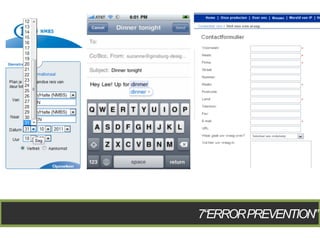
7“ERROR PREVENTION”
http://
http://vis.berkeley.edu/courses/                         touchedspace.wordpress.co
cs160-sp10/wiki/index.php/                               m/2011/10/06/in-remotes-
                                                         aim-for-recognition-rather-
HeuristicEvaluation-WeiWu                                than-recall/


                                   8 “RECOGNITION RATHER THAN RECALL”
9“HELPAND DOCUMENTATION”
          http://www.flickr.com/photos/gi/1275556
10“HELPUSERSRECOGNIZE,DIAGNOSE,ANDRECOVERFROMERRORS”
                              http://www.flickr.com/photos/furryscalyman/7730305
http://shastawriter.hubpages.com/hub/Guidelines-for-Building-a-Usable-Website


http://www.iphoneuxreviews.com/?
p=114
Accessibility:
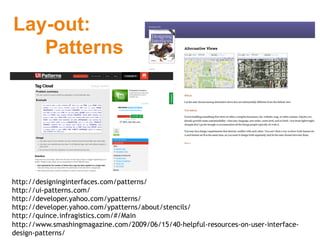
Lay-out:
   Patterns


http://designinginterfaces.com/patterns/
http://ui-patterns.com/
http://developer.yahoo.com/ypatterns/
http://developer.yahoo.com/ypatterns/about/stencils/
http://quince.infragistics.com/#/Main
http://www.smashingmagazine.com/2009/06/15/40-helpful-resources-on-user-interface-
design-patterns/
Lay-out:
   Icon sets
Standardized vs. Homemade designs


http://www.freeiconsweb.com/
http://www.iconarchive.com
http://userinterfaceicons.com/preview.php
http://www.veryicon.com/icons/system/
Methods:


http://www.usewell.be/#/methods/
http://www.designmethodenfinder.de/
http://www.usabilitynet.org/tools/methods.htm
http://www.idemployee.id.tue.nl/g.w.m.rauterberg/lecturenotes/
UsabilityMethodsToolboxHandbook.pdf
Tools:
   Prototyping


Balsamiq, Visio, Axure, Omnigraffle…
http://speckyboy.com/2010/01/11/10-completely-free-wireframe-and-mockup-
applications/
http://garmahis.com/reviews/wireframe-tools/
http://webdesignledger.com/tools/10-excellent-tools-for-creating-web-design-
wireframes
Tools:
   Testing


http://www.usefulusability.com/24-usability-testing-tools
Do it Yourself !
Exercise
•  Design a paper prototype
•  Based on a persona characteristic
•  To do:
  §  Design paper prototype
  §  User test
  §  Adapt prototype, based on user test
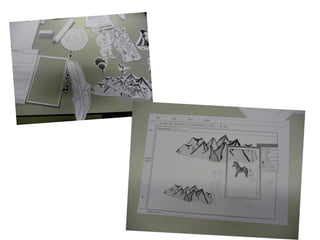
Paper prototyping
•  What?
  –  Interactive, visual representation of the user
     interaction
  –  Material = paper
  –  Interactive prototype
     •  Contains: information, interactions, visuals, content,...
•  The system‘works’
  –  Simulate interactivity
  –  Facilitator is ‘the computer’
  –  Scenario: functionalities of system
     •  Facilitator does not explain the interface (↔ storyboard)
Paper prototyping
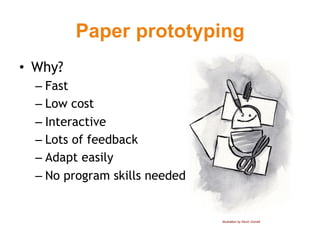
•  Why?
  –  Fast
  –  Low cost
  –  Interactive
  –  Lots of feedback
  –  Adapt easily
  –  No program skills needed


                                Illustration by Kevin Cornell
Paper prototyping
•  What is not paper prototyping?
  –  Visual design
  –  Page lay out & navigation
How?
•  http://vimeo.com/32401568
Timing
Groups
§  3 persons

• usertests: rolls
§  Facilitator (“de computer”)
§  Observator
§  End user

• Time
§    40 à 50 min: Paper prototype
§    5 à 10 min Prepare test
§    5 à 10 min Usertest
Background information
•  Redesign the application to the different
   functionalities
•  Focus on the target group
  –  Make a list of properties, needs and wishes
Persona characteristics
•  65+
•  Teenager (10-15)
•  Student (20-25)
Demo 1
Demo 2
1. Design paper prototype
1.  Add info to the persona
2.  Make a list of the User Interface
    elements
3.  Make every User Interface element
  §  Different screens
  §  UI elements
4.  Think of 5 tasks a user can do with your
    application. Try to make a workflow.
2.User tests
1.  3 rolls
  1.  Facilitator (“ be the computer “)
  2.  Observator (Intro, give tasks, note)
  3.  End user
2.  Test
  §  User: try to ‘think aloud’ & try to empathize in
      the persona
  §  Facilitator: make the interaction as smooth as
      possible
  §  Observator: Always try to ask why a user does
      certain actions. Your user is always right.
Contact
Hanne Sidarow
User Experience Expert
U-sentric

hanne@u-sentric.com
+32 474 68 99 63
www.u-sentric.com

Mathijs Verstraete
Researcher
CUO/IBBT/KU Leuven Future Health Department
mathijs.verstraete@soc.kuleuven.com
http://soc.kuleuven.be/com/mediac/cuo/

Webbt user_centred_demos