BUILDING YOUR USER
RESEARCH TOOLKIT
The Product Mentor Talk
Ian Moulton
October 7, 2015
• 12 years of experience building products
• 9 years in product management roles
• 5 different organizations
ABOUT ME
Organizations:
1. Startup: 60 employees – NYC, CA & WI – founded 2003
2. Cooperative: 3,200 employees – NYC, DC & CA – founded 1846
3. Digital: 200 employees – NYC – founded 1953
4. Startup: 7 employees – NYC – founded 2008
5. Hybrid: 250 employees – NYC & Montreal – founded 1998
ABOUT ME
Products:
• Consumer web (news websites, video players, YouTube channel)
• Business web tools (CMS for news and video publishers)
• Consumer mobile (iOS and Android apps)
• Consumer web (college guide, “Ask an Alum” service on websites)
• Business web tool (“Ask an Alum” admin tool for organizations)
• Consumer app/hardware (digital jukebox)
• Business web-based tools (jukebox management tools)
ABOUT ME
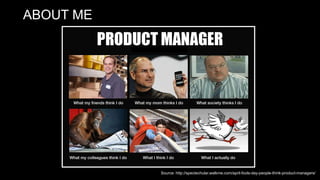
Source: http://spectechular.walkme.com/april-fools-day-people-think-product-managers/
ABOUT ME
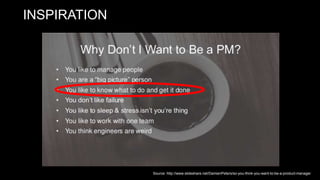
INSPIRATION
Source: http://www.slideshare.net/DamienPeters/so-you-think-you-want-to-be-a-product-manager
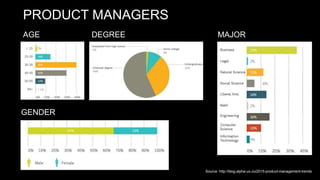
PRODUCT MANAGERS
AGE DEGREE
GENDER
MAJOR
Source: http://blog.alpha-ux.co/2015-product-management-trends
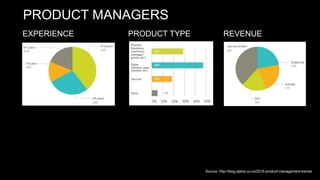
PRODUCT MANAGERS
PRODUCT TYPE REVENUEEXPERIENCE
Source: http://blog.alpha-ux.co/2015-product-management-trends
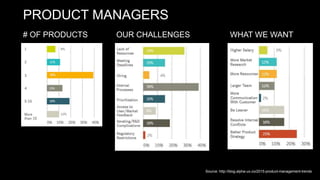
PRODUCT MANAGERS
OUR CHALLENGES WHAT WE WANT# OF PRODUCTS
Source: http://blog.alpha-ux.co/2015-product-management-trends
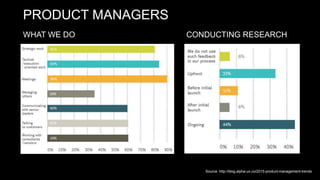
PRODUCT MANAGERS
WHAT WE DO CONDUCTING RESEARCH
Source: http://blog.alpha-ux.co/2015-product-management-trends
“Know thy user, and you are not thy user.”
- Arnie Lund
• You are the most one persona, but you are also too close to product
• Take notes when you first see the product
WHAT IS USER RESEARCH?
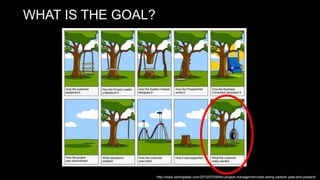
WHAT IS THE GOAL?
http://www.tamingdata.com/2010/07/08/the-project-management-tree-swing-cartoon-past-and-present/
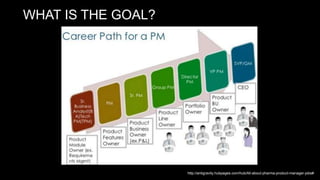
WHAT IS THE GOAL?
http://antigravity.hubpages.com/hub/All-about-pharma-product-manager-jobs#
WHAT IS USER RESEARCH?
• User Research focuses on understanding user behaviors,
needs, and motivations through observation techniques,
task analysis, and other feedback methodologies.
• Design research describes any number of investigative
techniques used to add context and insight to the design
process.
• Good user research provides actionable and testable
insights into users’ needs.
• User research helps us to understand how other people
live their lives, so that we can respond more effectively to
their needs with informed and inspired design
solutions.
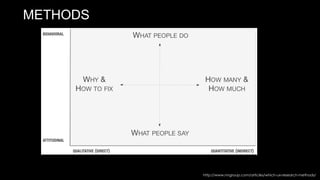
http://www.nngroup.com/articles/which-ux-research-methods/
METHODS
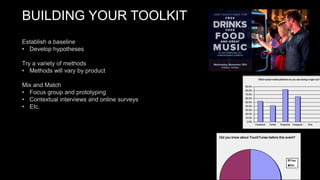
BUILDING YOUR TOOLKIT
Establish a baseline
• Develop hypotheses
Try a variety of methods
• Methods will vary by product
Mix and Match
• Focus group and prototyping
• Contextual interviews and online surveys
• Etc.
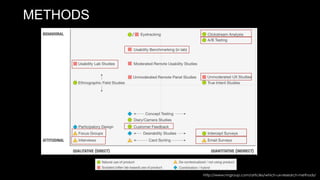
METHODS
http://www.nngroup.com/articles/which-ux-research-methods/
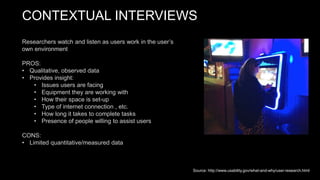
CONTEXTUAL INTERVIEWS
Researchers watch and listen as users work in the user’s
own environment
PROS:
• Qualitative, observed data
• Provides insight:
• Issues users are facing
• Equipment they are working with
• How their space is set-up
• Type of internet connection , etc.
• How long it takes to complete tasks
• Presence of people willing to assist users
CONS:
• Limited quantitative/measured data
Source: http://www.usability.gov/what-and-why/user-research.html
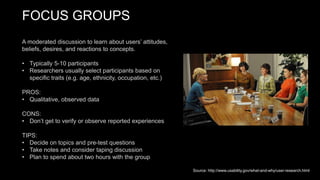
FOCUS GROUPS
A moderated discussion to learn about users’ attitudes,
beliefs, desires, and reactions to concepts.
• Typically 5-10 participants
• Researchers usually select participants based on
specific traits (e.g. age, ethnicity, occupation, etc.)
PROS:
• Qualitative, observed data
CONS:
• Don’t get to verify or observe reported experiences
TIPS:
• Decide on topics and pre-test questions
• Take notes and consider taping discussion
• Plan to spend about two hours with the group
Source: http://www.usability.gov/what-and-why/user-research.html
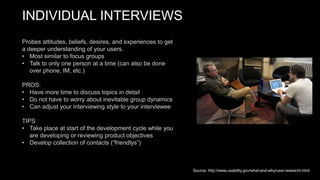
INDIVIDUAL INTERVIEWS
Probes attitudes, beliefs, desires, and experiences to get
a deeper understanding of your users.
• Most similar to focus groups
• Talk to only one person at a time (can also be done
over phone, IM, etc.)
PROS:
• Have more time to discuss topics in detail
• Do not have to worry about inevitable group dynamics
• Can adjust your interviewing style to your interviewee
TIPS
• Take place at start of the development cycle while you
are developing or reviewing product objectives
• Develop collection of contacts (“friendlys”)
Source: http://www.usability.gov/what-and-why/user-research.html
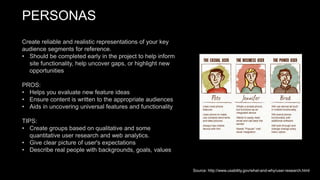
PERSONAS
Create reliable and realistic representations of your key
audience segments for reference.
• Should be completed early in the project to help inform
site functionality, help uncover gaps, or highlight new
opportunities
PROS:
• Helps you evaluate new feature ideas
• Ensure content is written to the appropriate audiences
• Aids in uncovering universal features and functionality
TIPS:
• Create groups based on qualitative and some
quantitative user research and web analytics.
• Give clear picture of user's expectations
• Describe real people with backgrounds, goals, values
Source: http://www.usability.gov/what-and-why/user-research.html
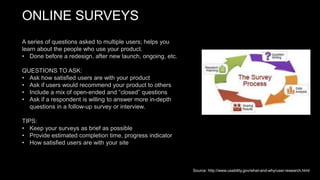
ONLINE SURVEYS
A series of questions asked to multiple users; helps you
learn about the people who use your product.
• Done before a redesign, after new launch, ongoing, etc.
QUESTIONS TO ASK:
• Ask how satisfied users are with your product
• Ask if users would recommend your product to others
• Include a mix of open-ended and “closed” questions
• Ask if a respondent is willing to answer more in-depth
questions in a follow-up survey or interview.
TIPS:
• Keep your surveys as brief as possible
• Provide estimated completion time, progress indicator
• How satisfied users are with your site
Source: http://www.usability.gov/what-and-why/user-research.html
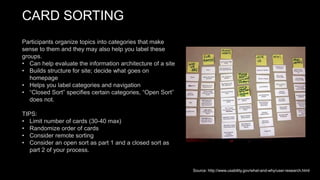
CARD SORTING
Participants organize topics into categories that make
sense to them and they may also help you label these
groups.
• Can help evaluate the information architecture of a site
• Builds structure for site; decide what goes on
homepage
• Helps you label categories and navigation
• “Closed Sort” specifies certain categories, “Open Sort”
does not.
TIPS:
• Limit number of cards (30-40 max)
• Randomize order of cards
• Consider remote sorting
• Consider an open sort as part 1 and a closed sort as
part 2 of your process.
Source: http://www.usability.gov/what-and-why/user-research.html
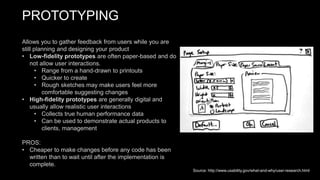
PROTOTYPING
Allows you to gather feedback from users while you are
still planning and designing your product
• Low-fidelity prototypes are often paper-based and do
not allow user interactions.
• Range from a hand-drawn to printouts
• Quicker to create
• Rough sketches may make users feel more
comfortable suggesting changes
• High-fidelity prototypes are generally digital and
usually allow realistic user interactions
• Collects true human performance data
• Can be used to demonstrate actual products to
clients, management
PROS:
• Cheaper to make changes before any code has been
written than to wait until after the implementation is
complete.
Source: http://www.usability.gov/what-and-why/user-research.html
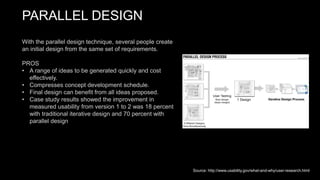
PARALLEL DESIGN
With the parallel design technique, several people create
an initial design from the same set of requirements.
PROS
• A range of ideas to be generated quickly and cost
effectively.
• Compresses concept development schedule.
• Final design can benefit from all ideas proposed.
• Case study results showed the improvement in
measured usability from version 1 to 2 was 18 percent
with traditional iterative design and 70 percent with
parallel design
Source: http://www.usability.gov/what-and-why/user-research.html
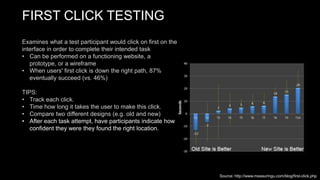
FIRST CLICK TESTING
Examines what a test participant would click on first on the
interface in order to complete their intended task
• Can be performed on a functioning website, a
prototype, or a wireframe
• When users' first click is down the right path, 87%
eventually succeed (vs. 46%)
TIPS:
• Track each click.
• Time how long it takes the user to make this click.
• Compare two different designs (e.g. old and new)
• After each task attempt, have participants indicate how
confident they were they found the right location.
Source: http://www.measuringu.com/blog/first-click.php
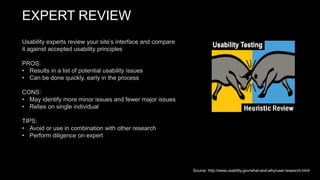
EXPERT REVIEW
Usability experts review your site’s interface and compare
it against accepted usability principles
PROS:
• Results in a list of potential usability issues
• Can be done quickly, early in the process
CONS:
• May identify more minor issues and fewer major issues
• Relies on single individual
TIPS:
• Avoid or use in combination with other research
• Perform diligence on expert
Source: http://www.usability.gov/what-and-why/user-research.html
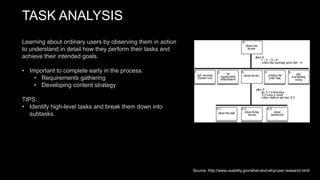
TASK ANALYSIS
Learning about ordinary users by observing them in action
to understand in detail how they perform their tasks and
achieve their intended goals.
• Important to complete early in the process:
• Requirements gathering
• Developing content strategy
TIPS:
• Identify high-level tasks and break them down into
subtasks.
Source: http://www.usability.gov/what-and-why/user-research.html
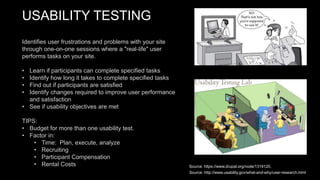
USABILITY TESTING
Identifies user frustrations and problems with your site
through one-on-one sessions where a "real-life" user
performs tasks on your site.
• Learn if participants can complete specified tasks
• Identify how long it takes to complete specified tasks
• Find out if participants are satisfied
• Identify changes required to improve user performance
and satisfaction
• See if usability objectives are met
TIPS:
• Budget for more than one usability test.
• Factor in:
• Time: Plan, execute, analyze
• Recruiting
• Participant Compensation
• Rental Costs Source: https://www.drupal.org/node/1319120,
Source: http://www.usability.gov/what-and-why/user-research.html
SELECTING METHODS
“One of the biggest challenges in performing user
research is determining which research approaches to
apply and when to apply them.”
- Demetrius Madrigal and Bryan McClain, uxmatters.com
TIPS:
- Early
- Regularly (plan for it)
- Quick and dirty
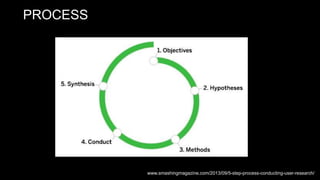
PROCESS
www.smashingmagazine.com/2013/09/5-step-process-conducting-user-research/
OBJECTIVES
1. Ask questions
• “Who would share program clips?”
• “How frequently would viewers share clips?”
• “Why would people choose to share clips?”
2. Identify overall objective
• You need to be able to reach that objective in the
time frame you have allotted for the research.
• Document in a one-pager.
Source: www.smashingmagazine.com/2013/09/5-step-process-conducting-user-research/
HYPOTHESES
• Creates awareness to help minimize bias
• Helps you select the right methods
• Use your early hypotheses to help communicate what
you’ve discovered through research.
• E.g. “We believed [A], but discovered [B].”
• The more the merrier
Source: www.smashingmagazine.com/2013/09/5-step-process-conducting-user-research/
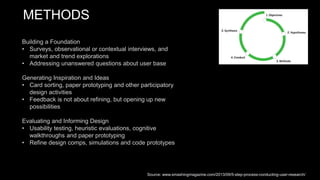
METHODS
Building a Foundation
• Surveys, observational or contextual interviews, and
market and trend explorations
• Addressing unanswered questions about user base
Generating Inspiration and Ideas
• Card sorting, paper prototyping and other participatory
design activities
• Feedback is not about refining, but opening up new
possibilities
Evaluating and Informing Design
• Usability testing, heuristic evaluations, cognitive
walkthroughs and paper prototyping
• Refine design comps, simulations and code prototypes
Source: www.smashingmagazine.com/2013/09/5-step-process-conducting-user-research/
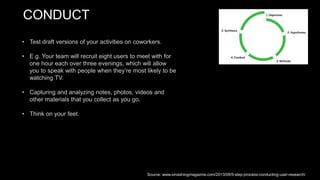
CONDUCT
• Test draft versions of your activities on coworkers.
• E.g. Your team will recruit eight users to meet with for
one hour each over three evenings, which will allow
you to speak with people when they’re most likely to be
watching TV.
• Capturing and analyzing notes, photos, videos and
other materials that you collect as you go.
• Think on your feet.
Source: www.smashingmagazine.com/2013/09/5-step-process-conducting-user-research/
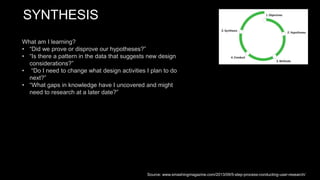
SYNTHESIS
What am I learning?
• “Did we prove or disprove our hypotheses?”
• “Is there a pattern in the data that suggests new design
considerations?”
• “Do I need to change what design activities I plan to do
next?”
• “What gaps in knowledge have I uncovered and might
need to research at a later date?”
Source: www.smashingmagazine.com/2013/09/5-step-process-conducting-user-research/
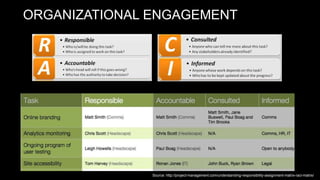
ORGANIZATIONAL ENGAGEMENT
Source: http://project-management.com/understanding-responsibility-assignment-matrix-raci-matrix/
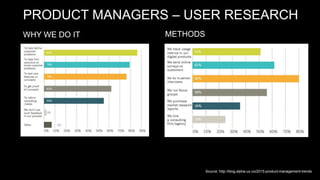
PRODUCT MANAGERS – USER RESEARCH
WHY WE DO IT METHODS
Source: http://blog.alpha-ux.co/2015-product-management-trends
USER RESEARCH DURING DESIGN
DESIGN
“Usability testing is the killing field of cherished notions.”
- David Orr
Failure comes when you don’t listen. You can’t put something out there and assume
it’s great. It’s up to us to make sure we’re listening to improve our chances for
success—if not this time, next time.”
—Alan Lewis
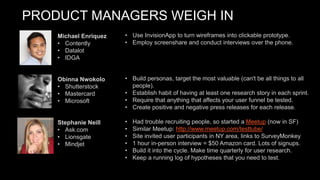
PRODUCT MANAGERS WEIGH IN
• Use InvisionApp to turn wireframes into clickable prototype.
• Employ screenshare and conduct interviews over the phone.
• Build personas, target the most valuable (can't be all things to all
people).
• Establish habit of having at least one research story in each sprint.
• Require that anything that affects your user funnel be tested.
• Create positive and negative press releases for each release.
• Had trouble recruiting people, so started a Meetup (now in SF)
• Similar Meetup: http://www.meetup.com/testtube/
• Site invited user participants in NY area, links to SurveyMonkey
• 1 hour in-person interview = $50 Amazon card. Lots of signups.
• Build it into the cycle. Make time quarterly for user research.
• Keep a running log of hypotheses that you need to test.
Michael Enriquez
• Contently
• Datalot
• IDGA
Obinna Nwokolo
• Shutterstock
• Mastercard
• Microsoft
Stephanie Neill
• Ask.com
• Lionsgate
• Mindjet
PRODUCT MANAGERS WEIGH IN
“Customers always know what’s wrong. They can’t always tell you
what they want, but they always can tell you what’s wrong.
-Carly Fiorina
• Recruiting users: C Space, Amazon Mechanical Turks, Fiverr.
• Also amassed user community for continual testing.
• Sprint-based approach doing research in 2-week bursts.
• Lot of work in a short amount of time; fits into tight timelines
• Agile, sprint-based research was THE key way to make the time.
• “Without it you could render your entire product useless and then
the investment is blown.
• Qualitative interviews have themes. It’s easy to find pain points.
• Keep participants from going to solutions; keep them in user mode.
• Never underestimate how many users are willing to take a survey.
• Easy to never get to research unless it is built into the project plan.
• “Good results can come when the whole team is thinking about the
research and testing and gear up for it together. ”
Jenn Bornstein
• TouchTunes
• DirecTV
• Nielsen
Rich Kang
• BeyondCurious
• TouchTunes
• Caesars
Matt Saunders
• Marvel
• Mindspark
• Associated Press
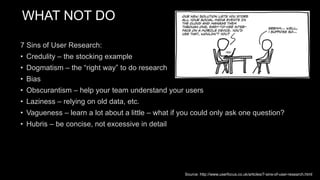
WHAT NOT DO
7 Sins of User Research:
• Credulity – the stocking example
• Dogmatism – the “right way” to do research
• Bias
• Obscurantism – help your team understand your users
• Laziness – relying on old data, etc.
• Vagueness – learn a lot about a little – what if you could only ask one question?
• Hubris – be concise, not excessive in detail
Source: http://www.userfocus.co.uk/articles/7-sins-of-user-research.html

Conducting User Research

  • 1.
    BUILDING YOUR USER RESEARCHTOOLKIT The Product Mentor Talk Ian Moulton October 7, 2015
  • 2.
    • 12 yearsof experience building products • 9 years in product management roles • 5 different organizations ABOUT ME
  • 3.
    Organizations: 1. Startup: 60employees – NYC, CA & WI – founded 2003 2. Cooperative: 3,200 employees – NYC, DC & CA – founded 1846 3. Digital: 200 employees – NYC – founded 1953 4. Startup: 7 employees – NYC – founded 2008 5. Hybrid: 250 employees – NYC & Montreal – founded 1998 ABOUT ME
  • 4.
    Products: • Consumer web(news websites, video players, YouTube channel) • Business web tools (CMS for news and video publishers) • Consumer mobile (iOS and Android apps) • Consumer web (college guide, “Ask an Alum” service on websites) • Business web tool (“Ask an Alum” admin tool for organizations) • Consumer app/hardware (digital jukebox) • Business web-based tools (jukebox management tools) ABOUT ME
  • 5.
  • 6.
  • 7.
    PRODUCT MANAGERS AGE DEGREE GENDER MAJOR Source:http://blog.alpha-ux.co/2015-product-management-trends
  • 8.
    PRODUCT MANAGERS PRODUCT TYPEREVENUEEXPERIENCE Source: http://blog.alpha-ux.co/2015-product-management-trends
  • 9.
    PRODUCT MANAGERS OUR CHALLENGESWHAT WE WANT# OF PRODUCTS Source: http://blog.alpha-ux.co/2015-product-management-trends
  • 10.
    PRODUCT MANAGERS WHAT WEDO CONDUCTING RESEARCH Source: http://blog.alpha-ux.co/2015-product-management-trends
  • 11.
    “Know thy user,and you are not thy user.” - Arnie Lund • You are the most one persona, but you are also too close to product • Take notes when you first see the product WHAT IS USER RESEARCH?
  • 12.
    WHAT IS THEGOAL? http://www.tamingdata.com/2010/07/08/the-project-management-tree-swing-cartoon-past-and-present/
  • 13.
    WHAT IS THEGOAL? http://antigravity.hubpages.com/hub/All-about-pharma-product-manager-jobs#
  • 14.
    WHAT IS USERRESEARCH? • User Research focuses on understanding user behaviors, needs, and motivations through observation techniques, task analysis, and other feedback methodologies. • Design research describes any number of investigative techniques used to add context and insight to the design process. • Good user research provides actionable and testable insights into users’ needs. • User research helps us to understand how other people live their lives, so that we can respond more effectively to their needs with informed and inspired design solutions.
  • 15.
  • 16.
    BUILDING YOUR TOOLKIT Establisha baseline • Develop hypotheses Try a variety of methods • Methods will vary by product Mix and Match • Focus group and prototyping • Contextual interviews and online surveys • Etc.
  • 17.
  • 18.
    CONTEXTUAL INTERVIEWS Researchers watchand listen as users work in the user’s own environment PROS: • Qualitative, observed data • Provides insight: • Issues users are facing • Equipment they are working with • How their space is set-up • Type of internet connection , etc. • How long it takes to complete tasks • Presence of people willing to assist users CONS: • Limited quantitative/measured data Source: http://www.usability.gov/what-and-why/user-research.html
  • 19.
    FOCUS GROUPS A moderateddiscussion to learn about users’ attitudes, beliefs, desires, and reactions to concepts. • Typically 5-10 participants • Researchers usually select participants based on specific traits (e.g. age, ethnicity, occupation, etc.) PROS: • Qualitative, observed data CONS: • Don’t get to verify or observe reported experiences TIPS: • Decide on topics and pre-test questions • Take notes and consider taping discussion • Plan to spend about two hours with the group Source: http://www.usability.gov/what-and-why/user-research.html
  • 20.
    INDIVIDUAL INTERVIEWS Probes attitudes,beliefs, desires, and experiences to get a deeper understanding of your users. • Most similar to focus groups • Talk to only one person at a time (can also be done over phone, IM, etc.) PROS: • Have more time to discuss topics in detail • Do not have to worry about inevitable group dynamics • Can adjust your interviewing style to your interviewee TIPS • Take place at start of the development cycle while you are developing or reviewing product objectives • Develop collection of contacts (“friendlys”) Source: http://www.usability.gov/what-and-why/user-research.html
  • 21.
    PERSONAS Create reliable andrealistic representations of your key audience segments for reference. • Should be completed early in the project to help inform site functionality, help uncover gaps, or highlight new opportunities PROS: • Helps you evaluate new feature ideas • Ensure content is written to the appropriate audiences • Aids in uncovering universal features and functionality TIPS: • Create groups based on qualitative and some quantitative user research and web analytics. • Give clear picture of user's expectations • Describe real people with backgrounds, goals, values Source: http://www.usability.gov/what-and-why/user-research.html
  • 22.
    ONLINE SURVEYS A seriesof questions asked to multiple users; helps you learn about the people who use your product. • Done before a redesign, after new launch, ongoing, etc. QUESTIONS TO ASK: • Ask how satisfied users are with your product • Ask if users would recommend your product to others • Include a mix of open-ended and “closed” questions • Ask if a respondent is willing to answer more in-depth questions in a follow-up survey or interview. TIPS: • Keep your surveys as brief as possible • Provide estimated completion time, progress indicator • How satisfied users are with your site Source: http://www.usability.gov/what-and-why/user-research.html
  • 23.
    CARD SORTING Participants organizetopics into categories that make sense to them and they may also help you label these groups. • Can help evaluate the information architecture of a site • Builds structure for site; decide what goes on homepage • Helps you label categories and navigation • “Closed Sort” specifies certain categories, “Open Sort” does not. TIPS: • Limit number of cards (30-40 max) • Randomize order of cards • Consider remote sorting • Consider an open sort as part 1 and a closed sort as part 2 of your process. Source: http://www.usability.gov/what-and-why/user-research.html
  • 24.
    PROTOTYPING Allows you togather feedback from users while you are still planning and designing your product • Low-fidelity prototypes are often paper-based and do not allow user interactions. • Range from a hand-drawn to printouts • Quicker to create • Rough sketches may make users feel more comfortable suggesting changes • High-fidelity prototypes are generally digital and usually allow realistic user interactions • Collects true human performance data • Can be used to demonstrate actual products to clients, management PROS: • Cheaper to make changes before any code has been written than to wait until after the implementation is complete. Source: http://www.usability.gov/what-and-why/user-research.html
  • 25.
    PARALLEL DESIGN With theparallel design technique, several people create an initial design from the same set of requirements. PROS • A range of ideas to be generated quickly and cost effectively. • Compresses concept development schedule. • Final design can benefit from all ideas proposed. • Case study results showed the improvement in measured usability from version 1 to 2 was 18 percent with traditional iterative design and 70 percent with parallel design Source: http://www.usability.gov/what-and-why/user-research.html
  • 26.
    FIRST CLICK TESTING Examineswhat a test participant would click on first on the interface in order to complete their intended task • Can be performed on a functioning website, a prototype, or a wireframe • When users' first click is down the right path, 87% eventually succeed (vs. 46%) TIPS: • Track each click. • Time how long it takes the user to make this click. • Compare two different designs (e.g. old and new) • After each task attempt, have participants indicate how confident they were they found the right location. Source: http://www.measuringu.com/blog/first-click.php
  • 27.
    EXPERT REVIEW Usability expertsreview your site’s interface and compare it against accepted usability principles PROS: • Results in a list of potential usability issues • Can be done quickly, early in the process CONS: • May identify more minor issues and fewer major issues • Relies on single individual TIPS: • Avoid or use in combination with other research • Perform diligence on expert Source: http://www.usability.gov/what-and-why/user-research.html
  • 28.
    TASK ANALYSIS Learning aboutordinary users by observing them in action to understand in detail how they perform their tasks and achieve their intended goals. • Important to complete early in the process: • Requirements gathering • Developing content strategy TIPS: • Identify high-level tasks and break them down into subtasks. Source: http://www.usability.gov/what-and-why/user-research.html
  • 29.
    USABILITY TESTING Identifies userfrustrations and problems with your site through one-on-one sessions where a "real-life" user performs tasks on your site. • Learn if participants can complete specified tasks • Identify how long it takes to complete specified tasks • Find out if participants are satisfied • Identify changes required to improve user performance and satisfaction • See if usability objectives are met TIPS: • Budget for more than one usability test. • Factor in: • Time: Plan, execute, analyze • Recruiting • Participant Compensation • Rental Costs Source: https://www.drupal.org/node/1319120, Source: http://www.usability.gov/what-and-why/user-research.html
  • 30.
    SELECTING METHODS “One ofthe biggest challenges in performing user research is determining which research approaches to apply and when to apply them.” - Demetrius Madrigal and Bryan McClain, uxmatters.com TIPS: - Early - Regularly (plan for it) - Quick and dirty
  • 31.
  • 32.
    OBJECTIVES 1. Ask questions •“Who would share program clips?” • “How frequently would viewers share clips?” • “Why would people choose to share clips?” 2. Identify overall objective • You need to be able to reach that objective in the time frame you have allotted for the research. • Document in a one-pager. Source: www.smashingmagazine.com/2013/09/5-step-process-conducting-user-research/
  • 33.
    HYPOTHESES • Creates awarenessto help minimize bias • Helps you select the right methods • Use your early hypotheses to help communicate what you’ve discovered through research. • E.g. “We believed [A], but discovered [B].” • The more the merrier Source: www.smashingmagazine.com/2013/09/5-step-process-conducting-user-research/
  • 34.
    METHODS Building a Foundation •Surveys, observational or contextual interviews, and market and trend explorations • Addressing unanswered questions about user base Generating Inspiration and Ideas • Card sorting, paper prototyping and other participatory design activities • Feedback is not about refining, but opening up new possibilities Evaluating and Informing Design • Usability testing, heuristic evaluations, cognitive walkthroughs and paper prototyping • Refine design comps, simulations and code prototypes Source: www.smashingmagazine.com/2013/09/5-step-process-conducting-user-research/
  • 35.
    CONDUCT • Test draftversions of your activities on coworkers. • E.g. Your team will recruit eight users to meet with for one hour each over three evenings, which will allow you to speak with people when they’re most likely to be watching TV. • Capturing and analyzing notes, photos, videos and other materials that you collect as you go. • Think on your feet. Source: www.smashingmagazine.com/2013/09/5-step-process-conducting-user-research/
  • 36.
    SYNTHESIS What am Ilearning? • “Did we prove or disprove our hypotheses?” • “Is there a pattern in the data that suggests new design considerations?” • “Do I need to change what design activities I plan to do next?” • “What gaps in knowledge have I uncovered and might need to research at a later date?” Source: www.smashingmagazine.com/2013/09/5-step-process-conducting-user-research/
  • 37.
  • 38.
    PRODUCT MANAGERS –USER RESEARCH WHY WE DO IT METHODS Source: http://blog.alpha-ux.co/2015-product-management-trends
  • 39.
    USER RESEARCH DURINGDESIGN DESIGN “Usability testing is the killing field of cherished notions.” - David Orr Failure comes when you don’t listen. You can’t put something out there and assume it’s great. It’s up to us to make sure we’re listening to improve our chances for success—if not this time, next time.” —Alan Lewis
  • 40.
    PRODUCT MANAGERS WEIGHIN • Use InvisionApp to turn wireframes into clickable prototype. • Employ screenshare and conduct interviews over the phone. • Build personas, target the most valuable (can't be all things to all people). • Establish habit of having at least one research story in each sprint. • Require that anything that affects your user funnel be tested. • Create positive and negative press releases for each release. • Had trouble recruiting people, so started a Meetup (now in SF) • Similar Meetup: http://www.meetup.com/testtube/ • Site invited user participants in NY area, links to SurveyMonkey • 1 hour in-person interview = $50 Amazon card. Lots of signups. • Build it into the cycle. Make time quarterly for user research. • Keep a running log of hypotheses that you need to test. Michael Enriquez • Contently • Datalot • IDGA Obinna Nwokolo • Shutterstock • Mastercard • Microsoft Stephanie Neill • Ask.com • Lionsgate • Mindjet
  • 41.
    PRODUCT MANAGERS WEIGHIN “Customers always know what’s wrong. They can’t always tell you what they want, but they always can tell you what’s wrong. -Carly Fiorina • Recruiting users: C Space, Amazon Mechanical Turks, Fiverr. • Also amassed user community for continual testing. • Sprint-based approach doing research in 2-week bursts. • Lot of work in a short amount of time; fits into tight timelines • Agile, sprint-based research was THE key way to make the time. • “Without it you could render your entire product useless and then the investment is blown. • Qualitative interviews have themes. It’s easy to find pain points. • Keep participants from going to solutions; keep them in user mode. • Never underestimate how many users are willing to take a survey. • Easy to never get to research unless it is built into the project plan. • “Good results can come when the whole team is thinking about the research and testing and gear up for it together. ” Jenn Bornstein • TouchTunes • DirecTV • Nielsen Rich Kang • BeyondCurious • TouchTunes • Caesars Matt Saunders • Marvel • Mindspark • Associated Press
  • 42.
    WHAT NOT DO 7Sins of User Research: • Credulity – the stocking example • Dogmatism – the “right way” to do research • Bias • Obscurantism – help your team understand your users • Laziness – relying on old data, etc. • Vagueness – learn a lot about a little – what if you could only ask one question? • Hubris – be concise, not excessive in detail Source: http://www.userfocus.co.uk/articles/7-sins-of-user-research.html

Editor's Notes

  • #4 If you can find somewhere where everything is happening in the same place, grab it.
  • #12 I aspire to be one of the key personas of the products I work on, but need to remind myself I am not all users.
  • #24 Me: haven’t done it.
  • #26 ME: Different designs for homepage, etc.
  • #27 ME: we did it with a prototype and found out what % were going to search, to see if we moved the needle
  • #41 Don’t be afraid to share rough ideas.