DATADATA
COMMUNICATIONCOMMUNICATION
LeCTUre-3LeCTUre-3
reCAp Of LeCTUre 2reCAp Of LeCTUre 2
• Key DataCommunication Terminology
• DataFlow/ Transmission Modes
• Networksand Why weneed Them?
• Distributed Processing
• Network Criteria
• Physical structureof Network
• Typeof connection
OvervIew Of LeCTUre 3OvervIew Of LeCTUre 3
• Physical Structureof Network
• Physical Topologies
1. Bus
2. Mesh
3. Star
4. Ring
5. Tree
6. Hybrid
TOpOLOgy
“The Topology is the geometric
representation of the relationship of
the links and linking devices”
OR
“Topology defines physical or logical
arrangement of links in a Network”
TOpOLOgy (CONT.)
• The ways in which the wires can be run in the network
to link with thecomputer.
• The ways in which the connections are made in the
network.
• Simply Thephysical layout of thenetwork.
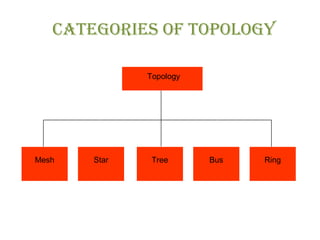
CATegOrIes Of TOpOLOgy
Topology
Mesh Star Tree Bus Ring
BUs TOpOLOgy
BUs TOpOLOgy (CONT.)
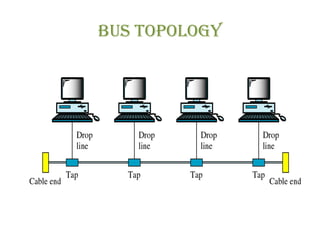
• Structure
• A bustopology, ismultipoint.
• Onelong cableactsasabackboneto link all thedevicesin anetwork.
• Nodesareconnected to thebuscableby drop linesand taps.
• A drop line is a connection running between the device and the main
cable.
• A tap is a connector that either splices into the main cable or punctures
thesheathing of acableto createacontact with themetallic core.
• As a signal travels along the backbone, some of its energy is transformed
into heat. Therefore, it becomes weaker and weaker as it travels farther
and farther. For this reason there is a limit on the number of taps a bus
can support and on thedistancebetween thosetaps.
BUs TOpOLOgy (CONT.)
• In abusnetwork every workstation needs
• BNC Barrel Connectors
• T-Connectors
• Terminators
• NIC.
• T-Connectors are used to provide connection from the bus link to a
workstation.
• NIC (Network Interface Card) is used to link a workstation with the
network.
• Barrel Connectors are used to connect two parts of a cable either broken
or when additional wireisrequired.
• Terminators areused for Termination purpose.
• Basically Thin Coaxial Cableisused in thistopology.
BUs TOpOLOgy (CONT.)
• Uses:
• It is often used when network installation is small, simply
or temporary.
• Busisapassivetopology,
• i.e. no activeelectron isused to amplify thesignal.
Bus Topology (ConT.)
• WORKING:
• Broadcast network
• all the computers on the network receive the information, but
only one computer (the one with the address that matches the
oneencoded in themessage) acceptstheinformation. Therest
disregardsthemessage.
• Protocol used is CSMA/CD (Carrier Sense Multiple Access
with Collision Detection),
• i.e. only one device can transmit the data at a time. More than
one signal introduces collision. It means if one computer
sends a signal over the bus; the other computer must wait for
sometime.
Bus Topology (ConT.)
Another important issuein busnetwork istermination.
Without termination, when thesignal reachestheend of the
wire, it bounces back and travels back up the wire which
makesthenetwork busy.
To stop the bouncing signal, we attach terminators at either
end of segment.
The terminator absorbs the electrical energy and stops the
reflection.
Example
○ Ethernet10Base2, 10Base5, and ARC Net.
Bus Topology (ConT.)
• ADVANTAGES
• popular because its working requirements are
comparatively simple, and growth is accomplished easily
and quickly.
• Easy to useand understand.
• It isreliablein small networks.
• Repeater can beused to extend thenetwork.
• It requiresleast amount of cable.
• It islessexpensivein cost.
Bus Topology (ConT.)
• DISADVANTAGES
• Heavy network traffic can slow the Bus, considerably
(morecollision, morewaiting time).
• Each BNC Barrel connecter weakens the signals as it
absorbsenergy for itsown charge.
• Difficult to troubleshoot and maintain because of cable
break, looseconnector, and malfunctioning computer.
• Singlecomputer failuredisturbsthewholenetwork.
• Not a good choice for large organizations, because of
slow datatraffic.
Mesh Topology
Mesh Topology (ConT.)
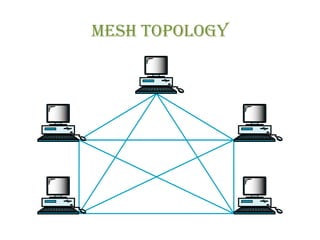
• In a mesh topology, every device has a dedicated point-to-point
link to every other device.
• The term dedicated means that the link carries traffic only
between thetwo devicesit connects.
• Primarily used in networksthat aremostly not LANs.
• Madeup of multiplepoint to point connections.
• Mesh networks can get complicated very quickly, because many
connectionsmust bemanaged in anetwork of any size.
• Mesh topology haveredundant linksbetween devices.
• Each workstation is connected with a multi-port device like HUB
that broadcaststhedata.
• Therearetwo typesof Mesh, i.e.
• TrueMesh
• HybridMesh
Mesh Topology (ConT.)
• TRUEMESH
• A true Mesh has a link between each device in the
network.
• It meansthat network isfully connected.
• A true mesh of six devices requires fifteen connections (5
x 6)/2 = 15 links and that for seven devices requires 21
links.
• The formula for finding total links in a true mesh is [n *
(n– 1)] /2, wherenistotal number of workstations.
Mesh Topology (ConT.)
• HYBRIDMESH
• Hybrid Mesh has extra links but not fully connected.
Most Mesh topology networks are Hybrid Mesh
networks.
links and porTs in Mesh
Topology
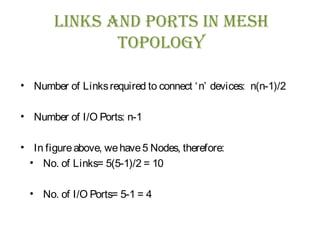
• Number of Linksrequired to connect ‘n’ devices: n(n-1)/2
• Number of I/O Ports: n-1
• In figureabove, wehave5 Nodes, therefore:
• No. of Links= 5(5-1)/2 = 10
• No. of I/O Ports= 5-1 = 4
Mesh Topology (ConT.)
• ADVANTAGES
• Each dedicated connection can carry its own data load,
thuseliminating thetraffic problems.
• It is robust. If one link becomes unusable, it does not
incapacitatetheentiresystem.
• privacy or security. Physical boundaries prevent other
usersfrom gaining accessto messages.
• Point-to-point links make fault identification and fault
isolation easy.
Mesh Topology (ConT.)
• DISADVANTAGES:
• Amount of cabling and thenumber of I/O portsrequired
• Installation and reconnection aredifficult.
• The sheer bulk of the wiring can be greater than the
available space (in walls, ceilings, or floors) can
accommodate.
• The hardware required to connect each link (I/O ports and
cable) can beprohibitively expensive.
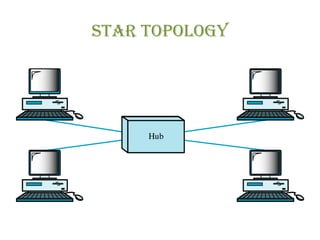
sTar Topology
sTar Topology (ConT.)
• Most commonly used network topology
• STRUCTURE:
• Each device has a dedicated point-to-point link only to a
central controller, usually called ahub or switch.
• Thedevicesarenot directly linked to oneanother.
• Unlike a mesh topology, a star topology does not allow
direct traffic between devices.
• The controller acts as an exchange: If one device wants to
send data to another, it sends the data to the controller,
which then relaysthedatato theother connected device.
sTar Topology (ConT.)
• WORKING:
• Each computer on star network communicates with a
Hub, that resend the message either to all computers
which is called Broadcasting Star or only to the
destination nodewhich iscalled Switched Star.
• Now-a-daysmost of Switched Star networksuseSwitches
instead of Intelligent Hubs because switches are less
expensivethan Intelligent hubs.
sTar Topology (ConT.)
• ADVANTAGES:
• Easy modification and expansion, without disturbing rest of the
network.
• Singlecomputer failuredoesnot affect thewholenetwork.
• Support of several cablestypesin thesamenetwork.
• Most flexibleof thethreetopologiesand easiest to diagnose.
• It islessexpensivethan amesh topology.
• Each device needs only one link and one I/O port to connect it
to any number of others.
• Thisfactor also makesit easy to install and reconfigure.
• Far lesscabling needed ascompareto mesh topology.
• Robustness. If one link fails, only that link is affected. All other
links remain active. This factor also lends itself to easy fault
identification and fault isolation.
sTar Topology (ConT.)
• DISADVANTAGES:
• Dependency of the whole topology on one single point,
thehub. If thehub goesdown, thewholesystem isdead.
• More cables are required as compare to Bus and Ring
topology and also Hub isexpensive.
rIng Topology
rIng TopologyrIng Topology
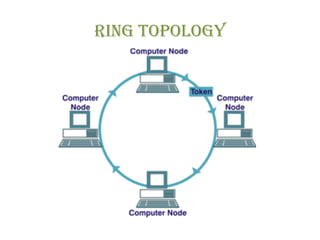
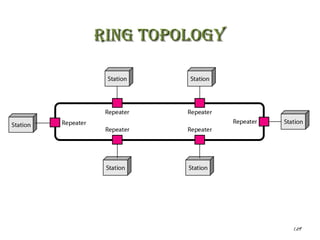
• Each device has a dedicated point-to-point connection with
only thetwo deviceson either sideof it.
• A signal is passed along the ring in one direction, from device
to device, until it reachesitsdestination.
• Each device in the ring incorporates a repeater. When a device
receives a signal intended for another device, its repeater
regeneratesthebitsand passesthem along
• Cable may be Coaxial with connectors or may be twisted pair
with aHUB. Commonly Twisted Pair cableisused.
• Thereisno termination becausethereisno end to thering.
1.29
rIng TopologyrIng Topology
rIng Topology
• Working:
• For data transmission, medium access is required that is done by Token
and thetechniqueisknown asToken Passing.
• Token is a short message that is passed around the ring until a computer
wishes to sends information to another computer, That computer modifies
thetoken, addsan electronic address& data, and sendsit around thering.
• Each computer in sequence receives the token and the information and
passes them to the next computer until either the electronic address
matches the address of a computer or the token returns to its origin. The
receiving computer returns a message to the originator indicating that the
messagehasbeen received.
• The sending computer then creates the token and begins transmitting. The
token circulatesuntil astation isready to send and capturesthetoken.
RING TOPOLOGY
• This all happens very quickly, a token can circle a ring 200
meters in diameter at about 10,000 times a second. Some
faster networkscirculateseveral tokensat once.
• Transmitted data moves in clockwise direction therefore there
isno chanceof collision.
• Example: FDDI is a fast fiber-optic network based on the
ring topology. Token ring isanother ring based network.
RING TOPOLOGYRING TOPOLOGY
• ADVANTAGES:
• It eliminates LANs depending on a central computer by
distributing someof thecentral systemsresponsibility to all
theother connected workstation.
• Every workstation on the ring listens to see if the network
is clear before sending a message. This helps avoiding
collision between themessages.
• The network degrades gracefully as more users we added
i.e. thenetwork doesn’t failed.
RING TOPOLOGYRING TOPOLOGY
• DISADVANTAGES:
• Failure of one computer on the ring can affect the whole
network.
• Also difficult to troubleshoot.
• Adding or removing nodesdisturb thenetwork.
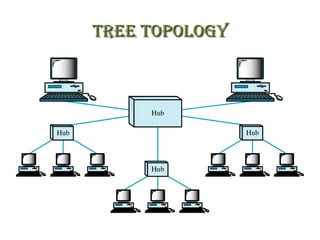
TRee TOPOLOGYTRee TOPOLOGY
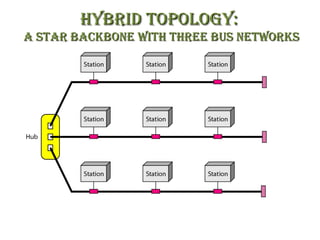
hYbRId TOPOLOGY:hYbRId TOPOLOGY:
a sTaR backbONe wITh ThRee bus NeTwORksa sTaR backbONe wITh ThRee bus NeTwORks
summaRYsummaRY
• Physical Structureof Network
• Physical Topologies
1. Bus
2. Mesh
3. Star
4. Ring
5. Tree
6. Hybrid
suGGesTed ReadINGsuGGesTed ReadING
• Section
– 1.2
• “Data Communications and Networking” 4th
Edition by
Behrouz A. Forouzan

Dc lec-03 (topologies)

  • 1.
  • 2.
    reCAp Of LeCTUre2reCAp Of LeCTUre 2 • Key DataCommunication Terminology • DataFlow/ Transmission Modes • Networksand Why weneed Them? • Distributed Processing • Network Criteria • Physical structureof Network • Typeof connection
  • 3.
    OvervIew Of LeCTUre3OvervIew Of LeCTUre 3 • Physical Structureof Network • Physical Topologies 1. Bus 2. Mesh 3. Star 4. Ring 5. Tree 6. Hybrid
  • 4.
    TOpOLOgy “The Topology isthe geometric representation of the relationship of the links and linking devices” OR “Topology defines physical or logical arrangement of links in a Network”
  • 5.
    TOpOLOgy (CONT.) • Theways in which the wires can be run in the network to link with thecomputer. • The ways in which the connections are made in the network. • Simply Thephysical layout of thenetwork.
  • 6.
  • 7.
  • 8.
    BUs TOpOLOgy (CONT.) •Structure • A bustopology, ismultipoint. • Onelong cableactsasabackboneto link all thedevicesin anetwork. • Nodesareconnected to thebuscableby drop linesand taps. • A drop line is a connection running between the device and the main cable. • A tap is a connector that either splices into the main cable or punctures thesheathing of acableto createacontact with themetallic core. • As a signal travels along the backbone, some of its energy is transformed into heat. Therefore, it becomes weaker and weaker as it travels farther and farther. For this reason there is a limit on the number of taps a bus can support and on thedistancebetween thosetaps.
  • 9.
    BUs TOpOLOgy (CONT.) •In abusnetwork every workstation needs • BNC Barrel Connectors • T-Connectors • Terminators • NIC. • T-Connectors are used to provide connection from the bus link to a workstation. • NIC (Network Interface Card) is used to link a workstation with the network. • Barrel Connectors are used to connect two parts of a cable either broken or when additional wireisrequired. • Terminators areused for Termination purpose. • Basically Thin Coaxial Cableisused in thistopology.
  • 10.
    BUs TOpOLOgy (CONT.) •Uses: • It is often used when network installation is small, simply or temporary. • Busisapassivetopology, • i.e. no activeelectron isused to amplify thesignal.
  • 11.
    Bus Topology (ConT.) •WORKING: • Broadcast network • all the computers on the network receive the information, but only one computer (the one with the address that matches the oneencoded in themessage) acceptstheinformation. Therest disregardsthemessage. • Protocol used is CSMA/CD (Carrier Sense Multiple Access with Collision Detection), • i.e. only one device can transmit the data at a time. More than one signal introduces collision. It means if one computer sends a signal over the bus; the other computer must wait for sometime.
  • 12.
    Bus Topology (ConT.) Anotherimportant issuein busnetwork istermination. Without termination, when thesignal reachestheend of the wire, it bounces back and travels back up the wire which makesthenetwork busy. To stop the bouncing signal, we attach terminators at either end of segment. The terminator absorbs the electrical energy and stops the reflection. Example ○ Ethernet10Base2, 10Base5, and ARC Net.
  • 13.
    Bus Topology (ConT.) •ADVANTAGES • popular because its working requirements are comparatively simple, and growth is accomplished easily and quickly. • Easy to useand understand. • It isreliablein small networks. • Repeater can beused to extend thenetwork. • It requiresleast amount of cable. • It islessexpensivein cost.
  • 14.
    Bus Topology (ConT.) •DISADVANTAGES • Heavy network traffic can slow the Bus, considerably (morecollision, morewaiting time). • Each BNC Barrel connecter weakens the signals as it absorbsenergy for itsown charge. • Difficult to troubleshoot and maintain because of cable break, looseconnector, and malfunctioning computer. • Singlecomputer failuredisturbsthewholenetwork. • Not a good choice for large organizations, because of slow datatraffic.
  • 15.
  • 16.
    Mesh Topology (ConT.) •In a mesh topology, every device has a dedicated point-to-point link to every other device. • The term dedicated means that the link carries traffic only between thetwo devicesit connects. • Primarily used in networksthat aremostly not LANs. • Madeup of multiplepoint to point connections. • Mesh networks can get complicated very quickly, because many connectionsmust bemanaged in anetwork of any size. • Mesh topology haveredundant linksbetween devices. • Each workstation is connected with a multi-port device like HUB that broadcaststhedata. • Therearetwo typesof Mesh, i.e. • TrueMesh • HybridMesh
  • 17.
    Mesh Topology (ConT.) •TRUEMESH • A true Mesh has a link between each device in the network. • It meansthat network isfully connected. • A true mesh of six devices requires fifteen connections (5 x 6)/2 = 15 links and that for seven devices requires 21 links. • The formula for finding total links in a true mesh is [n * (n– 1)] /2, wherenistotal number of workstations.
  • 18.
    Mesh Topology (ConT.) •HYBRIDMESH • Hybrid Mesh has extra links but not fully connected. Most Mesh topology networks are Hybrid Mesh networks.
  • 19.
    links and porTsin Mesh Topology • Number of Linksrequired to connect ‘n’ devices: n(n-1)/2 • Number of I/O Ports: n-1 • In figureabove, wehave5 Nodes, therefore: • No. of Links= 5(5-1)/2 = 10 • No. of I/O Ports= 5-1 = 4
  • 20.
    Mesh Topology (ConT.) •ADVANTAGES • Each dedicated connection can carry its own data load, thuseliminating thetraffic problems. • It is robust. If one link becomes unusable, it does not incapacitatetheentiresystem. • privacy or security. Physical boundaries prevent other usersfrom gaining accessto messages. • Point-to-point links make fault identification and fault isolation easy.
  • 21.
    Mesh Topology (ConT.) •DISADVANTAGES: • Amount of cabling and thenumber of I/O portsrequired • Installation and reconnection aredifficult. • The sheer bulk of the wiring can be greater than the available space (in walls, ceilings, or floors) can accommodate. • The hardware required to connect each link (I/O ports and cable) can beprohibitively expensive.
  • 22.
  • 23.
    sTar Topology (ConT.) •Most commonly used network topology • STRUCTURE: • Each device has a dedicated point-to-point link only to a central controller, usually called ahub or switch. • Thedevicesarenot directly linked to oneanother. • Unlike a mesh topology, a star topology does not allow direct traffic between devices. • The controller acts as an exchange: If one device wants to send data to another, it sends the data to the controller, which then relaysthedatato theother connected device.
  • 24.
    sTar Topology (ConT.) •WORKING: • Each computer on star network communicates with a Hub, that resend the message either to all computers which is called Broadcasting Star or only to the destination nodewhich iscalled Switched Star. • Now-a-daysmost of Switched Star networksuseSwitches instead of Intelligent Hubs because switches are less expensivethan Intelligent hubs.
  • 25.
    sTar Topology (ConT.) •ADVANTAGES: • Easy modification and expansion, without disturbing rest of the network. • Singlecomputer failuredoesnot affect thewholenetwork. • Support of several cablestypesin thesamenetwork. • Most flexibleof thethreetopologiesand easiest to diagnose. • It islessexpensivethan amesh topology. • Each device needs only one link and one I/O port to connect it to any number of others. • Thisfactor also makesit easy to install and reconfigure. • Far lesscabling needed ascompareto mesh topology. • Robustness. If one link fails, only that link is affected. All other links remain active. This factor also lends itself to easy fault identification and fault isolation.
  • 26.
    sTar Topology (ConT.) •DISADVANTAGES: • Dependency of the whole topology on one single point, thehub. If thehub goesdown, thewholesystem isdead. • More cables are required as compare to Bus and Ring topology and also Hub isexpensive.
  • 27.
  • 28.
    rIng TopologyrIng Topology •Each device has a dedicated point-to-point connection with only thetwo deviceson either sideof it. • A signal is passed along the ring in one direction, from device to device, until it reachesitsdestination. • Each device in the ring incorporates a repeater. When a device receives a signal intended for another device, its repeater regeneratesthebitsand passesthem along • Cable may be Coaxial with connectors or may be twisted pair with aHUB. Commonly Twisted Pair cableisused. • Thereisno termination becausethereisno end to thering.
  • 29.
  • 30.
    rIng Topology • Working: •For data transmission, medium access is required that is done by Token and thetechniqueisknown asToken Passing. • Token is a short message that is passed around the ring until a computer wishes to sends information to another computer, That computer modifies thetoken, addsan electronic address& data, and sendsit around thering. • Each computer in sequence receives the token and the information and passes them to the next computer until either the electronic address matches the address of a computer or the token returns to its origin. The receiving computer returns a message to the originator indicating that the messagehasbeen received. • The sending computer then creates the token and begins transmitting. The token circulatesuntil astation isready to send and capturesthetoken.
  • 31.
    RING TOPOLOGY • Thisall happens very quickly, a token can circle a ring 200 meters in diameter at about 10,000 times a second. Some faster networkscirculateseveral tokensat once. • Transmitted data moves in clockwise direction therefore there isno chanceof collision. • Example: FDDI is a fast fiber-optic network based on the ring topology. Token ring isanother ring based network.
  • 32.
    RING TOPOLOGYRING TOPOLOGY •ADVANTAGES: • It eliminates LANs depending on a central computer by distributing someof thecentral systemsresponsibility to all theother connected workstation. • Every workstation on the ring listens to see if the network is clear before sending a message. This helps avoiding collision between themessages. • The network degrades gracefully as more users we added i.e. thenetwork doesn’t failed.
  • 33.
    RING TOPOLOGYRING TOPOLOGY •DISADVANTAGES: • Failure of one computer on the ring can affect the whole network. • Also difficult to troubleshoot. • Adding or removing nodesdisturb thenetwork.
  • 34.
  • 35.
    hYbRId TOPOLOGY:hYbRId TOPOLOGY: asTaR backbONe wITh ThRee bus NeTwORksa sTaR backbONe wITh ThRee bus NeTwORks
  • 36.
    summaRYsummaRY • Physical StructureofNetwork • Physical Topologies 1. Bus 2. Mesh 3. Star 4. Ring 5. Tree 6. Hybrid
  • 37.
    suGGesTed ReadINGsuGGesTed ReadING •Section – 1.2 • “Data Communications and Networking” 4th Edition by Behrouz A. Forouzan