COMPUTER NETWORK
TOPOLOGIES
Prepared By
P.POORNA CHANDU
B.GURU SAI
T.NAGA SHESHU
 Network Topology is the schematic description of a
network arrangement, connecting various nodes(sender
and receiver) through lines of connection.
 Network topologies describe the ways in which the
elements of a network are mapped. They describe the
physical and logical arrangement of the network nodes.
What is a Topology?
 Bus Topology
 Ring Topology
 Star Topology
 Mesh Topology
 Hybrid Topology
 Tree Topology
Different Types of Topologies
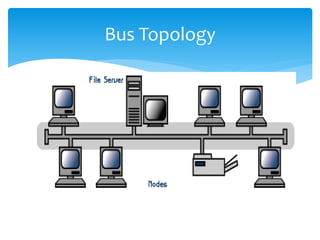
 Bus topology is a network type in which every
computer and network device is connected to single
cable
 it has exactly two endpoints, then it is called Linear
Bus topology, All nodes (file server, workstations, and
peripherals) are connected to the linear cable
Bus Topology
Bus Topology
Features of Bus Topology
 It transmits data only in one direction.
 Every device is connected to a single cable
Bus Topology
Advantages of Bus Topology
 It is Cheap, easy to handle and implement
 Require less cable
 It is best suited for small networks
Disadvantages of Bus Topology
 Cable has a limited length.
 It is slower than the ring topology
 Cables fails then whole network fails
Bus Topology
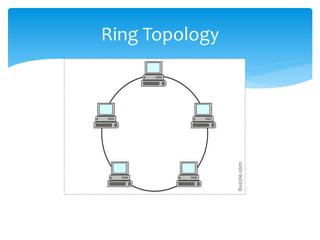
 In a ring network, every device has exactly two
neighbours for communication purposes
 It is called ring topology because it forms a ring as
each computer is connected to another computer,
with the last one connected to the first
Ring Topology
Ring Topology
Features of Ring Topology
 The transmission is unidirectional, but it can be
made bidirectional by having 2 connections
between each Network Node, it is called Dual
Ring Topology.
 Data is transferred in a sequential manner that is
bit by bit. Data transmitted, has to pass through
each node of the network, till the destination
node.
Ring Topology
Advantages of Ring Topology
 Easier to Mange than a Bus Network
 Good Communication over long distances
 Handles high volume of traffic
Disadvantages of Ring Topology
 The failure of a single node of the network can
cause the entire network to fail
 Adding or deleting the computers disturbs the
network activity
Ring Topology
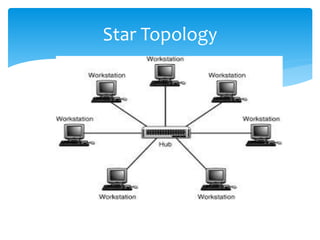
 In this type of topology all the computers are
connected to a single hub through a cable. This hub is
the central node and all others nodes are connected
to the central node
 The hub takes a signal that comes from any node and
passes it along to all the other nodes in the network
Star Topology
Star Topology
Features of Star Topology
 Every node has its own dedicated connection
to the hub.
 Hub acts as a repeater for data flow.
 Can be used with twisted pair, Optical Fibre or
coaxial cable.
Star Topology
Advantages of Star Topology
 Fast performance with few nodes and low network traffic.
 Hub can be upgraded easily
 Only that node is affected which has failed, rest of the
nodes can work smoothly
Disadvantages of Star Topology
 Cost of installation is high
 If the hub fails then the whole network is stopped because
all the nodes depend on the hub
Star Topology
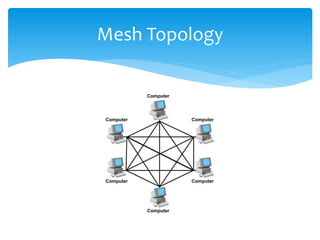
 It is a point-to-point connection to other nodes or
devices. All the network nodes are connected to each
other
 In this type of network, each node may send message
to destination through multiple paths
 The data is automatically configured to reach the
destination by taking the shortest route.
Mesh Topology
Mesh Topology
Features of Mesh Topology
 Fully connected.
 Robust.
 Not flexible.
Mesh Topology
Advantages of Mesh Topology
 Each connection can carry its own data load
 Provides security and privacy
 It has multiple links, so if one route is blocked
then other routes can be used for data
communication
Disadvantages of Mesh Topology
 Installation and configuration is difficult.
 Cabling cost is more
Mesh Topology
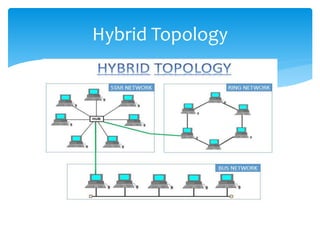
 A combination of any two or more network
topologies.
 For example if in an office in one department ring
topology is used and in another star topology is used,
connecting these topologies will result in Hybrid
Topology (ring topology and star topology).
Hybrid Topology
Hybrid Topology
Features of Hybrid Topology
 It is a combination of two or topologies
 Inherits the advantages and disadvantages of
the topologies included
Hybrid Topology
Advantages of Hybrid Topology
 Reliable as Error detecting and trouble shooting is
easy.
 Effective
 It is extremely flexible
Disadvantages of Hybrid Topology
 Complex in design.
 Costly
Hybrid Topology
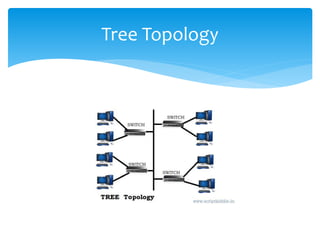
 It has a root node and all other nodes are connected
to it forming a hierarchy. It is also called hierarchical
topology. It should at least have three levels to the
hierarchy.
 The tree topology arranges links and nodes into
distinct hierarchies in order to allow greater control
and easier troubleshooting
Tree Topology
Tree Topology
Features of Tree Topology
 Ideal if workstations are located in groups.
 Used in Wide Area Network.
Tree Topology
Advantages of Tree Topology
 Extension of bus and star topologies.
 Expansion of nodes is possible and easy.
 Easily managed and maintained.
 Error detection is easily done
Disadvantages of Tree Topology
 If the backbone line breaks, the entire segment goes
down.
 Heavily cabled.
 Costly
Tree Topology
THANK YOU
ALL

Computer network

  • 1.
    COMPUTER NETWORK TOPOLOGIES Prepared By P.POORNACHANDU B.GURU SAI T.NAGA SHESHU
  • 2.
     Network Topologyis the schematic description of a network arrangement, connecting various nodes(sender and receiver) through lines of connection.  Network topologies describe the ways in which the elements of a network are mapped. They describe the physical and logical arrangement of the network nodes. What is a Topology?
  • 3.
     Bus Topology Ring Topology  Star Topology  Mesh Topology  Hybrid Topology  Tree Topology Different Types of Topologies
  • 4.
     Bus topologyis a network type in which every computer and network device is connected to single cable  it has exactly two endpoints, then it is called Linear Bus topology, All nodes (file server, workstations, and peripherals) are connected to the linear cable Bus Topology
  • 5.
  • 6.
    Features of BusTopology  It transmits data only in one direction.  Every device is connected to a single cable Bus Topology
  • 7.
    Advantages of BusTopology  It is Cheap, easy to handle and implement  Require less cable  It is best suited for small networks Disadvantages of Bus Topology  Cable has a limited length.  It is slower than the ring topology  Cables fails then whole network fails Bus Topology
  • 8.
     In aring network, every device has exactly two neighbours for communication purposes  It is called ring topology because it forms a ring as each computer is connected to another computer, with the last one connected to the first Ring Topology
  • 9.
  • 10.
    Features of RingTopology  The transmission is unidirectional, but it can be made bidirectional by having 2 connections between each Network Node, it is called Dual Ring Topology.  Data is transferred in a sequential manner that is bit by bit. Data transmitted, has to pass through each node of the network, till the destination node. Ring Topology
  • 11.
    Advantages of RingTopology  Easier to Mange than a Bus Network  Good Communication over long distances  Handles high volume of traffic Disadvantages of Ring Topology  The failure of a single node of the network can cause the entire network to fail  Adding or deleting the computers disturbs the network activity Ring Topology
  • 12.
     In thistype of topology all the computers are connected to a single hub through a cable. This hub is the central node and all others nodes are connected to the central node  The hub takes a signal that comes from any node and passes it along to all the other nodes in the network Star Topology
  • 13.
  • 14.
    Features of StarTopology  Every node has its own dedicated connection to the hub.  Hub acts as a repeater for data flow.  Can be used with twisted pair, Optical Fibre or coaxial cable. Star Topology
  • 15.
    Advantages of StarTopology  Fast performance with few nodes and low network traffic.  Hub can be upgraded easily  Only that node is affected which has failed, rest of the nodes can work smoothly Disadvantages of Star Topology  Cost of installation is high  If the hub fails then the whole network is stopped because all the nodes depend on the hub Star Topology
  • 16.
     It isa point-to-point connection to other nodes or devices. All the network nodes are connected to each other  In this type of network, each node may send message to destination through multiple paths  The data is automatically configured to reach the destination by taking the shortest route. Mesh Topology
  • 17.
  • 18.
    Features of MeshTopology  Fully connected.  Robust.  Not flexible. Mesh Topology
  • 19.
    Advantages of MeshTopology  Each connection can carry its own data load  Provides security and privacy  It has multiple links, so if one route is blocked then other routes can be used for data communication Disadvantages of Mesh Topology  Installation and configuration is difficult.  Cabling cost is more Mesh Topology
  • 20.
     A combinationof any two or more network topologies.  For example if in an office in one department ring topology is used and in another star topology is used, connecting these topologies will result in Hybrid Topology (ring topology and star topology). Hybrid Topology
  • 21.
  • 22.
    Features of HybridTopology  It is a combination of two or topologies  Inherits the advantages and disadvantages of the topologies included Hybrid Topology
  • 23.
    Advantages of HybridTopology  Reliable as Error detecting and trouble shooting is easy.  Effective  It is extremely flexible Disadvantages of Hybrid Topology  Complex in design.  Costly Hybrid Topology
  • 24.
     It hasa root node and all other nodes are connected to it forming a hierarchy. It is also called hierarchical topology. It should at least have three levels to the hierarchy.  The tree topology arranges links and nodes into distinct hierarchies in order to allow greater control and easier troubleshooting Tree Topology
  • 25.
  • 26.
    Features of TreeTopology  Ideal if workstations are located in groups.  Used in Wide Area Network. Tree Topology
  • 27.
    Advantages of TreeTopology  Extension of bus and star topologies.  Expansion of nodes is possible and easy.  Easily managed and maintained.  Error detection is easily done Disadvantages of Tree Topology  If the backbone line breaks, the entire segment goes down.  Heavily cabled.  Costly Tree Topology
  • 28.