Govt post Graduate college
khar
 Name: Farman Ullah
 Roll no: 512
 Semester: 5th BS Computer science
 Presentation and Assignment on
“Topology”
Subject: “Parallel and Distributed
Computing”
 Submitted To “Zain sir lec Bs CS”
1
Agenda of our presentation
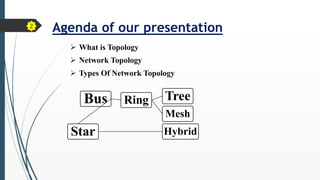
 What is Topology
 Network Topology
 Types Of Network Topology
Bus Ring Tree
Mesh
Star Hybrid
2
What is Topology
• The physical layout or the way in which network connection are
made is called Topology.
• A network topology is the physical and logical Arrangement of nodes
and connections in a network.
• Nodes usually include devices such as “ switches, Router, and
software with switch and router features.
3
Network topology
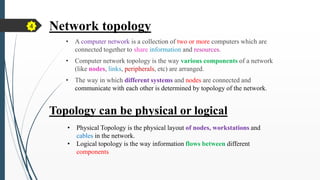
• A computer network is a collection of two or more computers which are
connected together to share information and resources.
• Computer network topology is the way various components of a network
(like nodes, links, peripherals, etc) are arranged.
• The way in which different systems and nodes are connected and
communicate with each other is determined by topology of the network.
Topology can be physical or logical
• Physical Topology is the physical layout of nodes, workstations and
cables in the network.
• Logical topology is the way information flows between different
components
4
Bus
Ring
Tree Mesh
Star
Hybrid
Types
5
 Bus Topology
• In the bus topology, the computers are connected through a common
communication media.
• A special type of central wire is used as communication media. This
central wire is called Bus.
• The computer are attached through the bus the ends of the bus are closed
with the terminator .
• The terminators are used to absorb signals.
Terminator
Node
6
z
 Advantage of Bus topology
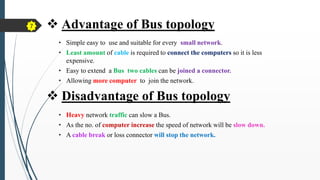
• Simple easy to use and suitable for every small network.
• Least amount of cable is required to connect the computers so it is less
expensive.
• Easy to extend a Bus two cables can be joined a connector.
• Allowing more computer to join the network.
• Heavy network traffic can slow a Bus.
• As the no. of computer increase the speed of network will be slow down.
• A cable break or loss connector will stop the network.
 Disadvantage of Bus topology
7
 Star topology
• In star topology Every node is connected to central node which is
called “HUB” or “switch”.
• The central node is the server and other node are clients.
• In this topology data from the server node is the first delivered to
the hub and is then transferred destination.
HUB
8
• Easy to install and modify
• Hub can be upgraded easily.
• New node can be added easily with out affection other node.
 Advantage of Star topology
 Disadvantage of Star topology
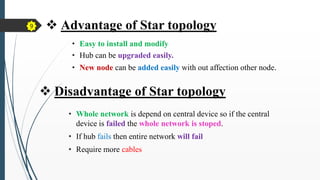
• Whole network is depend on central device so if the central
device is failed the whole network is stoped.
• If hub fails then entire network will fail
• Require more cables
9
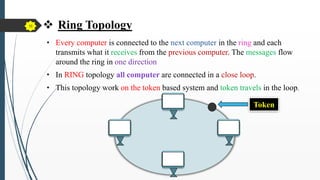
 Ring Topology
• Every computer is connected to the next computer in the ring and each
transmits what it receives from the previous computer. The messages flow
around the ring in one direction
• In RING topology all computer are connected in a close loop.
• This topology work on the token based system and token travels in the loop.
10
Token
Advantage of Ring topology
• It provides an orderly network in which every device has access to
the token and can transmit.
• It performs well under a heavy load
Disadvantage of Ring topology
• Failure of one computer can effect the whole network .
• Difficult to troubleshoot.
• Change mode with adding or removing a device effect the entire
network.
12
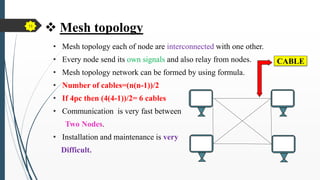
 Mesh topology
• Mesh topology each of node are interconnected with one other.
• Every node send its own signals and also relay from nodes.
• Mesh topology network can be formed by using formula.
• Number of cables=(n(n-1))/2
• If 4pc then (4(4-1))/2= 6 cables
• Communication is very fast between
Two Nodes.
• Installation and maintenance is very
Difficult.
CABLE
13
partial mesh
Full mesh
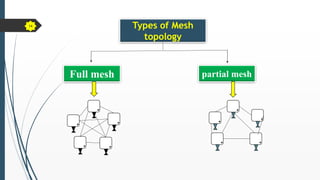
Types of Mesh
topology
14
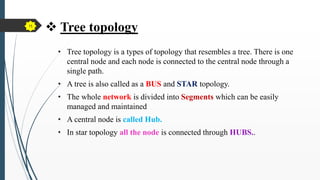
 Tree topology
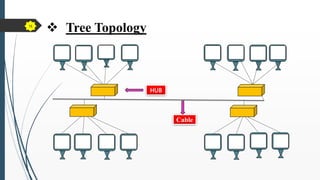
• Tree topology is a types of topology that resembles a tree. There is one
central node and each node is connected to the central node through a
single path.
• A tree is also called as a BUS and STAR topology.
• The whole network is divided into Segments which can be easily
managed and maintained
• A central node is called Hub.
• In star topology all the node is connected through HUBS..
15
 Tree Topology
HUB
Cable
16
Advantage of tree topology
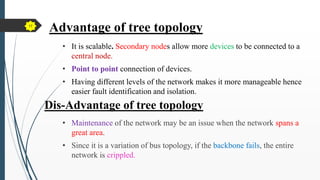
• It is scalable. Secondary nodes allow more devices to be connected to a
central node.
• Point to point connection of devices.
• Having different levels of the network makes it more manageable hence
easier fault identification and isolation.
Dis-Advantage of tree topology
• Maintenance of the network may be an issue when the network spans a
great area.
• Since it is a variation of bus topology, if the backbone fails, the entire
network is crippled.
17
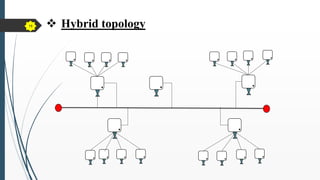
Hybrid topology
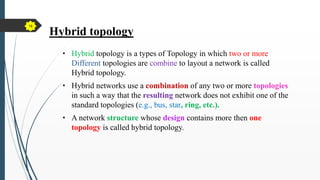
• Hybrid topology is a types of Topology in which two or more
Different topologies are combine to layout a network is called
Hybrid topology.
• Hybrid networks use a combination of any two or more topologies
in such a way that the resulting network does not exhibit one of the
standard topologies (e.g., bus, star, ring, etc.).
• A network structure whose design contains more then one
topology is called hybrid topology.
18
 Hybrid topology
19

presentation on topology.pptx BY Farman ullah

  • 1.
    Govt post Graduatecollege khar  Name: Farman Ullah  Roll no: 512  Semester: 5th BS Computer science  Presentation and Assignment on “Topology” Subject: “Parallel and Distributed Computing”  Submitted To “Zain sir lec Bs CS” 1
  • 2.
    Agenda of ourpresentation  What is Topology  Network Topology  Types Of Network Topology Bus Ring Tree Mesh Star Hybrid 2
  • 3.
    What is Topology •The physical layout or the way in which network connection are made is called Topology. • A network topology is the physical and logical Arrangement of nodes and connections in a network. • Nodes usually include devices such as “ switches, Router, and software with switch and router features. 3
  • 4.
    Network topology • Acomputer network is a collection of two or more computers which are connected together to share information and resources. • Computer network topology is the way various components of a network (like nodes, links, peripherals, etc) are arranged. • The way in which different systems and nodes are connected and communicate with each other is determined by topology of the network. Topology can be physical or logical • Physical Topology is the physical layout of nodes, workstations and cables in the network. • Logical topology is the way information flows between different components 4
  • 5.
  • 6.
     Bus Topology •In the bus topology, the computers are connected through a common communication media. • A special type of central wire is used as communication media. This central wire is called Bus. • The computer are attached through the bus the ends of the bus are closed with the terminator . • The terminators are used to absorb signals. Terminator Node 6 z
  • 7.
     Advantage ofBus topology • Simple easy to use and suitable for every small network. • Least amount of cable is required to connect the computers so it is less expensive. • Easy to extend a Bus two cables can be joined a connector. • Allowing more computer to join the network. • Heavy network traffic can slow a Bus. • As the no. of computer increase the speed of network will be slow down. • A cable break or loss connector will stop the network.  Disadvantage of Bus topology 7
  • 8.
     Star topology •In star topology Every node is connected to central node which is called “HUB” or “switch”. • The central node is the server and other node are clients. • In this topology data from the server node is the first delivered to the hub and is then transferred destination. HUB 8
  • 9.
    • Easy toinstall and modify • Hub can be upgraded easily. • New node can be added easily with out affection other node.  Advantage of Star topology  Disadvantage of Star topology • Whole network is depend on central device so if the central device is failed the whole network is stoped. • If hub fails then entire network will fail • Require more cables 9
  • 10.
     Ring Topology •Every computer is connected to the next computer in the ring and each transmits what it receives from the previous computer. The messages flow around the ring in one direction • In RING topology all computer are connected in a close loop. • This topology work on the token based system and token travels in the loop. 10 Token
  • 11.
    Advantage of Ringtopology • It provides an orderly network in which every device has access to the token and can transmit. • It performs well under a heavy load Disadvantage of Ring topology • Failure of one computer can effect the whole network . • Difficult to troubleshoot. • Change mode with adding or removing a device effect the entire network. 12
  • 12.
     Mesh topology •Mesh topology each of node are interconnected with one other. • Every node send its own signals and also relay from nodes. • Mesh topology network can be formed by using formula. • Number of cables=(n(n-1))/2 • If 4pc then (4(4-1))/2= 6 cables • Communication is very fast between Two Nodes. • Installation and maintenance is very Difficult. CABLE 13
  • 13.
    partial mesh Full mesh Typesof Mesh topology 14
  • 14.
     Tree topology •Tree topology is a types of topology that resembles a tree. There is one central node and each node is connected to the central node through a single path. • A tree is also called as a BUS and STAR topology. • The whole network is divided into Segments which can be easily managed and maintained • A central node is called Hub. • In star topology all the node is connected through HUBS.. 15
  • 15.
  • 16.
    Advantage of treetopology • It is scalable. Secondary nodes allow more devices to be connected to a central node. • Point to point connection of devices. • Having different levels of the network makes it more manageable hence easier fault identification and isolation. Dis-Advantage of tree topology • Maintenance of the network may be an issue when the network spans a great area. • Since it is a variation of bus topology, if the backbone fails, the entire network is crippled. 17
  • 17.
    Hybrid topology • Hybridtopology is a types of Topology in which two or more Different topologies are combine to layout a network is called Hybrid topology. • Hybrid networks use a combination of any two or more topologies in such a way that the resulting network does not exhibit one of the standard topologies (e.g., bus, star, ring, etc.). • A network structure whose design contains more then one topology is called hybrid topology. 18
  • 18.