DATA
COMMUNICATION
LeCTUre-2LeCTUre-2
reCAp Of LeCTUre 1reCAp Of LeCTUre 1
• DataCommunication
• DataCommunication System
• Factorseffecting DataCommunication system
• Componentsof datacommunication system
• DataRepresentation
OvervIew Of LeCTUre 2OvervIew Of LeCTUre 2
• Key DataCommunication Terminology
• DataFlow types
• Networksand Why weneed Them?
• Distributed Processing
• Network Criteria
• Physical structureof Network
• Typeof connection
Key DATA COMMUNICATIONKey DATA COMMUNICATION
TerMINOLOgyTerMINOLOgy
Session
Communication dialog between network usersor applications.
Network
Interconnected group of computersand communication devices.
Node
Any devicethat ispart of network.
Any device that is capable of sending or receiving data (e.g. computer, printer
etc.)
Link
connectsadjacent nodes.
e.g. Wires, Cables, any thing that physically connects two nodes, or it
can bewireless.
Key DATAKey DATA
COMMUNICATIONCOMMUNICATION
TerMINOLOgyTerMINOLOgy
Path
end-to-end routewithin anetwork.
Circuit
theconduit or physical path over which datatravels.
Packetizing
Dividing messages into fixed-length packets prior to
transmission over anetwork’scommunication media.
Routing
Determining a message’s path from sending to receiving
nodes.
DATA fLOw / TrANsMIssIONDATA fLOw / TrANsMIssION
MODeMODe
Communication between two devicescan be;
1. Simplex
2. Half-duplex
3. Full-duplex
sIMpLexsIMpLex
• Communication takeplaceonly in onedirection.
 Only sender just sendsdata& receiver just receivedata.
 The simplex mode can use the entire capacity of the channel to
send datain onedirection.
 Called asone-way transmission
 i.e. there is no back direction of transmission from receiver to
sender
 e.g.
 Radio, TV transmission.
 Input provided to the computer by keyboard, mouse, or scanner
etc.
 Theflow of datafrom thecomputer to monitor, and printer etc.
sIMpLexsIMpLex
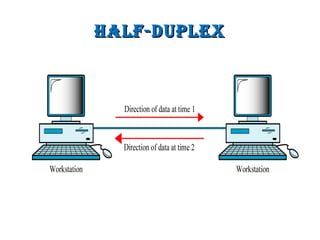
Half-DuplexHalf-Duplex
• Each station can both transmit and receive, but not at the same
time.
• When one device is sending, the other can only receive, and
viceversa
• the entire capacity of a channel is taken over by whichever of
thetwo devicesistransmitting at thetime.
• e.g.
 wirelesssystem
 walky-talky
 In computer field a multi-user environment is a best example of
half duplex mode, in which a terminal transmits data to main
computer and then thecomputer respondswith acknowledgment.
Half-DuplexHalf-Duplex
full Duplexfull Duplex
• Two-way transmission.
• Both sender and receiver transmit datasimultaneously.
• Signalsgoing in either direction sharethecapacity of thelink.
• Thissharing can occur in two ways:
• Either thelink must contain two physically separatetransmission paths
• Or the capacity of the channel is divided between signals
traveling in both directions.
• The best example is telephone communication. Similarly
modem card, NIC, sound card etc are the devices used in
computer technology for full duplex transmission.
full Duplexfull Duplex
NetworksNetworks
NetworksNetworks
• When two or more Devices (Nodes) are connected through a
medium (e.g. cable) to sharetheir resourcesand information, it
iscalled anetwork”.
• A node can beacomputer, printer, or any other devicecapable
of sending and/or receiving data generated by other nodes on
thenetwork.
• In other words, a group of computers and other devices
connected together is called computer network, and this
processiscalled computer networking.
Networks- wHy we NeeDNetworks- wHy we NeeD
tHem?tHem?
• Point to point communication not usually practical
 Devicesaretoo far apart.
 Largeset of deviceswould need impractical number of connections.
• Solution is to connect all devices to a central system known as a
NETWORK
BeNefits of NetworkiNgBeNefits of NetworkiNg
• Sharing of information.
 e.g. sharing information in businessenvironment
• Sharing thehardwareresources.
 E.g. Printer, modem, scanner, hard disk, CDRom, floppy disc,
plotter etc.
• Sharing SoftwareResources.
 MSOfficeand Lotsof application software.
• Preserving theinformation.
 Centralized backup.
• Protecting theinformation.
 By applying authentication schemes.
• E-mail
 peopleto communicate.
DistributeD ProcessingDistributeD Processing
• “Instead of a single large machine being responsible for all
aspects of a process, each separate computer handles a subset
of thetask”
• Most networks use distributed processing, in which a task is
divided among multiplecomputers.
network criterianetwork criteria
Data Communication
Network Criteria
Performance Reliability Security
network criterianetwork criteria
1. Performance
• Can be measured in many ways including Transit and
Responsetime.
• Transit time is the amount of time required for a message to
travel from onedeviceto another.
• Response time is the elapsed time between an inquiry and a
response.
• Performancedependsupon thesefactors
1. Number of Users
2. Typeof Transmission Medium
3. Capabilitiesof Hardware
4. Efficiency of Software
network criterianetwork criteria
2. Reliability
• Dependsupon ano. of factors
• Frequency of failure
• Recovery Timeof anetwork after Failure
• Network'srobustnessin acatastrophe.
• E.g. Fireearthquakeor theft
network criterianetwork criteria
3. Security
• Issuesinclude;
• Protecting datafrom unauthorized access,
• Protecting datafrom damage,
• and implementing policies and procedures
for recovery from breachesand datalosses.
Physical structures ofPhysical structures of
networknetwork
1. Typeof Connection
2. Topology
Physical structuresPhysical structures
• Type of Connection
• Also refer asLineConfiguration.
• “Line Configuration refers to the way two or more devices
attach to alink”
• In a network two or more devices are connected through
links.
• A link is a communications pathway that transfers data
from onedeviceto another.
• For communication to occur, two devices must be
connected in someway to thesamelink at thesametime.
• Therearetwo possibletypesof connections:
• point-to-point
• and multipoint.
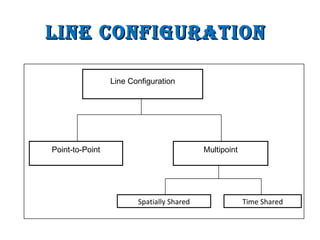
line configurationline configuration
Spatially Shared Time Shared
MultipointPoint-to-Point
Line Configuration
Point-to-PointPoint-to-Point
• A point-to-point connection provides a dedicated link
between two devices.
• The entire capacity/bandwidth of the link is reserved for
transmission between thosetwo devices.
• Most point-to-point connections use an actual length of
wire or cable to connect the two ends, but other options,
such asmicrowaveor satellitelinks, arealso possible.
• Data and control information pass directly between
entitieswith no intervening agent.
• e.g. TV Remote Control, mobile phone when talking, Base
station (Antenna)
Point-to-Point LinePoint-to-Point Line
ConfigurationConfiguration
MuLtiPointMuLtiPoint
• A multipoint (also called multi-drop) connection
is one in which more than two specific devices
shareasinglelink.
• Capacity (bandwidth) of thelink isshared.
• Spatial sharing
• Multipledevicessharethelink simultaneously.
• Temporal (Time) sharing
• User usesthelink only at their timeslot.
MuLtiPoint LineMuLtiPoint Line
ConfigurationConfiguration
SuMMarySuMMary
• Key DataCommunication Terminology
• DataFlow types/ Transmission Modes
• Networksand Why weneed Them?
• Distributed Processing
• Network Criteria
• Physical structureof Network
• Typeof connection
SuggeSted readingSuggeSted reading
 Section
 1.1,
 1.2,
 “Data Communications and Networking” 4th
Edition by Behrouz
A. Forouzan
 Sections
 1.3,
 “Data and Computer Communication” 6th Edition by William
Stallings

Dc lec-02 (networks)

  • 1.
  • 2.
    reCAp Of LeCTUre1reCAp Of LeCTUre 1 • DataCommunication • DataCommunication System • Factorseffecting DataCommunication system • Componentsof datacommunication system • DataRepresentation
  • 3.
    OvervIew Of LeCTUre2OvervIew Of LeCTUre 2 • Key DataCommunication Terminology • DataFlow types • Networksand Why weneed Them? • Distributed Processing • Network Criteria • Physical structureof Network • Typeof connection
  • 4.
    Key DATA COMMUNICATIONKeyDATA COMMUNICATION TerMINOLOgyTerMINOLOgy Session Communication dialog between network usersor applications. Network Interconnected group of computersand communication devices. Node Any devicethat ispart of network. Any device that is capable of sending or receiving data (e.g. computer, printer etc.) Link connectsadjacent nodes. e.g. Wires, Cables, any thing that physically connects two nodes, or it can bewireless.
  • 5.
    Key DATAKey DATA COMMUNICATIONCOMMUNICATION TerMINOLOgyTerMINOLOgy Path end-to-endroutewithin anetwork. Circuit theconduit or physical path over which datatravels. Packetizing Dividing messages into fixed-length packets prior to transmission over anetwork’scommunication media. Routing Determining a message’s path from sending to receiving nodes.
  • 6.
    DATA fLOw /TrANsMIssIONDATA fLOw / TrANsMIssION MODeMODe Communication between two devicescan be; 1. Simplex 2. Half-duplex 3. Full-duplex
  • 7.
    sIMpLexsIMpLex • Communication takeplaceonlyin onedirection.  Only sender just sendsdata& receiver just receivedata.  The simplex mode can use the entire capacity of the channel to send datain onedirection.  Called asone-way transmission  i.e. there is no back direction of transmission from receiver to sender  e.g.  Radio, TV transmission.  Input provided to the computer by keyboard, mouse, or scanner etc.  Theflow of datafrom thecomputer to monitor, and printer etc.
  • 8.
  • 9.
    Half-DuplexHalf-Duplex • Each stationcan both transmit and receive, but not at the same time. • When one device is sending, the other can only receive, and viceversa • the entire capacity of a channel is taken over by whichever of thetwo devicesistransmitting at thetime. • e.g.  wirelesssystem  walky-talky  In computer field a multi-user environment is a best example of half duplex mode, in which a terminal transmits data to main computer and then thecomputer respondswith acknowledgment.
  • 10.
  • 11.
    full Duplexfull Duplex •Two-way transmission. • Both sender and receiver transmit datasimultaneously. • Signalsgoing in either direction sharethecapacity of thelink. • Thissharing can occur in two ways: • Either thelink must contain two physically separatetransmission paths • Or the capacity of the channel is divided between signals traveling in both directions. • The best example is telephone communication. Similarly modem card, NIC, sound card etc are the devices used in computer technology for full duplex transmission.
  • 12.
  • 13.
  • 14.
    NetworksNetworks • When twoor more Devices (Nodes) are connected through a medium (e.g. cable) to sharetheir resourcesand information, it iscalled anetwork”. • A node can beacomputer, printer, or any other devicecapable of sending and/or receiving data generated by other nodes on thenetwork. • In other words, a group of computers and other devices connected together is called computer network, and this processiscalled computer networking.
  • 15.
    Networks- wHy weNeeDNetworks- wHy we NeeD tHem?tHem? • Point to point communication not usually practical  Devicesaretoo far apart.  Largeset of deviceswould need impractical number of connections. • Solution is to connect all devices to a central system known as a NETWORK
  • 16.
    BeNefits of NetworkiNgBeNefitsof NetworkiNg • Sharing of information.  e.g. sharing information in businessenvironment • Sharing thehardwareresources.  E.g. Printer, modem, scanner, hard disk, CDRom, floppy disc, plotter etc. • Sharing SoftwareResources.  MSOfficeand Lotsof application software. • Preserving theinformation.  Centralized backup. • Protecting theinformation.  By applying authentication schemes. • E-mail  peopleto communicate.
  • 17.
    DistributeD ProcessingDistributeD Processing •“Instead of a single large machine being responsible for all aspects of a process, each separate computer handles a subset of thetask” • Most networks use distributed processing, in which a task is divided among multiplecomputers.
  • 18.
    network criterianetwork criteria DataCommunication Network Criteria Performance Reliability Security
  • 19.
    network criterianetwork criteria 1.Performance • Can be measured in many ways including Transit and Responsetime. • Transit time is the amount of time required for a message to travel from onedeviceto another. • Response time is the elapsed time between an inquiry and a response. • Performancedependsupon thesefactors 1. Number of Users 2. Typeof Transmission Medium 3. Capabilitiesof Hardware 4. Efficiency of Software
  • 20.
    network criterianetwork criteria 2.Reliability • Dependsupon ano. of factors • Frequency of failure • Recovery Timeof anetwork after Failure • Network'srobustnessin acatastrophe. • E.g. Fireearthquakeor theft
  • 21.
    network criterianetwork criteria 3.Security • Issuesinclude; • Protecting datafrom unauthorized access, • Protecting datafrom damage, • and implementing policies and procedures for recovery from breachesand datalosses.
  • 22.
    Physical structures ofPhysicalstructures of networknetwork 1. Typeof Connection 2. Topology
  • 23.
    Physical structuresPhysical structures •Type of Connection • Also refer asLineConfiguration. • “Line Configuration refers to the way two or more devices attach to alink” • In a network two or more devices are connected through links. • A link is a communications pathway that transfers data from onedeviceto another. • For communication to occur, two devices must be connected in someway to thesamelink at thesametime. • Therearetwo possibletypesof connections: • point-to-point • and multipoint.
  • 24.
    line configurationline configuration SpatiallyShared Time Shared MultipointPoint-to-Point Line Configuration
  • 25.
    Point-to-PointPoint-to-Point • A point-to-pointconnection provides a dedicated link between two devices. • The entire capacity/bandwidth of the link is reserved for transmission between thosetwo devices. • Most point-to-point connections use an actual length of wire or cable to connect the two ends, but other options, such asmicrowaveor satellitelinks, arealso possible. • Data and control information pass directly between entitieswith no intervening agent. • e.g. TV Remote Control, mobile phone when talking, Base station (Antenna)
  • 26.
  • 27.
    MuLtiPointMuLtiPoint • A multipoint(also called multi-drop) connection is one in which more than two specific devices shareasinglelink. • Capacity (bandwidth) of thelink isshared. • Spatial sharing • Multipledevicessharethelink simultaneously. • Temporal (Time) sharing • User usesthelink only at their timeslot.
  • 28.
  • 29.
    SuMMarySuMMary • Key DataCommunicationTerminology • DataFlow types/ Transmission Modes • Networksand Why weneed Them? • Distributed Processing • Network Criteria • Physical structureof Network • Typeof connection
  • 30.
    SuggeSted readingSuggeSted reading Section  1.1,  1.2,  “Data Communications and Networking” 4th Edition by Behrouz A. Forouzan  Sections  1.3,  “Data and Computer Communication” 6th Edition by William Stallings