Line Configuration
•
•
•
1.
2.
•

Line configuration refers to the way two or more
communication devices attach to a link.
A link is the physical communication pathway that
transfers data from one device to another.
There are two line configurations:
Point-to-Point
Multipoint
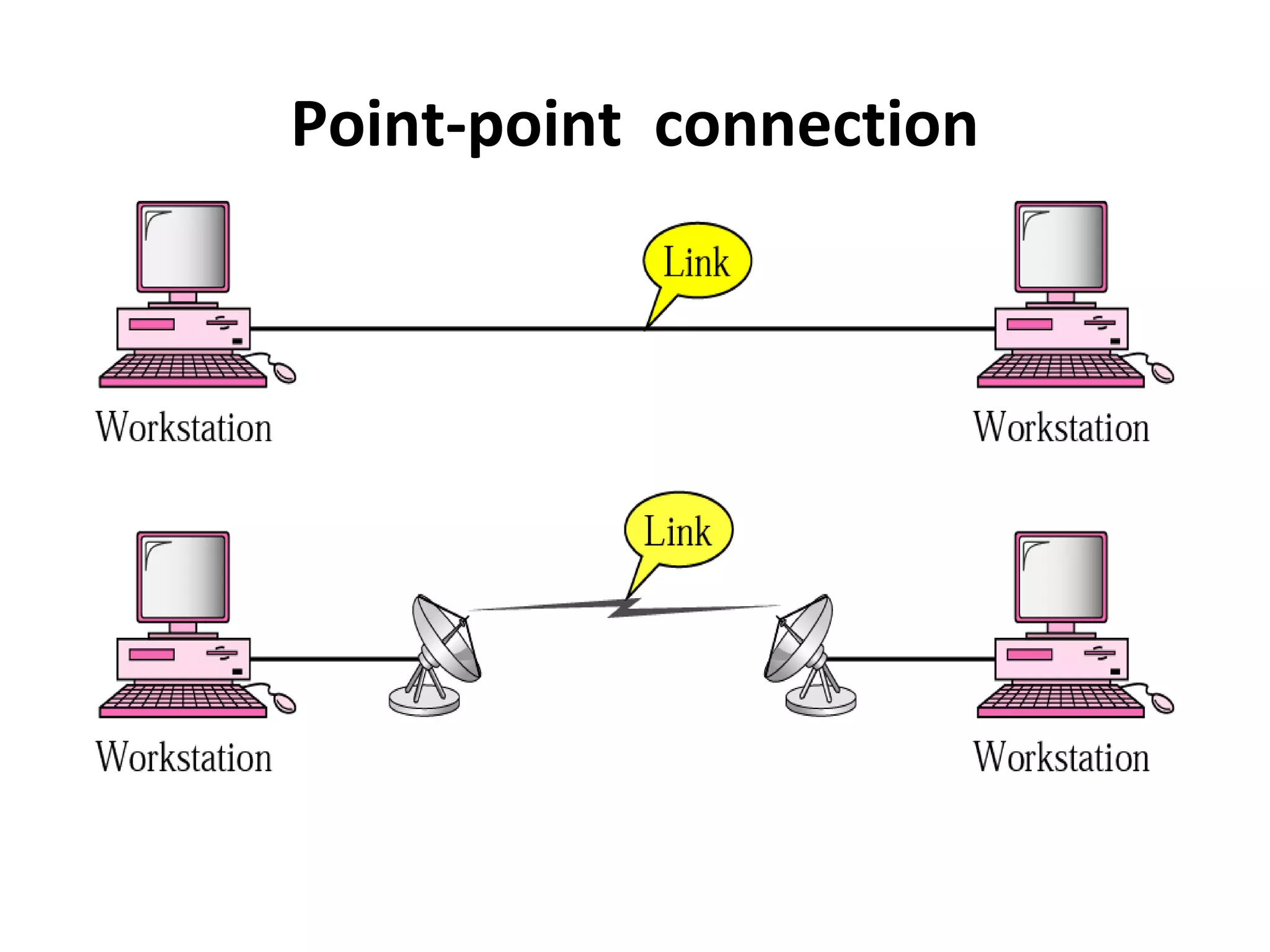
A point-to-point line configuration provides a dedicated
link between two devices. The entire capacity of the
channel is reserved for transmission between those two
devices.
Point-point connection
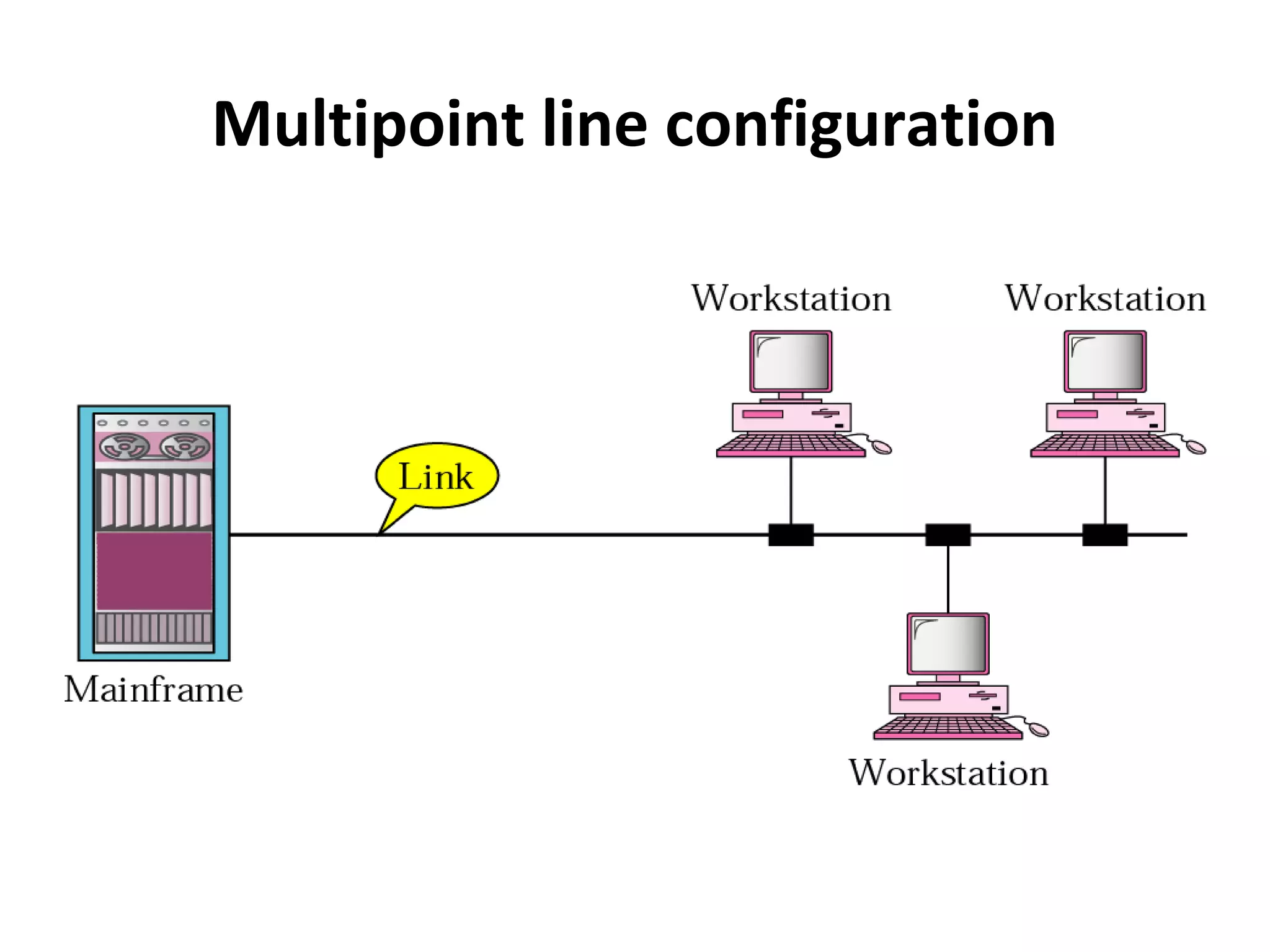
• A multipoint line configuration is one in which more than
two specific devices share a single link. In a multipoint
environment, the capacity of the channel is shared, either
spatially or temporally.
• If several devices can use the link simultaneously, it is a
spatially shared line configuration.
• If users must take turns, it is a time-shared line
configuration.
Multipoint line configuration
Network topology
• A topology is a way of “laying out” the
network. Topologies can be either physical or
logical.
• Physical topologies describe how the cables
are run.
• Logical topologies describe how the network
messages travel
Network topology (cont.)
•
•
•
•

Bus (can be both logical and physical)
Star (physical only)
Ring (can be both logical and physical)
Mesh (can be both logical and physical)
Network topology (cont.)
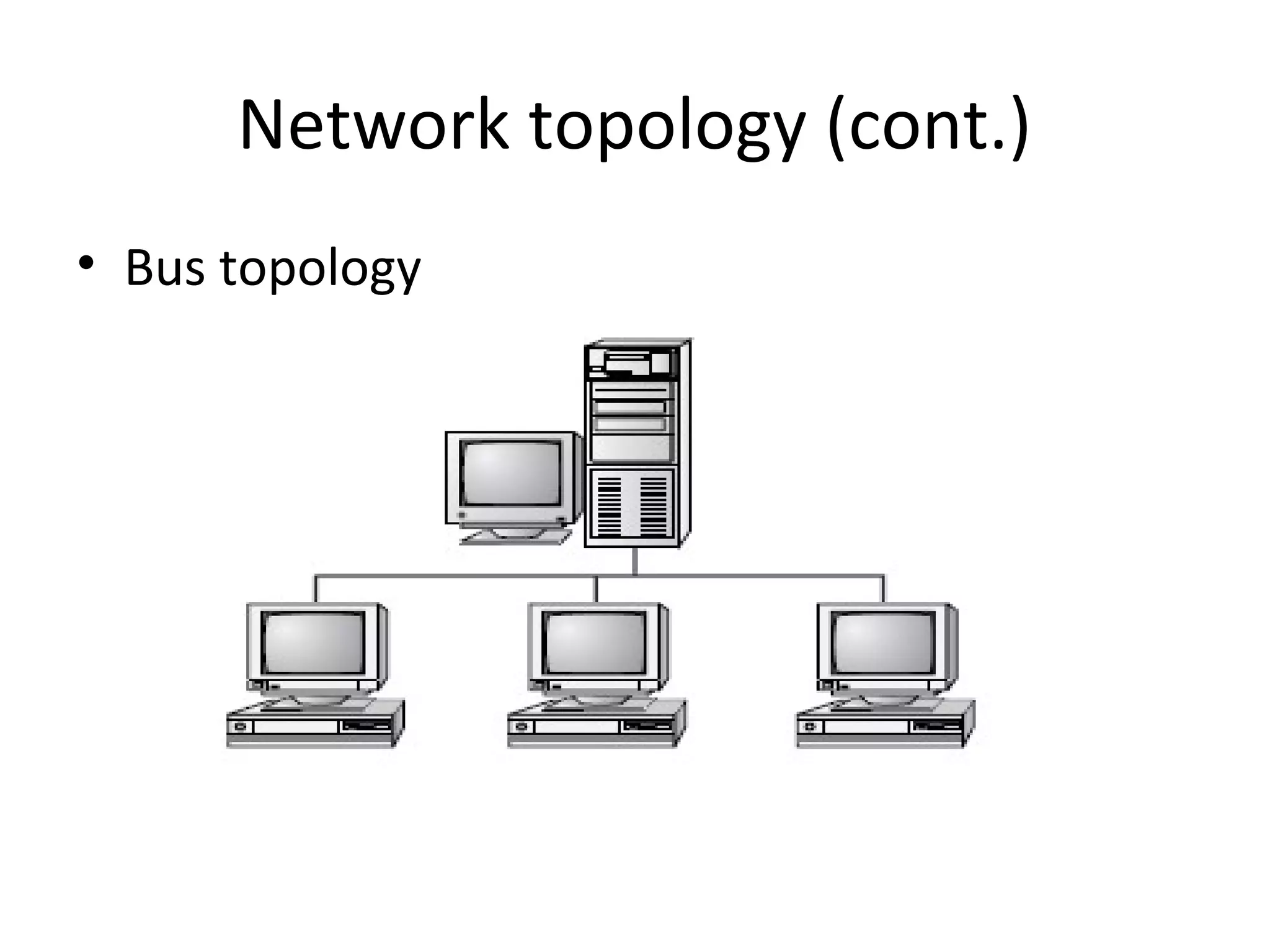
Bus
• A bus is the simplest physical topology. It consists of a single
cable that runs to every workstation
• This topology uses the least amount of cabling, but also
covers the shortest amount of distance.
• Each computer shares the same data and address path. With
a logical bus topology, messages pass through the trunk, and
each workstation checks to see if the message is addressed to
itself. If the address of the message matches the
workstation’s address, the network adapter copies the
message to the card’s on-board memory.
Network topology (cont.)
• it is difficult to add a workstation
• have to completely reroute the cable and
possibly run two additional lengths of it.
• if any one of the cables breaks, the entire
network is disrupted. Therefore, it is very
expensive to maintain.
Network topology (cont.)
• Bus topology
Network topology (cont.)
Star Topology
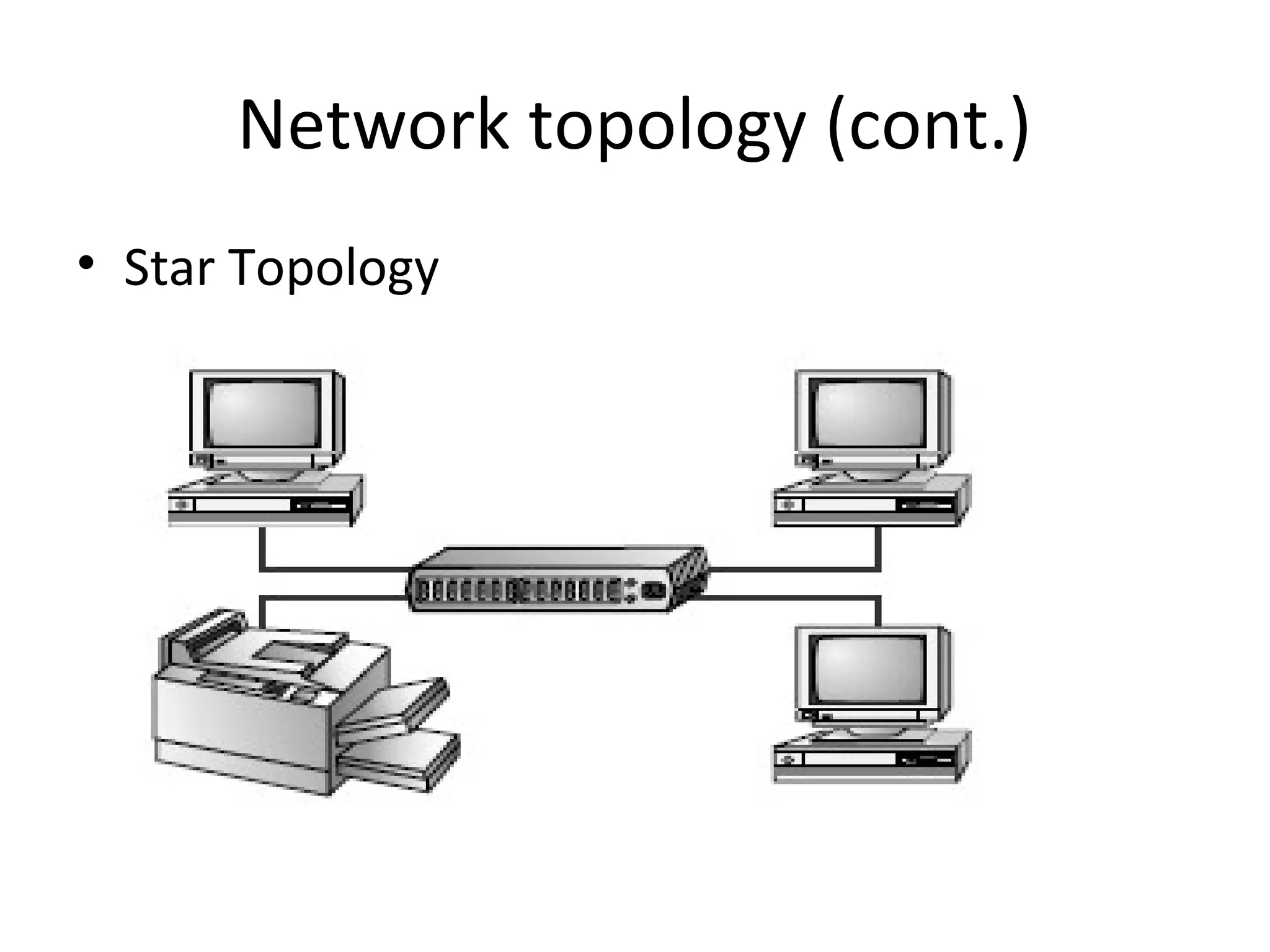
• A physical star topology branches each network device off a
central device called a hub, making it very easy to add a new
workstation.
• Also, if any workstation goes down it does not affect the
entire network. (But, as you might expect, if the central
device goes down, the entire network goes down.)
• Some types of Ethernet and ARCNet use a physical star
topology.
Network topology (cont.)
• Star topologies are easy to install. A cable is
run from each workstation to the hub. The
hub is placed in a central location in the office.
• Star topologies are more expensive to install
than bus networks, because there are several
more cables that need to be installed, plus the
cost of the hubs that are needed.
Network topology (cont.)
• Star Topology
Network topology (cont.)
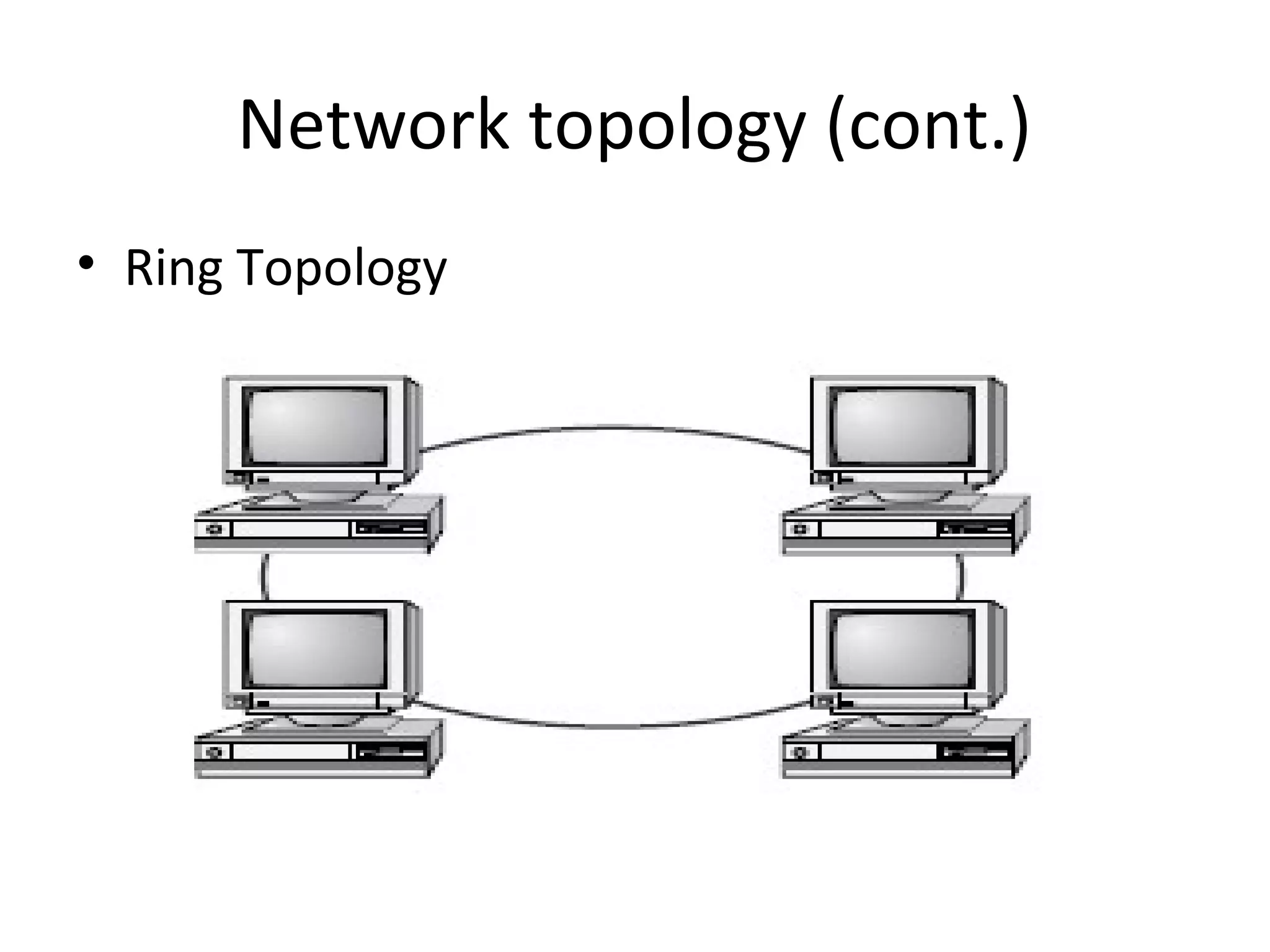
Ring
• Each computer connects to two other computers,
joining them in a circle creating a unidirectional path
where messages move workstation to workstation.
• Each entity participating in the ring reads a message,
then regenerates it and hands it to its neighbor on a
different network cable.
Network topology (cont.)
• The ring makes it difficult to add new
computers.
• Unlike a star topology network, the ring
topology network will go down if one entity is
removed from the ring.
• Physical ring topology systems don’t exist
much anymore, mainly because the hardware
involved was fairly expensive and the fault
tolerance was very low.
Network topology (cont.)
• Ring Topology
Network topology (cont.)
Mesh
• The mesh topology is the simplest logical topology in terms of
data flow, but it is the most complex in terms of physical
design.
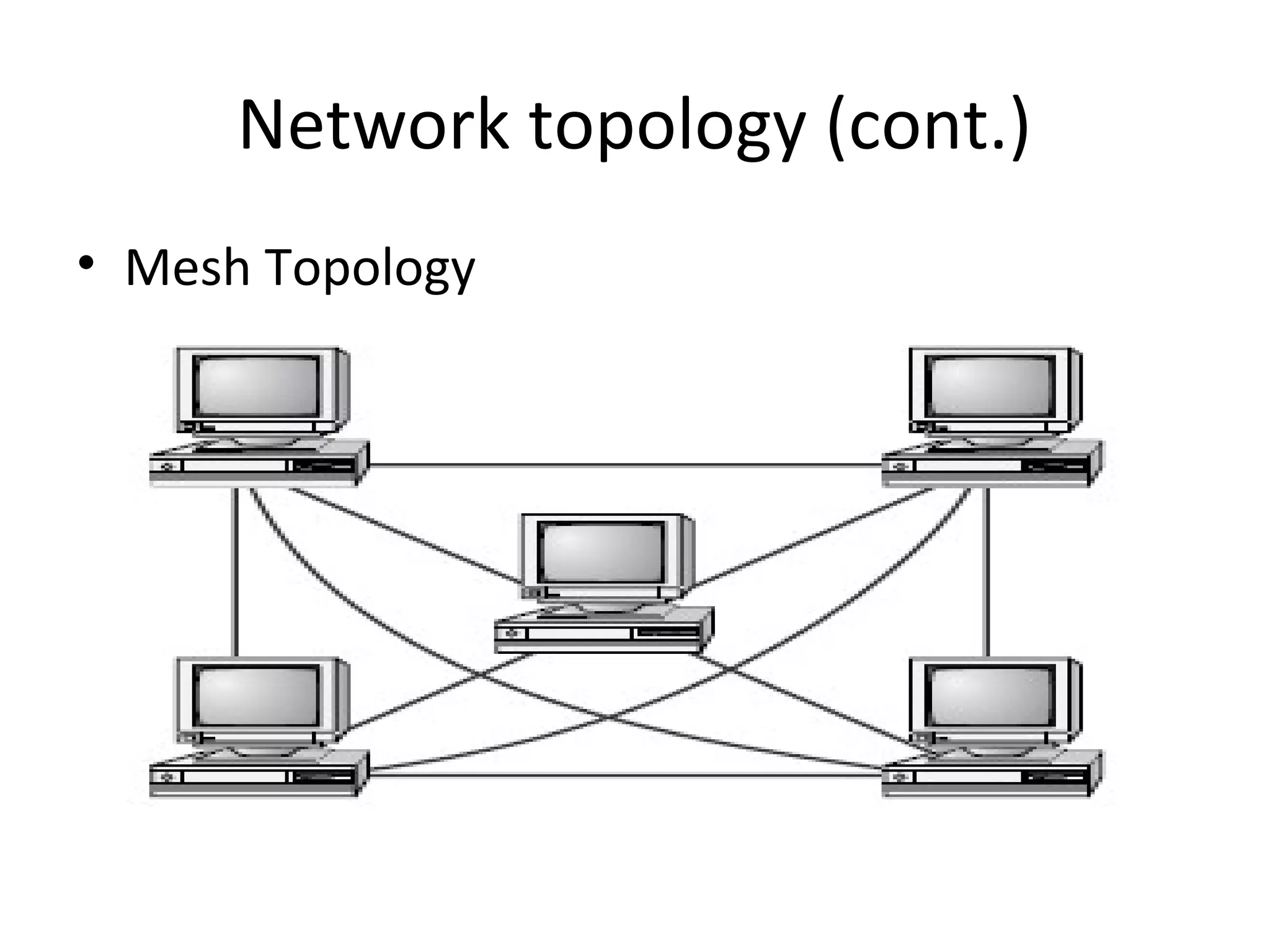
• In this physical topology, each device is connected to every
other device.
• This topology is rarely found in LANs, mainly because of the
complexity of the cabling.
Network topology (cont.)
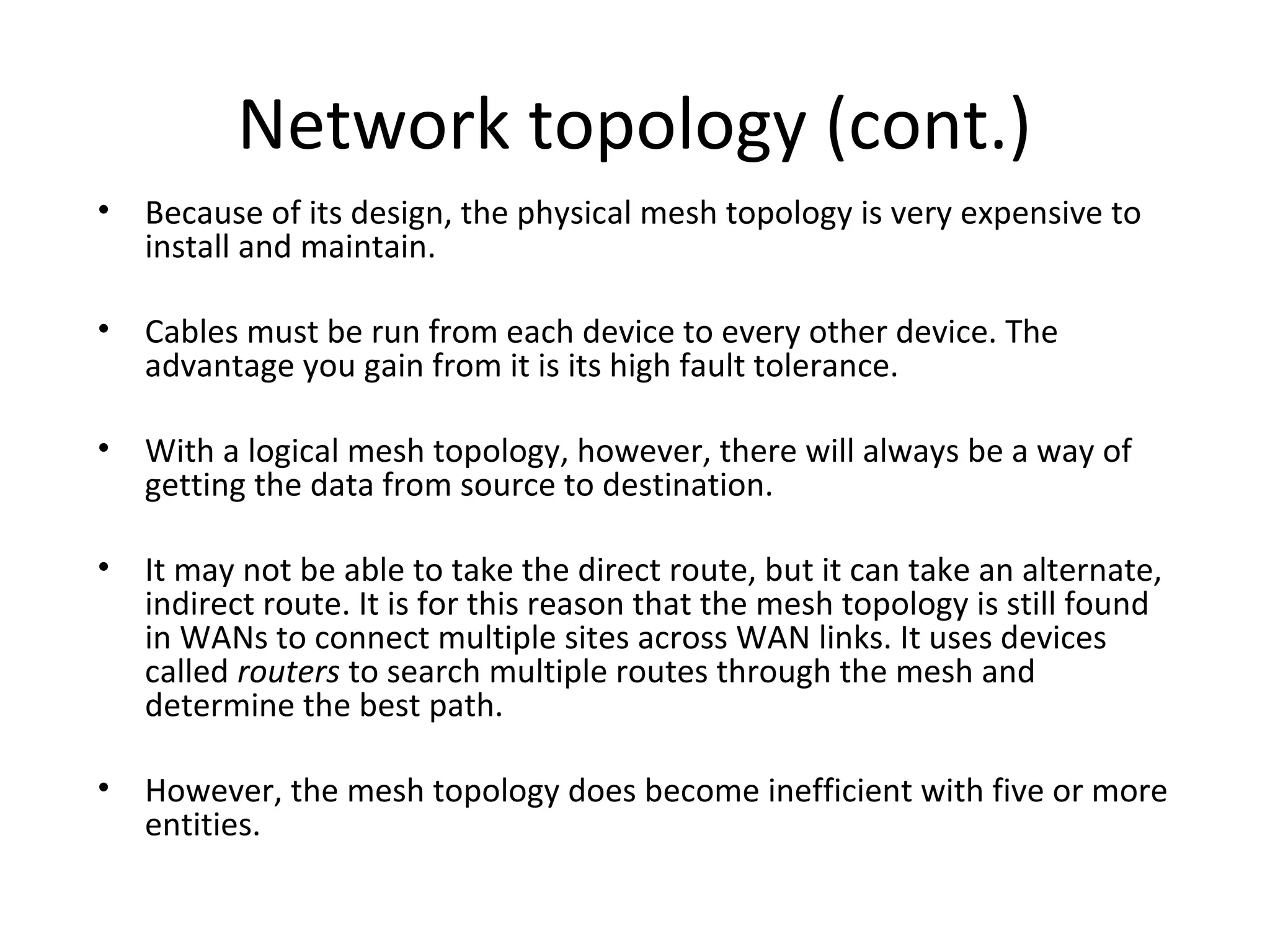
• Because of its design, the physical mesh topology is very expensive to
install and maintain.
• Cables must be run from each device to every other device. The
advantage you gain from it is its high fault tolerance.
• With a logical mesh topology, however, there will always be a way of
getting the data from source to destination.
• It may not be able to take the direct route, but it can take an alternate,
indirect route. It is for this reason that the mesh topology is still found
in WANs to connect multiple sites across WAN links. It uses devices
called routers to search multiple routes through the mesh and
determine the best path.
• However, the mesh topology does become inefficient with five or more
entities.
Network topology (cont.)
• Mesh Topology
Network topology (cont.)
•

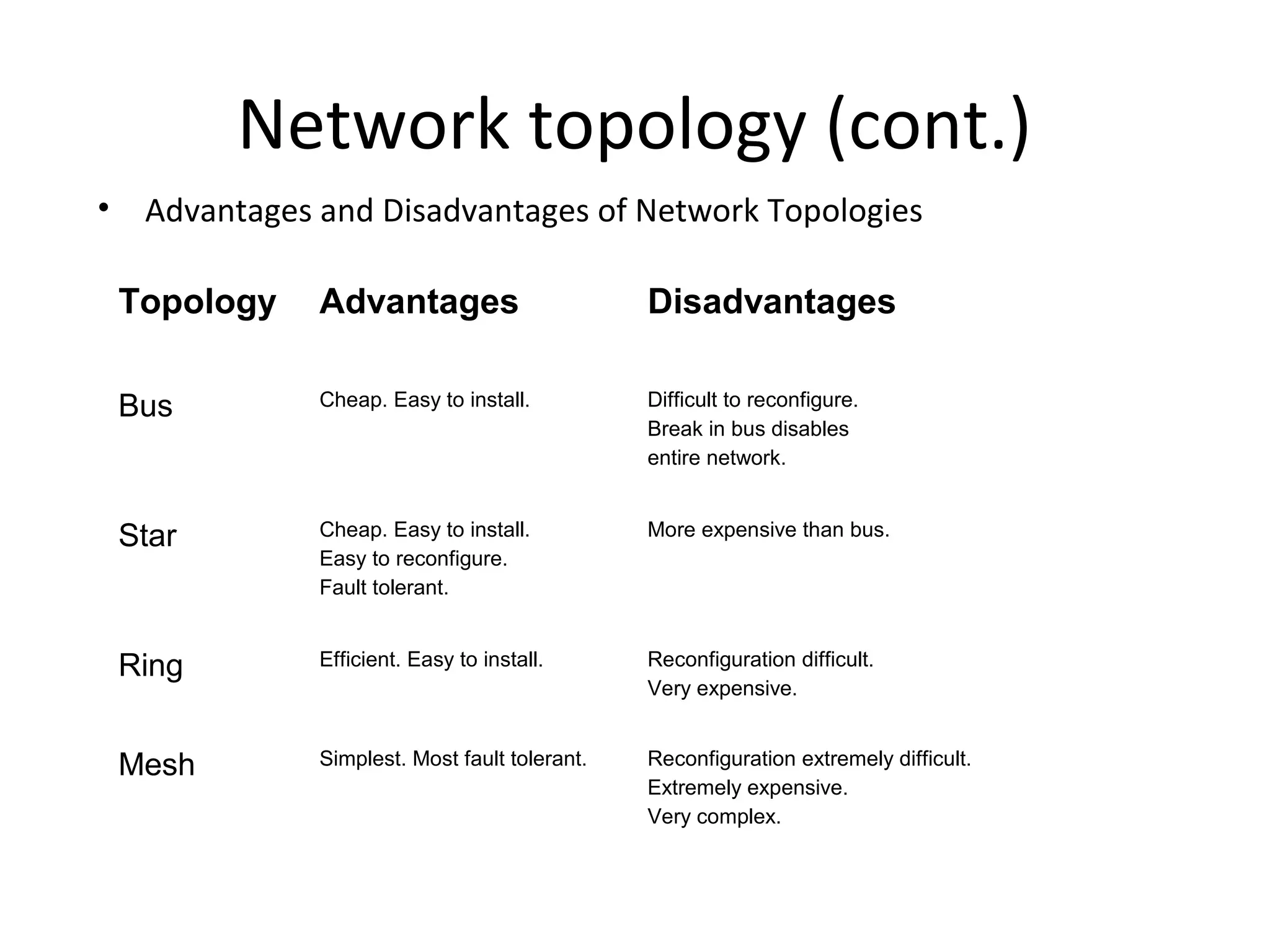
Advantages and Disadvantages of Network Topologies
Topology

Advantages

Disadvantages

Bus

Cheap. Easy to install.

Difficult to reconfigure.
Break in bus disables
entire network.

Star

Cheap. Easy to install.
Easy to reconfigure.
Fault tolerant.

More expensive than bus.

Ring

Efficient. Easy to install.

Reconfiguration difficult.
Very expensive.

Mesh

Simplest. Most fault tolerant.

Reconfiguration extremely difficult.
Extremely expensive.
Very complex.
Transmission Mode
The term transmission mode is used to define the
direction of signal flow between two linked devices.
There three types of transmission modes: simplex, halfduplex and full-duplex
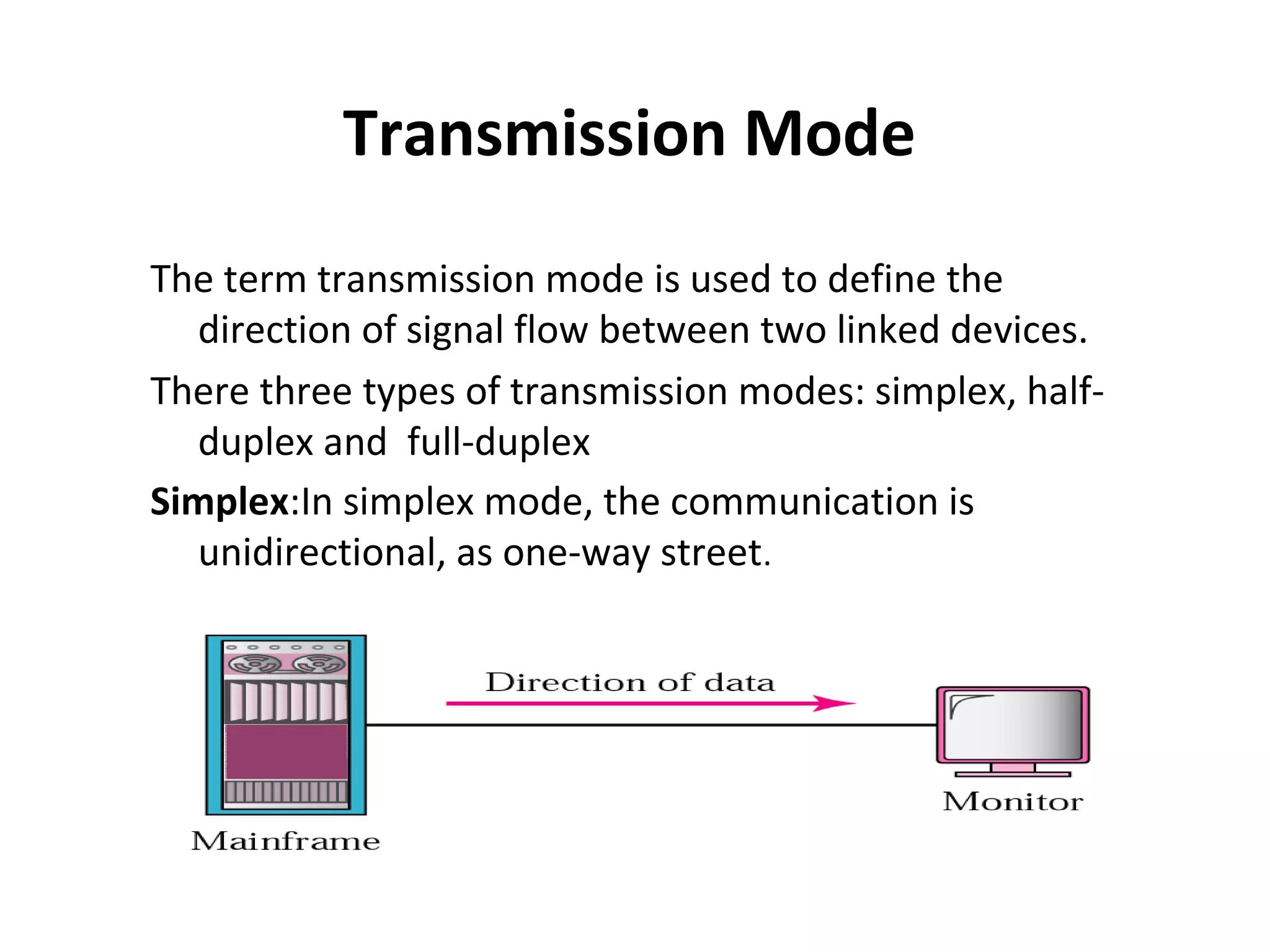
Simplex:In simplex mode, the communication is
unidirectional, as one-way street.
• Examples: keyboards and traditional monitors are both
examples of simplex devices.
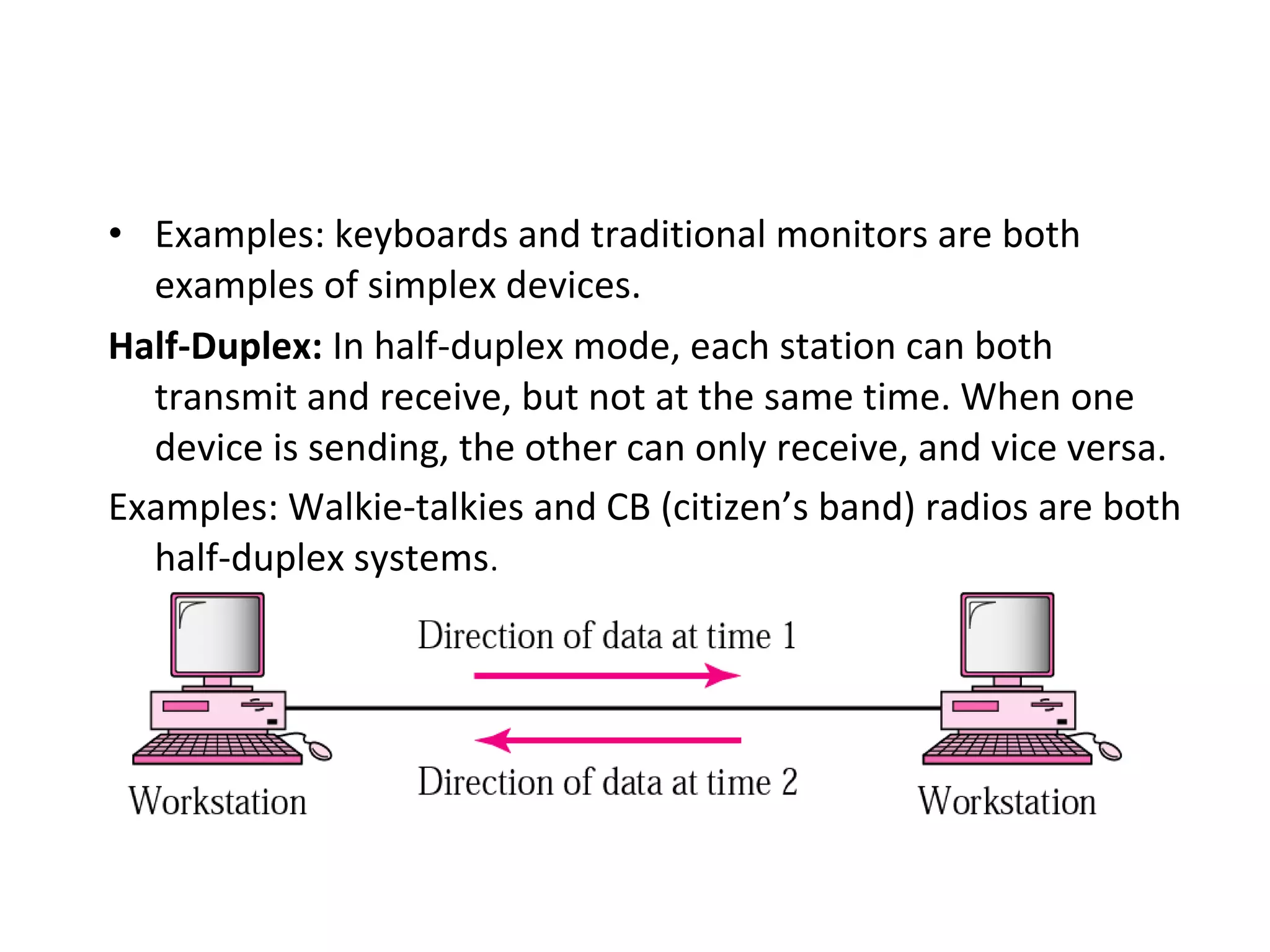
Half-Duplex: In half-duplex mode, each station can both
transmit and receive, but not at the same time. When one
device is sending, the other can only receive, and vice versa.
Examples: Walkie-talkies and CB (citizen’s band) radios are both
half-duplex systems.
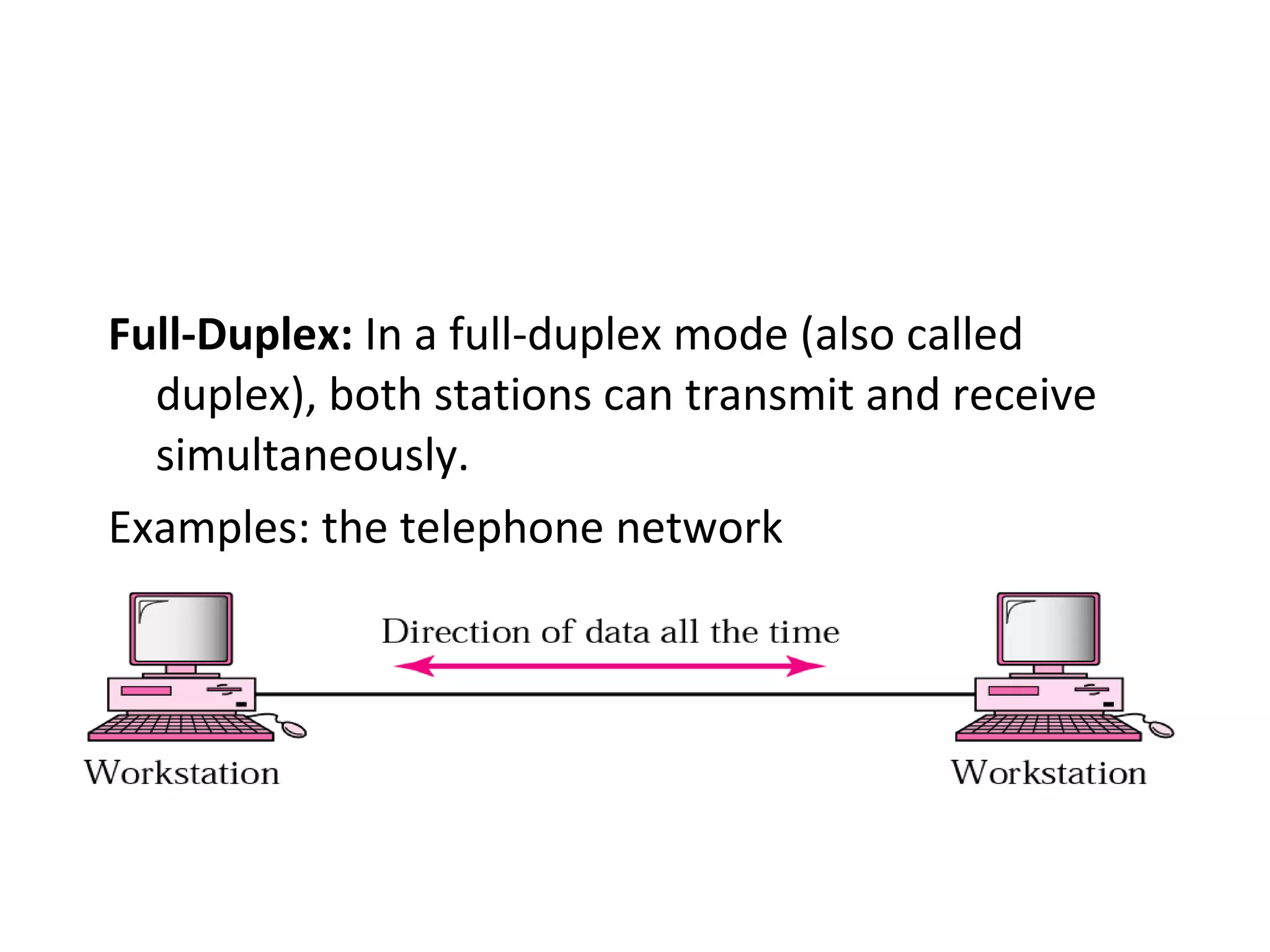
Full-Duplex: In a full-duplex mode (also called
duplex), both stations can transmit and receive
simultaneously.
Examples: the telephone network
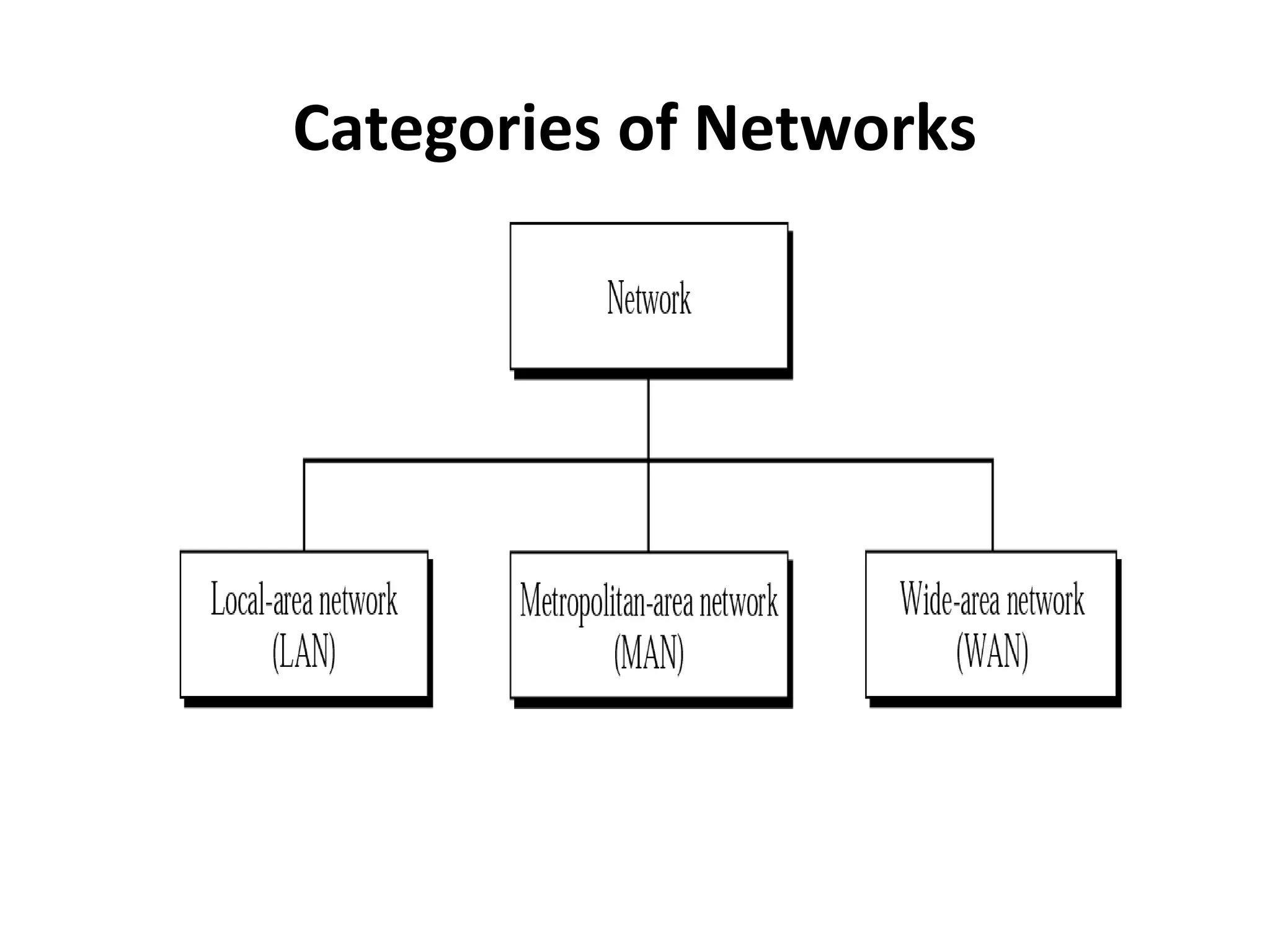
Categories of Networks
LANs
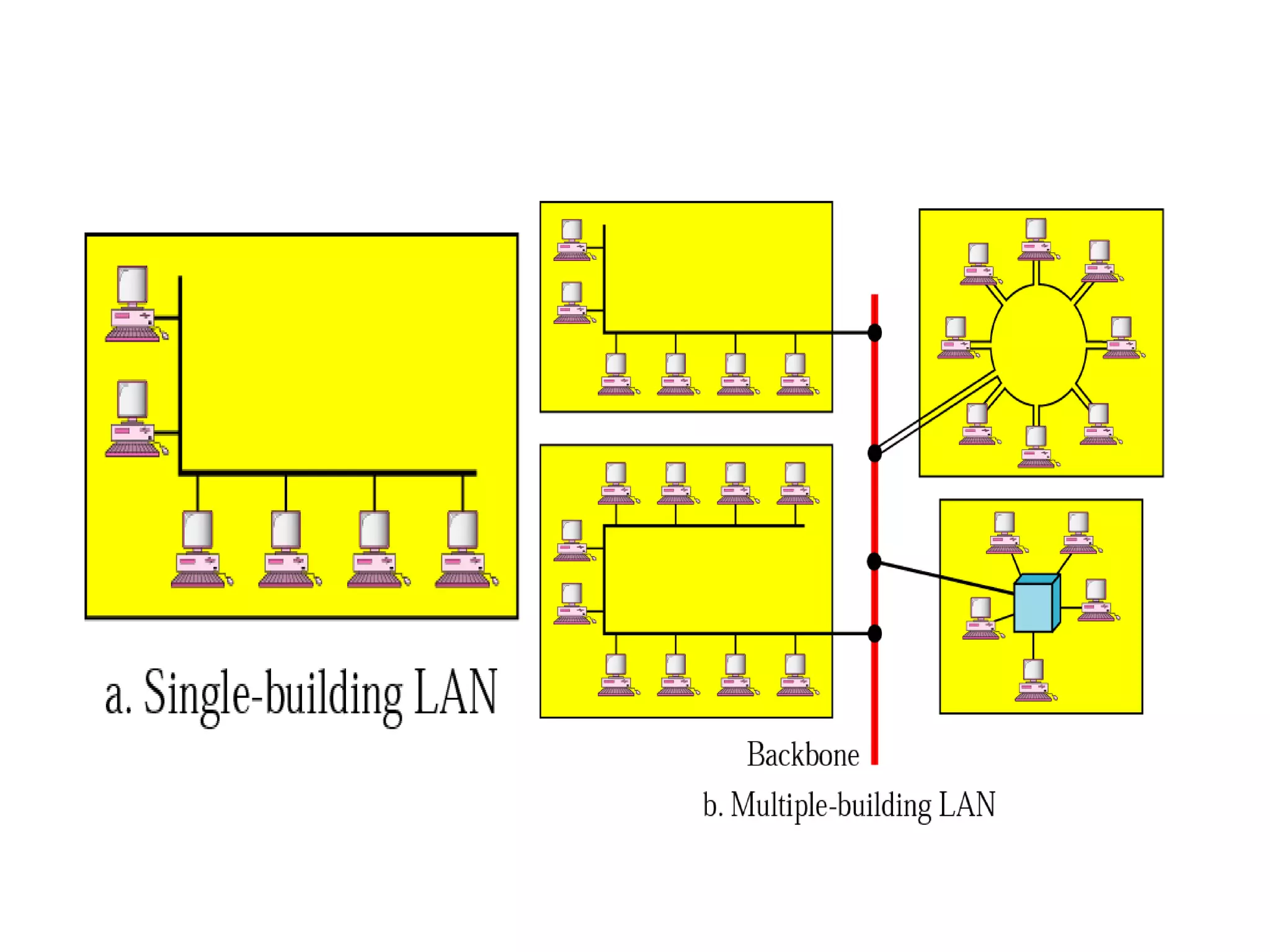
• A local area network (LAN) is usually privately
owned and links the devices in a single office,
building or campus. Currently, LAN size is
limited to a few kilometers.
• LANs are designed to allow resources be
shared between personal computers or
workstations. The resources to be shared can
include hardware (e.g. a printer), software (e.g.
an application program), or data.
• In general, LANs use only one type of transmission medium.
• The most common LAN topologies are bus, ring and star.
• LANs have data rates in the 4 to 16Mbs range. Today, however,
speeds are increasing and can reach 100Mbps with gigabit
systems in development.
Metropolitan Area Networks
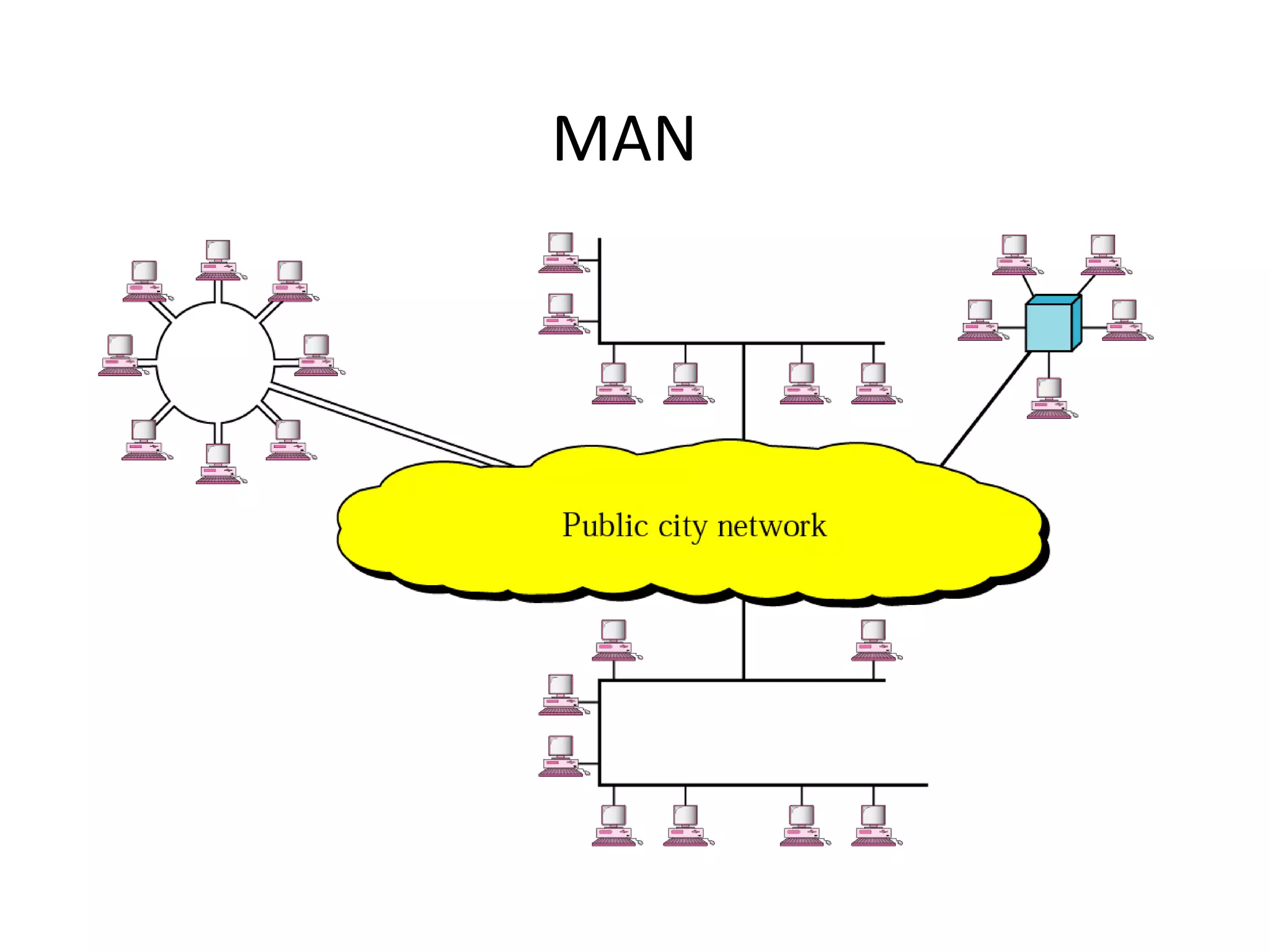
• A metropolitan area network (MAN) is designed to extend over
an entire city.
• A MAN may be wholly owned and operated by a private
company, or it may be a service provided by a public company,
such as a local telephone company.
MAN
Wide Area Network
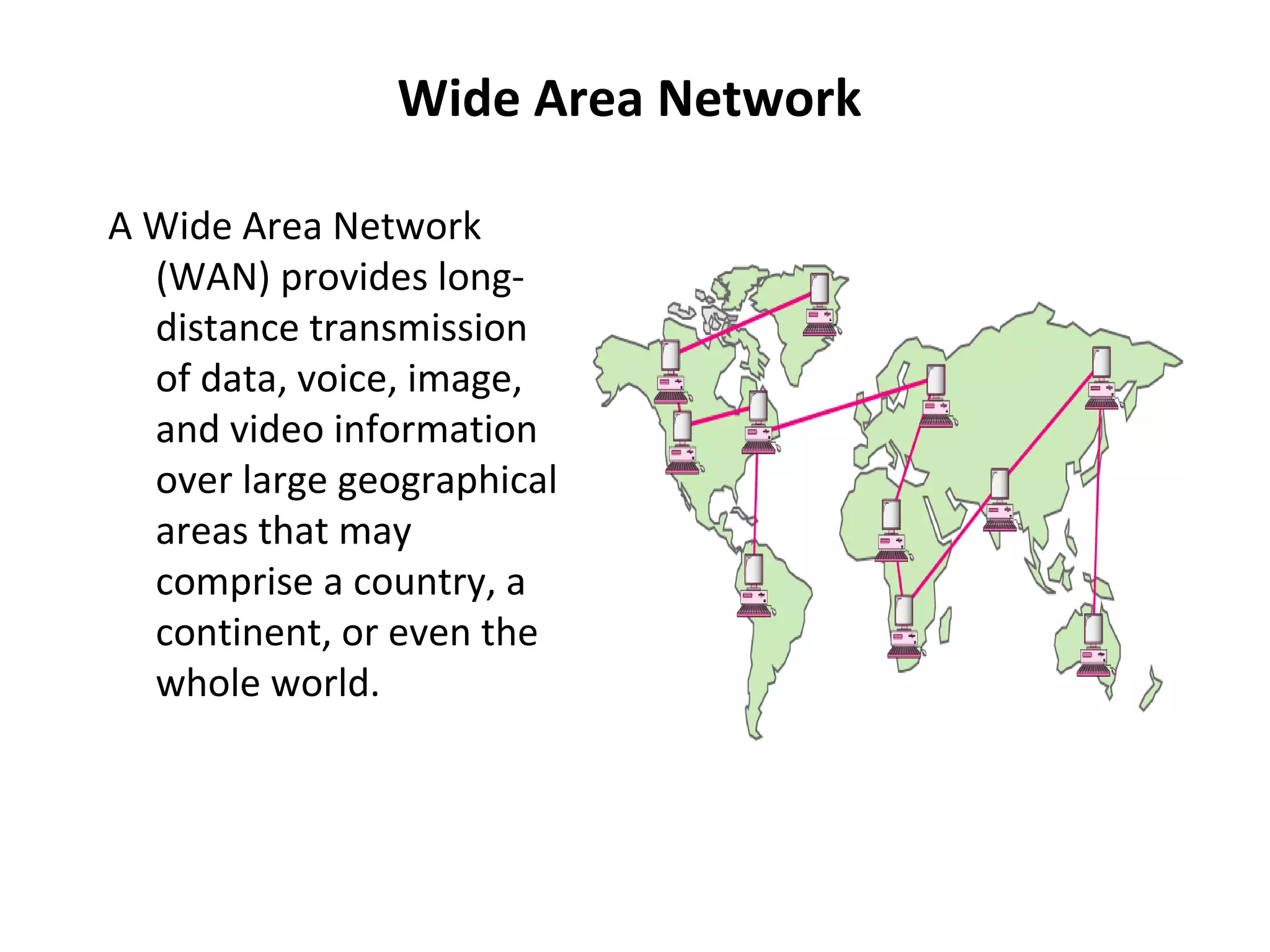
A Wide Area Network
(WAN) provides longdistance transmission
of data, voice, image,
and video information
over large geographical
areas that may
comprise a country, a
continent, or even the
whole world.

( Network topology) )final

  • 1.
    Line Configuration • • • 1. 2. • Line configurationrefers to the way two or more communication devices attach to a link. A link is the physical communication pathway that transfers data from one device to another. There are two line configurations: Point-to-Point Multipoint A point-to-point line configuration provides a dedicated link between two devices. The entire capacity of the channel is reserved for transmission between those two devices.
  • 2.
  • 3.
    • A multipointline configuration is one in which more than two specific devices share a single link. In a multipoint environment, the capacity of the channel is shared, either spatially or temporally. • If several devices can use the link simultaneously, it is a spatially shared line configuration. • If users must take turns, it is a time-shared line configuration.
  • 4.
  • 5.
    Network topology • Atopology is a way of “laying out” the network. Topologies can be either physical or logical. • Physical topologies describe how the cables are run. • Logical topologies describe how the network messages travel
  • 6.
    Network topology (cont.) • • • • Bus(can be both logical and physical) Star (physical only) Ring (can be both logical and physical) Mesh (can be both logical and physical)
  • 7.
    Network topology (cont.) Bus •A bus is the simplest physical topology. It consists of a single cable that runs to every workstation • This topology uses the least amount of cabling, but also covers the shortest amount of distance. • Each computer shares the same data and address path. With a logical bus topology, messages pass through the trunk, and each workstation checks to see if the message is addressed to itself. If the address of the message matches the workstation’s address, the network adapter copies the message to the card’s on-board memory.
  • 8.
    Network topology (cont.) •it is difficult to add a workstation • have to completely reroute the cable and possibly run two additional lengths of it. • if any one of the cables breaks, the entire network is disrupted. Therefore, it is very expensive to maintain.
  • 9.
  • 10.
    Network topology (cont.) StarTopology • A physical star topology branches each network device off a central device called a hub, making it very easy to add a new workstation. • Also, if any workstation goes down it does not affect the entire network. (But, as you might expect, if the central device goes down, the entire network goes down.) • Some types of Ethernet and ARCNet use a physical star topology.
  • 11.
    Network topology (cont.) •Star topologies are easy to install. A cable is run from each workstation to the hub. The hub is placed in a central location in the office. • Star topologies are more expensive to install than bus networks, because there are several more cables that need to be installed, plus the cost of the hubs that are needed.
  • 12.
  • 13.
    Network topology (cont.) Ring •Each computer connects to two other computers, joining them in a circle creating a unidirectional path where messages move workstation to workstation. • Each entity participating in the ring reads a message, then regenerates it and hands it to its neighbor on a different network cable.
  • 14.
    Network topology (cont.) •The ring makes it difficult to add new computers. • Unlike a star topology network, the ring topology network will go down if one entity is removed from the ring. • Physical ring topology systems don’t exist much anymore, mainly because the hardware involved was fairly expensive and the fault tolerance was very low.
  • 15.
  • 16.
    Network topology (cont.) Mesh •The mesh topology is the simplest logical topology in terms of data flow, but it is the most complex in terms of physical design. • In this physical topology, each device is connected to every other device. • This topology is rarely found in LANs, mainly because of the complexity of the cabling.
  • 17.
    Network topology (cont.) •Because of its design, the physical mesh topology is very expensive to install and maintain. • Cables must be run from each device to every other device. The advantage you gain from it is its high fault tolerance. • With a logical mesh topology, however, there will always be a way of getting the data from source to destination. • It may not be able to take the direct route, but it can take an alternate, indirect route. It is for this reason that the mesh topology is still found in WANs to connect multiple sites across WAN links. It uses devices called routers to search multiple routes through the mesh and determine the best path. • However, the mesh topology does become inefficient with five or more entities.
  • 18.
  • 19.
    Network topology (cont.) • Advantagesand Disadvantages of Network Topologies Topology Advantages Disadvantages Bus Cheap. Easy to install. Difficult to reconfigure. Break in bus disables entire network. Star Cheap. Easy to install. Easy to reconfigure. Fault tolerant. More expensive than bus. Ring Efficient. Easy to install. Reconfiguration difficult. Very expensive. Mesh Simplest. Most fault tolerant. Reconfiguration extremely difficult. Extremely expensive. Very complex.
  • 20.
    Transmission Mode The termtransmission mode is used to define the direction of signal flow between two linked devices. There three types of transmission modes: simplex, halfduplex and full-duplex Simplex:In simplex mode, the communication is unidirectional, as one-way street.
  • 21.
    • Examples: keyboardsand traditional monitors are both examples of simplex devices. Half-Duplex: In half-duplex mode, each station can both transmit and receive, but not at the same time. When one device is sending, the other can only receive, and vice versa. Examples: Walkie-talkies and CB (citizen’s band) radios are both half-duplex systems.
  • 22.
    Full-Duplex: In afull-duplex mode (also called duplex), both stations can transmit and receive simultaneously. Examples: the telephone network
  • 23.
  • 24.
    LANs • A localarea network (LAN) is usually privately owned and links the devices in a single office, building or campus. Currently, LAN size is limited to a few kilometers. • LANs are designed to allow resources be shared between personal computers or workstations. The resources to be shared can include hardware (e.g. a printer), software (e.g. an application program), or data.
  • 26.
    • In general,LANs use only one type of transmission medium. • The most common LAN topologies are bus, ring and star. • LANs have data rates in the 4 to 16Mbs range. Today, however, speeds are increasing and can reach 100Mbps with gigabit systems in development. Metropolitan Area Networks • A metropolitan area network (MAN) is designed to extend over an entire city. • A MAN may be wholly owned and operated by a private company, or it may be a service provided by a public company, such as a local telephone company.
  • 27.
  • 28.
    Wide Area Network AWide Area Network (WAN) provides longdistance transmission of data, voice, image, and video information over large geographical areas that may comprise a country, a continent, or even the whole world.