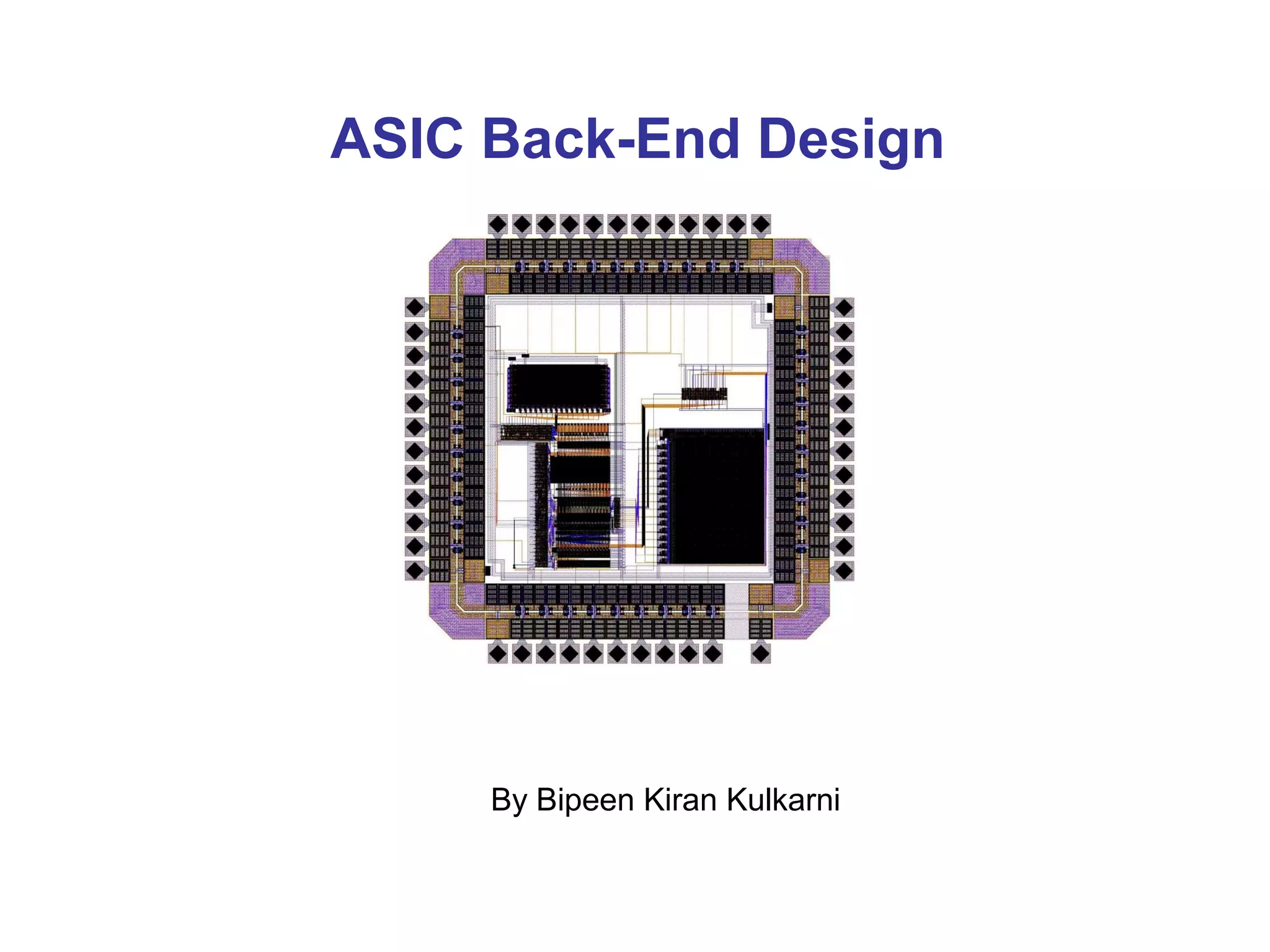
ASIC Back-End Design


     By Bipeen Kiran Kulkarni
Agenda
• Introduction
• Design Flow
   –   Overview
   –   Floorplan
   –   Timing Driven Placement
   –   Clock Tree Synthesis
   –   Routing
• Verification
• Design Example
Introduction
Introduction
• Technological Advances
  – 19th Century - Steel
  – 20th Century – Silicon

• Growth in Microelectronic (Silicon) Technology
  – Moore’s Law (# of transistors double/18 months)
  – One Transistor
  – Small Scale Integration (SSI)
      • Multiple Devices (Transistor / Resistor / Diodes)
      • Possibility to create more than one logic gate (Inverter, etc)
  – Large Scale Integration (LSI)
      • Systems with at least 1000 logic gates (Several thousand transistors)
  – Very Large Scale Integration
      • Millions to hundreds of millions of transistors (Microprocessors)
  – Intel indicates that dual core processors will soon exist that
    contain 1 billion transistors
Introduction
• Manual (Human) design can occur with small number of
  transistors

• As number of transistors increase through SSI and VLSI,
  the amount of evaluation and decision making would
  become overwhelming (Trade-offs)

  – Maintaining performance requirements (Power / Speed / Area)
  – Design and implementation times become impractical

• How does one create a complex electronic design
  consisting of millions of transistors?

Automate the Process using Computer-Aided Design (CAD) Tools
Introduction
• CAD tools provide several advantages
  – Ability to evaluate complex conditions in which solving one
    problem creates other problems
  – Use analytical methods to assess the cost of a decision
  – Use synthesis methods to help provide a solution
  – Allows the process of proposing and analyzing solutions to occur
    at the same time

• Electronic Design Automation
  – Using CAD tools to create complex electronic designs (ECAD)
  – Several companies who specialize in EDA
      • Cadence® Design Systems
      • Magma® Design Automation Inc.
      • Synopsys®


        CAD Tools Allow Large Problems to be Solved
Design Flow
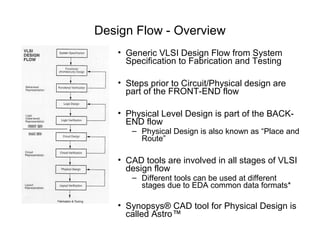
Design Flow - Overview
   • Generic VLSI Design Flow from System
     Specification to Fabrication and Testing

   • Steps prior to Circuit/Physical design are
     part of the FRONT-END flow

   • Physical Level Design is part of the BACK-
     END flow
      – Physical Design is also known as “Place and
        Route”

   • CAD tools are involved in all stages of VLSI
     design flow
      – Different tools can be used at different
        stages due to EDA common data formats*

   • Synopsys® CAD tool for Physical Design is
     called Astro™
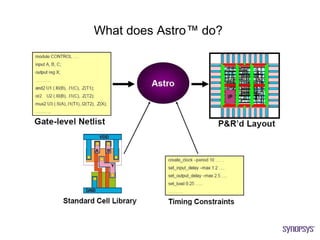
What does Astro™ do?
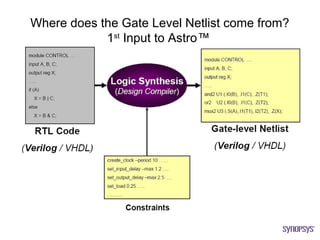
Where does the Gate Level Netlist come from?
            1st Input to Astro™
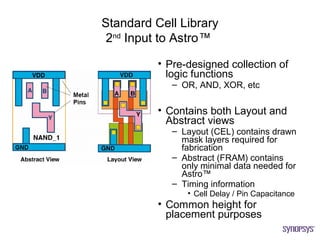
Standard Cell Library
 2nd Input to Astro™

          • Pre-designed collection of
            logic functions
             – OR, AND, XOR, etc

          • Contains both Layout and
            Abstract views
             – Layout (CEL) contains drawn
               mask layers required for
               fabrication
             – Abstract (FRAM) contains
               only minimal data needed for
               Astro™
             – Timing information
                • Cell Delay / Pin Capacitance
          • Common height for
            placement purposes
Basic Devices and Interconnect
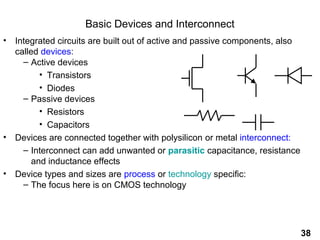
• Integrated circuits are built out of active and passive components, also
  called devices:
    – Active devices
         • Transistors
         • Diodes
    – Passive devices
         • Resistors
         • Capacitors
• Devices are connected together with polysilicon or metal interconnect:
    – Interconnect can add unwanted or parasitic capacitance, resistance
       and inductance effects
• Device types and sizes are process or technology specific:
    – The focus here is on CMOS technology


                                                                             38
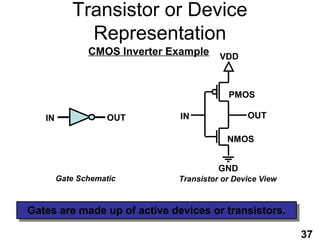
Transistor or Device
             Representation
               CMOS Inverter Example VDD


                                          PMOS

   IN               OUT       IN               OUT

                                          NMOS


                                        GND
        Gate Schematic        Transistor or Device View


Gates are made up of active devices or transistors.
                                                          37
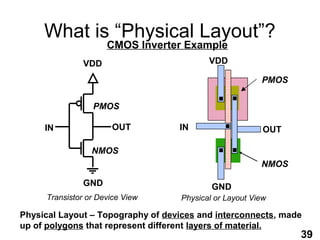
What is “Physical Layout”?
                     CMOS Inverter Example
               VDD                         VDD

                                                         PMOS

                 PMOS

     IN               OUT          IN                     OUT

                 NMOS
                                                         NMOS

               GND                          GND
     Transistor or Device View      Physical or Layout View

Physical Layout – Topography of devices and interconnects, made
up of polygons that represent different layers of material.
                                                                39
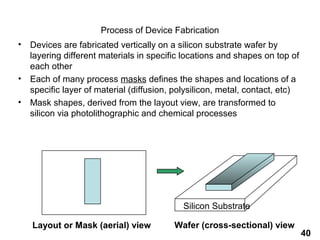
Process of Device Fabrication
•   Devices are fabricated vertically on a silicon substrate wafer by
    layering different materials in specific locations and shapes on top of
    each other
•   Each of many process masks defines the shapes and locations of a
    specific layer of material (diffusion, polysilicon, metal, contact, etc)
•   Mask shapes, derived from the layout view, are transformed to
    silicon via photolithographic and chemical processes


                                             Silicon Substrate

    Layout or Mask (aerial) view          Wafer (cross-sectional) view
                                                                               40
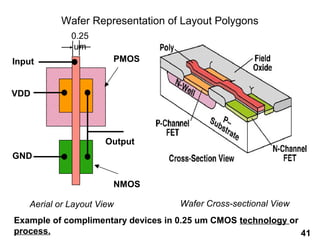
Wafer Representation of Layout Polygons
              0.25
               um
Input                   PMOS


VDD


                      Output
GND


                        NMOS

    Aerial or Layout View           Wafer Cross-sectional View
Example of complimentary devices in 0.25 um CMOS technology or
process.                                                       41
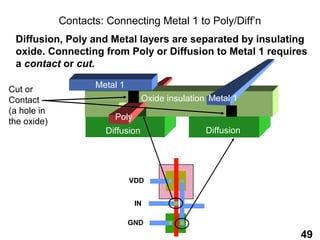
Contacts: Connecting Metal 1 to Poly/Diff’n
 Diffusion, Poly and Metal layers are separated by insulating
 oxide. Connecting from Poly or Diffusion to Metal 1 requires
 a contact or cut.

                    Metal 1
Cut or
Contact                           Oxide insulation Metal 1
(a hole in
                         Poly
the oxide)
                      Diffusion                   Diffusion


                              VDD


                                IN

                              GND
                                                              49
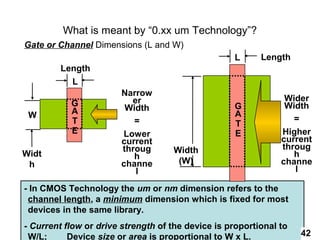
What is meant by “0.xx um Technology”?
Gate or Channel Dimensions (L and W)
                                                   L      Length
         Length
           L
                        Narrow
                          er                                    Wider
           G                                       G            Width
           A             Width
 W                                                 A
           T               =                                      =
                                                   T
           E            Lower                      E           Higher
                        current                                current
                        throug      Width                      throug
Widt                       h                                      h
 h                      channe       (W)                       channe
                           l                                      l

- In CMOS Technology the um or nm dimension refers to the
 channel length, a minimum dimension which is fixed for most
 devices in the same library.
- Current flow or drive strength of the device is proportional to
 W/L;      Device size or area is proportional to W x L.            42
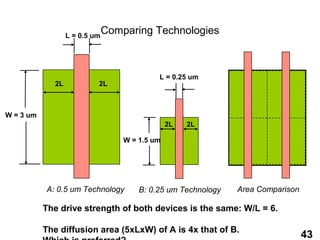
L = 0.5 um
                                Comparing Technologies


                                             L = 0.25 um
              2L            2L


W = 3 um
                                                 2L   2L

                                    W = 1.5 um


           A: 0.5 um Technology         B: 0.25 um Technology   Area Comparison

           The drive strength of both devices is the same: W/L = 6.

           The diffusion area (5xLxW) of A is 4x that of B.
                                                                                  43
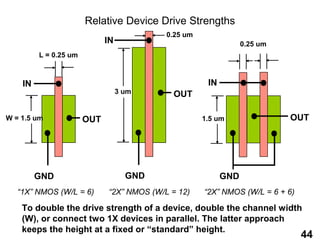
Relative Device Drive Strengths
                                           0.25 um
                             IN                                  0.25 um
         L = 0.25 um


    IN                                                IN
                                  3 um      OUT

W = 1.5 um             OUT                           1.5 um                OUT


         GND                        GND                    GND
   “1X” NMOS (W/L = 6)       “2X” NMOS (W/L = 12)    “2X” NMOS (W/L = 6 + 6)

    To double the drive strength of a device, double the channel width
    (W), or connect two 1X devices in parallel. The latter approach
    keeps the height at a fixed or “standard” height.
                                                                               44
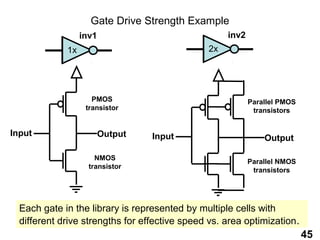
Gate Drive Strength Example
                  inv1                              inv2
             1x                                2x


                     PMOS                                  Parallel PMOS
                   transistor                               transistors


Input                    Output   Input                        Output

                      NMOS
                                                           Parallel NMOS
                    transistor
                                                            transistors


  Each gate in the library is represented by multiple cells with
  different drive strengths for effective speed vs. area optimization.
                                                                           45
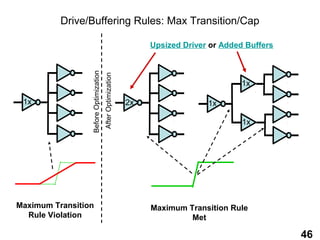
Drive/Buffering Rules: Max Transition/Cap

                                                                 Upsized Driver or Added Buffers


                 Before Optimization
                                       After Optimization
                                                                                        1x

 1x                                                         2x                 1x

                                                                                        1x


Maximum Transition                                               Maximum Transition Rule
  Rule Violation                                                          Met

                                                                                                   46
Timing Constraints
                       3rd Input to Astro™
• Derived from system specifications and implementation of
  design

• Identical to timing constraints used during logic synthesis

• Common constraints in electronic designs
   –   Clock Speed/Frequency
   –   Input / Output Delays associated with I/O signals
   –   Multicycle Paths
   –   False Paths

• Astro™ uses these constraints to consider timing during
  each stage of the place and route process
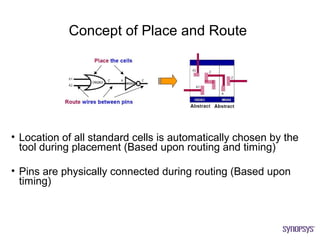
Concept of Place and Route


• Location of all standard cells is automatically chosen by the
  tool during placement (Based upon routing and timing)

• Pins are physically connected during routing (Based upon
  timing)
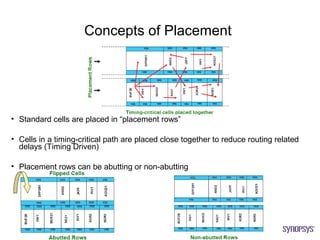
Concepts of Placement


• Standard cells are placed in “placement rows”

• Cells in a timing-critical path are placed close together to reduce routing related
  delays (Timing Driven)

• Placement rows can be abutting or non-abutting
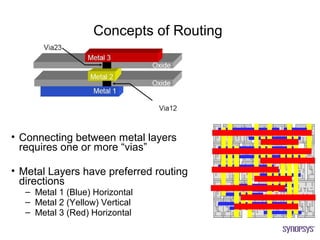
Concepts of Routing


• Connecting between metal layers
  requires one or more “vias”

• Metal Layers have preferred routing
  directions
  – Metal 1 (Blue) Horizontal
  – Metal 2 (Yellow) Vertical
  – Metal 3 (Red) Horizontal
Floorplan
Design Flow – Floorplan

• Layout design done at the chip level
   – Defining layout hierarchy
   – Estimation of required design area

• A blueprint showing the placement of major components in the
  design (non-standard cell)
   – Inputs / Output (I/O)
   – RAMs / ROMs/
   – Reusable Intellectual Property (IP) macros

• Approaches to Floorplanning (Automatic or Manual)
   – Constructive
   – Iterative
   – Knowledge-Based
Design Must Be Floorplanned Before P&R


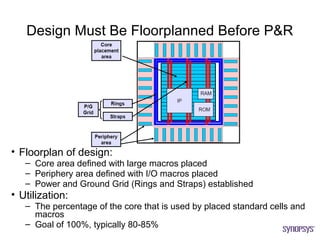
• Floorplan of design:
   – Core area defined with large macros placed
   – Periphery area defined with I/O macros placed
   – Power and Ground Grid (Rings and Straps) established
• Utilization:
   – The percentage of the core that is used by placed standard cells and
     macros
   – Goal of 100%, typically 80-85%
I/O Placement and Chip Package
         Requirements
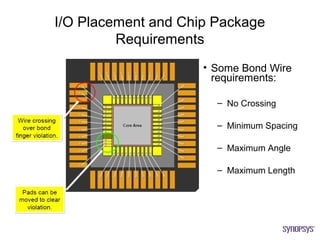
                     • Some Bond Wire
                       requirements:

                       – No Crossing

                       – Minimum Spacing

                       – Maximum Angle

                       – Maximum Length
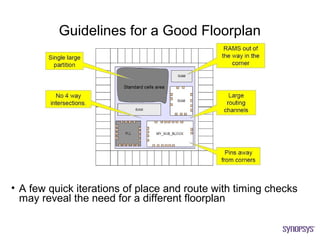
Guidelines for a Good Floorplan


• A few quick iterations of place and route with timing checks
  may reveal the need for a different floorplan
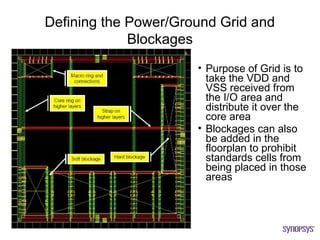
Defining the Power/Ground Grid and
             Blockages
                      • Purpose of Grid is to
                        take the VDD and
                        VSS received from
                        the I/O area and
                        distribute it over the
                        core area
                      • Blockages can also
                        be added in the
                        floorplan to prohibit
                        standards cells from
                        being placed in those
                        areas
Timing Driven Placement
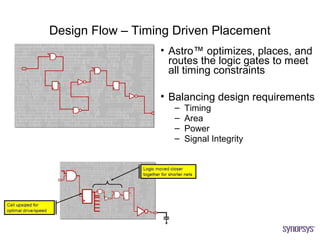
Design Flow – Timing Driven Placement
                  • Astro™ optimizes, places, and
                    routes the logic gates to meet
                    all timing constraints

                  • Balancing design requirements
                    –   Timing
                    –   Area
                    –   Power
                    –   Signal Integrity
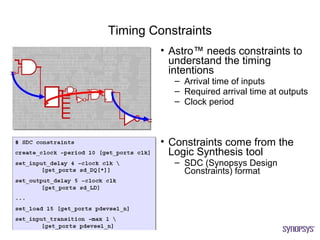
Timing Constraints
         • Astro™ needs constraints to
           understand the timing
           intentions
           – Arrival time of inputs
           – Required arrival time at outputs
           – Clock period


         • Constraints come from the
           Logic Synthesis tool
           – SDC (Synopsys Design
             Constraints) format
Cell and Net Delays


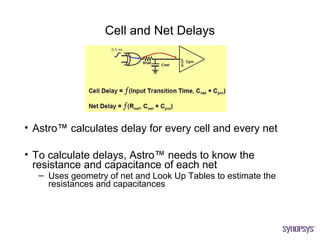
• Astro™ calculates delay for every cell and every net

• To calculate delays, Astro™ needs to know the
  resistance and capacitance of each net
   – Uses geometry of net and Look Up Tables to estimate the
     resistances and capacitances
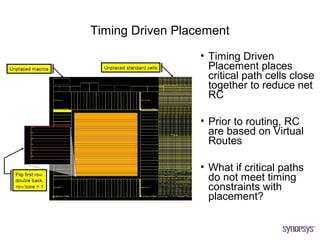
Timing Driven Placement
                  • Timing Driven
                    Placement places
                    critical path cells close
                    together to reduce net
                    RC

                  • Prior to routing, RC
                    are based on Virtual
                    Routes

                  • What if critical paths
                    do not meet timing
                    constraints with
                    placement?
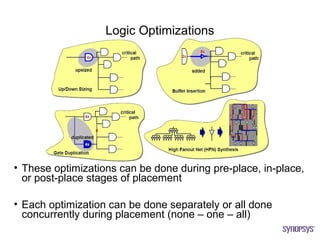
Logic Optimizations


• These optimizations can be done during pre-place, in-place,
  or post-place stages of placement

• Each optimization can be done separately or all done
  concurrently during placement (none – one – all)
Clock Tree Synthesis
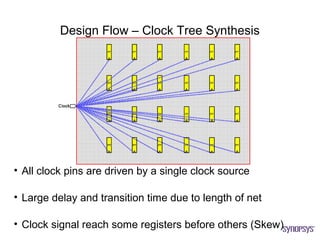
Design Flow – Clock Tree Synthesis


• All clock pins are driven by a single clock source

• Large delay and transition time due to length of net

• Clock signal reach some registers before others (Skew)
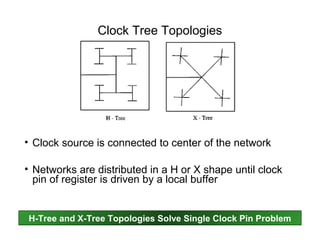
Clock Tree Topologies


• Clock source is connected to center of the network

• Networks are distributed in a H or X shape until clock
  pin of register is driven by a local buffer


H-Tree and X-Tree Topologies Solve Single Clock Pin Problem
After Clock Tree Synthesis


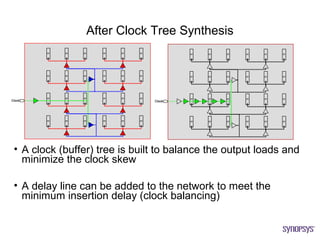
• A clock (buffer) tree is built to balance the output loads and
  minimize the clock skew

• A delay line can be added to the network to meet the
  minimum insertion delay (clock balancing)
Gated - CTS


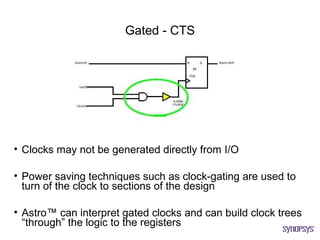
• Clocks may not be generated directly from I/O

• Power saving techniques such as clock-gating are used to
  turn of the clock to sections of the design

• Astro™ can interpret gated clocks and can build clock trees
  “through” the logic to the registers
Effects of CTS

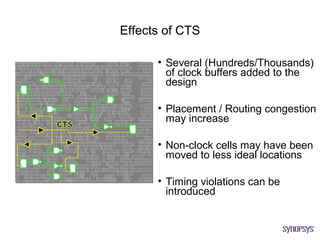
      • Several (Hundreds/Thousands)
        of clock buffers added to the
        design

      • Placement / Routing congestion
        may increase

      • Non-clock cells may have been
        moved to less ideal locations

      • Timing violations can be
        introduced
Routing
Design Flow – Routing

• Routing is a fundamental step in the place and route
  process

• Create metal shapes that meet the requirements of a
  fabrication process
   – The physical connection between cells in the design

• Virtual routes used during placement and CTS need to
  become reality
   – Timing of design needs to be preserved
   – Timing data such as signal transitions and clock skew needs to
     match the virtual route estimates


            Process of Routing Can Be Timing Driven
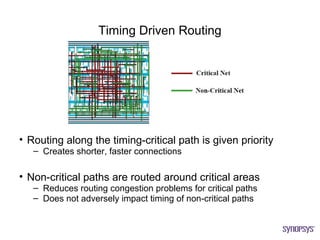
Timing Driven Routing


• Routing along the timing-critical path is given priority
   – Creates shorter, faster connections

• Non-critical paths are routed around critical areas
   – Reduces routing congestion problems for critical paths
   – Does not adversely impact timing of non-critical paths
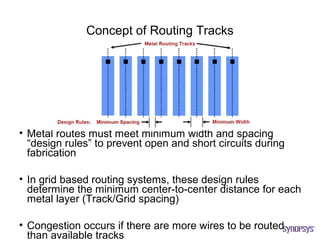
Concept of Routing Tracks


• Metal routes must meet minimum width and spacing
  “design rules” to prevent open and short circuits during
  fabrication

• In grid based routing systems, these design rules
  determine the minimum center-to-center distance for each
  metal layer (Track/Grid spacing)

• Congestion occurs if there are more wires to be routed
  than available tracks
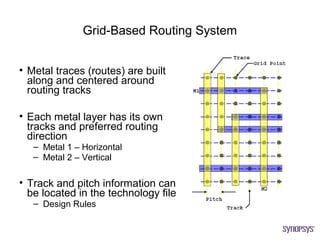
Grid-Based Routing System


• Metal traces (routes) are built
  along and centered around
  routing tracks

• Each metal layer has its own
  tracks and preferred routing
  direction
   – Metal 1 – Horizontal
   – Metal 2 – Vertical

• Track and pitch information can
  be located in the technology file
   – Design Rules
Verification
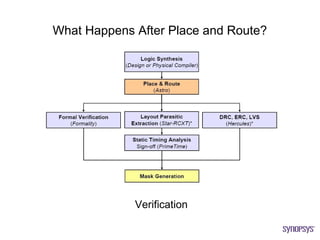
What Happens After Place and Route?


             Verification
Formal Verification

• New standard cells have been added to the design
  through timing optimizations and clock tree synthesis

• The final netlist created by Astro™ needs to be compared
  to the original gate-level netlist

• Formal verification ensures the functional equivalency at
  the logic level between the two implementations (original
  vs. final) of the design
   – The intended function was maintained throughout the physical
     design process


      Formality® is the Sign-Off Tool for Formal Verification
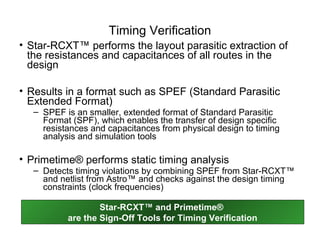
Timing Verification
• Star-RCXT™ performs the layout parasitic extraction of
  the resistances and capacitances of all routes in the
  design

• Results in a format such as SPEF (Standard Parasitic
  Extended Format)
  – SPEF is an smaller, extended format of Standard Parasitic
    Format (SPF), which enables the transfer of design specific
    resistances and capacitances from physical design to timing
    analysis and simulation tools

• Primetime® performs static timing analysis
  – Detects timing violations by combining SPEF from Star-RCXT™
    and netlist from Astro™ and checks against the design timing
    constraints (clock frequencies)

                  Star-RCXT™ and Primetime®
          are the Sign-Off Tools for Timing Verification
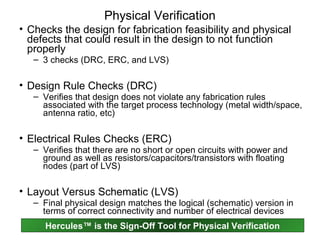
Physical Verification
• Checks the design for fabrication feasibility and physical
  defects that could result in the design to not function
  properly
   – 3 checks (DRC, ERC, and LVS)

• Design Rule Checks (DRC)
   – Verifies that design does not violate any fabrication rules
     associated with the target process technology (metal width/space,
     antenna ratio, etc)

• Electrical Rules Checks (ERC)
   – Verifies that there are no short or open circuits with power and
     ground as well as resistors/capacitors/transistors with floating
     nodes (part of LVS)

• Layout Versus Schematic (LVS)
   – Final physical design matches the logical (schematic) version in
     terms of correct connectivity and number of electrical devices
      Hercules™ is the Sign-Off Tool for Physical Verification
Fabrication
• Physical Design process is complete
  upon successful completion of timing,
  functional, and physical verification

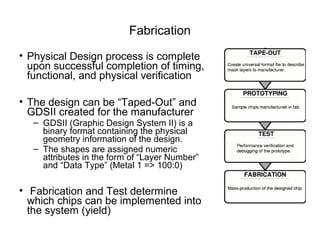
• The design can be “Taped-Out” and
  GDSII created for the manufacturer
  – GDSII (Graphic Design System II) is a
    binary format containing the physical
    geometry information of the design.
  – The shapes are assigned numeric
    attributes in the form of “Layer Number”
    and “Data Type” (Metal 1 => 100:0)

• Fabrication and Test determine
  which chips can be implemented into
  the system (yield)
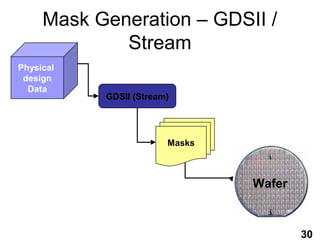
Mask Generation – GDSII /
             Stream
Physical
 design
  Data
           GDSII (Stream)


                        Masks


                                Wafer


                                        30
Example Design – Cory Ellinger Independent Study

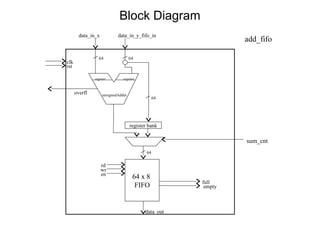
• 64x8 FIFO Block.
  – Inputs:
     • Direct input
     • Input through 64-bit addition
     • Read, Write, Enable, and Sum Control
        – Able to be read and written simultaneously
  – Outputs:
     • 64-bit FIFO out
     • Overflow flag
     • Full, Empty flags
Block Diagram
        data_in_x           data_in_y_fifo_in
                                                               add_fifo

                 64                 64
clk
rst

               register        register


      overfl        unsignedAdder
                                                 64


                                    register bank

                                                               sum_cnt
                                            64

                    rd
                    wr
                    en
                                     64 x 8
                                                      full
                                      FIFO             empty


                                           data_out
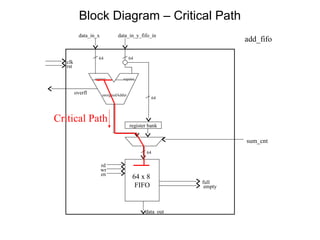
Block Diagram – Critical Path
           data_in_x           data_in_y_fifo_in
                                                                  add_fifo

                    64                 64
   clk
   rst

                  register        register


         overfl        unsignedAdder
                                                    64


Critical Path
                                       register bank

                                                                  sum_cnt
                                               64

                       rd
                       wr
                       en
                                        64 x 8
                                                         full
                                         FIFO             empty


                                              data_out
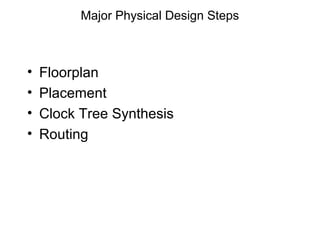
Major Physical Design Steps


•   Floorplan
•   Placement
•   Clock Tree Synthesis
•   Routing
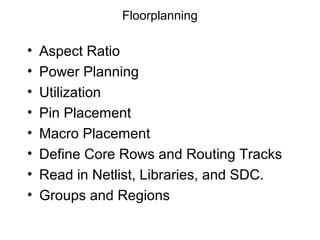
Floorplanning

•   Aspect Ratio
•   Power Planning
•   Utilization
•   Pin Placement
•   Macro Placement
•   Define Core Rows and Routing Tracks
•   Read in Netlist, Libraries, and SDC.
•   Groups and Regions
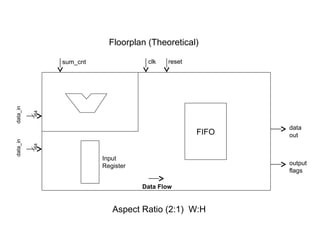
Floorplan (Theoretical)

               sum_cnt               clk   reset
data_in


          64


                                                          data
                                                   FIFO   out
data_in


          64


                         Input
                         Register                         output
                                                          flags

                                    Data Flow


                            Aspect Ratio (2:1) W:H
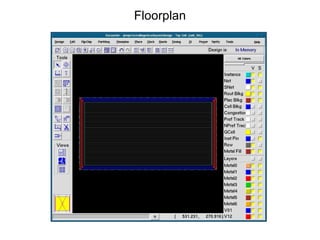
Floorplan
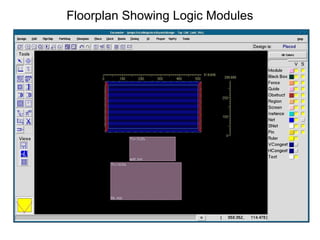
Floorplan Showing Logic Modules
Placement

 • Timing Driven Standard Cell Placement
 • Ignore Scan Chains ( if any )


• Timing
  – First look at non-wire load model timing.
  – Concentrate on any large setup violations.
  – Ignore violations caused by design rule
    failures.
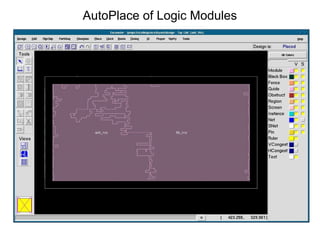
AutoPlace of Logic Modules
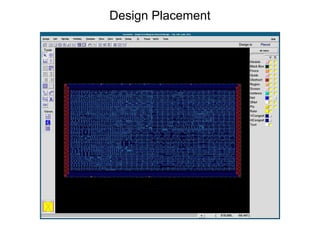
Design Placement
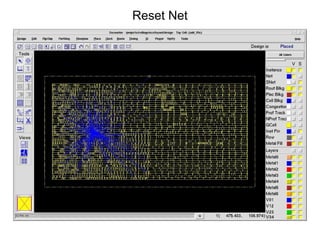
Reset Net
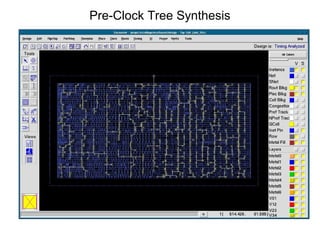
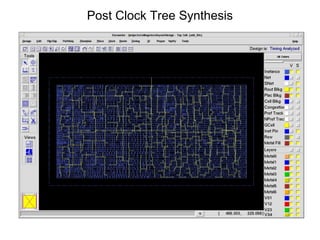
Pre-Clock Tree Synthesis
Clock Tree Synthesis


• Goals:
  – Low Clock Skew
  – Low Clock Insertion Delay
  – Sharp Transitions
• Timing
  – Setup violations clean
  – Design Rules fixed
  – Initial evaluation of real hold violations
Post Clock Tree Synthesis
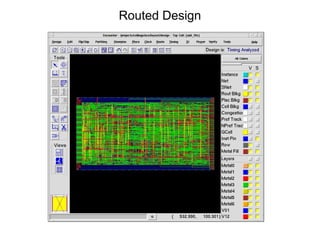
Routed Design
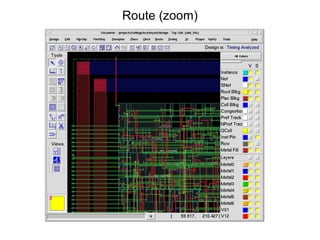
Route (zoom)
QUESTIONS ?

Asic pd

  • 1.
    ASIC Back-End Design By Bipeen Kiran Kulkarni
  • 2.
    Agenda • Introduction • DesignFlow – Overview – Floorplan – Timing Driven Placement – Clock Tree Synthesis – Routing • Verification • Design Example
  • 3.
  • 4.
    Introduction • Technological Advances – 19th Century - Steel – 20th Century – Silicon • Growth in Microelectronic (Silicon) Technology – Moore’s Law (# of transistors double/18 months) – One Transistor – Small Scale Integration (SSI) • Multiple Devices (Transistor / Resistor / Diodes) • Possibility to create more than one logic gate (Inverter, etc) – Large Scale Integration (LSI) • Systems with at least 1000 logic gates (Several thousand transistors) – Very Large Scale Integration • Millions to hundreds of millions of transistors (Microprocessors) – Intel indicates that dual core processors will soon exist that contain 1 billion transistors
  • 5.
    Introduction • Manual (Human)design can occur with small number of transistors • As number of transistors increase through SSI and VLSI, the amount of evaluation and decision making would become overwhelming (Trade-offs) – Maintaining performance requirements (Power / Speed / Area) – Design and implementation times become impractical • How does one create a complex electronic design consisting of millions of transistors? Automate the Process using Computer-Aided Design (CAD) Tools
  • 6.
    Introduction • CAD toolsprovide several advantages – Ability to evaluate complex conditions in which solving one problem creates other problems – Use analytical methods to assess the cost of a decision – Use synthesis methods to help provide a solution – Allows the process of proposing and analyzing solutions to occur at the same time • Electronic Design Automation – Using CAD tools to create complex electronic designs (ECAD) – Several companies who specialize in EDA • Cadence® Design Systems • Magma® Design Automation Inc. • Synopsys® CAD Tools Allow Large Problems to be Solved
  • 7.
  • 8.
    Design Flow -Overview • Generic VLSI Design Flow from System Specification to Fabrication and Testing • Steps prior to Circuit/Physical design are part of the FRONT-END flow • Physical Level Design is part of the BACK- END flow – Physical Design is also known as “Place and Route” • CAD tools are involved in all stages of VLSI design flow – Different tools can be used at different stages due to EDA common data formats* • Synopsys® CAD tool for Physical Design is called Astro™
  • 9.
  • 10.
    Where does theGate Level Netlist come from? 1st Input to Astro™
  • 11.
    Standard Cell Library 2nd Input to Astro™ • Pre-designed collection of logic functions – OR, AND, XOR, etc • Contains both Layout and Abstract views – Layout (CEL) contains drawn mask layers required for fabrication – Abstract (FRAM) contains only minimal data needed for Astro™ – Timing information • Cell Delay / Pin Capacitance • Common height for placement purposes
  • 12.
    Basic Devices andInterconnect • Integrated circuits are built out of active and passive components, also called devices: – Active devices • Transistors • Diodes – Passive devices • Resistors • Capacitors • Devices are connected together with polysilicon or metal interconnect: – Interconnect can add unwanted or parasitic capacitance, resistance and inductance effects • Device types and sizes are process or technology specific: – The focus here is on CMOS technology 38
  • 13.
    Transistor or Device Representation CMOS Inverter Example VDD PMOS IN OUT IN OUT NMOS GND Gate Schematic Transistor or Device View Gates are made up of active devices or transistors. Gates are made up of active devices or transistors. 37
  • 14.
    What is “PhysicalLayout”? CMOS Inverter Example VDD VDD PMOS PMOS IN OUT IN OUT NMOS NMOS GND GND Transistor or Device View Physical or Layout View Physical Layout – Topography of devices and interconnects, made up of polygons that represent different layers of material. 39
  • 15.
    Process of DeviceFabrication • Devices are fabricated vertically on a silicon substrate wafer by layering different materials in specific locations and shapes on top of each other • Each of many process masks defines the shapes and locations of a specific layer of material (diffusion, polysilicon, metal, contact, etc) • Mask shapes, derived from the layout view, are transformed to silicon via photolithographic and chemical processes Silicon Substrate Layout or Mask (aerial) view Wafer (cross-sectional) view 40
  • 16.
    Wafer Representation ofLayout Polygons 0.25 um Input PMOS VDD Output GND NMOS Aerial or Layout View Wafer Cross-sectional View Example of complimentary devices in 0.25 um CMOS technology or process. 41
  • 17.
    Contacts: Connecting Metal1 to Poly/Diff’n Diffusion, Poly and Metal layers are separated by insulating oxide. Connecting from Poly or Diffusion to Metal 1 requires a contact or cut. Metal 1 Cut or Contact Oxide insulation Metal 1 (a hole in Poly the oxide) Diffusion Diffusion VDD IN GND 49
  • 18.
    What is meantby “0.xx um Technology”? Gate or Channel Dimensions (L and W) L Length Length L Narrow er Wider G G Width A Width W A T = = T E Lower E Higher current current throug Width throug Widt h h h channe (W) channe l l - In CMOS Technology the um or nm dimension refers to the channel length, a minimum dimension which is fixed for most devices in the same library. - Current flow or drive strength of the device is proportional to W/L; Device size or area is proportional to W x L. 42
  • 19.
    L = 0.5um Comparing Technologies L = 0.25 um 2L 2L W = 3 um 2L 2L W = 1.5 um A: 0.5 um Technology B: 0.25 um Technology Area Comparison The drive strength of both devices is the same: W/L = 6. The diffusion area (5xLxW) of A is 4x that of B. 43
  • 20.
    Relative Device DriveStrengths 0.25 um IN 0.25 um L = 0.25 um IN IN 3 um OUT W = 1.5 um OUT 1.5 um OUT GND GND GND “1X” NMOS (W/L = 6) “2X” NMOS (W/L = 12) “2X” NMOS (W/L = 6 + 6) To double the drive strength of a device, double the channel width (W), or connect two 1X devices in parallel. The latter approach keeps the height at a fixed or “standard” height. 44
  • 21.
    Gate Drive StrengthExample inv1 inv2 1x 2x PMOS Parallel PMOS transistor transistors Input Output Input Output NMOS Parallel NMOS transistor transistors Each gate in the library is represented by multiple cells with different drive strengths for effective speed vs. area optimization. 45
  • 22.
    Drive/Buffering Rules: MaxTransition/Cap Upsized Driver or Added Buffers Before Optimization After Optimization 1x 1x 2x 1x 1x Maximum Transition Maximum Transition Rule Rule Violation Met 46
  • 23.
    Timing Constraints 3rd Input to Astro™ • Derived from system specifications and implementation of design • Identical to timing constraints used during logic synthesis • Common constraints in electronic designs – Clock Speed/Frequency – Input / Output Delays associated with I/O signals – Multicycle Paths – False Paths • Astro™ uses these constraints to consider timing during each stage of the place and route process
  • 24.
    Concept of Placeand Route • Location of all standard cells is automatically chosen by the tool during placement (Based upon routing and timing) • Pins are physically connected during routing (Based upon timing)
  • 25.
    Concepts of Placement •Standard cells are placed in “placement rows” • Cells in a timing-critical path are placed close together to reduce routing related delays (Timing Driven) • Placement rows can be abutting or non-abutting
  • 26.
    Concepts of Routing •Connecting between metal layers requires one or more “vias” • Metal Layers have preferred routing directions – Metal 1 (Blue) Horizontal – Metal 2 (Yellow) Vertical – Metal 3 (Red) Horizontal
  • 27.
  • 28.
    Design Flow –Floorplan • Layout design done at the chip level – Defining layout hierarchy – Estimation of required design area • A blueprint showing the placement of major components in the design (non-standard cell) – Inputs / Output (I/O) – RAMs / ROMs/ – Reusable Intellectual Property (IP) macros • Approaches to Floorplanning (Automatic or Manual) – Constructive – Iterative – Knowledge-Based
  • 29.
    Design Must BeFloorplanned Before P&R • Floorplan of design: – Core area defined with large macros placed – Periphery area defined with I/O macros placed – Power and Ground Grid (Rings and Straps) established • Utilization: – The percentage of the core that is used by placed standard cells and macros – Goal of 100%, typically 80-85%
  • 30.
    I/O Placement andChip Package Requirements • Some Bond Wire requirements: – No Crossing – Minimum Spacing – Maximum Angle – Maximum Length
  • 31.
    Guidelines for aGood Floorplan • A few quick iterations of place and route with timing checks may reveal the need for a different floorplan
  • 32.
    Defining the Power/GroundGrid and Blockages • Purpose of Grid is to take the VDD and VSS received from the I/O area and distribute it over the core area • Blockages can also be added in the floorplan to prohibit standards cells from being placed in those areas
  • 33.
  • 34.
    Design Flow –Timing Driven Placement • Astro™ optimizes, places, and routes the logic gates to meet all timing constraints • Balancing design requirements – Timing – Area – Power – Signal Integrity
  • 35.
    Timing Constraints • Astro™ needs constraints to understand the timing intentions – Arrival time of inputs – Required arrival time at outputs – Clock period • Constraints come from the Logic Synthesis tool – SDC (Synopsys Design Constraints) format
  • 36.
    Cell and NetDelays • Astro™ calculates delay for every cell and every net • To calculate delays, Astro™ needs to know the resistance and capacitance of each net – Uses geometry of net and Look Up Tables to estimate the resistances and capacitances
  • 37.
    Timing Driven Placement • Timing Driven Placement places critical path cells close together to reduce net RC • Prior to routing, RC are based on Virtual Routes • What if critical paths do not meet timing constraints with placement?
  • 38.
    Logic Optimizations • Theseoptimizations can be done during pre-place, in-place, or post-place stages of placement • Each optimization can be done separately or all done concurrently during placement (none – one – all)
  • 39.
  • 40.
    Design Flow –Clock Tree Synthesis • All clock pins are driven by a single clock source • Large delay and transition time due to length of net • Clock signal reach some registers before others (Skew)
  • 41.
    Clock Tree Topologies •Clock source is connected to center of the network • Networks are distributed in a H or X shape until clock pin of register is driven by a local buffer H-Tree and X-Tree Topologies Solve Single Clock Pin Problem
  • 42.
    After Clock TreeSynthesis • A clock (buffer) tree is built to balance the output loads and minimize the clock skew • A delay line can be added to the network to meet the minimum insertion delay (clock balancing)
  • 43.
    Gated - CTS •Clocks may not be generated directly from I/O • Power saving techniques such as clock-gating are used to turn of the clock to sections of the design • Astro™ can interpret gated clocks and can build clock trees “through” the logic to the registers
  • 44.
    Effects of CTS • Several (Hundreds/Thousands) of clock buffers added to the design • Placement / Routing congestion may increase • Non-clock cells may have been moved to less ideal locations • Timing violations can be introduced
  • 45.
  • 46.
    Design Flow –Routing • Routing is a fundamental step in the place and route process • Create metal shapes that meet the requirements of a fabrication process – The physical connection between cells in the design • Virtual routes used during placement and CTS need to become reality – Timing of design needs to be preserved – Timing data such as signal transitions and clock skew needs to match the virtual route estimates Process of Routing Can Be Timing Driven
  • 47.
    Timing Driven Routing •Routing along the timing-critical path is given priority – Creates shorter, faster connections • Non-critical paths are routed around critical areas – Reduces routing congestion problems for critical paths – Does not adversely impact timing of non-critical paths
  • 48.
    Concept of RoutingTracks • Metal routes must meet minimum width and spacing “design rules” to prevent open and short circuits during fabrication • In grid based routing systems, these design rules determine the minimum center-to-center distance for each metal layer (Track/Grid spacing) • Congestion occurs if there are more wires to be routed than available tracks
  • 49.
    Grid-Based Routing System •Metal traces (routes) are built along and centered around routing tracks • Each metal layer has its own tracks and preferred routing direction – Metal 1 – Horizontal – Metal 2 – Vertical • Track and pitch information can be located in the technology file – Design Rules
  • 50.
  • 51.
    What Happens AfterPlace and Route? Verification
  • 52.
    Formal Verification • Newstandard cells have been added to the design through timing optimizations and clock tree synthesis • The final netlist created by Astro™ needs to be compared to the original gate-level netlist • Formal verification ensures the functional equivalency at the logic level between the two implementations (original vs. final) of the design – The intended function was maintained throughout the physical design process Formality® is the Sign-Off Tool for Formal Verification
  • 53.
    Timing Verification • Star-RCXT™performs the layout parasitic extraction of the resistances and capacitances of all routes in the design • Results in a format such as SPEF (Standard Parasitic Extended Format) – SPEF is an smaller, extended format of Standard Parasitic Format (SPF), which enables the transfer of design specific resistances and capacitances from physical design to timing analysis and simulation tools • Primetime® performs static timing analysis – Detects timing violations by combining SPEF from Star-RCXT™ and netlist from Astro™ and checks against the design timing constraints (clock frequencies) Star-RCXT™ and Primetime® are the Sign-Off Tools for Timing Verification
  • 54.
    Physical Verification • Checksthe design for fabrication feasibility and physical defects that could result in the design to not function properly – 3 checks (DRC, ERC, and LVS) • Design Rule Checks (DRC) – Verifies that design does not violate any fabrication rules associated with the target process technology (metal width/space, antenna ratio, etc) • Electrical Rules Checks (ERC) – Verifies that there are no short or open circuits with power and ground as well as resistors/capacitors/transistors with floating nodes (part of LVS) • Layout Versus Schematic (LVS) – Final physical design matches the logical (schematic) version in terms of correct connectivity and number of electrical devices Hercules™ is the Sign-Off Tool for Physical Verification
  • 55.
    Fabrication • Physical Designprocess is complete upon successful completion of timing, functional, and physical verification • The design can be “Taped-Out” and GDSII created for the manufacturer – GDSII (Graphic Design System II) is a binary format containing the physical geometry information of the design. – The shapes are assigned numeric attributes in the form of “Layer Number” and “Data Type” (Metal 1 => 100:0) • Fabrication and Test determine which chips can be implemented into the system (yield)
  • 56.
    Mask Generation –GDSII / Stream Physical design Data GDSII (Stream) Masks Wafer 30
  • 57.
    Example Design –Cory Ellinger Independent Study • 64x8 FIFO Block. – Inputs: • Direct input • Input through 64-bit addition • Read, Write, Enable, and Sum Control – Able to be read and written simultaneously – Outputs: • 64-bit FIFO out • Overflow flag • Full, Empty flags
  • 58.
    Block Diagram data_in_x data_in_y_fifo_in add_fifo 64 64 clk rst register register overfl unsignedAdder 64 register bank sum_cnt 64 rd wr en 64 x 8 full FIFO empty data_out
  • 59.
    Block Diagram –Critical Path data_in_x data_in_y_fifo_in add_fifo 64 64 clk rst register register overfl unsignedAdder 64 Critical Path register bank sum_cnt 64 rd wr en 64 x 8 full FIFO empty data_out
  • 60.
    Major Physical DesignSteps • Floorplan • Placement • Clock Tree Synthesis • Routing
  • 61.
    Floorplanning • Aspect Ratio • Power Planning • Utilization • Pin Placement • Macro Placement • Define Core Rows and Routing Tracks • Read in Netlist, Libraries, and SDC. • Groups and Regions
  • 62.
    Floorplan (Theoretical) sum_cnt clk reset data_in 64 data FIFO out data_in 64 Input Register output flags Data Flow Aspect Ratio (2:1) W:H
  • 63.
  • 64.
  • 65.
    Placement • TimingDriven Standard Cell Placement • Ignore Scan Chains ( if any ) • Timing – First look at non-wire load model timing. – Concentrate on any large setup violations. – Ignore violations caused by design rule failures.
  • 66.
  • 67.
  • 68.
  • 69.
  • 70.
    Clock Tree Synthesis •Goals: – Low Clock Skew – Low Clock Insertion Delay – Sharp Transitions • Timing – Setup violations clean – Design Rules fixed – Initial evaluation of real hold violations
  • 71.
    Post Clock TreeSynthesis
  • 72.
  • 73.
  • 74.

Editor's Notes

  • #13 Fabrication Processes (also called Technologies) are built for specific target applications, which require different types of devices. Here are some technology examples and their application(s): Bipolar: Analog design. High Power CMOS: Digital design; Low power BiCMOS: (Bipolar and CMOS) Mixed Analog/Digital or Bipolar high-drive outputs of CMOS designs DRAM: Memories EEPROM: Reprogamable circuits GaAs: RF (Radio Frequency) designs The process assumed in this course is CMOS (Complementary Metal Oxyde Semiconductor), widely used for digital designs: -High performance (integration density and speed) -Low power -Low manufacturing costs (fewer masks)
  • #14 The basic building component of a gate is a FET (Field Effect Transistor). CMOS (Complimentary Metal Oxide Semiconductor FET) uses two types of FETs: P-type and N-type. A CMOS Inverter, the most basic CMOS gate, consists of one P-FET and its complimentary N-FET. The input terminals of complimentary transistors are wired together with a Polysilicon strap (also called the input “gate”) and likewise the output terminals are connected with a Metal strap. Most other gates consist of multiple pairs of P- and N-FETs. A 2-input NAND gate is made up of 2 pairs of transistors, or 4 transistors. A 2-input NAND gate is usually the “reference unit” when describing the size of other gates or design sizes. For example an INVERTER is the equivalent of 0.5 gates; an OR gate is the equivalent of 1.5 gates; a Flip Flop could be 4-8 gates. Reference to a design size of 500k Gates, for example, usually refers to 500k “equivalent 2-input NAND Gates”, or 2 Million transistors. Basic operation of an inverter: If a ZERO voltage (Logic “0”) is applied to the Input or Gate terminal (Poly), then the P-Channel FET is turned ON and the N-Channel FET is turned OFF. The output terminal is now connected to VDD and the path to ground is disconnected. The output terminal is pulled and held high to VDD (Logic “1”). When a voltage of VDD (Logic “1”) is applied to the Input or Gate terminal (Poly), then the P-Channel FET is turned OFF and the N-Channel FET is turned ON. The output terminal is now connected to GND and the path to VDD is disconnected. The output terminal is pulled and held low to GND (Logic “0”).
  • #15 Semiconductor devices are built or fabricated by growing, implanting and depositing materials on a silicon wafer. Polygons of a specific color or layer represent an aerial view of the specific areas on the silicon wafer where a particular material, represented by that layer, will be implanted or deposited. The composite picture of all of these layers superimposed on each other is called the layout or physical view of the design. Before the devices can be fabricated, each polygon layer is converted into one or more masks (see next page). How devices are formed: In the inverter example above, the dark green solid rectangle at the bottom represents an N-type Diffusion Area, while the pea-green stipple-patterned rectangle above represents P-type Diffusion, inside of a pink N-Well area. A transistor device is formed when a conductive material called polysilicon (poly for short), the stippled red line, crosses over and splits the diffusion area into two regions. The poly over the diffusion becomes the gate of both the N- and PMOS devices, and the two separated diffusion regions per device are called the source and drain regions. The source is usually connected to power or ground and the drain usually forms the device output or connects to another device’s source. The blue striped lines represent Metal 1, either aluminum or copper, which acts as interconnect. The small solid black squares are contacts or cuts, which form electrical connections between metal and diffusion or poly.
  • #16 A mask is a glass plate with shapes represented by either opaque or clear areas (depending on if the process step requires a positive or negative image). A photolithographic process allows light to pass through the clear areas of the mask onto the silicon wafer, which is covered by photo-sensitive material. Through chemical processes either the exposed or non-exposed areas will be etched away, depending again on the step, thereby exposing only key underlying areas. These areas are then either ion-implanted (forming “diffusion” areas) or covered with material (metal, polysilicon, oxide insulation) through a deposition step. The fabrication process entails processing the silicon wafer through numerous chemical and photo-lithographical steps, using multiple masks, to build up all the required layers of materials which create the required devices. The next page shows a cross-sectional view of a basic N- and PMOS device.
  • #17 CMOS technology implies that all active devices, or transistors, come in pairs of N- and PMOS transistors. On the left side, you see the layout implementation of the N- and PMOS devices. Each material layer (poly, metal1, diffusion, etc) is represented in layout tools by polygons of a unique color and layer number. When a design is “taped-out”, this refers to the process of writing out each mask layer in the a format called GDSII. The GDSII file is then used to create the individual glass masks for each process layer. On the right side, you see the same devices fabricated on silicon. The masks, which were derived from the 2-dimensional layout representation of the devices, were used to fabricate 3-dimensional devices in silicon. The reference made to the “0.25 um technology”, refers to the minimum width of the polysilicon gate, the red striped polygon above, which this particular process can build (see next page).
  • #18 A contact is literally a hole in the oxide insulation layer through which the metal can “droop” down and touch the poly or diffusion surface, creating an electrical connection between the two layers. A contact is the connector between Metal 1 and the layers below, polysilicon or diffusion. The connector between metal layers is called a “via”. (See next page)
  • #19 This course discusses primarily CMOS technology. In the drawing above, solid green = diffusion and striped red = polysilicon (poly). MOS transistors are formed where poly overlaps diffusion. The area where poly and diffusion intersect forms the “gate”, which controls the current flow (on/off) from one side of the diffusion, across the “channel”, to the other side of the diffusion. The gate dimensions determine the transistor’s area (proportional to W x L) and strength (proportional to W/L): the Width (W) is a diffusion dimension (channel width) and the Length (L) is the poly dimension (channel length). The ratio W/L is proportional to the amount of current the FET can deliver, or its “Drive strength” (the ability to charge/discharge capacitive load). For a given channel length L, the larger the width of the transistor the greater the drive capacity. It follows that the pull-up or pull-down speed of a transistor improves as the width is increased. Example: a 4um/0.25um device has twice the drive strength, or current flow, as a 2um/0.25um device. L is the minimum dimension which a particular process is able to manufacture and is the same for most transistors on the same chip. A “0.13um technology” means L = 0.13um. The size requirements of the transistors for each logic function are determined by performing timing analysis (static or dynamic) to determine the delays of all logic paths. If the delay of a particular path does not meet the design’s timing constraints, gates (devices) along the critical path can be up-sized to achieve faster speeds. The penalty for faster devices (upsizing) is a corresponding increase in silicon area needed to implement the faster gates. Balancing speed vs area is a common challenge in CMOS technology.
  • #20 The 3/0.5 device on the left has the same drive strength as the middle 1.5/0.25 device but the latter takes up ¼ of the area. You could theoretically fit four 0.25um devices in the area that one 0.5um device of identical strength takes up (right picture), therefore the push to continually reduce the channel L or minimum technology size. (Note: the length of the diffusion, the dimension perpendicular to the channel width, is usually 1 or 2 times the minimum technology dimension L. In this case the device size, which is essentially the diffusion area, is directly proportional to W x L.)
  • #21 In a standard cell library each logic gate is usually implemented with multiple drive capabilities. Example: a 2-input NAND gate might have 1X (nand2_1), 2X (nand2_2), 4X (nand2_4) etc versions. This enables synthesis and layout tools to choose the right size gate to achieve the desired speed constraints, while minimizing the area of the design. Besides having a fixed channel length L for all devices, what makes a standard cell “standard” is that the cell height is fixed or standardized, so that cells can be placed next to each other in rows with standard heights. To achieve this devices are “strengthened” by placing two or more minimum-size devices in parallel (rightmost picture) instead of making the diffusion of one device wider (middle picture).
  • #22 During synthesis and layout phases the design tools choose the smallest cell with enough drive level to satisfy the timing and drive/buffering requirements of the given circuit.
  • #23 In addition to meeting timing, the output of every gate usually has one or more “drive rules”, which must also be met. Example: maximum capacitance, maximum transition and/or maximum fanout rules. These rules or constraints help to reduce transient power consumption and ensure that gate loads stay within the characterized range of the delay models, among other things. If a maximum transition constraint is violated (example above), this can be handled by increasing the drive strength of the gate or by buffering the load on the net sufficiently to reduce the transition slope. The dotted waveform on the left represents the minimum transition “drive” or “buffering rule”, which is being violated as shown by solid waveform. On the right the transition time meets the minimum transition rule after buffer optimization. If a maximum capacitance constraint is violated upsizing the driver may not fix the problem if the max capacitance rule of the upsized driver is the same as the smaller one (since upsizing does not affect the capacitive loading). In this case only buffering the load helps.
  • #57 GDS II is the industry-standard data format for physical designs. The format was developed at Calma, once the industry leader in CAD systems. Because GDS II was used by so many companies as new tools were developed, the GDS II format became the default format. The GDS II format is used to make physical designs portable between different systems and different data bases. GDS II is a polygon-based format; it does not understand multi-level components such as transistor elements.